clock HONDA CR-V 2021 (in English) User Guide
[x] Cancel search | Manufacturer: HONDA, Model Year: 2021, Model line: CR-V, Model: HONDA CR-V 2021Pages: 690, PDF Size: 42.09 MB
Page 254 of 690
253
uuAudio System Basic Operation uAudio/Information Screen
Features
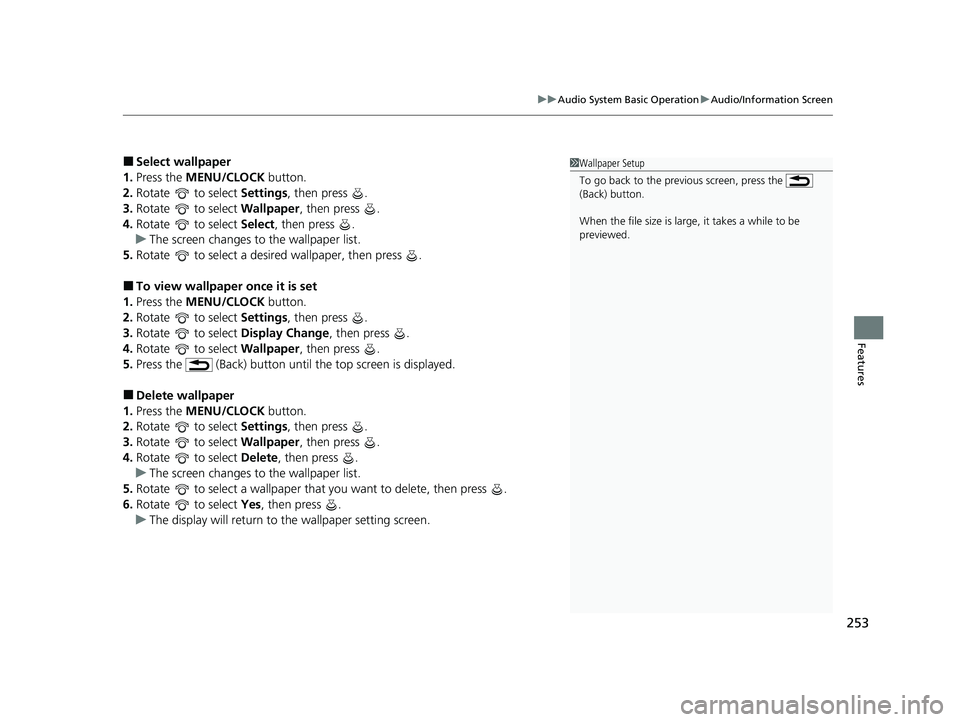
■Select wallpaper
1. Press the MENU/CLOCK button.
2. Rotate to select Settings, then press .
3. Rotate to select Wallpaper, then press .
4. Rotate to select Select, then press .
u The screen changes to the wallpaper list.
5. Rotate to select a desired wallpaper, then press .
■To view wallpaper once it is set
1. Press the MENU/CLOCK button.
2. Rotate to select Settings, then press .
3. Rotate to select Display Change, then press .
4. Rotate to select Wallpaper, then press .
5. Press the (Back) button until the top screen is displayed.
■Delete wallpaper
1. Press the MENU/CLOCK button.
2. Rotate to select Settings, then press .
3. Rotate to select Wallpaper, then press .
4. Rotate to select Delete, then press .
u The screen changes to the wallpaper list.
5. Rotate to select a wallpaper that you want to delete, then press .
6. Rotate to select Yes, then press .
u The display will return to the wallpaper setting screen.
1Wallpaper Setup
To go back to the previous screen, press the
(Back) button.
When the file size is large, it takes a while to be
previewed.
21 CR-V HYBRID HMIN-31TPG6100.book 253 ページ 2020年9月14日 月曜日 午前11時36分
Page 256 of 690
255
uuAudio System Basic Operation uDisplay Setup
Features
Display Setup
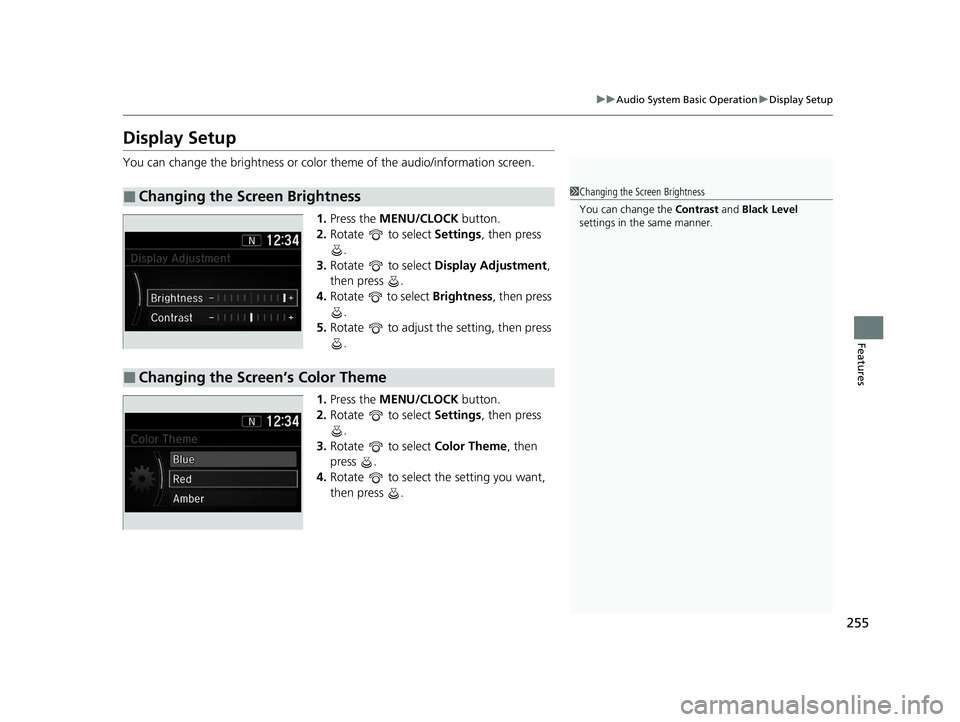
You can change the brightness or color theme of the audio/information screen.
1. Press the MENU/CLOCK button.
2. Rotate to select Settings, then press
.
3. Rotate to select Display Adjustment ,
then press .
4. Rotate to select Brightness, then press
.
5. Rotate to adjust th e setting, then press
.
1. Press the MENU/CLOCK button.
2. Rotate to select Settings, then press
.
3. Rotate to select Color Theme, then
press .
4. Rotate to select the setting you want,
then press .
■Changing the Screen Brightness1Changing the Screen Brightness
You can change the Contrast and Black Level
settings in the same manner.
■Changing the Screen’s Color Theme
21 CR-V HYBRID HMIN-31TPG6100.book 255 ページ 2020年9月14日 月曜日 午前11時36分
Page 257 of 690
256
uuAudio System Basic Operation uPlaying AM/FM Radio
Features
Playing AM/FM Radio
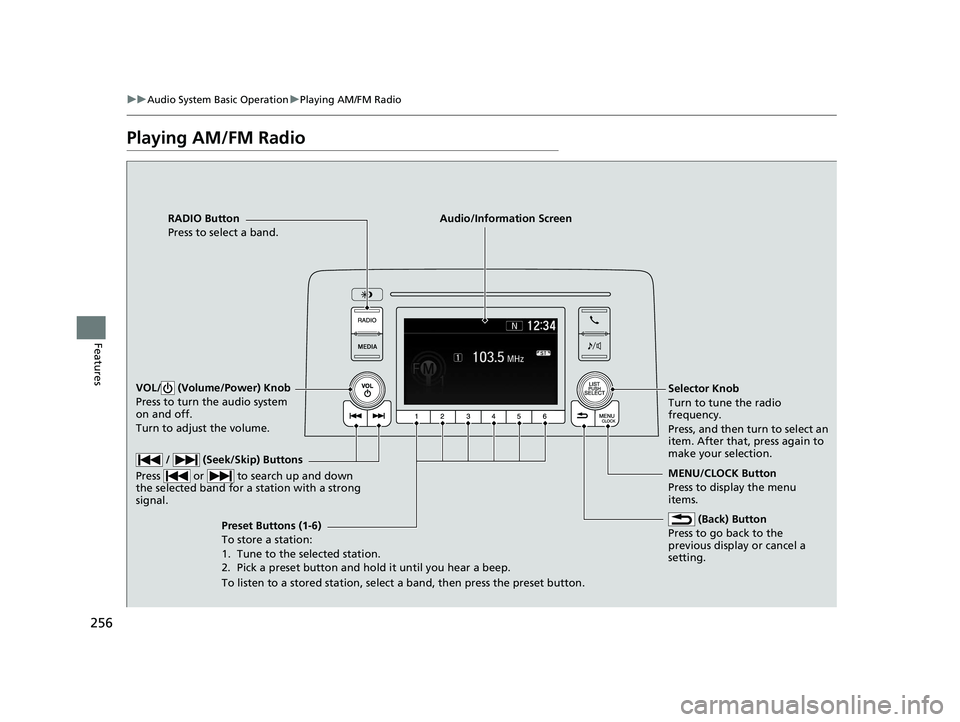
RADIO Button
Press to select a band.
(Back) Button
Press to go back to the
previous display or cancel a
setting.
/ (Seek/Skip) Buttons
Press or to search up and down
the selected band for a station with a strong
signal.
VOL/ (Volume/Power) Knob
Press to turn the audio system
on and off.
Turn to adjust the volume.
Preset Buttons (1-6)
To store a station:
1. Tune to the selected station.
2. Pick a preset button and hold it until you hear a beep.
To listen to a stored station, select a band, then press the preset button. Selector Knob
Turn to tune the radio
frequency.
Press, and then turn to select an
item. After that, press again to
make your selection.
MENU/CLOCK Button
Press to display the menu
items.
Audio/Information Screen
21 CR-V HYBRID HMIN-31TPG6100.book 256 ページ 2020年9月14日 月曜日 午前11時36分
Page 258 of 690
257
uuAudio System Basic Operation uPlaying AM/FM Radio
Features
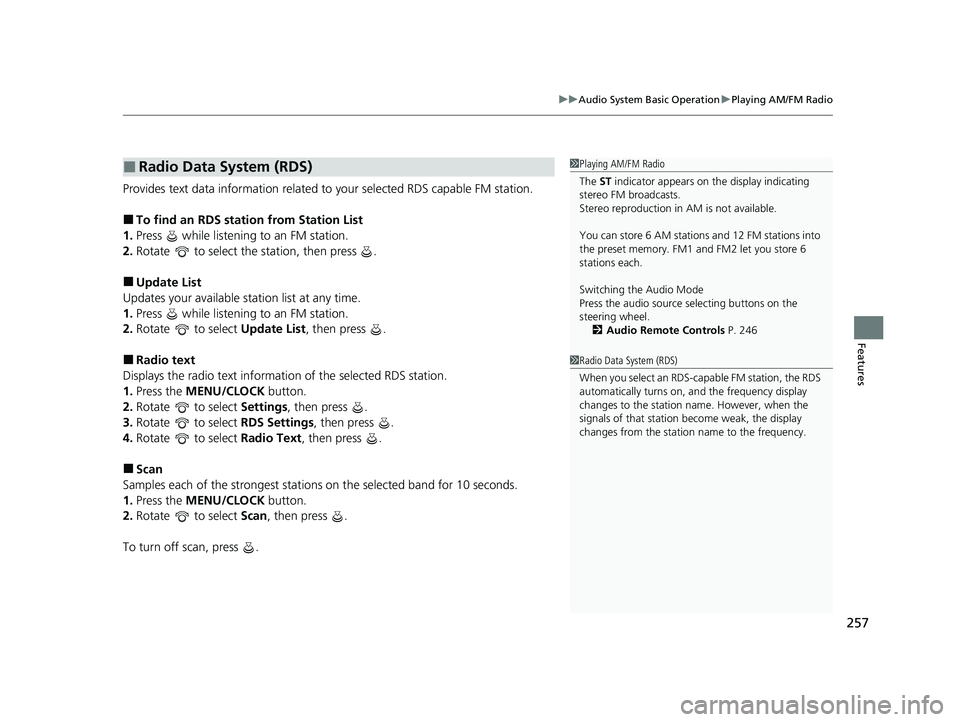
Provides text data information related to your selected RDS capable FM station.
■To find an RDS station from Station List
1. Press while listening to an FM station.
2. Rotate to select the station, then press .
■Update List
Updates your available st ation list at any time.
1. Press while listening to an FM station.
2. Rotate to select Update List, then press .
■Radio text
Displays the radio text information of the selected RDS station.
1. Press the MENU/CLOCK button.
2. Rotate to select Settings, then press .
3. Rotate to select RDS Settings, then press .
4. Rotate to select Radio Text, then press .
■Scan
Samples each of the strongest stations on the selected band for 10 seconds.
1. Press the MENU/CLOCK button.
2. Rotate to select Scan, then press .
To turn off scan, press .
■Radio Data System (RDS)1 Playing AM/FM Radio
The ST indicator appears on the display indicating
stereo FM broadcasts.
Stereo reproduction in AM is not available.
You can store 6 AM stations and 12 FM stations into
the preset memory. FM1 and FM2 let you store 6
stations each.
Switching the Audio Mode
Press the audio source selecting buttons on the
steering wheel. 2 Audio Remote Controls P. 246
1Radio Data System (RDS)
When you select an RDS-capable FM station, the RDS
automatically turns on, and the frequency display
changes to the station name. However, when the
signals of that station become weak, the display
changes from the statio n name to the frequency.
21 CR-V HYBRID HMIN-31TPG6100.book 257 ページ 2020年9月14日 月曜日 午前11時36分
Page 259 of 690
258
uuAudio System Basic Operation uPlaying an iPod
Features
Playing an iPod
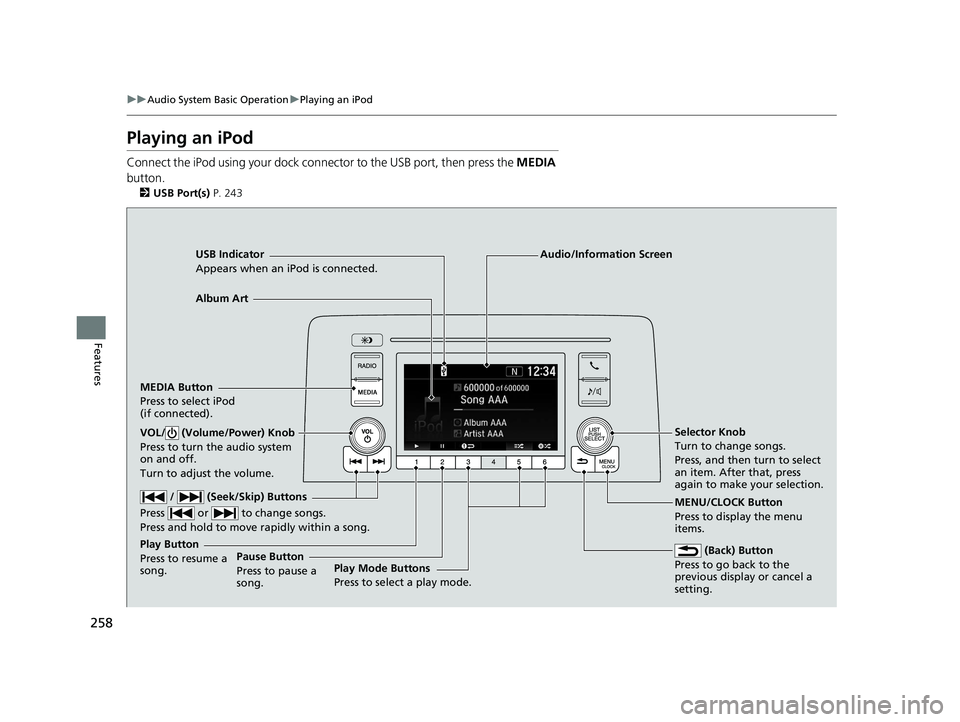
Connect the iPod using your dock connector to the USB port, then press the MEDIA
button.
2 USB Port(s) P. 243
USB Indicator
Appears when an iPod is connected.
MEDIA Button
Press to select iPod
(if connected).
(Back) Button
Press to go back to the
previous display or cancel a
setting.
/ (Seek/Skip) Buttons
Press or to change songs.
Press and hold to move rapidly within a song.
VOL/ (Volume/Power) Knob
Press to turn the audio system
on and off.
Turn to adjust the volume.Selector Knob
Turn to change songs.
Press, and then turn to select
an item. After that, press
again to make your selection.
MENU/CLOCK Button
Press to display the menu
items.
Audio/Information Screen
Albu
m Art
Play Mode Buttons
Press to sele
ct a play mode.
Play Button
Press to resume a
song. Pause Button
Press to pause a
song.
21 CR-V HYBRID HMIN-31TPG6100.book 258 ページ 2020年9月14日 月曜日 午前11時36分
Page 261 of 690
uuAudio System Basic Operation uPlaying an iPod
260
Features
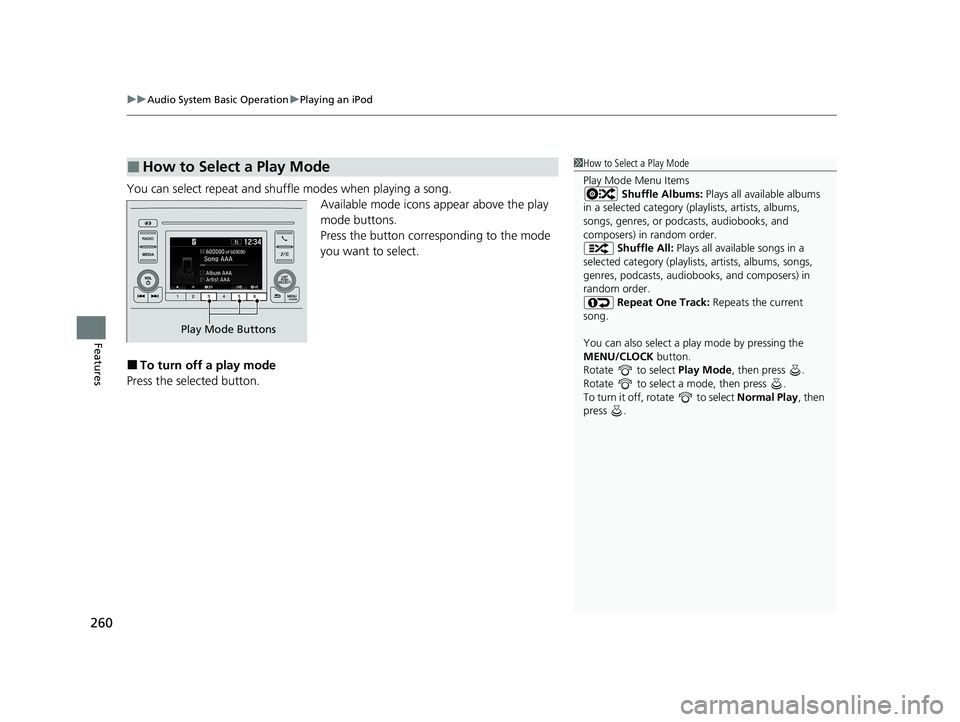
You can select repeat and shuffle modes when playing a song.
Available mode icons appear above the play
mode buttons.
Press the button corresponding to the mode
you want to select.
■To turn off a play mode
Press the selected button.
■How to Select a Play Mode1 How to Select a Play Mode
Play Mode Menu Items
Shuffle Albums: Plays all available albums
in a selected category (playlists, artists, albums,
songs, genres, or podca sts, audiobooks, and
composers) in random order.
Shuffle All: Plays all available songs in a
selected category (playlists , artists, albums, songs,
genres, podcasts, audiobooks, and composers) in
random order.
Repeat One Track: Repeats the current
song.
You can also select a pl ay mode by pressing the
MENU/CLOCK button.
Rotate to select Play Mode, then press .
Rotate to select a mode, then press .
To turn it off, rotate to select Normal Play, then
press .
Play Mode Buttons
21 CR-V HYBRID HMIN-31TPG6100.book 260 ページ 2020年9月14日 月曜日 午前11時36分
Page 262 of 690
261
uuAudio System Basic Operation uPlaying Pandora ®
Continued
Features
Playing Pandora ®
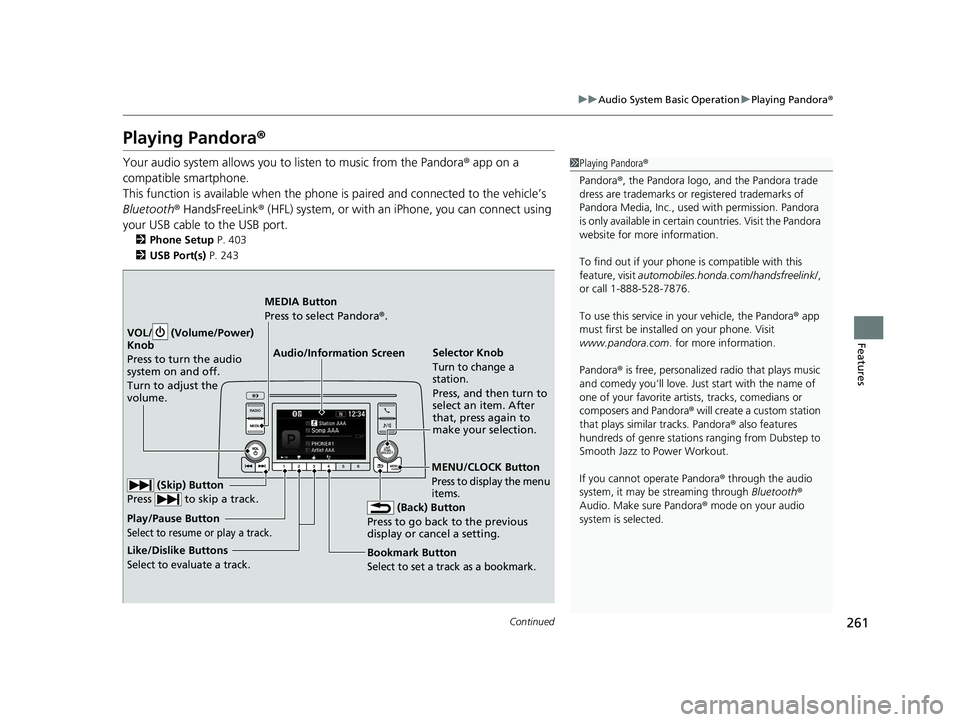
Your audio system allows you to listen to music from the Pandora ® app on a
compatible smartphone.
This function is available when the phone is paired and connected to the vehicle’s
Bluetooth ® HandsFreeLink ® (HFL) system, or with an iPhone, you can connect using
your USB cable to the USB port.
2 Phone Setup P. 403
2 USB Port(s) P. 243
1Playing Pandora ®
Pandora ®, the Pandora logo, and the Pandora trade
dress are trademarks or registered trademarks of
Pandora Media, Inc., used with permission. Pandora
is only available in certai n countries. Visit the Pandora
website for more information.
To find out if your phone is compatible with this
feature, visit automobiles.honda.com /handsfreelink/,
or call 1-888-528-7876.
To use this service in your vehicle, the Pandora ® app
must first be installed on your phone. Visit
www.pandora.com . for more information.
Pandora ® is free, personalized radio that plays music
and comedy you’ll love. Just start with the name of
one of your favorite arti sts, tracks, comedians or
composers and Pandora ® will create a custom station
that plays similar tracks. Pandora ® also features
hundreds of genre stations ranging from Dubstep to
Smooth Jazz to Power Workout.
If you cannot operate Pandora ® through the audio
system, it may be streaming through Bluetooth®
Audio. Make sure Pandora ® mode on your audio
system is selected.
Audio/Information Screen Selector Knob
Turn to change a
station.
Press, and then turn to
select an item. After
that, press again to
make your selection.
VOL/ (Volume/Power)
Kn
ob
Press to turn the audio
system on and off.
Turn to adjust the
volume.
(Back) Button
Press to go back to the previous
display or cancel a setting.
MEDIA Button
Press to select Pandora ®.
Play/Pause Button
Select to resume or play a track.
(Skip) Button
Press to skip a track.
Like/Dislike Buttons
Select to evaluate a track.
MENU/CLOCK Button
Press to display the menu
items.
Bookmark Button
Select to set a track as a bookmark.
21 CR-V HYBRID HMIN-31TPG6100.book 261 ページ 2020年9月14日 月曜日 午前11時36分
Page 263 of 690
uuAudio System Basic Operation uPlaying Pandora ®
262
Features
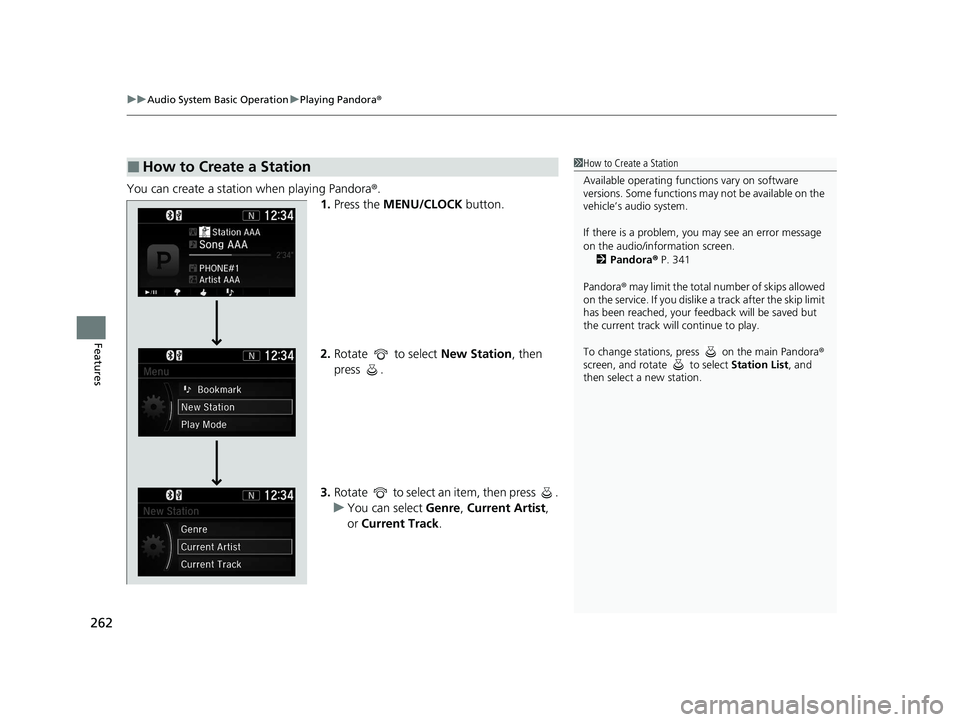
You can create a station when playing Pandora®.
1. Press the MENU/CLOCK button.
2. Rotate to select New Station, then
press .
3. Rotate to select an item, then press .
u You can select Genre, Current Artist,
or Current Track.
■How to Create a Station1How to Create a Station
Available operating functi ons vary on software
versions. Some functions ma y not be available on the
vehicle’s audio system.
If there is a problem, you may see an error message
on the audio/information screen.
2 Pandora ® P. 341
Pandora ® may limit the total number of skips allowed
on the service. If you dislike a track after the skip limit
has been reached, your fe edback will be saved but
the current track will continue to play.
To change stations, pre ss on the main Pandora ®
screen, and rotate to select Station List, and
then select a new station.
21 CR-V HYBRID HMIN-31TPG6100.book 262 ページ 2020年9月14日 月曜日 午前11時36分
Page 264 of 690
263
uuAudio System Basic Operation uPlaying a USB Flash Drive
Continued
Features
Playing a USB Flash Drive
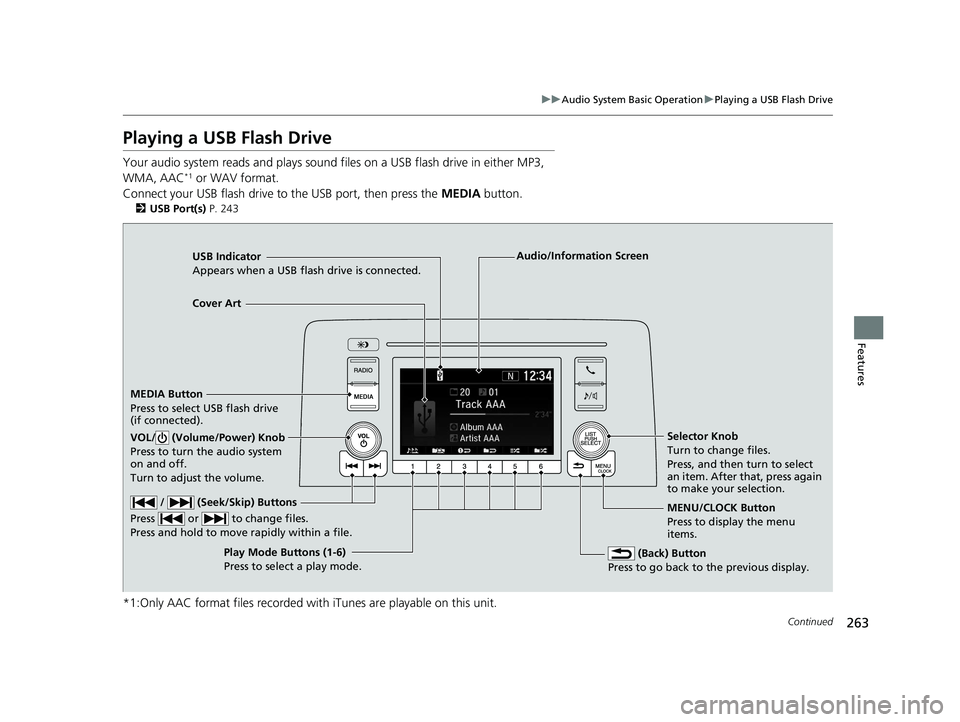
Your audio system reads and plays sound files on a USB flash drive in either MP3,
WMA, AAC*1 or WAV format.
Connect your USB flash drive to the USB port, then press the MEDIA button.
2USB Port(s) P. 243
*1:Only AAC format files recorded with iTunes are playable on this unit.
USB Indicator
Appears when a USB flash drive is connected.
MEDIA Button
Press to select USB flash drive
(if connected).
(Back) Button
Press to go back to the previous display.
/ (Seek/Skip) Buttons
Press or to change files.
Press and hold to move rapidly within a file.
VOL/ (Volume/Power) Knob
Press to turn the audio system
on and off.
Turn to adjust the volume.Selector Knob
Turn to change files.
Press, and then turn to select
an item. After that, press again
to make your selection.
MENU/CLOCK Button
Press to display the menu
items.
Audio/Information Screen
Play Mode Buttons (1-6)
Pres
s to select a play mode.
Cover Art
21 CR-V HYBRID HMIN-31TPG6100.book 263 ページ 2020年9月14日 月曜日 午前11時36分
Page 266 of 690
265
uuAudio System Basic Operation uPlaying a USB Flash Drive
Features
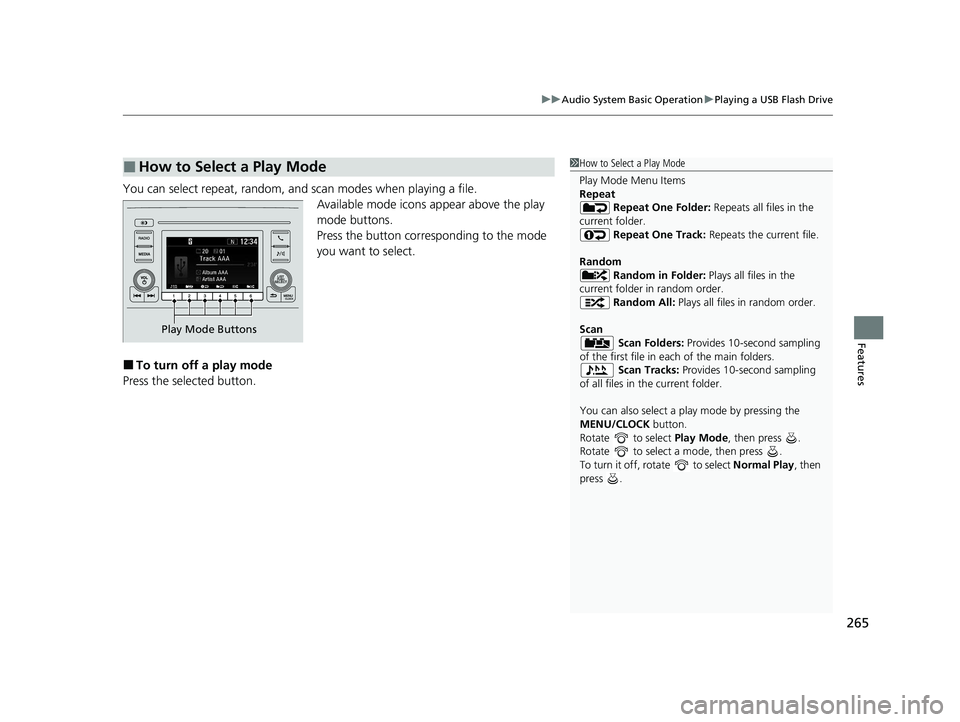
You can select repeat, random, and scan modes when playing a file.
Available mode icons appear above the play
mode buttons.
Press the button corresponding to the mode
you want to select.
■To turn off a play mode
Press the selected button.
■How to Select a Play Mode1 How to Select a Play Mode
Play Mode Menu Items
Repeat
Repeat One Folder: Repeats all files in the
current folder. Repeat One Track: Repeats the current file.
Random Random in Folder: Plays all files in the
current folder in random order. Random All: Plays all files in random order.
Scan Scan Folders: Provides 10-second sampling
of the first file in each of the main folders.
Scan Tracks: Provides 10-second sampling
of all files in the current folder.
You can also select a pl ay mode by pressing the
MENU/CLOCK button.
Rotate to select Play Mode, then press .
Rotate to select a mode, then press .
To turn it off, rotate to select Normal Play, then
press .
Play Mode Buttons
21 CR-V HYBRID HMIN-31TPG6100.book 265 ページ 2020年9月14日 月曜日 午前11時36分