radio controls HONDA CR-V 2021 Owner's Manual (in English)
[x] Cancel search | Manufacturer: HONDA, Model Year: 2021, Model line: CR-V, Model: HONDA CR-V 2021Pages: 690, PDF Size: 42.09 MB
Page 6 of 690
Contents
Child Safety P. 72Exhaust Gas Hazard P. 86Safety Labels P. 87
Tailgate P. 166 Security System P. 177 Windows P. 180
Operating the Switches Around the Steering Wheel P. 185 Mirrors P. 205
Climate Control System P. 234
Audio Error Messages P. 339 General Information on the Audio System P. 344
Bluetooth ® HandsFreeLink ® P. 397, 421 Compass* P. 455
Off-Highway Driving Guidelines P. 465 When Driving P. 467 Honda Sensing ® P. 501 Braking P. 549
Refueling P. 570 Fuel Economy and CO
2 Emissions P. 573
Maintenance Under the Hood P. 584 Replacing Light Bulbs P. 596
Checking and Maintaining Tires P. 604 12-volt Battery P. 613 Remote Transmitter Care P. 615
Cleaning P. 617 Accessories and Modifications P. 622
Handling of the Jack P. 641 Power System Won’t Start P. 642 If the 12-Volt Battery Is Dead P. 645
Fuses P. 657 Emergency Towing P. 661
Refueling P. 663
Devices that Emit Radio Waves P. 669 Reporting Safety Defects P. 670
Authorized Manuals P. 676 Customer Service Information P. 677
Quick Reference GuideP. 6
Safe DrivingP. 41
Instrument PanelP. 89
ControlsP. 149
FeaturesP. 241
DrivingP. 457
MaintenanceP. 575
Handling the UnexpectedP. 625
InformationP. 665
IndexP. 679
21 CR-V HYBRID HMIN-31TPG6100.book 5 ページ 2020年9月14日 月曜日 午前11時36分
Page 155 of 690
154
uuLocking and Unlocking the Doors uLow Smart Entry Remote Signal Strength
Controls
Low Smart Entry Remo te Signal Strength
The vehicle transmits radio waves to loca te the smart entry remote when locking/
unlocking the doors, opening the tailgate, or to activate the power system.
In the following cases, locking/unlocking the doors, opening the tailgate, or
activating the power system may be inhibited or operation may be unstable:
• Strong radio waves are being tra nsmitted by nearby equipment.
• You are carrying the smart entry remote together with telecommunications
equipment, laptop computers, ce ll phones, or wireless devices.
• A metallic object is touching or covering the smart entry remote.1Low Smart Entry Remote Signal Strength
Communication between the smart entry remote and
the vehicle consumes the smart entry remote’s
battery.
Battery life is about two years, but this varies
depending on re gularity of use.
The battery is consumed whenever the smart entry
remote is receivi ng strong radio wave s. Avoid placing
it near electrical appliances such as televisions and
personal computers.
21 CR-V HYBRID HMIN-31TPG6100.book 154 ページ 2020年9月14日 月曜日 午前11時36分
Page 178 of 690
177Continued
Controls
Security System
Immobilizer System
This system prevents a key that has not been pre-registered from starting the power
system.
Pay attention to the follo wing when pressing the POWER button:
• Do not allow objects that emit strong radio waves near the POWER button.
• Make sure the key is not covered by or touching a metal object.
• Do not bring a key from another vehicle’s immobilizer system near the POWER
button.
• Do not put the key near magnetic items. El ectronic device, such as televisions and
audio systems emit strong magnetic fiel ds. Note that even a key chain can
become magnetic.
Security System Alarm*
The security system alarm activates when the tailgate, hood or doors are forcibly
opened. The alarm does not activate if the tailgate or doors are opened with the key,
remote transmitter or smart entry system.
However, the alarm activates if a door is opened with the key and then the hood is
opened before the power mode is set to ON.
■When the security system alarm activates
The horn sounds intermittently, and some exterior lights flash.
1Immobilizer System
NOTICE
Leaving the key in the vehicl e can result in theft or
accidental movement of the vehicle.
Always take the key with you whenever you leave the
vehicle unattended.
Do not alter the system or add other devices to it.
Doing so may damage the system and make your
vehicle inoperable.
1 Security System Alarm*
The security system alarm continues for a maximum
of two minutes until the security system alarm
deactivates.
* Not available on all models
21 CR-V HYBRID HMIN-31TPG6100.book 177 ページ 2020年9月14日 月曜日 午前11時36分
Page 232 of 690
Continued231
uuInterior Convenience Items uOther Interior Convenience Items
Controls
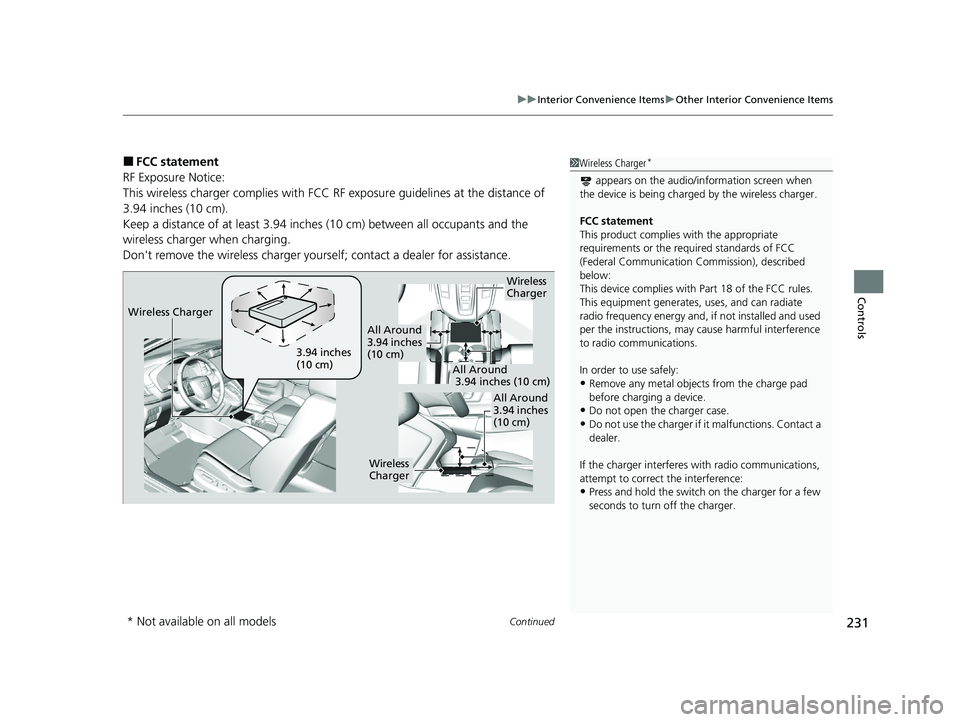
■FCC statement
RF Exposure Notice:
This wireless charger complies with FCC RF exposure guidelines at the distance of
3.94 inches (10 cm).
Keep a distance of at l east 3.94 inches (10 cm) be tween all occupants and the
wireless charger when charging.
Don't remove the wireless charger yourse lf; contact a dealer for assistance.1Wireless Charger*
appears on the audio/information screen when
the device is being charge d by the wireless charger.
FCC statement
This product complies with the appropriate
requirements or the requ ired standards of FCC
(Federal Communication Commission), described
below:
This device complies with Part 18 of the FCC rules.
This equipment generates, uses, and can radiate
radio frequency energy and, if not installed and used
per the instructions, may cause harmful interference
to radio communications.
In order to use safely:
•Remove any metal objects from the charge pad
before charging a device.
•Do not open the charger case.
•Do not use the charger if it malfunctions. Contact a
dealer.
If the charger interferes with radio communications,
attempt to correct the interference:
•Press and hold the switch on the charger for a few
seconds to turn off the charger.
Wireless
Charger
3.94 inches
(10 cm)
All Around
3.94 inches
(10 cm)
All Around
3.94 inches (10 cm)
All Around
3.94 inches
(10 cm)
Wireless
Charger
Wireless Charger
* Not available on all models
21 CR-V HYBRID HMIN-31TPG6100.book 231 ページ 2020年9月14日 月曜日 午前11時36分
Page 242 of 690
241
Features
This chapter describes how to operate technology features.
Audio SystemAbout Your Audio System ................ 242
USB Port(s) ....................................... 243
Audio System Theft Protection ......... 245
Audio Remote Controls .................... 246
Audio System Basic Operation Audio/Information Screen ................ 250
Adjusting the Sound ........................ 254
Display Setup ................................... 255
Playing AM/FM Radio ....................... 256
Playing an iPod ................................ 258
Playing Pandora ®.............................. 261
Playing a USB Flash Drive ................. 263
Models with color audio system
Playing Bluetooth ® Audio................. 266
Siri ® Eyes Free .................................. 269
Audio System Basic Operation Audio/Information Screen ................ 271
Adjusting the Sound ........................ 292
Display Setup ................................... 293
Voice Control Operation .................. 295
Playing AM/FM Radio ....................... 299
Playing SiriusXM ® Radio ................... 303
Playing an iPod ................................ 310
Song By Voice
TM (SBV) ...................... 313
Playing Pandora ®............................. 317
Playing a USB Flash Drive ................. 319
Models with Display Audio
Playing Bluetooth ® Audio ................ 322
HondaLink ®..................................... 324
Wi-Fi Connection ............................. 329
Siri ® Eyes Free .................................. 331
Apple CarPlay
TM............................... 332
Android AutoTM............................... 335
Audio Error Messages ...................... 339
General Information on the Audio System ............................................. 344
Customized Features ................ 361, 368
HomeLink ® Universal Transceiver
*.. 394
Bluetooth® HandsFreeLink® ..... 397, 421
Compass
*.......................................... 455
* Not available on all models
21 CR-V HYBRID HMIN-31TPG6100.book 241 ページ 2020年9月14日 月曜日 午前11時36分
Page 243 of 690
242
Features
Audio System
About Your Audio System
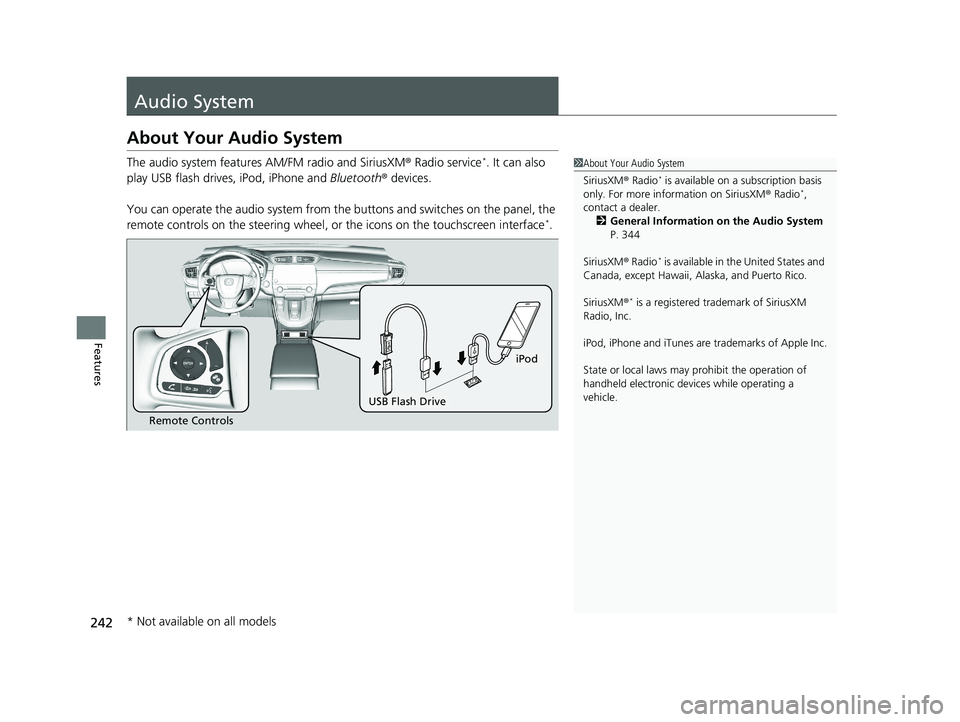
The audio system features AM/FM radio and SiriusXM® Radio service*. It can also
play USB flash drives, iPod, iPhone and Bluetooth® devices.
You can operate the audio system from the buttons and switches on the panel, the
remote controls on the steering wheel, or the icons on the touchscreen interface
*.
1 About Your Audio System
SiriusXM ® Radio
* is available on a subscription basis
only. For more information on SiriusXM ® Radio*,
contact a dealer. 2 General Information on the Audio System
P. 344
SiriusXM ® Radio
* is available in the United States and
Canada, except Ha waii, Alaska, and Puerto Rico.
SiriusXM ®
* is a registered tra demark of SiriusXM
Radio, Inc.
iPod, iPhone and iTunes are trademarks of Apple Inc.
State or local laws may pr ohibit the operation of
handheld electronic devices while operating a
vehicle.
Remote Controls
iPod
USB Flash Drive
* Not available on all models
21 CR-V HYBRID HMIN-31TPG6100.book 242 ページ 2020年9月14日 月曜日 午前11時36分
Page 249 of 690
248
uuAudio System uAudio Remote Controls
Features
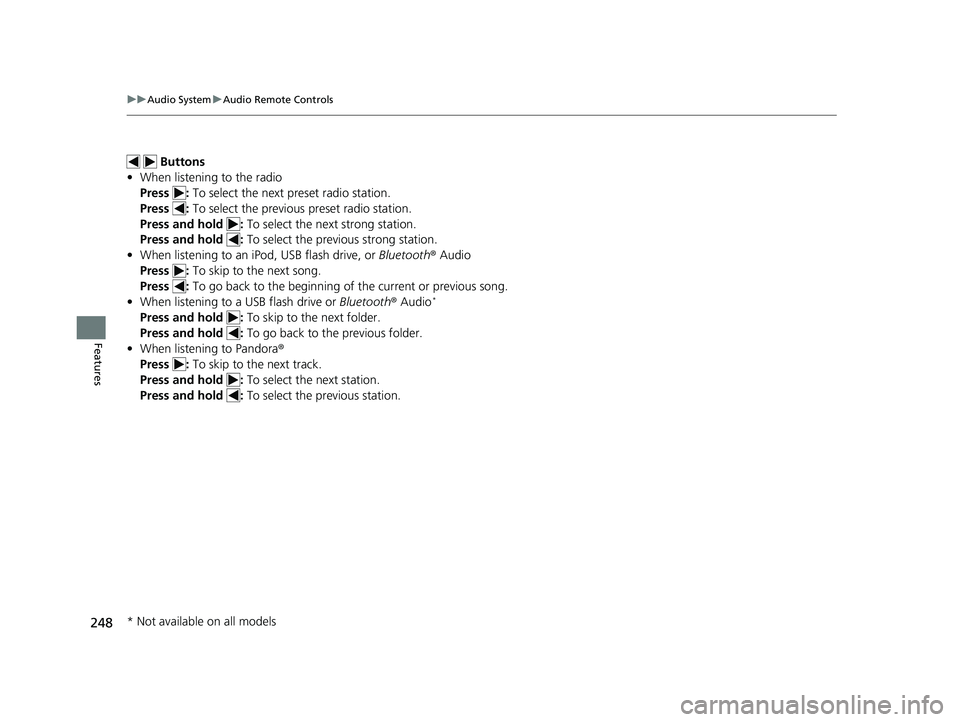
Buttons
• When listening to the radio
Press : To select the next preset radio station.
Press : To select the previous preset radio station.
Press and hold : To select the next strong station.
Press and hold : To select the previous strong station.
• When listening to an iPod, USB flash drive, or Bluetooth ® Audio
Press : To skip to the next song.
Press : To go back to the beginning of the current or previous song.
• When listening to a USB flash drive or Bluetooth® Audio
*
Press and hold : To skip to the next folder.
Press and hold : To go back to the previous folder.
• When listening to Pandora ®
Press : To skip to the next track.
Press and hold : To select the next station.
Press and hold : To select the previous station.
* Not available on all models
21 CR-V HYBRID HMIN-31TPG6100.book 248 ページ 2020年9月14日 月曜日 午前11時36分
Page 258 of 690
257
uuAudio System Basic Operation uPlaying AM/FM Radio
Features
Provides text data information related to your selected RDS capable FM station.
■To find an RDS station from Station List
1. Press while listening to an FM station.
2. Rotate to select the station, then press .
■Update List
Updates your available st ation list at any time.
1. Press while listening to an FM station.
2. Rotate to select Update List, then press .
■Radio text
Displays the radio text information of the selected RDS station.
1. Press the MENU/CLOCK button.
2. Rotate to select Settings, then press .
3. Rotate to select RDS Settings, then press .
4. Rotate to select Radio Text, then press .
■Scan
Samples each of the strongest stations on the selected band for 10 seconds.
1. Press the MENU/CLOCK button.
2. Rotate to select Scan, then press .
To turn off scan, press .
■Radio Data System (RDS)1 Playing AM/FM Radio
The ST indicator appears on the display indicating
stereo FM broadcasts.
Stereo reproduction in AM is not available.
You can store 6 AM stations and 12 FM stations into
the preset memory. FM1 and FM2 let you store 6
stations each.
Switching the Audio Mode
Press the audio source selecting buttons on the
steering wheel. 2 Audio Remote Controls P. 246
1Radio Data System (RDS)
When you select an RDS-capable FM station, the RDS
automatically turns on, and the frequency display
changes to the station name. However, when the
signals of that station become weak, the display
changes from the statio n name to the frequency.
21 CR-V HYBRID HMIN-31TPG6100.book 257 ページ 2020年9月14日 月曜日 午前11時36分
Page 301 of 690
uuAudio System Basic Operation uPlaying AM/FM Radio
300
Features
To store a station:
1. Tune to the selected station.
2. Select and hold the preset number fo r the station you want to store.
You can also store a preset station by the following procedure.
1. Tune to the selected station.
2. Select the open/close ic on to display a list.
3. Select the Preset tab.
4. Select and hold the preset number fo r the station you want to store.
Lists the strongest stations on the selected band.
1. Select the open/close ic on to display a list.
2. Select the Station List tab.
3. Select the station.
■Manual update
Updates your available station list at any time.
1. Select the open/close ic on to display a list.
2. Select the Station List tab.
3. Select Refresh .
■Preset Memory
■Station List
1Preset Memory
The ST indicator appears on the display indicating
stereo FM broadcasts.
Stereo reproduction in AM is not available.
Switching the Audio Mode
Press the or button on the steering wheel or
select SOURCE on the screen.
2 Audio Remote Controls P. 246
You can store 6 AM stations and 12 FM stations into
preset memory.
HD Radio Technology manufactured under license
from iBiquity Digi tal Corporation. U.S. and Foreign
Patents. HD Radio
TM and the HD, HD Radio, and
“Arc” logos are proprietary trademarks of iBiquity
Digital Corp.
34
21 CR-V HYBRID HMIN-31TPG6100.book 300 ページ 2020年9月14日 月曜日 午前11時36分
Page 305 of 690
uuAudio System Basic Operation uPlaying SiriusXM ® Radio
304
Features
1. Select MENU .
2. Select Tune Mode .
3. Select Channel Mode or Category Mode .
■To Change the Tune Mode1Playing SiriusXM ® Radio
In the channel mode, all available channels are
selectable. In the categor y mode, you can select a
channel within a ca tegory (Jazz, Rock, Classical, etc.).
There may be instances when SiriusXM ® Radio does
not broadcast all the data fi elds (artist name, title).
This does not indicate a problem with your audio
system.
SiriusXM ® Radio stations load in ascending order,
which can take about a minute. Once they have
loaded you will be able to scroll up or down to make
your selections.
Switching the Audio Mode
Press the or button on the steering wheel or
select SOURCE on the screen.
2 Audio Remote Controls P. 246
Tune Start:
When you change to a preset channel, a song being
played on that channel restarts from the beginning
with this function. This can be turned on or off from
the Audio Settings screen.
2 Customized Features P. 368
34
21 CR-V HYBRID HMIN-31TPG6100.book 304 ページ 2020年9月14日 月曜日 午前11時36分