dead battery HONDA CR-V HYBRID 2020 Owner's Manual (in English)
[x] Cancel search | Manufacturer: HONDA, Model Year: 2020, Model line: CR-V HYBRID, Model: HONDA CR-V HYBRID 2020Pages: 687, PDF Size: 41.59 MB
Page 39 of 687
Quick Reference Guide
37
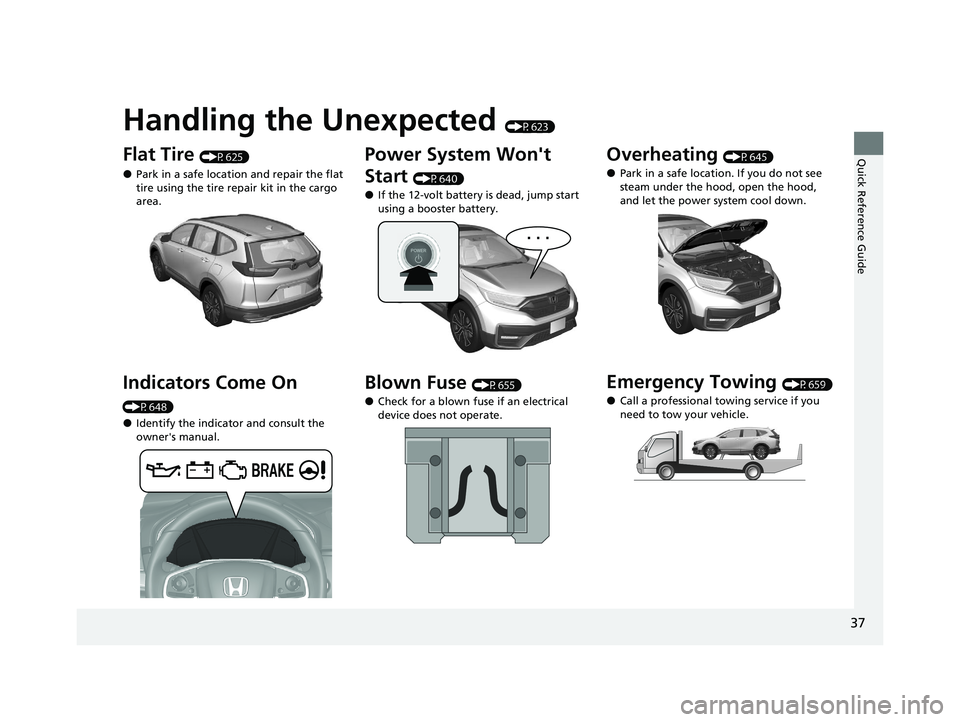
Handling the Unexpected (P623)
Flat Tire (P625)
●Park in a safe location and repair the flat
tire using the tire repair kit in the cargo
area.
Indicators Come On
(P648)
●Identify the indicator and consult the
owner's manual.
Power System Won't
Start
(P640)
●If the 12-volt battery is dead, jump start
using a booster battery.
Blown Fuse (P655)
●Check for a blown fuse if an electrical
device does not operate.
Overheating (P645)
●Park in a safe location. If you do not see
steam under the hood, open the hood,
and let the power system cool down.
Emergency Towing (P659)
●Call a professional towing service if you
need to tow your vehicle.
20 CR-V HYBRID HMIN-31TPG6000.book 37 ページ 2019年11月28日 木曜日 午後1 時50分
Page 159 of 687
Continued157
uuLocking and Unlocking the Doors uLocking/Unlocking the Doors from the Outside
Controls
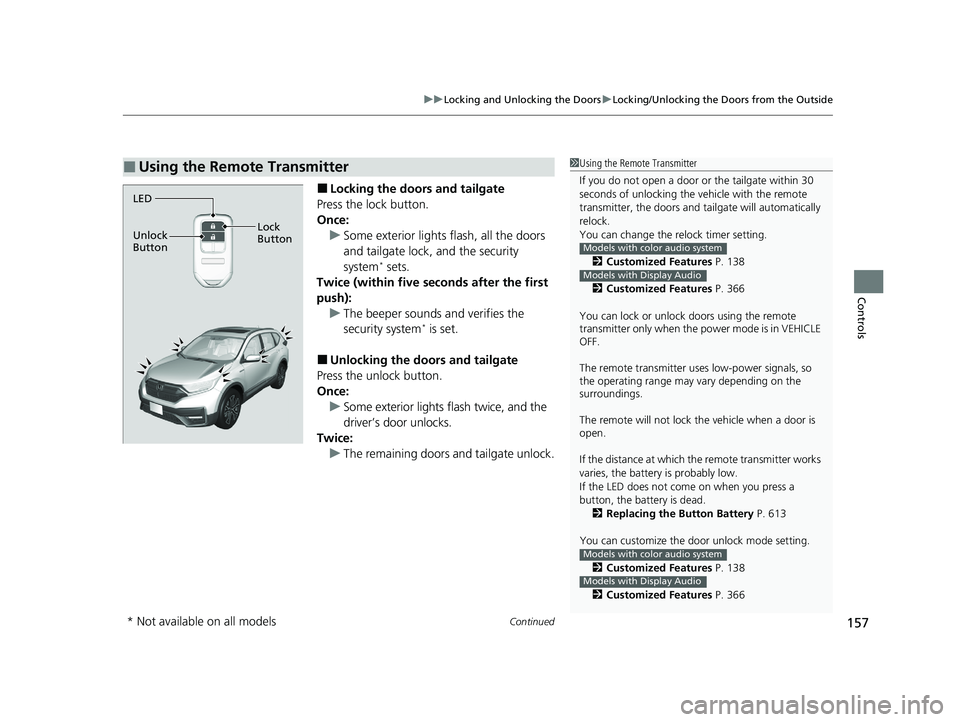
■Locking the doors and tailgate
Press the lock button.
Once: u Some exterior lights flash, all the doors
and tailgate lock, and the security
system
* sets.
Twice (within five se conds after the first
push): u The beeper sounds and verifies the
security system
* is set.
■Unlocking the doors and tailgate
Press the unlock button.
Once:
u Some exterior lights flash twice, and the
driver’s door unlocks.
Twice: u The remaining doors and tailgate unlock.
■Using the Remote Transmitter1Using the Remote Transmitter
If you do not open a door or the tailgate within 30
seconds of unlocking the vehicle with the remote
transmitter, the doors and ta ilgate will automatically
relock.
You can change the relock timer setting.
2 Customized Features P. 138
2 Customized Features P. 366
You can lock or unlock doors using the remote
transmitter only when the power mode is in VEHICLE
OFF.
The remote transmitter us es low-power signals, so
the operating range may vary depending on the
surroundings.
The remote will not lock th e vehicle when a door is
open.
If the distance at which the remote transmitter works
varies, the batter y is probably low.
If the LED does not come on when you press a
button, the battery is dead. 2 Replacing the Button Battery P. 613
You can customize the door unlock mode setting. 2 Customized Features P. 138
2 Customized Features P. 366
Models with color audio system
Models with Display Audio
Models with color audio system
Models with Display Audio
LED
Unlock
Button Lock
Button
* Not available on all models
20 CR-V HYBRID HMIN-31TPG6000.book 157 ページ 2019年11月28日 木曜日 午後1時50分
Page 178 of 687
uuSecurity System uSecurity System Alarm*
176
Controls
■To deactivate the security system alarm
Unlock the vehicle using the key, remote transmitter or smart entry system, or turn
the power mode is set to ON. The system, along with the horn and flashing lights, is
deactivated.
■Setting the security system alarm
The security system alarm automatically sets when the following conditions have
been met:
• The power mode is set to VEHICLE OFF (LOCK).
• The hood and tailgate are closed.
• All doors and tailgate are locked from outsi de with the key, remote transmitter,
or smart entry system.
■When the security system alarm sets
The security system alarm indicator in the instrument panel blinks and the blinking
interval changes after about 15 seconds.
■To cancel the security system alarm
The security system alarm is canceled when the vehicle is unlocked using the remote
transmitter or smart entry system, or when the power mode is set to ON. The
security system alarm indicator goes off at the same time.
1 Security System Alarm*
Do not set the security system alarm when someone
is in the vehicle or a window is open. The system can
accidentally activate when:
•Unlocking the door with the lock tab.•Opening the hood with the hood release handle.
If the 12-volt battery goes dead after you have set the
security system alarm, the security alarm may go off
once the 12-volt battery is recharged or replaced.
If this occurs, deactivate the security system alarm by
unlocking a door using the ke y, remote transmitter,
or smart entry system.
Do not alter the system or add other devices to it.
Doing so may damage the system and make your
vehicle inoperable.
* Not available on all models
20 CR-V HYBRID HMIN-31TPG6000.book 176 ページ 2019年11月28日 木曜日 午後1時50分
Page 245 of 687
243
uuAudio System uAudio System Theft Protection
Features
Audio System Theft Protection
The audio system is disabled when it is disconnected from the power source, such as
when the battery is disconnected or goes dead. In certain conditions, the system
may display a code entry screen. If this occurs, reactivate the audio system.
■Reactivating the audio system
1. Set the power mode to ON.
2. Turn on the audio system.
3. Press and hold the audio system powe r button for more than two seconds.
u The audio system is reac tivated when the audio co ntrol unit establishes a
connection with the vehicl e control unit. If the control unit fails to recognize
the audio unit, you must go to a deal er and have the audio unit checked.
20 CR-V HYBRID HMIN-31TPG6000.book 243 ページ 2019年11月28日 木曜日 午後1時50分
Page 549 of 687
547Continued
Driving
Braking
Brake System
Use the parking brake to keep the vehicle stationary when parked. When the
parking brake is applied, you can manu ally or automatically release it.
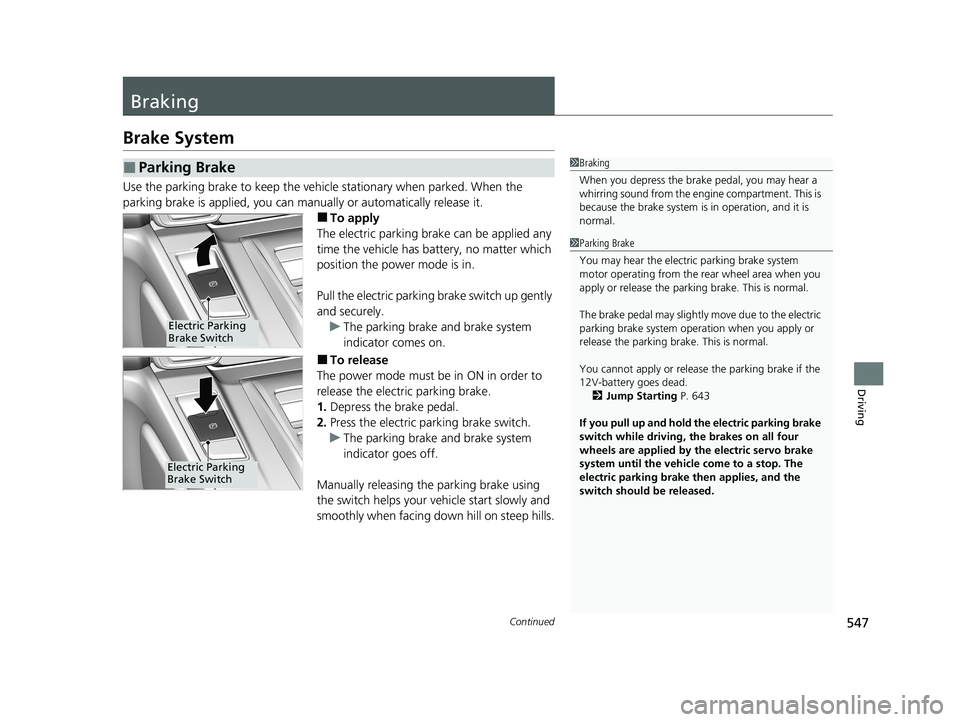
■To apply
The electric parking brake can be applied any
time the vehicle has battery, no matter which
position the power mode is in.
Pull the electric parking brake switch up gently
and securely. u The parking brake and brake system
indicator comes on.
■To release
The power mode must be in ON in order to
release the electric parking brake.
1. Depress the brake pedal.
2. Press the electric parking brake switch.
u The parking brake and brake system
indicator goes off.
Manually releasing the parking brake using
the switch helps your vehicle start slowly and
smoothly when facing down hill on steep hills.
■Parking Brake1 Braking
When you depress the brak e pedal, you may hear a
whirring sound from the engine compartment. This is
because the brake system is in operation, and it is
normal.
1 Parking Brake
You may hear the electric parking brake system
motor operating from the re ar wheel area when you
apply or release the parki ng brake. This is normal.
The brake pedal may slightly move due to the electric
parking brake system opera tion when you apply or
release the parking br ake. This is normal.
You cannot apply or release the parking brake if the
12V-battery goes dead. 2 Jump Starting P. 643
If you pull up and hold the electric parking brake
switch while driving, the brakes on all four
wheels are applied by the electric servo brake
system until the vehicle come to a stop. The
electric parking brake then applies, and the
switch should be released.
Electric Parking
Brake Switch
Electric Parking
Brake Switch
20 CR-V HYBRID HMIN-31TPG6000.book 547 ページ 2019年11月28日 木曜日 午後1時50分
Page 613 of 687
611
Maintenance
12-volt Battery
Checking the 12-volt Battery
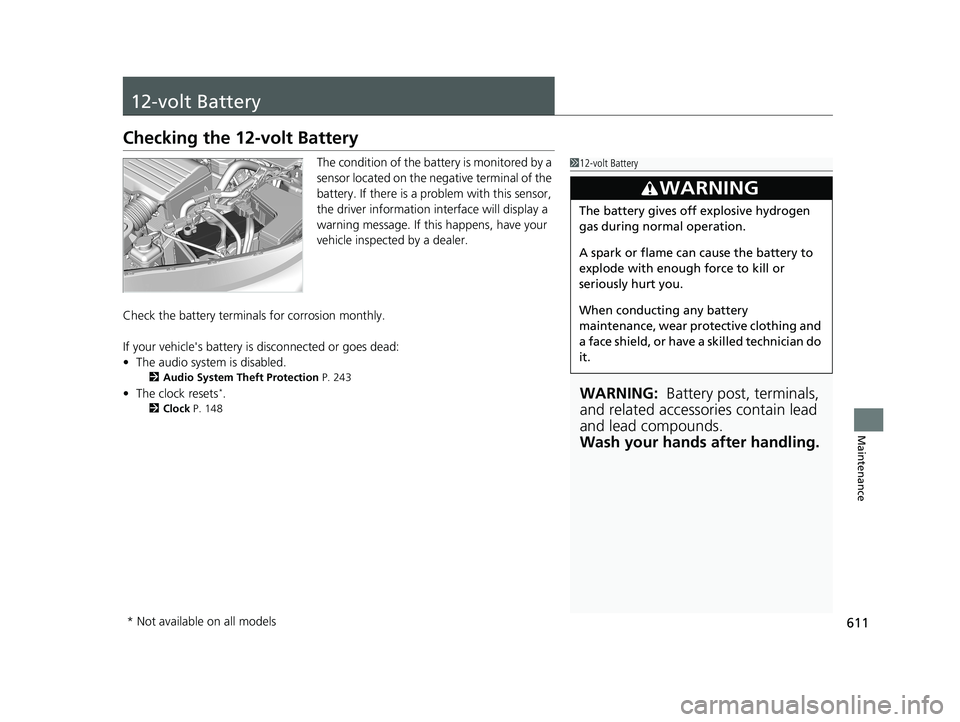
The condition of the battery is monitored by a
sensor located on the negative terminal of the
battery. If there is a problem with this sensor,
the driver information interface will display a
warning message. If this happens, have your
vehicle inspected by a dealer.
Check the battery termin als for corrosion monthly.
If your vehicle's battery is disconnected or goes dead:
• The audio system is disabled.
2 Audio System Theft Protection P. 243
•The clock resets*.
2 Clock P. 148
112-volt Battery
WARNING: Battery post, terminals,
and related accessories contain lead
and lead compounds.
Wash your hands after handling.
3WARNING
The battery gives off explosive hydrogen
gas during normal operation.
A spark or flame can cause the battery to
explode with enough force to kill or
seriously hurt you.
When conducting any battery
maintenance, wear prot ective clothing and
a face shield, or have a skilled technician do
it.
* Not available on all models
20 CR-V HYBRID HMIN-31TPG6000.book 611 ページ 2019年11月28日 木曜日 午後1時50分
Page 671 of 687

669Continued
Information
Emissions Testing
Testing of Readiness Codes
Your vehicle has readiness code as part of the onboard self diagnostic system.
Some States use these codes for testing to verify whether your vehicle’s emissions
components are working properly.
The codes may not be read properly if te sting is performed just after the 12-volt
battery has gone dead or been disconnected.
To check if they are set, set the powe r mode to ON, without turning the power
system on. The malfunction indicator lamp will come on for several seconds. If it
then goes off, the readiness co des are set. If it blinks five times, the readiness codes
are not set.
If you are required to have your vehicle te sted before the readiness codes are ready,
prepare the vehicle for retest ing by doing the following:
1. Fill the gas tank to approximately 3/4 full.
2. Park the vehicle and leave the power system off for six hours or more.
3. Make sure the ambient temperature is between 40°F and 95°F (4°C and 35°C).
4. Turn the power system on.1Testing of Readiness Codes
The readiness codes are erased when the 12-volt
battery is disconnected, and set again only after
several days of driving unde r a variety of conditions.
If a testing facility determines that the readiness
codes are not set, you may be requested to return at
a later date to complete the test.
If the testing facility determines the readiness codes
are still not set, see a dealer.
20 CR-V HYBRID HMIN-31TPG6000.book 669 ページ 2019年11月28日 木曜日 午後1時50分
Page 680 of 687
678
Index
CMBSTM (Collision Mitigation Braking
SystemTM) ................................................. 502
Coat Hook ................................................. 221
Collision Mitigation Braking System
TM
(CMBSTM) .................................................. 502
Compass .................................................... 453
Continuously Variable Transmission Creeping ................................................. 472
Kickdown ................................................ 472
Controls ..................................................... 147
Coolant (Engine) ....................................... 589
Adding to the Radiator ............................ 590
Adding to the Reserve Tank ..................... 589
Overheating............................................. 645
Creeping (Continuously Variable Transmission) ........................................... 472
Cross Traffic Monitor ................................ 562
Cup Holders ............................................... 219
Customer Service Information ................. 674
Customized Features ................ 138, 359, 366
D
Daytime Running Lights ........................... 191
Dead Battery ............................................. 643
Deceleration Paddle Selector ................... 480
Indicator .................................................... 93
Defaulting All the Settings ...................... 391
Deflation Warning System Indicator .................................................... 97 Defrosting the Windshield and
Windows ................................................. 235
Detachable Anchor .................................... 53
Devices that Emit Radio Waves ............... 667
Dimming
Headlights ............................................... 187
Rearview Mirror....................................... 203
Dipstick (Engine Oil) ................................. 585
Directional Signals (Turn Signal) ............. 186
Display Setup .................................... 253, 291
Display/Information Button ..................... 126
Door Mirrors ............................................. 204
Doors ......................................................... 150
Auto Door Locking .................................. 163
Auto Door Unlocking .............................. 163
Keys ........................................................ 150
Locking/Unlocking the Doors from the
Inside .................................................... 160
Locking/Unlocking the Doors from the
Outside ................................................. 153
Lockout Prevention System ...................... 159
DOT Tire Quality Grading ........................ 605
Driver Information Interface ................... 126
Driver’s Seat Lumbar Support .................. 205
Driving ...................................................... 455
Braking ................................................... 547
Off-Highway Driving Guidelines............... 463
Shifting ................................................... 473
Transmission ........................................... 472
Driving Position Memory System ............ 200
Dust and Pollen Filter ............................... 614
E
Eco Assist® System ...................................... 18
Eco Drive Display ................................ 19, 130
ECON Mode .............................................. 483
Elapsed Time ............................................ 128
Electric Power Steering (EPS) System Indicator ........................................... 96, 652
Electronic Stability Control (ESC) ............ 485
Emergency ................................................ 659
Emissions Testing (Readiness Codes) ...... 669
Engine
Coolant .................................................. 589
Jump Starting ......................................... 643
Number .................................................. 666
Oil .......................................................... 584
Switch Buzzer ......................................... 184
Engine Coolant ........................................ 589
Adding to the Radiator ........................... 590
Adding to the Reserve Tank .................... 589
Overheating ............................................ 645
Engine Oil ................................................. 584
Adding ................................................... 586
Checking ................................................ 585
Displaying Oil Life ................................... 578
Low Oil Pressure Indicator ................. 91, 648
Recommended Engine Oil ....................... 584
EPS (Electric Power Steering) System ............................................... 96, 652
EV Button ................................................... 14
EV Indicator ................................................ 92
EV Mode Indicator ..................................... 92
20 CR-V HYBRID HMIN-31TPG6000.book 678 ページ 2019年11月28日 木曜日 午後1時50分