navigation system HONDA CR-Z 2013 1.G User Guide
[x] Cancel search | Manufacturer: HONDA, Model Year: 2013, Model line: CR-Z, Model: HONDA CR-Z 2013 1.GPages: 325, PDF Size: 11.73 MB
Page 214 of 325
213
Driving
Multi-View Rear Camera
About Your Multi-View Rear Camera
For models with the navigation system, see the Navigation System Manual.
Models with navigation system1About Your Multi-View Rear Camera
The rear camera view is restricted. You cannot see
the corner ends of the bumper or what is underneath
the bumper. Its unique lens also makes objects
appear closer or farther than they actually are.
Visually confirm that it is safe to drive before backing
up. Certain conditions (such as weather, lighting, and
high temperatures) may also restrict the rear view. Do
not rely in the rearview display which does not give you all information about conditions at the back of
your vehicle.
If the camera lens is covered with dirt or moisture,
use a soft, moist cloth to keep the lens clean and free of debris.
Main MenuTable of Contents
Page 215 of 325
214
Driving
Rearview Camera
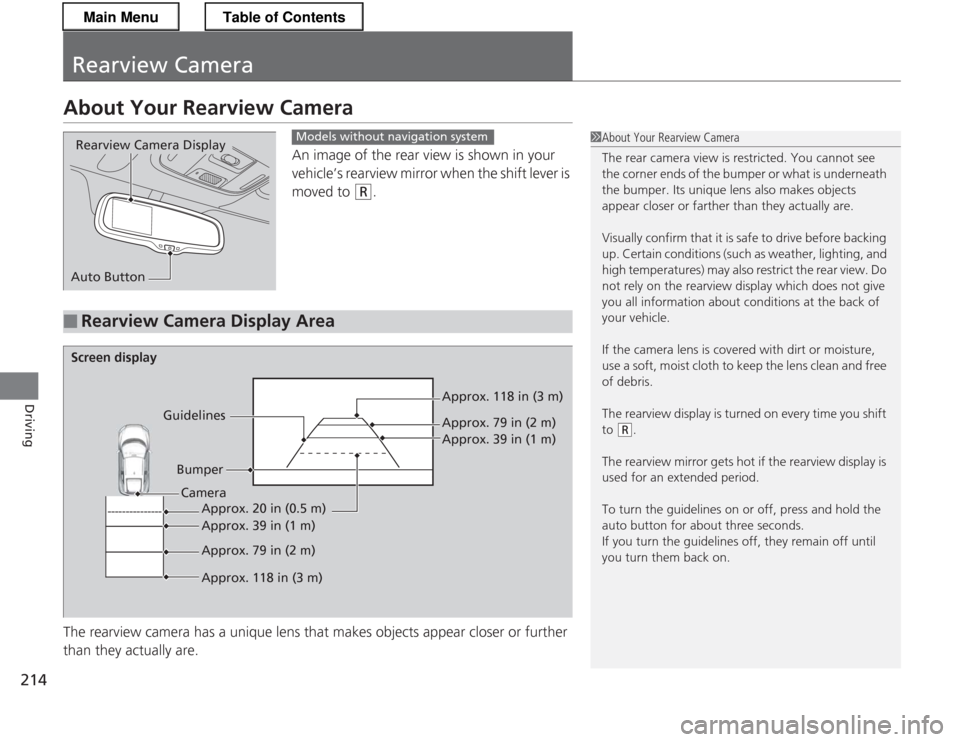
About Your Rearview CameraAn image of the rear view is shown in your
vehicle’s rearview mirror when the shift lever is moved to
(R.
The rearview camera has a unique lens that makes objects appear closer or further
than they actually are.
Rearview Camera Display
Auto ButtonModels without navigation system
■Rearview Camera Display Area
1About Your Rearview Camera
The rear camera view is restricted. You cannot see
the corner ends of the bumper or what is underneath
the bumper. Its unique lens also makes objects
appear closer or farther than they actually are.
Visually confirm that it is safe to drive before backing
up. Certain conditions (such as weather, lighting, and
high temperatures) may also restrict the rear view. Do
not rely on the rearview display which does not give you all information about conditions at the back of
your vehicle.
If the camera lens is covered with dirt or moisture,
use a soft, moist cloth to keep the lens clean and free of debris.
The rearview display is turned on every time you shift to
(R .
The rearview mirror gets hot if the rearview display is
used for an extended period.
To turn the guidelines on or off, press and hold the
auto button for about three seconds.
If you turn the guidelines off, they remain off until
you turn them back on.
Screen display
GuidelinesBumper Approx. 118 in (3 m)
Approx. 79 in (2 m)
Approx. 39 in (1 m)
Approx. 20 in (0.5 m)
Approx. 39 in (1 m)
Approx. 79 in (2 m)
Approx. 118 in (3 m)
Camera
Main MenuTable of Contents
Page 263 of 325

262
Maintenance
12 Volt Battery
Checking the 12 Volt BatteryCheck the battery condition monthly. Look at
the test indicator window and check the
terminals for corrosion.
If your vehicle's battery is disconnected or goes dead: • The audio system is disabled.
2 Reactivating the audio system P. 141
• The clock resets.
2 Setting the Clock P. 98
• The navigation system *
is disabled. A PIN code will be required.
2 Refer to the navigation system manual
Charging the 12 Volt Battery
Disconnect both battery cables to prevent damaging your vehicle's electrical system.
Always disconnect the negative (-) cable first, and reconnect it last.
112 Volt Battery
WARNING: Battery post, terminals,
and related accessori es contain lead
and lead compounds. Wash your hands after handling.
The test indicator's color information is on the
battery.
When you find corrosion, clean the battery terminals
by applying a baking powder and water solution. Clean terminals with a damp towel. Cloth/towel dry
the battery. Coat the termina ls with grease to help
prevent future corrosion.
3WARNING
The battery gives off explosive hydrogen
gas during normal operation.
A spark or flame can cause the battery to
explode with enough force to kill or seriously hurt you.
When conducting any battery
maintenance, wear protective clothing and
a face shield, or have a skilled technician do
it.
Test Indicator Window
* Not available on all models
Main MenuTable of Contents
Page 316 of 325
315
Information
Authorized Manuals
■Service Express
For electronic copies of service publication s, you can purchase a subscription to
Service Express. Visit techinfo.honda.com for pricing and options.
■ U.S. Owners
The publications listed below can be pu rchased from Helm Incorporated. You can
order a manual by phone at (800) 782-4356 (credi t card orders only), or online at
www.helminc.com .
Make an inquiry to Helm Inc. at (800) 782-4356 if you are interested in ordering
other models' or other years' manuals.
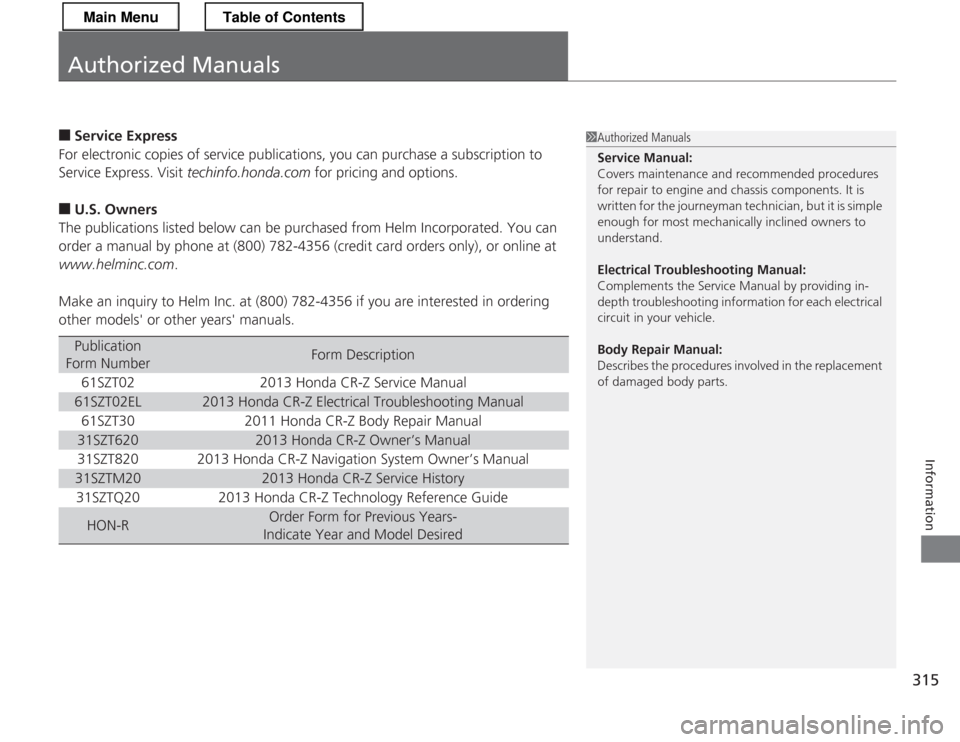
Publication
Form NumberForm Description
61SZT022013 Honda CR-Z Service Manual
61SZT02EL2013 Honda CR-Z Electrical Troubleshooting Manual
61SZT302011 Honda CR-Z Body Repair Manual
31SZT6202013 Honda CR-Z Owner’s Manual
31SZT8202013 Honda CR-Z Navigation System Owner’s Manual
31SZTM202013 Honda CR-Z Service History
31SZTQ202013 Honda CR-Z Technology Reference Guide
HON-ROrder Form for Previous Years-
Indicate Year and Model Desired
1Authorized Manuals Service Manual: Covers maintenance and recommended procedures
for repair to engine and chassis components. It is
written for the journeyman technician, but it is simple
enough for most mechanically inclined owners to understand. Electrical Troublesho oting Manual:
Complements the Service Manual by providing in-
depth troubleshooting information for each electrical circuit in your vehicle.
Body Repair Manual:
Describes the procedures involved in the replacement
of damaged body parts.
Main MenuTable of Contents