parking brake HONDA CR-Z 2013 1.G Owners Manual
[x] Cancel search | Manufacturer: HONDA, Model Year: 2013, Model line: CR-Z, Model: HONDA CR-Z 2013 1.GPages: 325, PDF Size: 11.73 MB
Page 5 of 325
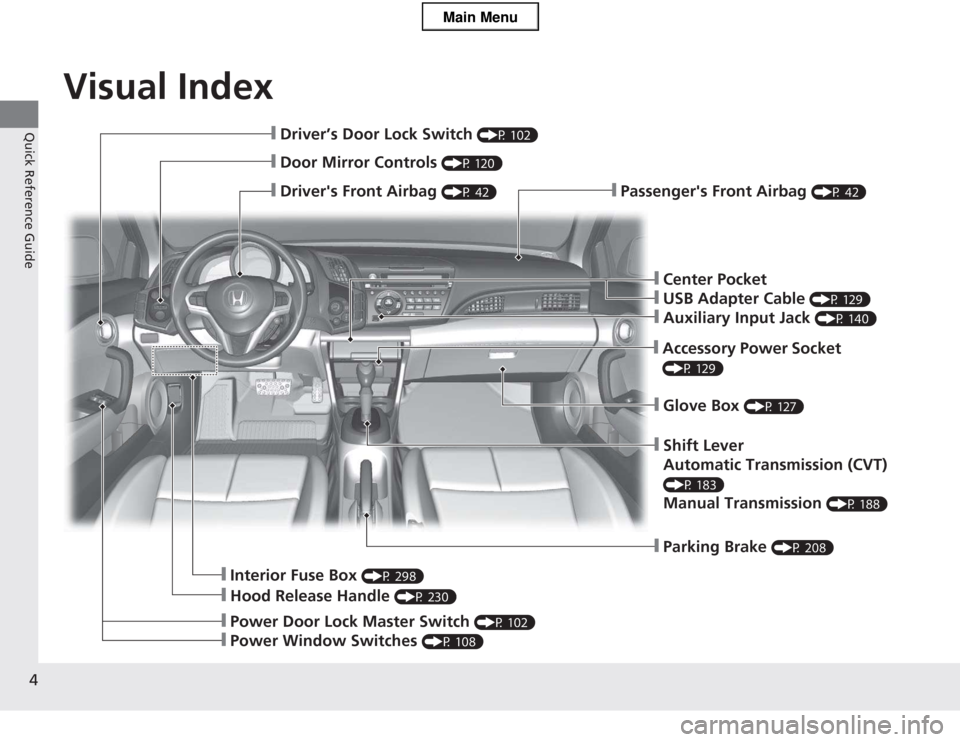
Visual Index
4
Quick Reference Guide
❙Passenger's Front Airbag (P 42)❙Driver's Front Airbag (P 42)
❙Driver’s Door Lock Switch (P 102)
❙Door Mirror Controls (P 120)
❙Hood Release Handle (P 230)
❙Interior Fuse Box (P 298)
❙Shift Lever
Automatic Transmission (CVT)
(P 183)Manual Transmission (P 188)
❙Glove Box (P 127)
❙Parking Brake (P 208)
❙Accessory Power Socket
(P 129)
❙Center Pocket
❙USB Adapter Cable (P 129)
❙Auxiliary Input Jack (P 140)
❙Power Door Lock Master Switch (P 102)
❙Power Window Switches (P 108)
Main Menu
Page 7 of 325
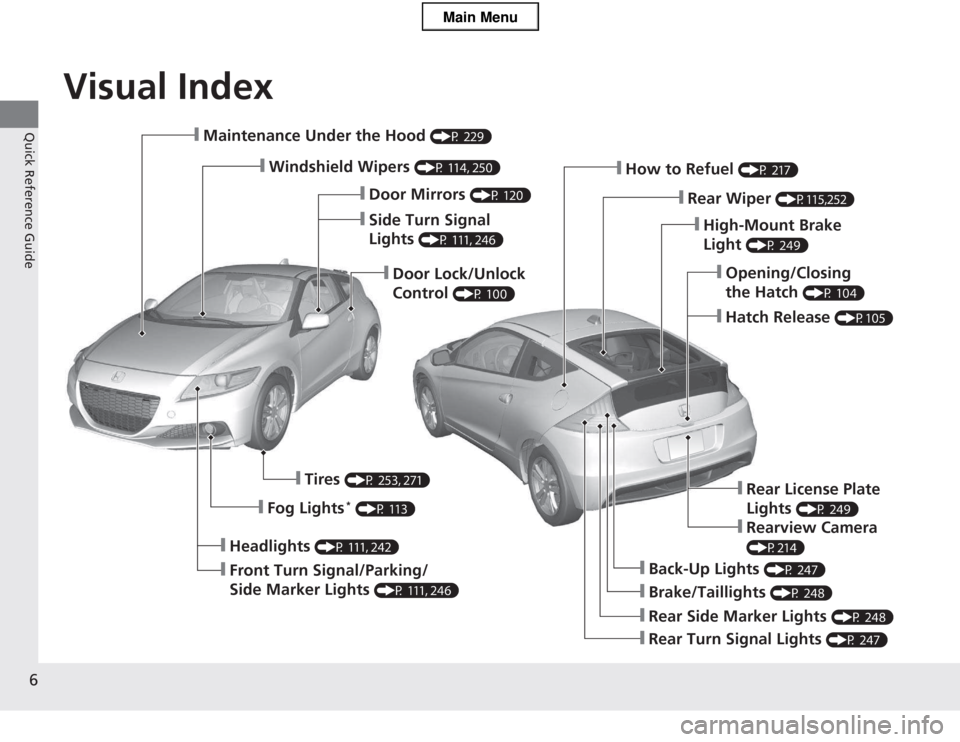
Visual Index
6
Quick Reference Guide❙Maintenance Under the Hood (P 229)
❙Windshield Wipers (P 114, 250)
❙Door Lock/Unlock Control (P 100)
❙Headlights
(P 111, 242)
❙Front Turn Signal/Parking/
Side Marker Lights (P 111, 246)
❙Tires
(P 253, 271)
❙Fog Lights *
(P 113)
❙Brake/Taillights (P 248)
❙Back-Up Lights (P 247)
❙Rear Turn Signal Lights (P 247)
❙Rear Side Marker Lights (P 248)
❙High-Mount Brake Light (P 249)
❙How to Refuel
(P 217)
❙Rear Wiper (P115,252)
❙Opening/Closing the Hatch (P 104)
❙Hatch Release
(P105)
❙Side Turn Signal Lights (P 111, 246)
❙Door Mirrors
(P 120)
❙Rear License Plate Lights (P 249)
❙Rearview Camera
(P214)
Main Menu
Page 15 of 325
14
Quick Reference Guide
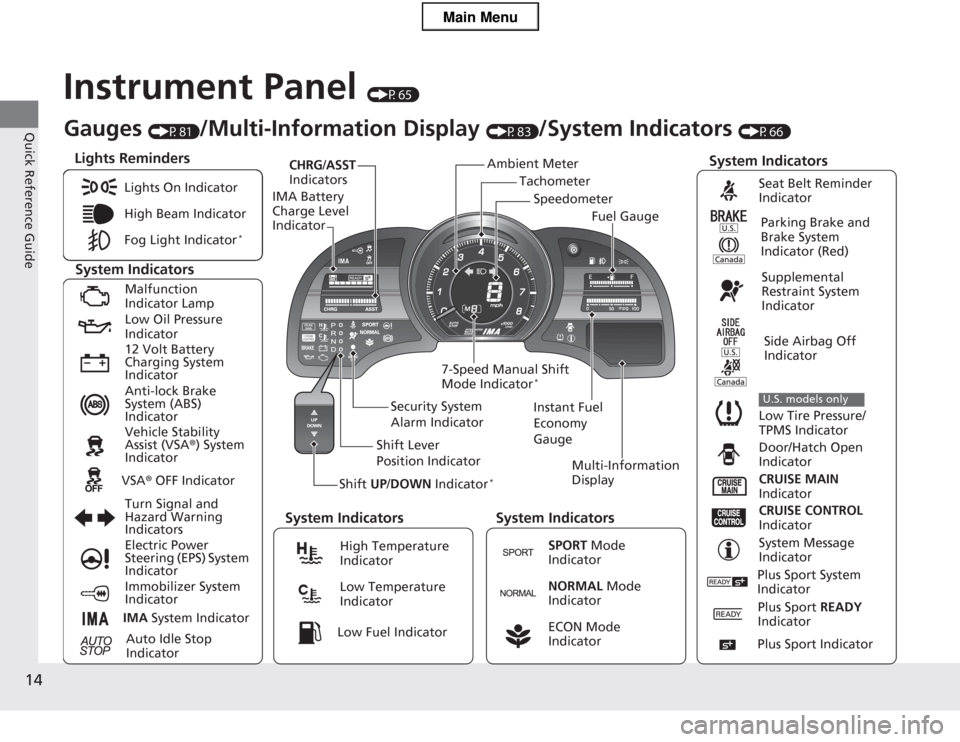
Instrument Panel (P65)
Tachometer
CHRG
/ASST
Indicators
IMA Battery Charge Level Indicator
Shift UP/DOWN Indicator * Multi-Information
Display
7-Speed Manual Shift Mode Indicator
*
System Indicators
Lights Reminders
Instant Fuel
Economy GaugeSpeedometer
Fuel Gauge
Security System
Alarm Indicator
Shift Lever
Position Indicator
Gauges
(P81)/Multi-Information Display (P83)/System Indicators (P66)
Ambient Meter
System Indicators System Indicators System Indicators
Lights On Indicator
High Beam Indicator
Fog Light Indicator
*
Malfunction
Indicator Lamp
Low Oil Pressure Indicator
12 Volt Battery
Charging System Indicator
Anti-lock Brake
System (ABS) Indicator
Vehicle Stability Assist (VSA
®) System
Indicator
VSA ® OFF Indicator
Turn Signal and
Hazard Warning
Indicators
Electric Power
Steering (EPS) System Indicator
Immobilizer System Indicator
IMA System Indicator
Auto Idle Stop
Indicator
Seat Belt Reminder
Indicator
Parking Brake and
Brake System Indicator (Red)
Supplemental
Restraint System
Indicator
Side Airbag Off
Indicator
Low Tire Pressure/
TPMS Indicator
U.S. models only
Door/Hatch Open
Indicator
CRUISE MAIN
Indicator
CRUISE CONTROL
Indicator
System Message
IndicatorHigh Temperature Indicator
Low Temperature Indicator
SPORT Mode
Indicator
NORMAL Mode
Indicator
ECON Mode
Indicator Low Fuel Indicator
Plus Sport System
Indicator
Plus Sport READY
Indicator
Plus Sport Indicator
Main Menu
Page 25 of 325
24
Quick Reference Guide
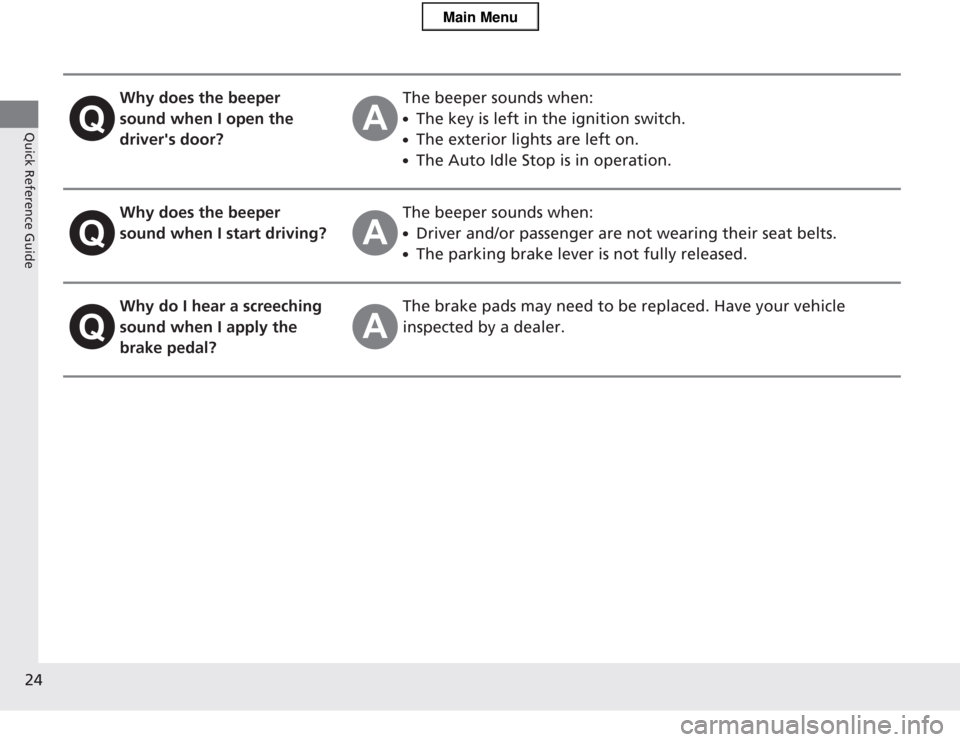
Why does the beeper
sound when I open the driver's door?The beeper sounds when: ●The key is left in the ignition switch.
● The exterior lights are left on.
● The Auto Idle Stop is in operation.
Why does the beeper
sound when I start driving?The beeper sounds when: ●Driver and/or passenger are not wearing their seat belts.
● The parking brake lever is not fully released.
Why do I hear a screeching
sound when I apply the
brake pedal?The brake pads may need to be replaced. Have your vehicle
inspected by a dealer.
Main Menu
Page 67 of 325
66
Instrument Panel
Indicators
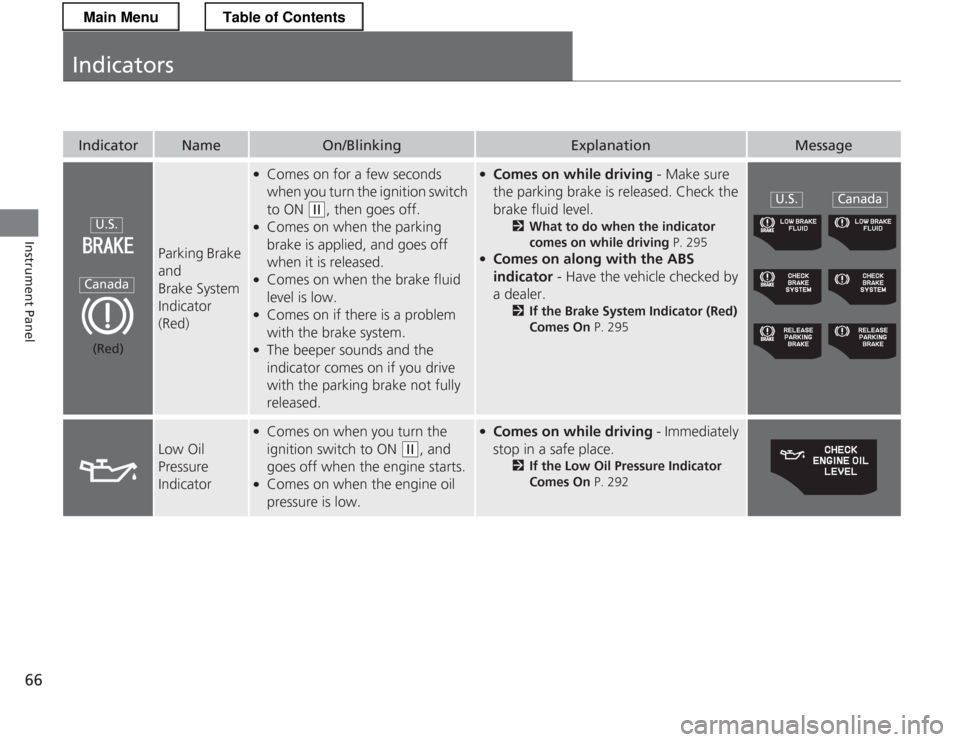
IndicatorNameOn/BlinkingExplanationMessage
Parking Brake and
Brake System Indicator
(Red)
●Comes on for a few seconds
when you turn the ignition switch to ON
(w , then goes off.
● Comes on when the parking
brake is applied, and goes off when it is released.
● Comes on when the brake fluid
level is low.
● Comes on if there is a problem
with the brake system.
● The beeper sounds and the
indicator comes on if you drive
with the parking brake not fully released.
●Comes on while driving - Make sure
the parking brake is released. Check the
brake fluid level. 2What to do when the indicator
comes on while driving P. 295
● Comes on along with the ABS indicator - Have the vehicle checked by
a dealer. 2If the Brake System Indicator (Red)
Comes On P. 295
Low Oil
Pressure
Indicator
●
Comes on when you turn the
ignition switch to ON
(w , and
goes off when the engine starts.
● Comes on when the engine oil
pressure is low.
●Comes on while driving - Immediately
stop in a safe place. 2If the Low Oil Pressure Indicator
Comes On P. 292
U.S.
Canada
(Red)
U.S.Canada
Main MenuTable of Contents
Page 80 of 325
79
uuIndicatorsuMulti-Information Display Warning and Information Messages
Continued
Instrument Panel
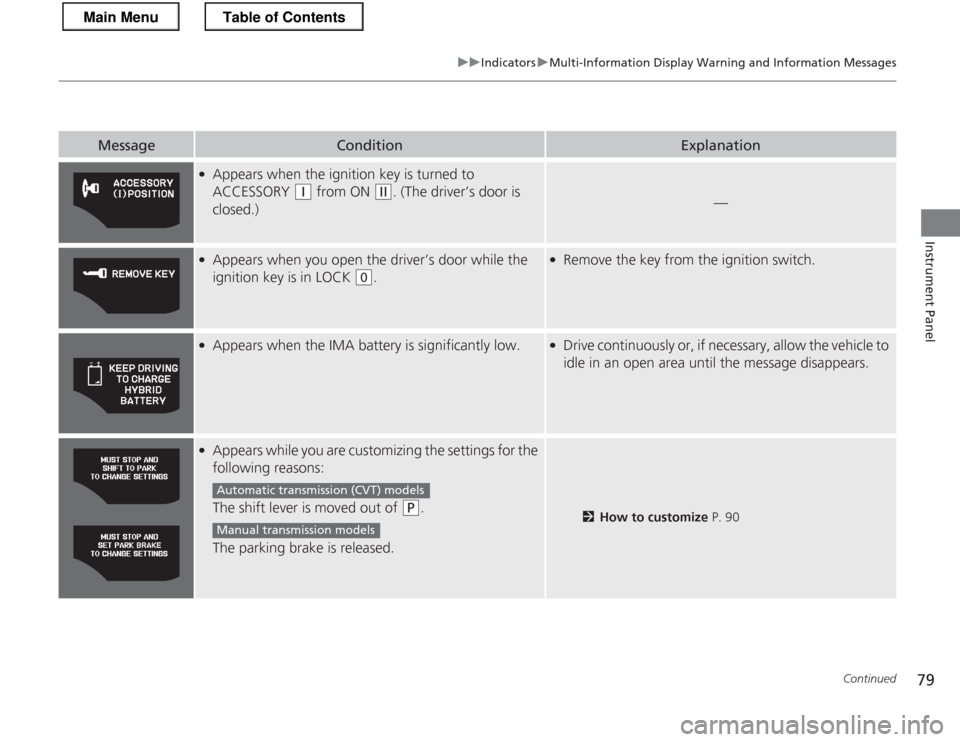
MessageConditionExplanation
●Appears when the ignition key is turned to
ACCESSORY
(q from ON (w. (The driver’s door is
closed.)—
● Appears when you open the driver’s door while the
ignition key is in LOCK
(0 .
●
Remove the key from the ignition switch.
●
Appears when the IMA battery is significantly low.●Drive continuously or, if necessary, allow the vehicle to
idle in an open area until the message disappears.
●Appears while you are customizing the settings for the
following reasons:
The shift lever is moved out of
(P .
The parking brake is released.2 How to customize P. 90
Automatic transmiss ion (CVT) models
Manual transmission models
Main MenuTable of Contents
Page 87 of 325
uuGauges and Multi-Information DisplayuMulti-Information Display
86
Instrument Panel
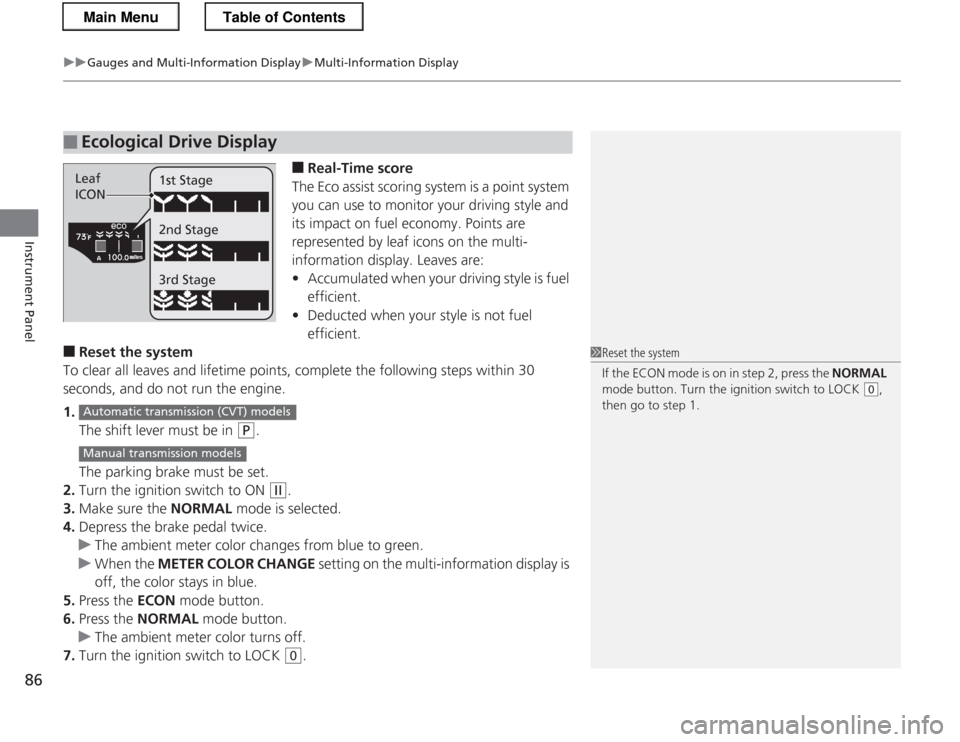
■ Real-Time score
The Eco assist scoring system is a point system
you can use to monitor your driving style and
its impact on fuel economy. Points are
represented by leaf icons on the multi-
information display. Leaves are:• Accumulated when your driving style is fuel
efficient.
• Deducted when your style is not fuel efficient.
■ Reset the system
To clear all leaves and lifetime points, complete the following steps within 30
seconds, and do not run the engine. 1. The shift lever must be in
(P .
The parking brake must be set.
2. Turn the ignition switch to ON
(w .
3. Make sure the NORMAL mode is selected.
4. Depress the brake pedal twice.
uThe ambient meter color changes from blue to green.
uWhen the METER COLOR CHANGE setting on the multi-information display is
off, the color stays in blue.
5. Press the ECON mode button.
6. Press the NORMAL mode button.
uThe ambient meter color turns off.
7. Turn the ignition switch to LOCK
(0 .
■Ecological Drive Display
Leaf
ICON 1st Stage 2nd Stage 3rd Stage
1Reset the system
If the ECON mode is on in step 2, press the
NORMAL
mode button. Turn the ignition switch to LOCK
(0 ,
then go to step 1.
Automatic transmiss ion (CVT) models
Manual transmission models
Main MenuTable of Contents
Page 91 of 325
uuGauges and Multi-Information DisplayuMulti-Information Display
90
Instrument Panel
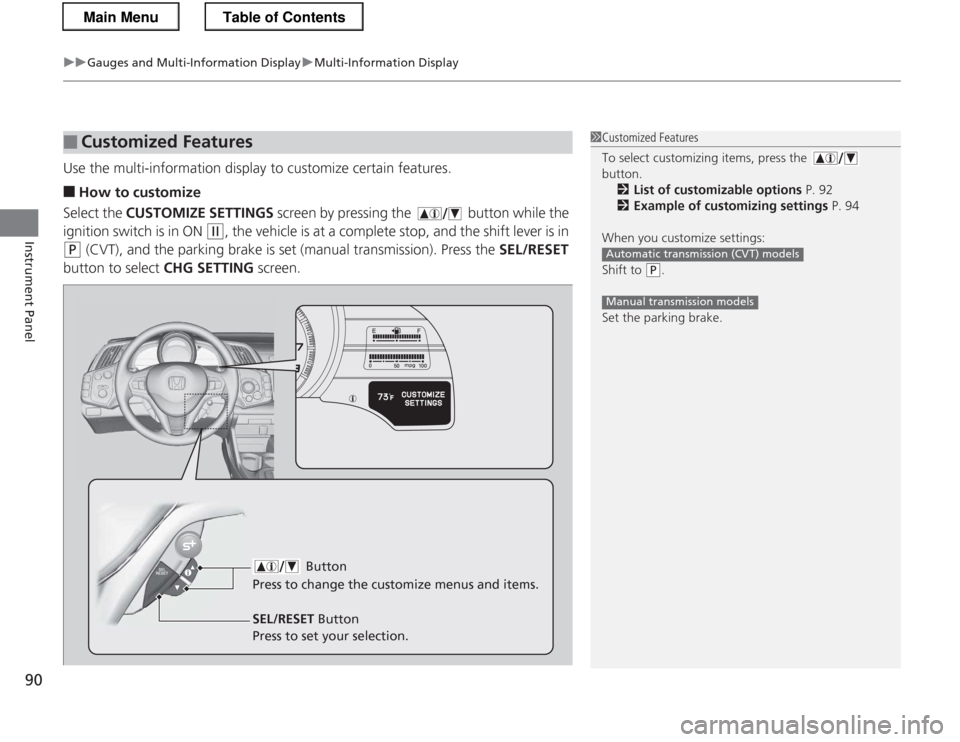
Use the multi-information display to customize certain features. ■ How to customize
Select the CUSTOMIZE SETTINGS screen by pressing the button while the
ignition switch is in ON
(w , the vehicle is at a complete stop, and the shift lever is in
(P (CVT), and the parking brake is set (manual transmission). Press the SEL/RESET
button to select CHG SETTING screen.
■Customized Features1Customized Features
To select customizing items, press the button.
2 List of customizable options P. 92
2 Example of customizing settings P. 94
When you customize settings:
Shift to
(P .
Set the parking brake.
Automatic transmission (CVT) models
Manual transmission models
Button
Press to change the cu stomize menus and items.
SEL/RESET Button
Press to set your selection.
Main MenuTable of Contents
Page 114 of 325
113
uuOperating the Switches Around the Steering WheeluFog Lights*
Controls
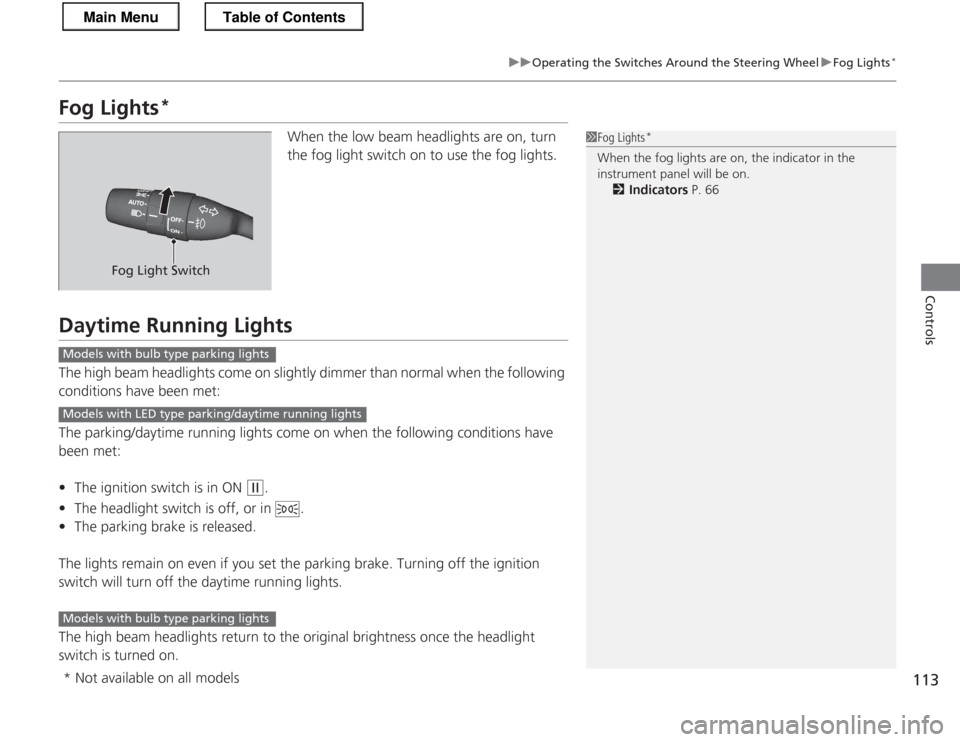
Fog Lights *
When the low beam headlights are on, turn
the fog light switch on to use the fog lights.
Daytime Running Lights
The high beam headlights come on slightly dimmer than normal when the following
conditions have been met:
The parking/daytime running lights come on when the following conditions have
been met: •The ignition switch is in ON
(w .
• The headlight switch is off, or in .
• The parking brake is released.
The lights remain on even if you set the parking brake. Turning off the ignition
switch will turn off the daytime running lights.
The high beam headlights return to the original brightness once the headlight
switch is turned on.
1Fog Lights *
When the fog lights are on, the indicator in the
instrument panel will be on. 2 Indicators P. 66
Fog Light Switch
Models with bulb type parking lights
Models with LED type parking/daytime running lights
Models with bulb type parking lights
* Not available on all models
Main MenuTable of Contents
Page 172 of 325
171
Driving
This chapter discusses driving, refueling, and information on items such as accessories.
Before Driving Driving Preparation .............................. 172
Maximum Load Limit............................ 175
Towing a Trailer Towing Your Vehicle ............................ 177
When Driving Starting the Engine .............................. 178
Precautions While Driving..................... 181
Automatic Transmission (CVT) .............. 182
Shifting ................................................ 183
Shifting ................................................ 188
Automatic transmission (CVT) models
Manual transmission models
Auto Idle Stop ..................................... 191
Auto Idle Stop ..................................... 194
3-Mode Drive System........................... 197
Plus Sport System ................................ 198
Cruise Control ..................................... 200
VSA ® (Vehicle Stability Assist), aka ESC
(Electronic Stability Control), System .. 203
TPMS (Tire Pressure Monitoring System) ........ 205
Tire Pressure Monitoring System (TPMS) -
Required Federal Explanation ............. 206
Braking
Brake System ....................................... 208
Automatic transmission (CVT) models
Manual transmission models
ABS (Anti-lock Brake System) ................ 210
Brake Assist System .............................. 211
Parking Your Vehicle When Stopped ..................................... 212
Multi-View Rear Camera .................. 213
Rearview Camera ............................. 214
Refueling Fuel Information ................................... 216
How to Refuel ...................................... 217
Fuel Economy
Improving Fuel Economy....................... 219
Accessories and Modifications
Accessories ........................................... 220
Modifications ....................................... 220
Main Menu