tow HONDA CR-Z 2013 1.G Owners Manual
[x] Cancel search | Manufacturer: HONDA, Model Year: 2013, Model line: CR-Z, Model: HONDA CR-Z 2013 1.GPages: 325, PDF Size: 11.73 MB
Page 1 of 325
Contents
This owner’s manual should be considered a permanent part of the
vehicle and should remain with the vehicle when it is sold.
This owner’s manual covers all models of your vehicle. You may find
descriptions of equipment and features that are not on your
particular model.
Images throughout this owner’s manual (including the front cover)
represent features and equipment that are available on some, but
not all, models. Your particular model may not have some of these features.
This owner's manual is for vehicles sold in the United States and Canada.
The information and specifications included in this publication were
in effect at the time of approval for printing. Honda Motor Co., Ltd.
reserves the right, however, to discontinue or change specifications
or design at any time without notice and without incurring any
obligation.2 Safe Driving P. 27
For Safe Driving P. 28 Seat Belts P. 32 Airbags P. 39
2Instrument Panel P. 65
Indicators P. 66 Gauges and Multi-Information Display P. 81
2Controls P. 97
Setting the Clock P. 98 Locking and Unlocking the Doors P. 99
Operating the Switches Around the Steering Wheel P. 110
Interior Lights/Interior Convenience Items P. 126
2Features P. 137
Audio System P. 138 Audio Error Messages P. 153
2Driving P. 171
Before Driving P. 172 Towing a Trailer P. 177
Multi-View Rear Camera P. 213
Refueling P. 216 Fuel Economy P. 219
2Maintenance P. 221
Before Performing Maintenance P. 222 Maintenance Minder
Page 2 of 325
Contents
Child Safety P. 54 Exhaust Gas Hazard P. 62 Safety Labels P. 63
Opening and Closing the Hatch P. 104 Security System P. 106 Opening and Closing the Windows P. 108
Adjusting the Mirrors P. 119Adjusting the Seats P. 121
Climate Control System P. 134
General Information on the Audio System P. 155 Bluetooth® HandsFreeLink ® P. 158
When Driving P. 178 Braking P. 208 Parking Your Vehicle P. 212
Rearview Camera P. 214
Accessories and Modifications P. 220
Maintenance Under the Hood P. 229 Replacing Light Bulbs P. 242
Checking and Maintaining Tires P. 253 12 Volt Battery P. 262 Remote Transmitter Care P. 263
Cleaning P. 265
Engine Does Not Start P. 286 Jump Starting P. 287 Shift Lever Does Not Move P. 289
Fuses P. 297 Emergency Towing P. 301 When You Cannot Open the Hatch P. 303
Devices that Emit Radio Waves P. 309 Reporting Safety Defects P. 310
Authorized Manuals P. 315 Customer Service Information P. 316
Quick Reference GuideP. 2
Safe DrivingP. 27
Instrument PanelP. 65
ControlsP. 97
FeaturesP. 137
DrivingP. 171
MaintenanceP. 221
Handling the UnexpectedP. 269
InformationP. 305
IndexP. 317
Note: All page numbers referenced in this document are hyperlinked.
2013 CR-Z Online Reference Owner's Manual
Page 16 of 325
15
Quick Reference Guide
Controls (P97)
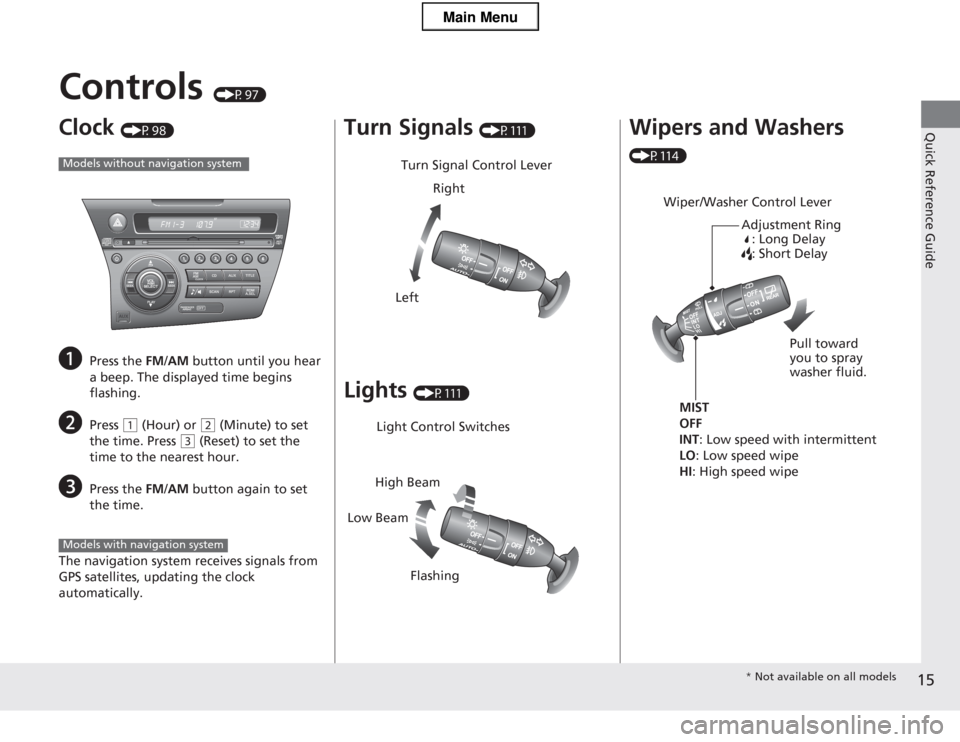
Clock (P98)
a Press the FM/AM button until you hear
a beep. The displayed time begins
flashing.
b Press
(1 (Hour) or (2 (Minute) to set
the time. Press
(3 (Reset) to set the
time to the nearest hour.
c Press the FM/AM button again to set
the time.
The navigation system receives signals from
GPS satellites, updating the clock automatically.
Models without navigation system
Models with navigation system
Turn Signals (P111)
Lights (P111)
Turn Signal Control Lever
Right
Left
Light Control Switches
Low Beam High Beam
Flashing
Wipers and Washers
(P114)
Wiper/Washer Control Lever Adjustment Ring: Long Delay
: Short Delay
MIST
OFF INT : Low speed with intermittent
LO : Low speed wipe
HI : High speed wipe Pull toward you to spray
washer fluid.
*
Not available on all models
Main Menu
Page 17 of 325
16
Quick Reference Guide
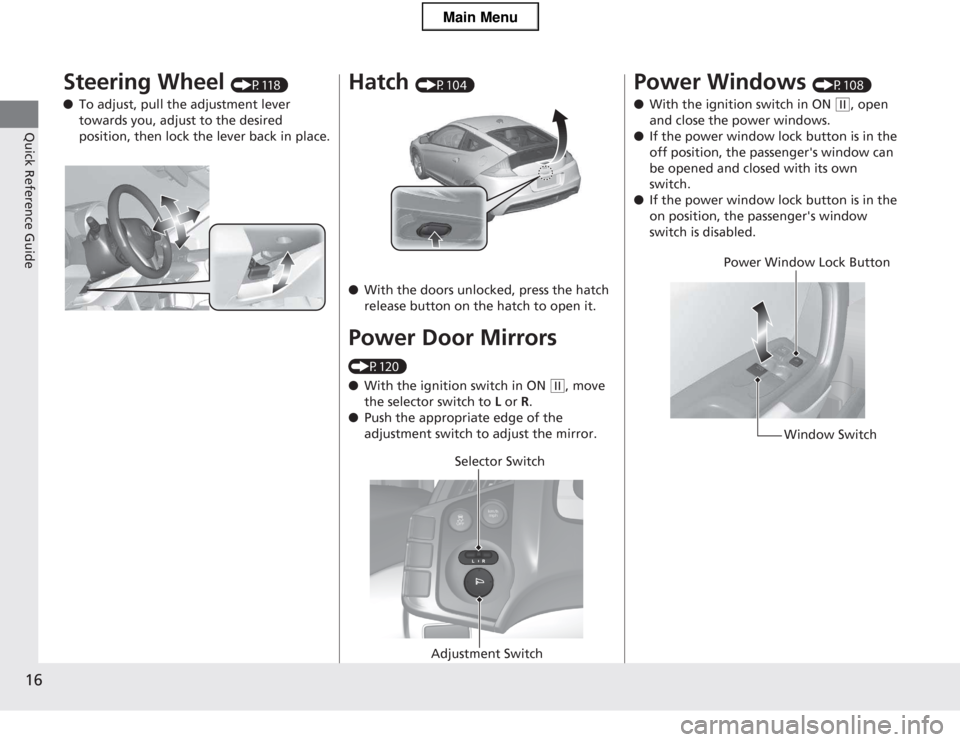
Steering Wheel (P118)
● To adjust, pull the adjustment lever
towards you, adjust to the desired
position, then lock the lever back in place.Hatch (P104)
● With the doors unlocked, press the hatch
release button on the hatch to open it.
Power Door Mirrors
(P120) ● With the ignition switch in ON
(w, move
the selector switch to L or R.
● Push the appropriate edge of the
adjustment switch to adjust the mirror.
Selector Switch
Adjustment Switch
Power Windows (P108)
● With the ignition switch in ON
(w, open
and close the power windows.
● If the power window lock button is in the
off position, the passenger's window can be opened and closed with its own
switch.
● If the power window lock button is in the
on position, the passenger's window
switch is disabled.
Power Window Lock Button
Window Switch
Main Menu
Page 23 of 325
22
Quick Reference Guide
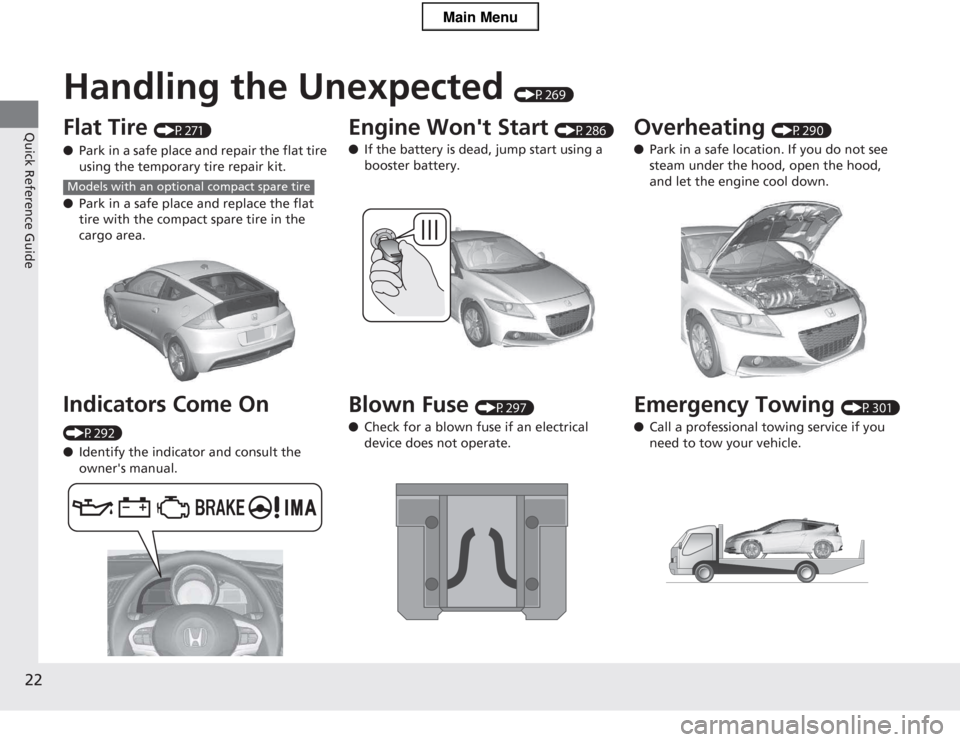
Handling the Unexpected (P269)
Flat Tire (P271)
● Park in a safe place and repair the flat tire
using the temporary tire repair kit.
● Park in a safe place and replace the flat
tire with the compact spare tire in the
cargo area.
Indicators Come On
(P292) ● Identify the indicator and consult the
owner's manual.
Models with an optional compact spare tire
Engine Won't Start (P286)
● If the battery is dead, jump start using a booster battery.
Blown Fuse (P297)
● Check for a blown fuse if an electrical device does not operate.Overheating (P290)
● Park in a safe location. If you do not see
steam under the hood, open the hood, and let the engine cool down.
Emergency Towing (P301)
● Call a professional towing service if you need to tow your vehicle.
Main Menu
Page 45 of 325
44
uuAirbagsuFront Airbags (SRS)
Safe Driving
■When front airbags should not deploy
Minor frontal crashes: Front airbags were designed to supplement seat belts and
help save lives, not to prevent minor scrapes, or even broken bones that might occur
during a less than moderate-to-severe frontal crash.
Side impacts: Front airbags can provide protection when a sudden deceleration
causes a driver or passenger to move towards the front of the vehicle. Side airbags
and side curtain airbags have been specifically designed to help reduce the severity
of injuries that can occur during a mode rate-to-severe side impact which can cause
the driver or passenger to move towards the side of the vehicle.
Rear impacts: Head restraints and seat belts are your best protection during a rear
impact. Front airbags cannot provide any sig nificant protection and are not designed
to deploy in such collisions.
Rollovers: Seat belts and, in vehicles equipped with a rollover sensor, side airbags,
and side curtain airbags offer the best protection in a rollover. Because front airbags could provide little if any protectio n, they are not designed to deploy during a
rollover.
■ When front airbags deploy with little or no visible damage
Because the airbag system senses s udden deceleration, a strong impact to the
vehicle framework or suspension might cause one or more of the airbags to deploy.
Examples include running into a curb, the edge of a hole, or other low fixed object
that causes a sudden deceleration in the vehicle chassis. Since the impact is
underneath the vehicle, damage may not be readily apparent.
■ When front airbags may not depl oy, even though exterior damage
appears severe
Since crushable body parts absorb crash energy during an impact, the amount of
visible damage does not always indicate proper airbag operation. In fact, some
collisions can result in severe damage but no airbag deployment because the airbags
would not have been needed or would not have provided protection even if they
had deployed.
Main MenuTable of Contents
Page 48 of 325
47
uuAirbagsuSide Airbags
Continued
Safe Driving
■When a side airbag deploys with little or no visible damage
Because the airbag system senses sudden acceleration, a strong impact to the side
of the vehicle's framework can cause a side airbag to deploy. In such cases, there
may be little or no damage, but the side impact sensors detected a severe enough
impact to deploy the airbag. ■ When a side airbag may not deploy, even though visible damage appears
severe
It is possible for a side airbag to not deploy during an impact that results in
apparently severe damage. This can occur when the point of impact was towards
the far front or rear of the vehicle, or wh en the vehicle's crushable body parts
absorbed most of the crash energy. In ei ther case, the side airbag would not have
been needed nor provided protection even if it had deployed.
Main MenuTable of Contents
Page 115 of 325
114
uuOperating the Switches Around the Steering WheeluWipers and Washers
Controls
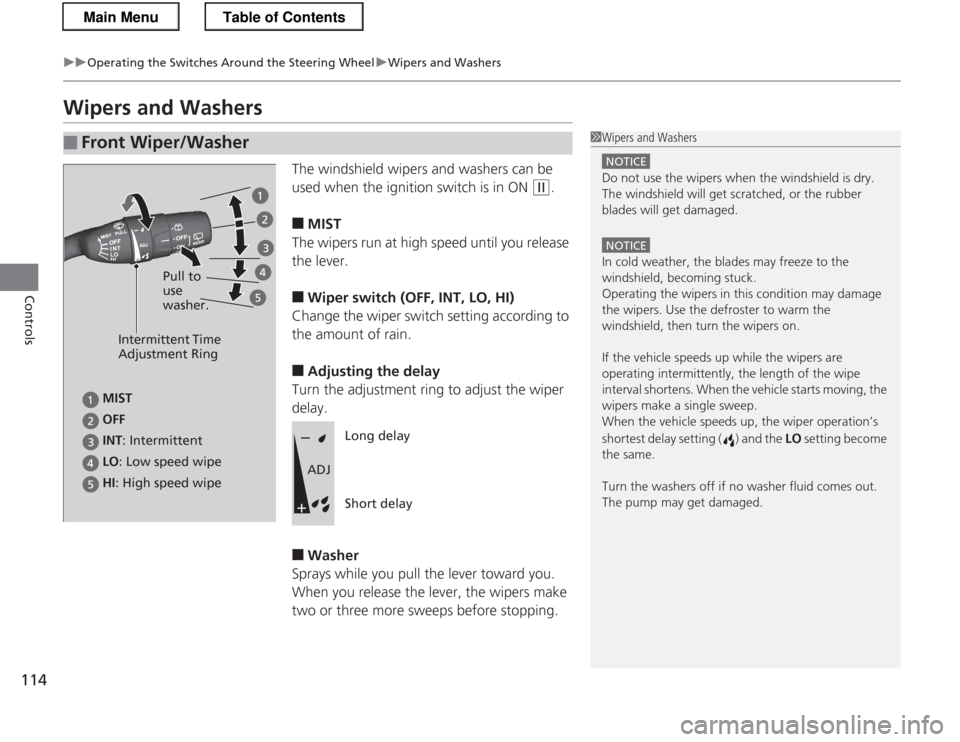
Wipers and WashersThe windshield wipers and washers can be
used when the ignition switch is in ON
(w.
■ MIST
The wipers run at high speed until you release the lever. ■ Wiper switch (OFF, INT, LO, HI)
Change the wiper switch setting according to
the amount of rain. ■ Adjusting the delay
Turn the adjustment ring to adjust the wiper delay. ■ Washer
Sprays while you pull the lever toward you.
When you release the lever, the wipers make
two or three more sweeps before stopping.
■Front Wiper/Washer1Wipers and Washers
NOTICE
Do not use the wipers when the windshield is dry.
The windshield will get scratched, or the rubber
blades will get damaged.
NOTICE
In cold weather, the blades may freeze to the
windshield, becoming stuck.
Operating the wipers in this condition may damage the wipers. Use the defroster to warm the
windshield, then turn the wipers on.
If the vehicle speeds up while the wipers are
operating intermitte ntly, the length of the wipe
interval shortens. When the vehicle starts moving, the
wipers make a single sweep.
When the vehicle speeds up, the wiper operation’s
shortest delay setting ( ) and the LO setting become
the same.
Turn the washers off if no washer fluid comes out.
The pump may get damaged.
Intermittent Time
Adjustment Ring
HI : High speed wipe Pull to use washer.
LO
: Low speed wipe
INT
: Intermittent
OFF
MIST
Long delay Short delay
ADJ
Main MenuTable of Contents
Page 172 of 325
171
Driving
This chapter discusses driving, refueling, and information on items such as accessories.
Before Driving Driving Preparation .............................. 172
Maximum Load Limit............................ 175
Towing a Trailer Towing Your Vehicle ............................ 177
When Driving Starting the Engine .............................. 178
Precautions While Driving..................... 181
Automatic Transmission (CVT) .............. 182
Shifting ................................................ 183
Shifting ................................................ 188
Automatic transmission (CVT) models
Manual transmission models
Auto Idle Stop ..................................... 191
Auto Idle Stop ..................................... 194
3-Mode Drive System........................... 197
Plus Sport System ................................ 198
Cruise Control ..................................... 200
VSA ® (Vehicle Stability Assist), aka ESC
(Electronic Stability Control), System .. 203
TPMS (Tire Pressure Monitoring System) ........ 205
Tire Pressure Monitoring System (TPMS) -
Required Federal Explanation ............. 206
Braking
Brake System ....................................... 208
Automatic transmission (CVT) models
Manual transmission models
ABS (Anti-lock Brake System) ................ 210
Brake Assist System .............................. 211
Parking Your Vehicle When Stopped ..................................... 212
Multi-View Rear Camera .................. 213
Rearview Camera ............................. 214
Refueling Fuel Information ................................... 216
How to Refuel ...................................... 217
Fuel Economy
Improving Fuel Economy....................... 219
Accessories and Modifications
Accessories ........................................... 220
Modifications ....................................... 220
Main Menu
Page 176 of 325
175
uuBefore DrivinguMaximum Load Limit
Continued
Driving
Maximum Load Limit
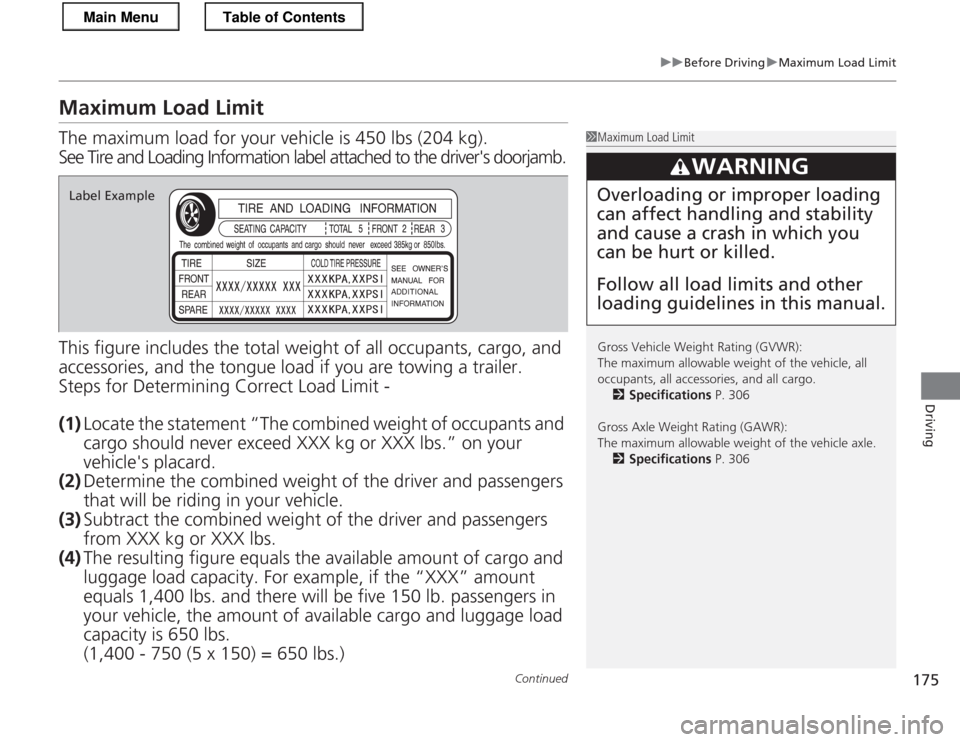
The maximum load for your vehicle is 450 lbs (204 kg).
See Tire and Loading Information label attached to the driver's doorjamb.
This figure includes the total weight of all occupants, cargo, and
accessories, and the tongue load if you are towing a trailer.
Steps for Determining Correct Load Limit -
(1) Locate the statement “The combined weight of occupants and
cargo should never exceed XXX kg or XXX lbs.” on your vehicle's placard.
(2) Determine the combined weight of the driver and passengers
that will be riding in your vehicle.
(3) Subtract the combined weight of the driver and passengers
from XXX kg or XXX lbs.
(4) The resulting figu re equals the availabl e amount of cargo and
luggage load capacity. For example, if the “XXX” amount equals 1,400 lbs. an d there will be five 15 0 lb. passengers in
your vehicle, the amount of available carg o and luggage load
capacity is 650 lbs.(1,400 - 750 (5 x 150) = 650 lbs.)
1Maximum Load Limit
Gross Vehicle Weight Rating (GVWR):
The maximum allowable weight of the vehicle, all
occupants, all accessories, and all cargo. 2 Specifications P. 306
Gross Axle Weight Rating (GAWR):
The maximum allowable weight of the vehicle axle. 2 Specifications P. 306
3WARNING
Overloading or improper loading can affect handling and stability and cause a crash in which you can be hurt or killed. Follow all load limits and other loading guidelines in this manual.Label Example
Main MenuTable of Contents