ad blue HONDA CR-Z 2013 1.G Technology Reference Guide
[x] Cancel search | Manufacturer: HONDA, Model Year: 2013, Model line: CR-Z, Model: HONDA CR-Z 2013 1.GPages: 22, PDF Size: 3.34 MB
Page 2 of 22
Voice Recognition* ................................................................................................\f8
Navigation*.............................................................................................................. 22
Bluetooth
®HandsFreeLink®(HFL)........................................................................25
SMS Text Messaging* ..............................................................................................32
iPod
®or USB Flash Drive .....................................................................................34
Bluetooth®Audio* ....................................................................................................35
Pandora* ...................................................................................................................36
Owner Link ..............................................................................................................37
Safety Reminder ......................................................................................................37
Fuel Recommendation...........................................................................................38
*if equipped
Auto Door Locks .....................................................................................................2
Fuel Fill Door .............................................................................................................3
Instrument Panel Indicators ...................................................................................4
Multi\bInformation Display (MID) ...........................................................................6
Tire Pressure Monitoring System (TPMS)...........................................................8
Paddle Shifting* ..........................................................................................................9
3\bMode Drive System ............................................................................................\f0
Plus Sport System ...................................................................................................\f\f
Eco Assist
TM..............................................................................................................\f2
Rearview Camera* .................................................................................................\f6
Multi\bView Rear Camera* ....................................................................................\f7
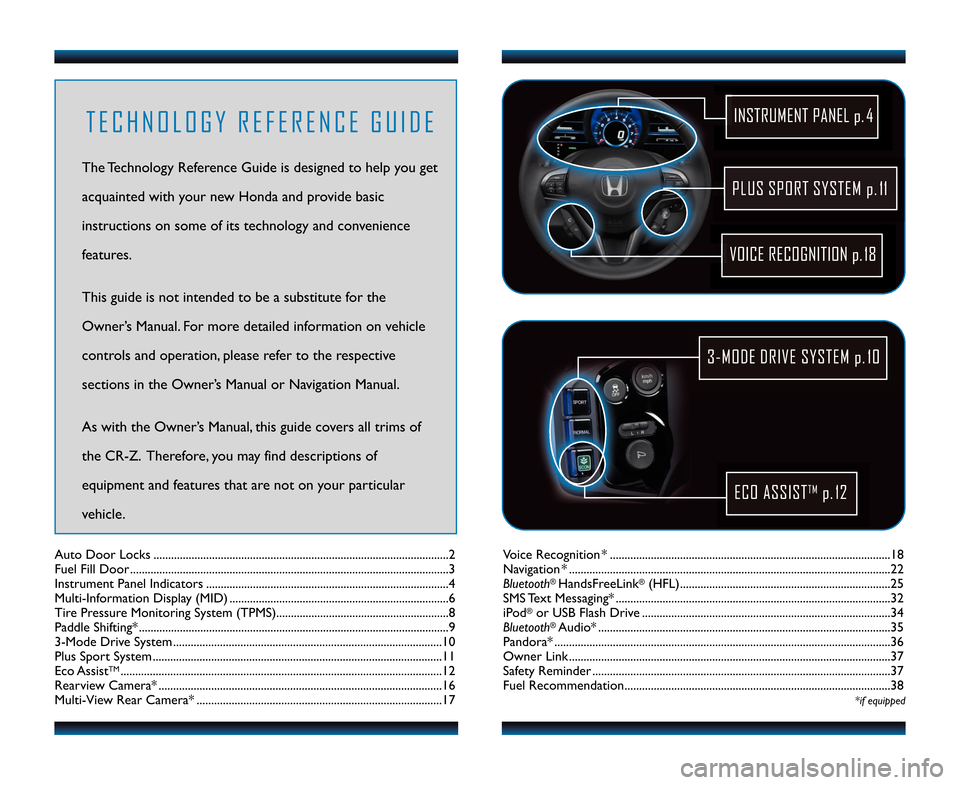
PLUS SPORT SYSTEM p.11
VOICE RECOGNITION p.18
INSTRUMENT PANEL p. \f
3MODE DRIVE SYSTEM p.1\b
ECO ASSISTTMp.12
T E C H N O L O G Y R E F E R E N C E G U I D E
The Technology Reference Guide is designed to help you get
acquainted with your new Honda and provide basic
instructions on some of its technology and convenience
features.
This guide is not intended to be a substitute \2for the
Owner’s Manual. For more detailed information on vehicle
controls and operation, please refer to the respective
sections in the Owner’s Manual or Navigation Manual.
As with the Owner’s Manual, this guide covers all trims of
the CR\bZ. Therefore, you may find descriptions of
equipment and features that are not on your particular
vehicle.
13 CRZ TRG_ATG_NEW \ASTYLE 10/3/2012 \A11\f12 AM Page 2
Page 4 of 22
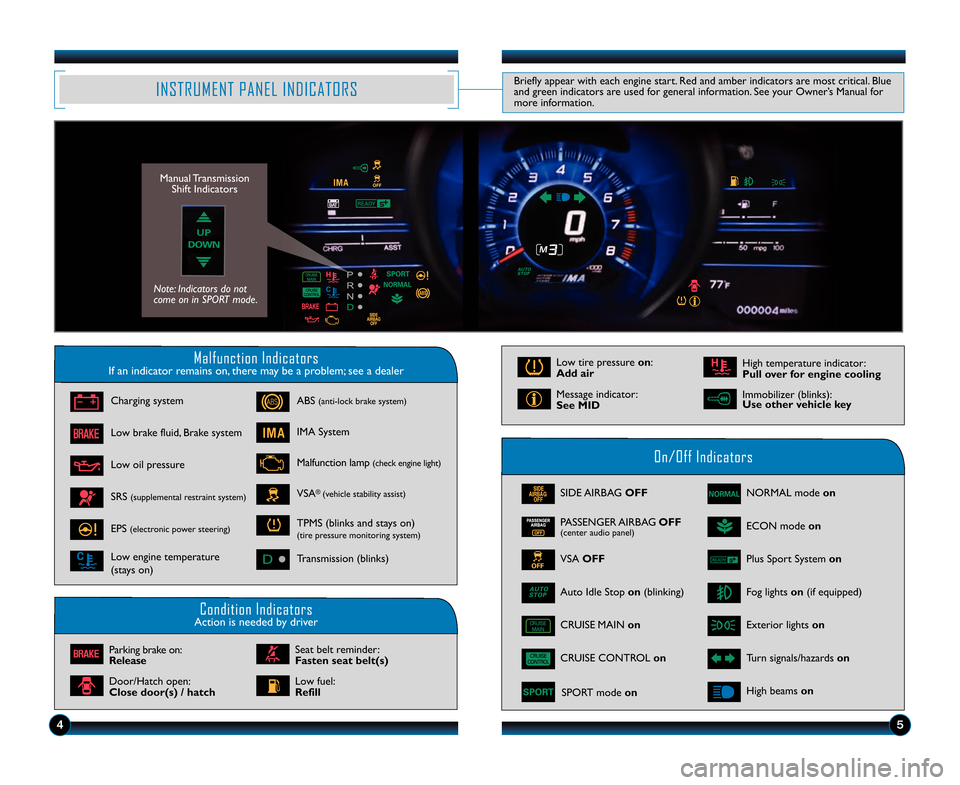
Malfunction IndicatorsIf an indicator remains on, there may be a problem; see a dealer
On/Off Indicators
Condition IndicatorsAction is needed by driver
SIDE AIRBAG OFF
CRUISE CONTROL on
SPORT mode on
VSA OFF
Fog lights on (if equipped)
Exterior lights on
Turn signals/hazards on
Auto Idle Stop on (blinking)
NORMAL mode on
ECON mode on
High beams on
Charging system
Low brake fluid, Brake system
Low oil pressure
ABS (anti\block brake system)
Low tire pressure on:
Add air
Message indicator:
See MID
High temperature indicator:
Pull over for engine cooling
IMA System
Malfunction lamp (check engine light)
VSA®(vehicle stability assist)SRS (supplemental restraint system)
EPS (electronic power steering)
Low engine temperature
(stays on)
TPMS (blinks and stays on)(tire pressure monitoring system)
Transmission (blinks)
Parking brake on:
Release
Door/Hatch open:
Close door(s) / hatch
Seat belt reminder:
Fasten seat belt(s)
Low fuel:
Refill
INSTRUMENT PANEL INDICATORSBriefly appear with each engine start. Red and amber indicators are most critical. Blue
and green indicators are used for general information. See your Owner’s Manual for
more information.
45
CRUISE MAIN on
PASSENGER AIRBAG OFF(center audio panel)
Manual Transmission
Shift Indicators
Note: Indicators do not
come on in SPORT mode.
Immobilizer (blinks):
Use other vehicle key
Plus Sport System on
13 CRZ TRG_ATG_NEW \ASTYLE 10/3/2012 \A11\f12 AM Page 4
Page 5 of 22
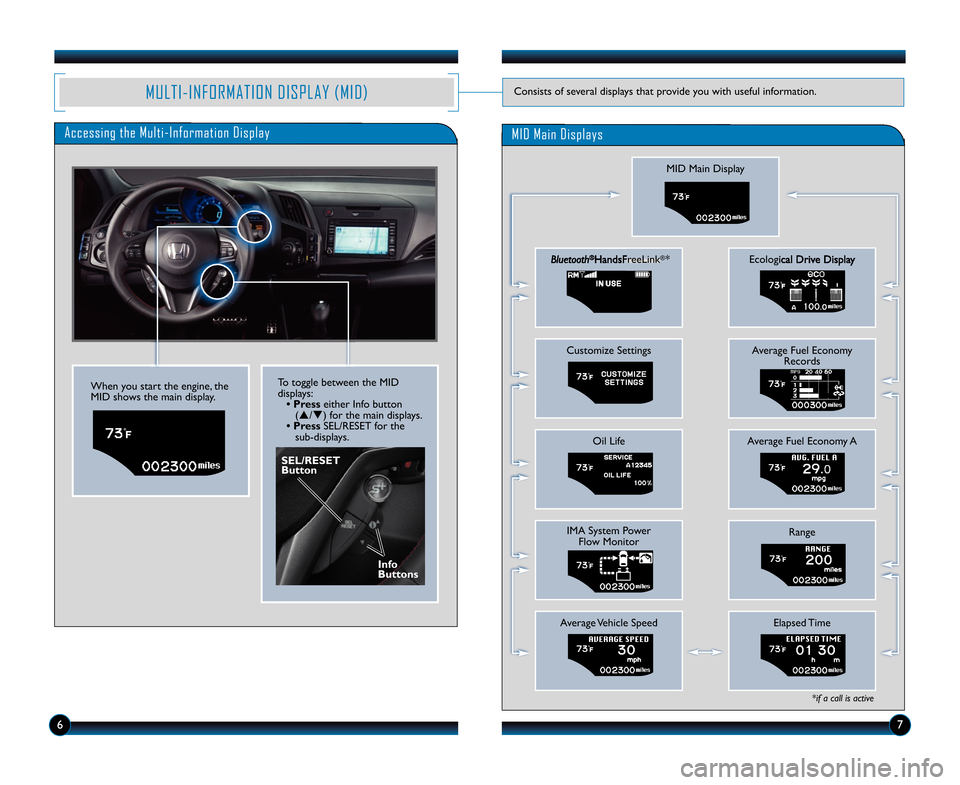
Accessing the MultiInformation Display
MID Main Display
Bluetooth®HandsFreeLink®*
Customize Settings
Oil Life
IMA System PowerFlow Monitor
Average Vehicle Speed
Ecological Drive Display
Average Fuel Economy Records
Average Fuel Economy A
Range
Elapsed Time
*if a call is active
MID Main Displays
When you start the engine, the
MID shows the main display.
SEL/RESET
Button
To toggle between the MID
displays:
• Press either Info button
(p/q) for the main displays.
• Press SEL/RESET for the
sub\bdisplays.
67
MULTIINFORMATION DISPLAY (MID)Consists of several displays that provide you with useful information.
Info
Buttons
13 CRZ TRG_ATG_NEW \ASTYLE 10/3/2012 \A11\f12 AM Page 5
Page 7 of 22
10
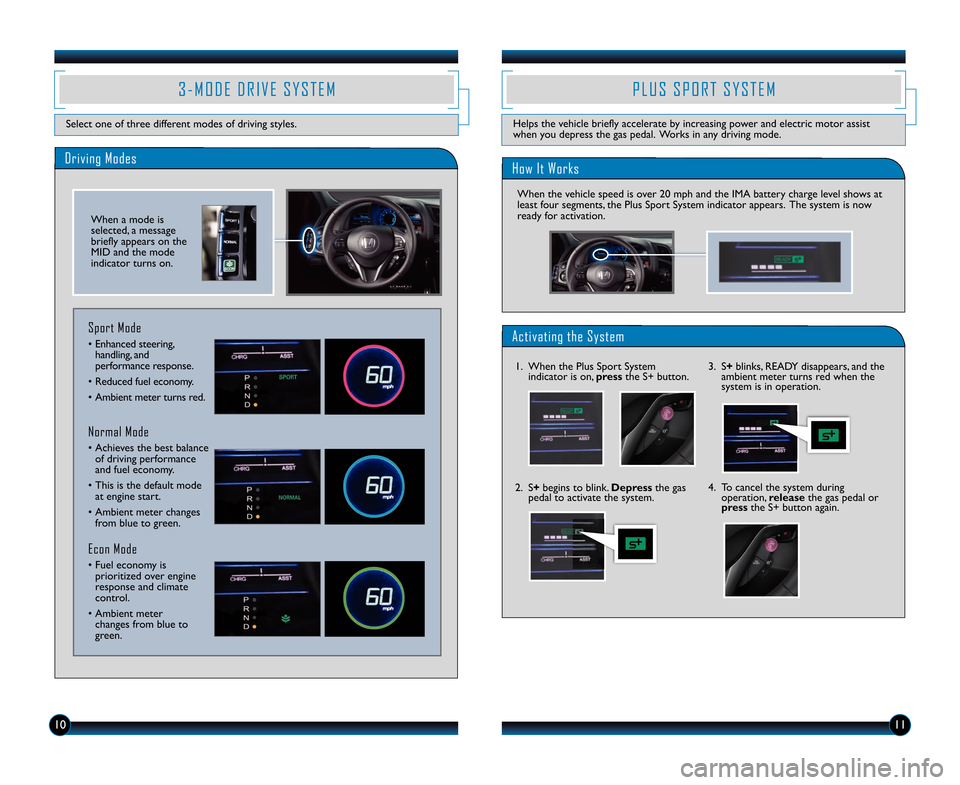
3 M O D E D R I V E S Y S T E M
Select one of three different modes of driving styles.\F
Driving Modes
Normal Mode
• Achieves the best balanceof driving performance
and fuel economy.
• This is the default mode\F at engine start.
• Ambient meter changes from blue to green.
Sport Mode
• \fnhanced steering,handling, and
performance response.
• Reduced fuel economy.
• Ambient meter turns red.
Econ Mode
• Fuel economy is prioritized over engine
response and climate
control.
• Ambient meter changes from blue to
green.
When a mode is
selected, a message
briefly appears on the
MID and the mode
indicator turns on.
\f \b U S S \f O R T S Y S T E M
Helps the vehicle briefly accelerate by increasing power and electric motor assist\F
when you depress the gas pedal. Works in any driving mode.
11
How It Works
When the vehicle speed is over 20 mph and the IMA \Fbattery charge level shows at
least four segments, the Plus Sport System indicator appears. The system is now
ready for activation.
Activating the System
1. When the Plus Sport System indicator is on, press the S+ button.
2. S+ begins to blink. Depress the gas
pedal to activate the syst\Fem. \b. S+
blinks, R\fADY disappears, and the
ambient meter turns red when the
system is in operation.
4. To cancel the system during operation, release the gas pedal or
press the S+ button again.
13 CRZ TRG_ATG_NEW \ASTYLE 10/3/2012 \A1\f3\b PM Page 7
Page 11 of 22
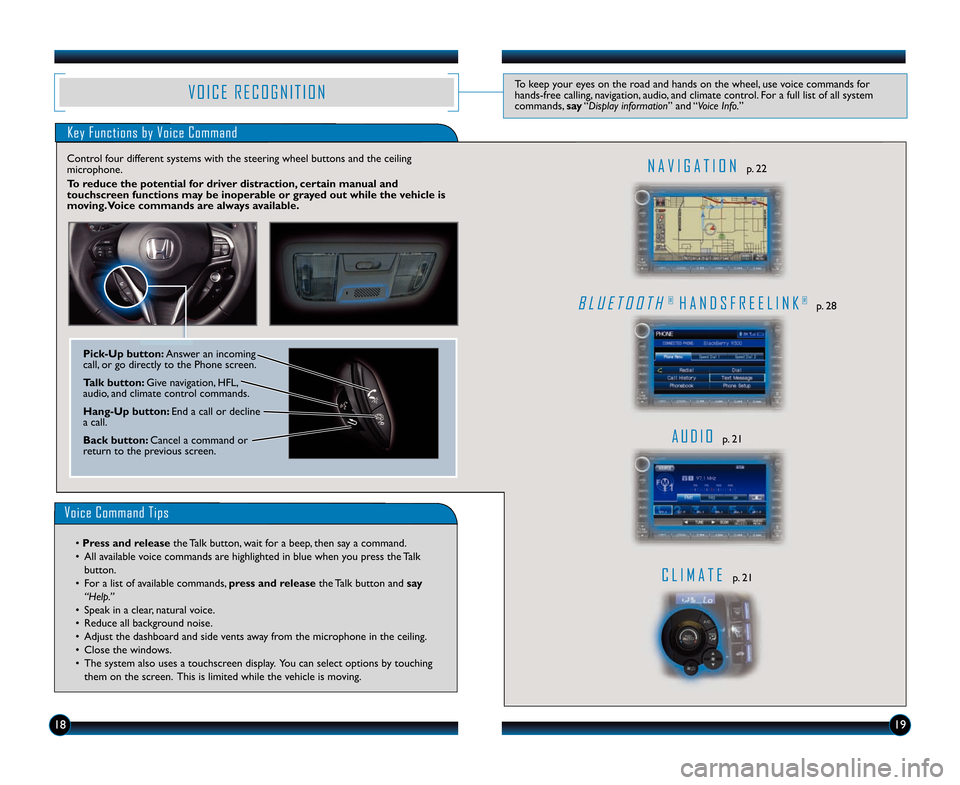
V O I C E R E C O G N I T I O NTo keep your eyes on the road and hands on the whe\Hel, use voice commands for
handsfree calling, navigation, audio, and climate control. For a full list of all sy\Hstem
commands, say“Display infor\fation” and “Voic\b Info.”
Key Functions by Voice Command
B L U E T O O T \b® \b A N D S F R E E L I N K®p. 28
A U D I Op. 21
C L I \f A T Ep. 21
N A V I G A T I O Np. 22
Control four different systems with the steering\H wheel buttons and the ce\Hiling
microphone.
\bo reduce the potential\c for driver distraction, certain manual and
touchscreen functions may \fe inopera\fle or grayed out while the v\cehicle is
moving. Voice commands are always availa\fle.
Voice Command Tips
• Press and release
the Talk button, wait for a beep, then say a command.
• \bll available voice commands are highlighted in blue\H when you press the Talk button.
• For a list of available commands, press and release the Talk button and say
“H\blp.”
• Speak in a clear, natural voice.
• Reduce all background noise.
• \bdjust the dashboard and side vents away from the microphone in the ceiling.
• Close the windows.
• The system also uses a touch\Hscreen display. You can select options by touching them on the screen. This is limited while \Hthe vehicle is moving.
1819
PickUp \futton: \bnswer an incoming
call, or go directly to the Phone screen.
\balk \futton: \five navigation, HFL,
audio, and climate control commands.
HangUp \futton: End a call or decline
a call.
Back \futton: Cancel a command or
return to the previous screen.
13 CRZ TRG_ATG_NEW \ASTYLE 10/3/2012 \A10\f15 AM Page 11
Page 14 of 22
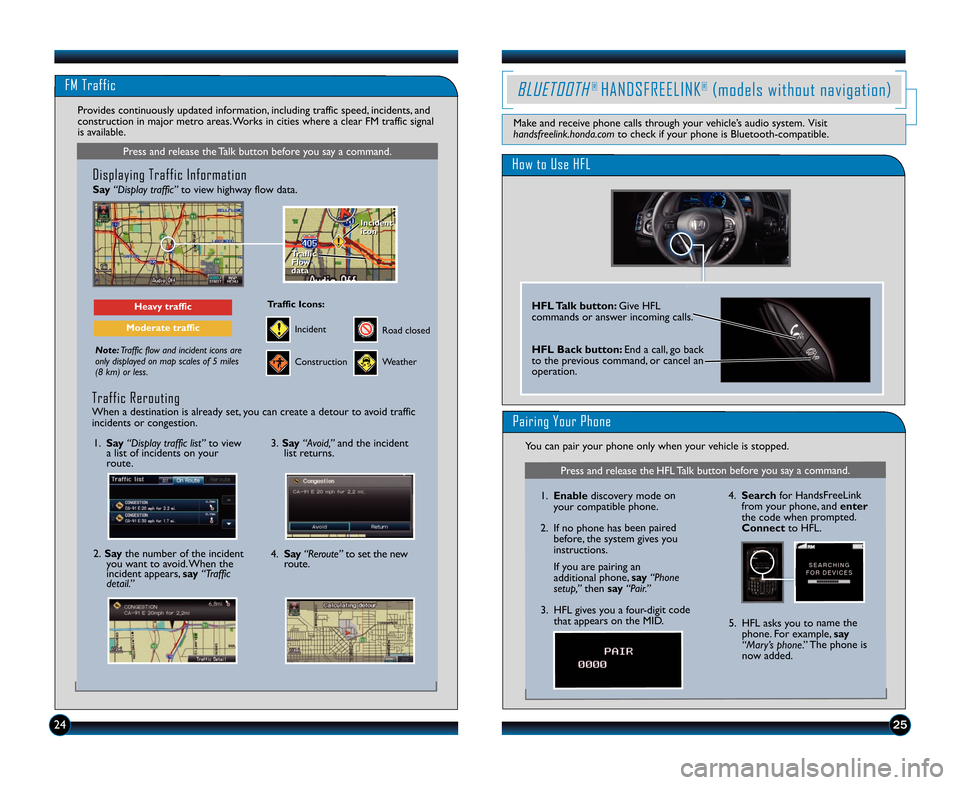
FM Traffic
25
Press and release the Talk button before you say a command.
Displaying Traffic Information
Say“Display traffic” to view highway flow data.
Note:Traffic flow and incident icons are
only displayed on map scales of 5 miles
(8 km) or less.
Heavy traffic
Moderate traffic
Traffic
Flow
data
Traffic
Flow
data Incident
icon
Incident
icon
Incident
Traffic Icons\f
Construction
Road closed
Weather
Provides continuously updated information, including traffic speed, incidents, and
construction in major metro areas. Works in cities where a clear FM traffic signal
is available.
\f. Say “Display traffic list” to view
a list of incidents on your
route.
2. Say the number of the incident
you want to avoid. When the
incident appears, say “Traffic
detail.”
3. Say “Avoid,” and the incident
list returns.
4. Say “Reroute” to set the new
route.
Traffic Rerouting
When a destination is already set, you can create a detour to avoid traffic
incidents or congestion.
24
How to Use HFL
HFL Talk button\f Give HFL
commands or answer incoming calls.
HFL Back button\f End a call, go back
to the previous command, or cancel an
operation.
BLUETOOTH® HANDSFREELINK®(models without navigation)
Make and receive phone calls through your vehicle’s audio system. Visit
handsfreelink.honda.com to check if your phone is Bluetooth\bcompatible.
Pairing Your Phone
You can pair your phone only when your vehicle is stopped.
Press and release the HFL Talk button before you say a command.
\f.Enable discovery mode on
your compatible phone.
2. If no phone has been paired before, the system gives you
instructions.
If you are pairing an
additional phone, say “Phone
setup,” then say “Pair.”
3. HFL gives you a four\bdigit code that appears on the MID. 4.
Search for HandsFreeLink
from your phone, and enter
the code when prompted.
Connect to HFL.
5. HFL asks you to name the phone. For example, say
“Mary’s phone.” The phone is
now added.
13 CRZ TRG_ATG_NEW \ASTYLE 10/3/2012 \A11\f15 AM Page 14
Page 16 of 22
2\b29
BLUETOOTH® HANDSFREELINK® (models with navigation)
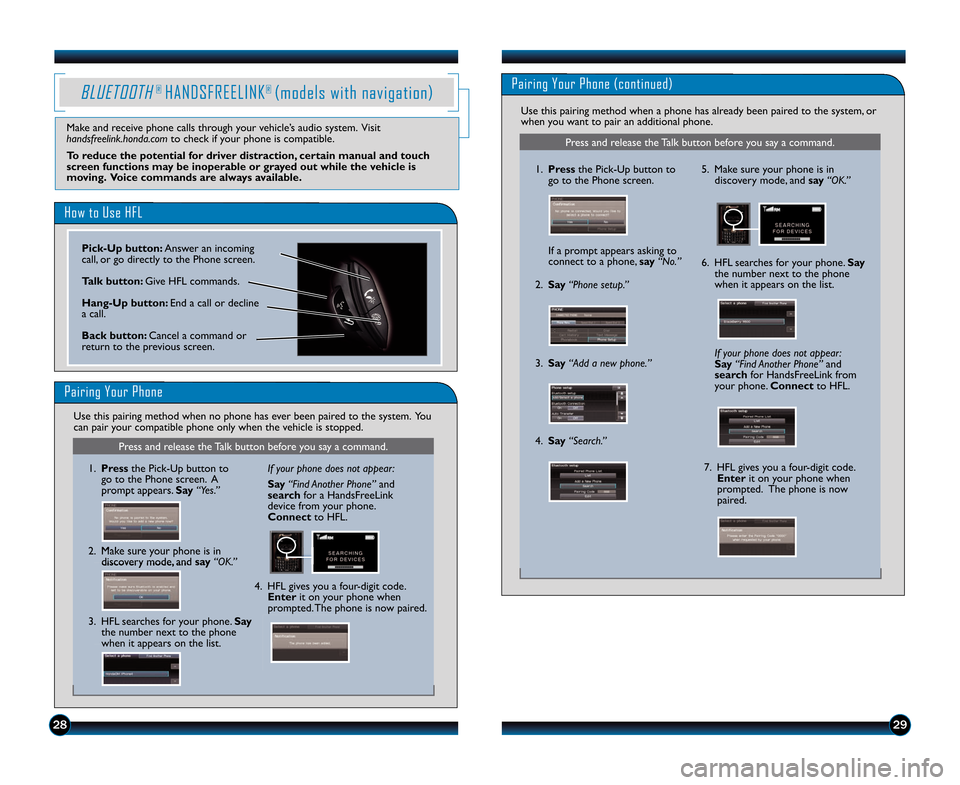
How to Use HFL
Pairing Your Phone
Press and release the Talk button before you say a command.
\f. Pressthe Pick\bUp button to
go to the Phone screen. A
prompt appears. Say “Yes.”
2. Make sure your phone is in discovery mode, and say “OK.” If your phone does not appear:
Say “Find Another Phone” and
search for a HandsFreeLink
device from your phone.
Connect to HFL.
4. HFL gives you a four\bdigit code. Enter it on your phone when
prompted. The phone is now paired.
3. HFL searches for your phone. Say the number next to the phone
when it appears on the list.
Make and receive phone calls through your vehicle’s audio system. Visit
handsfreelink.honda.com to check if your phone is compatible.
To reduce the potential for driver distraction, certain manual and touch
screen functions may be inoperable or grayed out while the vehicle is
moving. Voice commands are always available.
Use this pairing method when no phone has ever been paired to the system. You
can pair your compatible phone only when the vehicle is stopped.
1. Press the PickUp button to
go to the Phone screen.
If a prompt appears asking to
connect to a phone, say“No.” 5. Make sure your phone is in
discovery mode, and say “OK.”
6. HFL searches for your phone. Say
the number next to the phone
when it appears on the list.
7. HFL gives you a fourdigit code. Enter it on your phone when
prompted. The phone is now
paired.
If your phone does not appear:
Say
“ F i n d A n o t h e r P h o n e ” and
search for HandsFreeLink from
your phone. Connectto HFL.
2. Say“Phone setup.”
3. Say“Add a new phone.”
4. Say“Search.”
Press and release the Talk button before you say a command.
Pairing Your Phone (continued)
Use this pairing method when a phone has already been paired to the system, or
when you want to pair an additional phone.
PickUp button\f Answer an incoming
call, or go directly to the Phone screen.
Talk button\f Give HFL commands.
HangUp button\f End a call or decline
a call.
Back button\f Cancel a command or
return to the previous screen.
13 CRZ TRG_ATG_NEW \ASTYLE 10/3/2012 \A11\f15 AM Page 1\b
Page 19 of 22
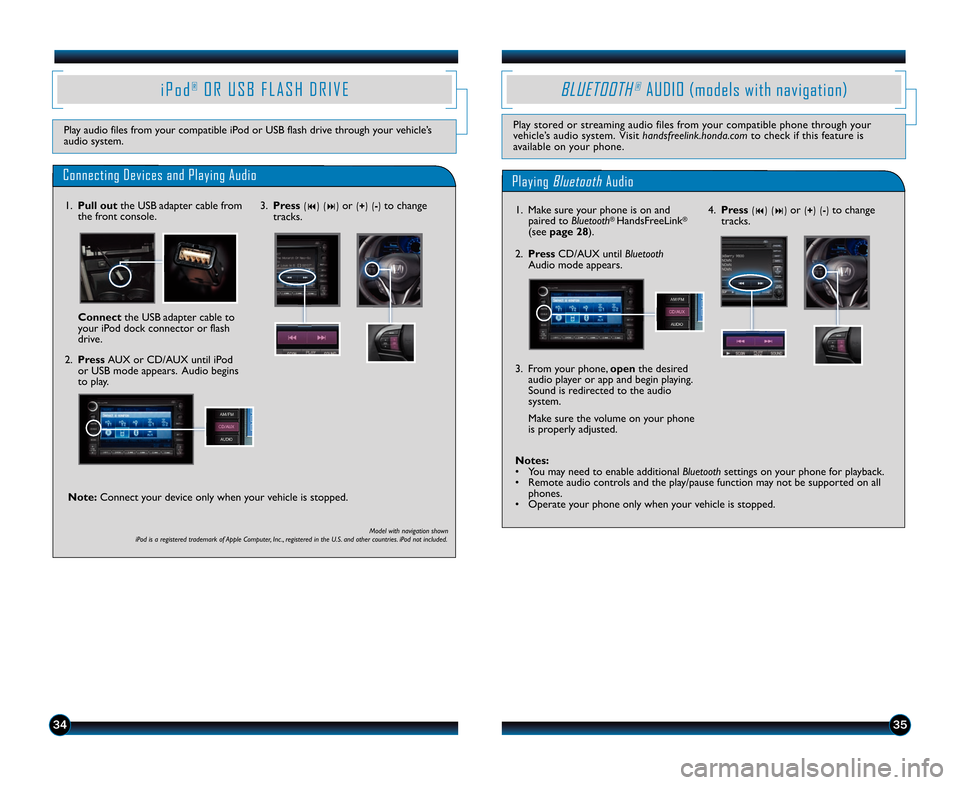
4. Press(9) (:) or (+) () to change
tracks.
Notes\f
• You may need to enable additional Bluetooth settings on your phone for playback.
• Remote audio controls and the play/pause function may not be supported on all phones.
• Operate your phone only when your vehicle is stopped.
3. From your phone, open
the desired
audio player or app and begin playing.
Sound is redirected to the audio
system.
Make sure the volume on your phone
is properly adjusted.
3435
i P o d®O R U S B F L A S H D R I V E
Play audio files from your compatible iPod or USB flash drive through your vehicle’s
audio system.
Connecting Devices and Playing Audio
\f. Pull out the USB adapter cable from
the front console.
2. Press AUX or CD/AUX until iPod or USB mode appears. Audio begins
to play.
Playing BluetoothAudio
BLUETOOTH®AUDIO (models with navigation)
Play stored or streaming audio files from your compatible phone through your
vehicle’s audio system. Visit handsfreelink.honda.comto check if this feature is
available on your phone.
\f. Make sure your phone is on and paired to Bluetooth® HandsFreeLink®
(see page 28).
2. Press CD/AUX until Bluetooth
Audio mode appears.
Connect the USB adapter cable to
your iPod dock connector or flash
drive.
Model with navigation shown
iPod is a registered trademark of Apple Computer, Inc ., registered in the U.S. and other countries. iPod not included.
3. Press(9) (:) or (+) () to change
tracks.
Note\f Connect your device only when your vehicle is stopped.
13 CRZ TRG_ATG_NEW \ASTYLE 10/3/2012 \A11\f1\b AM Page 19
Page 20 of 22
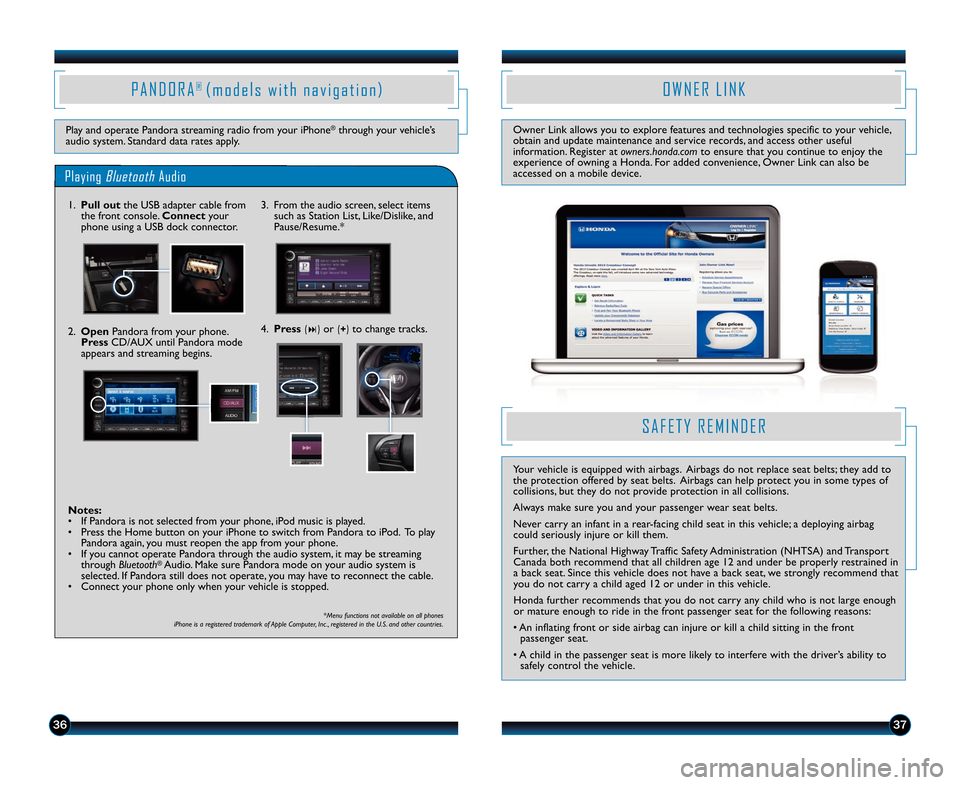
3637
Play and operate Pandora streaming radio from your iPhone®through your vehicle’s
audio system. Standard data rates apply.
O W N E R L I N K
Owner Link allows you to explore features and technologies specific to your vehicle,
obtain and update maintenance and service records, and access other useful
information. Register at owners.honda.comto ensure that you continue to enjoy the
experience of owning a Honda. For added convenience, Owner Link can also be
accessed on a mobile device.
S AFE TY R EM IN DER
Y o ur v e h ic le is e q uip ped w it h a ir b ags. A ir b ags d o n o t r e p la c e s e at b elt s ; t h ey a dd t o
t h e p ro te ctio n o ffe re d by s e at b elt s . A ir b ags c an h elp p ro te ct y o u in s o m e t y p es o f
c o llis io ns, b ut t h ey d o n o t p rov id e p ro te ctio n in a ll c o llis io ns.
A lw ay s m ak e s u re y o u a n d y o ur p asse n ge r w ear s e at b elt s .
N eve r c arr y a n in fa n t in a r e ar\b fa c in g c h ild s e at in t h is v e h ic le ; a d ep lo yin g a ir b ag
c o uld s e rio usly in ju re o r k ill t h em .
F u rth er, t h e N atio nal H ig h w ay T ra ffic S afe ty A dm in is tr a tio n ( N HTSA ) a n d T ra n sp o rt
C an ad a b o th r e co m men d t h at a ll c h ild re n a ge \f 2 a n d u nd er b e p ro perly r e str a in ed in
a b ac k s e at. S in ce t h is v e h ic le d o es n o t h av e a b ac k s e at, w e s tr o ngly r e co m men d t h at
y o u d o n o t c arr y a c h ild a ge d \f 2 o r u nd er in t h is v e h ic le .
H ond a fu rth er r e co m men d s t h at y o u d o n o t c arr y a n y c h ild w ho is n o t la rg e e n o ugh
o r m atu re e n o ugh t o r id e in t h e fr o nt p asse n ge r s e at fo r t h e fo llow in g r e aso ns:
• A n in fla tin g fr o nt o r s id e a ir b ag c an in ju re o r k ill a c h ild s it tin g in t h e fr o nt
p asse n ge r s e at.
• A c h ild in t h e p asse n ge r s e at is m ore lik e ly t o in te rfe re w it h t h e d riv e r’s a b ilit y t o
s a fe ly c o ntr o l t h e v e h ic le .
4. Press(:) or (+) to change tracks.
Notes\f
• If Pandora is not selected from your phone, iPod music is played.
• Press the Home button on your iPhone to switch from Pandora to iPod. To play Pandora again, you must reopen the app from your phone.
• If you cannot operate Pandora through the audio system, it may be streaming through Bluetooth
®Audio. Make sure Pandora mode on your audio system is
selected. If Pandora still does not operate, you may have to reconnect the cable.
• Connect your phone only when your vehicle is stopped. 3. From the audio screen, select items
such as Station List, Like/Dislike, and
Pause/Resume.*
Playing BluetoothAudio
P A N D O R A® ( m o d e l s w i t h n a v i g a t i o n )
\f. Pull out the USB adapter cable from
the front console. Connect your
phone using a USB dock connector.
2. Open Pandora from your phone.
Press CD/AUX until Pandora mode
appears and streaming begins.
*Menu functions not available on all phones
iPhone is a registered trademark of Apple Computer, Inc ., registered in the U.S. and other countries.
13 CRZ TRG_ATG_NEW \ASTYLE 10/3/2012 \A11\f1\b AM Page 20