ECO mode HONDA CR-Z 2015 1.G User Guide
[x] Cancel search | Manufacturer: HONDA, Model Year: 2015, Model line: CR-Z, Model: HONDA CR-Z 2015 1.GPages: 329, PDF Size: 17.44 MB
Page 44 of 329
Continued43
uuAirbags uFront Airbags (SRS)
Safe DrivingFront airbags are designed to inflate duri ng moderate-to-severe frontal collisions.
When the vehicle decelerates suddenly, the sensors send information to the control
unit which signals one or both front airbags to inflate.
A frontal collision can be either head-on or angled between two vehicles, or when a
vehicle crashes into a stationary object, such as a concrete wall.
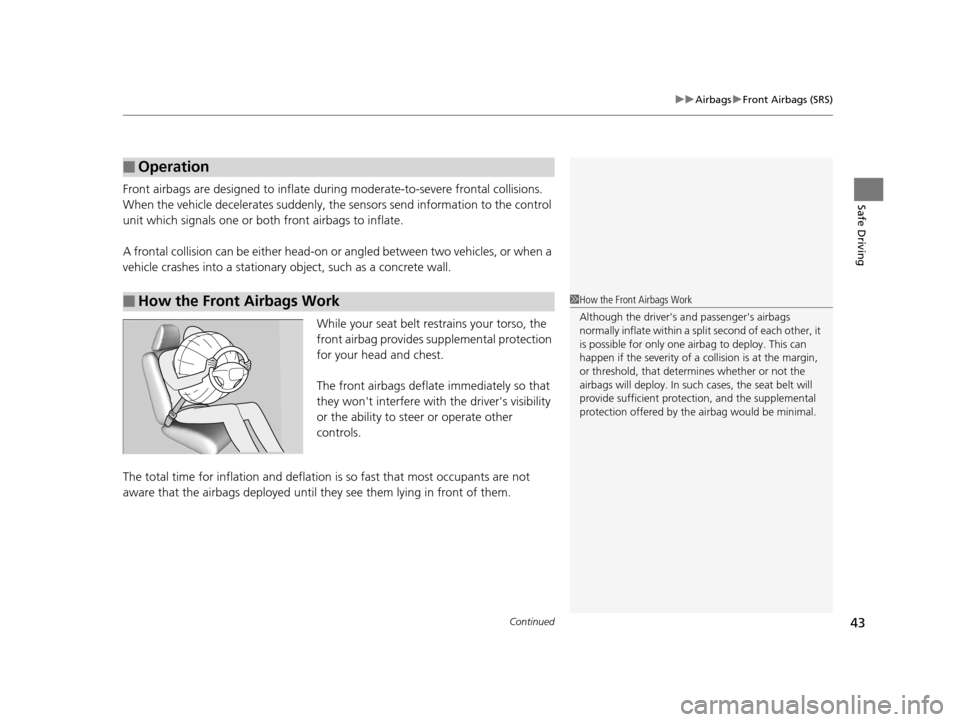
While your seat belt restrains your torso, the
front airbag provides supplemental protection
for your head and chest.
The front airbags deflate immediately so that
they won't interfere with the driver's visibility
or the ability to steer or operate other
controls.
The total time for inflation and deflation is so fast that most occupants are not
aware that the airbags deployed until th ey see them lying in front of them.
■Operation
■How the Front Airbags Work1How the Front Airbags Work
Although the driver's a nd passenger's airbags
normally inflate within a spli t second of each other, it
is possible for only one airbag to deploy. This can
happen if the severity of a collision is at the margin,
or threshold, that determines whether or not the
airbags will deploy. In such cases, the seat belt will
provide sufficient protec tion, and the supplemental
protection offered by the airbag would be minimal.
15 CR-Z-31SZT6400.book 43 ページ 2014年8月1日 金曜日 午後1時59分
Page 54 of 329
53
uuAirbags uAirbag Care
Safe Driving
Airbag Care
You do not need to, and should not, perform any maintenance on or replace any
airbag system components yourself. However, you should have your vehicle
inspected by a dealer in the following situations:
■When the airbags have deployed
If an airbag has inflated, th e control unit and other related parts must be replaced.
Similarly, once an automatic seat belt te nsioner has been activated, it must be
replaced.
■When the vehicle has been in a moderate-to-severe collision
Even if the airbags did not infl ate, have your dealer inspect the following: the driver’s
seat position sensor, weight sensors in the passenger’s seat, seat belt tensioners,
and each seat belt that was worn during the crash.
■Do not remove or modify a se at without consulting a dealer
This would likely disable the driver's seat po sition sensor or the weight sensors in the
passenger’s seat. If it is necessary to re move or modify a seat to accommodate a
person with disabilities, contact a Honda dealer, or for U.S. vehicles, American
Honda Automobile Customer Service at 800-999-1009 and for Canadian vehicles,
Honda Canada Customer Relations at 888-9-HONDA-9.
1 Airbag Care
We recommend against the use of salvaged airbag
system components, including the airbag, tensioners,
sensors, and control unit.
15 CR-Z-31SZT6400.book 53 ページ 2014年8月1日 金曜日 午後1時59分
Page 64 of 329
63
Safe Driving
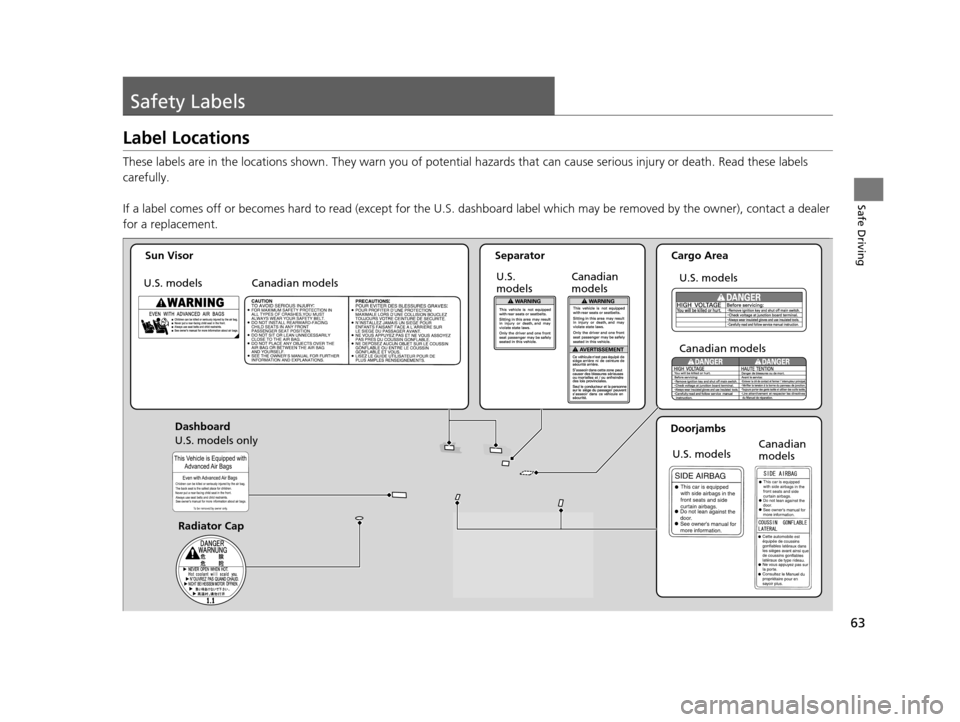
Safety Labels
Label Locations
These labels are in the locations shown. They warn you of potential hazards that can cause serious injury or death. Read these labels
carefully.
If a label comes off or becomes hard to read (except for the U. S. dashboard label which may be removed by the owner), contact a dealer
for a replacement.
Sun Visor
Canadian models Separator
Canadian
models
U.S. models U.S.
modelsCargo Area
U.S. models
Canadian models
Doorjambs U.S. models Canadian
models
Dashboard
U.S. models only
Radiator Cap
15 CR-Z-31SZT6400.book 63 ページ 2014年8月1日 金曜日 午後1時59分
Page 68 of 329
67
uuIndicators u
Continued
Instrument Panel
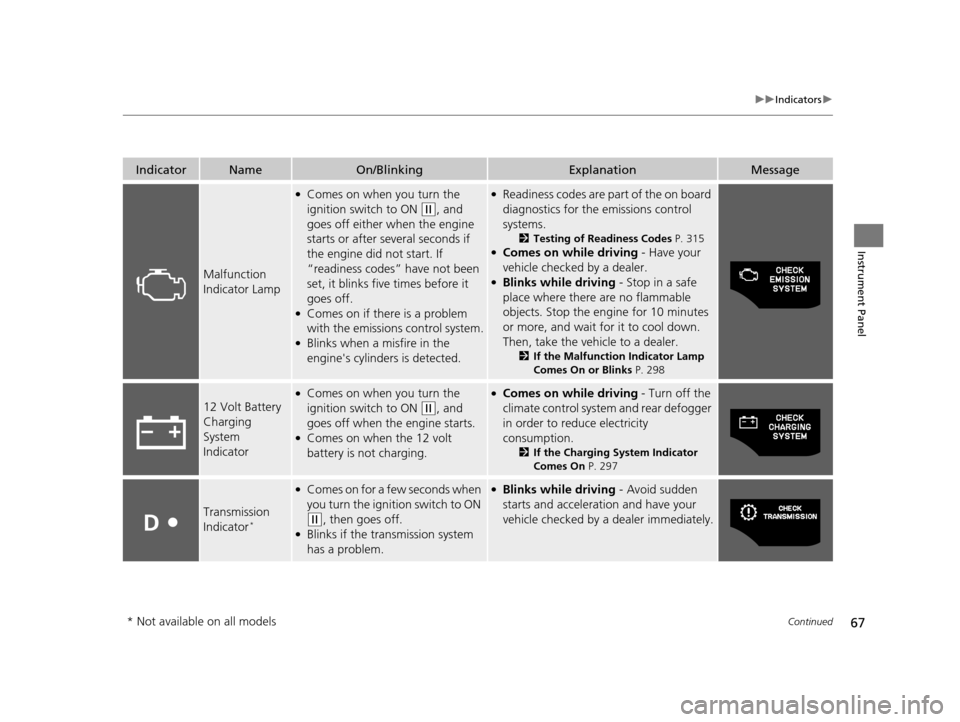
IndicatorNameOn/BlinkingExplanationMessage
Malfunction
Indicator Lamp
●Comes on when you turn the
ignition switch to ON
(w, and
goes off either when the engine
starts or after several seconds if
the engine did not start. If
“readiness codes” have not been
set, it blinks five times before it
goes off.
●Comes on if there is a problem
with the emissions control system.
●Blinks when a misfire in the
engine's cylinders is detected.
●Readiness codes are part of the on board
diagnostics for the emissions control
systems.
2 Testing of Readiness Codes P. 315●Comes on while driving - Have your
vehicle checked by a dealer.
●Blinks while driving - Stop in a safe
place where there are no flammable
objects. Stop the engine for 10 minutes
or more, and wait for it to cool down.
Then, take the vehicle to a dealer.
2 If the Malfunction Indicator Lamp
Comes On or Blinks P. 298
12 Volt Battery
Charging
System
Indicator
●Comes on when you turn the
ignition switch to ON
(w, and
goes off when the engine starts.
●Comes on when the 12 volt
battery is not charging.
●Comes on while driving - Turn off the
climate control system and rear defogger
in order to reduce electricity
consumption.
2 If the Charging System Indicator
Comes On P. 297
Transmission
Indicator*
●Comes on for a few seconds when
you turn the ignition switch to ON
(w, then goes off.●Blinks if the transmission system
has a problem.
●Blinks while driving - Avoid sudden
starts and acceleration and have your
vehicle checked by a dealer immediately.
* Not available on all models
15 CR-Z-31SZT6400.book 67 ページ 2014年8月1日 金曜日 午後1時59分
Page 72 of 329
71
uuIndicators u
Continued
Instrument Panel
IndicatorNameOn/BlinkingExplanationMessage
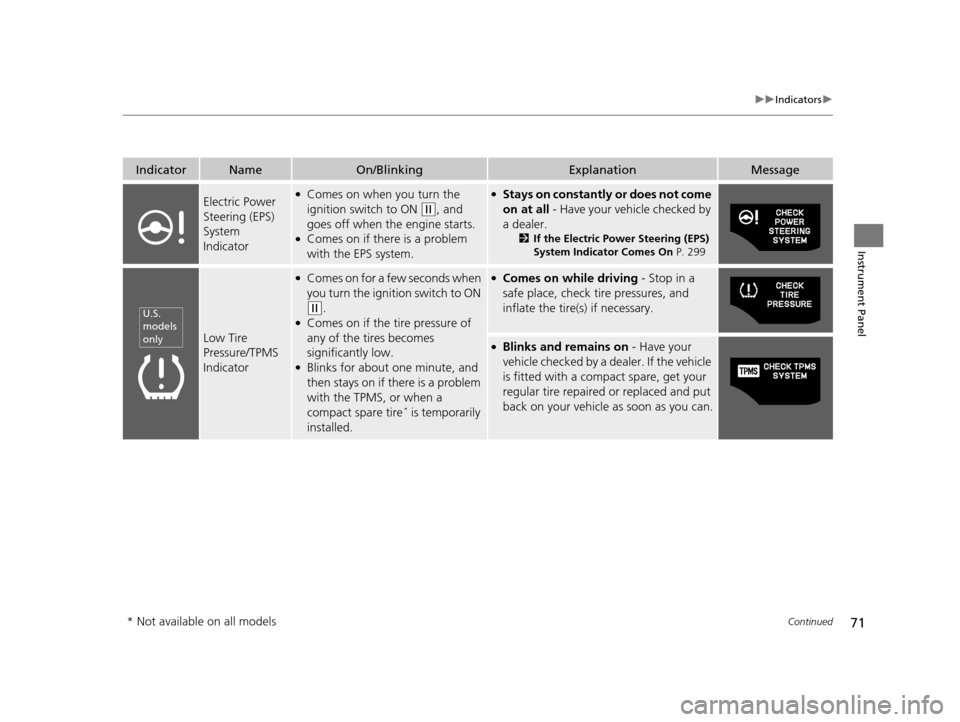
Electric Power
Steering (EPS)
System
Indicator●Comes on when you turn the
ignition switch to ON
(w, and
goes off when the engine starts.
●Comes on if there is a problem
with the EPS system.
●Stays on constantly or does not come
on at all - Have your vehicle checked by
a dealer.
2 If the Electric Power Steering (EPS)
System Indicator Comes On P. 299
Low Tire
Pressure/TPMS
Indicator
●Comes on for a few seconds when
you turn the ignition switch to ON
(w.●Comes on if the tire pressure of
any of the tires becomes
significantly low.
●Blinks for about one minute, and
then stays on if there is a problem
with the TPMS, or when a
compact spare tire
* is temporarily
installed.
●Comes on while driving - Stop in a
safe place, check tire pressures, and
inflate the tire(s) if necessary.
●Blinks and remains on - Have your
vehicle checked by a dealer. If the vehicle
is fitted with a compact spare, get your
regular tire repaired or replaced and put
back on your vehicle as soon as you can.
U.S.
models
only
* Not available on all models
15 CR-Z-31SZT6400.book 71 ページ 2014年8月1日 金曜日 午後1時59分
Page 77 of 329
76
uuIndicators u
Instrument Panel
*1:The driving mode message on the multi-information display app ears for a few seconds when you press the appropriate mode butt on.
IndicatorNameOn/BlinkingExplanationMessage
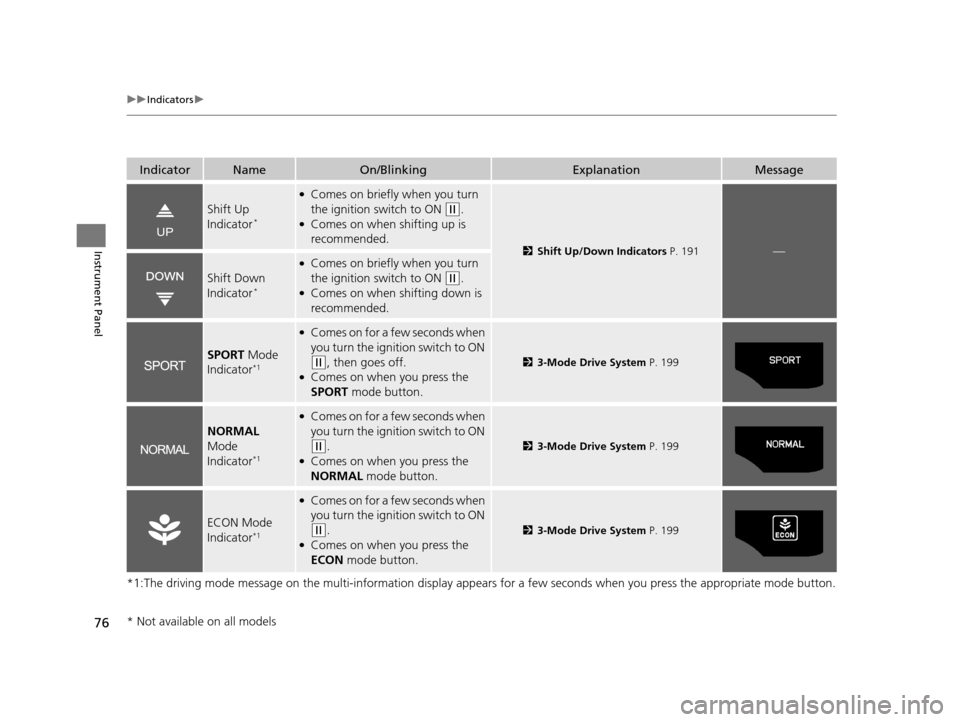
Shift Up
Indicator*
●Comes on briefly when you turn
the ignition switch to ON
(w.●Comes on when shifting up is
recommended.
2Shift Up/Down Indicators P. 191—
Shift Down
Indicator*
●Comes on briefly when you turn
the ignition switch to ON
(w.●Comes on when shifting down is
recommended.
SPORT Mode
Indicator*1
●Comes on for a few seconds when
you turn the igniti on switch to ON
(w, then goes off.●Comes on when you press the
SPORT mode button.
23-Mode Drive System P. 199
NORMAL
Mode
Indicator
*1
●Comes on for a few seconds when
you turn the igniti on switch to ON
(w.●Comes on when you press the
NORMAL mode button.
23-Mode Drive System P. 199
ECON Mode
Indicator*1
●Comes on for a few seconds when
you turn the ignition switch to ON
(w.●Comes on when you press the
ECON mode button.
23-Mode Drive System P. 199
* Not available on all models
15 CR-Z-31SZT6400.book 76 ページ 2014年8月1日 金曜日 午後1時59分
Page 79 of 329
78
uuIndicators uMulti-Information Display Warn ing and Information Messages
Instrument Panel
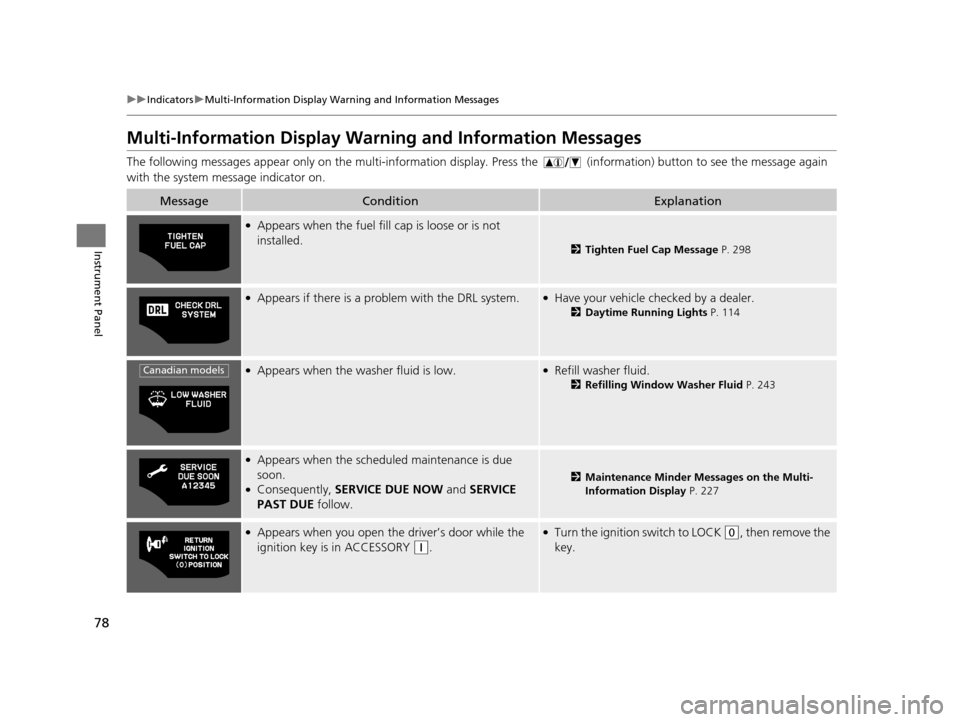
Multi-Information Display Warn ing and Information Messages
The following messages appear only on the multi-information display. Press the (information) button to see the message again
with the system me ssage indicator on.
MessageConditionExplanation
●Appears when the fuel fill cap is loose or is not
installed.
2Tighten Fuel Cap Message P. 298
●Appears if there is a prob lem with the DRL system.●Have your vehicle checked by a dealer.
2Daytime Running Lights P. 114
●Appears when the washer fluid is low.●Refill washer fluid.
2Refilling Window Washer Fluid P. 243
●Appears when the scheduled maintenance is due
soon.
●Consequently, SERVICE DUE NOW and SERVICE
PAST DUE follow.2Maintenance Minder Messages on the Multi-
Information Display P. 227
●Appears when you open the driver’s door while the
ignition key is in ACCESSORY
(q.
●Turn the ignition switch to LOCK (0, then remove the
key.
Canadian models
15 CR-Z-31SZT6400.book 78 ページ 2014年8月1日 金曜日 午後1時59分
Page 80 of 329
79
uuIndicators uMulti-Information Display Warning and Information Messages
Continued
Instrument Panel
MessageConditionExplanation
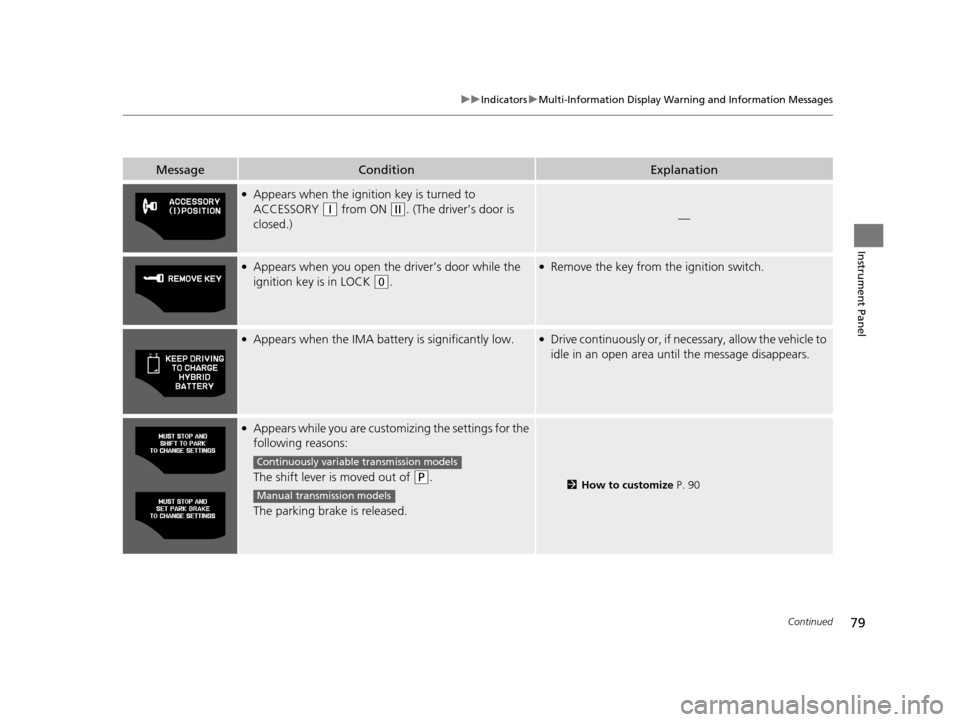
●Appears when the igniti on key is turned to
ACCESSORY
(q from ON (w. (The driver’s door is
closed.)—
●Appears when you open th e driver’s door while the
ignition key is in LOCK
(0.
●Remove the key from the ignition switch.
●Appears when the IMA batt ery is significantly low.●Drive continuously or, if nece ssary, allow the vehicle to
idle in an open area unt il the message disappears.
●Appears while you are custom izing the settings for the
following reasons:
The shift lever is moved out of
(P.
The parking brake is released.2 How to customize P. 90
Continuously variable transmission models
Manual transmission models
15 CR-Z-31SZT6400.book 79 ページ 2014年8月1日 金曜日 午後1時59分
Page 81 of 329
80
uuIndicators uMulti-Information Display Warn ing and Information Messages
Instrument Panel
MessageConditionExplanation
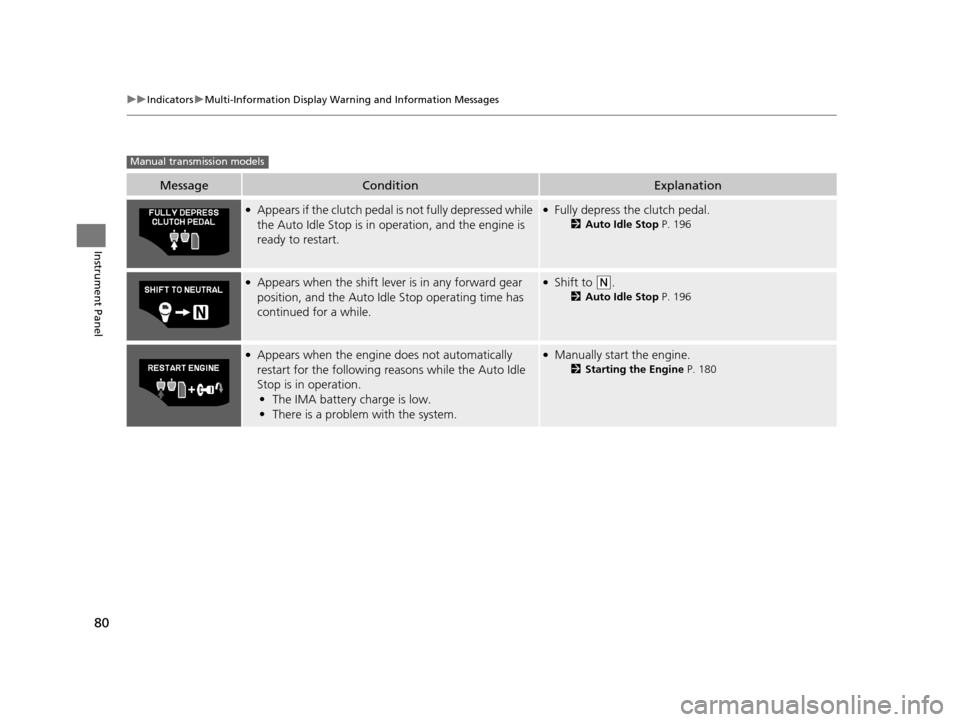
●Appears if the clutch pedal is not fully depressed while
the Auto Idle Stop is in operation, and the engine is
ready to restart.●Fully depress the clutch pedal.
2Auto Idle Stop P. 196
●Appears when the shift leve r is in any forward gear
position, and the Auto Idle Stop operating time has
continued for a while.●Shift to (N.
2 Auto Idle Stop P. 196
●Appears when the engine does not automatically
restart for the following re asons while the Auto Idle
Stop is in operation.
• The IMA battery charge is low.
• There is a problem with the system.●Manually start the engine.
2 Starting the Engine P. 180
Manual transmission models
15 CR-Z-31SZT6400.book 80 ページ 2014年8月1日 金曜日 午後1時59分
Page 84 of 329
83
uuGauges and Multi-Information Display uMulti-Information Display
Continued
Instrument Panel
Multi-Information Display
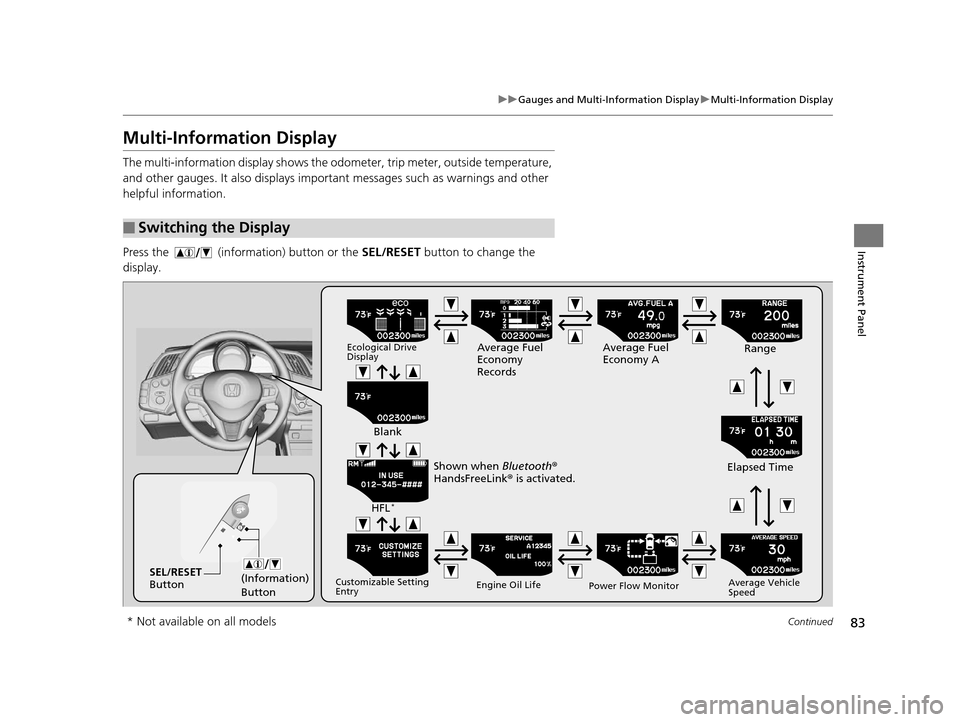
The multi-information display shows the odom eter, trip meter, outside temperature,
and other gauges. It also displays important messages such as warnings and other
helpful information.
Press the (information) button or the SEL/RESET button to change the
display.
■Switching the Display
(Information)
ButtonSEL/RESET
Button
Ecological Drive
DisplayAverage Fuel
Economy
Records Average Fuel
Economy A
Range
Elapsed Time
Average Vehicle
Speed
Power Flow Monitor
Engine Oil Life
Customizable Setting
Entry
HFL*
Blank
Shown when Bluetooth ®
HandsFreeLink ® is activated.
* Not available on all models
15 CR-Z-31SZT6400.book 83 ページ 2014年8月1日 金曜日 午後1時59分