buttons HONDA CR-Z 2015 1.G User Guide
[x] Cancel search | Manufacturer: HONDA, Model Year: 2015, Model line: CR-Z, Model: HONDA CR-Z 2015 1.GPages: 329, PDF Size: 17.44 MB
Page 148 of 329
147
uuAudio System uPlaying the AM/FM Radio
Continued
Features
Playing the AM/FM Radio
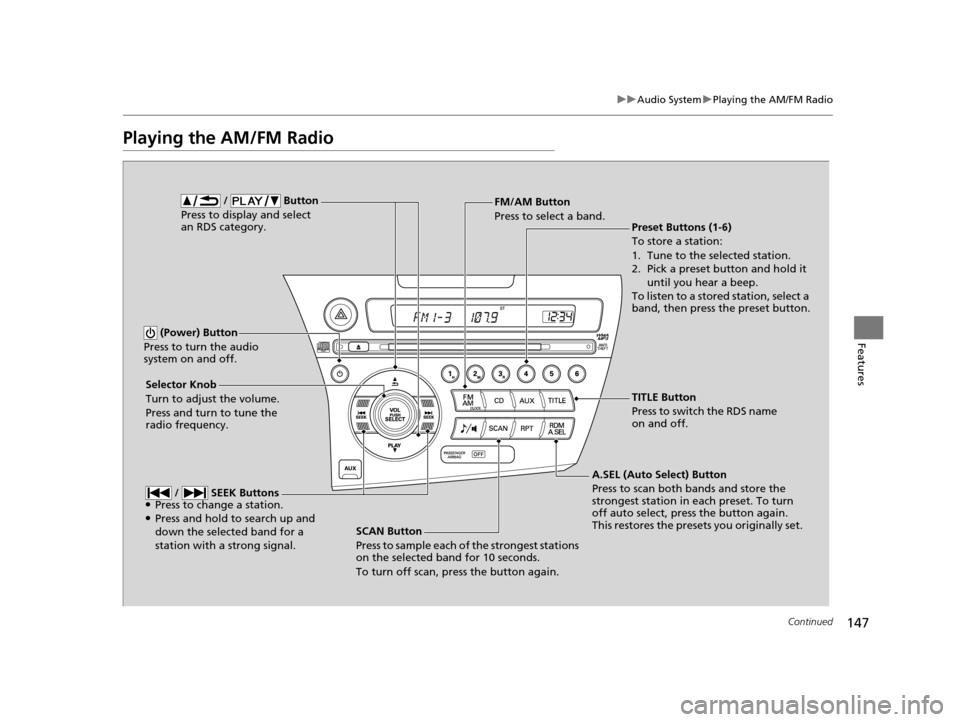
SCAN Button
Press to sample each of the strongest stations
on the selected band for 10 seconds.
To turn off scan, press the button again.
(Power) Button
Press to turn the audio
system on and off.
Preset Buttons (1-6)
To store a station:
1. Tune to the selected station.
2. Pick a preset button and hold it until you hear a beep.
To listen to a stored station, select a
band, then press the preset button.
Selector Knob
Turn to adjust the volume.
Press and turn to tune the
radio frequency. FM/AM Button
Press to select a band.
A.SEL (Auto Select) Button
Press to scan both bands and store the
strongest station in each preset. To turn
off auto select, press the button again.
This restores the presets you originally set.
/ Button
Press to display and select
an RDS category.
/ SEEK Buttons●Press to change a station.●Press and hold to search up and
down the selected band for a
station with a strong signal.
TITLE Button
Press to switch the RDS name
on and off.
15 CR-Z-31SZT6400.book 147 ページ 2014年8月1日 金曜日 午後1時59分
Page 150 of 329
149
uuAudio System uPlaying a CD
Continued
Features
Playing a CD
Your audio system supports audio CDs, CD-Rs and CD-RWs in either MP3 or WMA
format. With the CD loaded, press the CD button.
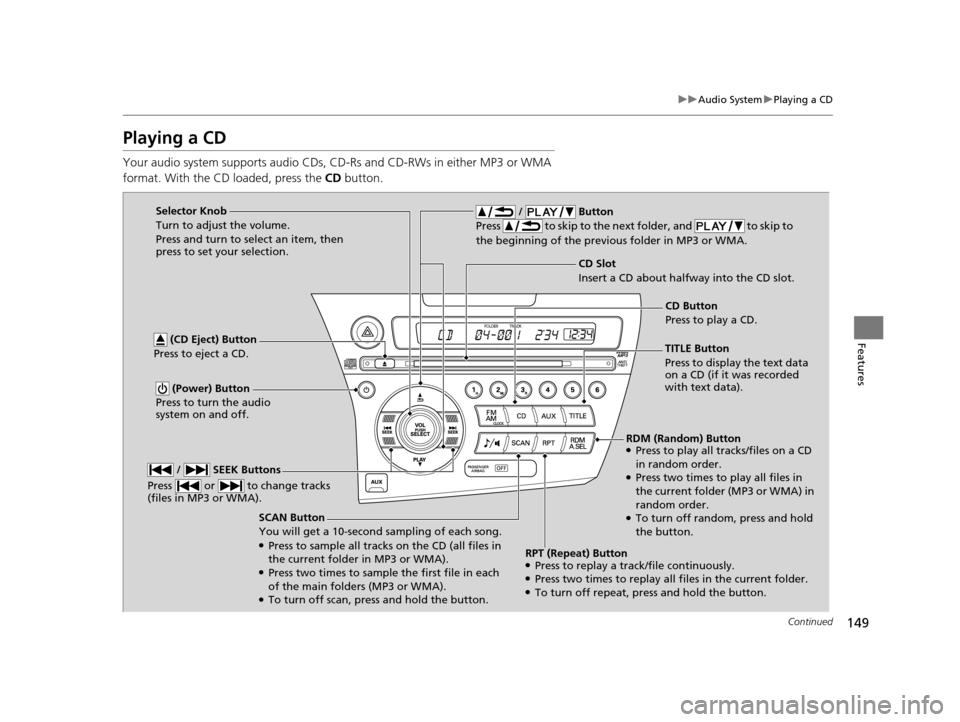
SCAN Button
You will get a 10-second sampling of each song.
●Press to sample all tracks on the CD (all files in
the current folder in MP3 or WMA).
●Press two times to sample the first file in each
of the main folders (MP3 or WMA).
●To turn off scan, press and hold the button.
(CD Eject) Button
Press to eject a CD.
/ Button
Press to skip to the next folder, and to skip to
the beginning of the previous folder in MP3 or WMA.
(Power) Button
Press to turn the audio
system on and off.
CD Slot
Insert a CD about halfway into the CD slot.
/ SEEK Buttons
Press or to change tracks
(files in MP3 or WMA).
Selector Knob
Turn to adjust the volume.
Press and turn to select an item, then
press to set your selection.
TITLE Button
Press to display the text data
on a CD (if it was recorded
with text data).CD Button
Press to play a CD.
RDM (Random) Button
●Press to play all tracks/files on a CD
in random order.
●Press two times to play all files in
the current folder (MP3 or WMA) in
random order.
●To turn off random , press and hold
the button.
RPT (Repeat) Button
●Press to replay a track/file continuously.●Press two times to replay all files in the current folder.●To turn off repeat, press and hold the button.
15 CR-Z-31SZT6400.book 149 ページ 2014年8月1日 金曜日 午後1時59分
Page 152 of 329
151
uuAudio System uPlaying an iPod
Continued
Features
Playing an iPod
Connect the iPod using your dock connector to the USB adapter cable, then press
the AUX button.
2USB Adapter Cable P. 141
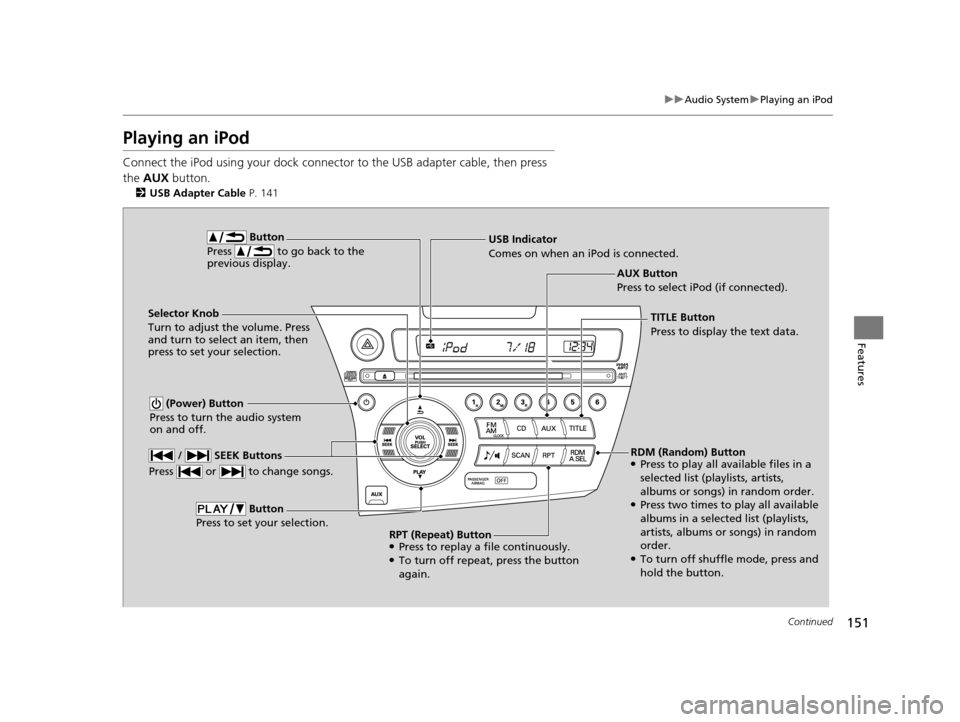
AUX Button
Press to select iPod (if connected).
Button
Press to go back to the
previous display.
(Power) Button
Press to turn the audio system
on and off.
Selector Knob
Turn to adjust the volume. Press
and turn to select an item, then
press to set your selection. USB Indicator
Comes on when an iPod is connected.
/ SEEK Buttons
Press or to change songs.
Button
Press to set your selection.
TITLE Button
Press to display the text data.
RDM (Random) Button
●Press to play all available files in a
selected list (playlists, artists,
albums or songs) in random order.
●Press two times to play all available
albums in a selected list (playlists,
artists, albums or songs) in random
order.
●To turn off shuffle mode, press and
hold the button.
RPT (Repeat) Button
●Press to replay a file continuously.●To turn off repeat, press the button
again.
15 CR-Z-31SZT6400.book 151 ページ 2014年8月1日 金曜日 午後1時59分
Page 154 of 329
153
uuAudio System uPlaying a USB Flash Drive
Continued
Features
Playing a USB Flash Drive
Your audio system reads and plays sound files on a USB flash drive in either MP3,
WMA or AAC*1 format.
Connect your USB flash drive to the USB adapter cable, then press the AUX button.
2USB Adapter Cable P. 141
*1:Only AAC format files recorded with iTunes are playable on this unit.
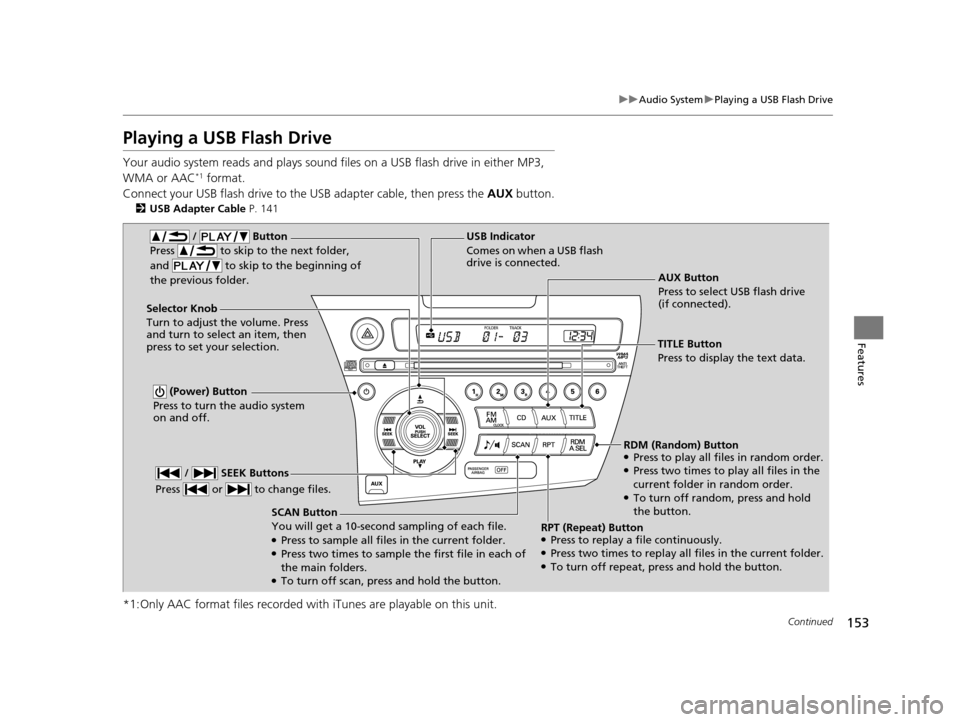
AUX Button
Press to select USB flash drive
(if connected).
SCAN Button
You will get a 10-second sampling of each file.
●Press to sample all files in the current folder.●Press two times to sample the first file in each of
the main folders.
●To turn off scan, pres s and hold the button.
(Power) Button
Press to turn the audio system
on and off.
Selector Knob
Turn to adjust the volume. Press
and turn to select an item, then
press to set your selection. USB Indicator
Comes on when a USB flash
drive is connected.
/ Button
Press to skip to the next folder,
and to skip to the beginning of
the previous folder.
/ SEEK Buttons
Press or to change files.
TITLE Button
Press to display the text data.
RDM (Random) Button
●Press to play all files in random order.●Press two times to play all files in the
current folder in random order.
●To turn off random, press and hold
the button.
RPT (Repeat) Button
●Press to replay a file continuously.●Press two times to replay all files in the current folder.●To turn off repeat, pr ess and hold the button.
15 CR-Z-31SZT6400.book 153 ページ 2014年8月1日 金曜日 午後1時59分
Page 161 of 329
160
Features
Bluetooth® HandsFreeLink ®
See the Navigation System Manu al for how to operate the Bluetooth®
HandsFreeLink ®.
Bluetooth ® HandsFreeLink ® (HFL) allows you to place and receive phone calls using
your vehicle's audio system, without handling your cell phone.
Using HFL
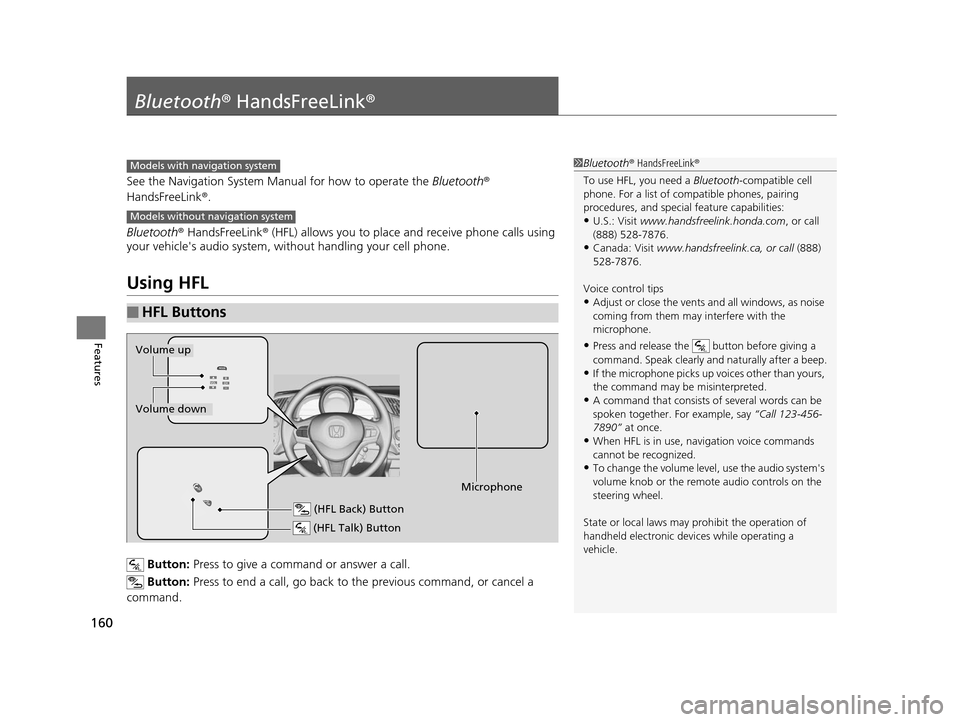
Button: Press to give a command or answer a call.
Button: Press to end a call, go back to the previous command, or cancel a
command.
■HFL Buttons
1 Bluetooth ® HandsFreeLink ®
To use HFL, you need a Bluetooth-compatible cell
phone. For a list of compatible phones, pairing
procedures, and special feature capabilities:
•U.S.: Visit www.handsfreelink.honda.com , or call
(888) 528-7876.
•Canada: Visit www.handsfreelink .ca, or call (888)
528-7876.
Voice control tips
•Adjust or close the vents and all windows, as noise
coming from them may interfere with the
microphone.
•Press and release the button before giving a
command. Speak clearly and naturally after a beep.
•If the microphone picks up vo ices other than yours,
the command may be misinterpreted.
•A command that consists of several words can be
spoken together. For example, say “Call 123-456-
7890” at once.
•When HFL is in use, navigation voice commands
cannot be recognized.
•To change the volume level, use the audio system's
volume knob or the remote audio controls on the
steering wheel.
State or local laws may pr ohibit the operation of
handheld electronic devi ces while operating a
vehicle.
Models with navigation system
Models without navigation system
(HFL Talk) Button
Volume up
Microphone
(HFL Back) Button
Volume down
15 CR-Z-31SZT6400.book 160 ページ 2014年8月1日 金曜日 午後1時59分
Page 188 of 329
Continued187
uuWhen Driving uShifting
Driving
Use the paddle shifters to change betw een 1st and 7th speeds without removing
your hands from the steering wheel. The transmission switches to the 7-speed
manual shift mode when you pull a paddle shifter while driving. This mode is useful
when engine braking is needed.
You can cancel this mode by pressing any of the three driving mode buttons, or
pulling the
(+ paddle shifter for a few seconds.
■When the driving mode is in ECON or NORMAL
The shift mode goes into the 7-speed ma nual shift mode temporarily, and the
number is displayed in the shift indicator.
The 7-speed manual shift mode is canceled automatically if you drive at constant
speed or accelerate, and the number in the shift indicator goes off.
The 7-speed manual shift mode is especially useful when reducing the vehicle speed
temporarily before making a turn.
■When the driving mode is in SPORT
The shift mode goes into the 7-speed manual shift mode. The M indicator and the
speed number are displayed in the shift indicator. As the vehicle speed slows down,
the transmission automatically shifts down accordingly. When the vehicle comes to
a stop, it automatically shifts down into 1st.
If the vehicle speed increases and the engi ne speed reaches near the tachometer’s
red zone, the transmission automatically shifts up.
■7-Speed Manual Shift Mode1 7-Speed Manual Shift Mode
To improve fuel economy, the transmission may shift
up to a higher speed than the seventh under certain
circumstances. In this case, the number in the shift
indicator remains as 7.
In the 7-speed manual shif t mode, the transmission
shifts up or down by operating either paddle shifter
under the following conditions:
Shift Up: The engine sp eed reaches the lowest
threshold of the hi gher speed position.
Shift Down: The engine sp eed reaches the highest
threshold of the lower speed position.
When the engine speed reaches near the
tachometer’s red zone, the transmission shifts up
automatically.
When the engine speed reaches the lowest threshold
of the selected speed positi on, the transmission shifts
down automatically.
Operating the paddle shifte rs on slippery surfaces
may cause the tires to lock up. In this case, the 7-
speed manual shift mode is canceled and goes back
to the normal D driving mode.
15 CR-Z-31SZT6400.book 187 ページ 2014年8月1日 金曜日 午後1時59分
Page 190 of 329
189
uuWhen Driving uShifting
Driving
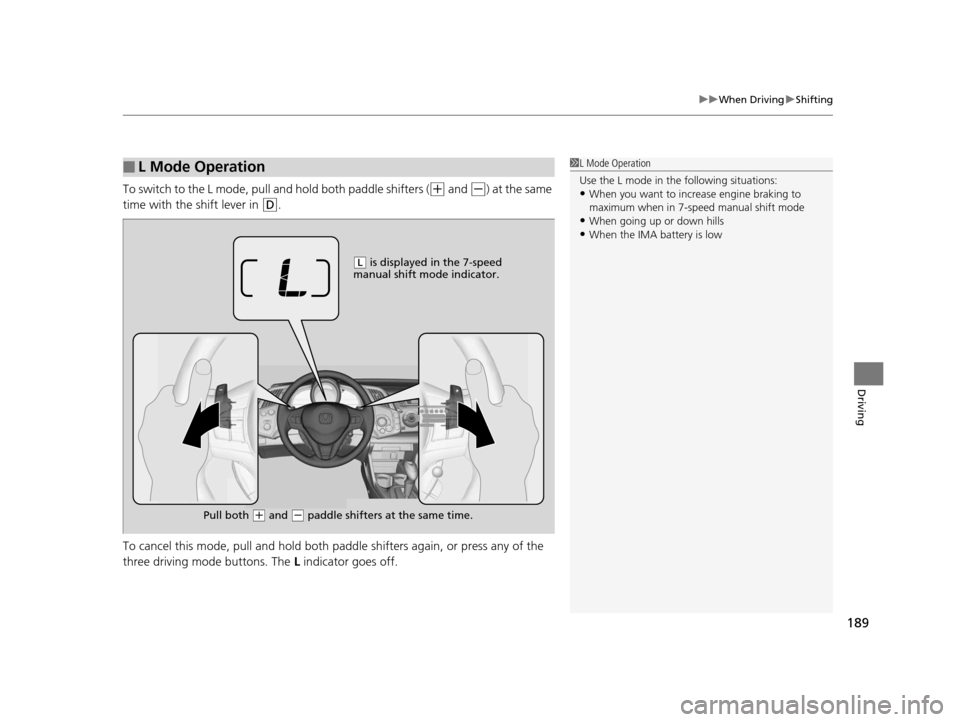
To switch to the L mode, pull a nd hold both paddle shifters ((+ and (-) at the same
time with the shift lever in
(D.
To cancel this mode, pull and hold both pa ddle shifters again, or press any of the
three driving mode buttons. The L indicator goes off.
■L Mode Operation1L Mode Operation
Use the L mode in the following situations:
•When you want to increa se engine braking to
maximum when in 7-speed manual shift mode
•When going up or down hills•When the IMA battery is low
( L is displayed in the 7-speed
manual shift mode indicator.
Pull both
( + and (- paddle shifters at the same time.
15 CR-Z-31SZT6400.book 189 ページ 2014年8月1日 金曜日 午後1時59分
Page 205 of 329
uuWhen Driving uCruise Control
204
Driving
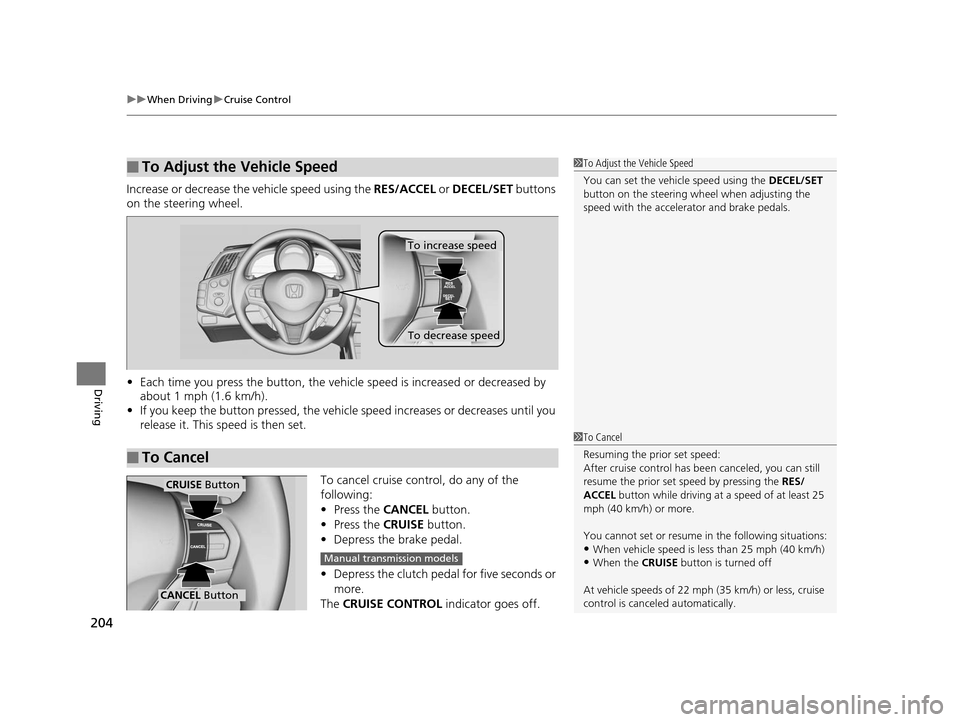
Increase or decrease the vehicle speed using the RES/ACCEL or DECEL/SET buttons
on the steering wheel.
• Each time you press the button, the vehicl e speed is increased or decreased by
about 1 mph (1.6 km/h).
• If you keep the button pressed, the vehicl e speed increases or decreases until you
release it. This speed is then set.
To cancel cruise control, do any of the
following:
• Press the CANCEL button.
• Press the CRUISE button.
• Depress the brake pedal.
• Depress the clutch pedal for five seconds or
more.
The CRUISE CONTROL indicator goes off.
■To Adjust the Vehicle Speed1To Adjust the Vehicle Speed
You can set the vehicle speed using the DECEL/SET
button on the steering wheel when adjusting the
speed with the accelera tor and brake pedals.
■To Cancel
To decrease speed
To increase speed
1To Cancel
Resuming the prior set speed:
After cruise control has be en canceled, you can still
resume the prior set speed by pressing the RES/
ACCEL button while driving at a speed of at least 25
mph (40 km/h) or more.
You cannot set or resume in the following situations:
•When vehicle speed is less than 25 mph (40 km/h)
•When the CRUISE button is turned off
At vehicle speeds of 22 m ph (35 km/h) or less, cruise
control is canceled automatically.
CRUISE Button
CANCEL Button
Manual transmission models
15 CR-Z-31SZT6400.book 204 ページ 2014年8月1日 金曜日 午後1時59分
Page 228 of 329
227Continued
Maintenance
Maintenance MinderTM
If the engine oil life is less than 15%, you will see the Maintenance Minder messages
appear on the multi-informat ion display every time you turn the ignition switch to
ON
(w. The messages notify you when to change the engine oil, or when to bring
your vehicle to a dealer for indicated maintenance services.
To Use Maintenance MinderTM
Maintenance items, which should be serviced at the same time that you replace the
engine oil, appear on the multi-information display.
You can view them on the engine oil life screen when the remaining engine oil life
is under 15 percent.
1. Turn the ignition switch to ON
(w.
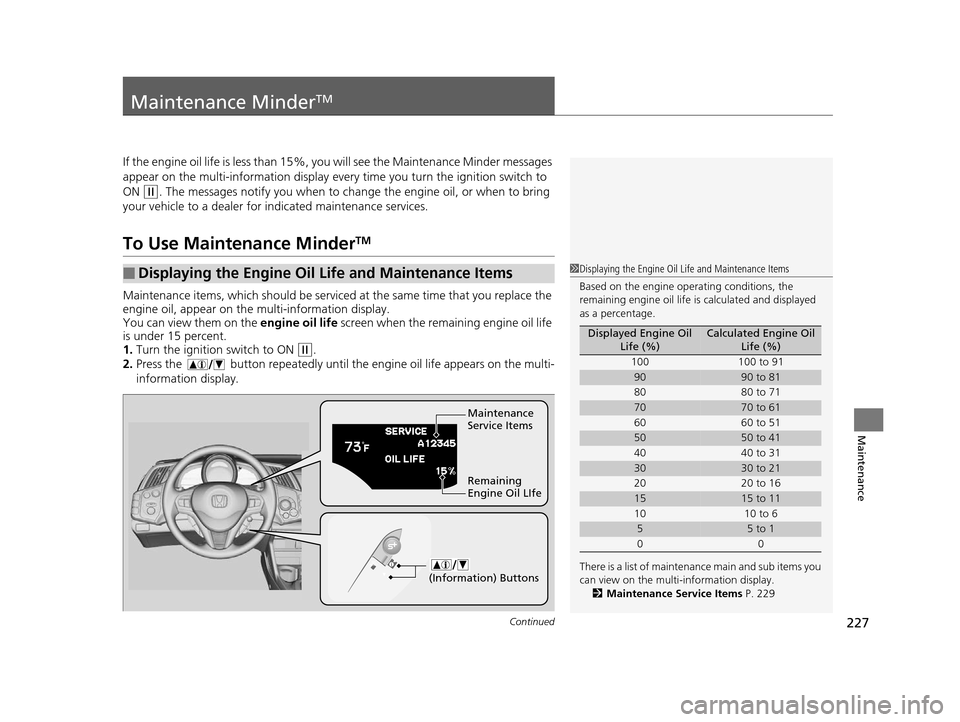
2. Press the button repeatedly until the engine oil life appears on the multi-
information display.
■Displaying the Engine Oil Life and Maintenance Items1Displaying the Engine Oil Life and Maintenance Items
Based on the engine ope rating conditions, the
remaining engine oi l life is calculated and displayed
as a percentage.
There is a list of maintena nce main and sub items you
can view on the multi-information display.
2 Maintenance Service Items P. 229
Displayed Engine Oil
Life (%)Calculated Engine Oil Life (%)
100 100 to 91
9090 to 81
80 80 to 71
7070 to 61
60 60 to 51
5050 to 41
40 40 to 31
3030 to 21
20 20 to 16
1515 to 11
10 10 to 6
55 to 1
00
Maintenance
Service Items
Remaining
Engine Oil LIfe
(Information) Buttons
15 CR-Z-31SZT6400.book 227 ページ 2014年8月1日 金曜日 午後1時59分
Page 325 of 329
324
Index
Fuel Fill Door....................................... 22, 219
Fuses .......................................................... 301
Inspecting and Changing ......................... 304
Locations ......................................... 301, 302
G
Gasoline (Fuel) Economy ................................................. 221
Gauge ....................................................... 81
Information ............................................. 218
Instant Fuel Economy ................................. 81
Low Fuel Indicator ..................................... 68
Refueling ................................................. 218
Gauges ......................................................... 81
Gear Shift Lever Positions
Continuously Variable Transmission ......... 185
Glass (care) ................................................ 270
Glove Box .................................................. 128
H
Halogen Bulbs ........................................... 244
Handling the Unexpected ........................ 273
HandsFreeLink® (HFL)............................... 160
HFL Buttons ............................................. 160
HFL Menus .............................................. 162
HFL Status Display.................................... 161
Phone Setup ............................................ 164
Hatch ......................................................... 105
Door/Hatch Open Indicator .................. 31, 69 Unable to Open....................................... 307
Hazard Warning Button .............................. 4
Head Restraints ........................................ 124
Headlights ................................................. 112
Aiming .................................................... 244
Automatic Operation............................... 113
Dimming ................................................. 112
Operating................................................ 112
Heaters (Seat) ........................................... 135
HFL (HandsFreeLink ®)............................... 160
High Temperature Indicator ...................... 72
High-Beam Indicator .................................. 73
Hill Start Assist System ............................. 182
Honda IMA System ..................................... 12
I
Identification Numbers ............................ 312
Engine and Transmission ......................... 312
Vehicle Identification ............................... 312
Ignition Switch ......................................... 111
Illumination Control ................................. 117
Knob ....................................................... 117
IMA Battery Charge Level Indicator .......... 82
IMA System Indicator ................................. 72
Immobilizer System .................................. 107
Indicator.................................................... 75
Indicators .................................................... 66
7-Speed Manual Shift Mode ...................... 74
Anti-lock Brake System (ABS)..................... 69
Auto Idle Stop ........................................... 75 Charging System............................... 67, 297
CRUISE CONTROL ............................. 75, 203
CRUISE MAIN.................................... 75, 202
Door Open.......................................... 31, 69
ECON Mode ............................................. 76
Electric Power Steering (EPS)
System ............................................ 71, 299
Fog Light .................................................. 74
High Temperature ..................................... 72
High-Beam................................................ 73
IMA System .............................................. 72
Immobilizer System ................................... 75
Lights On .................................................. 74
Low Fuel ................................................... 68
Low Oil Pressure ............................... 66, 296
Low Temperature...................................... 73
Low Tire Pressure/TPMS .................... 71, 207
Malfunction Indicator Lamp .............. 67, 298
NORMAL Mode ........................................ 76
Parking Brake and Brak e System ....... 66, 299
Plus Sport System...................................... 77
Seat Belt Reminder .............................. 33, 68
Security System Alarm............................... 75
Shift Down ............................................... 76
Shift Lever Position.................................... 74
Shift Up .................................................... 76
Side Airbag Off ................................... 52, 73
SPORT Mode............................................. 76
Supplemental Restraint System ........... 50, 69
System Message ....................................... 72
Transmission ............................................. 67
15 CR-Z-31SZT6400.book 324 ページ 2014年8月1日 金曜日 午後1時59分