warning HONDA CR-Z 2015 1.G Owner's Manual
[x] Cancel search | Manufacturer: HONDA, Model Year: 2015, Model line: CR-Z, Model: HONDA CR-Z 2015 1.GPages: 329, PDF Size: 17.44 MB
Page 84 of 329
83
uuGauges and Multi-Information Display uMulti-Information Display
Continued
Instrument Panel
Multi-Information Display
The multi-information display shows the odom eter, trip meter, outside temperature,
and other gauges. It also displays important messages such as warnings and other
helpful information.
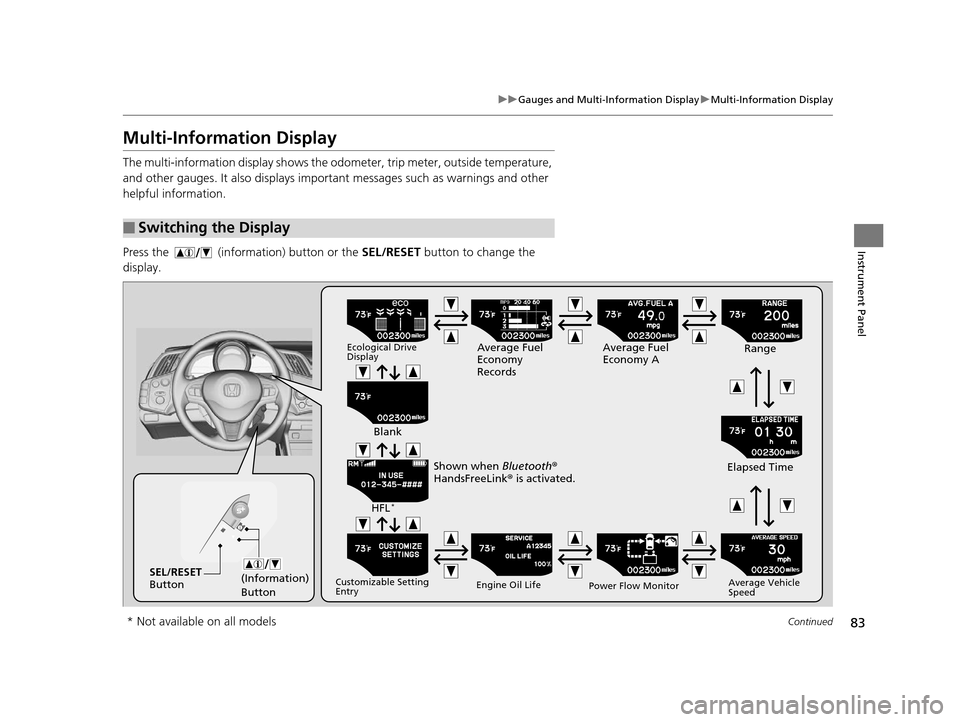
Press the (information) button or the SEL/RESET button to change the
display.
■Switching the Display
(Information)
ButtonSEL/RESET
Button
Ecological Drive
DisplayAverage Fuel
Economy
Records Average Fuel
Economy A
Range
Elapsed Time
Average Vehicle
Speed
Power Flow Monitor
Engine Oil Life
Customizable Setting
Entry
HFL*
Blank
Shown when Bluetooth ®
HandsFreeLink ® is activated.
* Not available on all models
15 CR-Z-31SZT6400.book 83 ページ 2014年8月1日 金曜日 午後1時59分
Page 110 of 329
109Continued
Controls
Opening and Closing the Windows
Opening/Closing the Power Windows
The power windows can be opened and closed when the ignition switch is in ON
(w, using the switches on the doors. The driver side switches can be used to open
and close both windows.
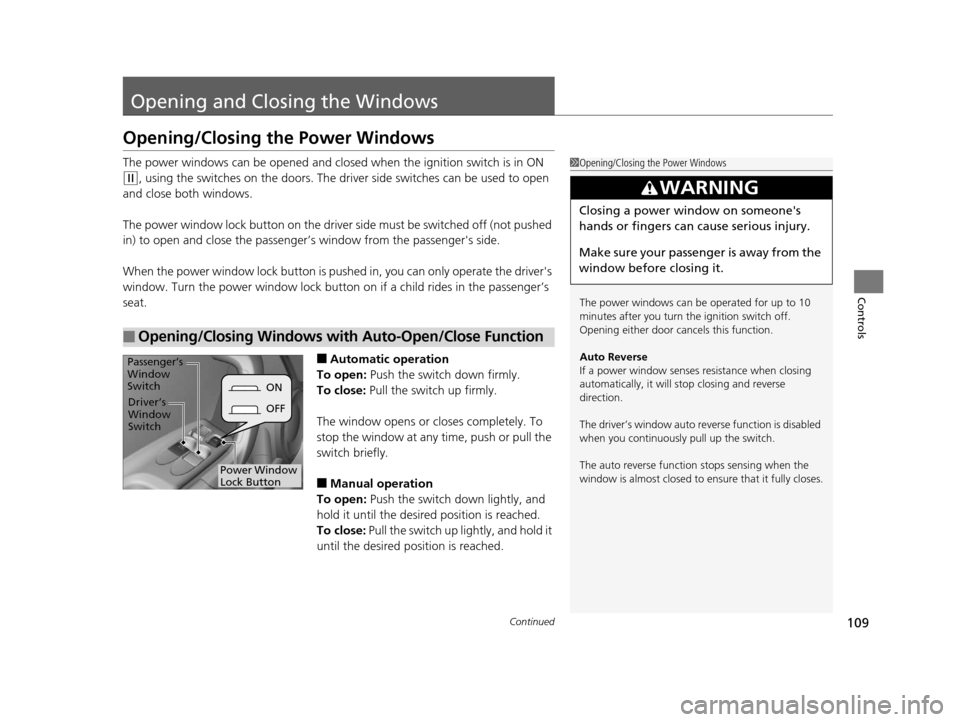
The power window lock button on the driver side must be switched off (not pushed
in) to open and close the passenger’s window from the passenger's side.
When the power window lock button is pushed in, you can only operate the driver's
window. Turn the power window lock button on if a child rides in the passenger’s
seat.
■Automatic operation
To open: Push the switch down firmly.
To close: Pull the switch up firmly.
The window opens or closes completely. To
stop the window at any time, push or pull the
switch briefly.
■Manual operation
To open: Push the switch down lightly, and
hold it until the desired position is reached.
To close: Pull the switch up lightly, and hold it
until the desired position is reached.
■Opening/Closing Windows with Auto-Open/Close Function
1 Opening/Closing the Power Windows
The power windows can be operated for up to 10
minutes after you turn the ignition switch off.
Opening either door cancels this function.
Auto Reverse
If a power window senses resistance when closing
automatically, it will stop closing and reverse
direction.
The driver’s window auto re verse function is disabled
when you continuously pull up the switch.
The auto reverse function stops sensing when the
window is almost closed to en sure that it fully closes.
3WARNING
Closing a power window on someone's
hands or fingers can cause serious injury.
Make sure your passenger is away from the
window before closing it.
ON
OFF
Power Window
Lock Button
Driver’s
Window
Switch
Passenger’s
Window
Switch
15 CR-Z-31SZT6400.book 109 ページ 2014年8月1日 金曜日 午後1時59分
Page 112 of 329
111
Controls
Operating the Switches Around the Steering Wheel
Ignition Switch
1Ignition Switch
You cannot take the key out unless the shift lever is
in
( P.
If you open the driver's door when the key is in LOCK
(0 or ACCESSORY (q, a warning buzzer will sound
to remind you to take the key out.
When this happens, the fo llowing messages appear
on the multi-information display:
•In LOCK ( 0: REMOVE KEY
•In ACCESSORY (q: RETURN IGNITION SWITCH
TO LOCK (0) POSITION
The buzzer will stop when you take the key out.
If the key won't turn from LOCK
( 0 to ACCESSORY
(q, turn the key while moving the steering wheel left
and right. The steering wh eel will unlock, allowing
the key to turn.
3WARNING
Removing the key from the ignition switch
while driving locks the steering. This can
cause you to lose control of the vehicle.
Remove the key from the ignition switch
only when parked.
Manual transmission models
Continuously variable transmission models
All models
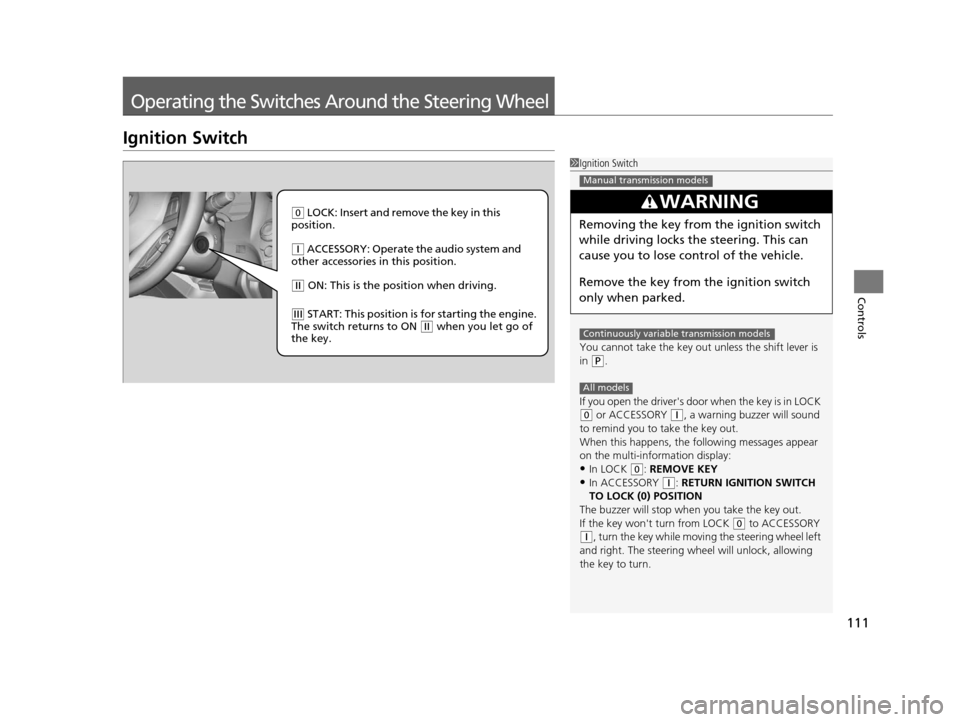
( 0 LOCK: Insert and remove the key in this
position.
( q ACCESSORY: Operate the audio system and
other accessories in this position.
( w ON: This is the position when driving.
(e START: This position is for starting the engine.
The switch returns to ON ( w when you let go of
the key.
15 CR-Z-31SZT6400.book 111 ページ 2014年8月1日 金曜日 午後1時59分
Page 120 of 329
119
uuOperating the Switches Around the Steering Wheel uAdjusting the Steering Wheel
Controls
Adjusting the Steering Wheel
The steering wheel height and distance from your body can be adjusted so that you
can comfortably grip the steering wheel in an appropriate driving posture.
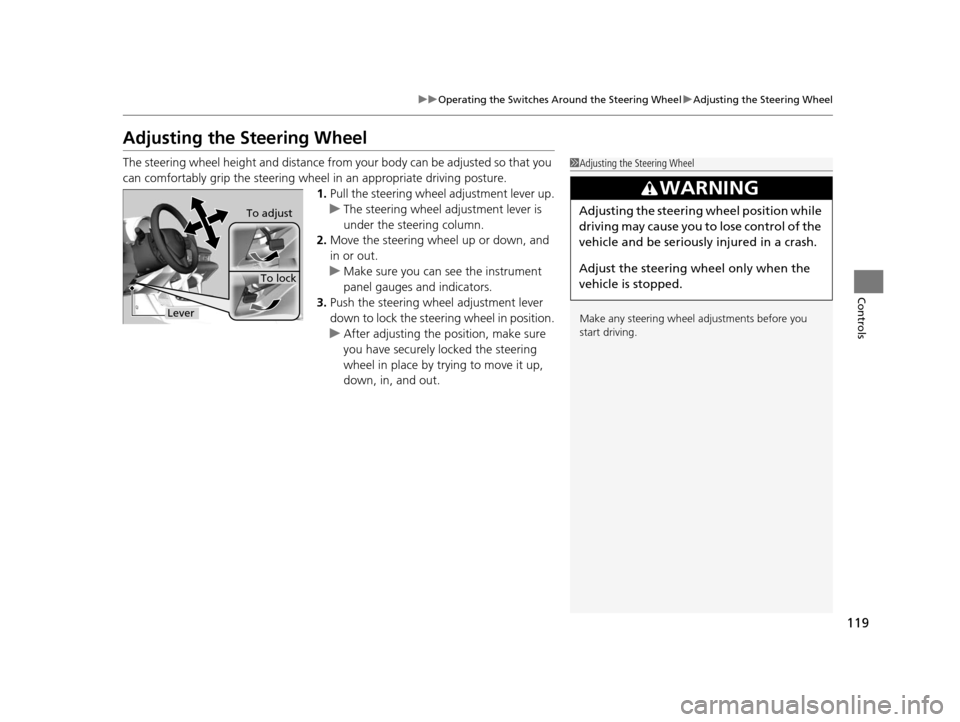
1. Pull the steering wheel adjustment lever up.
u The steering wheel adjustment lever is
under the steering column.
2. Move the steering wheel up or down, and
in or out.
u Make sure you can see the instrument
panel gauges and indicators.
3. Push the steering wheel adjustment lever
down to lock the steering wheel in position.
u After adjusting the position, make sure
you have securely locked the steering
wheel in place by trying to move it up,
down, in, and out.1Adjusting the Steering Wheel
Make any steering wheel adjustments before you
start driving.
3WARNING
Adjusting the steering wheel position while
driving may cause you to lose control of the
vehicle and be seriously injured in a crash.
Adjust the steering wh eel only when the
vehicle is stopped.To adjust
To lock
Lever
15 CR-Z-31SZT6400.book 119 ページ 2014年8月1日 金曜日 午後1時59分
Page 123 of 329
122
Controls
Adjusting the Seats
Adjusting the Seat Positions
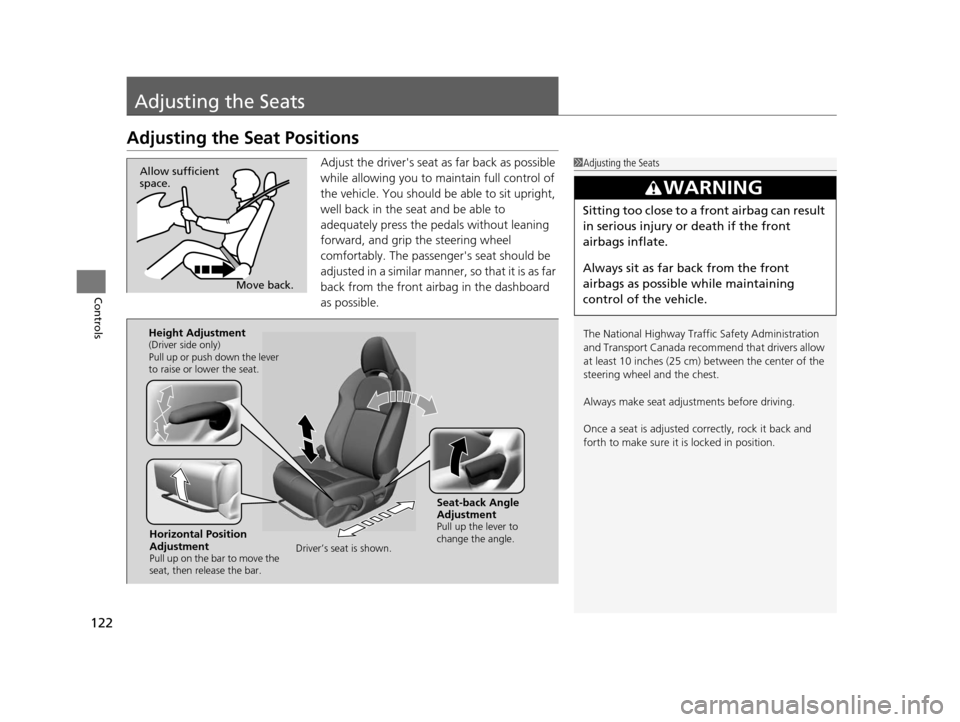
Adjust the driver's seat as far back as possible
while allowing you to maintain full control of
the vehicle. You should be able to sit upright,
well back in the seat and be able to
adequately press the pedals without leaning
forward, and grip the steering wheel
comfortably. The passenger's seat should be
adjusted in a similar manner, so that it is as far
back from the front airbag in the dashboard
as possible.1Adjusting the Seats
The National Highway Traffic Safety Administration
and Transport Cana da recommend that drivers allow
at least 10 inches (25 cm) between the center of the
steering wheel and the chest.
Always make seat adjustments before driving.
Once a seat is adjusted co rrectly, rock it back and
forth to make sure it is locked in position.
3WARNING
Sitting too close to a front airbag can result
in serious injury or death if the front
airbags inflate.
Always sit as far back from the front
airbags as possible while maintaining
control of the vehicle.
Move back.
Allow sufficient
space.
Horizontal Position
Adjustment
Pull up on the bar to move the
seat, then release the bar.
Height Adjustment(Driver side only)
Pull up or push down the lever
to raise or lower the seat.
Seat-back Angle
Adjustment
Pull up the lever to
change the angle.
Driver’s seat is shown.
15 CR-Z-31SZT6400.book 122 ページ 2014年8月1日 金曜日 午後1時59分
Page 124 of 329
Continued123
uuAdjusting the Seats uAdjusting the Seat Positions
Controls
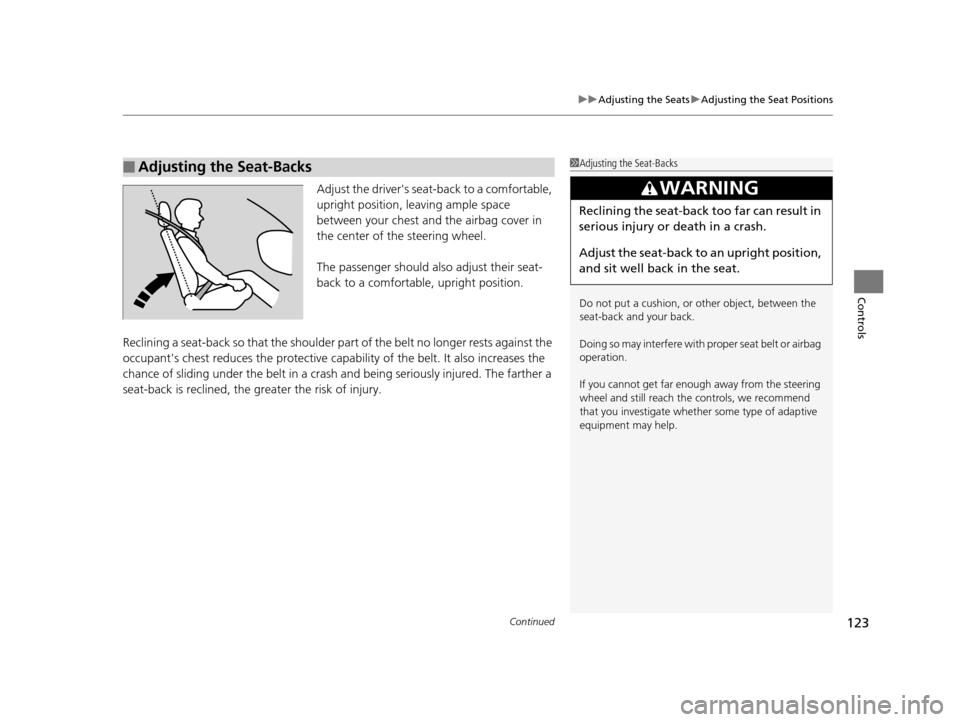
Adjust the driver's seat -back to a comfortable,
upright position, leaving ample space
between your chest and the airbag cover in
the center of the steering wheel.
The passenger should also adjust their seat-
back to a comfortable, upright position.
Reclining a seat-back so that the shoulder part of the belt no longer rests against the
occupant's chest reduces the protective capa bility of the belt. It also increases the
chance of sliding under the belt in a crash and being seriously injured. The farther a
seat-back is reclined, the gr eater the risk of injury.
■Adjusting the Seat-Backs1Adjusting the Seat-Backs
Do not put a cushion, or other object, between the
seat-back and your back.
Doing so may interfere with proper seat belt or airbag
operation.
If you cannot get far e nough away from the steering
wheel and still reach th e controls, we recommend
that you investigate whether some type of adaptive
equipment may help.
3WARNING
Reclining the seat-back too far can result in
serious injury or death in a crash.
Adjust the seat-back to an upright position,
and sit well back in the seat.
15 CR-Z-31SZT6400.book 123 ページ 2014年8月1日 金曜日 午後1時59分
Page 125 of 329
uuAdjusting the Seats uAdjusting the Seat Positions
124
Controls
Your vehicle is equipped with head restraints in both seating positions. However,
they are non-adjustable.
Head restraints are most effective for pr otection against whiplash and other rear-
impact crash injuries.
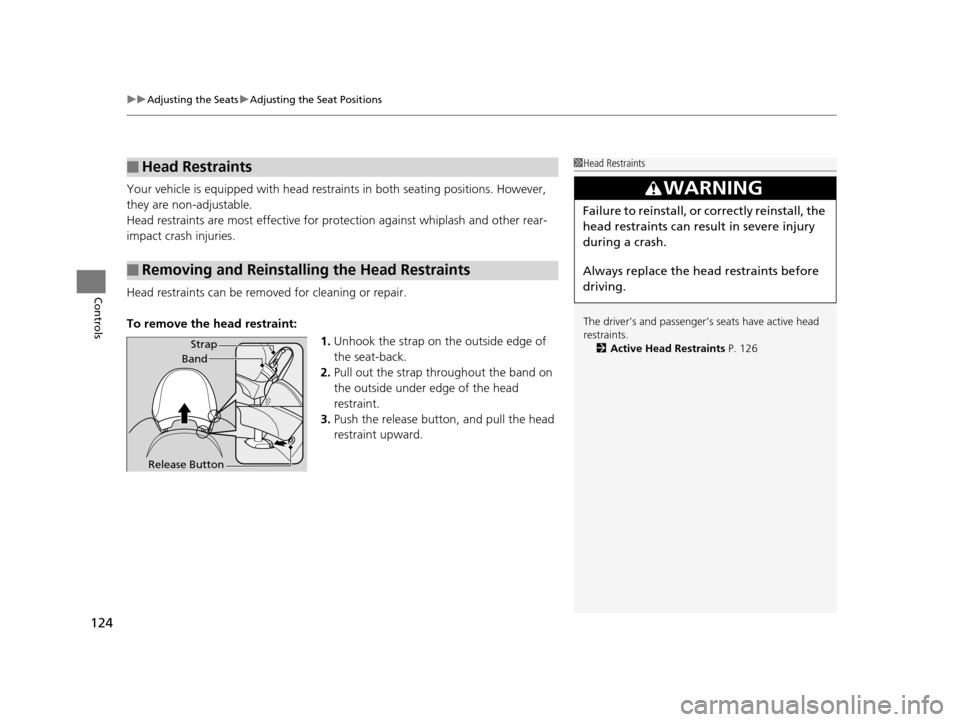
Head restraints can be removed for cleaning or repair.
To remove the head restraint:
1.Unhook the strap on the outside edge of
the seat-back.
2. Pull out the strap throughout the band on
the outside under edge of the head
restraint.
3. Push the release butt on, and pull the head
restraint upward.
■Head Restraints
■Removing and Reinstalling the Head Restraints
1 Head Restraints
The driver’s and pa ssenger’s seats have active head
restraints.
2 Active Head Restraints P. 126
3WARNING
Failure to reinstall, or correctly reinstall, the
head restraints can result in severe injury
during a crash.
Always replace the he ad restraints before
driving.
Strap
Band
Release Button
15 CR-Z-31SZT6400.book 124 ページ 2014年8月1日 金曜日 午後1時59分
Page 126 of 329
Continued125
uuAdjusting the Seats uAdjusting the Seat Positions
Controls
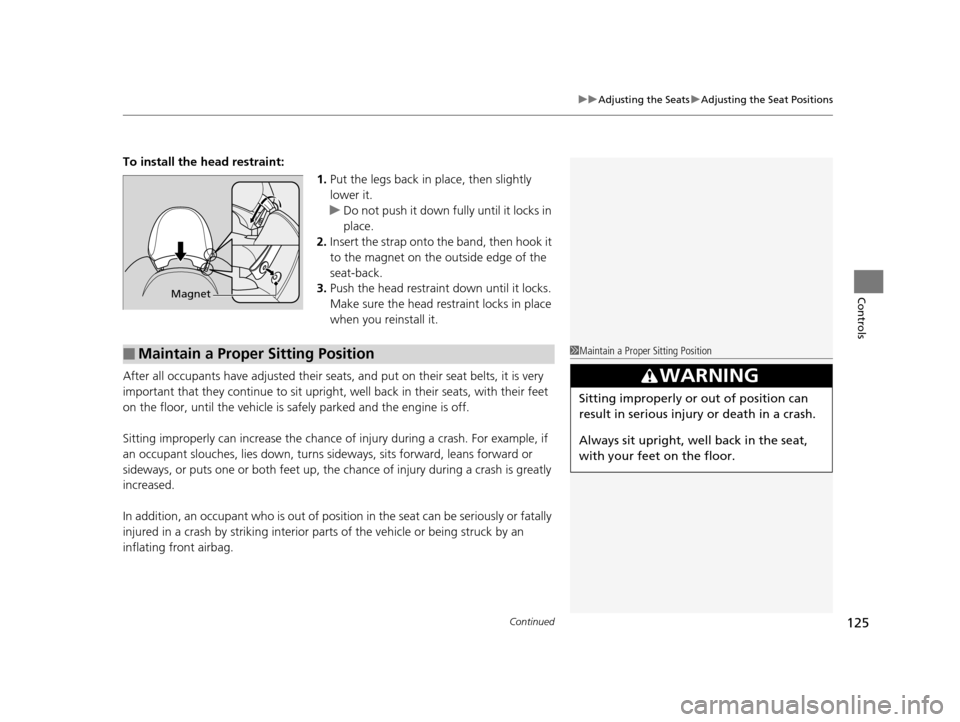
To install the head restraint:
1.Put the legs back in place, then slightly
lower it.
u Do not push it down fully until it locks in
place.
2. Insert the strap onto the band, then hook it
to the magnet on the outside edge of the
seat-back.
3. Push the head restraint down until it locks.
Make sure the head restraint locks in place
when you reinstall it.
After all occupants have adjusted their seats, and put on their seat belts, it is very
important that they continue to sit upright, well back in their seats, with their feet
on the floor, until the vehicle is safely parked and the engine is off.
Sitting improperly can increase the chance of injury during a crash. For example, if
an occupant slouches, lies down, turns si deways, sits forward, leans forward or
sideways, or puts one or both feet up, the chance of injury during a crash is greatly
increased.
In addition, an occupant who is out of position in the seat can be seriously or fatally
injured in a crash by striking interior parts of the vehicle or being struck by an
inflating front airbag.
Magnet
■Maintain a Proper Sitting Position1 Maintain a Proper Sitting Position
3WARNING
Sitting improperly or out of position can
result in serious injury or death in a crash.
Always sit upright, well back in the seat,
with your feet on the floor.
15 CR-Z-31SZT6400.book 125 ページ 2014年8月1日 金曜日 午後1時59分
Page 129 of 329
128
uuInterior Lights/Interior Convenience Items uInterior Convenience Items
Controls
Interior Convenience Items
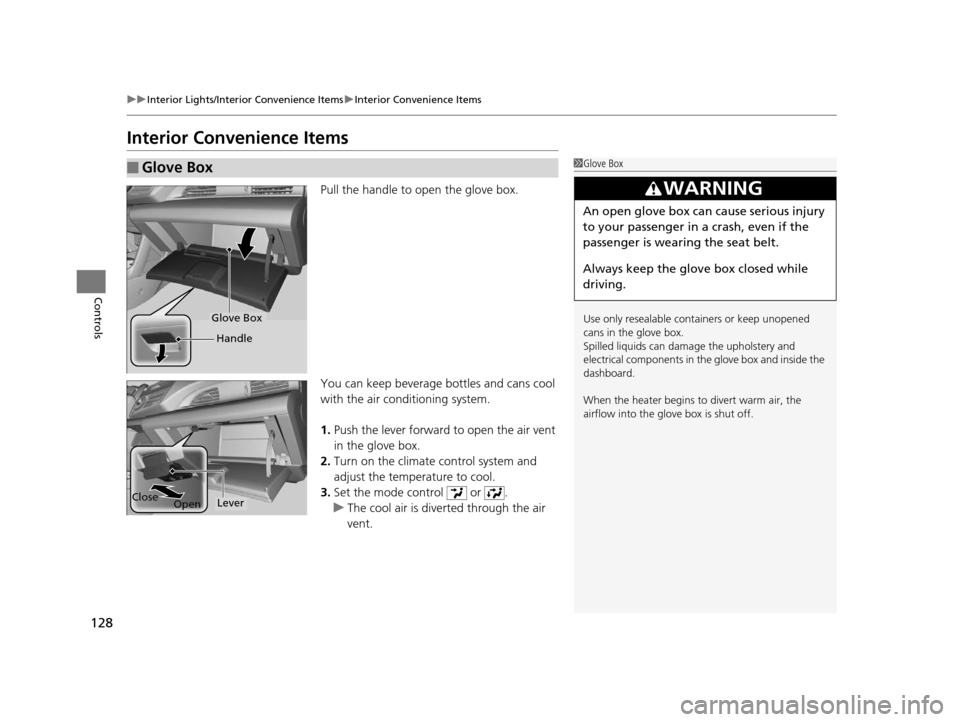
Pull the handle to open the glove box.
You can keep beverage bottles and cans cool
with the air condi tioning system.
1. Push the lever forward to open the air vent
in the glove box.
2. Turn on the climate control system and
adjust the temperature to cool.
3. Set the mode control or .
u The cool air is dive rted through the air
vent.
■Glove Box1 Glove Box
Use only resealable cont ainers or keep unopened
cans in the glove box.
Spilled liquids can dama ge the upholstery and
electrical components in the glove box and inside the
dashboard.
When the heater begins to divert warm air, the
airflow into the glov e box is shut off.
3WARNING
An open glove box can cause serious injury
to your passenger in a crash, even if the
passenger is wearing the seat belt.
Always keep the glove box closed while
driving.
Glove Box
Handle
Close
OpenLever
15 CR-Z-31SZT6400.book 128 ページ 2014年8月1日 金曜日 午後1時59分
Page 132 of 329
Continued131
uuInterior Lights/Interior Convenience Items uInterior Convenience Items
Controls
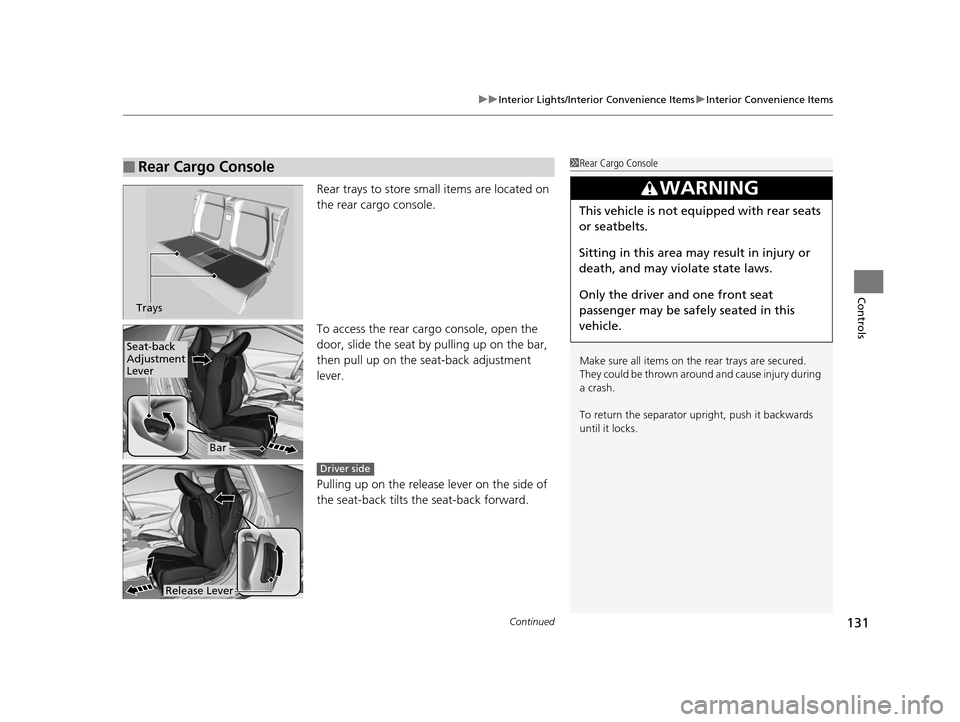
Rear trays to store small items are located on
the rear cargo console.
To access the rear ca rgo console, open the
door, slide the seat by pulling up on the bar,
then pull up on the seat-back adjustment
lever.
Pulling up on the release lever on the side of
the seat-back tilts the seat-back forward.
■Rear Cargo Console1 Rear Cargo Console
Make sure all items on the rear trays are secured.
They could be thrown around and cause injury during
a crash.
To return the separator upright, push it backwards
until it locks.
3WARNING
This vehicle is not equipped with rear seats
or seatbelts.
Sitting in this area may result in injury or
death, and may violate state laws.
Only the driver and one front seat
passenger may be safely seated in this
vehicle.
Trays
Seat-back
Adjustment
Lever
Bar
Release Lever
Driver side
15 CR-Z-31SZT6400.book 131 ページ 2014年8月1日 金曜日 午後1時59分