audio HONDA CR-Z 2015 1.G Owners Manual
[x] Cancel search | Manufacturer: HONDA, Model Year: 2015, Model line: CR-Z, Model: HONDA CR-Z 2015 1.GPages: 329, PDF Size: 17.44 MB
Page 3 of 329
Contents
This owner’s manual should be considered a permanent part of the
vehicle and should remain with the vehicle when it is sold.
This owner’s manual covers all models of your vehicle. You may find
descriptions of equipment and features that are not on your
particular model.
Images throughout this owner’s manu al (including the front cover)
represent features and equipment that are available on some, but
not all, models. Your particular mo del may not have some of these
features.
This owner's manual is for vehicles sold in the United States and
Canada.
The information and specifications in cluded in this publication were
in effect at the time of approval for printing. Honda Motor Co., Ltd.
reserves the right, however, to discontinue or change specifications
or design at any time without notice and without incurring any
obligation.2 Safe Driving P. 27
For Safe Driving P. 28 Seat Belts P. 32 Airbags P. 39
2Instrument Panel P. 65
Indicators P. 66 Gauges and Multi-Information Display P. 81
2Controls P. 97
Clock P. 98 Locking and Unlocking the Doors P. 99
Operating the Switches Ar ound the Steering Wheel P. 111
Interior Lights/Interior Convenience Items P. 127
2 Features P. 139
Audio System P. 140 Audio Error Messages P. 155
2Driving P. 173
Before Driving P. 174 Towing a Trailer P. 179
Multi-View Rear Camera P. 215
Refueling P. 218 Fuel Economy P. 221
2Maintenance P. 223
Before Performing Maintenance P. 224 Maintenance MinderTM P. 227
Checking and Maintaining Wiper Blades P. 252
Climate Control System Maintenance P. 267
2Handling the Unexpected P. 273
Tools P. 274 If a Tire Goes Flat P. 275
Overheating P. 294 Indicator, Coming On/Blinking P. 296
2Information P. 309
Specifications P. 310 Identification Numbers P. 312
Emissions Testing P. 315 Warranty Coverages P. 317
15 CR-Z-31SZT6400.book 2 ページ 2014年8月1日 金曜日 午後1時59分
Page 4 of 329
Contents
Child Safety P. 54Exhaust Gas Hazard P. 62Safety Labels P. 63
Opening and Closing the Hatch P. 105 Security System P. 107 Opening and Closing the Windows P. 109
Adjusting the Mirrors P. 120 Adjusting the Seats P. 122
Climate Control System P. 136
General Information on the Audio System P. 157 Bluetooth® HandsFreeLink ® P. 160
When Driving P. 180 Braking P. 210Parking Your Vehicle P. 214
Rearview Camera P. 216
Accessories and Modifications P. 222
Maintenance Under the Hood P. 231 Replacing Light Bulbs P. 244
Checking and Maintaining Tires P. 255 12 Volt Battery P. 264 Remote Transmitter Care P. 266
Cleaning P. 268
Engine Does Not Start P. 290 Jump Starting P. 291 Shift Lever Does Not Move P. 293
Fuses P. 301 Emergency Towing P. 305When You Cannot Open the Hatch P. 307
Devices that Emit Radio Waves P. 313 Reporting Safety Defects P. 314
Authorized Manuals P. 319 Customer Service Information P. 320
Quick Reference GuideP. 4
Safe DrivingP. 27
Instrument PanelP. 65
ControlsP. 97
FeaturesP. 139
DrivingP. 173
MaintenanceP. 223
Handling the UnexpectedP. 273
InformationP. 309
IndexP. 321
15 CR-Z-31SZT6400.book 3 ページ 2014年8月1日 金曜日 午後1時59分
Page 5 of 329
4
Quick Reference Guide
Quick Reference Guide
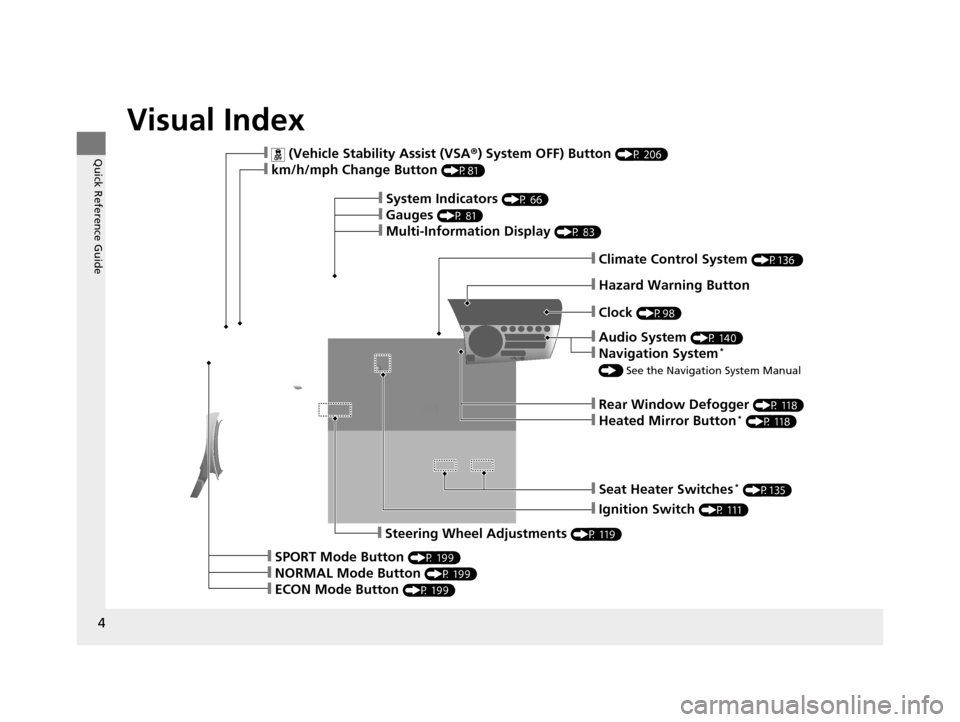
Visual Index
❙Rear Window Defogger (P 118)
❙Heated Mirror Button* (P 118)
❙Seat Heater Switches* (P135)
❙Ignition Switch (P 111)
❙Steering Wheel Adjustments (P 119)
❙SPORT Mode Button (P 199)
❙NORMAL Mode Button (P 199)
❙ECON Mode Button (P 199)
❙ (Vehicle Stability Assist (VSA®) System OFF) Button (P 206)
❙km/h/mph Change Button (P81)
❙System Indicators (P 66)
❙Gauges (P 81)
❙Multi-Information Display (P 83)
❙Climate Control System (P136 )
❙Hazard Warning Button
❙Clock (P98)
❙Audio System (P 140)
❙Navigation System*
() See the Navigation System Manual
15 CR-Z-31SZT6400.book 4 ページ 2014年8月1日 金曜日 午後1時59分
Page 6 of 329
5
Quick Reference Guide
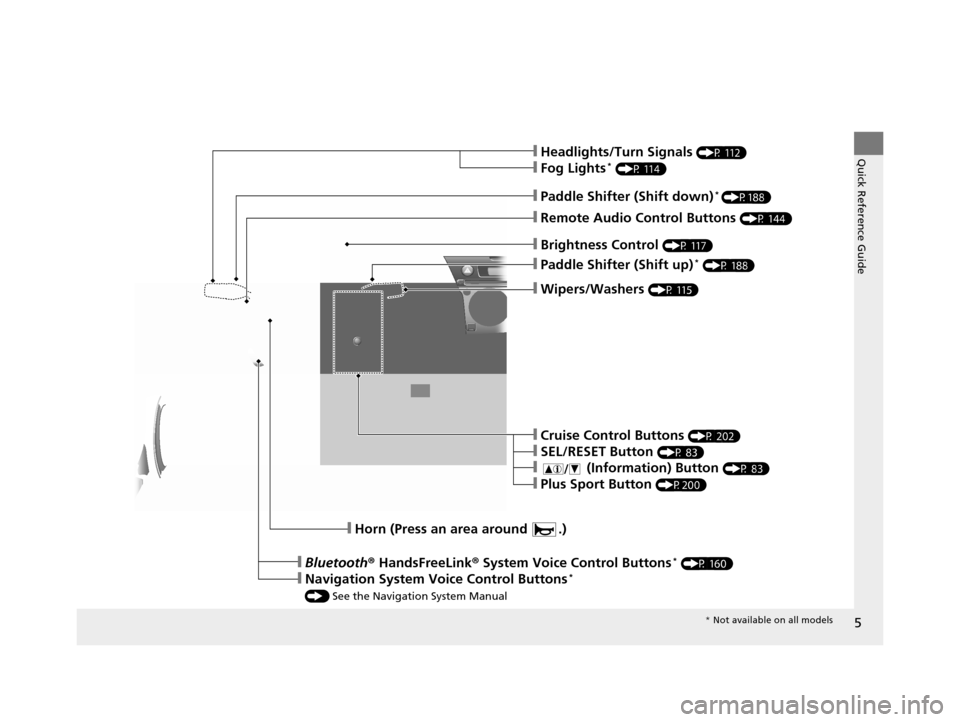
❙Wipers/Washers (P 115)
❙Paddle Shifter (Shift up)* (P 188)
❙Brightness Control (P 117)
❙Headlights/Turn Signals (P 112)
❙Fog Lights* (P 114)
❙Remote Audio Control Buttons (P 144)
❙Paddle Shifter (Shift down)* (P188)
❙Horn (Press an area around .)
❙Bluetooth® HandsFreeLink® System Voice Control Buttons* (P 160)
❙Navigation System Voice Control Buttons*
() See the Navigation System Manual
❙Cruise Control Buttons (P 202)
❙SEL/RESET Button (P 83)
❙ (Information) Button (P 83)
❙Plus Sport Button (P200)
* Not available on all models
15 CR-Z-31SZT6400.book 5 ページ 2014年8月1日 金曜日 午後1時59分
Page 21 of 329
20
Quick Reference Guide
Features (P139)
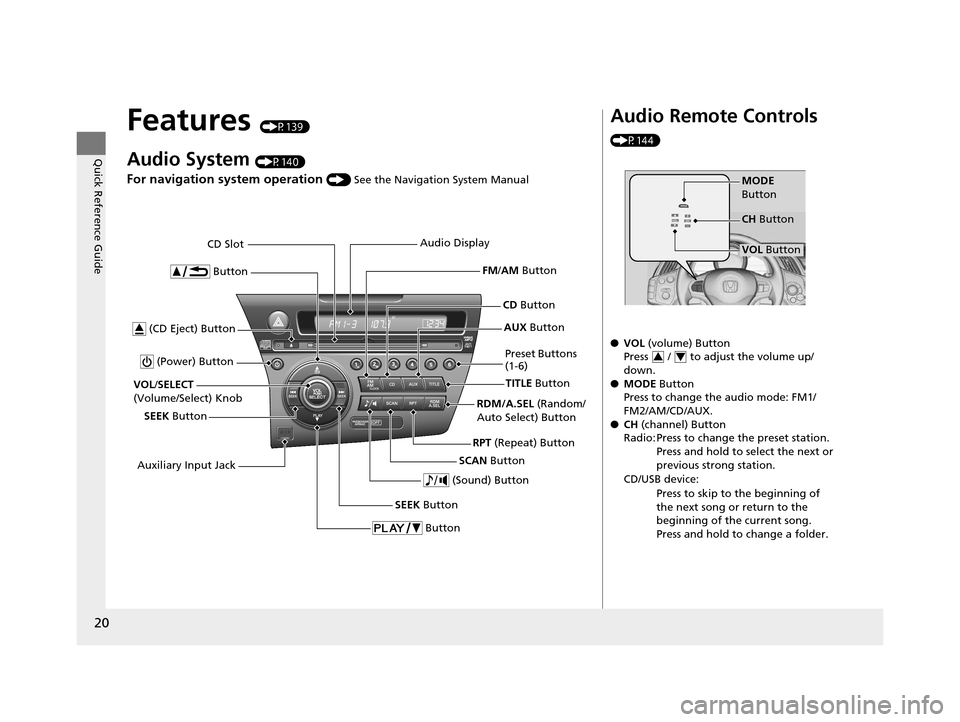
Audio System (P140)
For navigation system operation () See the Navigation System Manual
Button
TITLE Button
FM
/AM Button
(Power) Button
CD Button
AUX Button
CD Slot
(CD Eject) Button
SCAN Button
(Sound) Button
VOL /SELECT
(Volume/Select) Knob
SEEK Button Preset Buttons
(1-6)
Button
SEEK Button
Auxiliary Input Jack Audio Display
RDM/A.SEL (Random/
Auto Select) Button
RPT (Repeat) Button
Audio Remote Controls
(P144)
●VOL (volume) Button
Press / to adjust the volume up/
down.
● MODE Button
Press to change the audio mode: FM1/
FM2/AM/CD/AUX.
● CH (channel) Button
Radio: Press to change the preset station. Press and hold to select the next or
previous strong station.
CD/USB device: Press to skip to the beginning of
the next song or return to the
beginning of the current song.
Press and hold to change a folder.
MODE
Button
VOL Button
CH
Button
34
15 CR-Z-31SZT6400.book 20 ページ 2014年8月1日 金曜日 午後1時59分
Page 112 of 329
111
Controls
Operating the Switches Around the Steering Wheel
Ignition Switch
1Ignition Switch
You cannot take the key out unless the shift lever is
in
( P.
If you open the driver's door when the key is in LOCK
(0 or ACCESSORY (q, a warning buzzer will sound
to remind you to take the key out.
When this happens, the fo llowing messages appear
on the multi-information display:
•In LOCK ( 0: REMOVE KEY
•In ACCESSORY (q: RETURN IGNITION SWITCH
TO LOCK (0) POSITION
The buzzer will stop when you take the key out.
If the key won't turn from LOCK
( 0 to ACCESSORY
(q, turn the key while moving the steering wheel left
and right. The steering wh eel will unlock, allowing
the key to turn.
3WARNING
Removing the key from the ignition switch
while driving locks the steering. This can
cause you to lose control of the vehicle.
Remove the key from the ignition switch
only when parked.
Manual transmission models
Continuously variable transmission models
All models
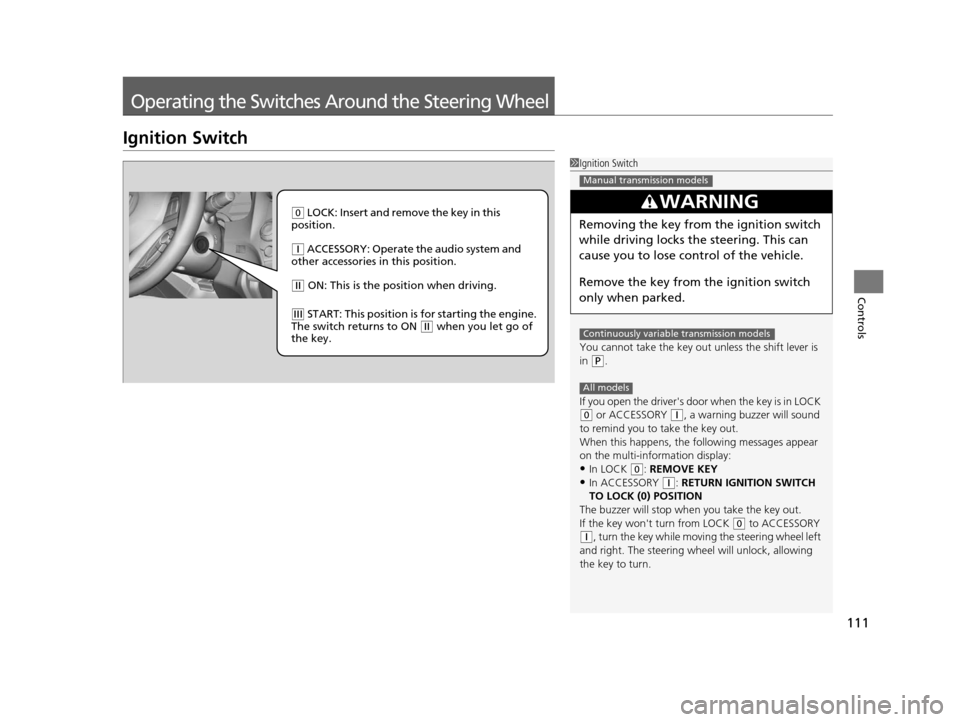
( 0 LOCK: Insert and remove the key in this
position.
( q ACCESSORY: Operate the audio system and
other accessories in this position.
( w ON: This is the position when driving.
(e START: This position is for starting the engine.
The switch returns to ON ( w when you let go of
the key.
15 CR-Z-31SZT6400.book 111 ページ 2014年8月1日 金曜日 午後1時59分
Page 140 of 329
139
Features
This chapter describes how to operate technology features.
Audio System
About Your Audio System................ 140
USB Adapter Cable .......................... 141
Auxiliary Input Jack .......................... 142
Audio System Theft Protection ......... 143
Audio Remote Controls.................... 144
Audio System Basic Operation.......... 145
Playing the AM/FM Radio ................. 147
Playing a CD .................................... 149
Playing an iPod ................................ 151
Playing a USB Flash Drive ................. 153 Audio Error Messages
CD Player......................................... 155
iPod/USB Flash Drive ........................ 156
General Information on the Audio System Recommended CDs ......................... 157
Compatible iPod and USB Flash Drives ..... 159
Bluetooth ® HandsFreeLink®
Using HFL ........................................ 160
HFL Menus ...................................... 162
15 CR-Z-31SZT6400.book 139 ページ 2014年8月1日 金曜日 午後1時59分
Page 141 of 329
140
Features
Audio System
About Your Audio System
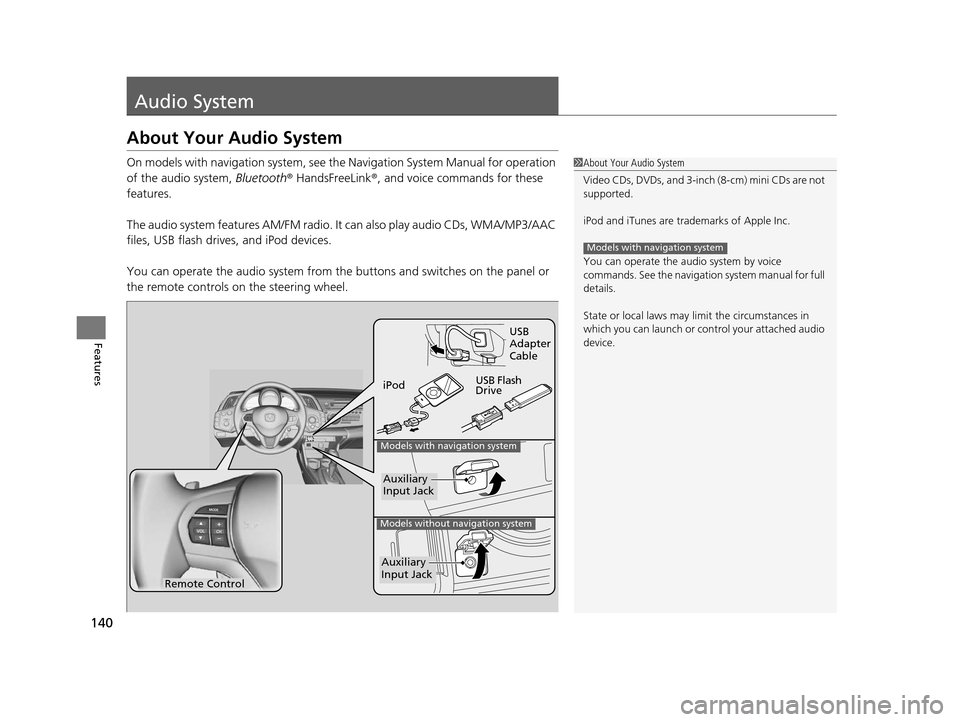
On models with navigation system, see the Navigation System Manual for operation
of the audio system, Bluetooth® HandsFreeLink ®, and voice commands for these
features.
The audio system features AM/FM radio. It can also play audio CDs, WMA/MP3/AAC
files, USB flash drives, and iPod devices.
You can operate the audio system from the buttons and switches on the panel or
the remote controls on the steering wheel.1About Your Audio System
Video CDs, DVDs, and 3-inch (8-cm) mini CDs are not
supported.
iPod and iTunes are trademarks of Apple Inc.
You can operate the audio system by voice
commands. See the navigation system manual for full
details.
State or local laws may li mit the circumstances in
which you can launch or cont rol your attached audio
device.
Models with navigation system
Remote Control iPod
USB Flash
DriveUSB
Adapter
Cable
Models with navigation system
Models without navigation system
Auxiliary
Input Jack
Auxiliary
Input Jack
15 CR-Z-31SZT6400.book 140 ページ 2014年8月1日 金曜日 午後1時59分
Page 142 of 329
141
uuAudio System uUSB Adapter Cable
Features
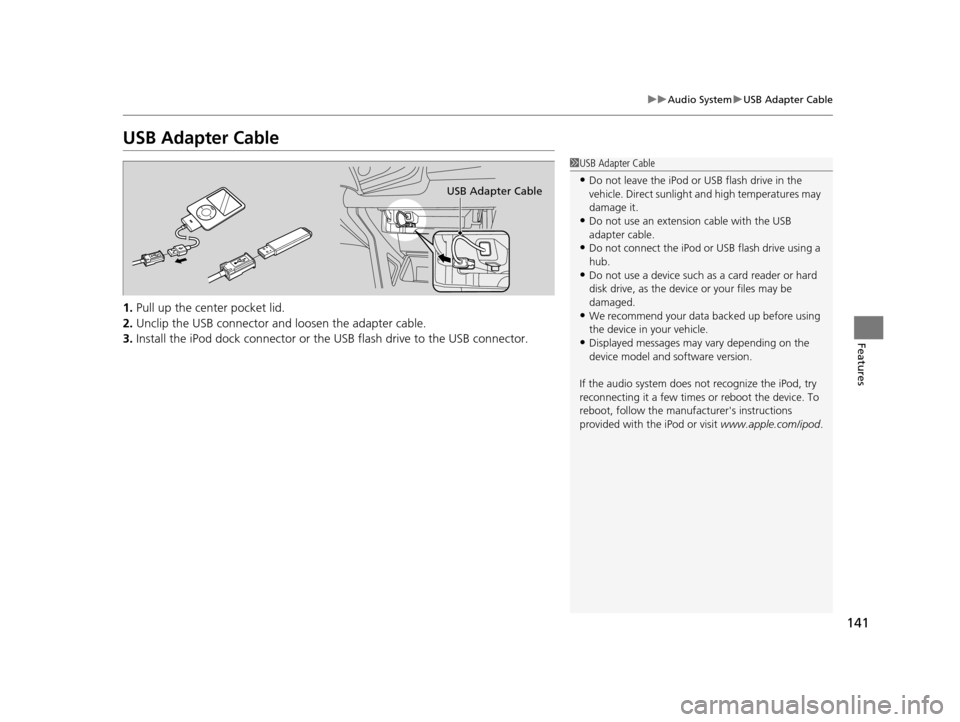
USB Adapter Cable
1. Pull up the center pocket lid.
2. Unclip the USB connector an d loosen the adapter cable.
3. Install the iPod dock connector or the USB flash drive to the USB connector.
1USB Adapter Cable
•Do not leave the iPod or USB flash drive in the
vehicle. Direct sunlight and high temperatures may
damage it.
•Do not use an extension cable with the USB
adapter cable.
•Do not connect the iPod or USB flash drive using a
hub.
•Do not use a device such as a card reader or hard
disk drive, as the device or your files may be
damaged.
•We recommend your data backed up before using
the device in your vehicle.
•Displayed messages may vary depending on the
device model and software version.
If the audio system does not recognize the iPod, try
reconnecting it a few times or reboot the device. To
reboot, follow the manufac turer's instructions
provided with the iPod or visit www.apple.com/ipod.
USB Adapter Cable
15 CR-Z-31SZT6400.book 141 ページ 2014年8月1日 金曜日 午後1時59分
Page 143 of 329
142
uuAudio System uAuxiliary Input Jack
Features
Auxiliary Input Jack
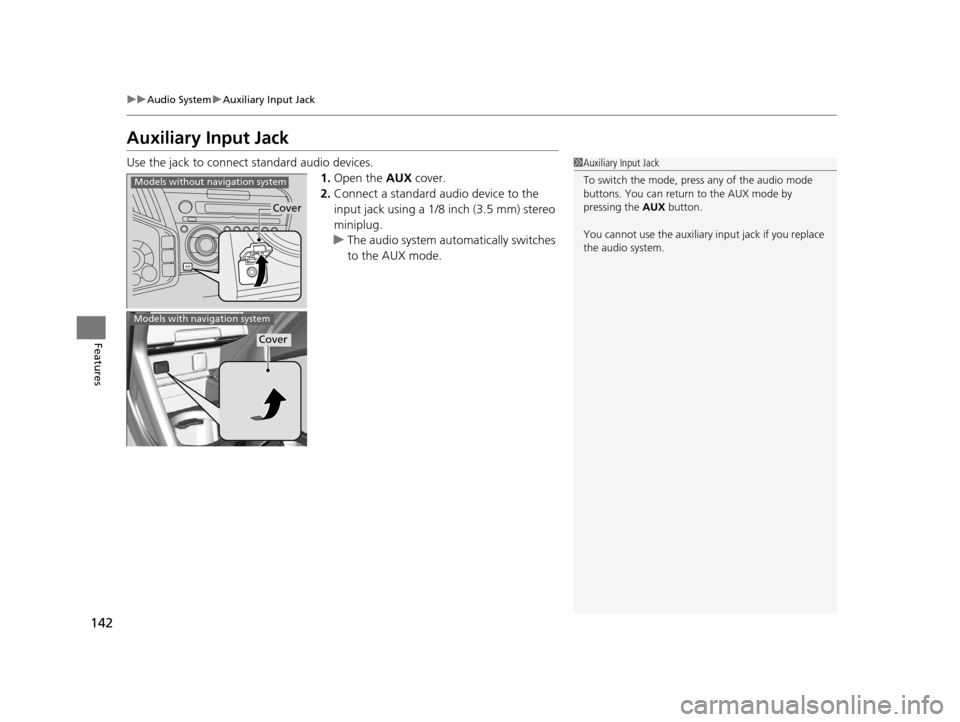
Use the jack to connect standard audio devices.
1.Open the AUX cover.
2. Connect a standard audio device to the
input jack using a 1/8 inch (3.5 mm) stereo
miniplug.
u The audio system automatically switches
to the AUX mode.1Auxiliary Input Jack
To switch the mode, pres s any of the audio mode
buttons. You can return to the AUX mode by
pressing the AUX button.
You cannot use the auxiliary input jack if you replace
the audio system.
Cover
Models without navigation system
Models with navigation system
Cover
15 CR-Z-31SZT6400.book 142 ページ 2014年8月1日 金曜日 午後1時59分