ad blue HONDA CROSSTOUR 2011 Navigation Manual (in English)
[x] Cancel search | Manufacturer: HONDA, Model Year: 2011, Model line: CROSSTOUR, Model: HONDA CROSSTOUR 2011Pages: 156, PDF Size: 3.91 MB
Page 1 of 156
Navigation System1
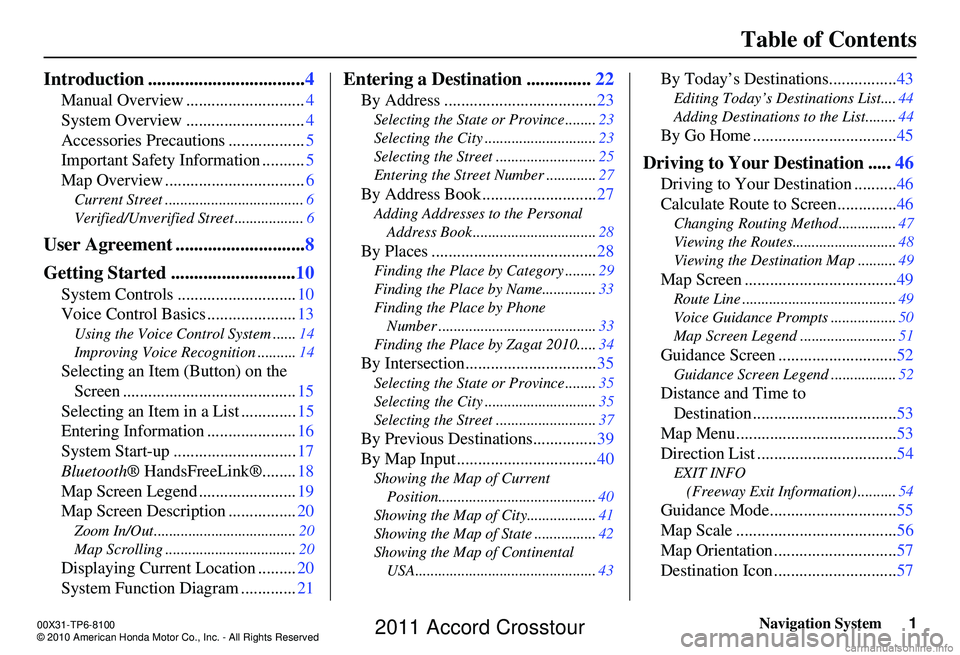
Table of Contents
Introduction .................................. 4
Manual Overview ............................ 4
System Overview ............................ 4
Accessories Precautions .................. 5
Important Safety Information .......... 5
Map Overview ................................. 6
Current Street .................................... 6
Verified/Unverified Street .................. 6
User Agreement ............................8
Getting Started ........................... 10
System Controls ............................ 10
Voice Control Basics ..................... 13
Using the Voice Control System ...... 14
Improving Voice Rec ognition ..........14
Selecting an Item (Button) on the
Screen ......................................... 15
Selecting an Item in a List ............. 15
Entering Information ..................... 16
System Start-up ............................. 17
Bluetooth ® HandsFreeLink®........ 18
Map Screen Legend ....................... 19
Map Screen Description ................ 20
Zoom In/Out..................................... 20
Map Scrolling .................................. 20
Displaying Current Location .........20
System Function Diagram ............. 21
Entering a Destination ..............22
By Address .................................... 23
Selecting the State or Province ........ 23
Selecting the City ............................. 23
Selecting the Street .......................... 25
Entering the Street Number ............. 27
By Address Book ...........................27
Adding Addresses to the Personal
Address Book ................................ 28
By Places ....................................... 28
Finding the Place by Category ........ 29
Finding the Place by Name.............. 33
Finding the Place by Phone Number ......................................... 33
Finding the Place by Zagat 2010..... 34
By Intersection...............................35
Selecting the State or Province ........ 35
Selecting the City ............................. 35
Selecting the Street .......................... 37
By Previous Destinations...............39
By Map Input ................................. 40
Showing the Map of Current
Position......................................... 40
Showing the Map of City ..................41
Showing the Map of State ................ 42
Showing the Map of Continental USA............................................... 43
By Today’s Destinations................ 43
Editing Today’s Destinations List.... 44
Adding Destinations to the List........44
By Go Home .................................. 45
Driving to Your Destination .....46
Driving to Your Destination .......... 46
Calculate Route to Screen.............. 46
Changing Routing Method ............... 47
Viewing the Routes........................... 48
Viewing the Destination Map .......... 49
Map Screen ....................................49
Route Line ........................................ 49
Voice Guidance Prompts ................. 50
Map Screen Legend ......................... 51
Guidance Screen ............................52
Guidance Screen Legend ................. 52
Distance and Time to
Destination .................................. 53
Map Menu...................................... 53
Direction List ................................. 54
EXIT INFO
(Freeway Exit Information) .......... 54
Guidance Mode.............................. 55
Map Scale ...................................... 56
Map Orientation ............................. 57
Destination Icon ............................. 57
00X31-TP6-8100
\251 2010 American Honda Motor Co., Inc. - All Rights Reserved
2011 Accord Crosstour
Page 7 of 156
Navigation System7
Introduction
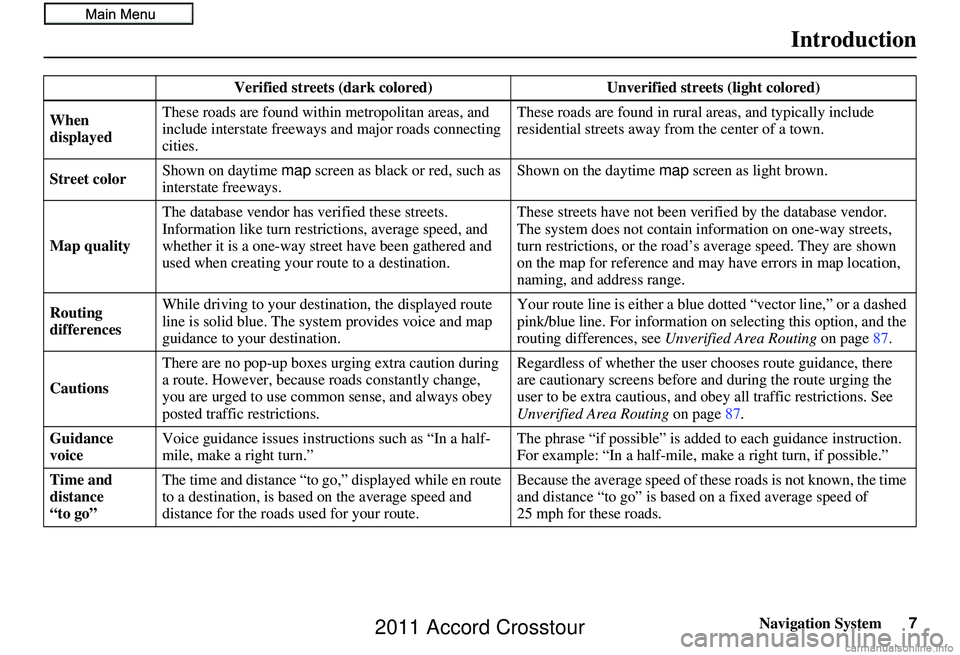
Verified streets (dark colored) Unverified streets (light colored)
When
displayed These roads are found within metropolitan areas, and
include interstate freeways
and major roads connecting
cities. These roads are found in rural
areas, and typically include
residential streets away fr om the center of a town.
Street color Shown on daytime
map screen as black or red, such as
interstate freeways. Shown on the daytime
map screen as light brown.
Map quality The database vendor has
verified these streets.
Information like turn restri ctions, average speed, and
whether it is a one-way street have been gathered and
used when creating your route to a destination. These streets have not been ve
rified by the database vendor.
The system does not contain in formation on one-way streets,
turn restrictions, or the road’s average speed. They are shown
on the map for reference and may have errors in map location,
naming, and address range.
Routing
differences While driving to your destin
ation, the displayed route
line is solid blue. The syst em provides voice and map
guidance to your destination. Your route line is either a blue
dotted “vector line,” or a dashed
pink/blue line. For information on selecting this option, and the
routing differences, see Unverified Area Routing on page87.
Cautions There are no pop-up boxes urging extra caution during
a route. However, because roads constantly change,
you are urged to use common
sense, and always obey
posted traffic restrictions. Regardless of whether the user
chooses route guidance, there
are cautionary screens before and during the route urging the
user to be extra cautious, and obey all traffic restrictions. See
Unverified Area Routing on page87.
Guidance
voice Voice guidance issues instructions such as “In a half-
mile, make a right turn.” The phrase “if possible” is added
to each guidance instruction.
For example: “In a half-mile, ma ke a right turn, if possible.”
Time and
distance
“to go” The time and distance “to go,
” displayed while en route
to a destination, is based on the average speed and
distance for the roads used for your route. Because the average speed of thes
e roads is not known, the time
and distance “to go” is based on a fixed average speed of
25 mph for these roads.
2011 Accord Crosstour
Page 13 of 156
Navigation System13
Getting Started
Voice Control Basics
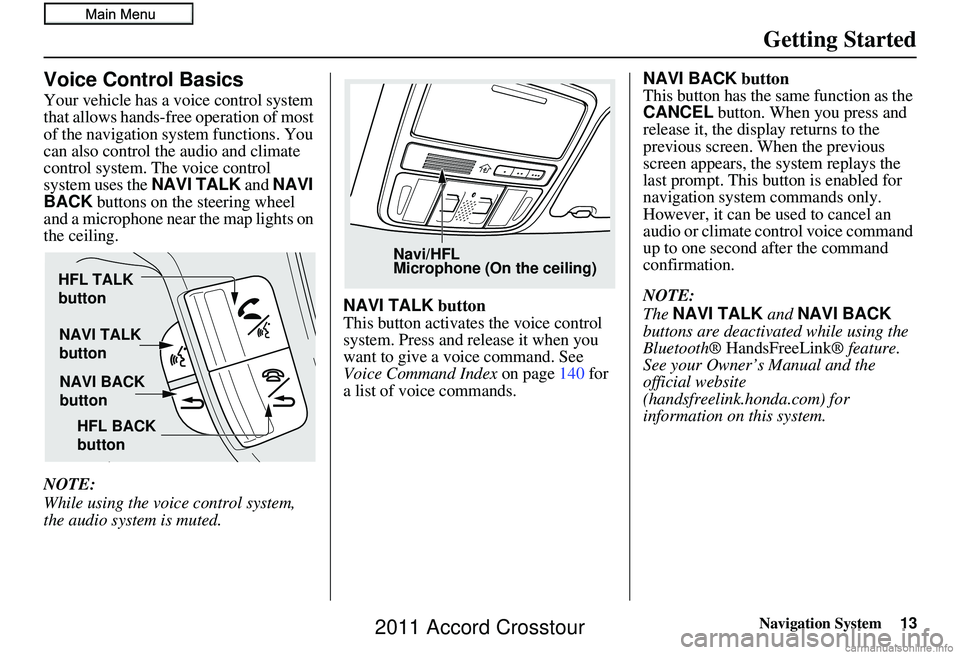
Your vehicle has a voice control system
that allows hands-free operation of most
of the navigation system functions. You
can also control the audio and climate
control system. The voice control
system uses the NAVI TALK and NAVI
BACK buttons on the steering wheel
and a microphone near the map lights on
the ceiling.
NOTE:
While using the voice control system,
the audio system is muted. NAVI TALK
button
This button activates the voice control
system. Press and release it when you
want to give a voice command. See
Voice Command Index on page140 for
a list of voice commands. NAVI BACK
button
This button has the same function as the
CANCEL button. When you press and
release it, the display returns to the
previous screen. When the previous
screen appears, the system replays the
last prompt. This button is enabled for
navigation system commands only.
However, it can be used to cancel an
audio or climate control voice command
up to one second after the command
confirmation.
NOTE:
The NAVI TALK and NAVI BACK
buttons are deactivated while using the
Bluetooth® HandsFreeLink ® feature.
See your Owner’s Manual and the
official website
(handsfreelink.honda.com) for
information on this system.
NAVI TALK
button
NAVI BACK
button
HFL TALK
button
HFL BACK
button
Navi/HFL
Microphone (On the ceiling)
2011 Accord Crosstour
Page 14 of 156
14Navigation System
Getting Started
Using the Voice Control System
You should use the voice control system
as much as possible, and consider
manual entry using the Interface Dial
as a backup method of entry.
Most of the system’s functions can be
controlled by voice commands activated
with the NAVI TALK button. To
control the navigation system by voice:
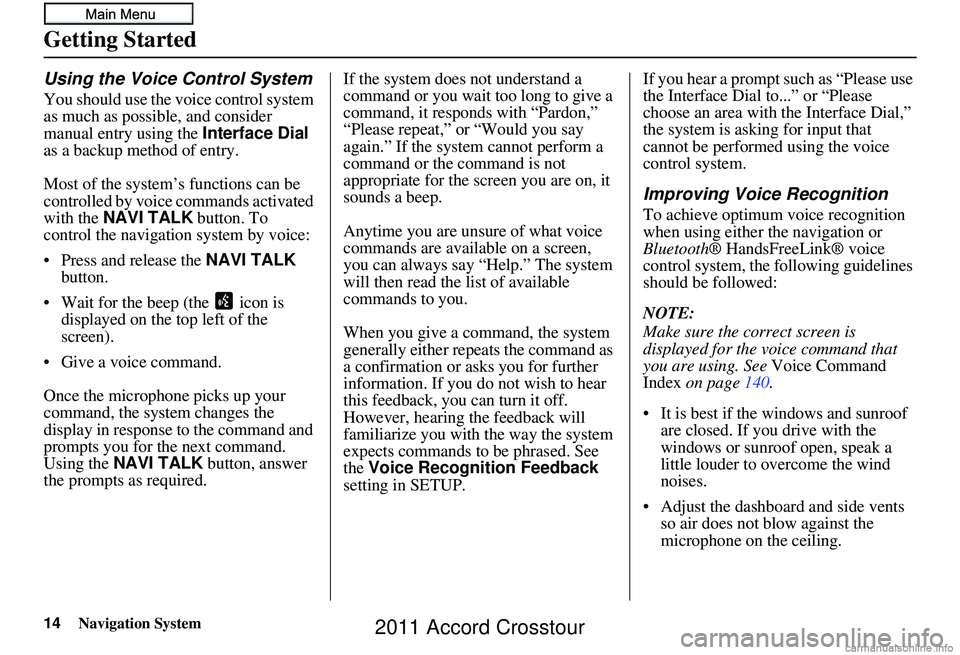
• Press and release the NAVI TALK
button.
• Wait for the beep (the icon is displayed on the top left of the
screen).
• Give a voice command.
Once the microphone picks up your
command, the system changes the
display in response to the command and
prompts you for the next command.
Using the NAVI TALK button, answer
the prompts as required. If the system does not understand a
command or you wait too long to give a
command, it responds with “Pardon,”
“Please repeat,” or “Would you say
again.” If the system cannot perform a
command or the command is not
appropriate for the screen you are on, it
sounds a beep.
Anytime you are unsure of what voice
commands are available on a screen,
you can always say “Help.” The system
will then read the list of available
commands to you.
When you give a command, the system
generally either repeats the command as
a confirmation or asks you for further
information. If you do not wish to hear
this feedback, you can turn it off.
However, hearing the feedback will
familiarize you with the way the system
expects commands to be phrased. See
the
Voice Recognition Feedback
setting in SETUP. If you hear a prompt such as “Please use
the Interface Dial to...” or “Please
choose an area with the Interface Dial,”
the system is asking for input that
cannot be performed using the voice
control system.
Improving Voice Recognition
To achieve optimum voice recognition
when using either the navigation or
Bluetooth
® HandsFreeLink® voice
control system, the following guidelines
should be followed:
NOTE:
Make sure the correct screen is
displayed for the vo ice command that
you are using. See Voice Command
Index on page 140.
• It is best if the windows and sunroof are closed. If you drive with the
windows or sunroof open, speak a
little louder to overcome the wind
noises.
• Adjust the dashboard and side vents so air does not blow against the
microphone on the ceiling.
2011 Accord Crosstour
Page 18 of 156
18Navigation System
Getting Started
If you press the CANCEL button, the
message will be displayed the next time
you start the vehicle.
NOTE:
The system will display the current
message and any older or previously
unread messages, with the newest
message listed first.Bluetooth® HandsFreeLink®
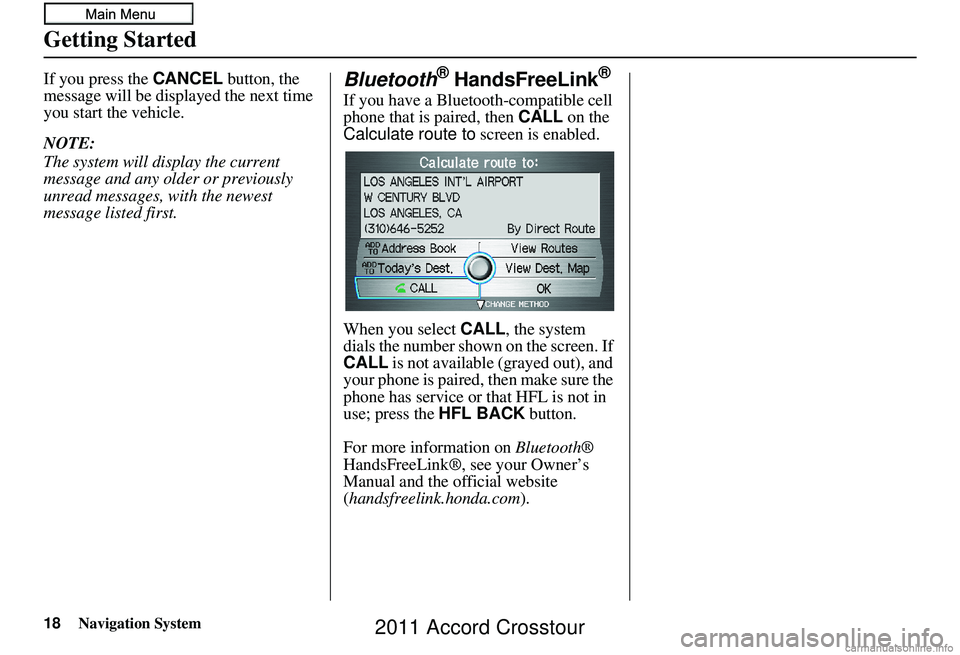
If you have a Bluetooth-compatible cell
phone that is paired, then CALL on the
Calculate route to screen is enabled.
When you select CALL, the system
dials the number shown on the screen. If
CALL is not available (grayed out), and
your phone is paired, then make sure the
phone has service or that HFL is not in
use; press the HFL BACK button.
For more information on Bluetooth®
HandsFreeLink®, see your Owner’s
Manual and the official website
(handsfreelink.honda.com ).
2011 Accord Crosstour
Page 21 of 156
Navigation System21
Getting Started
System Function Diagram
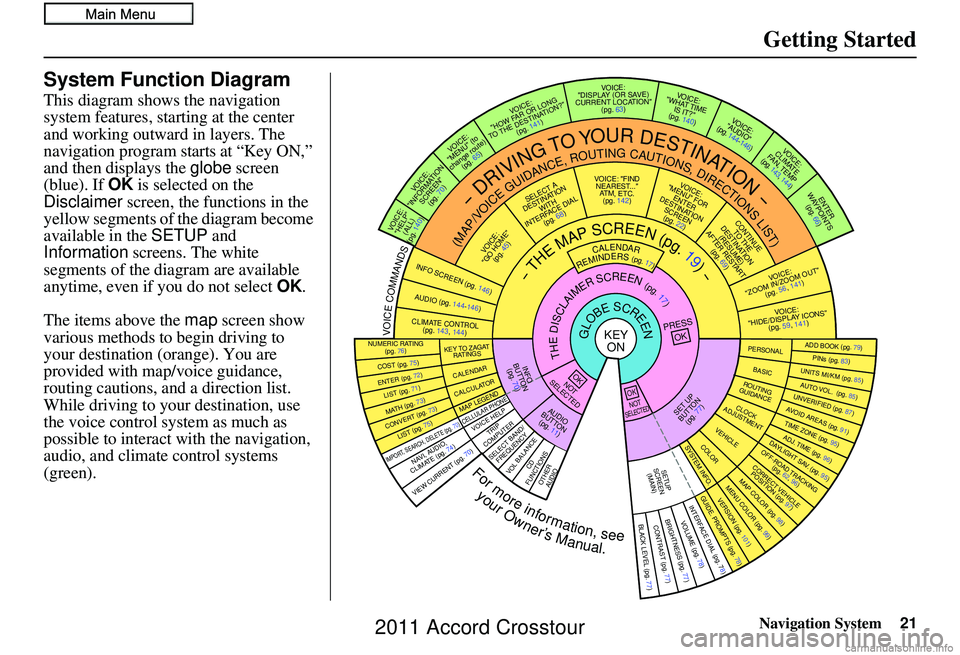
This diagram shows the navigation
system features, starting at the center
and working outward in layers. The
navigation program starts at “Key ON,”
and then displays the globe screen
(blue). If OK is selected on the
Disclaimer screen, the functions in the
yellow segments of the diagram become
available in the SETUP and
Information screens. The white
segments of the diagram are available
anytime, even if you do not select OK.
The items above the map screen show
various methods to begin driving to
your destination (orange). You are
provided with map/voice guidance,
routing cautions, and a direction list.
While driving to your destination, use
the voice control system as much as
possible to interact with the navigation,
audio, and climat e control systems
(green).
REMINDERS(pg.17)CALENDAR
-THEMAPSCREEN(pg.19)-
(MAP/VOICEGUIDANCE,ROUTINGCAUTIONS,DIRECTIONSLIST)
-DRIVINGTOYOURDESTINATION-
VOI CE:
"HELP" (ALL)
(pg. 140)
VOICE:
"INFORMATION SCREEN"(pg. 70)
VOICE:
"MENU" (to
change route) (pg. 65)
VOICE:
"HOW FAR OR LONG
TO THE DESTINATION?" (pg. 141)
VOICE:
"DISPLAY (OR SAV E )
CURRENT LOCA TION"
(pg. 63)VOICE:
"WHAT TIME IS IT?"
(pg. 140)
VOICE:
"AUDIO"
(pg. 144-146)
VOI CE:
CLIMATE
FA N , TEMP
(pg. 143, 144)
ENTER
WAYPOINTS (pg. 66)
VOICE:
"ZOOM IN/ZOOM OUT" (pg. 56, 141)
VOICE:
"HIDE/DISPLAY ICONS" (pg. 59, 1 41)
ADD BOOK (pg. 79)PINs (pg. 83)UNITS MI/KM (pg. 85)AUTO VOL. (pg. 85)UNVERIFIE
D (pg. 87)AVOID AREAS (pg. 91)TIME ZONE (pg. 95)ADJ. TIME (pg. 96)DAYLIGHT SAV. (pg. 95)OFF-ROAD TRA
CKING
(pg. 62, 96)CORRECT VEHICLE
POSITION (pg. 97)MAP COLOR (pg. 98)MENU COLOR (pg. 99)GUIDE. PROMPTS (pg. 78)VERSION (pg. 101)
BRIGHTNESS (pg. 77)VOLUME (pg. 78)INTERFACE DIAL (pg. 78)VIEW CURRENT (pg. 70)
COST (pg. 75)
NUMERIC RAT I N G
(pg. 76)
ENTER (pg. 72)LIST (pg. 71)MATH (pg. 73)CONVERT (pg. 73)LIST (pg. 75)
NAVI, AUDIO,
CLIMATE (pg. 7 4 )IMPORT, SEARCH, DELETE (pg. 70)
PRESS
OK
NOT
SELECTEDOK
NOTSELECTED
OK
TRIP
COMPUTER
KEY TO ZAGA T
RATINGS
CALENDAR
CALCULA TORMAP LEGEND
VOICE HELP
SELECT BAND/
FREQUENCYVOL BALANCECD
FUNCTIONSOTHER AUD IO
SET UP
BUTTON (pg. 77)AUDIO
BUTTON (pg. 11)
INFO
BUTTON (pg. 70)THEDISCLAIMERSCREEN(pg.17)
VOI CE: "FIND
NEARES T..."
AT M , ETC.
(pg. 142)
SELECT A
DESTINATION WITH
INTERFACE DIAL (pg. 68)
VOICE:
"GO HOME" (pg. 45)
VOICE:
"MENU" FOR ENTER
DESTINATION SCREEN(pg. 22)
CONTINUE TO THE
DESTINATION (RESUME)
AFTER RESTART (pg. 69)
GLOBESCREENKEYONPERSONAL
BASICROUTING
GUIDANCE
CLOCK
ADJUSTMENT
VEHICLECOLORSYSTEM INFO .
VOICECOMMANDSINFO SCREEN (pg. 146)
AUDIO (pg. 144-146)
CLIMATE CONTR OL
(pg. 143, 144 )
BLACK LEVEL (pg. 77)CONTRAST (pg. 77)
SETUP
SCREE N
(MAIN)
CELLULAR PHONE
Formoreinformation,see
yourOwner’sManual.
2011 Accord Crosstour
Page 46 of 156
46Navigation System
Driving to Your Destination
Driving to Your Destination
A route typically has three phases.
• Initial route calculation (Calculate
route to screen) (see page 46).
• Change the route while en route (see page 65).
• Resume the route when restarting the engine (see Continue Trip Screen on
page 69).
Calculate Route to Screen
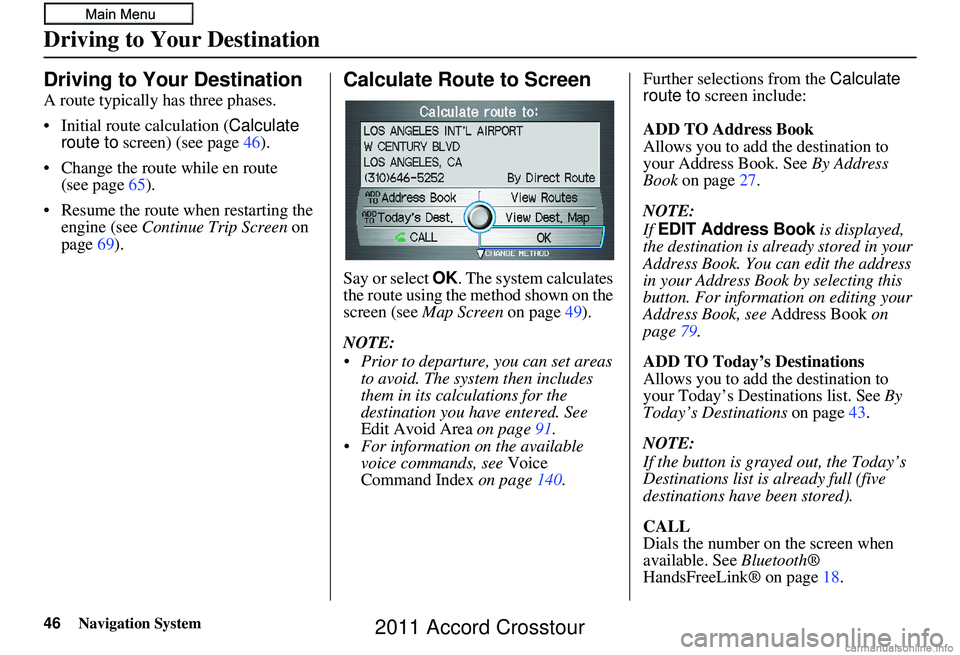
Say or select OK . The system calculates
the route using the method shown on the
screen (see Map Screen on page 49).
NOTE:
Prior to departure, you can set areas to avoid. The system then includes
them in its calculations for the
destination you have entered. See
Edit Avoid Area on page91.
For information on the available voice commands, see Voice
Command Index on page 140. Further selections from the
Calculate
route to screen include:
ADD TO Address Book
Allows you to add the destination to
your Address Book. See By Address
Book on page 27.
NOTE:
If EDIT Address Book is displayed,
the destination is alre ady stored in your
Address Book. You can edit the address
in your Address Book by selecting this
button. For informatio n on editing your
Address Book, see Address Book on
page 79.
ADD TO Today’s Destinations
Allows you to add the destination to
your Today’s Destinations list. See By
Today’s Destinations on page43.
NOTE:
If the button is grayed out, the Today’s
Destinations list is already full (five
destinations have been stored).
CALL
Dials the number on the screen when
available. See Bluetooth®
HandsFreeLink® on page 18.
2011 Accord Crosstour
Page 48 of 156
48Navigation System
Viewing the Routes
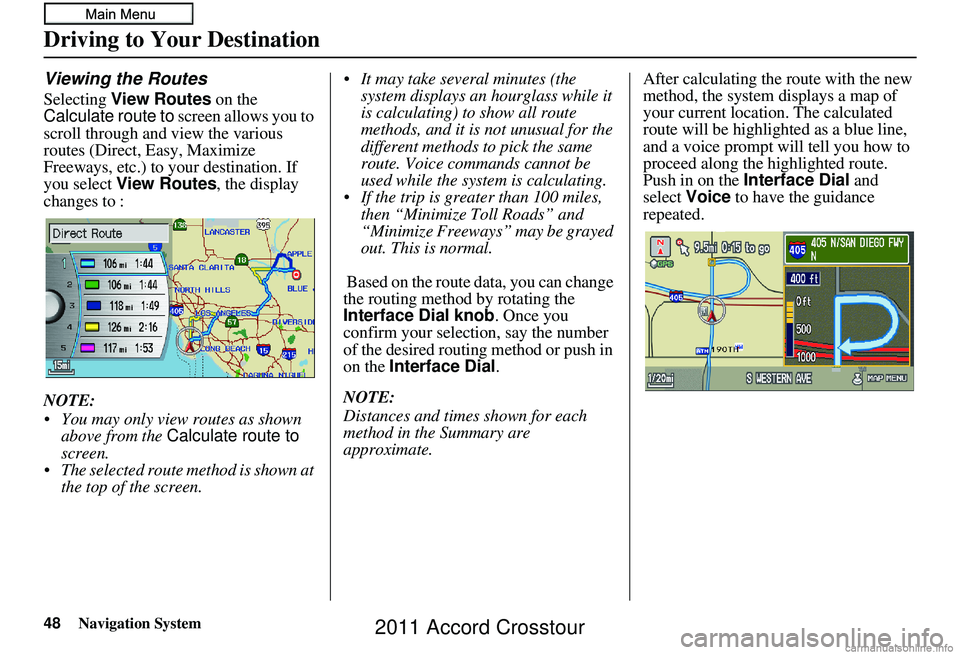
Selecting View Routes on the
Calculate route to screen allows you to
scroll through and view the various
routes (Direct, Easy, Maximize
Freeways, etc.) to your destination. If
you select View Routes , the display
changes to :
NOTE:
You may only view routes as shown above from the Calculate route to
screen.
The selected route method is shown at the top of the screen. It may take several minutes (the
system displays an hourglass while it
is calculating) to show all route
methods, and it is not unusual for the
different methods to pick the same
route. Voice commands cannot be
used while the system is calculating.
If the trip is greater than 100 miles, then “Minimize Toll Roads” and
“Minimize Freeways” may be grayed
out. This is normal.
Based on the route data, you can change
the routing method by rotating the
Interface Dial knob. Once you
confirm your selection, say the number
of the desired routing method or push in
on the Interface Dial .
NOTE:
Distances and times shown for each
method in the Summary are
approximate. After calculating the route with the new
method, the system displays a map of
your current locatio
n. The calculated
route will be highlighted as a blue line,
and a voice prompt will tell you how to
proceed along the highlighted route.
Push in on the Interface Dial and
select Voice to have the guidance
repeated.
Driving to Your Destination
2011 Accord Crosstour
Page 49 of 156
Navigation System49
Driving to Your Destination
Viewing the Destination Map
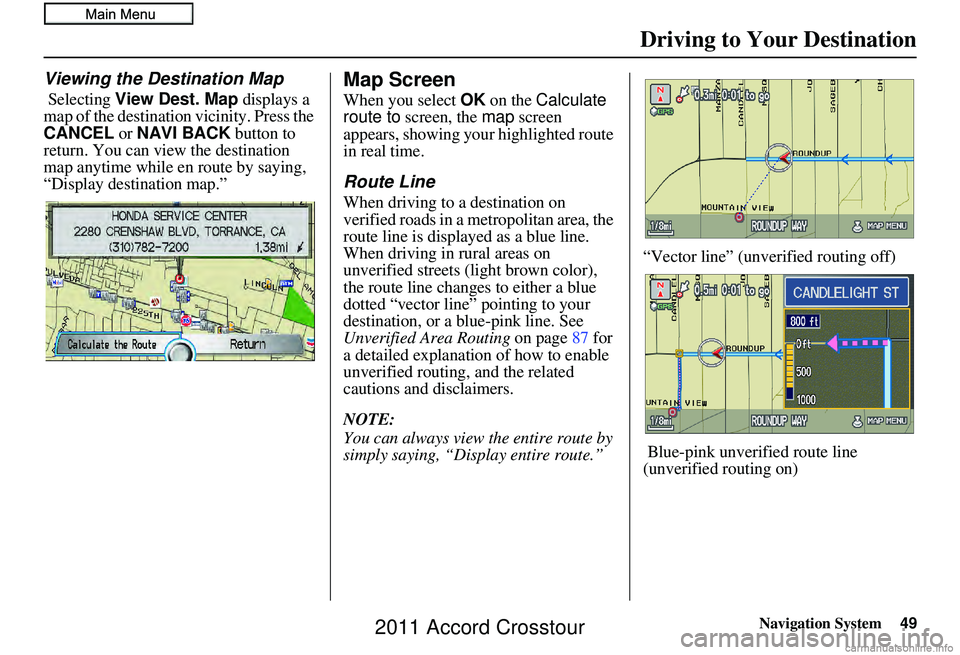
Selecting View Dest. Map displays a
map of the destination vicinity. Press the
CANCEL or NAVI BACK button to
return. You can view the destination
map anytime while en route by saying,
“Display destination map.”
Map Screen
When you select OK on the Calculate
route to screen, the map screen
appears, showing your highlighted route
in real time.
Route Line
When driving to a destination on
verified roads in a metropolitan area, the
route line is displayed as a blue line.
When driving in rural areas on
unverified streets (light brown color),
the route line changes to either a blue
dotted “vector line” pointing to your
destination, or a blue-pink line. See
Unverified Area Routing on page87 for
a detailed explanatio n of how to enable
unverified routing, and the related
cautions and disclaimers.
NOTE:
You can always view the entire route by
simply saying, “Display entire route.” “Vector line” (unverified routing off)
Blue-pink unverified route line
(unverified routing on)
2011 Accord Crosstour
Page 51 of 156
Navigation System51
Driving to Your Destination
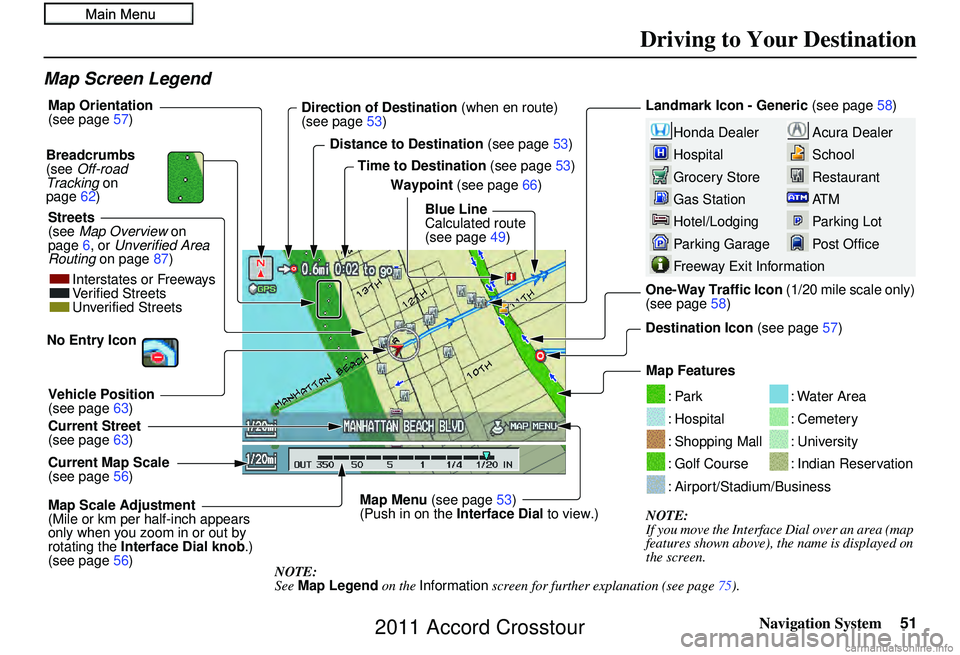
Map Screen Legend
Acura Dealer
School
Restaurant
AT M
Parking Lot
Post OfficeHonda Dealer
Hospital
Grocery Store
Gas Station
Hotel/Lodging
Parking Garage
Freeway Exit Information
Landmark Icon - Generic (see page58)
Destination Icon (see page57)
Map Features
NOTE:
If you move the Interface Dial over an area (map
features shown above), the name is displayed on
the screen.
: Par k
: Hospital
: Shopping Mall
: Golf Course
: Water Area
: Cemetery
: University
: Indian Reservation
: Airport/Stadium/Business
Map Scale Adjustment
(Mile or km per half-inch appears
only when you zoom in or out by
rotating the Interface Dial knob .)
(see page 56)
NOTE:
See Map Legend on the Information screen for further explanation (see page 75).
Current Map Scale
(see page
56)
Current Street
(see page
63)
Vehicle Position
(see page
63)
Breadcrumbs
(see
Off-road
Tracking on
page 62)
Streets
(see Map Overview on
page 6, or Unverified Area
Routing on page 87) Direction of Destination
(when en route)
(see page 53)
Map Orientation
(see page
57)
Distance to Destination (see page53)
Time to Destination (see page53)
Waypoint (see page 66)
Blue Line
Calculated route
(see page 49)
Map Menu (see page53)
(Push in on the Interface Dial to view.) One-Way Traffic Icon (1/20 mile scale only)
(see page
58)
Interstates or Freeways
Verified Streets
Unverified Streets
No Entry Icon
2011 Accord Crosstour