phone HONDA CROSSTOUR 2011 Navigation Manual (in English)
[x] Cancel search | Manufacturer: HONDA, Model Year: 2011, Model line: CROSSTOUR, Model: HONDA CROSSTOUR 2011Pages: 156, PDF Size: 3.91 MB
Page 1 of 156
Navigation System1
Table of Contents
Introduction .................................. 4
Manual Overview ............................ 4
System Overview ............................ 4
Accessories Precautions .................. 5
Important Safety Information .......... 5
Map Overview ................................. 6
Current Street .................................... 6
Verified/Unverified Street .................. 6
User Agreement ............................8
Getting Started ........................... 10
System Controls ............................ 10
Voice Control Basics ..................... 13
Using the Voice Control System ...... 14
Improving Voice Rec ognition ..........14
Selecting an Item (Button) on the
Screen ......................................... 15
Selecting an Item in a List ............. 15
Entering Information ..................... 16
System Start-up ............................. 17
Bluetooth ® HandsFreeLink®........ 18
Map Screen Legend ....................... 19
Map Screen Description ................ 20
Zoom In/Out..................................... 20
Map Scrolling .................................. 20
Displaying Current Location .........20
System Function Diagram ............. 21
Entering a Destination ..............22
By Address .................................... 23
Selecting the State or Province ........ 23
Selecting the City ............................. 23
Selecting the Street .......................... 25
Entering the Street Number ............. 27
By Address Book ...........................27
Adding Addresses to the Personal
Address Book ................................ 28
By Places ....................................... 28
Finding the Place by Category ........ 29
Finding the Place by Name.............. 33
Finding the Place by Phone Number ......................................... 33
Finding the Place by Zagat 2010..... 34
By Intersection...............................35
Selecting the State or Province ........ 35
Selecting the City ............................. 35
Selecting the Street .......................... 37
By Previous Destinations...............39
By Map Input ................................. 40
Showing the Map of Current
Position......................................... 40
Showing the Map of City ..................41
Showing the Map of State ................ 42
Showing the Map of Continental USA............................................... 43
By Today’s Destinations................ 43
Editing Today’s Destinations List.... 44
Adding Destinations to the List........44
By Go Home .................................. 45
Driving to Your Destination .....46
Driving to Your Destination .......... 46
Calculate Route to Screen.............. 46
Changing Routing Method ............... 47
Viewing the Routes........................... 48
Viewing the Destination Map .......... 49
Map Screen ....................................49
Route Line ........................................ 49
Voice Guidance Prompts ................. 50
Map Screen Legend ......................... 51
Guidance Screen ............................52
Guidance Screen Legend ................. 52
Distance and Time to
Destination .................................. 53
Map Menu...................................... 53
Direction List ................................. 54
EXIT INFO
(Freeway Exit Information) .......... 54
Guidance Mode.............................. 55
Map Scale ...................................... 56
Map Orientation ............................. 57
Destination Icon ............................. 57
00X31-TP6-8100
\251 2010 American Honda Motor Co., Inc. - All Rights Reserved
2011 Accord Crosstour
Page 2 of 156
2Navigation System
Table of Contents
Landmark Icons .............................58
Showing Icons on the Map............... 60
Icon Options .................................... 60
Going Off the Route ......................62
Off-road Tracking.......................... 62
Viewing/Saving the Current Location ...................................... 63
Pop-Ups and Disclaimers .............. 64
Changing the Route ....................... 65
MENU Screen (Route) ..................... 65
Cancel Route.................................... 65
Change Method................................ 65
Search Waypoint .............................. 66
Delete Waypoint .............................. 67
Back to Route ................................... 67
Avoid Street...................................... 67
Detour .............................................. 67
Changing Your Destination ...........68
Find Nearest (Voice command) .......68
Go Home (Voice command) ............ 68
Using Interface Dial to Change Destination ................................... 68
Entering a Destination from the Menu Screen (while en route) ................ 69
Continue Trip Screen..................... 69
Information Features ................70
Information Screen ........................ 70
Cellular Phone ............................... 70
Trip Computer ............................... 70
Calendar ......................................... 71
Entering Your Schedule ................... 72
Calculator.......................................73
Unit Conversion ............................... 73
Voice Command Help ...................74
Map Legend ................................... 75
Key to Zagat Ratings ..................... 75
System Setup ..............................77
SETUP Mode................................. 77
SETUP Screen (Main Setup) ......... 77
Brightness ........................................ 77
Contrast ........................................... 77
Black Level....................................... 77
Volume ............................................. 78
Interface Dial Feedbac k ..................78
Guidance Prompts ....... .................... 78
SETUP Screen (Other) .................. 79
Personal Information ..................... 79
Address Book ................................... 79
Home Address .................................. 83
PIN Number ..................................... 83
Previous Destinations ...................... 84
Basic Settings.................................85
Units (mile or km) ............................ 85
Voice Recognition Fe edback ...........85
Auto Volume for Speed .................... 85
Routing & Guidance ......................86
Rerouting ......................................... 86
Unverified Area Routing .................. 87
Edit Avoid Area................................ 91
Edit Waypoint Search Area.............. 93
Guidance Mode .... ............................94
Clock Adjustment .......................... 94
Auto Daylight ................................... 95
Auto Time Zone ................................ 95
Daylight Saving Time (DST) Selection
(Change DST Schedule) ...............96
Time Adjustment .............................. 96
Vehicle ...........................................96
Off-road Tracking............................96
Correct Vehicle Position.................. 97
Color ..............................................98
Map Color ........................................ 98
Menu Color ...................................... 99
Switching Display Mode Manually .. 99
Switching Display Mode Automatically.............................. 100
System Information ..................... 101
2011 Accord Crosstour
Page 4 of 156
Navigation System
Introduction
Manual Overview
The manual is divided into the
following sections:
Getting Started - A basic introduction that discusses the controls and how to
communicate with the system.
Entering a Destination - How to enter an address or locate a point of interest
(POI).
Driving to Your Destination - An explanation of th e map features,
guidance, and cautions.
Information Features - Cellular Phone, Trip Computer, Calendar,
Calculator, Voice Command Help,
Map Legend, and Key to Zagat
Ratings.
System Setup - How to set up and tailor the system for your personal
use and use the Address Book. The back of this manual contains:
Map Coverage (page
112)
Frequently Asked Questions (FAQs) (page 128)
Troubleshooting Guide (page 135)
Glossary of Terms (page 137)
Voice Command List (page 140)
Operation Specific to Alaska and Hawaii (page 126)
System Overview
Your navigation system is a highly
sophisticated location system with voice
control that uses satellites and a map
database to show you where you are and
to help guide you to a desired
destination.
The navigation system receives signals
from the global positioning system
(GPS), a network of 24 satellites in orbit
around the earth. By receiving signals
from several of these satellites, the
navigation system can determine the
latitude, longitude, and elevation of
your vehicle. In addition, a gyroscopic
yaw sensor and a vehicle speed sensor
in your vehicle keep track of the
direction and speed of travel at all times.
This vehicle’s navigation display, if so
equipped, includes mercury-containing
components. Upon removal, please
reuse, recycle, or dispose of as
hazardous waste.
NOTICE
4
2011 Accord Crosstour
Page 5 of 156
Navigation System5
Introduction
The navigation system applies location,
direction, and speed information to the
maps and calculates a route to the
destination you enter. As you drive to
that destination, the system provides
map and voice guidance.
The navigation system is easy to use.
The locations of many places of
business and entertainment are already
entered in the system. You can select
any of them as a destination by using the
Interface Dial or voice control.
There are several ways to enter a
destination, such as by point of interest
(POI), by address, by phone number,
and by selecting it from the map. The
last 50 destinations are saved for reuse
at a later date. The system also allows
you to store a home address to simplify
returning home from your destination.Accessories Precautions
If you have rear window tinting
installed, be aware that if the tint has
metallic properties, it can seriously
degrade or prevent GPS reception. This
is because the GPS antenna is located
under the dashboard.
If you plan to install electronic
components, such as radar detectors,
vehicle tracking devices, remote
starters, additional amplifiers, or other
audio components, ensure that they are
not located near the navigation control
unit in the right side floor storage
compartment of the cargo area, near the
navigation display in the dash, or near
the GPS antenna under the dashboard.
Signal noise emanating from these
devices can cause intermittent
disruption of the navigation system.
Important Safety Information
The navigation system can distract your
attention from the road if you focus on
the screen or operate the system’s
controls while driving.
Enter as much information as possible
into the system before you begin
driving, or when the vehicle is stopped.
Then, as you drive, listen to the audio
instructions and use voice commands
when possible.
2011 Accord Crosstour
Page 10 of 156
10Navigation System
Getting Started
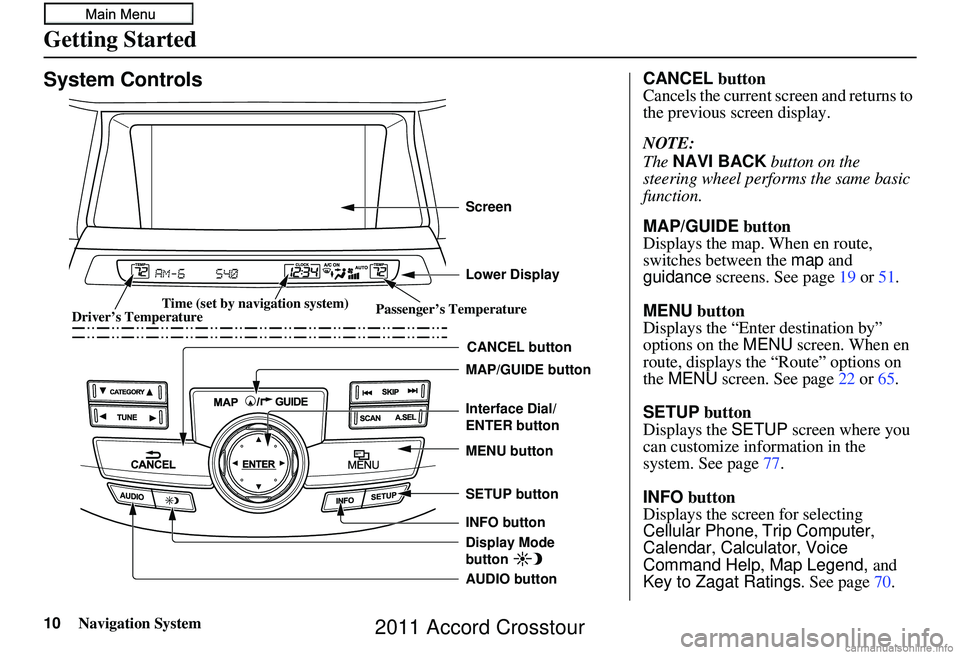
System Controls
CANCEL button
SETUP button
INFO button Interface Dial/
ENTER button
MENU button
AUDIO button MAP/GUIDE button Lower Display Screen
Display Mode
button
Passenger’s Temperature
Driver’s Temperature Time (set by navigation system)
CANCEL
button
Cancels the current screen and returns to
the previous screen display.
NOTE:
The NAVI BACK button on the
steering wheel perfor ms the same basic
function.
MAP/GUIDE button
Displays the map. When en route,
switches between the map and
guidance screens. See page 19 or 51 .
MENU button
Displays the “Enter destination by”
options on the MENU screen. When en
route, displays the “Route” options on
the MENU screen. See page 22 or 65 .
SETUP button
Displays the SETUP screen where you
can customize information in the
system. See page 77.
INFO button
Displays the screen for selecting
Cellular Phone, Trip Computer ,
Calendar , Calculator, Voice
Command Help , Map Legend, and
Key to Zagat Ratings . See page70.
2011 Accord Crosstour
Page 13 of 156
Navigation System13
Getting Started
Voice Control Basics
Your vehicle has a voice control system
that allows hands-free operation of most
of the navigation system functions. You
can also control the audio and climate
control system. The voice control
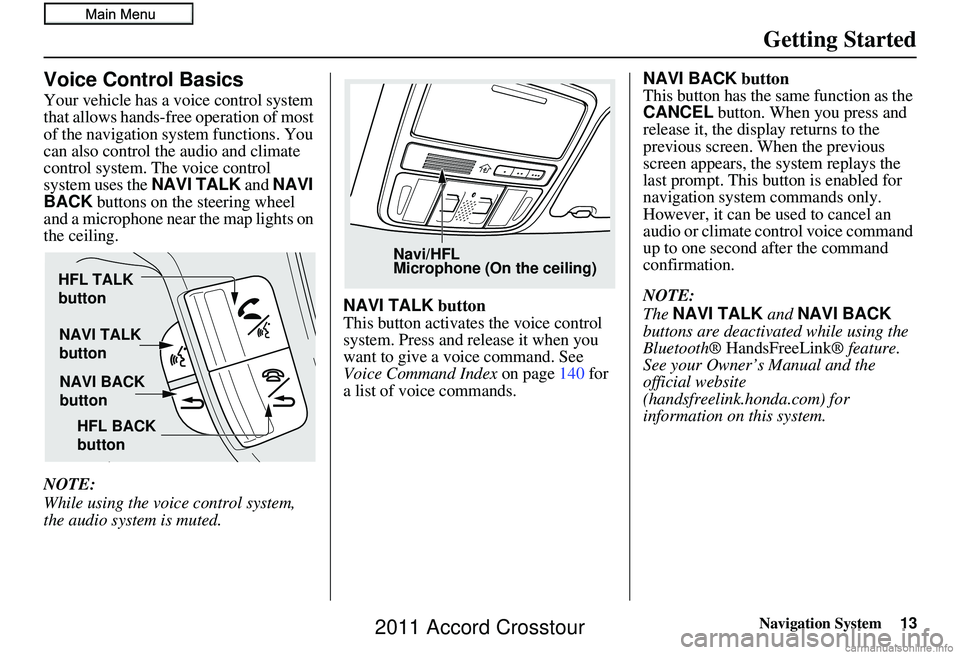
system uses the NAVI TALK and NAVI
BACK buttons on the steering wheel
and a microphone near the map lights on
the ceiling.
NOTE:
While using the voice control system,
the audio system is muted. NAVI TALK
button
This button activates the voice control
system. Press and release it when you
want to give a voice command. See
Voice Command Index on page140 for
a list of voice commands. NAVI BACK
button
This button has the same function as the
CANCEL button. When you press and
release it, the display returns to the
previous screen. When the previous
screen appears, the system replays the
last prompt. This button is enabled for
navigation system commands only.
However, it can be used to cancel an
audio or climate control voice command
up to one second after the command
confirmation.
NOTE:
The NAVI TALK and NAVI BACK
buttons are deactivated while using the
Bluetooth® HandsFreeLink ® feature.
See your Owner’s Manual and the
official website
(handsfreelink.honda.com) for
information on this system.
NAVI TALK
button
NAVI BACK
button
HFL TALK
button
HFL BACK
button
Navi/HFL
Microphone (On the ceiling)
2011 Accord Crosstour
Page 14 of 156
14Navigation System
Getting Started
Using the Voice Control System
You should use the voice control system
as much as possible, and consider
manual entry using the Interface Dial
as a backup method of entry.
Most of the system’s functions can be
controlled by voice commands activated
with the NAVI TALK button. To
control the navigation system by voice:
• Press and release the NAVI TALK
button.
• Wait for the beep (the icon is displayed on the top left of the
screen).
• Give a voice command.
Once the microphone picks up your
command, the system changes the
display in response to the command and
prompts you for the next command.
Using the NAVI TALK button, answer
the prompts as required. If the system does not understand a
command or you wait too long to give a
command, it responds with “Pardon,”
“Please repeat,” or “Would you say
again.” If the system cannot perform a
command or the command is not
appropriate for the screen you are on, it
sounds a beep.
Anytime you are unsure of what voice
commands are available on a screen,
you can always say “Help.” The system
will then read the list of available
commands to you.
When you give a command, the system
generally either repeats the command as
a confirmation or asks you for further
information. If you do not wish to hear
this feedback, you can turn it off.
However, hearing the feedback will
familiarize you with the way the system
expects commands to be phrased. See
the
Voice Recognition Feedback
setting in SETUP. If you hear a prompt such as “Please use
the Interface Dial to...” or “Please
choose an area with the Interface Dial,”
the system is asking for input that
cannot be performed using the voice
control system.
Improving Voice Recognition
To achieve optimum voice recognition
when using either the navigation or
Bluetooth
® HandsFreeLink® voice
control system, the following guidelines
should be followed:
NOTE:
Make sure the correct screen is
displayed for the vo ice command that
you are using. See Voice Command
Index on page 140.
• It is best if the windows and sunroof are closed. If you drive with the
windows or sunroof open, speak a
little louder to overcome the wind
noises.
• Adjust the dashboard and side vents so air does not blow against the
microphone on the ceiling.
2011 Accord Crosstour
Page 15 of 156
Navigation System15
Getting Started
• If more than one person is speaking at
the same time, the system may
misinterpret your command.
• After pressing and releasing the NAVI TALK button, wait for the
beep, then give a voice command
while the icon is displayed on the
top left of the screen .
• Give a voice command in a clear, natural speaking voice without
pausing between words.
• If the system cannot recognize your command because of background
noise, speak louder.
• If you are still having trouble with the voice control sy stem, refer to Voice
Command Help on the
Information screen or say “Help”
while the icon is displayed on the
top left of the screen.
NOTE:
The voice control system can be used
only in the driver’s seat because the
microphone unit removes noises from
the front passenger’s side.Selecting an Item (Button)
on the Screen
On most screens, there are items that
can be selected (like buttons with titles
such as OK or Return ). To select an
item on any screen, do one of the
following:
• Use the voice control system and say the name of the desired item. Almost
all selectable items on the screen,
including some listed items, are
recognized by the voice control
system.
• Move the highlighting to the desired item with the Interface Dial or its
knob , then push in on the Interface
Dial .
Tip:
If items are grayed out, this means that
they cannot be selected.
Selecting an Item in a List
To scroll through a list, do one of the
following:
• Rotate the Interface Dial knob to
scroll one item at a time.
• Use the voice control system to scroll page by page. For example, to scroll
up, say “Up” or “Previous.” To scroll
down, say “Next” or “Down.”
• Move the Interface Dial up or down
to scroll through the list page by
page.
If you cannot find the desired name, or
have made an error, return to the
previous screen by pressing the
CANCEL or the NAVI BACK button
on the steering wheel.
To select the desired item in the list, do
one of the following:
• Use the voice control system, and say the item number of the desired item.
• Rotate the Interface Dial knob to
move the highlighting to the item,
then push in on the Interface Dial.
2011 Accord Crosstour
Page 18 of 156
18Navigation System
Getting Started
If you press the CANCEL button, the
message will be displayed the next time
you start the vehicle.
NOTE:
The system will display the current
message and any older or previously
unread messages, with the newest
message listed first.Bluetooth® HandsFreeLink®
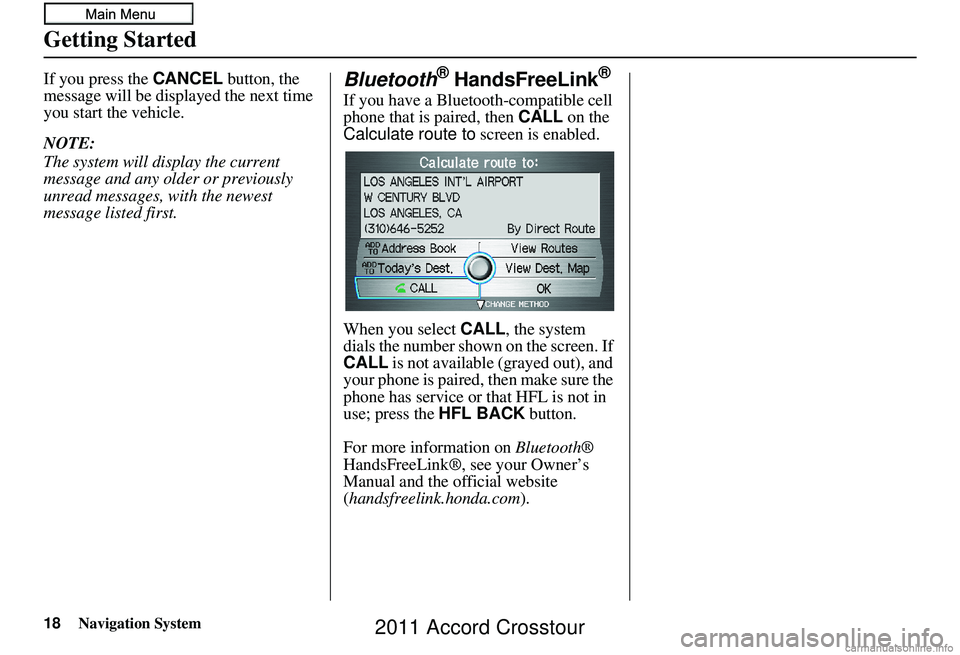
If you have a Bluetooth-compatible cell
phone that is paired, then CALL on the
Calculate route to screen is enabled.
When you select CALL, the system
dials the number shown on the screen. If
CALL is not available (grayed out), and
your phone is paired, then make sure the
phone has service or that HFL is not in
use; press the HFL BACK button.
For more information on Bluetooth®
HandsFreeLink®, see your Owner’s
Manual and the official website
(handsfreelink.honda.com ).
2011 Accord Crosstour
Page 21 of 156
Navigation System21
Getting Started
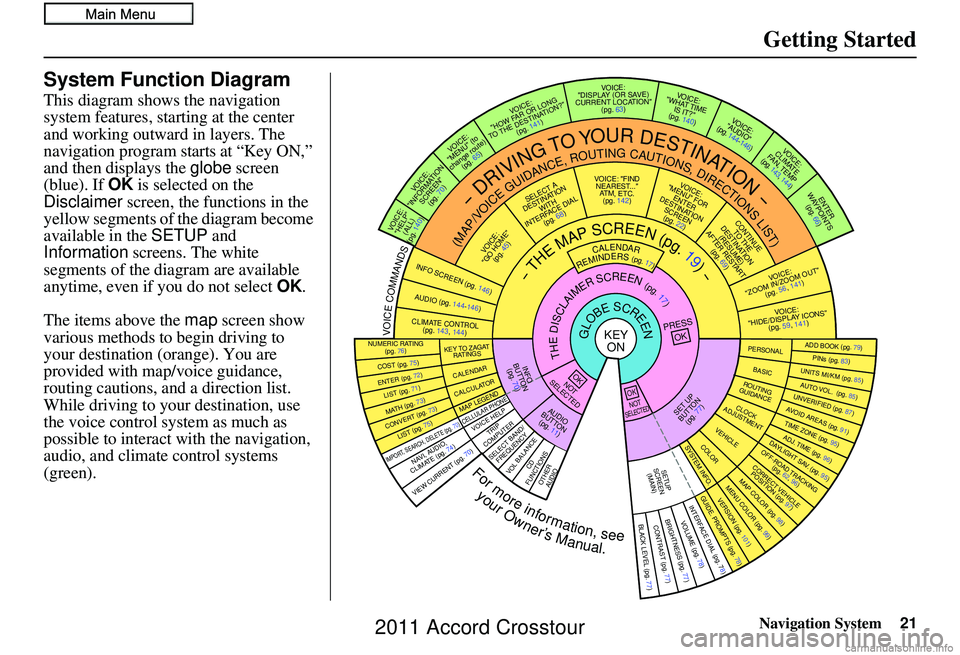
System Function Diagram
This diagram shows the navigation
system features, starting at the center
and working outward in layers. The
navigation program starts at “Key ON,”
and then displays the globe screen
(blue). If OK is selected on the
Disclaimer screen, the functions in the
yellow segments of the diagram become
available in the SETUP and
Information screens. The white
segments of the diagram are available
anytime, even if you do not select OK.
The items above the map screen show
various methods to begin driving to
your destination (orange). You are
provided with map/voice guidance,
routing cautions, and a direction list.
While driving to your destination, use
the voice control system as much as
possible to interact with the navigation,
audio, and climat e control systems
(green).
REMINDERS(pg.17)CALENDAR
-THEMAPSCREEN(pg.19)-
(MAP/VOICEGUIDANCE,ROUTINGCAUTIONS,DIRECTIONSLIST)
-DRIVINGTOYOURDESTINATION-
VOI CE:
"HELP" (ALL)
(pg. 140)
VOICE:
"INFORMATION SCREEN"(pg. 70)
VOICE:
"MENU" (to
change route) (pg. 65)
VOICE:
"HOW FAR OR LONG
TO THE DESTINATION?" (pg. 141)
VOICE:
"DISPLAY (OR SAV E )
CURRENT LOCA TION"
(pg. 63)VOICE:
"WHAT TIME IS IT?"
(pg. 140)
VOICE:
"AUDIO"
(pg. 144-146)
VOI CE:
CLIMATE
FA N , TEMP
(pg. 143, 144)
ENTER
WAYPOINTS (pg. 66)
VOICE:
"ZOOM IN/ZOOM OUT" (pg. 56, 141)
VOICE:
"HIDE/DISPLAY ICONS" (pg. 59, 1 41)
ADD BOOK (pg. 79)PINs (pg. 83)UNITS MI/KM (pg. 85)AUTO VOL. (pg. 85)UNVERIFIE
D (pg. 87)AVOID AREAS (pg. 91)TIME ZONE (pg. 95)ADJ. TIME (pg. 96)DAYLIGHT SAV. (pg. 95)OFF-ROAD TRA
CKING
(pg. 62, 96)CORRECT VEHICLE
POSITION (pg. 97)MAP COLOR (pg. 98)MENU COLOR (pg. 99)GUIDE. PROMPTS (pg. 78)VERSION (pg. 101)
BRIGHTNESS (pg. 77)VOLUME (pg. 78)INTERFACE DIAL (pg. 78)VIEW CURRENT (pg. 70)
COST (pg. 75)
NUMERIC RAT I N G
(pg. 76)
ENTER (pg. 72)LIST (pg. 71)MATH (pg. 73)CONVERT (pg. 73)LIST (pg. 75)
NAVI, AUDIO,
CLIMATE (pg. 7 4 )IMPORT, SEARCH, DELETE (pg. 70)
PRESS
OK
NOT
SELECTEDOK
NOTSELECTED
OK
TRIP
COMPUTER
KEY TO ZAGA T
RATINGS
CALENDAR
CALCULA TORMAP LEGEND
VOICE HELP
SELECT BAND/
FREQUENCYVOL BALANCECD
FUNCTIONSOTHER AUD IO
SET UP
BUTTON (pg. 77)AUDIO
BUTTON (pg. 11)
INFO
BUTTON (pg. 70)THEDISCLAIMERSCREEN(pg.17)
VOI CE: "FIND
NEARES T..."
AT M , ETC.
(pg. 142)
SELECT A
DESTINATION WITH
INTERFACE DIAL (pg. 68)
VOICE:
"GO HOME" (pg. 45)
VOICE:
"MENU" FOR ENTER
DESTINATION SCREEN(pg. 22)
CONTINUE TO THE
DESTINATION (RESUME)
AFTER RESTART (pg. 69)
GLOBESCREENKEYONPERSONAL
BASICROUTING
GUIDANCE
CLOCK
ADJUSTMENT
VEHICLECOLORSYSTEM INFO .
VOICECOMMANDSINFO SCREEN (pg. 146)
AUDIO (pg. 144-146)
CLIMATE CONTR OL
(pg. 143, 144 )
BLACK LEVEL (pg. 77)CONTRAST (pg. 77)
SETUP
SCREE N
(MAIN)
CELLULAR PHONE
Formoreinformation,see
yourOwner’sManual.
2011 Accord Crosstour