cooling HONDA CROSSTOUR 2014 1.G User Guide
[x] Cancel search | Manufacturer: HONDA, Model Year: 2014, Model line: CROSSTOUR, Model: HONDA CROSSTOUR 2014 1.GPages: 573, PDF Size: 21.2 MB
Page 157 of 573
uuHeating and Cooling System
*uUsing Vents, Heating and A/C
156Controls
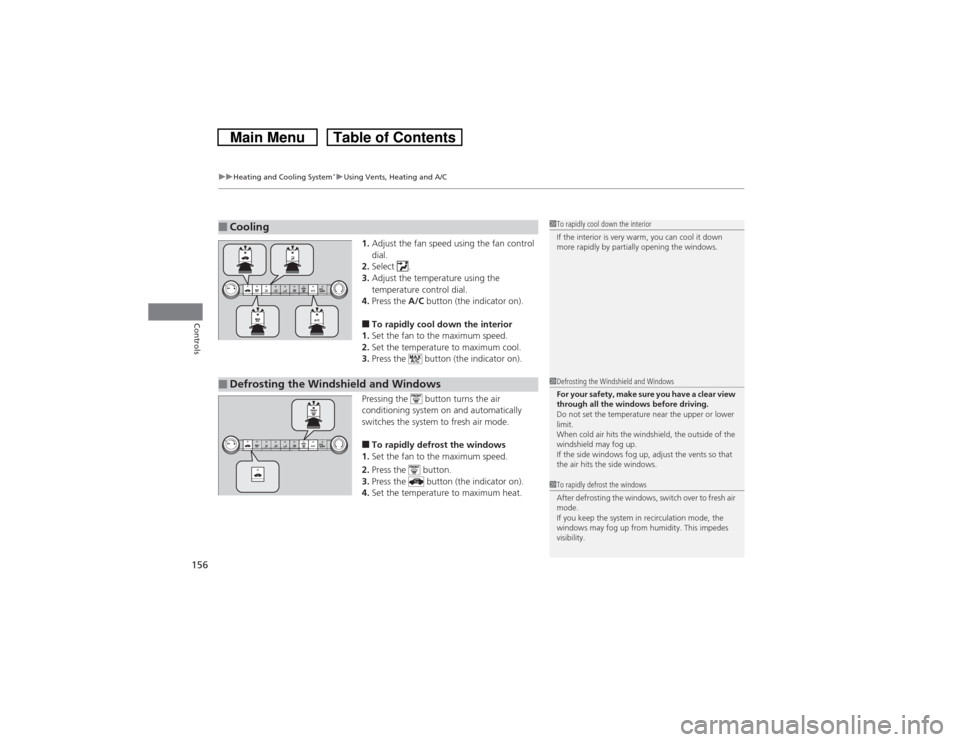
1.Adjust the fan speed using the fan control
dial.
2.Select .
3.Adjust the temperature using the
temperature control dial.
4.Press the A/C button (the indicator on).■To rapidly cool down the interior
1.Set the fan to the maximum speed.
2.Set the temperature to maximum cool.
3.Press the button (the indicator on).
Pressing the button turns the air
conditioning system on and automatically
switches the system to fresh air mode.■To rapidly defrost the windows
1.Set the fan to the maximum speed.
2.Press the button.
3.Press the button (the indicator on).
4.Set the temperature to maximum heat.
■Cooling
1To rapidly cool down the interior
If the interior is very warm, you can cool it down
more rapidly by partially opening the windows.
■Defrosting the Windshield and Windows
1Defrosting the Windshield and Windows
For your safety, make sure you have a clear view
through all the windows before driving.
Do not set the temperature near the upper or lower
limit.
When cold air hits the windshield, the outside of the
windshield may fog up.
If the side windows fog up, adjust the vents so that
the air hits the side windows.1To rapidly defrost the windows
After defrosting the windows, switch over to fresh air
mode.
If you keep the system in recirculation mode, the
windows may fog up from humidity. This impedes
visibility.
Page 420 of 573
419
uuTowing a TraileruTowing Your Vehicle
Driving
•Monitor your temperature gauge. If it nears the red (Hot) mark, turn off the
heating and cooling system
*/climate control system
* and reduce speed. Pull to the
side of the road safely to cool down the engine if necessary.
•Shift to the
(S or
(d position if the transmission shifts frequently.
Towing Your VehicleYour vehicle is not designed to be towed behind a motor home. If your vehicle needs
to be towed in an emergency, refer to the emergency towing information.2Emergency Towing P. 542■Driving in Hilly Terrain* Not available on all models
Page 421 of 573
420Driving
When DrivingStarting the Engine
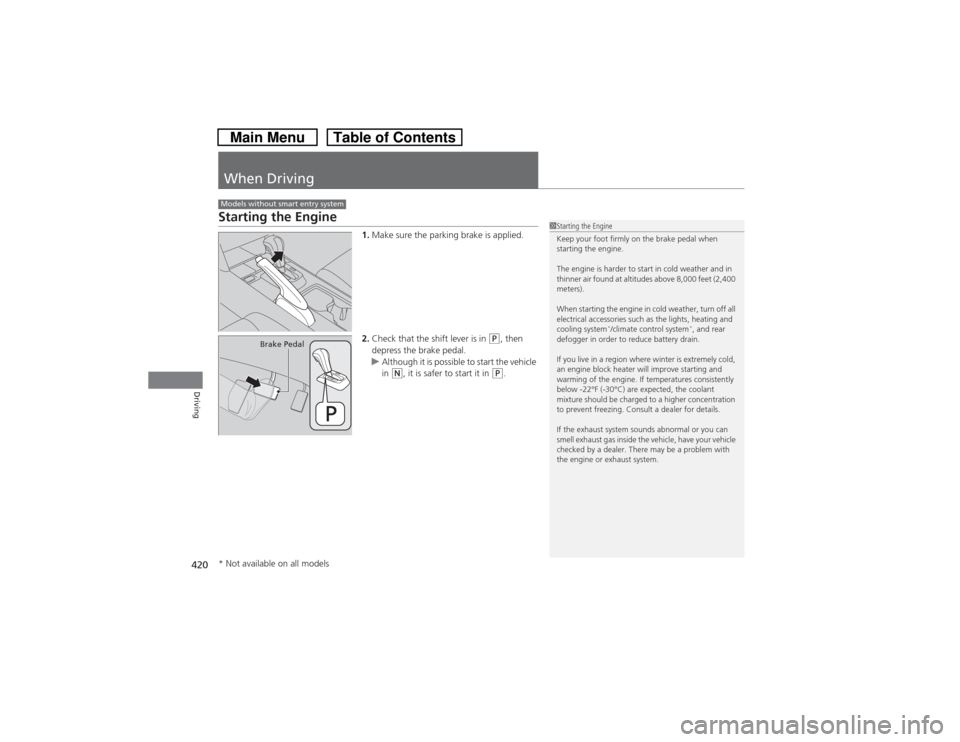
1.Make sure the parking brake is applied.
2.Check that the shift lever is in
(P, then
depress the brake pedal.
uAlthough it is possible to start the vehicle
in
(N, it is safer to start it in
(P.
Models without smart entry system
1Starting the Engine
Keep your foot firmly on the brake pedal when
starting the engine.
The engine is harder to start in cold weather and in
thinner air found at altitudes above 8,000 feet (2,400
meters).
When starting the engine in cold weather, turn off all
electrical accessories such as the lights, heating and
cooling system
*/climate control system
*, and rear
defogger in order to reduce battery drain.
If you live in a region where winter is extremely cold,
an engine block heater will improve starting and
warming of the engine. If temperatures consistently
below -22°F (-30°C) are expected, the coolant
mixture should be charged to a higher concentration
to prevent freezing. Consult a dealer for details.
If the exhaust system sounds abnormal or you can
smell exhaust gas inside the vehicle, have your vehicle
checked by a dealer. There may be a problem with
the engine or exhaust system.
Brake Pedal
* Not available on all models
Page 462 of 573
461
Maintenance
This chapter discusses basic maintenance.
Before Performing Maintenance
Inspection and Maintenance ............ 462Safety When Performing Maintenance..... 463Parts and Fluids Used in Maintenance
Service ........................................... 464
Maintenance Minder
TM..................... 465
Maintenance Under the Hood
Maintenance Items Under the Hood ..... 469Opening the Hood ........................... 471
Recommended Engine Oil ................ 472
Oil Check ......................................... 473
Adding Engine Oil ............................ 475Changing the Engine Oil and Oil Filter ....476
Engine Coolant ................................ 478
Transmission Fluid ............................ 480
Brake Fluid ....................................... 481
Power Steering Fluid Check
*............ 482
Refilling Window Washer Fluid......... 483
Replacing Light Bulbs....................... 484
Checking and Maintaining Wiper Blades
... 493
Checking and Maintaining Tires
Checking Tires ................................. 497Tire and Loading Information Label ...... 498Tire Labeling .................................... 498DOT Tire Quality Grading (U.S. Vehicles)....... 500Wear Indicators................................ 502Tire Service Life ................................ 502
Tire and Wheel Replacement ........... 503
Tire Rotation .................................... 504
Winter Tires ..................................... 505
Battery............................................... 506
Remote Transmitter Care................. 507
Replacing the Button Battery ........... 507
Heating and Cooling System
*/Climate
Control System
* Maintenance....... 509
Cleaning
Interior Care .................................... 510
Exterior Care.................................... 512
* Not available on all models
Page 479 of 573
478
uuMaintenance Under the HooduEngine Coolant
Maintenance
Engine CoolantThis coolant is premixed with 50% antifreeze and 50% water. Do not add any
straight antifreeze or water.
We recommend you check the engine coolant level every time you refuel. Check the
reserve tank first. If it is completely empty, also check the coolant level in the
radiator. Add the engine coolant accordingly.
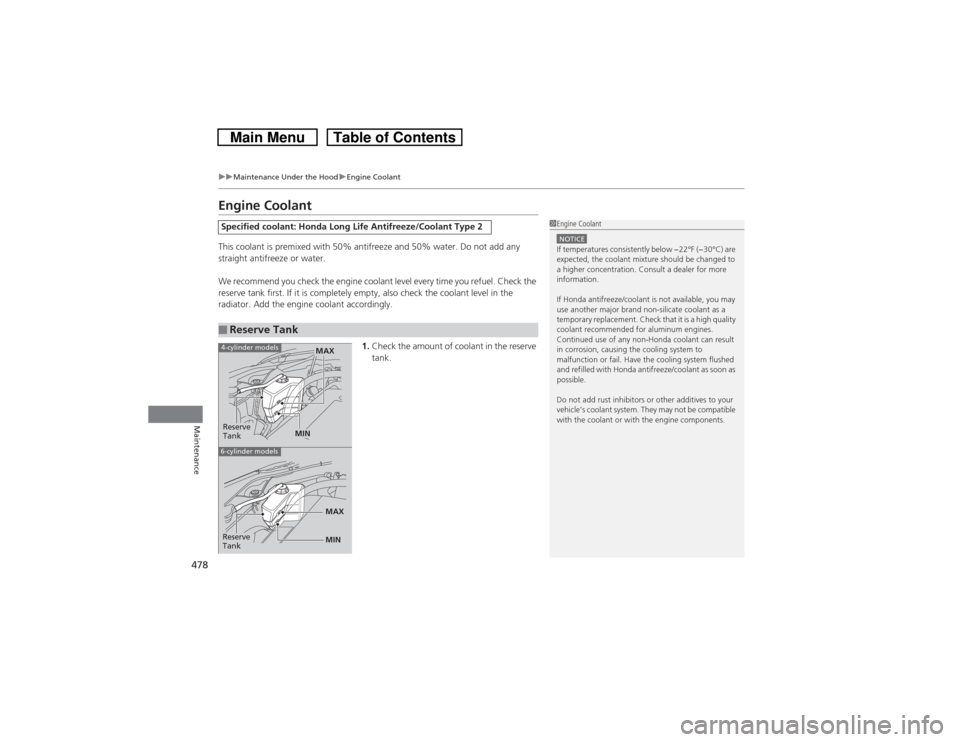
1.Check the amount of coolant in the reserve
tank.Specified coolant: Honda Long Life Antifreeze/Coolant Type 2■Reserve Tank
1Engine CoolantNOTICEIf temperatures consistently below −22°F (−30°C) are
expected, the coolant mixture should be changed to
a higher concentration. Consult a dealer for more
information.
If Honda antifreeze/coolant is not available, you may
use another major brand non-silicate coolant as a
temporary replacement. Check that it is a high quality
coolant recommended for aluminum engines.
Continued use of any non-Honda coolant can result
in corrosion, causing the cooling system to
malfunction or fail. Have the cooling system flushed
and refilled with Honda antifreeze/coolant as soon as
possible.
Do not add rust inhibitors or other additives to your
vehicle’s coolant system. They may not be compatible
with the coolant or with the engine components.
Reserve
Tank
MAX
MIN
4-cylinder models6-cylinder models
MIN MAX
Reserve
Tank
Page 480 of 573
479
uuMaintenance Under the HooduEngine Coolant
Maintenance
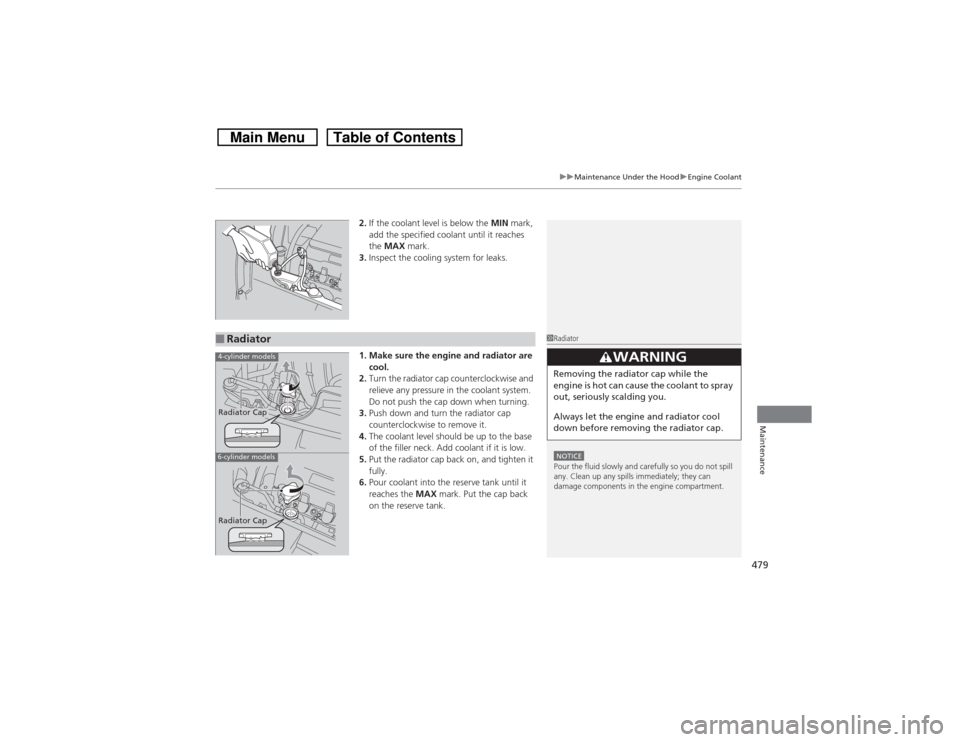
2.If the coolant level is below the MIN mark,
add the specified coolant until it reaches
the MAX mark.
3.Inspect the cooling system for leaks.
1. Make sure the engine and radiator are
cool.
2.Turn the radiator cap counterclockwise and
relieve any pressure in the coolant system.
Do not push the cap down when turning.
3.Push down and turn the radiator cap
counterclockwise to remove it.
4.The coolant level should be up to the base
of the filler neck. Add coolant if it is low.
5.Put the radiator cap back on, and tighten it
fully.
6.Pour coolant into the reserve tank until it
reaches the MAX mark. Put the cap back
on the reserve tank.
■Radiator
1RadiatorNOTICEPour the fluid slowly and carefully so you do not spill
any. Clean up any spills immediately; they can
damage components in the engine compartment.
33
WARNING
Removing the radiator cap while the
engine is hot can cause the coolant to spray
out, seriously scalding you.
Always let the engine and radiator cool
down before removing the radiator cap.
4-cylinder models6-cylinder modelsRadiator Cap
Radiator Cap
Page 510 of 573
509Maintenance
Heating and Cooling System
*/Climate Control System
* Maintenance
Dust and Pollen FilterThe heating and cooling system
*/climate control system
* is equipped with a dust
and pollen filter that collects pollen, dust, and other debris in the air. The
Maintenance Minder
TM messages will let you know when to replace the filter.
We recommend that you replace the dust and pollen filter sooner when using your
vehicle in areas with high concentrations of dust.
1Dust and Pollen Filter
If the airflow from the heating and cooling system
*/
climate control system
* deteriorates noticeably, and
the windows fog up easily, the filter may need to be
replaced. Please contact a dealer for replacement.
* Not available on all models
Page 534 of 573
533
uuOverheatinguHow to Handle Overheating
Handling the Unexpected
■Next thing to do
1.Check that the cooling fan is operating and
stop the engine once the temperature
gauge needle comes down.
uIf the cooling fan is not operating,
immediately stop the engine.
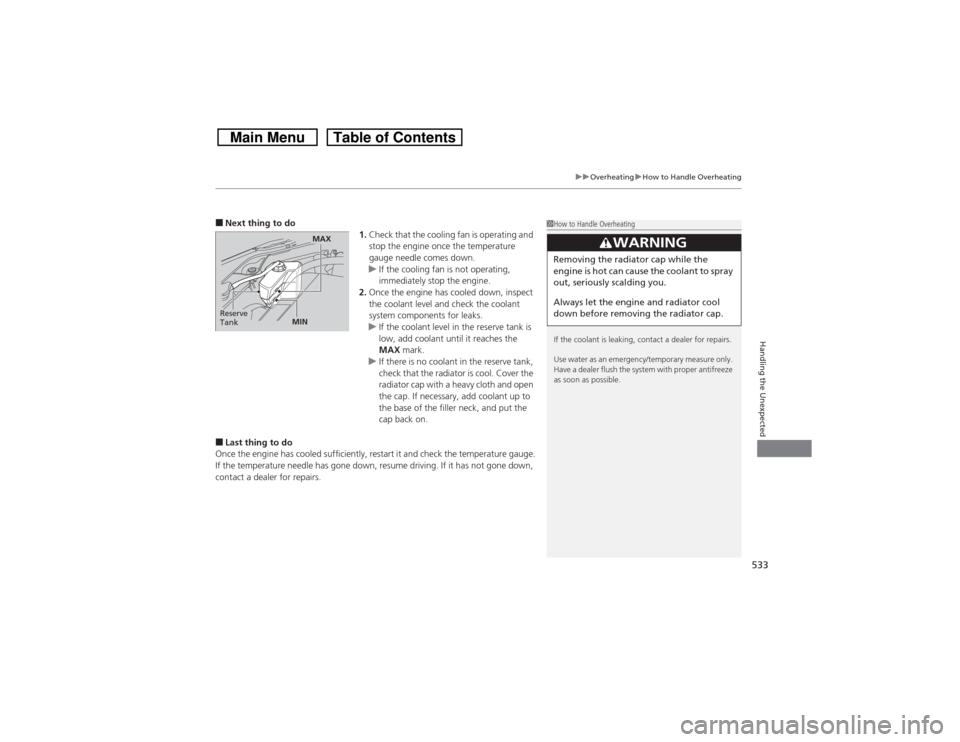
2.Once the engine has cooled down, inspect
the coolant level and check the coolant
system components for leaks.
uIf the coolant level in the reserve tank is
low, add coolant until it reaches the
MAX mark.
uIf there is no coolant in the reserve tank,
check that the radiator is cool. Cover the
radiator cap with a heavy cloth and open
the cap. If necessary, add coolant up to
the base of the filler neck, and put the
cap back on.■Last thing to do
Once the engine has cooled sufficiently, restart it and check the temperature gauge.
If the temperature needle has gone down, resume driving. If it has not gone down,
contact a dealer for repairs.
1How to Handle Overheating
If the coolant is leaking, contact a dealer for repairs.
Use water as an emergency/temporary measure only.
Have a dealer flush the system with proper antifreeze
as soon as possible.
3
WARNING
Removing the radiator cap while the
engine is hot can cause the coolant to spray
out, seriously scalding you.
Always let the engine and radiator cool
down before removing the radiator cap.
Reserve
Tank
MAX
MIN
Page 535 of 573
534Handling the Unexpected
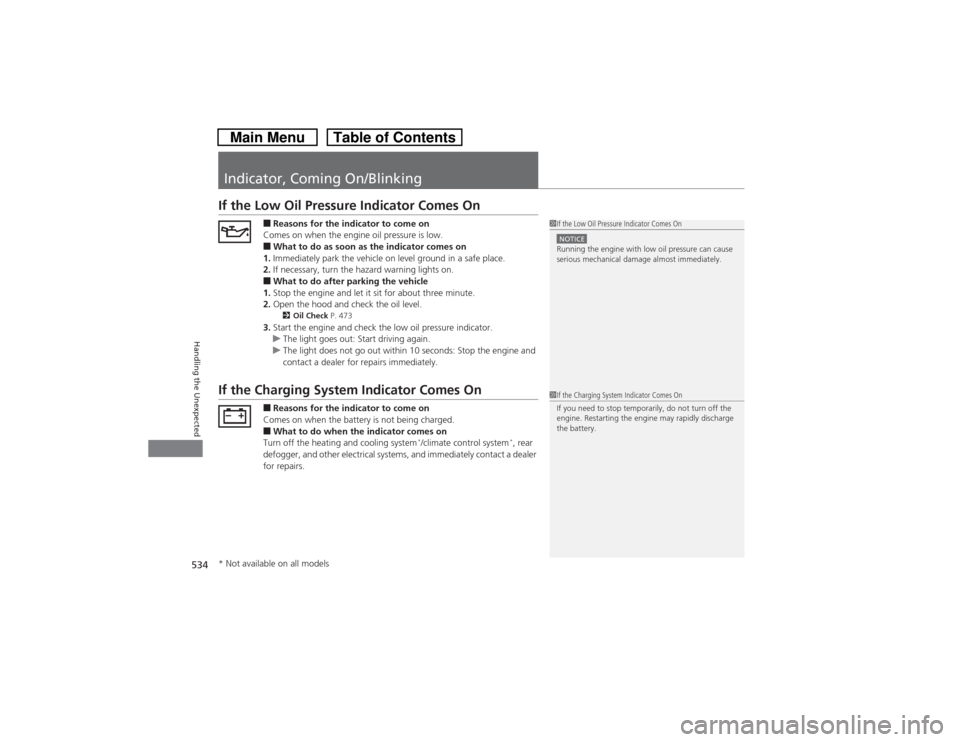
Indicator, Coming On/BlinkingIf the Low Oil Pressure Indicator Comes On
■Reasons for the indicator to come on
Comes on when the engine oil pressure is low.■What to do as soon as the indicator comes on
1.Immediately park the vehicle on level ground in a safe place.
2.If necessary, turn the hazard warning lights on.■What to do after parking the vehicle
1.Stop the engine and let it sit for about three minute.
2.Open the hood and check the oil level.2Oil Check P. 473
3.Start the engine and check the low oil pressure indicator.
uThe light goes out: Start driving again.
uThe light does not go out within 10 seconds: Stop the engine and
contact a dealer for repairs immediately.
If the Charging System Indicator Comes On
■Reasons for the indicator to come on
Comes on when the battery is not being charged.■What to do when the indicator comes on
Turn off the heating and cooling system
*/climate control system
*, rear
defogger, and other electrical systems, and immediately contact a dealer
for repairs.
1If the Low Oil Pressure Indicator Comes OnNOTICERunning the engine with low oil pressure can cause
serious mechanical damage almost immediately.1If the Charging System Indicator Comes On
If you need to stop temporarily, do not turn off the
engine. Restarting the engine may rapidly discharge
the battery.
* Not available on all models
Page 563 of 573
Index
562Index
Index
AABS (Anti-lock Brake System)................... 451
Accessories and Modifications................. 460
Accessory Power Sockets.......................... 147
Additives
Coolant ................................................... 478
Engine Oil ................................................ 472
Washer .................................................... 483
Additives, Engine Oil................................ 472
Adjusting
Armrest ................................................... 141
Front Seats .............................................. 133
Head Restraints........................................ 136
Mirrors .................................................... 130
Rear Seats................................................ 139
Steering Wheel ........................................ 129
Aha
TM................................................. 209, 262
Air Conditioning System (Climate Control
System).................................................... 157
Changing the Mode ........................ 157, 158
Defrosting the Windshield and
Windows ............................................... 159
Dust and Pollen Filter ............................... 509
Recirculation/Fresh Air Mode ........... 157, 158
Sensors .................................................... 162
Synchronized Mode ................................. 161
Using Automatic Climate Control ............ 157
Air Conditioning System (Heating and
Cooling System)...................................... 154
Cooling ................................................... 156Defrosting the Windshield and
Windows ............................................... 156
Dust and Pollen Filter............................... 509
Heating ................................................... 155
Air Pressure............................... 498, 547, 549
Airbags........................................................ 39
Advanced Airbags ..................................... 45
Airbag Care............................................... 53
Event Data Recorder .................................. 24
Front Airbags (SRS) .................................... 42
Indicator........................................ 50, 73, 79
Passenger Airbag Off Indicator .................. 51
Sensors ..................................................... 39
Side Airbag Cutoff System......................... 48
Side Airbag Off Indicator ........................... 52
Side Airbags .............................................. 46
Side Curtain Airbags.................................. 49
AM/FM Radio............................ 171, 193, 232
Anti-lock Brake System (ABS).................. 451
Indicator.................................................... 73
Armrest..................................................... 141
Audio Remote Controls........................... 168
Audio System............................................ 164
Adjusting the Sound................ 170, 191, 222
Auxiliary Input Jack.................................. 165
Error Messages ........................................ 268
General Information ................................ 276
HDD ........................................................ 242
Internet Radio ................................. 207, 260
iPod ................................................ 203, 252
MP3/WMA/AAC ...................... 179, 210, 263Reactivating ............................................ 166
Recommended CDs ................................ 277
Recommended Devices ........................... 279
Remote Controls ..................................... 168
Security Code ......................................... 166
Theft Protection ...................................... 166
Touch Screen .................................. 183, 216
USB Adapter Cable ................................. 165
USB Flash Drives...................................... 280
Authorized Manuals................................ 557
Auto Door Locking/Unlocking................ 101
Customize ...................................... 298, 309
Automatic Lighting.................................. 120
Automatic Transmission.......................... 425
Creeping................................................. 425
Fluid ....................................................... 480
Kickdown ............................................... 425
Operating the Shift Lever .......... 18, 427, 429
Shift Lever Does Not Move ...................... 531
Shifting ........................................... 426, 428
Auxiliary Input Jack................................. 165
BBattery...................................................... 506
Charging System Indicator ................ 71, 534
Jump Starting ......................................... 528
Maintenance (Checking the Battery) ....... 506
Maintenance (Replacing) ......................... 507
Belts (Seat).................................................. 32
Beverage Holders..................................... 146