sensor HONDA CROSSTOUR 2014 1.G User Guide
[x] Cancel search | Manufacturer: HONDA, Model Year: 2014, Model line: CROSSTOUR, Model: HONDA CROSSTOUR 2014 1.GPages: 573, PDF Size: 21.2 MB
Page 54 of 573
53
uuAirbagsuAirbag Care
Safe Driving
Airbag CareYou do not need to, and should not, perform any maintenance on or replace any
airbag system components yourself. However, you should have your vehicle
inspected by a dealer in the following situations:■When the airbags have deployed
If an airbag has inflated, the control unit and other related parts must be replaced.
Similarly, once an automatic seat belt tensioner has been activated, it must be
replaced.■When the vehicle has been in a moderate-to-severe collision
Even if the airbags did not inflate, have your dealer inspect the following: the driver’s
seat position sensor, weight sensors in the passenger’s seat, front seat belt
tensioners, and each seat belt that was worn during the crash.■Do not remove or modify a front seat without consulting a dealer
This would likely disable the driver’s seat position sensor or the weight sensors in the
passenger’s seat. If it is necessary to remove or modify a front seat to accommodate
a person with disabilities, contact a Honda dealer, or for U.S. vehicles, American
Honda Automobile Customer Service at 800-999-1009 and for Canadian vehicles,
Honda Canada Customer Relations at 888-9-HONDA-9.
1Airbag Care
We recommend against the use of salvaged airbag
system components, including the airbag, tensioners,
sensors, and control unit.
Page 72 of 573
71
uuIndicatorsu
Continued
Instrument Panel
*1:Models with the smart entry system have an ENGINE START/STOP button instead of an ignition switch.Indicator
Name
On/Blinking
Explanation
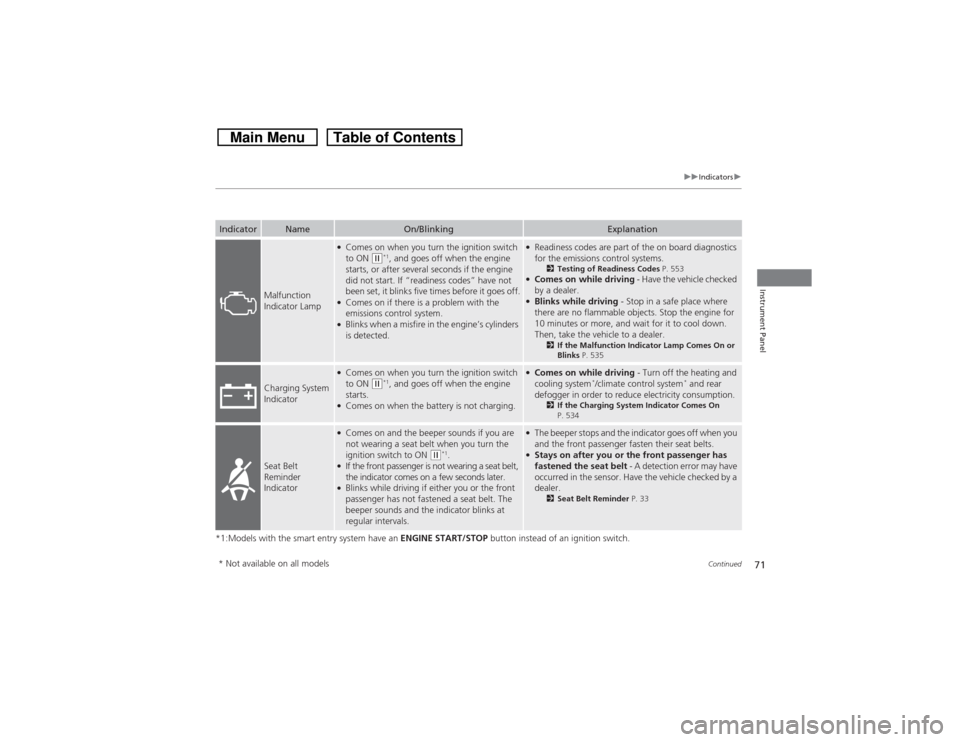
Malfunction
Indicator Lamp
●Comes on when you turn the ignition switch
to ON
(w*1, and goes off when the engine
starts, or after several seconds if the engine
did not start. If “readiness codes” have not
been set, it blinks five times before it goes off.
●Comes on if there is a problem with the
emissions control system.●Blinks when a misfire in the engine’s cylinders
is detected.
●Readiness codes are part of the on board diagnostics
for the emissions control systems.
2Testing of Readiness Codes P. 553
●Comes on while driving - Have the vehicle checked
by a dealer.●Blinks while driving - Stop in a safe place where
there are no flammable objects. Stop the engine for
10 minutes or more, and wait for it to cool down.
Then, take the vehicle to a dealer.
2If the Malfunction Indicator Lamp Comes On or
Blinks P. 535
Charging System
Indicator
●Comes on when you turn the ignition switch
to ON
(w*1, and goes off when the engine
starts.
●Comes on when the battery is not charging.
●Comes on while driving - Turn off the heating and
cooling system
*/climate control system
* and rear
defogger in order to reduce electricity consumption.
2If the Charging System Indicator Comes On
P. 534
Seat Belt
Reminder
Indicator
●Comes on and the beeper sounds if you are
not wearing a seat belt when you turn the
ignition switch to ON
(w*1.
●If the front passenger is not wearing a seat belt,
the indicator comes on a few seconds later.●Blinks while driving if either you or the front
passenger has not fastened a seat belt. The
beeper sounds and the indicator blinks at
regular intervals.
●The beeper stops and the indicator goes off when you
and the front passenger fasten their seat belts.●Stays on after you or the front passenger has
fastened the seat belt - A detection error may have
occurred in the sensor. Have the vehicle checked by a
dealer.
2Seat Belt Reminder P. 33
* Not available on all models
Page 77 of 573
76
uuIndicatorsu
Instrument Panel
*1:Models with the smart entry system have an ENGINE START/STOP button instead of an ignition switch.Indicator
Name
On/Blinking
Explanation
Message
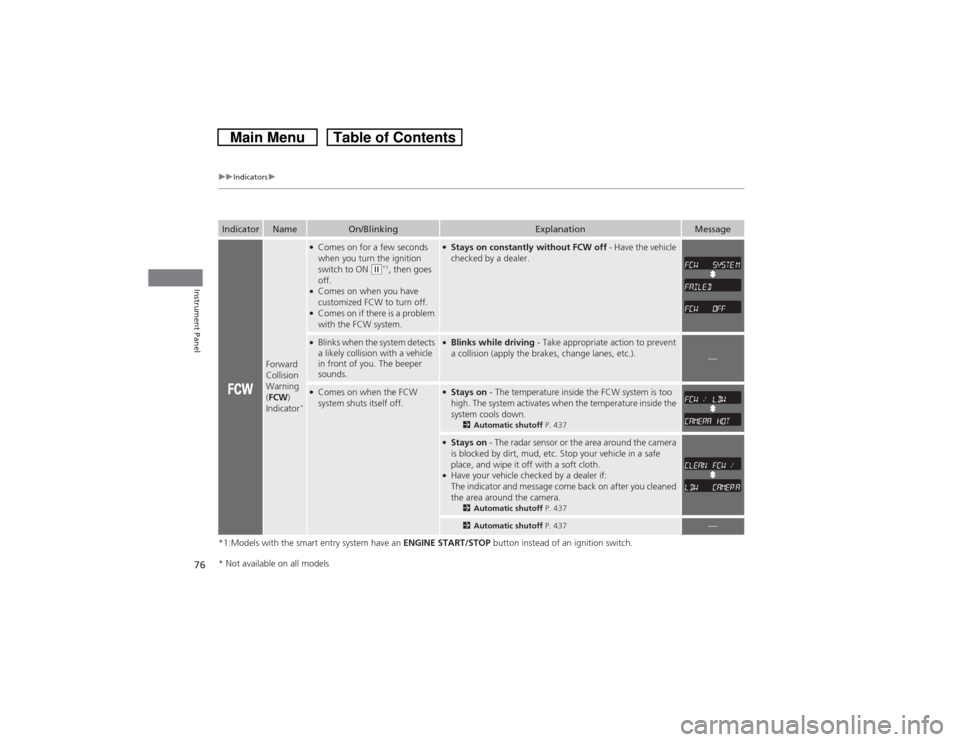
Forward
Collision
Warning
(FCW)
Indicator
*●Comes on for a few seconds
when you turn the ignition
switch to ON
(w*1, then goes
off.
●Comes on when you have
customized FCW to turn off.●Comes on if there is a problem
with the FCW system.
●Stays on constantly without FCW off - Have the vehicle
checked by a dealer.
●Blinks when the system detects
a likely collision with a vehicle
in front of you. The beeper
sounds.
●Blinks while driving - Take appropriate action to prevent
a collision (apply the brakes, change lanes, etc.).
—
●Comes on when the FCW
system shuts itself off.
●Stays on - The temperature inside the FCW system is too
high. The system activates when the temperature inside the
system cools down.
2Automatic shutoff P. 437
●Stays on - The radar sensor or the area around the camera
is blocked by dirt, mud, etc. Stop your vehicle in a safe
place, and wipe it off with a soft cloth.●Have your vehicle checked by a dealer if:
The indicator and message come back on after you cleaned
the area around the camera.
2Automatic shutoff P. 4372Automatic shutoff P. 437
—
* Not available on all models
Page 87 of 573
uuGauges and DisplaysuInformation Display
86Instrument Panel
Shows the outside temperature in Fahrenheit (U.S.) or Celsius (Canada).■Adjusting the outside temperature display
Adjust the temperature reading up to ±5°F or ±3°C if the temperature reading
seems incorrect.
1.Turn the ignition switch to ON
(w*1.
2.Press and hold the (Select/Reset) knob for 10 seconds or more while the
outside temperature is shown on the information display.
uThe information display goes into temperature adjustment mode. The display
starts showing from -5°F to +5°F (U.S.) or -3°C to +3°C (Canada).
3.Release the knob when the right adjustment amount is shown.
uThe adjustment is complete.
*1: Models with the smart entry system have an ENGINE START/STOP button instead of an
ignition switch.■Outside Temperature
1Outside Temperature
The temperature sensor is in the front bumper. Road
heat and exhaust from another vehicle can affect the
temperature reading when your vehicle speed is less
than 19 mph (30 km/h).
It may take several minutes for the display to be
updated after the temperature reading has stabilized.
Use the audio/information screen’s customized
features to correct the temperature.
2Customized Features
* P. 281
Models with audio touch screen
* Not available on all models
Page 88 of 573
87
Controls
This chapter explains how to operate the various controls necessary for driving.
Setting the Clock................................ 88
Locking and Unlocking the Doors
Key Types and Functions .................... 91Low Smart Entry Remote Signal Strength
*.. 93
Locking/Unlocking the Doors from the
Outside ............................................ 94
Locking/Unlocking the Doors from the
Inside ............................................... 99
Childproof Door Locks ..................... 100
Auto Door Locking/Unlocking .......... 101
Opening and Closing the Tailgate... 105
Security System................................ 107
Immobilizer System .......................... 107
Security System Alarm ...................... 107Opening and Closing the Windows..... 110
Opening and Closing the Moonroof
.. 113
Operating the Switches Around the
Steering Wheel
Ignition Switch
*............................... 114
ENGINE START/STOP Button
*........... 115
Ignition Switch and Power Mode
Comparison ................................... 118
Turn Signals ..................................... 119
Light Switches.................................. 119
Fog Lights ........................................ 122
Daytime Running Lights ................... 122
Wipers and Washers ........................ 123
Brightness Control ........................... 125
Rear Defogger/Heated Door Mirror Button.. 126Driving Position Memory System
*.... 127Adjusting the Steering Wheel .......... 129
Adjusting the Mirrors....................... 130
Interior Rearview Mirror ................... 130
Power Door Mirrors ......................... 131
Adjusting the Seats.......................... 133
Adjusting the Seat Positions ............. 133
Interior Lights/Interior Convenience
Items................................................ 142
Interior Lights .................................. 142
Interior Convenience Items .............. 144
Heating and Cooling System
*......... 154
Using Vents, Heating and A/C.......... 154
Climate Control System
*.................. 157
Using Automatic Climate Control .... 157
Automatic Climate Control Sensors ... 162
* Not available on all models
Page 97 of 573
uuLocking and Unlocking the DoorsuLocking/Unlocking the Doors from the Outside
96Controls
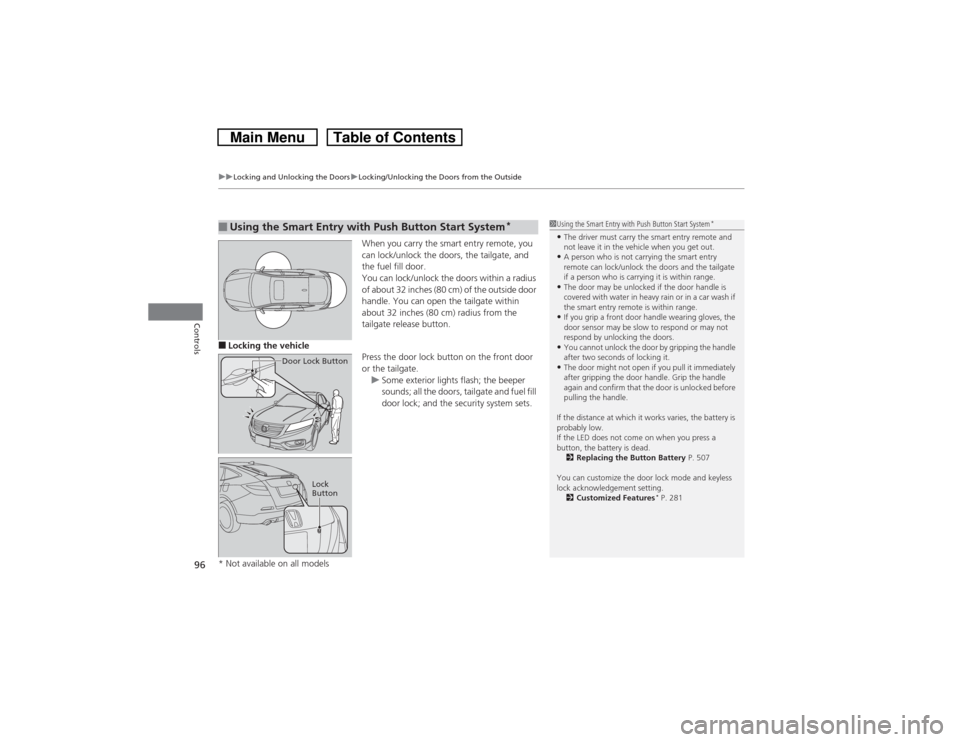
When you carry the smart entry remote, you
can lock/unlock the doors, the tailgate, and
the fuel fill door.
You can lock/unlock the doors within a radius
of about 32 inches (80 cm) of the outside door
handle. You can open the tailgate within
about 32 inches (80 cm) radius from the
tailgate release button.
■Locking the vehicle
Press the door lock button on the front door
or the tailgate.
uSome exterior lights flash; the beeper
sounds; all the doors, tailgate and fuel fill
door lock; and the security system sets.■Using the Smart Entry with Push Button Start System
*
Door Lock Button
Lock
Button
1Using the Smart Entry with Push Button Start System
*
•The driver must carry the smart entry remote and
not leave it in the vehicle when you get out.•A person who is not carrying the smart entry
remote can lock/unlock the doors and the tailgate
if a person who is carrying it is within range.•The door may be unlocked if the door handle is
covered with water in heavy rain or in a car wash if
the smart entry remote is within range.•If you grip a front door handle wearing gloves, the
door sensor may be slow to respond or may not
respond by unlocking the doors.•You cannot unlock the door by gripping the handle
after two seconds of locking it.•The door might not open if you pull it immediately
after gripping the door handle. Grip the handle
again and confirm that the door is unlocked before
pulling the handle.
If the distance at which it works varies, the battery is
probably low.
If the LED does not come on when you press a
button, the battery is dead.
2Replacing the Button Battery P. 507
You can customize the door lock mode and keyless
lock acknowledgement setting.
2Customized Features
* P. 281
* Not available on all models
Page 121 of 573
uuOperating the Switches Around the Steering WheeluLight Switches
120Controls
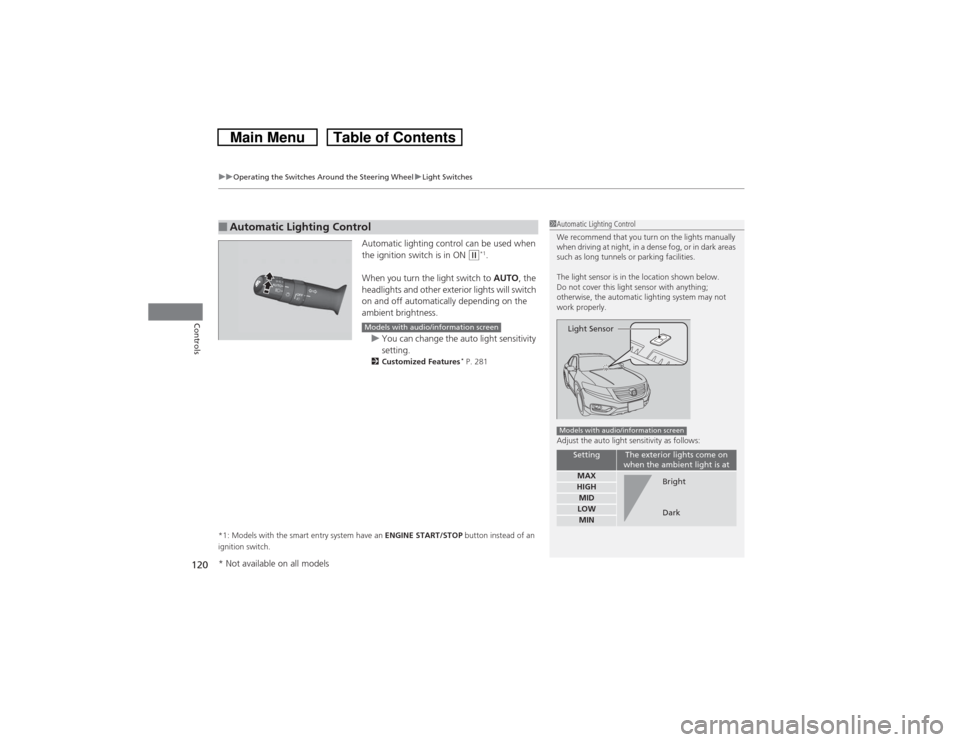
Automatic lighting control can be used when
the ignition switch is in ON
(w*1.
When you turn the light switch to AUTO, the
headlights and other exterior lights will switch
on and off automatically depending on the
ambient brightness.
uYou can change the auto light sensitivity
setting.
2Customized Features
* P. 281
*1: Models with the smart entry system have an ENGINE START/STOP button instead of an
ignition switch.
■Automatic Lighting Control
1Automatic Lighting Control
We recommend that you turn on the lights manually
when driving at night, in a dense fog, or in dark areas
such as long tunnels or parking facilities.
The light sensor is in the location shown below.
Do not cover this light sensor with anything;
otherwise, the automatic lighting system may not
work properly.
Adjust the auto light sensitivity as follows:
Setting
The exterior lights come on
when the ambient light is at
MAXHIGHMIDLOWMINLight SensorModels with audio/information screen
Bright
Dark
Models with audio/information screen
* Not available on all models
Page 131 of 573
130Controls
Adjusting the MirrorsInterior Rearview MirrorAdjust the angle of the rearview mirror when you are sitting in the correct driving
position.
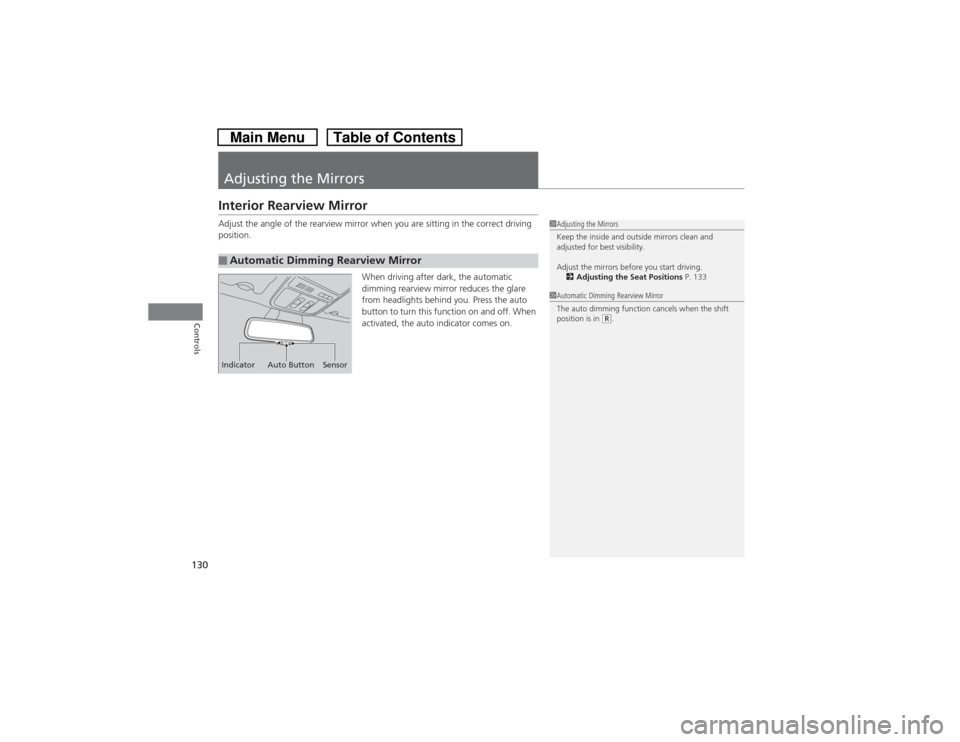
When driving after dark, the automatic
dimming rearview mirror reduces the glare
from headlights behind you. Press the auto
button to turn this function on and off. When
activated, the auto indicator comes on.■Automatic Dimming Rearview Mirror
1Adjusting the Mirrors
Keep the inside and outside mirrors clean and
adjusted for best visibility.
Adjust the mirrors before you start driving.
2Adjusting the Seat Positions P. 133
Indicator Auto Button Sensor
1Automatic Dimming Rearview Mirror
The auto dimming function cancels when the shift
position is in
(R.
Page 140 of 573
139
uuAdjusting the SeatsuRear Seats
Continued
Controls
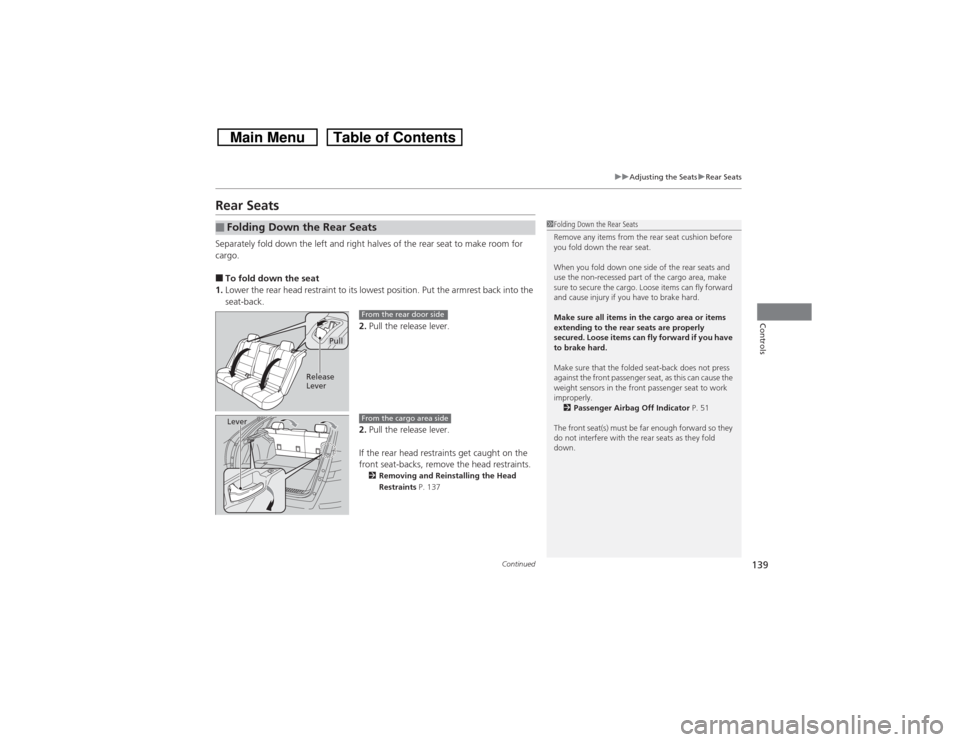
Rear SeatsSeparately fold down the left and right halves of the rear seat to make room for
cargo.■To fold down the seat
1.Lower the rear head restraint to its lowest position. Put the armrest back into the
seat-back.
2.Pull the release lever.
2.Pull the release lever.
If the rear head restraints get caught on the
front seat-backs, remove the head restraints.
2Removing and Reinstalling the Head
Restraints P. 137
■Folding Down the Rear Seats
1Folding Down the Rear Seats
Remove any items from the rear seat cushion before
you fold down the rear seat.
When you fold down one side of the rear seats and
use the non-recessed part of the cargo area, make
sure to secure the cargo. Loose items can fly forward
and cause injury if you have to brake hard.
Make sure all items in the cargo area or items
extending to the rear seats are properly
secured. Loose items can fly forward if you have
to brake hard.
Make sure that the folded seat-back does not press
against the front passenger seat, as this can cause the
weight sensors in the front passenger seat to work
improperly.
2Passenger Airbag Off Indicator P. 51
The front seat(s) must be far enough forward so they
do not interfere with the rear seats as they fold
down.
Pull
Release
Lever
From the rear door side
Lever
From the cargo area side
Page 162 of 573
161
uuClimate Control System
*uSynchronized Mode
Controls
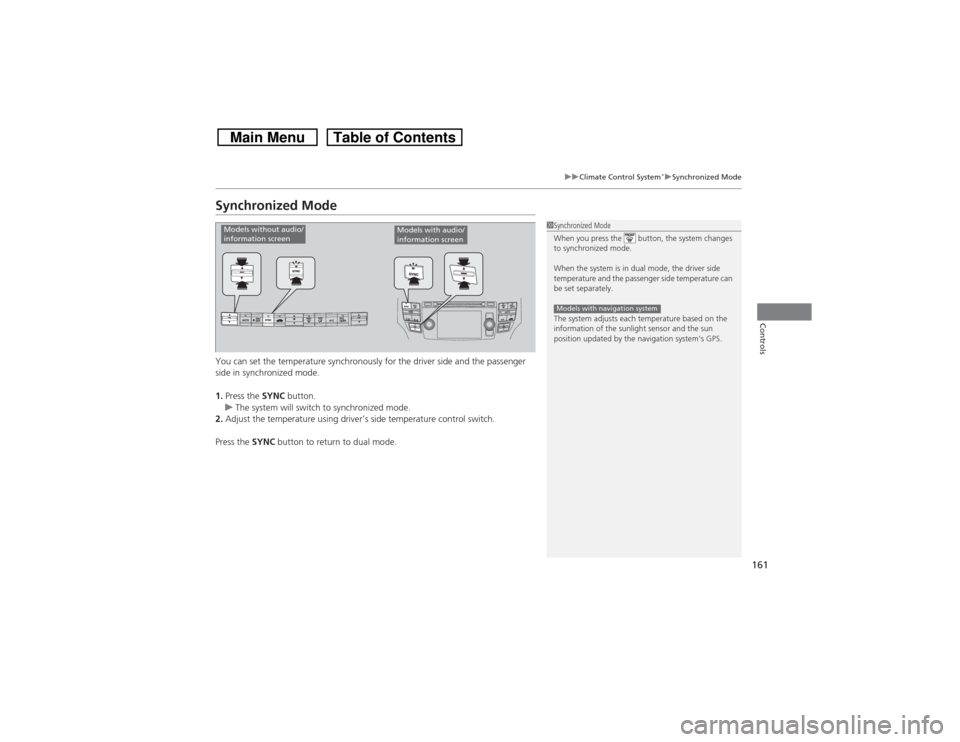
Synchronized ModeYou can set the temperature synchronously for the driver side and the passenger
side in synchronized mode.
1.Press the SYNC button.
uThe system will switch to synchronized mode.
2.Adjust the temperature using driver’s side temperature control switch.
Press the SYNC button to return to dual mode.
1Synchronized Mode
When you press the button, the system changes
to synchronized mode.
When the system is in dual mode, the driver side
temperature and the passenger side temperature can
be set separately.
The system adjusts each temperature based on the
information of the sunlight sensor and the sun
position updated by the navigation system’s GPS.Models with navigation system
Models without audio/
information screen
Models with audio/
information screen