key HONDA CROSSTOUR 2014 1.G Owner's Manual
[x] Cancel search | Manufacturer: HONDA, Model Year: 2014, Model line: CROSSTOUR, Model: HONDA CROSSTOUR 2014 1.GPages: 573, PDF Size: 21.2 MB
Page 231 of 573
230
uuAudio System Basic OperationuVoice Control Operation
Features
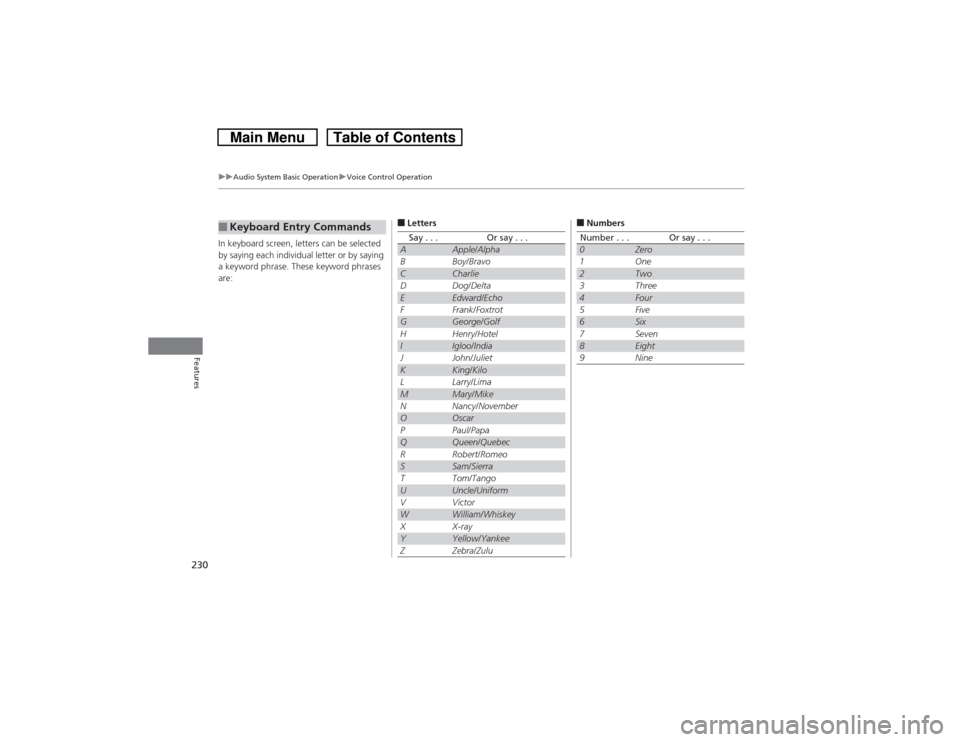
In keyboard screen, letters can be selected
by saying each individual letter or by saying
a keyword phrase. These keyword phrases
are:■Keyboard Entry Commands
■LettersSay . . .
Or say . . .
A
Apple/Alpha
B
Boy/Bravo
C
Charlie
D
Dog/Delta
E
Edward/Echo
F
Frank/Foxtrot
G
George/Golf
H
Henry/Hotel
I
Igloo/India
J
John/Juliet
K
King/Kilo
L
Larry/Lima
M
Mary/Mike
N
Nancy/November
O
Oscar
P
Paul/Papa
Q
Queen/Quebec
R
Robert/Romeo
S
Sam/Sierra
T
Tom/Tango
U
Uncle/Uniform
V
Victor
W
William/Whiskey
X
X-ray
Y
Yellow/Yankee
Z
Zebra/Zulu
■NumbersNumber . . .
Or say . . .
0
Zero
1
One
2
Two
3
Three
4
Four
5
Five
6
Six
7
Seven
8
Eight
9
Nine
Page 285 of 573
284
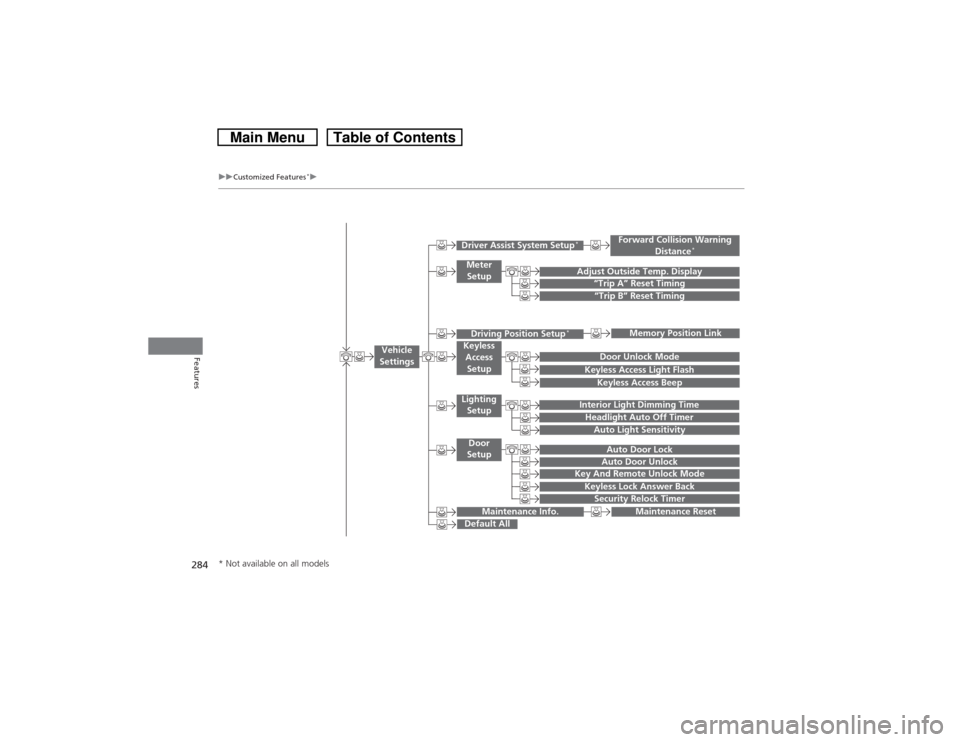
uuCustomized Features
*u
Features
“Trip B” Reset Timing
Adjust Outside Temp. Display
“Trip A” Reset TimingKeyless Access Light FlashAuto Light Sensitivity
Auto Door LockAuto Door Unlock
Forward Collision Warning
Distance
*
Door Unlock Mode
Interior Light Dimming TimeHeadlight Auto Off Timer
Memory Position Link
Key And Remote Unlock ModeKeyless Lock Answer BackSecurity Relock Timer
Maintenance Reset
Default All
Vehicle
Settings
Driver Assist System Setup
*
Meter
SetupDriving Position Setup
*
Keyless
Access
SetupLighting
SetupDoor
Setup
Maintenance Info.
Keyless Access Beep
* Not available on all models
Page 291 of 573
290
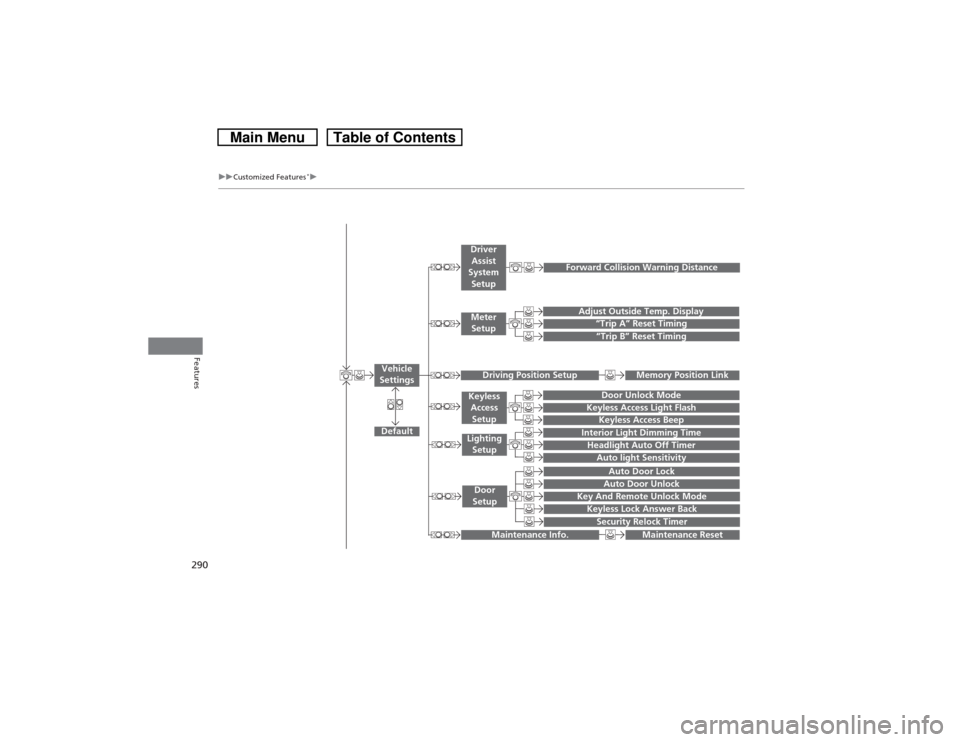
uuCustomized Features
*u
Features
“Trip A” Reset Timing“Trip B” Reset Timing
Adjust Outside Temp. Display
Forward Collision Warning Distance
Default
Memory Position Link
Door Unlock Mode
Keyless Access Light Flash
Interior Light Dimming TimeHeadlight Auto Off TimerAuto light Sensitivity
Key And Remote Unlock ModeKeyless Lock Answer BackSecurity Relock TimerAuto Door LockAuto Door Unlock
Maintenance Reset
Vehicle
Settings
Meter
SetupDriver
Assist
System
SetupDriving Position Setup
Keyless
Access
SetupLighting
SetupDoor
Setup
Maintenance Info.
Keyless Access Beep
Page 298 of 573
297
uuCustomized Features
*u
Continued
Features
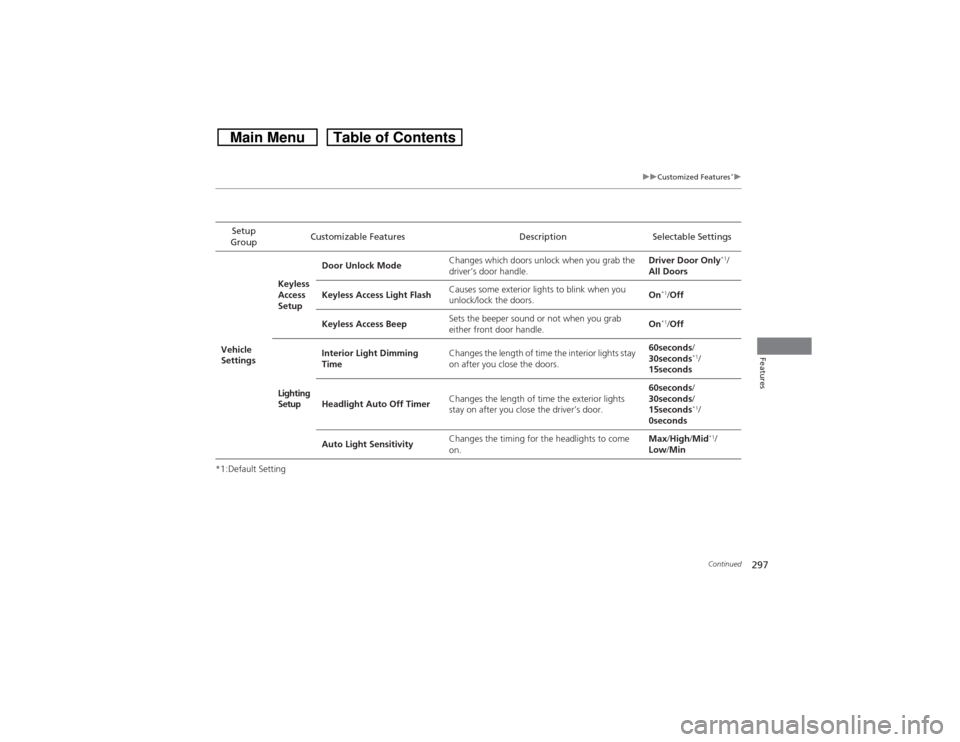
*1:Default SettingSetup
GroupCustomizable Features Description Selectable Settings
Vehicle
SettingsKeyless
Access
SetupDoor Unlock ModeChanges which doors unlock when you grab the
driver’s door handle.Driver Door Only
*1/
All Doors
Keyless Access Light FlashCauses some exterior lights to blink when you
unlock/lock the doors.On
*1/Off
Keyless Access BeepSets the beeper sound or not when you grab
either front door handle.On*1/Off
Lighting
SetupInterior Light Dimming
TimeChanges the length of time the interior lights stay
on after you close the doors.60seconds/
30seconds
*1/
15seconds
Headlight Auto Off TimerChanges the length of time the exterior lights
stay on after you close the driver’s door.60seconds/
30seconds/
15seconds*1/
0seconds
Auto Light SensitivityChanges the timing for the headlights to come
on.Max/High/Mid*1/
Low/Min
Page 299 of 573
298
uuCustomized Features
*u
Features
*1:Default SettingSetup
GroupCustomizable Features Description Selectable Settings
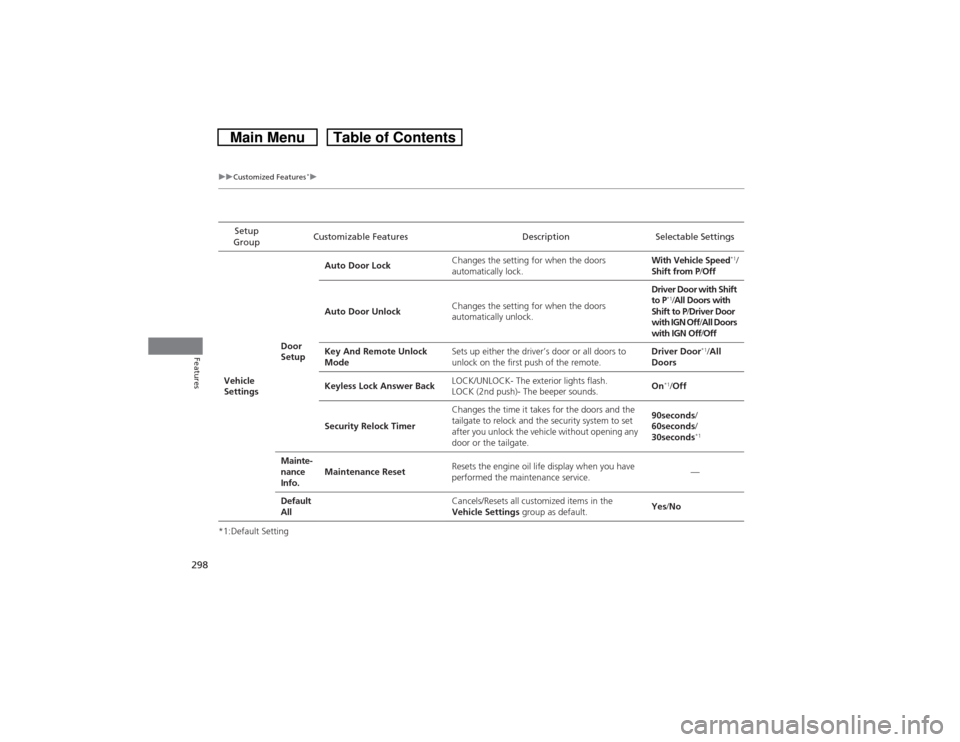
Vehicle
SettingsDoor
SetupAuto Door LockChanges the setting for when the doors
automatically lock.With Vehicle Speed
*1/
Shift from P/Off
Auto Door UnlockChanges the setting for when the doors
automatically unlock.Driver Door with Shift
to P
*1/All Doors with
Shift to P/Driver Door
with IGN Off/All Doors
with IGN Off/Off
Key And Remote Unlock
ModeSets up either the driver’s door or all doors to
unlock on the first push of the remote.Driver Door
*1/All
Doors
Keyless Lock Answer BackLOCK/UNLOCK- The exterior lights flash.
LOCK (2nd push)- The beeper sounds.On
*1/Off
Security Relock TimerChanges the time it takes for the doors and the
tailgate to relock and the security system to set
after you unlock the vehicle without opening any
door or the tailgate.90seconds/
60seconds/
30seconds
*1
Mainte-
nance
Info.Maintenance ResetResets the engine oil life display when you have
performed the maintenance service.—
Default
All
Cancels/Resets all customized items in the
Vehicle Settings group as default.Yes/No
Page 308 of 573
307
uuCustomized Features
*u
Continued
Features
*1:Default SettingSetup
GroupCustomizable Features Description Selectable SettingsVehicle
SettingsDriver
Assist
System
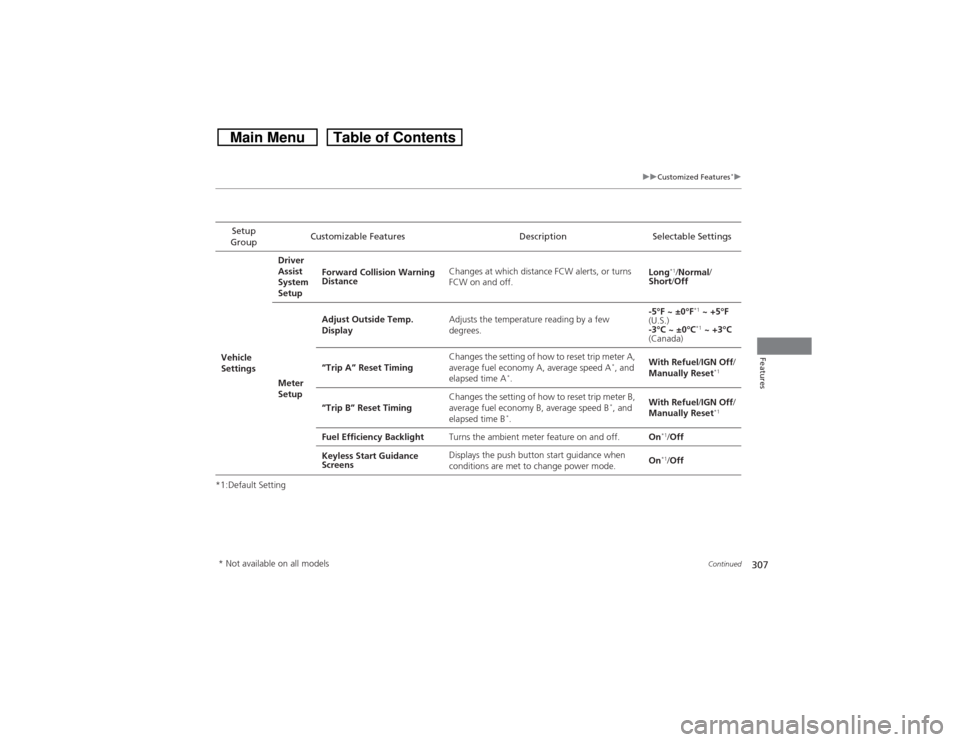
SetupForward Collision Warning
DistanceChanges at which distance FCW alerts, or turns
FCW on and off.Long
*1/Normal/
Short/Off
Meter
SetupAdjust Outside Temp.
DisplayAdjusts the temperature reading by a few
degrees.-5°F ~ ±0°F
*1 ~ +5°F
(U.S.)
-3°C ~ ±0°C*1 ~ +3°C
(Canada)
“Trip A” Reset TimingChanges the setting of how to reset trip meter A,
average fuel economy A, average speed A
*, and
elapsed time A
*.With Refuel/IGN Off/
Manually Reset
*1
“Trip B” Reset TimingChanges the setting of how to reset trip meter B,
average fuel economy B, average speed B
*, and
elapsed time B
*.With Refuel/IGN Off/
Manually Reset
*1
Fuel Efficiency BacklightTurns the ambient meter feature on and off.On
*1/Off
Keyless Start Guidance
ScreensDisplays the push button start guidance when
conditions are met to change power mode.On*1/Off
* Not available on all models
Page 309 of 573
308
uuCustomized Features
*u
Features
*1:Default SettingSetup
GroupCustomizable Features Description Selectable Settings
Vehicle
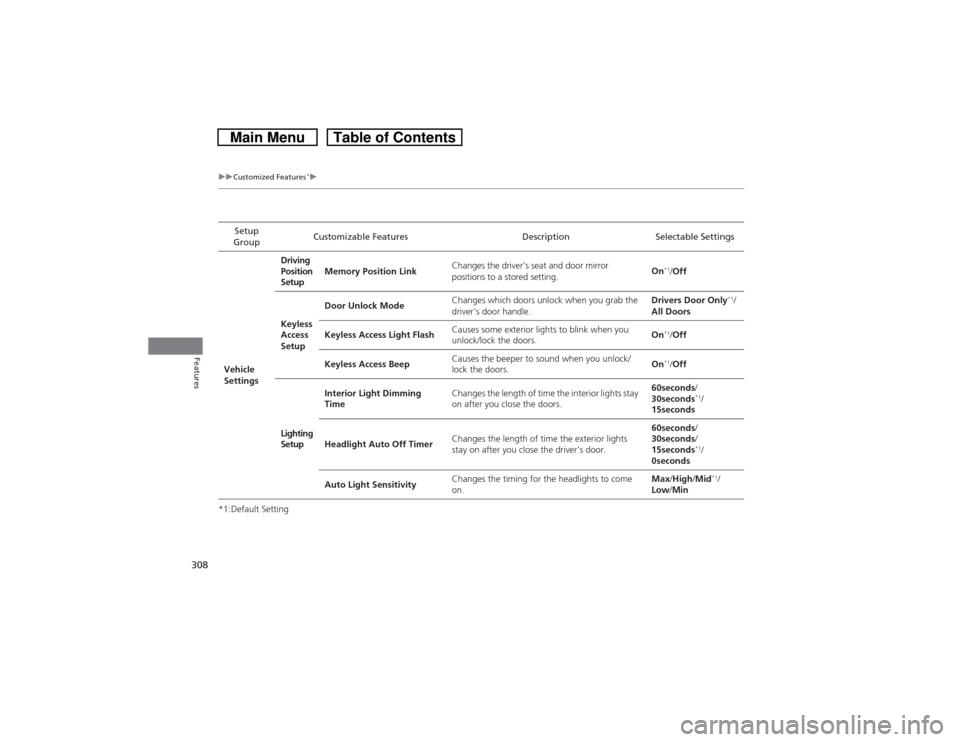
SettingsDriving
Position
SetupMemory Position LinkChanges the driver’s seat and door mirror
positions to a stored setting.On
*1/Off
Keyless
Access
SetupDoor Unlock ModeChanges which doors unlock when you grab the
driver’s door handle.Drivers Door Only
*1/
All Doors
Keyless Access Light FlashCauses some exterior lights to blink when you
unlock/lock the doors.On
*1/Off
Keyless Access BeepCauses the beeper to sound when you unlock/
lock the doors.On*1/Off
Lighting
SetupInterior Light Dimming
TimeChanges the length of time the interior lights stay
on after you close the doors.60seconds/
30seconds
*1/
15seconds
Headlight Auto Off TimerChanges the length of time the exterior lights
stay on after you close the driver’s door.60seconds/
30seconds/
15seconds*1/
0seconds
Auto Light SensitivityChanges the timing for the headlights to come
on.Max/High/Mid*1/
Low/Min
Page 310 of 573
309
uuCustomized Features
*u
Continued
Features
*1:Default SettingSetup
GroupCustomizable Features Description Selectable Settings
Vehicle
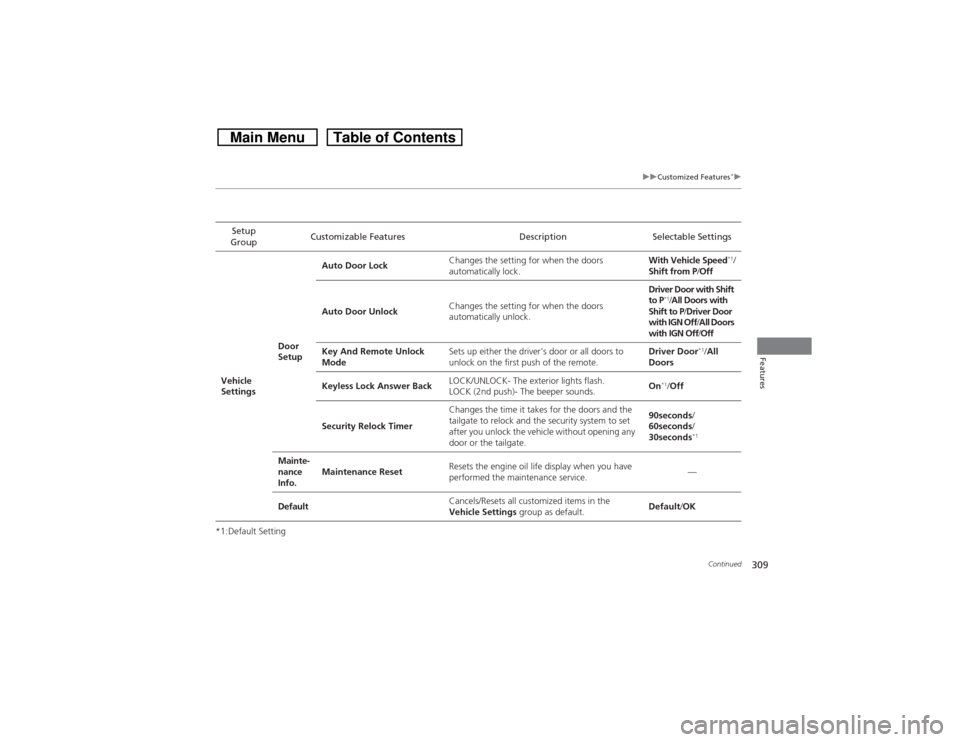
SettingsDoor
SetupAuto Door LockChanges the setting for when the doors
automatically lock.With Vehicle Speed
*1/
Shift from P/Off
Auto Door UnlockChanges the setting for when the doors
automatically unlock.Driver Door with Shift
to P
*1/All Doors with
Shift to P/Driver Door
with IGN Off/All Doors
with IGN Off/Off
Key And Remote Unlock
ModeSets up either the driver’s door or all doors to
unlock on the first push of the remote.Driver Door
*1/All
Doors
Keyless Lock Answer BackLOCK/UNLOCK- The exterior lights flash.
LOCK (2nd push)- The beeper sounds.On
*1/Off
Security Relock TimerChanges the time it takes for the doors and the
tailgate to relock and the security system to set
after you unlock the vehicle without opening any
door or the tailgate.90seconds/
60seconds/
30seconds
*1
Mainte-
nance
Info.Maintenance ResetResets the engine oil life display when you have
performed the maintenance service.—
DefaultCancels/Resets all customized items in the
Vehicle Settings group as default.Default/OK
Page 324 of 573
323
uuBluetooth® HandsFreeLink®uHFL Menus
Continued
Features
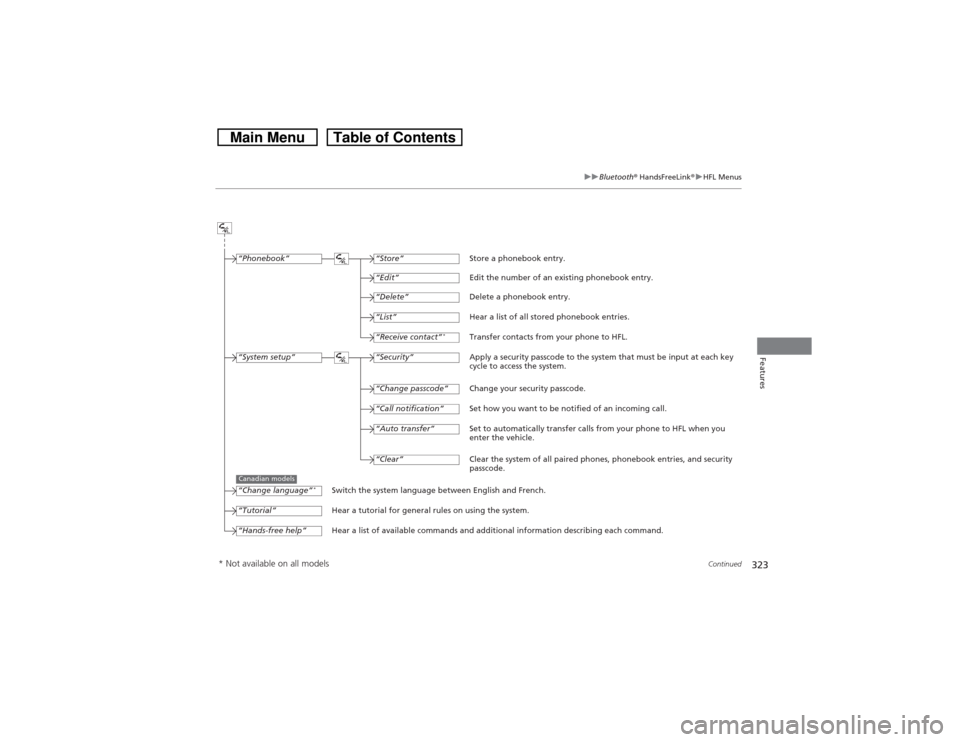
“Change passcode”
Store a phonebook entry.
Edit the number of an existing phonebook entry.
Delete a phonebook entry.
Hear a list of all stored phonebook entries.
Transfer contacts from your phone to HFL.
Apply a security passcode to the system that must be input at each key
cycle to access the system.
Change your security passcode.
Set how you want to be notified of an incoming call.
Set to automatically transfer calls from your phone to HFL when you
enter the vehicle.
Switch the system language between English and French.
Hear a tutorial for general rules on using the system.
Hear a list of available commands and additional information describing each command.“Store”
“Edit”“Delete”“List”“Receive contact”
*
“Security”“Call notification”“Auto transfer”
“Phonebook”“System setup”“Change language”
*
“Tutorial”“Hands-free help”
Clear the system of all paired phones, phonebook entries, and security
passcode. “Clear”
Canadian models
* Not available on all models
Page 327 of 573
uuBluetooth® HandsFreeLink®uHFL Menus
326Features
You can make calls using any phone number or a name in the HFL phonebook, and
redial the last number called.■Direct dialing a phone number
1.Say “Call” or “Dial.”
2.Say the number you want to dial after the prompts.
3.Say “Call” or “Dial” after the prompts.■From the HFL phonebook
1.Say “Call” or “Dial.”
2.Say the name stored in the HFL phonebook after the prompts.
3.Follow the HFL prompts.■To redial the last number called by HFL
Say “Redial.”■To end a call
Press the (HFL back) button.■Making a Call
1Making a Call
Press the button and wait for a beep before
giving a command.
HFL uses a Class 2 Bluetooth, with has a maximum
range of about 30 feet (10 meters).
HFL allows you to talk up to 30 minutes after you
remove the key from the ignition switch. However,
this may weaken the vehicle’s battery.
Once a call is connected, you can hear the voice of
the person you are calling through the audio
speakers.