light HONDA CROSSTOUR 2014 1.G Workshop Manual
[x] Cancel search | Manufacturer: HONDA, Model Year: 2014, Model line: CROSSTOUR, Model: HONDA CROSSTOUR 2014 1.GPages: 573, PDF Size: 21.2 MB
Page 291 of 573
290
uuCustomized Features
*u
Features
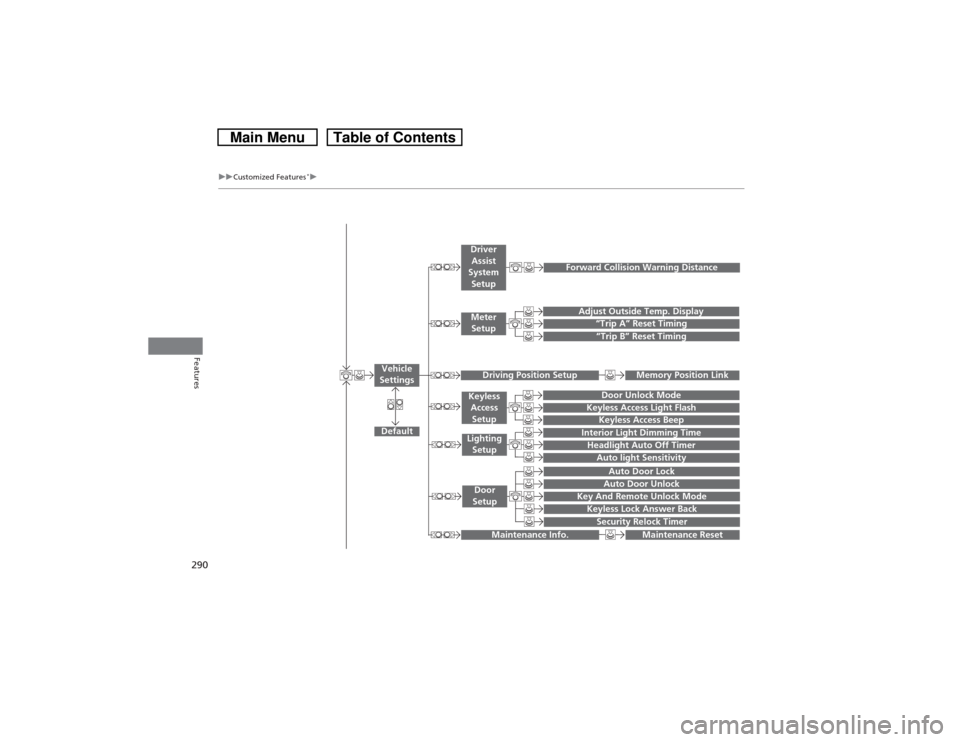
“Trip A” Reset Timing“Trip B” Reset Timing
Adjust Outside Temp. Display
Forward Collision Warning Distance
Default
Memory Position Link
Door Unlock Mode
Keyless Access Light Flash
Interior Light Dimming TimeHeadlight Auto Off TimerAuto light Sensitivity
Key And Remote Unlock ModeKeyless Lock Answer BackSecurity Relock TimerAuto Door LockAuto Door Unlock
Maintenance Reset
Vehicle
Settings
Meter
SetupDriver
Assist
System
SetupDriving Position Setup
Keyless
Access
SetupLighting
SetupDoor
Setup
Maintenance Info.
Keyless Access Beep
Page 294 of 573
293
uuCustomized Features
*u
Continued
Features
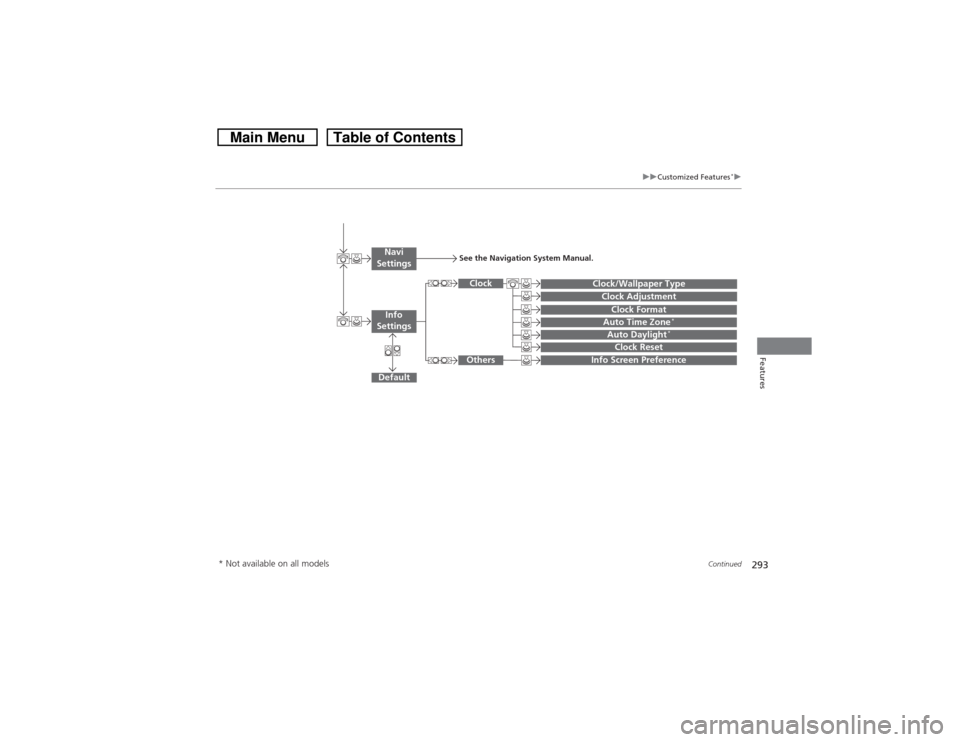
Auto Daylight
*
Clock Reset
Info Screen Preference
Clock FormatAuto Time Zone
*
Clock/Wallpaper TypeClock Adjustment
Clock
Default
Others
Info
SettingsNavi
Settings
See the Navigation System Manual.
* Not available on all models
Page 298 of 573
297
uuCustomized Features
*u
Continued
Features
*1:Default SettingSetup
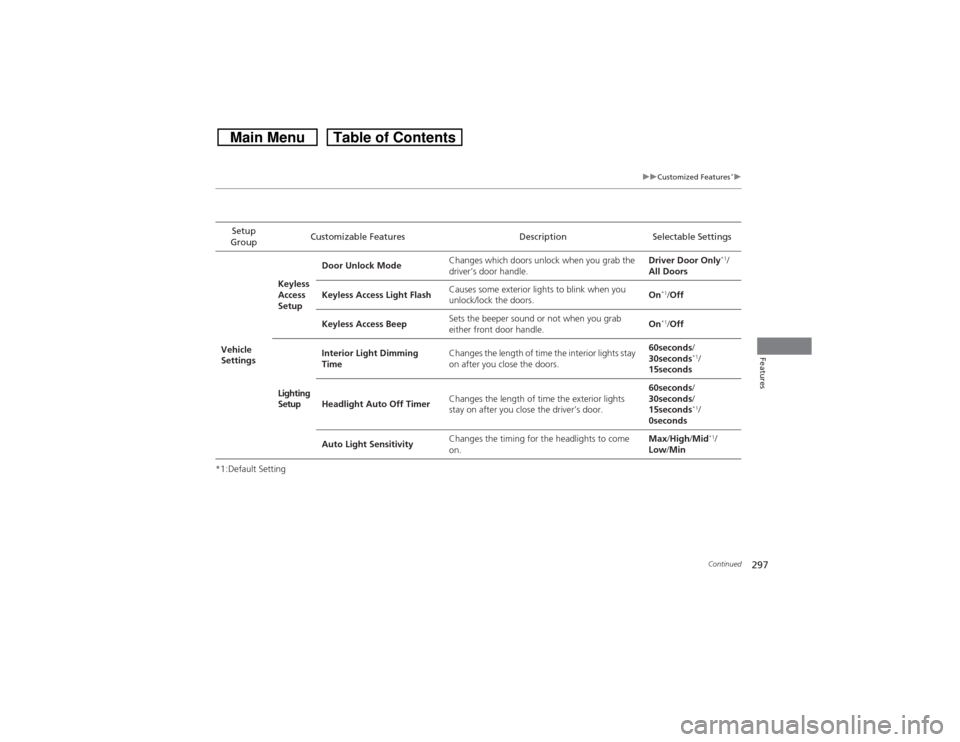
GroupCustomizable Features Description Selectable Settings
Vehicle
SettingsKeyless
Access
SetupDoor Unlock ModeChanges which doors unlock when you grab the
driver’s door handle.Driver Door Only
*1/
All Doors
Keyless Access Light FlashCauses some exterior lights to blink when you
unlock/lock the doors.On
*1/Off
Keyless Access BeepSets the beeper sound or not when you grab
either front door handle.On*1/Off
Lighting
SetupInterior Light Dimming
TimeChanges the length of time the interior lights stay
on after you close the doors.60seconds/
30seconds
*1/
15seconds
Headlight Auto Off TimerChanges the length of time the exterior lights
stay on after you close the driver’s door.60seconds/
30seconds/
15seconds*1/
0seconds
Auto Light SensitivityChanges the timing for the headlights to come
on.Max/High/Mid*1/
Low/Min
Page 299 of 573
298
uuCustomized Features
*u
Features
*1:Default SettingSetup
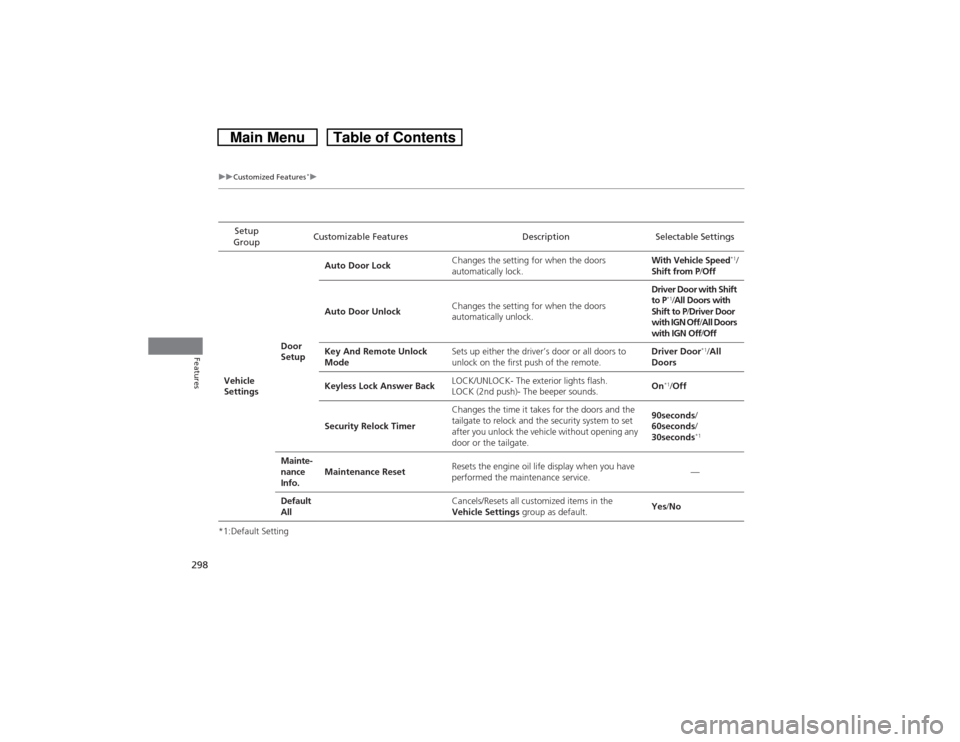
GroupCustomizable Features Description Selectable Settings
Vehicle
SettingsDoor
SetupAuto Door LockChanges the setting for when the doors
automatically lock.With Vehicle Speed
*1/
Shift from P/Off
Auto Door UnlockChanges the setting for when the doors
automatically unlock.Driver Door with Shift
to P
*1/All Doors with
Shift to P/Driver Door
with IGN Off/All Doors
with IGN Off/Off
Key And Remote Unlock
ModeSets up either the driver’s door or all doors to
unlock on the first push of the remote.Driver Door
*1/All
Doors
Keyless Lock Answer BackLOCK/UNLOCK- The exterior lights flash.
LOCK (2nd push)- The beeper sounds.On
*1/Off
Security Relock TimerChanges the time it takes for the doors and the
tailgate to relock and the security system to set
after you unlock the vehicle without opening any
door or the tailgate.90seconds/
60seconds/
30seconds
*1
Mainte-
nance
Info.Maintenance ResetResets the engine oil life display when you have
performed the maintenance service.—
Default
All
Cancels/Resets all customized items in the
Vehicle Settings group as default.Yes/No
Page 307 of 573
306
uuCustomized Features
*u
Features
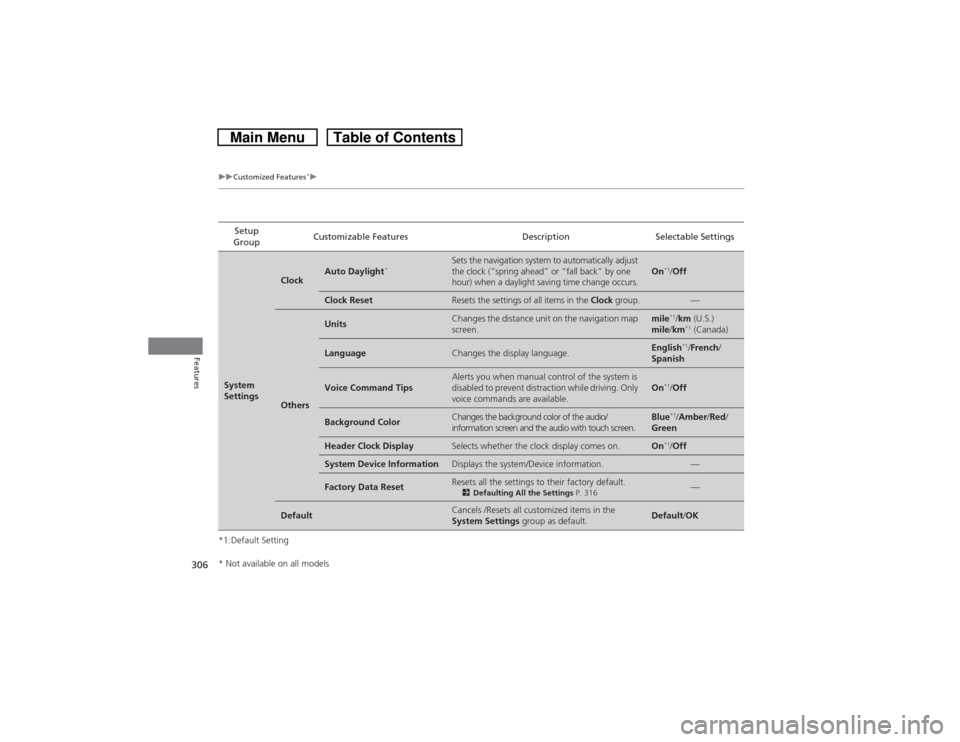
*1:Default SettingSetup
GroupCustomizable Features Description Selectable SettingsSystem
Settings
Clock
Auto Daylight
*
Sets the navigation system to automatically adjust
the clock (“spring ahead” or “fall back” by one
hour) when a daylight saving time change occurs.
On
*1/Off
Clock Reset
Resets the settings of all items in the Clock group.
—
Others
Units
Changes the distance unit on the navigation map
screen.
mile
*1/km (U.S.)
mile/km*1 (Canada)
Language
Changes the display language.
English
*1/French/
Spanish
Voice Command Tips
Alerts you when manual control of the system is
disabled to prevent distraction while driving. Only
voice commands are available.
On
*1/Off
Background Color
Changes the background color of the audio/
information screen and the audio with touch screen.
Blue
*1/Amber/Red/
Green
Header Clock Display
Selects whether the clock display comes on.
On
*1/Off
System Device Information
Displays the system/Device information.
—
Factory Data Reset
Resets all the settings to their factory default.2Defaulting All the Settings P. 316
—
Default
Cancels /Resets all customized items in the
System Settings group as default.
Default/OK
* Not available on all models
Page 308 of 573
307
uuCustomized Features
*u
Continued
Features
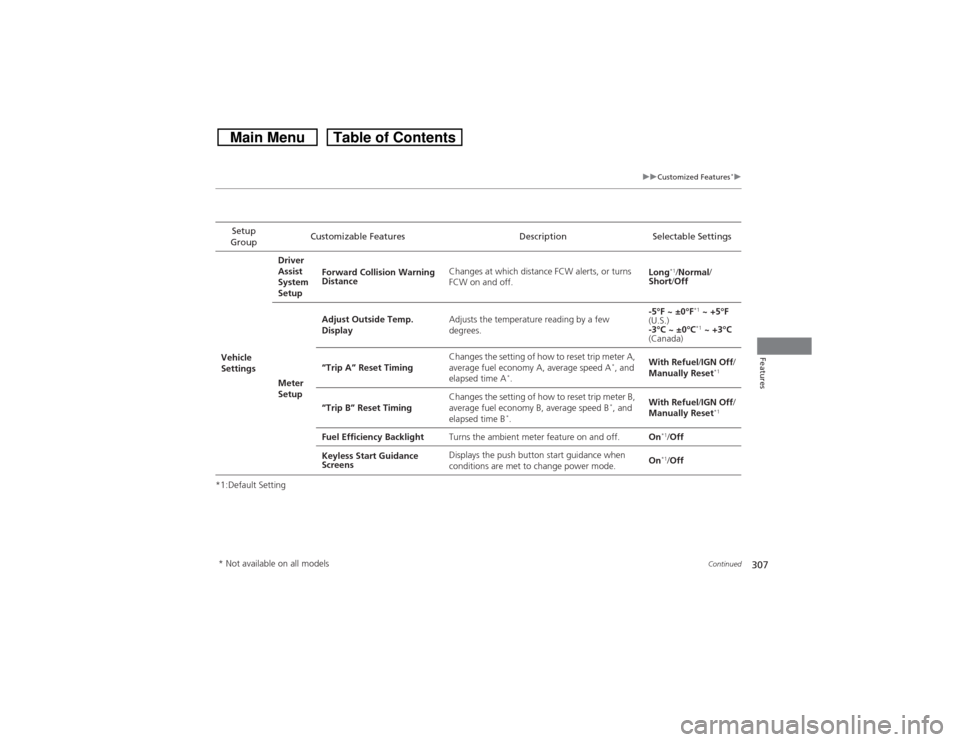
*1:Default SettingSetup
GroupCustomizable Features Description Selectable SettingsVehicle
SettingsDriver
Assist
System
SetupForward Collision Warning
DistanceChanges at which distance FCW alerts, or turns
FCW on and off.Long
*1/Normal/
Short/Off
Meter
SetupAdjust Outside Temp.
DisplayAdjusts the temperature reading by a few
degrees.-5°F ~ ±0°F
*1 ~ +5°F
(U.S.)
-3°C ~ ±0°C*1 ~ +3°C
(Canada)
“Trip A” Reset TimingChanges the setting of how to reset trip meter A,
average fuel economy A, average speed A
*, and
elapsed time A
*.With Refuel/IGN Off/
Manually Reset
*1
“Trip B” Reset TimingChanges the setting of how to reset trip meter B,
average fuel economy B, average speed B
*, and
elapsed time B
*.With Refuel/IGN Off/
Manually Reset
*1
Fuel Efficiency BacklightTurns the ambient meter feature on and off.On
*1/Off
Keyless Start Guidance
ScreensDisplays the push button start guidance when
conditions are met to change power mode.On*1/Off
* Not available on all models
Page 309 of 573
308
uuCustomized Features
*u
Features
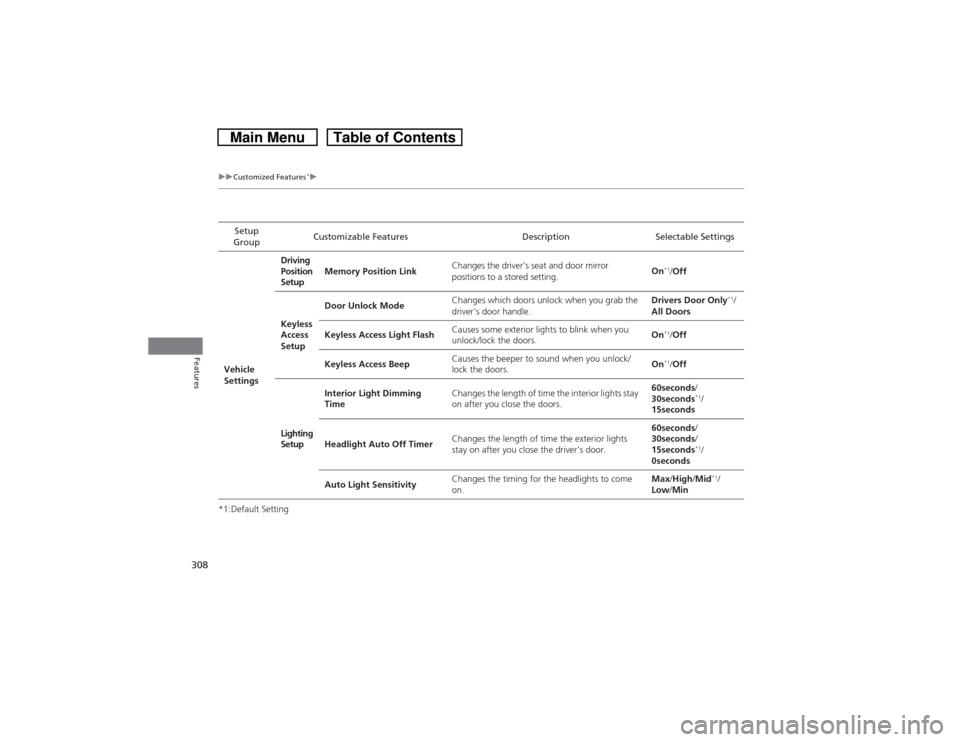
*1:Default SettingSetup
GroupCustomizable Features Description Selectable Settings
Vehicle
SettingsDriving
Position
SetupMemory Position LinkChanges the driver’s seat and door mirror
positions to a stored setting.On
*1/Off
Keyless
Access
SetupDoor Unlock ModeChanges which doors unlock when you grab the
driver’s door handle.Drivers Door Only
*1/
All Doors
Keyless Access Light FlashCauses some exterior lights to blink when you
unlock/lock the doors.On
*1/Off
Keyless Access BeepCauses the beeper to sound when you unlock/
lock the doors.On*1/Off
Lighting
SetupInterior Light Dimming
TimeChanges the length of time the interior lights stay
on after you close the doors.60seconds/
30seconds
*1/
15seconds
Headlight Auto Off TimerChanges the length of time the exterior lights
stay on after you close the driver’s door.60seconds/
30seconds/
15seconds*1/
0seconds
Auto Light SensitivityChanges the timing for the headlights to come
on.Max/High/Mid*1/
Low/Min
Page 310 of 573
309
uuCustomized Features
*u
Continued
Features
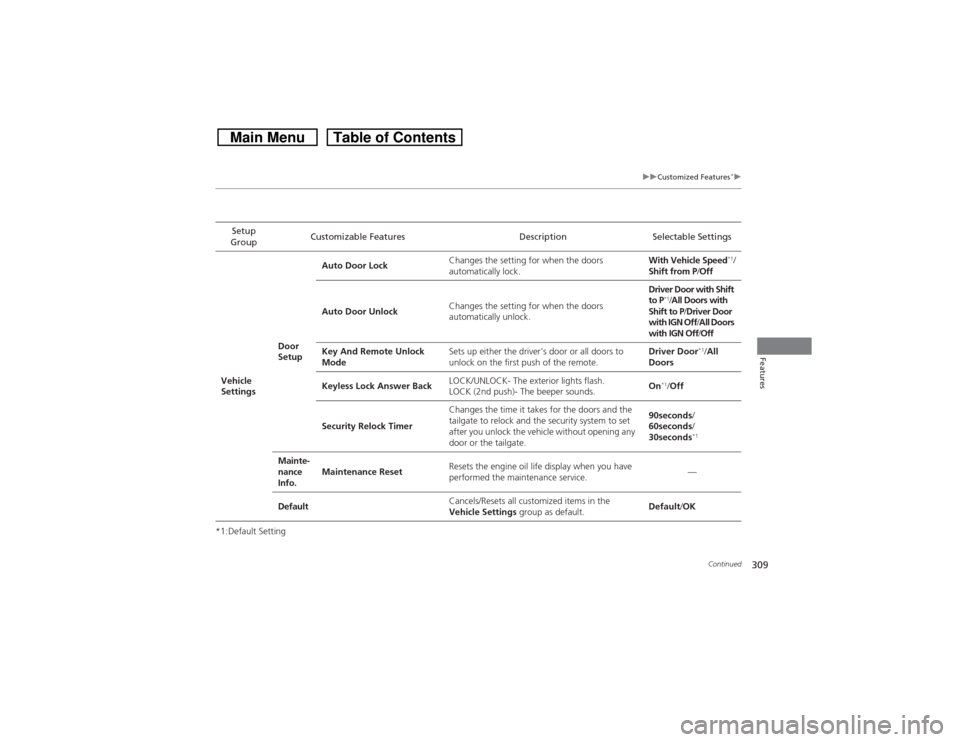
*1:Default SettingSetup
GroupCustomizable Features Description Selectable Settings
Vehicle
SettingsDoor
SetupAuto Door LockChanges the setting for when the doors
automatically lock.With Vehicle Speed
*1/
Shift from P/Off
Auto Door UnlockChanges the setting for when the doors
automatically unlock.Driver Door with Shift
to P
*1/All Doors with
Shift to P/Driver Door
with IGN Off/All Doors
with IGN Off/Off
Key And Remote Unlock
ModeSets up either the driver’s door or all doors to
unlock on the first push of the remote.Driver Door
*1/All
Doors
Keyless Lock Answer BackLOCK/UNLOCK- The exterior lights flash.
LOCK (2nd push)- The beeper sounds.On
*1/Off
Security Relock TimerChanges the time it takes for the doors and the
tailgate to relock and the security system to set
after you unlock the vehicle without opening any
door or the tailgate.90seconds/
60seconds/
30seconds
*1
Mainte-
nance
Info.Maintenance ResetResets the engine oil life display when you have
performed the maintenance service.—
DefaultCancels/Resets all customized items in the
Vehicle Settings group as default.Default/OK
Page 315 of 573
314
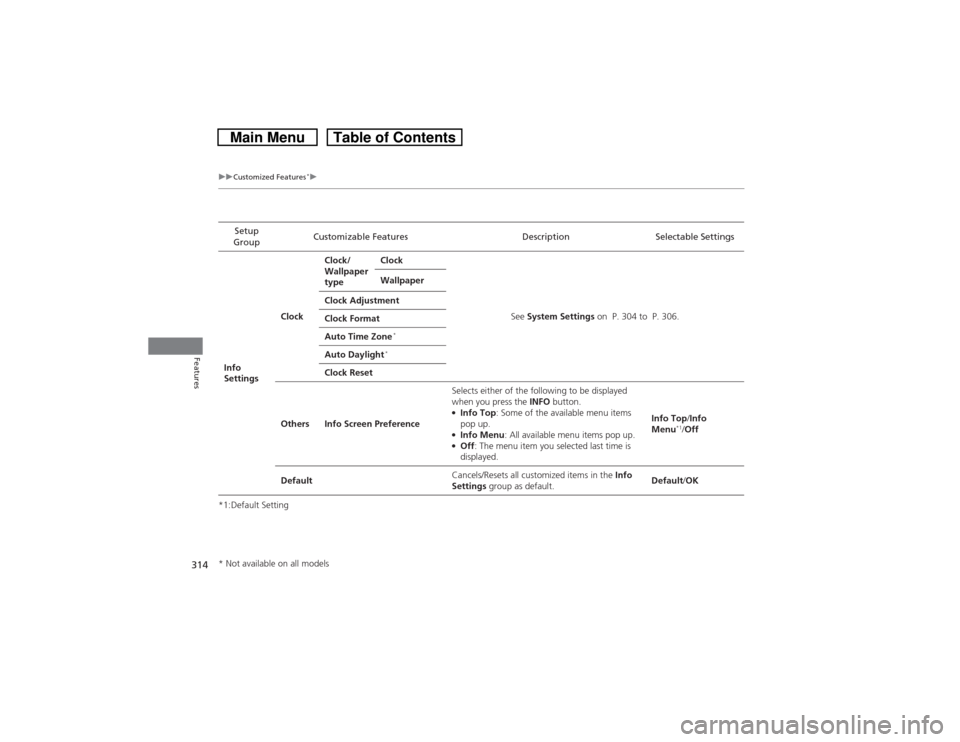
uuCustomized Features
*u
Features
*1:Default SettingSetup
GroupCustomizable Features Description Selectable Settings
Info
SettingsClockClock/
Wallpaper
typeClock
See System Settings on P. 304 to P. 306. Wallpaper
Clock Adjustment
Clock Format
Auto Time Zone
*
Auto Daylight
*
Clock Reset
Others Info Screen PreferenceSelects either of the following to be displayed
when you press the INFO button.
●Info Top: Some of the available menu items
pop up.●Info Menu: All available menu items pop up.●Off: The menu item you selected last time is
displayed.Info Top/Info
Menu
*1/Off
DefaultCancels/Resets all customized items in the Info
Settings group as default.Default/OK
* Not available on all models
Page 319 of 573
318Features
HomeLink® Universal Transceiver
*
The HomeLink® Universal Transceiver can be programmed to operate up to three
remote controlled devices around your home, such as garage doors, lighting, or
home security systems.
Refer to the safety information that comes with your garage door opener to test that
the safety features are functioning properly. If you do not have the safety
information, contact the manufacturer.
Before programming HomeLink, make sure that people and objects are out of the
way of the garage or gate to prevent potential injury or damage.
When programming a garage door opener, park just outside the garage door’s
path.Training HomeLink
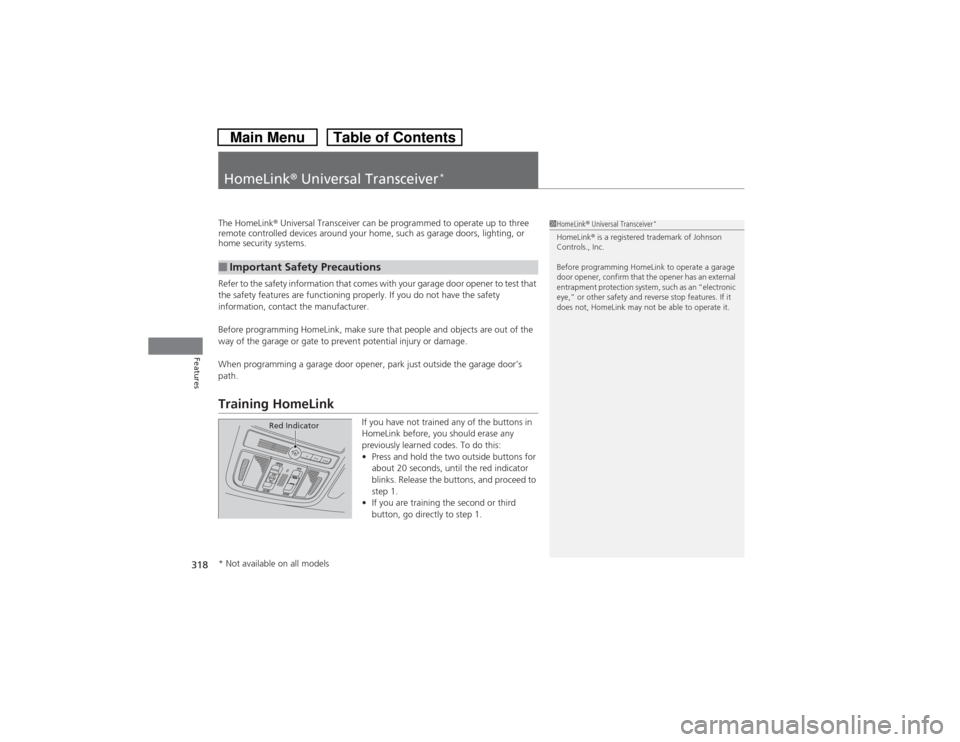
If you have not trained any of the buttons in
HomeLink before, you should erase any
previously learned codes. To do this:
•Press and hold the two outside buttons for
about 20 seconds, until the red indicator
blinks. Release the buttons, and proceed to
step 1.
•If you are training the second or third
button, go directly to step 1.
■Important Safety Precautions
1HomeLink® Universal Transceiver
*
HomeLink® is a registered trademark of Johnson
Controls., Inc.
Before programming HomeLink to operate a garage
door opener, confirm that the opener has an external
entrapment protection system, such as an “electronic
eye,” or other safety and reverse stop features. If it
does not, HomeLink may not be able to operate it.
Red Indicator
* Not available on all models