bluetooth HONDA CROSSTOUR 2015 1.G Owner's Manual
[x] Cancel search | Manufacturer: HONDA, Model Year: 2015, Model line: CROSSTOUR, Model: HONDA CROSSTOUR 2015 1.GPages: 573
Page 288 of 573
287
uuCustomized Features*u
Continued
Features
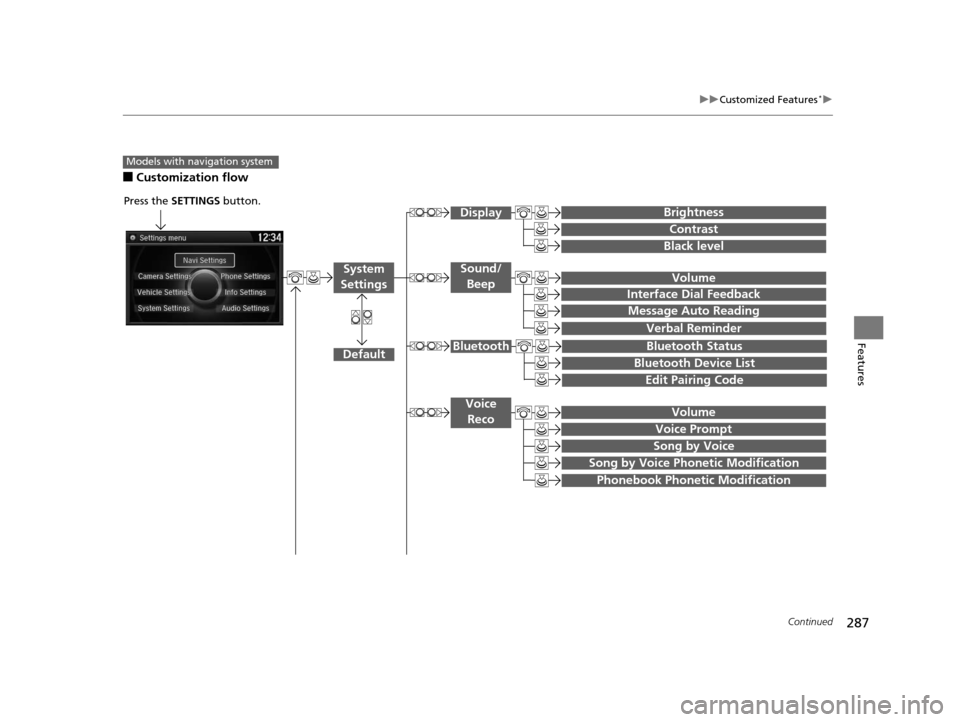
■Customization flow
Models with navigation system
Song by Voice
Song by Voice Phonetic Modification
Phonebook Phonetic Modification
Press the SETTINGS button.
Volume
Voice Prompt
Message Auto Reading
Volume
Interface Dial Feedback
Verbal Reminder
Brightness
Contrast
Black level
Bluetooth Status
Bluetooth Device List
Edit Pairing Code
Default
Sound/Beep
Display
System
Settings
Bluetooth
Voice Reco
15 CROSSTOUR-31TP66500.book 287 ページ 2014年7月31日 木曜日 午後3時23分
Page 291 of 573
290
uuCustomized Features*u
Features
*1:May change depending on your currently selected source.
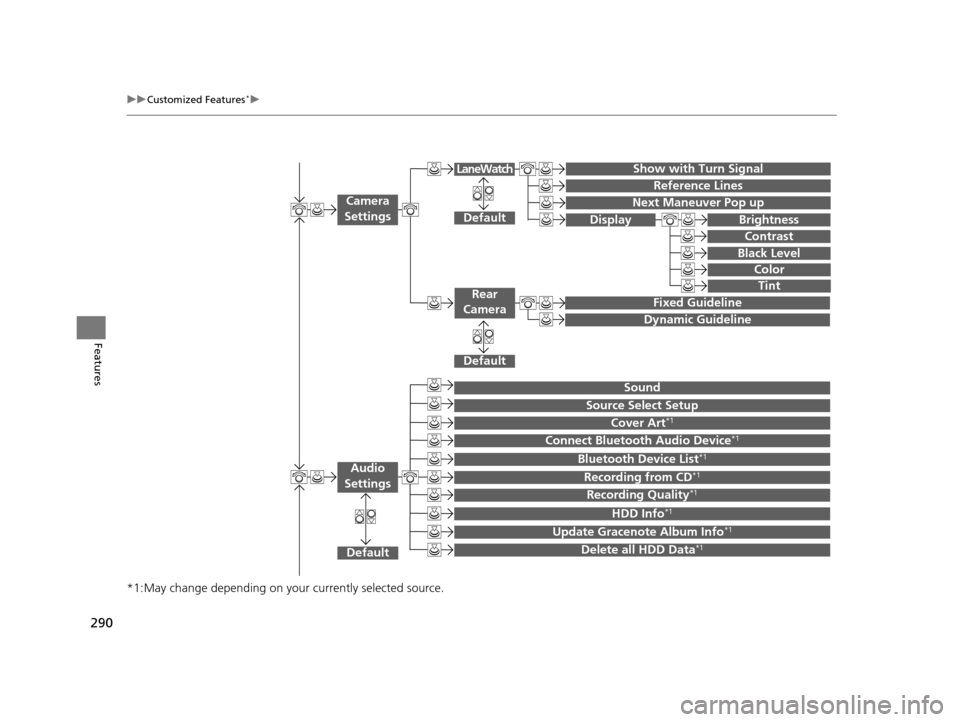
Show with Turn Signal
Reference Lines
Next Maneuver Pop up
Default
Fixed Guideline
Dynamic Guideline
Default
Default
Sound
Source Select Setup
Cover Art*1
Connect Bluetooth Audio Device*1
Bluetooth Device List*1
Recording from CD*1
Recording Quality*1
HDD Info*1
Update Gracenote Album Info*1
Delete all HDD Data*1
Camera
Settings
Rear
Camera
LaneWatch
Audio
Settings
Display Brightness
Contrast
Black Level
Color
Tint
15 CROSSTOUR-31TP66500.book 290 ページ 2014年7月31日 木曜日 午後3時23分
Page 292 of 573
291
uuCustomized Features*u
Continued
Features
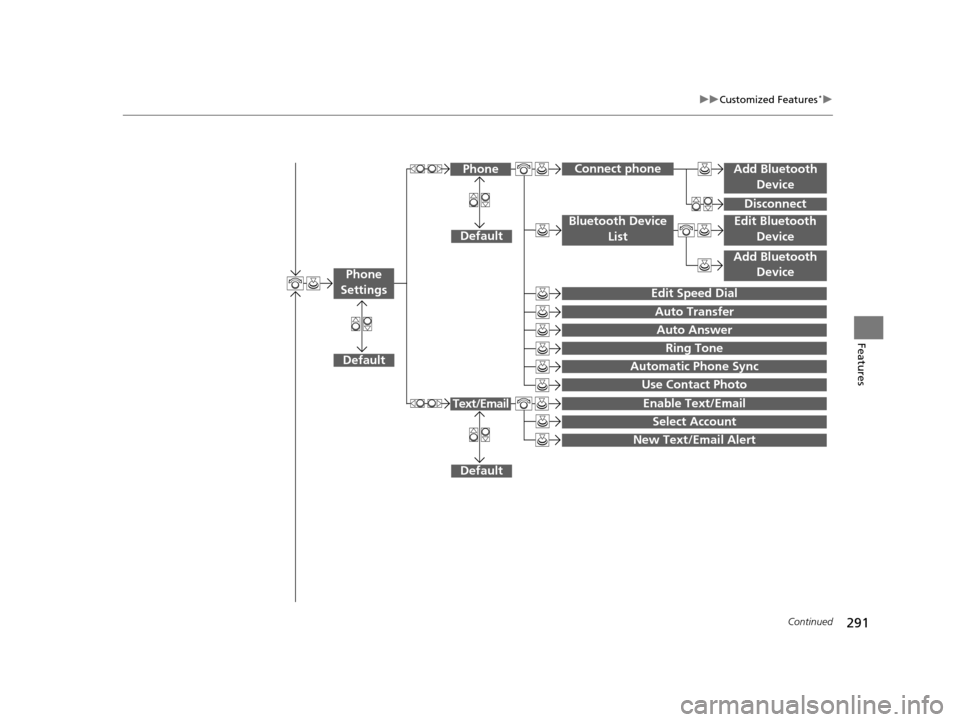
Add Bluetooth
Device
Disconnect
Default
PhoneConnect phone
Edit Bluetooth Device
Add Bluetooth Device
Bluetooth Device
List
Edit Speed Dial
Auto Transfer
Auto Answer
Ring Tone
Automatic Phone Sync
Use Contact Photo
Default
Default
Enable Text/Email
Select Account
New Text/Email Alert
Text/Email
Phone
Settings
15 CROSSTOUR-31TP66500.book 291 ページ 2014年7月31日 木曜日 午後3時23分
Page 294 of 573
293
uuCustomized Features*u
Continued
Features
■List of customizable options
*1:Default Setting Setup
Group Customizable Features Description Selectable Settings
System
Settings
Display
BrightnessChanges the brightness of the audio/information
screen.—
ContrastChanges the contrast of the audio/information
screen.—
Black levelChanges the black level of the audio/information
screen.—
BeepSelects whether a beeper
sounds or not when
you operate the selector knob.On*1/ Off
Blue-
tooth
BluetoothTurns the Bluetooth® on and off.On*1/Off
Bluetooth Device List
Pairs a new phone to HFL, edits and deletes a
paired phone, and create a security PIN.
2 Phone Setup P. 338
—
Edit Pairing CodeChanges a pairing code.
2To change the pairing code setting P. 340Random/Fixed*1
Voice RecognitionTurns the voice rec ognition on and off.On*1/Off
Models without navigation system
15 CROSSTOUR-31TP66500.book 293 ページ 2014年7月31日 木曜日 午後3時23分
Page 299 of 573
298
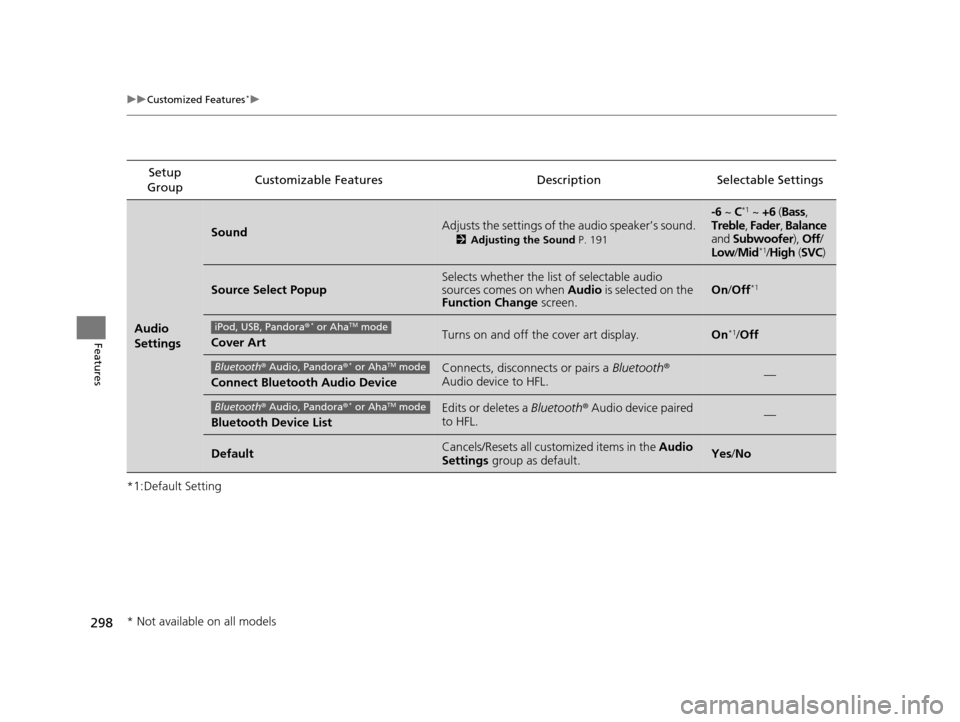
uuCustomized Features*u
Features
*1:Default SettingSetup
Group Customizable Features Descri
ption Selectable Settings
Audio
Settings
SoundAdjusts the settings of the audio speaker’s sound.
2Adjusting the Sound P. 191
-6 ~ C*1 ~ +6 (Bass ,
Treble , Fader , Balance
and Subwoofer ), Off/
Low /Mid
*1/High (SVC)
Source Select PopupSelects whether the list of selectable audio
sources comes on when Audio is selected on the
Function Change screen.On/Off*1
Cover ArtTurns on and off the cover art display.On*1/Off
Connect Bluetooth Audio Device
Connects, disconnects or pairs a Bluetooth®
Audio device to HFL.—
Bluetooth Device List
Edits or deletes a Bluetooth® Audio device paired
to HFL.—
DefaultCancels/Resets all cust omized items in the Audio
Settings group as default.Yes/No
iPod, USB, Pandora ®* or AhaTM mode
Bluetooth® Audio, Pandora ®* or AhaTM mode
Bluetooth® Audio, Pandora ®* or AhaTM mode
* Not available on all models
15 CROSSTOUR-31TP66500.book 298 ページ 2014年7月31日 木曜日 午後3時23分
Page 301 of 573
300
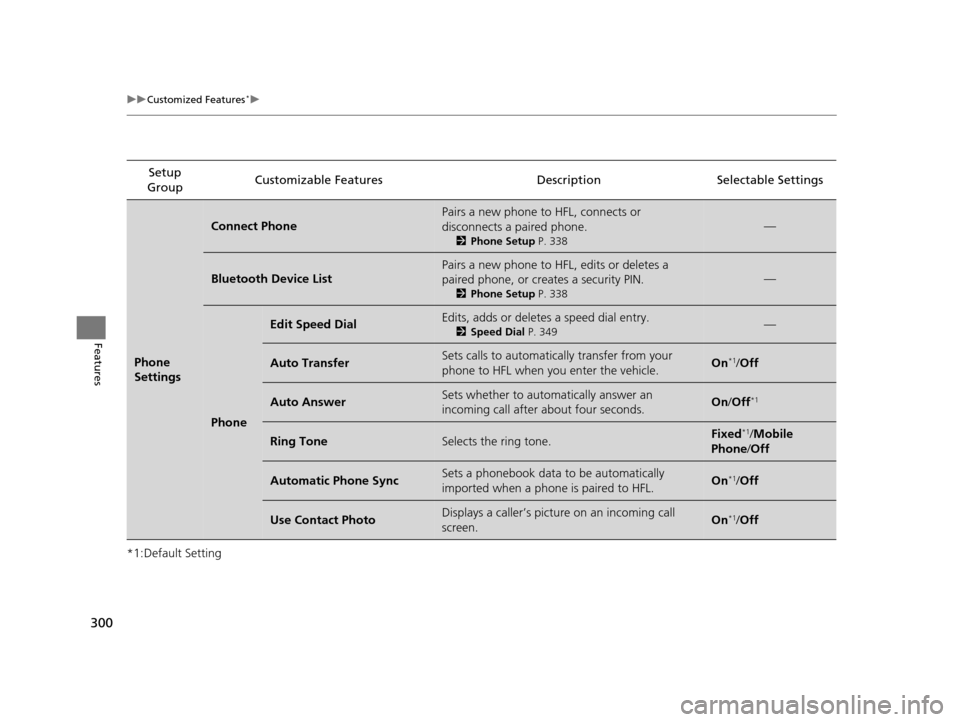
uuCustomized Features*u
Features
*1:Default SettingSetup
Group Customizable Features Descri
ption Selectable Settings
Phone
Settings
Connect Phone
Pairs a new phone to HFL, connects or
disconnects a paired phone.
2Phone Setup P. 338
—
Bluetooth Device List
Pairs a new phone to HFL, edits or deletes a
paired phone, or creates a security PIN.
2Phone Setup P. 338
—
Phone
Edit Speed DialEdits, adds or deletes a speed dial entry.
2Speed Dial P. 349—
Auto TransferSets calls to automatically transfer from your
phone to HFL when you enter the vehicle.On*1/Off
Auto AnswerSets whether to automatically answer an
incoming call after about four seconds.On /Off*1
Ring ToneSelects the ring tone.Fixed*1/Mobile
Phone /Off
Automatic Phone SyncSets a phonebook data to be automatically
imported when a phone is paired to HFL.On*1/Off
Use Contact PhotoDisplays a caller’s picture on an incoming call
screen.On*1/Off
15 CROSSTOUR-31TP66500.book 300 ページ 2014年7月31日 木曜日 午後3時23分
Page 304 of 573
303
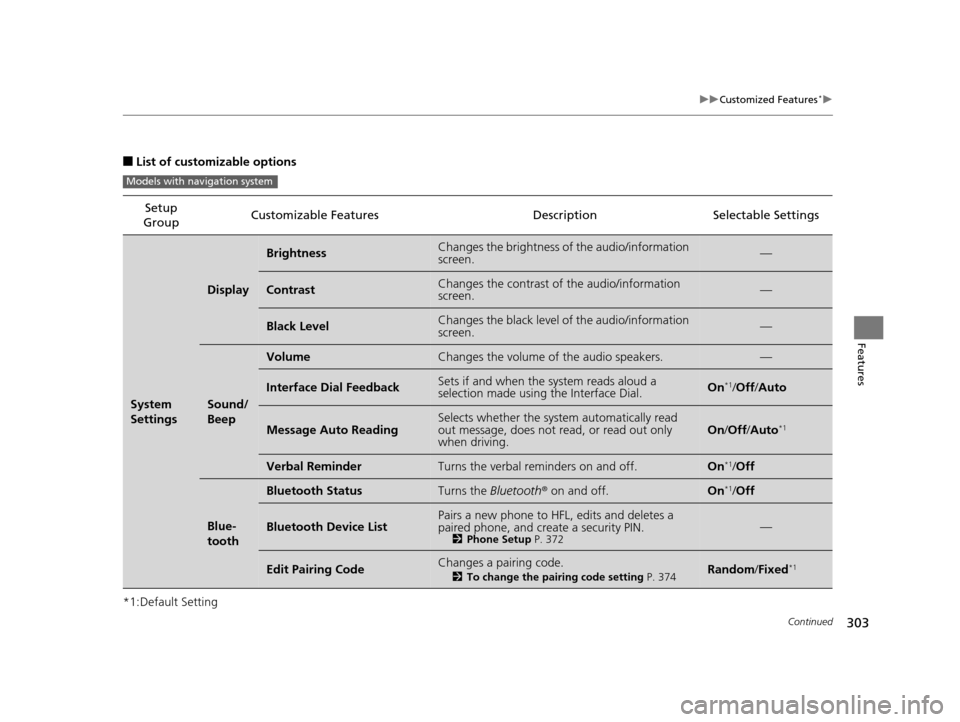
uuCustomized Features*u
Continued
Features
■List of customizable options
*1:Default Setting Setup
Group Customizable Features Description Selectable Settings
System
Settings
Display
BrightnessChanges the brightness of the audio/information
screen.—
ContrastChanges the contrast of the audio/information
screen.—
Black LevelChanges the black level of the audio/information
screen.—
Sound/
Beep
VolumeChanges the volume of the audio speakers.—
Interface Dial FeedbackSets if and when the
system reads aloud a
selection made using the Interface Dial.On*1/ Off /Auto
Message Auto ReadingSelects whether the system automatically read
out message, does not read, or read out only
when driving.On /Off /Auto*1
Verbal ReminderTurns the verbal reminders on and off.On*1/Off
Blue-
tooth
Bluetooth StatusTurns the Bluetooth® on and off.On*1/Off
Bluetooth Device ListPairs a new phone to HFL, edits and deletes a
paired phone, and create a security PIN.
2 Phone Setup P. 372—
Edit Pairing CodeChanges a pairing code.
2To change the pairing code setting P. 374Random/Fixed*1
Models with navigation system
15 CROSSTOUR-31TP66500.book 303 ページ 2014年7月31日 木曜日 午後3時23分
Page 311 of 573
310
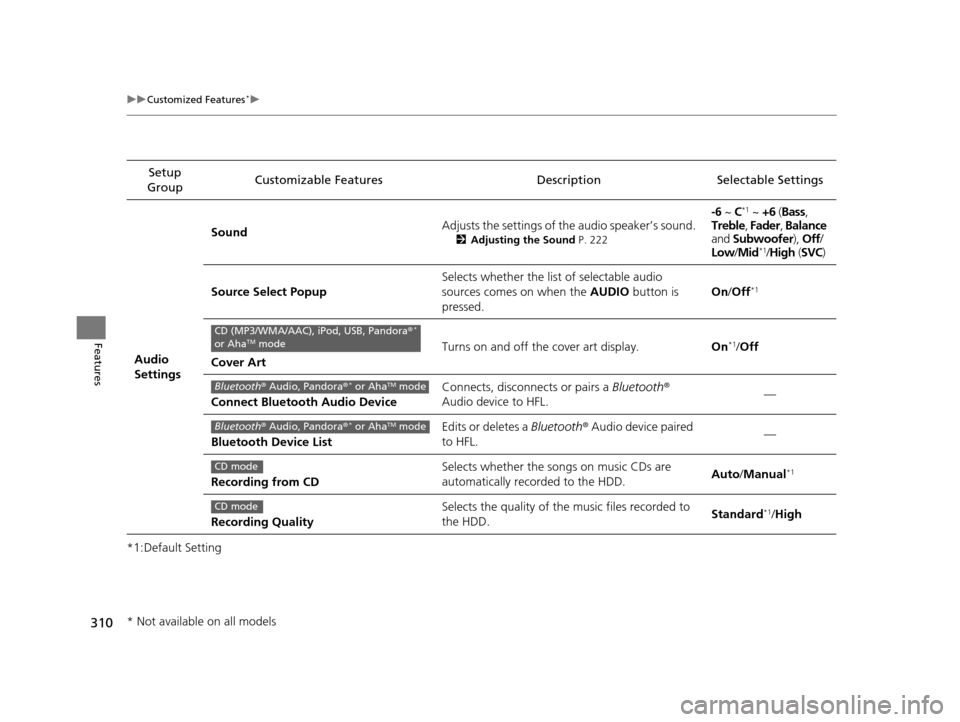
uuCustomized Features*u
Features
*1:Default SettingSetup
Group Customizable Features Descri
ption Selectable Settings
Audio
Settings Sound
Adjusts the settings of th
e audio speaker’s sound.
2Adjusting the Sound P. 222
-6 ~ C*1 ~ +6 (Bass ,
Treble , Fader , Balance
and Subwoofer ), Off/
Low /Mid
*1/High (SVC)
Source Select Popup Selects whether the list of selectable audio
sources comes on when the
AUDIO button is
pressed. On
/Off
*1
Cover Art Turns on and off the cover art display.
On
*1/Off
Connect Bluetooth Audio Device Connects, disconnects or pairs a
Bluetooth®
Audio device to HFL. —
Bluetooth Device List Edits or deletes a
Bluetooth® Audio device paired
to HFL. —
Recording from CD Selects whether the songs on music CDs are
automatically recorded to the HDD.
Auto
/Manual
*1
Recording Quality Selects the quality of the music files recorded to
the HDD.
Standard*1/
High
CD (MP3/WMA/AAC), iPod, USB, Pandora ®*
or AhaTM mode
Bluetooth ® Audio, Pandora ®* or AhaTM mode
Bluetooth® Audio, Pandora ®* or AhaTM mode
CD mode
CD mode
* Not available on all models
15 CROSSTOUR-31TP66500.book 310 ページ 2014年7月31日 木曜日 午後3時23分
Page 312 of 573
311
uuCustomized Features*u
Continued
Features
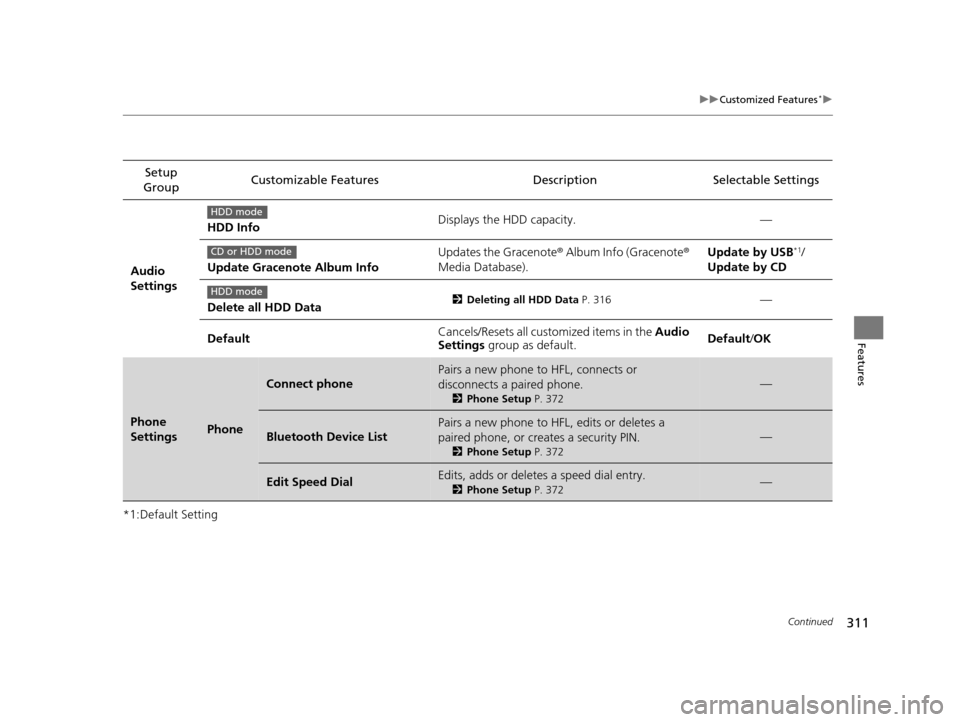
*1:Default SettingSetup
Group Customizable Features Description Selectable Settings
Audio
Settings HDD Info
Displays the HDD capacity. —
Update Gracenote Album Info Updates the Gracenote
® Album Info (Gracenote ®
Media Database). Update by USB
*1/
Update by CD
Delete all HDD Data
2 Deleting all HDD Data P. 316—
Default Cancels/Resets all customized items in the
Audio
Settings group as default. Default/
OK
Phone
SettingsPhone
Connect phone
Pairs a new phone to HFL, connects or
disconnects a paired phone.
2Phone Setup P. 372
—
Bluetooth Device List
Pairs a new phone to HFL, edits or deletes a
paired phone, or creates a security PIN.
2Phone Setup P. 372
—
Edit Speed DialEdits, adds or deletes a speed dial entry.
2Phone Setup P. 372—
HDD mode
CD or HDD mode
HDD mode
15 CROSSTOUR-31TP66500.book 311 ページ 2014年7月31日 木曜日 午後3時23分
Page 320 of 573
319Continued
Features
Bluetooth® HandsFreeLink ®
Bluetooth® HandsFreeLink ® (HFL) allows you to place and receive phone calls using
your vehicle’s audio system, without handling your cell phone.
Using HFL
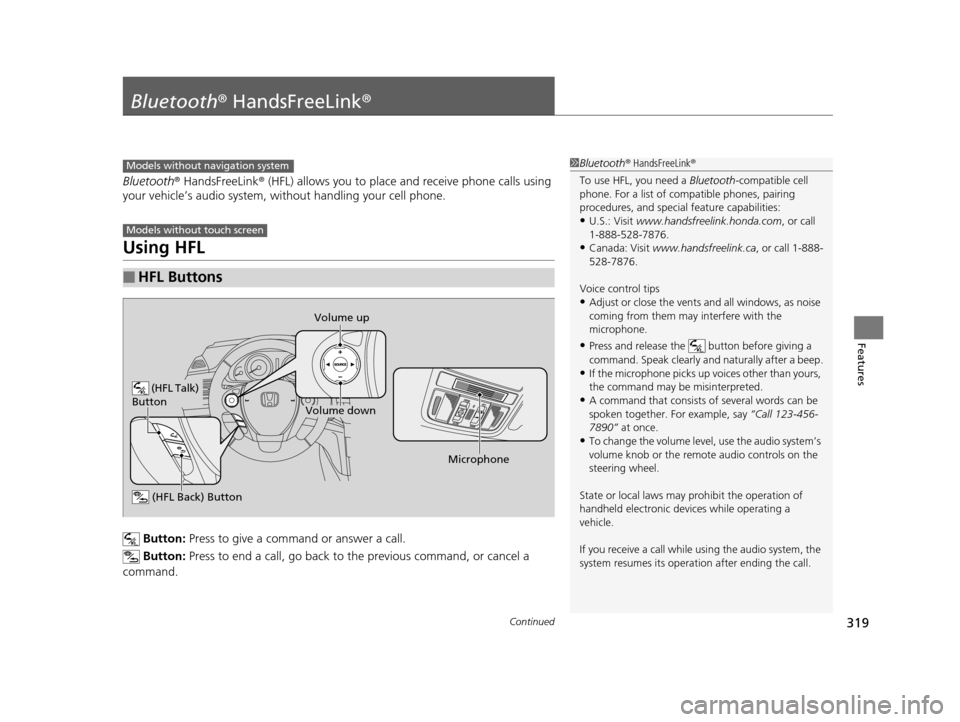
Button: Press to give a command or answer a call.
Button: Press to end a call, go back to the previous command, or cancel a
command.
■HFL Buttons
1 Bluetooth ® HandsFreeLink ®
To use HFL, you need a Bluetooth-compatible cell
phone. For a list of compatible phones, pairing
procedures, and special feature capabilities:
•U.S.: Visit www.handsfreelink.honda.com , or call
1-888-528-7876.
•Canada: Visit www.handsfreelink.ca , or call 1-888-
528-7876.
Voice control tips
•Adjust or close the vents and all windows, as noise
coming from them may interfere with the
microphone.
•Press and release the button before giving a
command. Speak clearly and naturally after a beep.
•If the microphone picks up vo ices other than yours,
the command may be misinterpreted.
•A command that consists of several words can be
spoken together. For example, say “Call 123-456-
7890” at once.
•To change the volume level, use the audio system’s
volume knob or the remote audio controls on the
steering wheel.
State or local laws may pr ohibit the operation of
handheld electronic devi ces while operating a
vehicle.
If you receive a call while using the audio system, the
system resumes its operati on after ending the call.
Models without navigation system
Models without touch screen
(HFL Talk)
Button
Volume up
Microphone
(HFL Back) Button
Volume down
15 CROSSTOUR-31TP66500.book 319 ページ 2014年7月31日 木曜日 午後3時23分