clock HONDA CROSSTOUR 2015 1.G Owner's Manual
[x] Cancel search | Manufacturer: HONDA, Model Year: 2015, Model line: CROSSTOUR, Model: HONDA CROSSTOUR 2015 1.GPages: 573
Page 289 of 573
288
uuCustomized Features*u
Features
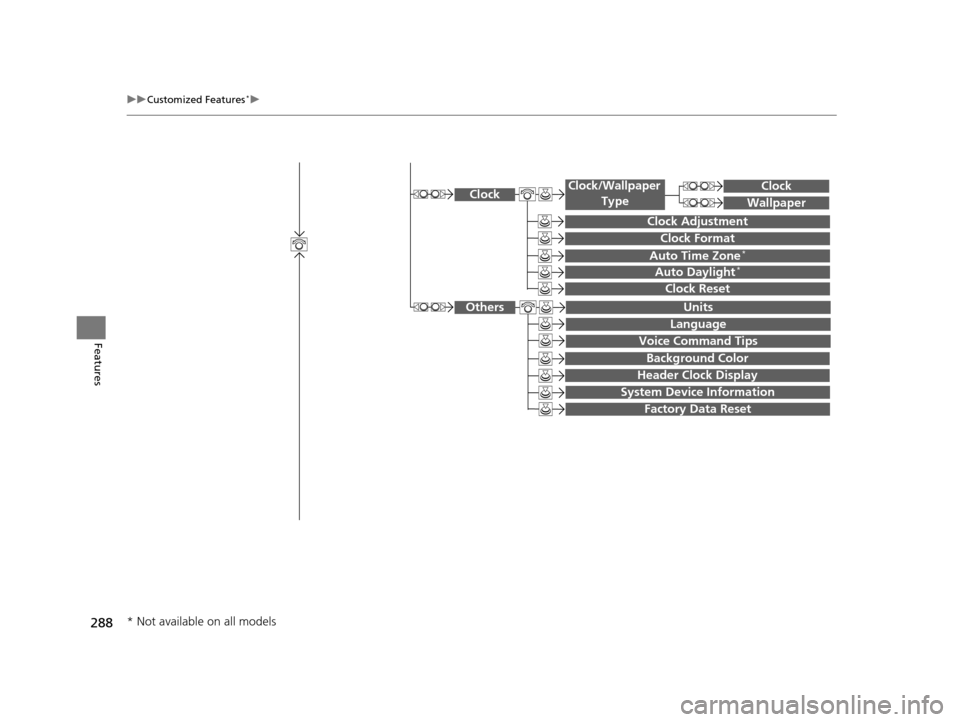
System Device Information
Factory Data Reset
Background Color
Header Clock Display
Clock Reset
Auto Time Zone*
Auto Daylight*
Clock
Clock Adjustment
Clock Format
Clock
Units
Language
Voice Command Tips
Others
Wallpaper
Clock/Wallpaper
Type
* Not available on all models
15 CROSSTOUR-31TP66500.book 288 ページ 2014年7月31日 木曜日 午後3時23分
Page 293 of 573
292
uuCustomized Features*u
Features
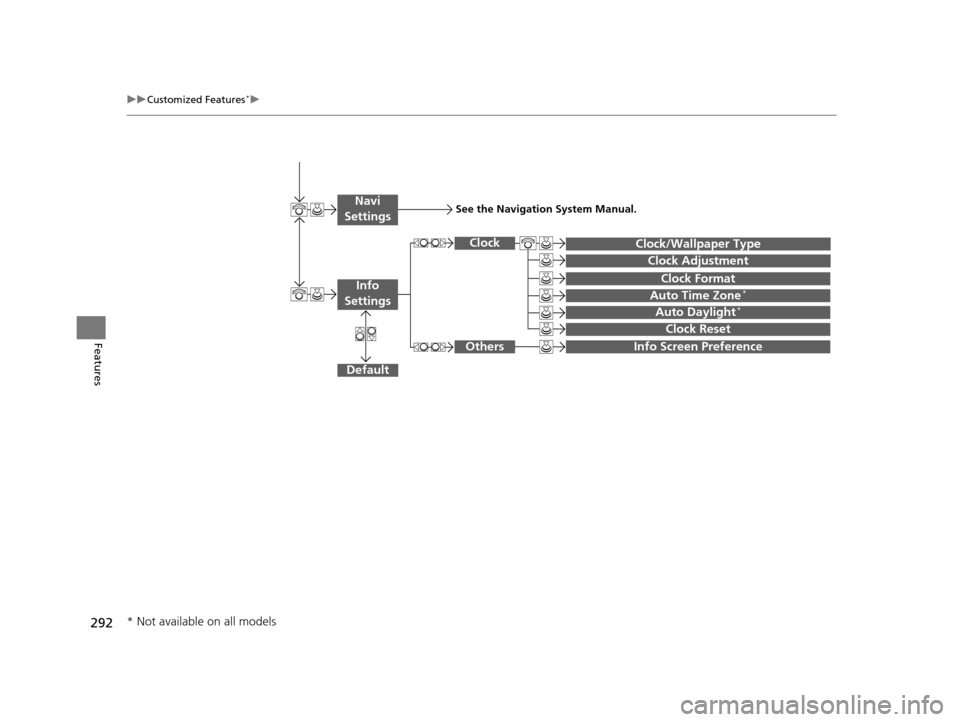
Auto Daylight*
Clock Reset
Info Screen Preference
Clock Format
Auto Time Zone*
Clock/Wallpaper Type
Clock Adjustment
Clock
Default
Others
Info
Settings
Navi
SettingsSee the Navigation System Manual.
* Not available on all models
15 CROSSTOUR-31TP66500.book 292 ページ 2014年7月31日 木曜日 午後3時23分
Page 295 of 573
294
uuCustomized Features*u
Features
*1:Default SettingSetup
Group Customizable Features Descri
ption Selectable Settings
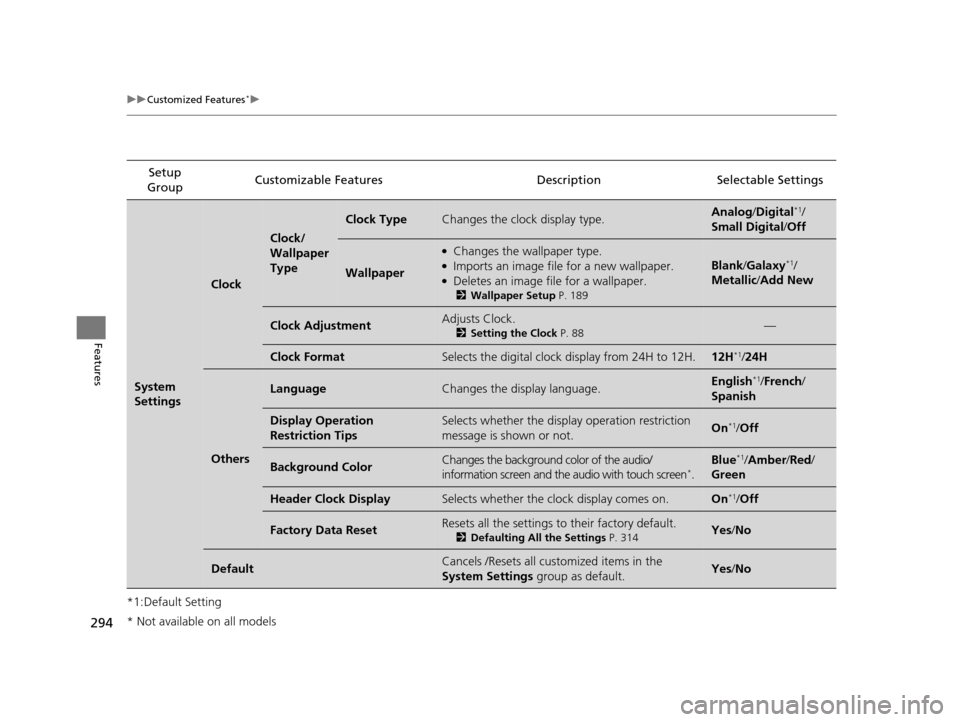
System
Settings
Clock
Clock/
Wallpaper
Type
Clock TypeChanges the clock display type.Analog/Digital*1/
Small Digital /Off
Wallpaper
●Changes the wallpaper type.●Imports an image file for a new wallpaper.●Deletes an image file for a wallpaper.
2 Wallpaper Setup P. 189
Blank/Galaxy*1/
Metallic /Add New
Clock AdjustmentAdjusts Clock.
2 Setting the Clock P. 88—
Clock FormatSelects the digital clock display from 24H to 12H.12H*1/24H
Others
LanguageChanges the display language.English*1/French /
Spanish
Display Operation
Restriction TipsSelects whether the display operation restriction
message is shown or not.On*1/ Off
Background ColorChanges the background color of the audio/
information screen and the audio with touch screen*.
Blue*1/Amber /Red/
Green
Header Clock DisplaySelects whether the clock display comes on.On*1/ Off
Factory Data ResetResets all the settings to their factory default.
2 Defaulting All the Settings P. 314Yes/No
DefaultCancels /Resets all customized items in the
System Settings group as default.Yes/No
* Not available on all models
15 CROSSTOUR-31TP66500.book 294 ページ 2014年7月31日 木曜日 午後3時23分
Page 300 of 573
299
uuCustomized Features*u
Continued
Features
Setup
Group Customizable Features
DescriptionSelectable Settings
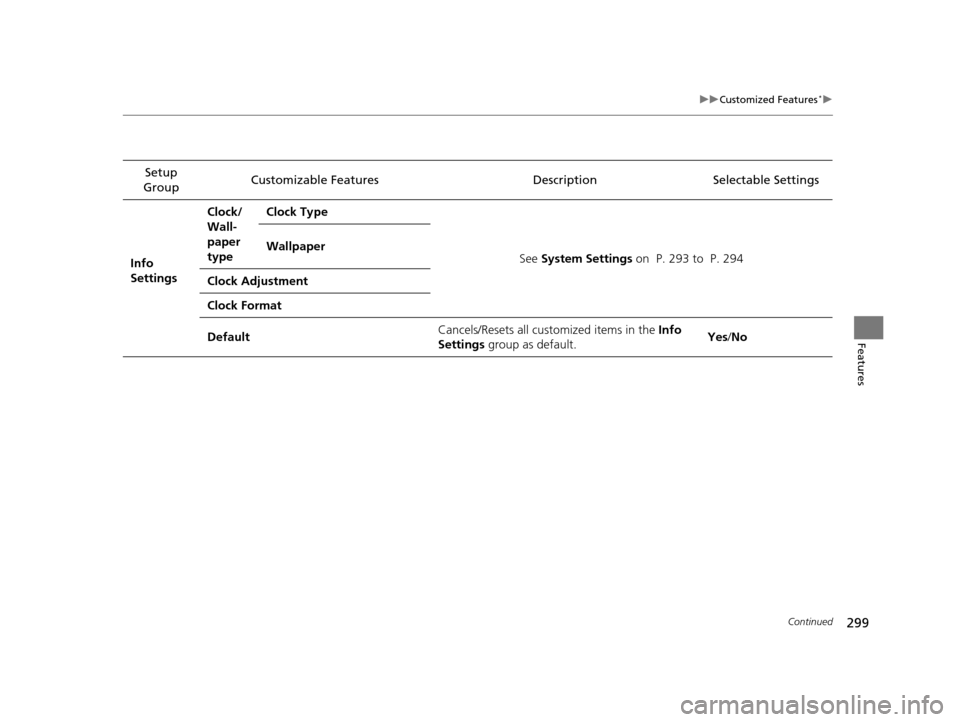
Info
Settings Clock/
Wall-
paper
type
Clock Type
See System Settings on P. 293 to P. 294
Wallpaper
Clock Adjustment
Clock Format
Default Cancels/Resets all customized items in the
Info
Settings group as default. Yes
/No
15 CROSSTOUR-31TP66500.book 299 ページ 2014年7月31日 木曜日 午後3時23分
Page 305 of 573
304
uuCustomized Features*u
Features
*1:Default SettingSetup
Group Customizable Features Descri
ption Selectable Settings
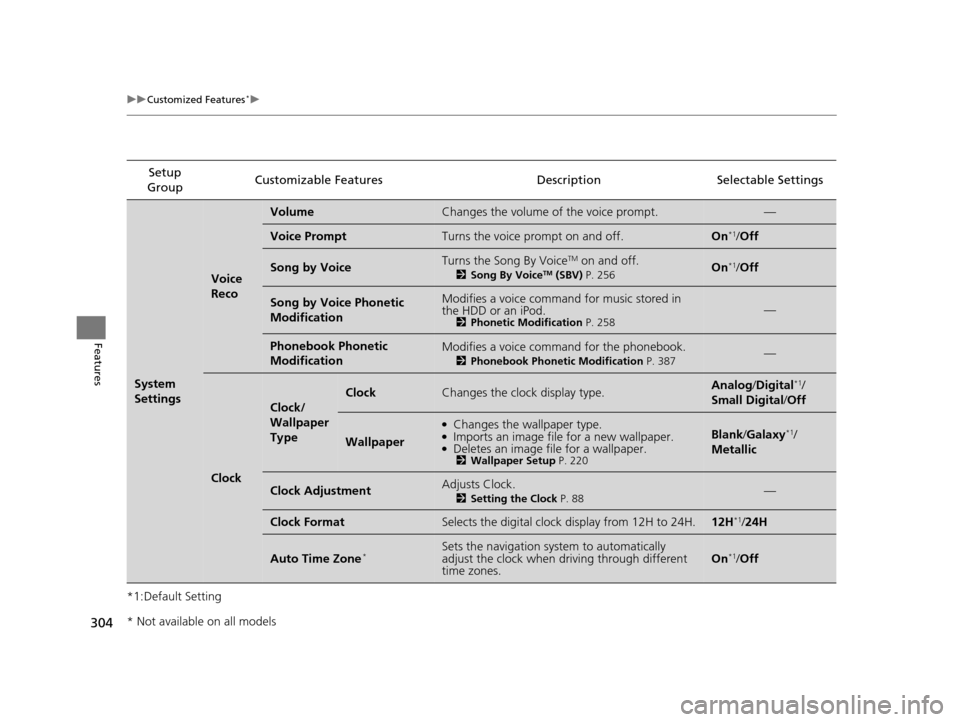
System
Settings
Voice
Reco
VolumeChanges the volume of the voice prompt.—
Voice PromptTurns the voice prompt on and off.On*1/Off
Song by VoiceTurns the Song By VoiceTM on and off.
2 Song By VoiceTM (SBV) P. 256On*1/Off
Song by Voice Phonetic
ModificationModifies a voice command for music stored in
the HDD or an iPod.
2 Phonetic Modification P. 258—
Phonebook Phonetic
ModificationModifies a voice command for the phonebook.
2Phonebook Phonetic Modification P. 387—
Clock
Clock/
Wallpaper
Type
ClockChanges the clock display type.Analog/Digital*1/
Small Digital /Off
Wallpaper
●Changes the wallpaper type.●Imports an image file for a new wallpaper.●Deletes an image file for a wallpaper.2 Wallpaper Setup P. 220
Blank/Galaxy*1/
Metallic
Clock AdjustmentAdjusts Clock.
2 Setting the Clock P. 88—
Clock FormatSelects the digital clock display from 12H to 24H.12H*1/24H
Auto Time Zone*Sets the navigation sy stem to automatically
adjust the clock when driving through different
time zones.On*1/ Off
* Not available on all models
15 CROSSTOUR-31TP66500.book 304 ページ 2014年7月31日 木曜日 午後3時23分
Page 306 of 573
305
uuCustomized Features*u
Continued
Features
*1:Default SettingSetup
Group Customizable Features Description Selectable Settings
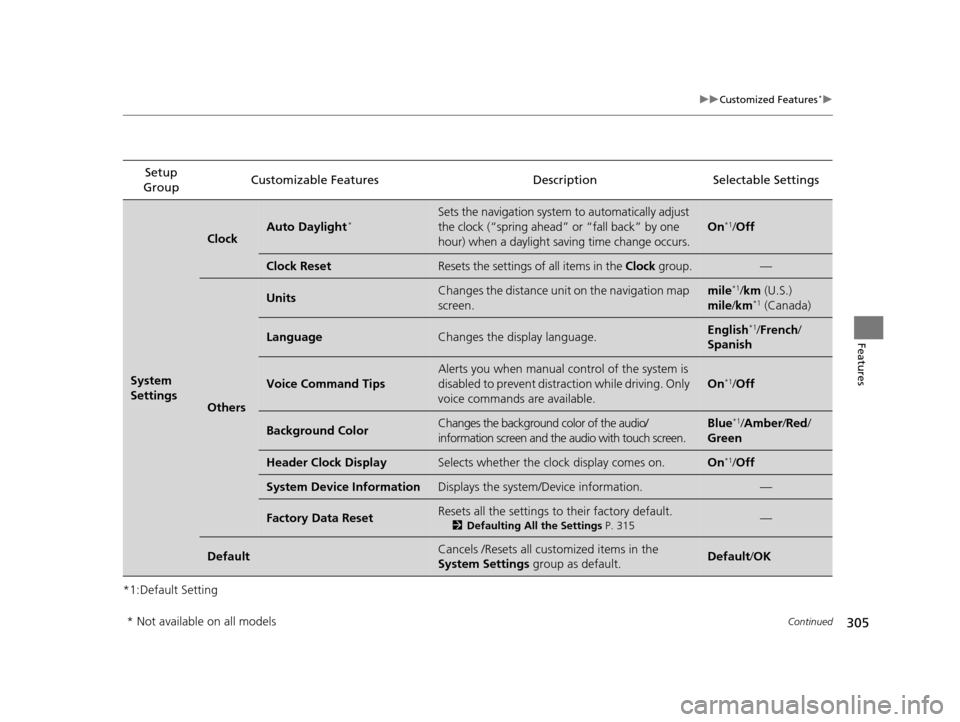
System
Settings
ClockAuto Daylight*Sets the navigation system to automatically adjust
the clock (“spring ahead”
or “fall back” by one
hour) when a daylight saving time change occurs.
On*1/ Off
Clock ResetResets the settings of all items in the Clock group.—
Others
UnitsChanges the distance unit on the navigation map
screen.mile*1/km (U.S.)
mile /km*1 (Canada)
LanguageChanges the display language.English*1/ French /
Spanish
Voice Command Tips
Alerts you when manual co ntrol of the system is
disabled to prevent distraction while driving. Only
voice commands are available.
On*1/ Off
Background ColorChanges the background color of the audio/
information screen and the audio with touch screen.Blue*1/Amber /Red /
Green
Header Clock DisplaySelects whether the clock display comes on.On*1/ Off
System Device InformationDisplays the system/Device information.—
Factory Data ResetResets all the settings to their factory default.
2 Defaulting All the Settings P. 315—
DefaultCancels /Resets all cust omized items in the
System Settings group as default.Default/OK
* Not available on all models
15 CROSSTOUR-31TP66500.book 305 ページ 2014年7月31日 木曜日 午後3時23分
Page 314 of 573
313
uuCustomized Features*u
Features
*1:Default SettingSetup
Group Customizable Features Description Selectable Settings
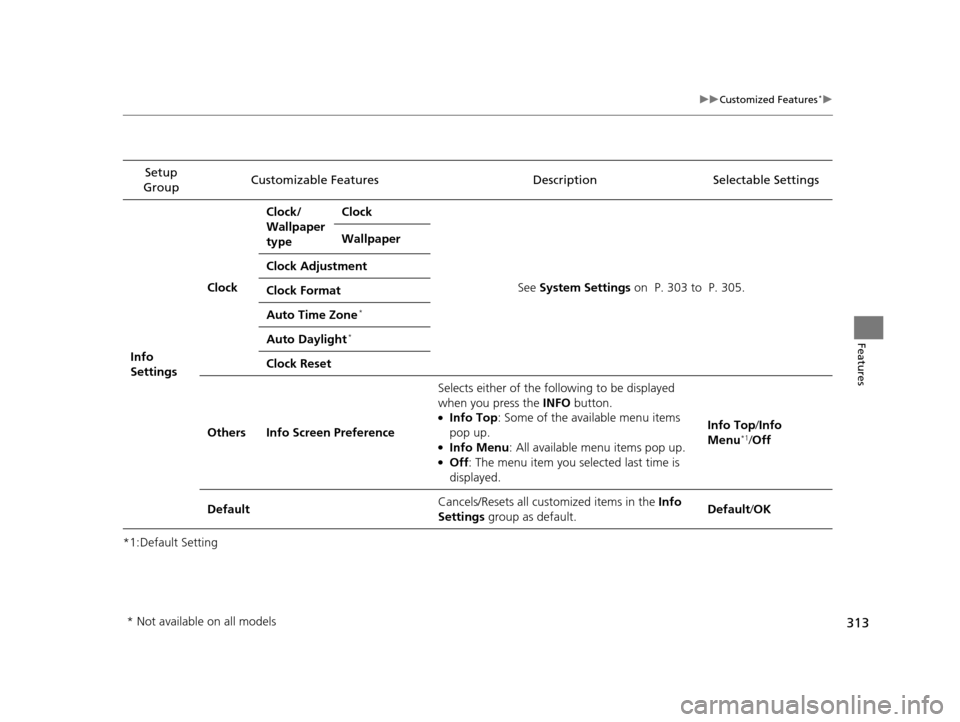
Info
Settings Clock
Clock/
Wallpaper
type
Clock
See System Settings on P. 303 to P. 305.
Wallpaper
Clock Adjustment
Clock Format
Auto Time Zone
*
Auto Daylight*
Clock Reset
Others Info Screen Preference Selects either of the following to be displayed
when you press the INFO
button.
●Info Top: Some of the available menu items
pop up.
●Info Menu : All available menu items pop up.●Off: The menu item you selected last time is
displayed. Info Top
/Info
Menu
*1/ Off
Default Cancels/Resets all customized items in the
Info
Settings group as default. Default/
OK
* Not available on all models
15 CROSSTOUR-31TP66500.book 313 ページ 2014年7月31日 木曜日 午後3時23分
Page 480 of 573
479
uuMaintenance Under the Hood uEngine Coolant
Maintenance
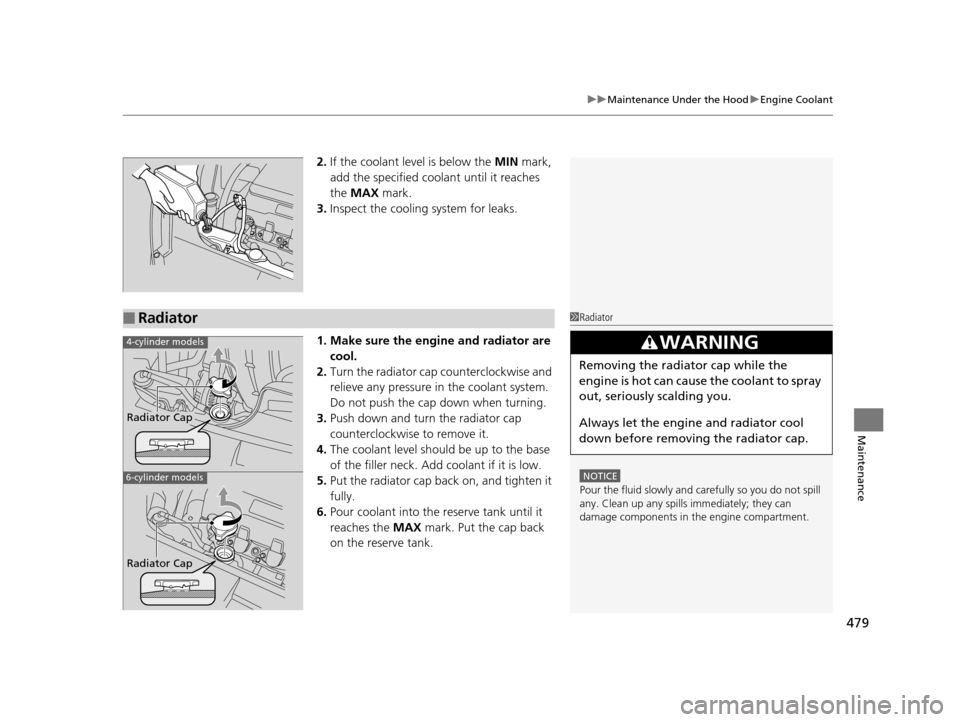
2. If the coolant level is below the MIN mark,
add the specified coolant until it reaches
the MAX mark.
3. Inspect the cooling system for leaks.
1. Make sure the engine and radiator are cool.
2. Turn the radiator cap counterclockwise and
relieve any pressure in the coolant system.
Do not push the cap down when turning.
3. Push down and turn the radiator cap
counterclockwise to remove it.
4. The coolant level should be up to the base
of the filler neck. Add coolant if it is low.
5. Put the radiator cap back on, and tighten it
fully.
6. Pour coolant into the reserve tank until it
reaches the MAX mark. Put the cap back
on the reserve tank.
■Radiator1 Radiator
NOTICE
Pour the fluid slowly and ca refully so you do not spill
any. Clean up any spills immediately; they can
damage components in the engine compartment.
3WARNING
Removing the radiator cap while the
engine is hot can cause the coolant to spray
out, seriously scalding you.
Always let the engine and radiator cool
down before removing the radiator cap.
4-cylinder models
6-cylinder models
Radiator Cap
Radiator Cap
15 CROSSTOUR-31TP66500.book 479 ページ 2014年7月31日 木曜日 午後3時23分
Page 507 of 573
506
Maintenance
Battery
Checking the Battery
Check the battery condition monthly by inspecting the terminals and cable ends for
corrosion.
If your vehicle’s battery is disconnected or goes dead:
• The audio system is disabled.
2 Reactivating the audio system P. 166
•The clock resets.
2 Setting the Clock P. 88
•The navigation system* is disabled.
2 Refer to the navigation system manual
Charging the Battery
Disconnect both battery cables to prevent da maging your vehicle’s electrical system.
Always disconnect the negative (–) cable first, and reconnect it last.
1 Battery
WARNING: Battery post, terminals,
and related accessories contain lead
and lead compounds.
Wash your hands after handling.
When you find corrosion, cl ean the battery terminals
by applying a baking powder and water solution.
Clean the terminals with a damp towel. Cloth/towel
dry the battery. Coat the terminals with grease to
help prevent future corrosion.
When replacing the battery, the replacement must be
of the same specifications.
Please consult a dealer for more information.
3WARNING
The battery gives off explosive hydrogen
gas during normal operation.
A spark or flame can cause the battery to
explode with enough force to kill or
seriously hurt you.
When conducting any battery
maintenance, wear prot ective clothing and
a face shield, or have a skilled technician do
it.
* Not available on all models
15 CROSSTOUR-31TP66500.book 506 ページ 2014年7月31日 木曜日 午後3時23分
Page 522 of 573
Continued521
uuIf a Tire Goes Flat uChanging a Flat Tire
Handling the Unexpected
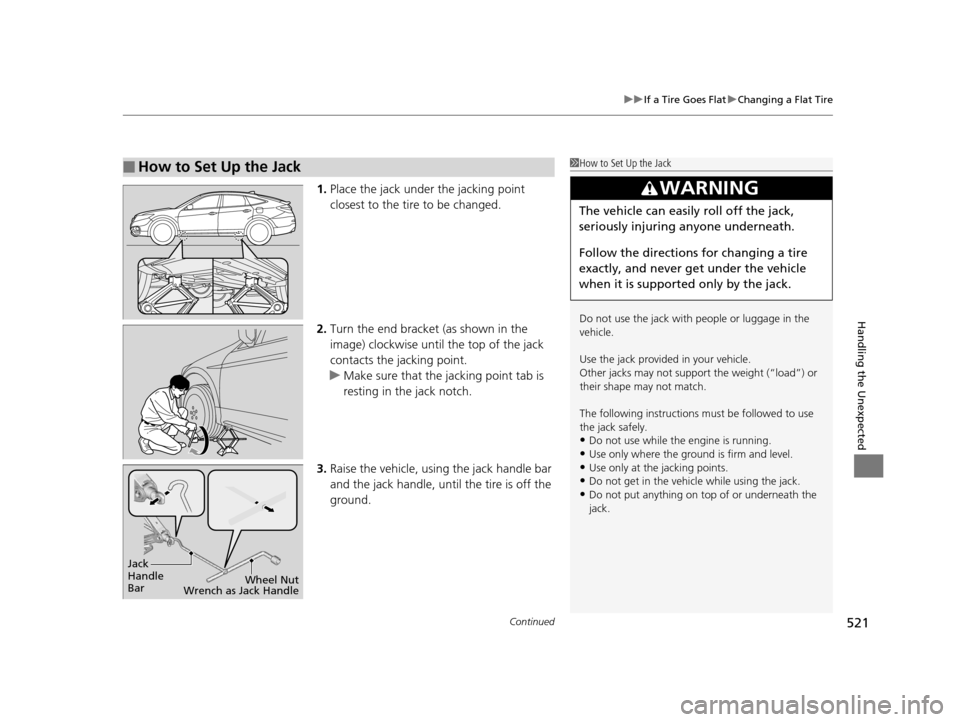
1. Place the jack under the jacking point
closest to the tire to be changed.
2. Turn the end bracket (as shown in the
image) clockwise until the top of the jack
contacts the jacking point.
u Make sure that the jacking point tab is
resting in the jack notch.
3. Raise the vehicle, using the jack handle bar
and the jack handle, until the tire is off the
ground.
■How to Set Up the Jack1How to Set Up the Jack
Do not use the jack with people or luggage in the
vehicle.
Use the jack provided in your vehicle.
Other jacks may not support the weight (“load”) or
their shape may not match.
The following instructions must be followed to use
the jack safely.
•Do not use while the engine is running.
•Use only where the ground is firm and level.
•Use only at the jacking points.•Do not get in the vehicl e while using the jack.
•Do not put anything on top of or underneath the
jack.
3WARNING
The vehicle can easily roll off the jack,
seriously injuring anyone underneath.
Follow the directions for changing a tire
exactly, and never get under the vehicle
when it is supported only by the jack.
Jack
Handle
Bar Wheel Nut
Wrench as Jack Handle
15 CROSSTOUR-31TP66500.book 521 ページ 2014年7月31日 木曜日 午後3時23分