automatic HONDA CROSSTOUR 2015 1.G Owner's Guide
[x] Cancel search | Manufacturer: HONDA, Model Year: 2015, Model line: CROSSTOUR, Model: HONDA CROSSTOUR 2015 1.GPages: 573
Page 131 of 573
130
Controls
Adjusting the Mirrors
Interior Rearview Mirror
Adjust the angle of the rearview mirror when you are sitting in the correct driving
position.
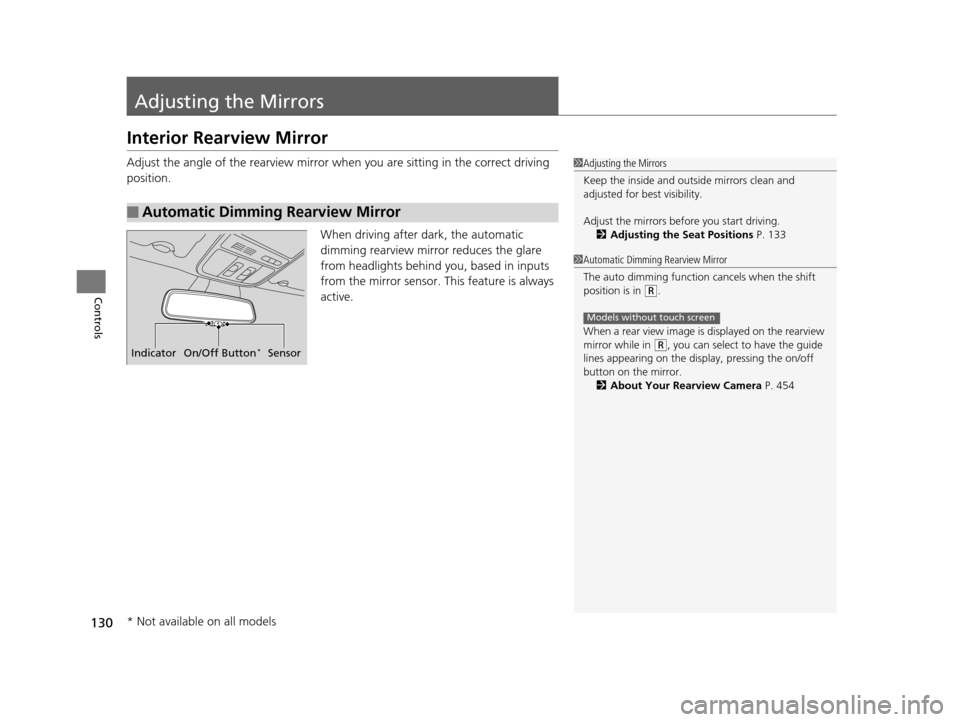
When driving after dark, the automatic
dimming rearview mirror reduces the glare
from headlights behind you, based in inputs
from the mirror sensor. This feature is always
active.
■Automatic Dimming Rearview Mirror
1Adjusting the Mirrors
Keep the inside and out side mirrors clean and
adjusted for best visibility.
Adjust the mirrors befo re you start driving.
2 Adjusting the Seat Positions P. 133
Indicator On/Off Button*Sensor
1Automatic Dimming Rearview Mirror
The auto dimming function cancels when the shift
position is in
(R.
When a rear view image is displayed on the rearview
mirror while in
( R, you can select to have the guide
lines appearing on the display, pressing the on/off
button on the mirror.
2 About Your Rearview Camera P. 454
Models without touch screen
* Not available on all models
15 CROSSTOUR-31TP66500.book 130 ページ 2014年7月31日 木曜日 午後3時23分
Page 132 of 573
131
uuAdjusting the Mirrors uPower Door Mirrors
Continued
Controls
Power Door Mirrors
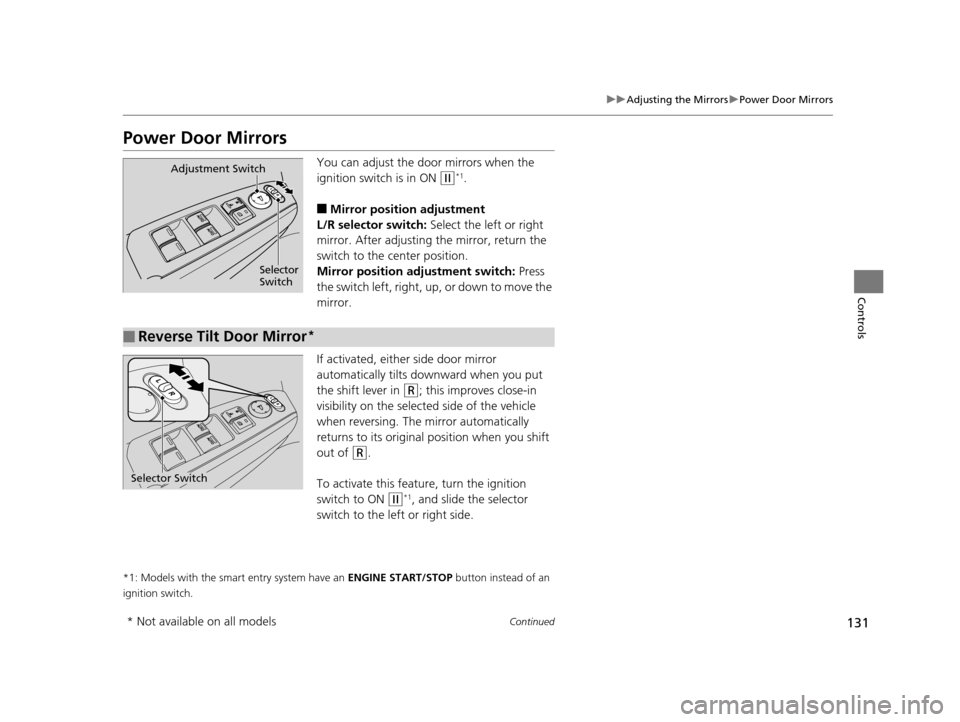
You can adjust the door mirrors when the
ignition switch is in ON
(w*1.
■Mirror position adjustment
L/R selector switch: Select the left or right
mirror. After adjusting the mirror, return the
switch to the center position.
Mirror positi on adjustment switch: Press
the switch left, right, up , or down to move the
mirror.
If activated, either side door mirror
automatically tilts do wnward when you put
the shift lever in
(R; this improves close-in
visibility on the selected side of the vehicle
when reversing. The mirror automatically
returns to its original position when you shift
out of
(R.
To activate this featur e, turn the ignition
switch to ON
(w*1, and slide the selector
switch to the left or right side.
*1: Models with the smart entry system have an ENGINE START/STOP button instead of an
ignition switch.
Selector
Switch
Adjustment Switch
■Reverse Tilt Door Mirror*
Selector Switch
* Not available on all models
15 CROSSTOUR-31TP66500.book 131 ページ 2014年7月31日 木曜日 午後3時23分
Page 154 of 573
153
uuInterior Lights/Interior Convenience Items uInterior Convenience Items
Controls
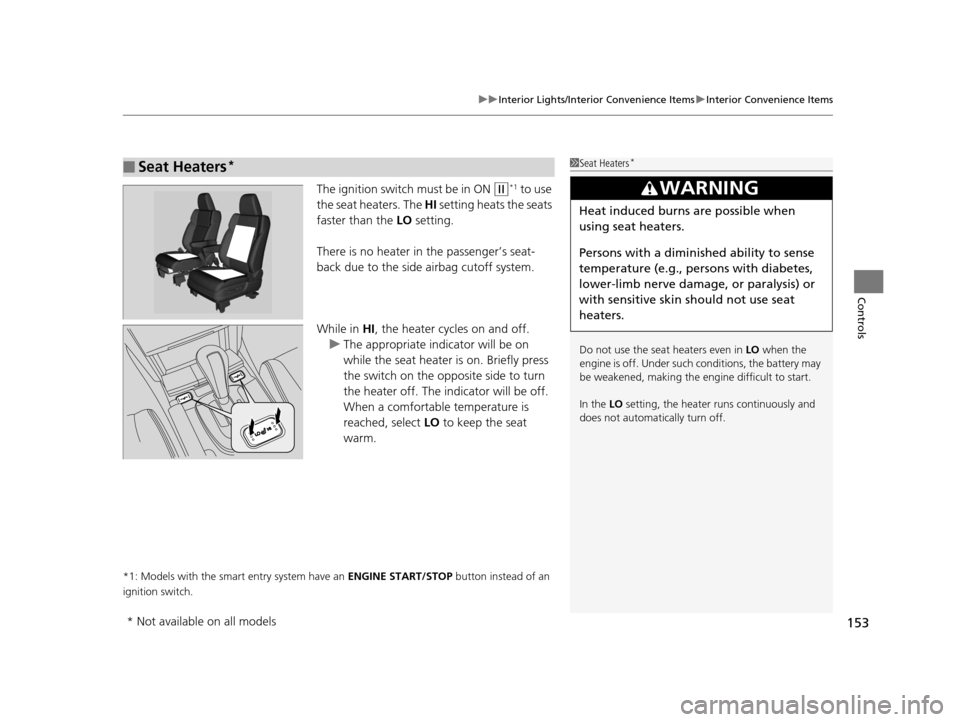
The ignition switch must be in ON (w*1 to use
the seat heaters. The HI setting heats the seats
faster than the LO setting.
There is no heater in the passenger’s seat-
back due to the side airbag cutoff system.
While in HI , the heater cycles on and off.
u The appropriate indicator will be on
while the seat heater is on. Briefly press
the switch on the opposite side to turn
the heater off. The indicator will be off.
When a comfortable temperature is
reached, select LO to keep the seat
warm.
*1: Models with the smart entry system have an ENGINE START/STOP button instead of an
ignition switch.
■Seat Heaters*1 Seat Heaters*
Do not use the seat heaters even in LO when the
engine is off. Under such conditions, the battery may
be weakened, making the engine difficult to start.
In the LO setting, the heater runs continuously and
does not automatically turn off.
3WARNING
Heat induced burns are possible when
using seat heaters.
Persons with a diminished ability to sense
temperature (e.g., persons with diabetes,
lower-limb nerve damage, or paralysis) or
with sensitive skin should not use seat
heaters.
* Not available on all models
15 CROSSTOUR-31TP66500.book 153 ページ 2014年7月31日 木曜日 午後3時23分
Page 156 of 573
Continued155
uuHeating and Cooling System*uUsing Vents, Heating and A/C
Controls
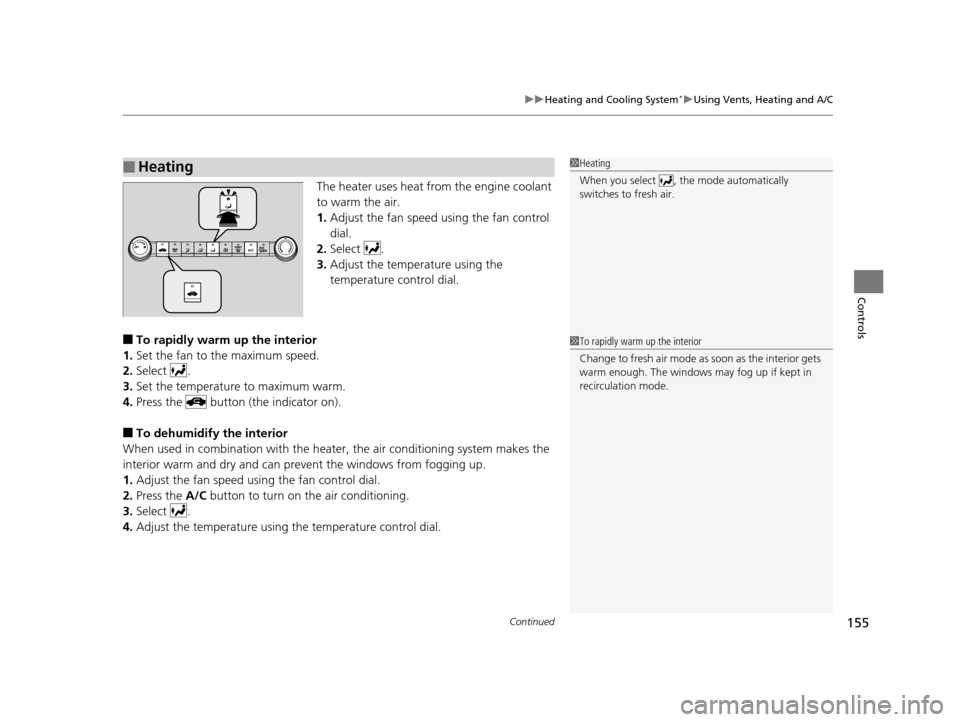
The heater uses heat from the engine coolant
to warm the air.
1. Adjust the fan speed using the fan control
dial.
2. Select .
3. Adjust the temperature using the
temperature control dial.
■To rapidly warm up the interior
1. Set the fan to the maximum speed.
2. Select .
3. Set the temperature to maximum warm.
4. Press the button (the indicator on).
■To dehumidify the interior
When used in combination with the heat er, the air conditioning system makes the
interior warm and dry and can prev ent the windows from fogging up.
1. Adjust the fan speed using the fan control dial.
2. Press the A/C button to turn on the air conditioning.
3. Select .
4. Adjust the temperature using the temperature control dial.
■Heating1Heating
When you select , th e mode automatically
switches to fresh air.
1 To rapidly warm up the interior
Change to fresh air mode as soon as the interior gets
warm enough. The windows may fog up if kept in
recirculation mode.
15 CROSSTOUR-31TP66500.book 155 ページ 2014年7月31日 木曜日 午後3時23分
Page 157 of 573
uuHeating and Cooling System*uUsing Vents, Heating and A/C
156
Controls
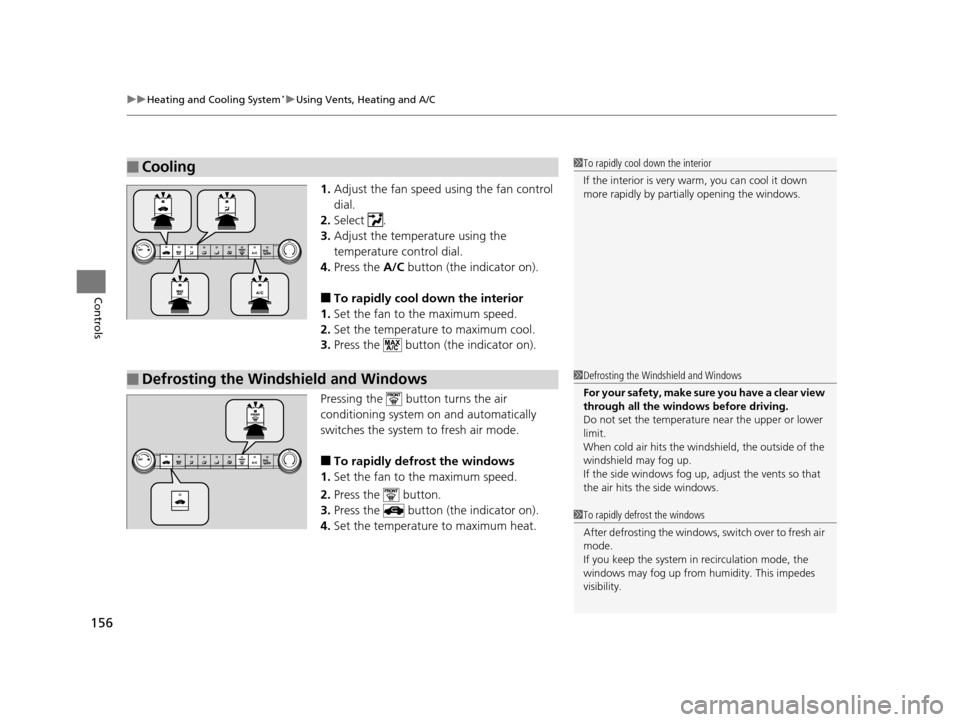
1. Adjust the fan speed using the fan control
dial.
2. Select .
3. Adjust the temperature using the
temperature control dial.
4. Press the A/C button (the indicator on).
■To rapidly cool down the interior
1. Set the fan to the maximum speed.
2. Set the temperature to maximum cool.
3. Press the button (the indicator on).
Pressing the button turns the air
conditioning system on and automatically
switches the system to fresh air mode.
■To rapidly defrost the windows
1. Set the fan to the maximum speed.
2. Press the button.
3. Press the button (the indicator on).
4. Set the temperature to maximum heat.
■Cooling1To rapidly cool down the interior
If the interior is very warm, you can cool it down
more rapidly by parti ally opening the windows.
■Defrosting the Windshield and Windows1Defrosting the Windshield and Windows
For your safety, make sure you have a clear view
through all the windows before driving.
Do not set the temperatur e near the upper or lower
limit.
When cold air hits the windshield, the outside of the
windshield may fog up.
If the side windows fog up, adjust the vents so that
the air hits th e side windows.
1To rapidly defrost the windows
After defrosting the windows, switch over to fresh air
mode.
If you keep the system in recirculation mode, the
windows may fog up from humidity. This impedes
visibility.
15 CROSSTOUR-31TP66500.book 156 ページ 2014年7月31日 木曜日 午後3時23分
Page 158 of 573
157Continued
Controls
Climate Control System*
Using Automatic Climate Control
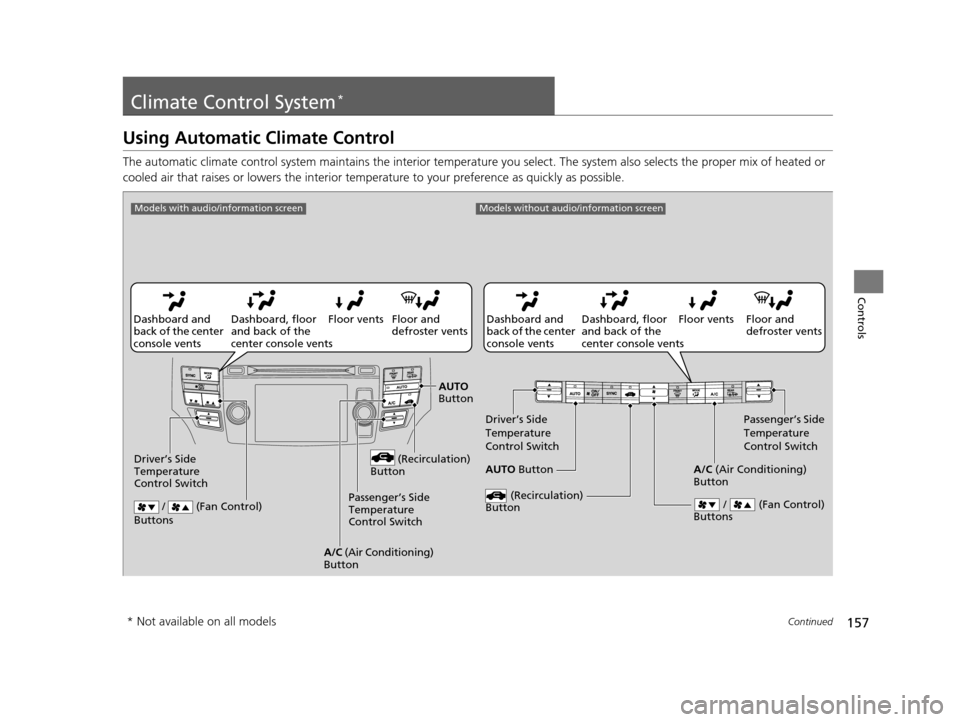
The automatic climate control system maintains the interior te mperature you select. The system al so selects the proper mix of heated or
cooled air that raises or lowers the interior temp erature to your preference as quickly as possible.
Floor and
defroster vents
Floor vents
Dashboard, floor
and back of the
center console vents
Dashboard and
back of the center
console vents
AUTO Button
Driver’s Side
Temperature
Control Switch
Passenger’s Side
Temperature
Control Switch
/ (Fan Control)
Buttons
(Recirculation)
Button
A/C (Air Conditioning)
Button
Models without audio/information screen
Floor and
defroster vents
Floor vents
Dashboard, floor
and back of the
center console vents
Dashboard and
back of the center
console vents
AUTO
Button
Driver’s Side
Temperature
Control Switch (Recirculation)
Button
/ (Fan Control)
Buttons
A/C (Air Conditioning)
Button Passenger’s Side
Temperature
Control Switch
Models with audio/information screen
* Not available on all models
15 CROSSTOUR-31TP66500.book 157 ページ 2014年7月31日 木曜日 午後3時23分
Page 159 of 573
uuClimate Control System*uUsing Automatic Climate Control
158
Controls
Use the system when the engine is running.
1. Press the AUTO button.
2. Adjust the interior temperature using the dr iver’s side or passenger’s side control
switch.
3. Press the (On/Off) button to cancel.
■Switching between the recirculation and fresh air modes
Press the (recirculation) button and switch the mode depending on
environmental conditions.
Recirculation Mode (indicator on): Recirculates air from the vehicle’s interior through
the system.
Fresh Air Mode (indicator off): Maintains outside ventilation. Keep the system in
fresh air mode in normal situations.
1 Using Automatic Climate Control
If any buttons are presse d while using the climate
control system in auto, the function of the button
that was pressed will take priority.
The AUTO indicator will go off, but functions
unrelated to the button th at was pressed will be
controlled automatically.
To prevent cold air from bl owing in from outside, the
fan may not start i mmediately when the AUTO
button is pressed.
If the interior is very warm, you can cool it down
more rapidly by partial ly opening the windows,
turning the system on auto, and setting the
temperature to low. Change the fresh mode to
recirculation mode until the temperature cools down.
When you set the temperat ure to the lower or upper
limit, Lo or Hi is displayed.
Pressing the button switches the climate
control system between on and off. When turned on,
the system returns to your last selection.
15 CROSSTOUR-31TP66500.book 158 ページ 2014年7月31日 木曜日 午後3時23分
Page 160 of 573
Continued159
uuClimate Control System*uUsing Automatic Climate Control
Controls
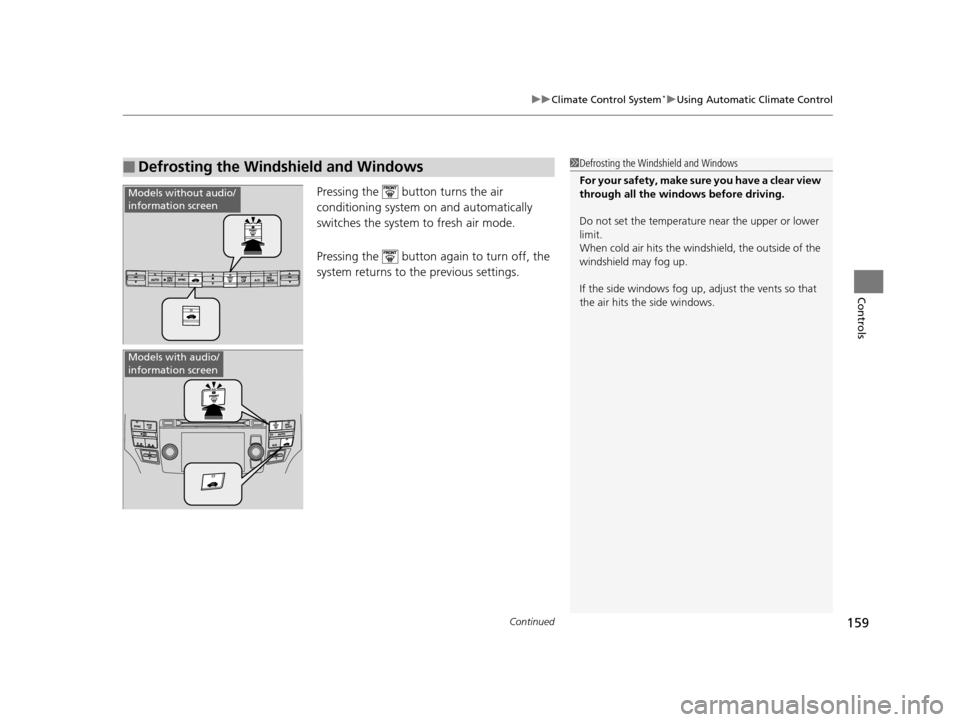
Pressing the button turns the air
conditioning system on and automatically
switches the system to fresh air mode.
Pressing the button again to turn off, the
system returns to the previous settings.
■Defrosting the Windshield and Windows1Defrosting the Windshield and Windows
For your safety, make sure you have a clear view
through all the windows before driving.
Do not set the temperatur e near the upper or lower
limit.
When cold air hits the windshield, the outside of the
windshield may fog up.
If the side windows fog up, adjust the vents so that
the air hits th e side windows.
Models without audio/
information screen
Models with audio/
information screen
15 CROSSTOUR-31TP66500.book 159 ページ 2014年7月31日 木曜日 午後3時23分
Page 161 of 573
uuClimate Control System*uUsing Automatic Climate Control
160
Controls
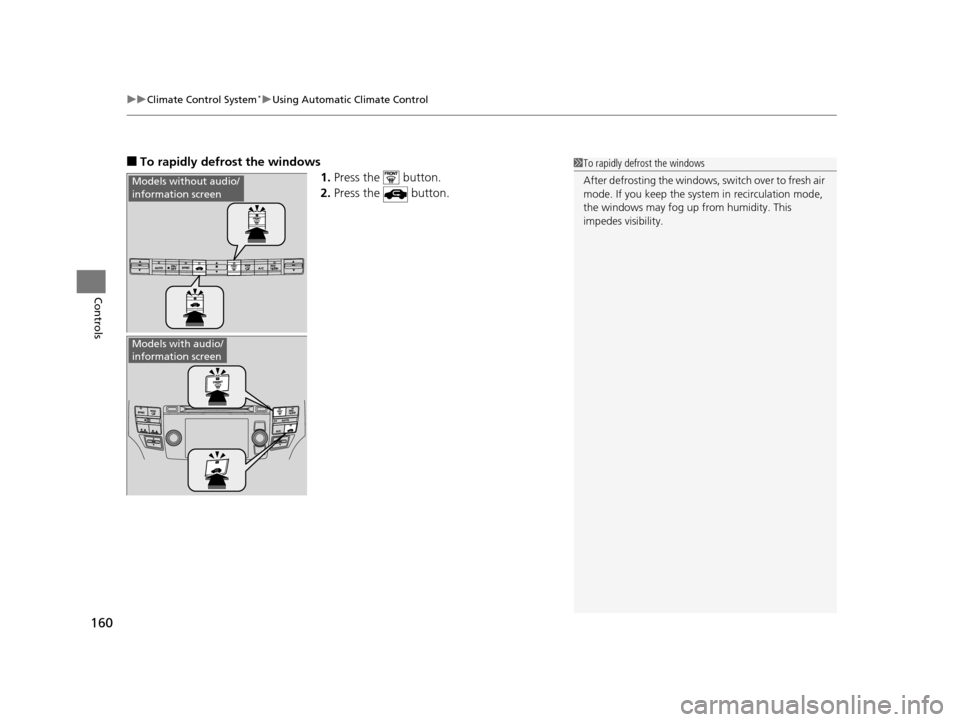
■To rapidly defrost the windows
1.Press the button.
2. Press the button.
Models without audio/
information screen
Models with audio/
information screen
1To rapidly defrost the windows
After defrosting the windows, switch over to fresh air
mode. If you keep the syst em in recirculation mode,
the windows may fog up from humidity. This
impedes visibility.
15 CROSSTOUR-31TP66500.book 160 ページ 2014年7月31日 木曜日 午後3時23分
Page 163 of 573
162
uuClimate Control System*uAutomatic Climate Control Sensors
Controls
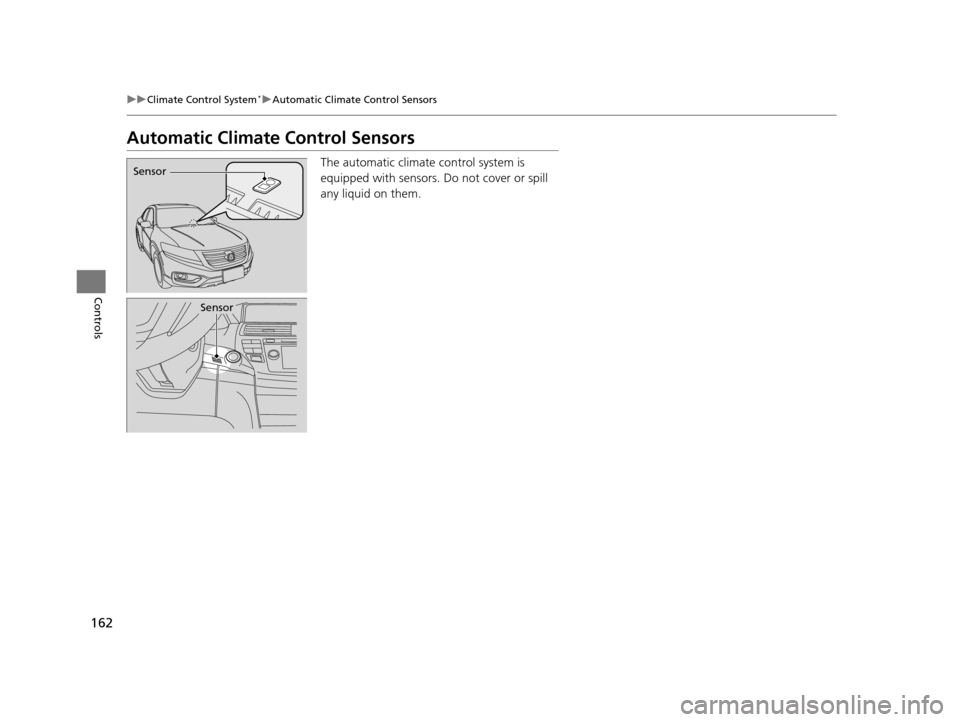
Automatic Climate Control Sensors
The automatic climate control system is
equipped with sensors. Do not cover or spill
any liquid on them.Sensor
Sensor
15 CROSSTOUR-31TP66500.book 162 ページ 2014年7月31日 木曜日 午後3時23分