engine HONDA CROSSTOUR 2015 1.G Repair Manual
[x] Cancel search | Manufacturer: HONDA, Model Year: 2015, Model line: CROSSTOUR, Model: HONDA CROSSTOUR 2015 1.GPages: 573
Page 139 of 573
uuAdjusting the Seats uAdjusting the Seat Positions
138
Controls
After all occupants have adjusted their seats and head restraints, and put on their
seat belts, it is very important that they continue to sit upright, well back in their
seats, with their feet on the floor, until the vehicle is safely parked and the engine is
off.
Sitting improperly can increase the chance of injury during a crash. For example, if
an occupant slouches, lies down, turns si deways, sits forward, leans forward or
sideways, or puts one or both feet up, the chance of injury during a crash is greatly
increased.
In addition, an occupant who is out of position in the front seat can be seriously or
fatally injured in a crash by striking interior parts of the vehicle or being struck by an
inflating front airbag.
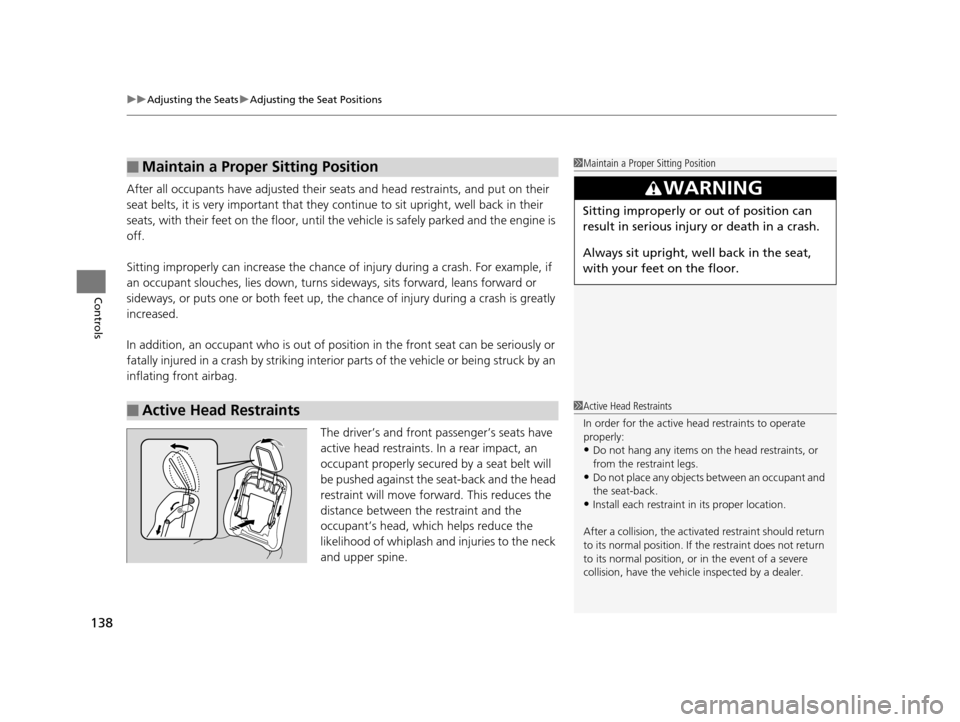
The driver’s and front passenger’s seats have
active head restraints. In a rear impact, an
occupant properly secured by a seat belt will
be pushed against the seat-back and the head
restraint will move forward. This reduces the
distance between the restraint and the
occupant’s head, which helps reduce the
likelihood of whiplash and injuries to the neck
and upper spine.
■Maintain a Proper Sitting Position
■Active Head Restraints
1 Maintain a Proper Sitting Position
3WARNING
Sitting improperly or out of position can
result in serious injury or death in a crash.
Always sit upright, well back in the seat,
with your feet on the floor.
1Active Head Restraints
In order for the active head restraints to operate
properly:
•Do not hang any items on the head restraints, or
from the restraint legs.
•Do not place any objects between an occupant and
the seat-back.
•Install each restraint in its proper location.
After a collision, th e activated restraint should return
to its normal position. If the restraint does not return
to its normal position, or in the event of a severe
collision, have the vehicl e inspected by a dealer.
15 CROSSTOUR-31TP66500.book 138 ページ 2014年7月31日 木曜日 午後3時23分
Page 143 of 573
142
Controls
Interior Lights/Interior Convenience Items
Interior Lights
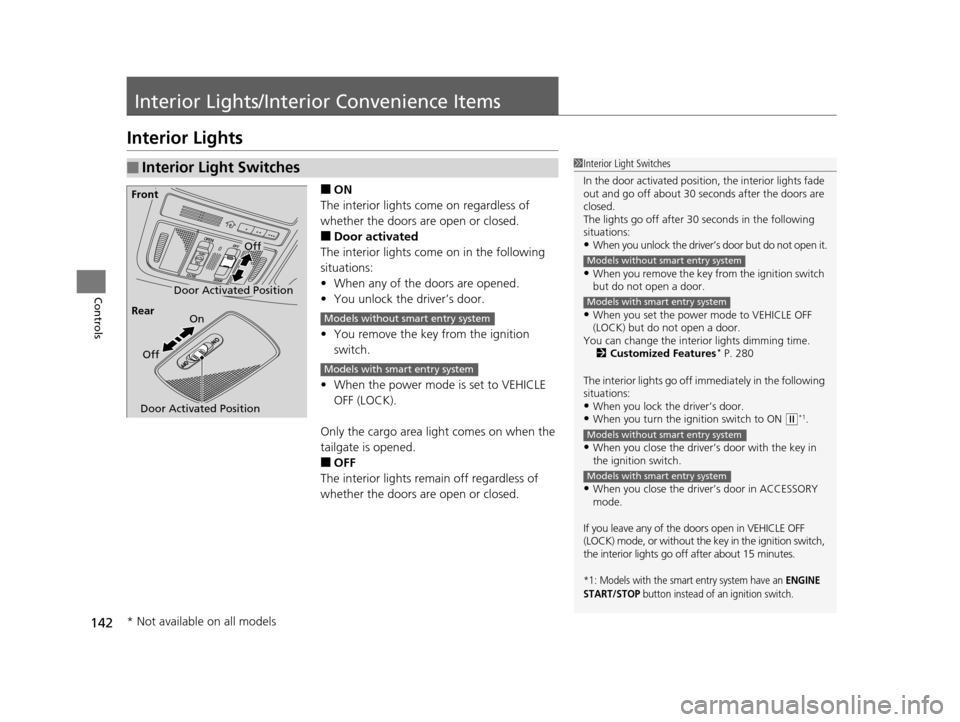
■ON
The interior lights come on regardless of
whether the doors are open or closed.
■Door activated
The interior lights come on in the following
situations:
• When any of the doors are opened.
• You unlock the driver’s door.
• You remove the key from the ignition
switch.
• When the power mode is set to VEHICLE
OFF (LOCK).
Only the cargo area light comes on when the
tailgate is opened.
■OFF
The interior lights remain off regardless of
whether the doors are open or closed.
■Interior Light Switches1 Interior Light Switches
In the door activated position, the interior lights fade
out and go off about 30 se conds after the doors are
closed.
The lights go off after 30 seconds in the following
situations:
•When you unlock the driver’s door but do not open it.
•When you remove the key from the ignition switch
but do not open a door.
•When you set the power mode to VEHICLE OFF
(LOCK) but do not open a door.
You can change the interi or lights dimming time.
2 Customized Features
* P. 280
The interior lights go off i mmediately in the following
situations:
•When you lock the driver’s door.•When you turn the ignition switch to ON ( w*1.
•When you close the driver’s door with the key in
the ignition switch.
•When you close the driver’s door in ACCESSORY
mode.
If you leave any of the doo rs open in VEHICLE OFF
(LOCK) mode, or without the key in the ignition switch,
the interior lights go off after about 15 minutes.
*1: Models with the smart entry system have an ENGINE
START/STOP button instead of an ignition switch.
Models without smart entry system
Models with smart entry system
Models without smart entry system
Models with smart entry system
Door Activated Position
Off
Front
Door Activated Position On
Off
Rear
Models without smart entry system
Models with smart entry system
* Not available on all models
15 CROSSTOUR-31TP66500.book 142 ページ 2014年7月31日 木曜日 午後3時23分
Page 148 of 573
Continued147
uuInterior Lights/Interior Convenience Items uInterior Convenience Items
Controls
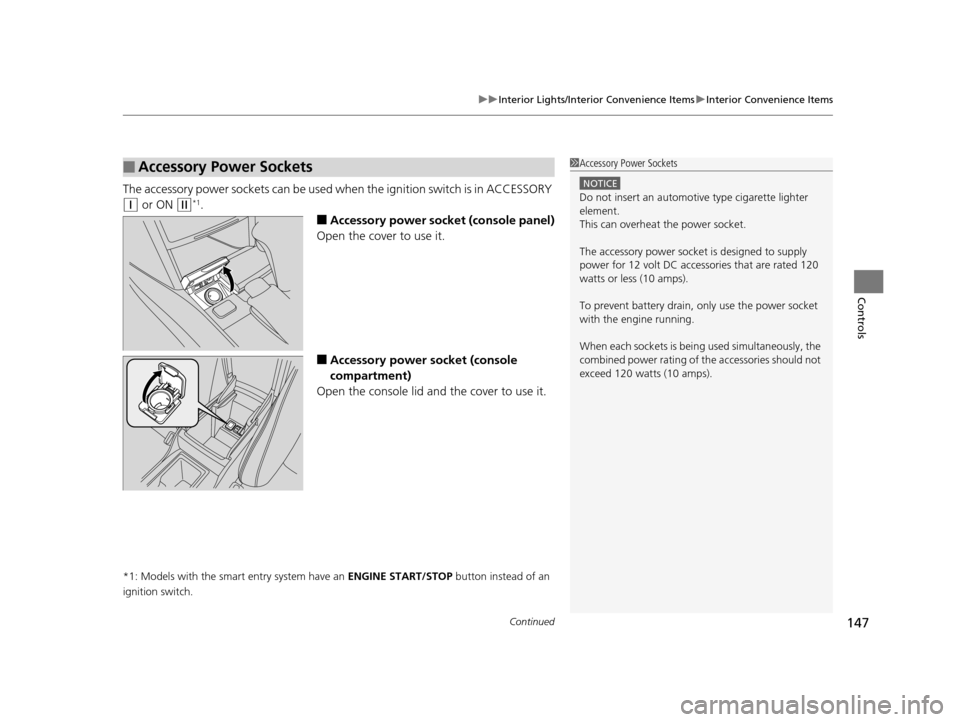
The accessory power so ckets can be used when the i gnition switch is in ACCESSORY
(q or ON (w*1.
■Accessory power socket (console panel)
Open the cover to use it.
■Accessory power socket (console
compartment)
Open the console lid and the cover to use it.
*1: Models with the smart entry system have an ENGINE START/STOP button instead of an
ignition switch.
■Accessory Power Sockets1 Accessory Power Sockets
NOTICE
Do not insert an automotive type cigarette lighter
element.
This can overheat the power socket.
The accessory power socket is designed to supply
power for 12 volt DC access ories that are rated 120
watts or less (10 amps).
To prevent battery drain, only use the power socket
with the engine running.
When each sockets is being used simultaneously, the
combined power rating of the accessories should not
exceed 120 watts (10 amps).
15 CROSSTOUR-31TP66500.book 147 ページ 2014年7月31日 木曜日 午後3時23分
Page 154 of 573
153
uuInterior Lights/Interior Convenience Items uInterior Convenience Items
Controls
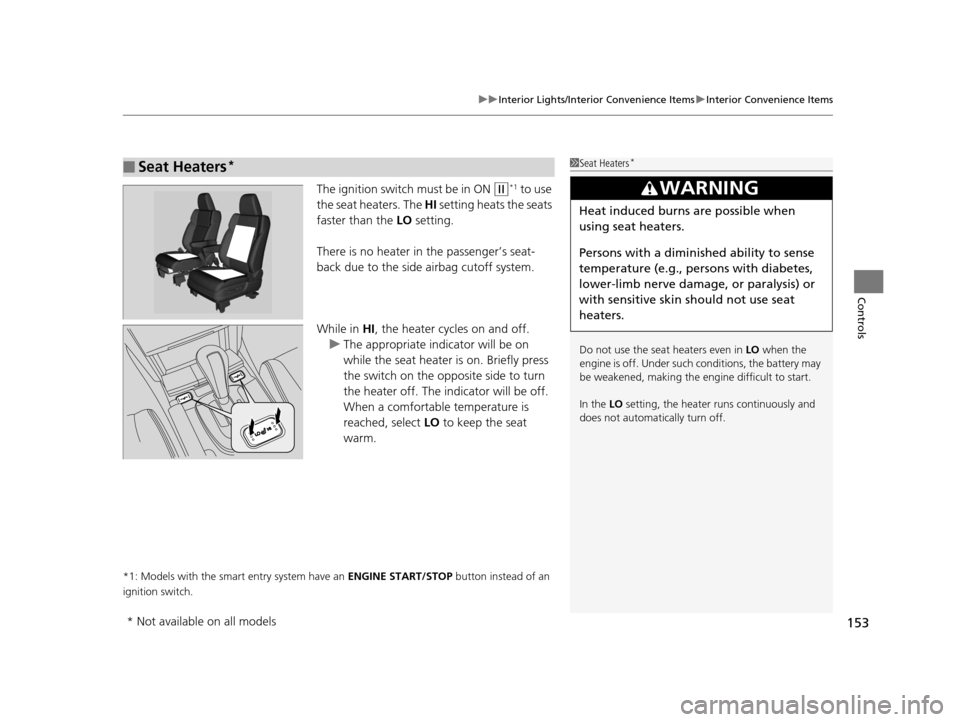
The ignition switch must be in ON (w*1 to use
the seat heaters. The HI setting heats the seats
faster than the LO setting.
There is no heater in the passenger’s seat-
back due to the side airbag cutoff system.
While in HI , the heater cycles on and off.
u The appropriate indicator will be on
while the seat heater is on. Briefly press
the switch on the opposite side to turn
the heater off. The indicator will be off.
When a comfortable temperature is
reached, select LO to keep the seat
warm.
*1: Models with the smart entry system have an ENGINE START/STOP button instead of an
ignition switch.
■Seat Heaters*1 Seat Heaters*
Do not use the seat heaters even in LO when the
engine is off. Under such conditions, the battery may
be weakened, making the engine difficult to start.
In the LO setting, the heater runs continuously and
does not automatically turn off.
3WARNING
Heat induced burns are possible when
using seat heaters.
Persons with a diminished ability to sense
temperature (e.g., persons with diabetes,
lower-limb nerve damage, or paralysis) or
with sensitive skin should not use seat
heaters.
* Not available on all models
15 CROSSTOUR-31TP66500.book 153 ページ 2014年7月31日 木曜日 午後3時23分
Page 156 of 573
Continued155
uuHeating and Cooling System*uUsing Vents, Heating and A/C
Controls
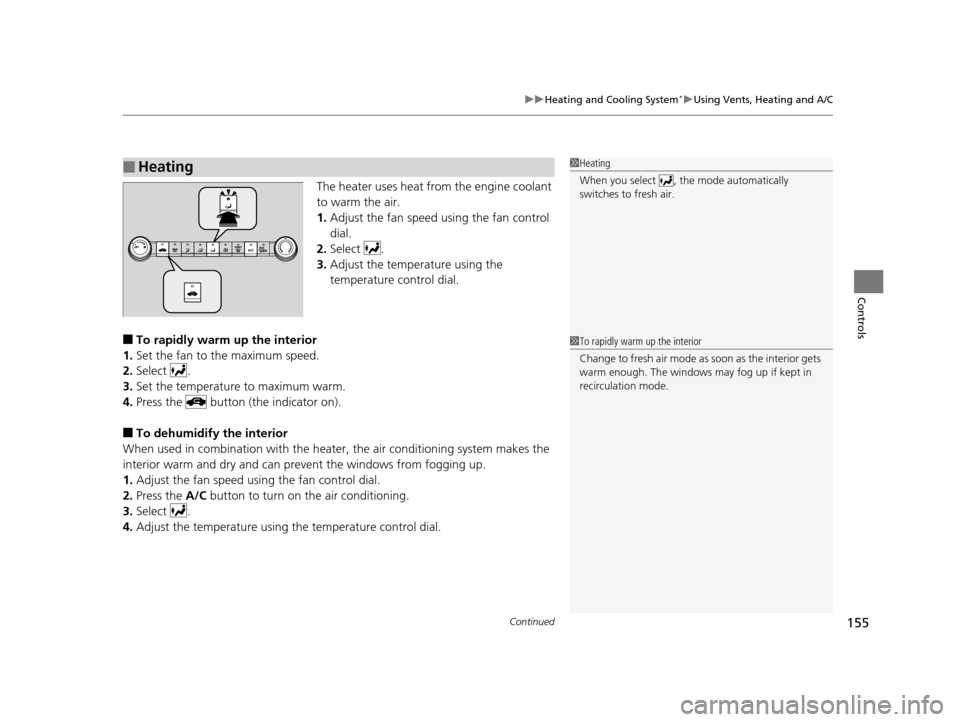
The heater uses heat from the engine coolant
to warm the air.
1. Adjust the fan speed using the fan control
dial.
2. Select .
3. Adjust the temperature using the
temperature control dial.
■To rapidly warm up the interior
1. Set the fan to the maximum speed.
2. Select .
3. Set the temperature to maximum warm.
4. Press the button (the indicator on).
■To dehumidify the interior
When used in combination with the heat er, the air conditioning system makes the
interior warm and dry and can prev ent the windows from fogging up.
1. Adjust the fan speed using the fan control dial.
2. Press the A/C button to turn on the air conditioning.
3. Select .
4. Adjust the temperature using the temperature control dial.
■Heating1Heating
When you select , th e mode automatically
switches to fresh air.
1 To rapidly warm up the interior
Change to fresh air mode as soon as the interior gets
warm enough. The windows may fog up if kept in
recirculation mode.
15 CROSSTOUR-31TP66500.book 155 ページ 2014年7月31日 木曜日 午後3時23分
Page 159 of 573
uuClimate Control System*uUsing Automatic Climate Control
158
Controls
Use the system when the engine is running.
1. Press the AUTO button.
2. Adjust the interior temperature using the dr iver’s side or passenger’s side control
switch.
3. Press the (On/Off) button to cancel.
■Switching between the recirculation and fresh air modes
Press the (recirculation) button and switch the mode depending on
environmental conditions.
Recirculation Mode (indicator on): Recirculates air from the vehicle’s interior through
the system.
Fresh Air Mode (indicator off): Maintains outside ventilation. Keep the system in
fresh air mode in normal situations.
1 Using Automatic Climate Control
If any buttons are presse d while using the climate
control system in auto, the function of the button
that was pressed will take priority.
The AUTO indicator will go off, but functions
unrelated to the button th at was pressed will be
controlled automatically.
To prevent cold air from bl owing in from outside, the
fan may not start i mmediately when the AUTO
button is pressed.
If the interior is very warm, you can cool it down
more rapidly by partial ly opening the windows,
turning the system on auto, and setting the
temperature to low. Change the fresh mode to
recirculation mode until the temperature cools down.
When you set the temperat ure to the lower or upper
limit, Lo or Hi is displayed.
Pressing the button switches the climate
control system between on and off. When turned on,
the system returns to your last selection.
15 CROSSTOUR-31TP66500.book 158 ページ 2014年7月31日 木曜日 午後3時23分
Page 167 of 573
166
uuAudio System uAudio System Theft Protection
Features
Audio System Theft Protection
The audio system is disabled when it is di sconnected from the power source, such as
when the battery is disconnected or goes dead.
■Reactivating the audio system
1. Turn the ignition switch to ON
(w, and turn on the audio system.
u If you turn the ignition switch to ACCESSORY
(q, you will be requested to
enter the audio security code.
u You can find out about your serial numb er and security code from a dealer.
2. Enter the audio security code using the preset buttons.
3. If you enter an incorrect digit, continue to the last digit, then try again. If you do
not enter the code correctly after 10 tries , leave the system for one hour before
trying again, or visit a dealer to have the system reset.
1. Turn the ignition switch to ON
(w*1.
2. Turn on the audio system.
3. Press and hold the audio system power button for more than two seconds.
u The audio system is reac tivated when the audio co ntrol unit establishes a
connection with the vehicle control unit. If the control unit fails to recognize
the audio unit, you must go to a dealer and have the audio unit checked.
*1: Models with the smart entry system have an ENGINE START/STOP button instead of an
ignition switch.
1 Audio System Theft Protection
Find the audio system’s se curity code and serial
number label in your owner’s manual kit.
Do not store the label in your vehicle. If you lose the
label, you must first retrie ve the serial number, and
then obtain the code.
You can register the securi ty code at Honda Owners
(owners.honda.com. ), and find information on how
to retrieve the serial num ber and obtain the code at
radio-navicode.honda.com .
We recommend that you write down the serial
number in this owner’s manual.
You can find out about your serial number and
security code from a dealer.
U.S. models
Audio system without touch screen
U.S. models
Audio system without touch screen
U.S. models
Audio system without touch screen
Audio system without touch screen
Audio system without touch screen
Audio system without touch screen
Canadian models
Audio system with touch screen
15 CROSSTOUR-31TP66500.book 166 ページ 2014年7月31日 木曜日 午後3時23分
Page 183 of 573
182
Features
Audio System Basic Operation
To use the audio system function, the ignition switch must be in ACCESSORY (q or
ON
(w*1.
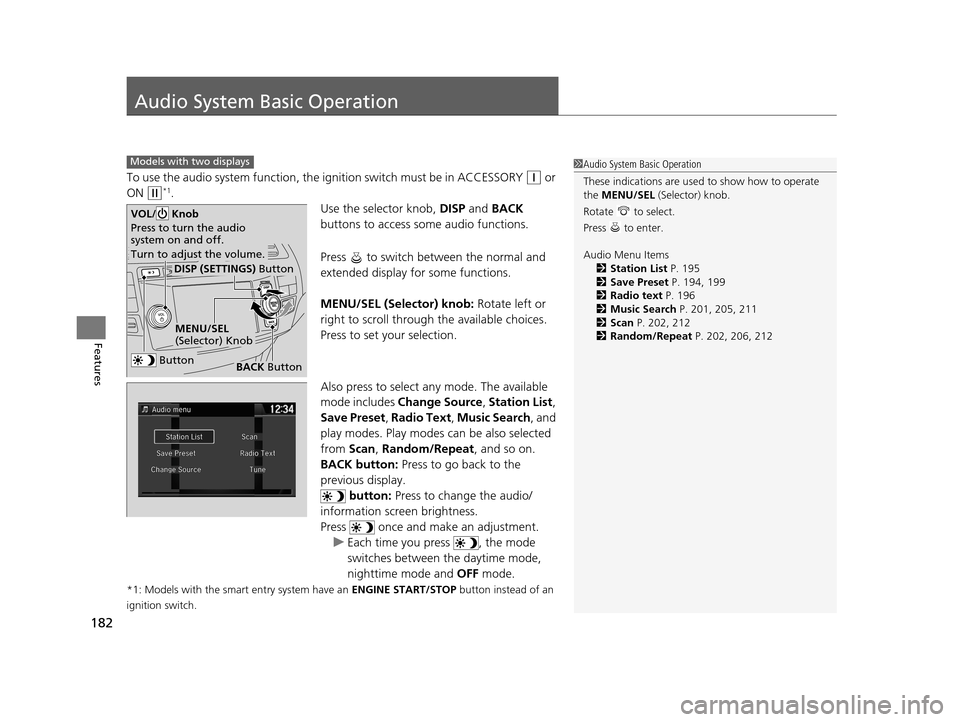
Use the selector knob, DISP and BACK
buttons to access some audio functions.
Press to switch between the normal and
extended display fo r some functions.
MENU/SEL (Selector) knob: Rotate left or
right to scroll through the available choices.
Press to set your selection.
Also press to select any mode. The available
mode includes Change Source , Station List ,
Save Preset , Radio Text , Music Search, and
play modes. Play modes can be also selected
from Scan, Random/Repeat , and so on.
BACK button: Press to go back to the
previous display. button: Press to change the audio/
information screen brightness.
Press once and make an adjustment. u Each time you press , the mode
switches between the daytime mode,
nighttime mode and OFF mode.
*1: Models with the smart entry system have an ENGINE START/STOP button instead of an
ignition switch.
Models with two displays1 Audio System Basic Operation
These indications are used to show how to operate
the MENU/SEL (Selector) knob.
Rotate to select.
Press to enter.
Audio Menu Items 2 Station List P. 195
2 Save Preset P. 194, 199
2 Radio text P. 196
2 Music Search P. 201, 205, 211
2 Scan P. 202, 212
2 Random/Repeat P. 202, 206, 212
Button
MENU/SEL
(Selector) Knob
DISP (SETTINGS) Button
BACK Button
VOL/ Knob
Press to turn the audio
system on and off.
Turn to adjust the volume.
15 CROSSTOUR-31TP66500.book 182 ページ 2014年7月31日 木曜日 午後3時23分
Page 216 of 573
215
Features
Audio System Basic Operation
To use the audio system function, the ignition swit ch must be in ACCESSORY (q or
ON
(w*1.
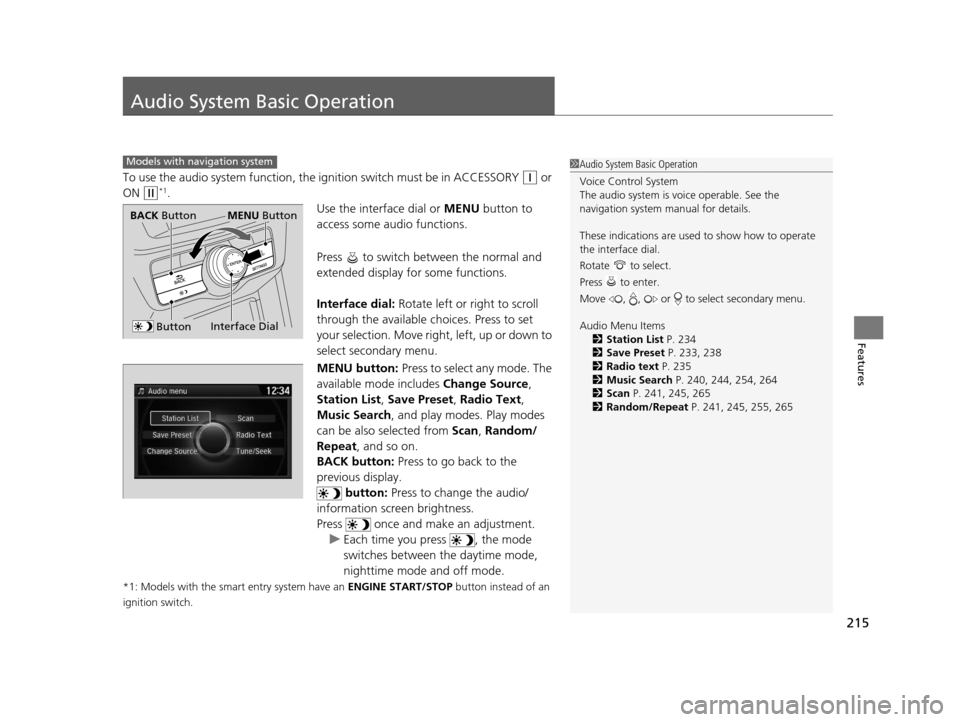
Use the interface dial or MENU button to
access some audio functions.
Press to switch between the normal and
extended display fo r some functions.
Interface dial: Rotate left or right to scroll
through the available ch oices. Press to set
your selection. Move right, left, up or down to
select secondary menu.
MENU button: Press to select any mode. The
available mode includes Change Source,
Station List , Save Preset , Radio Text,
Music Search , and play mode s. Play modes
can be also selected from Scan, Random/
Repeat , and so on.
BACK button: Press to go back to the
previous display. button: Press to change the audio/
information screen brightness.
Press once and make an adjustment.
u Each time you press , the mode
switches between the daytime mode,
nighttime mode and off mode.
*1: Models with the smart entry system have an ENGINE START/STOP button instead of an
ignition switch.
Models with navigation system1 Audio System Basic Operation
Voice Control System
The audio system is voice operable. See the
navigation system manual for details.
These indications are used to show how to operate
the interface dial.
Rotate to select.
Press to enter.
Move , , or to select secondary menu.
Audio Menu Items 2 Station List P. 234
2 Save Preset P. 233, 238
2 Radio text P. 235
2 Music Search P. 240, 244, 254, 264
2 Scan P. 241, 245, 265
2 Random/Repeat P. 241, 245, 255, 265
Interface Dial
MENU ButtonBACK Button
Button
15 CROSSTOUR-31TP66500.book 215 ページ 2014年7月31日 木曜日 午後3時23分
Page 244 of 573
Continued243
uuAudio System Basic Operation uPlaying Hard Disc Drive (HDD) Audio
Features
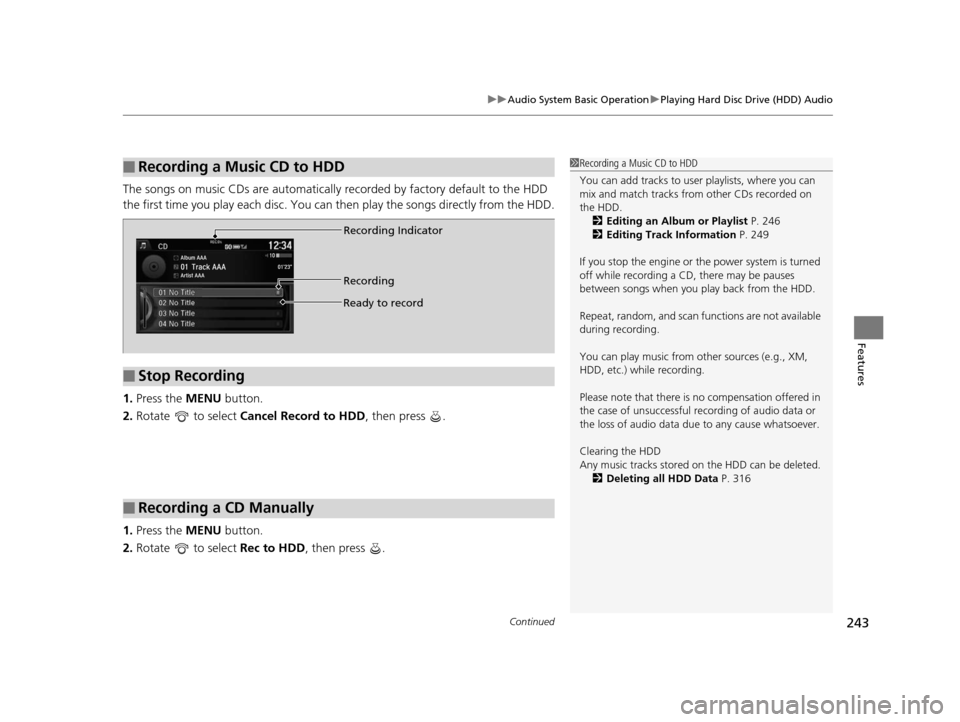
The songs on music CDs are automatically recorded by factory default to the HDD
the first time you play each disc. You ca n then play the songs directly from the HDD.
1. Press the MENU button.
2. Rotate to select Cancel Record to HDD , then press .
1. Press the MENU button.
2. Rotate to select Rec to HDD, then press .
■Recording a Music CD to HDD1Recording a Music CD to HDD
You can add tracks to user playlists, where you can
mix and match tracks from other CDs recorded on
the HDD.
2 Editing an Album or Playlist P. 246
2 Editing Track Information P. 249
If you stop the engine or th e power system is turned
off while recording a CD, there may be pauses
between songs when you play back from the HDD.
Repeat, random, and scan f unctions are not available
during recording.
You can play music from other sources (e.g., XM,
HDD, etc.) while recording.
Please note that there is no compensation offered in
the case of unsuccessful re cording of audio data or
the loss of audio data due to any cause whatsoever.
Clearing the HDD
Any music tracks stored on the HDD can be deleted. 2 Deleting all HDD Data P. 316
■Stop Recording
■Recording a CD Manually
Recording Indicator
Recording
Ready to record
15 CROSSTOUR-31TP66500.book 243 ページ 2014年7月31日 木曜日 午後3時23分