change HONDA CRV 2023 Owners Manual
[x] Cancel search | Manufacturer: HONDA, Model Year: 2023, Model line: CRV, Model: HONDA CRV 2023Pages: 719, PDF Size: 13.43 MB
Page 618 of 719
617
uuMaintenance Under the Hood uChanging the Engine Oil and Oil Filter
Maintenance
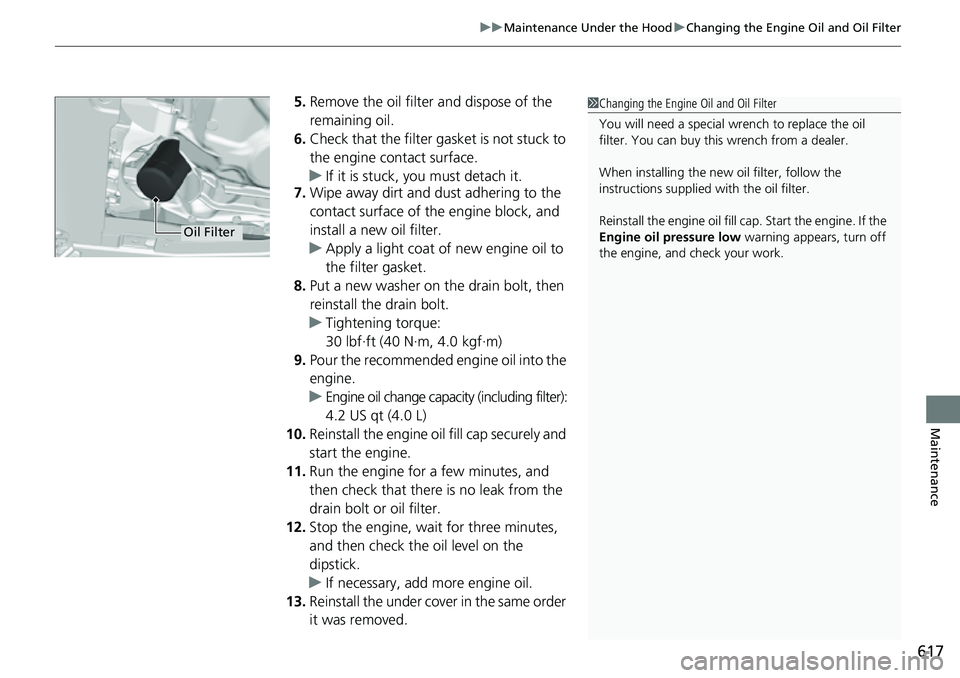
5. Remove the oil filter and dispose of the
remaining oil.
6. Check that the filter gasket is not stuck to
the engine contact surface.
u If it is stuck, you must detach it.
7. Wipe away dirt and dust adhering to the
contact surface of the engine block, and
install a new oil filter.
u Apply a light coat of new engine oil to
the filter gasket.
8. Put a new washer on the drain bolt, then
reinstall the drain bolt.
u Tightening torque:
30 lbf∙ft (40 N∙m, 4.0 kgf∙m)
9. Pour the recommended engine oil into the
engine.
u Engine oil change capacity (including filter):
4.2 US qt (4.0 L)
10. Reinstall the engine oil fill cap securely and
start the engine.
11. Run the engine for a few minutes, and
then check that there is no leak from the
drain bolt or oil filter.
12. Stop the engine, wait for three minutes,
and then check the oil level on the
dipstick.
u If necessary, add more engine oil.
13. Reinstall the under cover in the same order
it was removed.1Changing the Engine Oil and Oil Filter
You will need a special wrench to replace the oil
filter. You can buy this wrench from a dealer.
When installing the new oil filter, follow the
instructions supplied with the oil filter.
Reinstall the engine oil fill cap. Start the engine. If the
Engine oil pressure low warning appears, turn off
the engine, and check your work.
Oil Filter
Page 621 of 719
620
uuMaintenance Under the Hood uTransmission Fluid
Maintenance
Transmission Fluid
Have a dealer check the fluid level and replace if necessary.
Do not attempt to check or change the transmission fluid yourself.
Specified fluid: Honda HEVF-Type 11Transmission Fluid
NOTICE
Do not mix Honda HEVF-Type 1 with other
transmission fluids.
Using a transmission fluid other than Honda HEVF-
Type 1 may adversely affect the operation and durability
of your vehicle’s transmission, and damage the
transmission.
Any damage caused by using a transmission fluid that
is not equivalent to Honda HEVF-Type 1 is not
covered by Honda’s new ve hicle limited warranty.
Page 668 of 719
667
Handling the Unexpected
Power System Won’t Start
Checking the Procedure
If the power system won't start, check the following items and take appropriate action.
If you cannot turn on the power system after checking all the it ems in the list above, have your vehicle checked by a dealer.
If you must start the vehicle immediately, use an as sisting vehicle or booster battery to jump start it.
2If the 12-Volt Battery Is Dead P. 671
Depending on the situation, you may be able to temporarily turn the power system on using the emergency starting procedure.
2Emergency Power System On P. 669
ChecklistConditionWhat to Do
Check if the related
indicator or driver
information interface
messages come on.The Temperature is too cold for vehicle to operate message
appears.●You must wait for an increase in the
ambient temperature or move the
vehicle to a warmer location.
●Contact dealer if necessary.
The To start, touch start butto n with emblem side of
remote message appears.
u Make sure the keyless remote is in its operating range.
2 POWER Button Operating Range P. 184
2If the Keyless Remote Battery is Weak
P. 668
Check the fuses.
Check all fuses, or have your vehicle checked by a dealer.2Inspecting and Changing Fuses P. 687
Check the power system starting procedure.
Follow the instructions, and try to start the power system again.2Turning on the Power P. 455
Check the shift position. The transmission is not in (P. Change the shift position to (P.
Check the immobilizer
system indicator.When the immobilizer system indicator is blinking, the power
system cannot be turned on.2Immobilizer System P. 176
2 Immobilizer System Indicator P. 107
Page 669 of 719
668
uuPower System Won’t Start uIf the Keyless Remote Battery is Weak
Handling the Unexpected
If the Keyless Remote Battery is Weak
If the beeper sounds, the To start, touch start butto n with emblem side of
remote message appears on the driver information interface, the POWER button
flashes, and the READY indicator does not come on, tu rn on the power system as
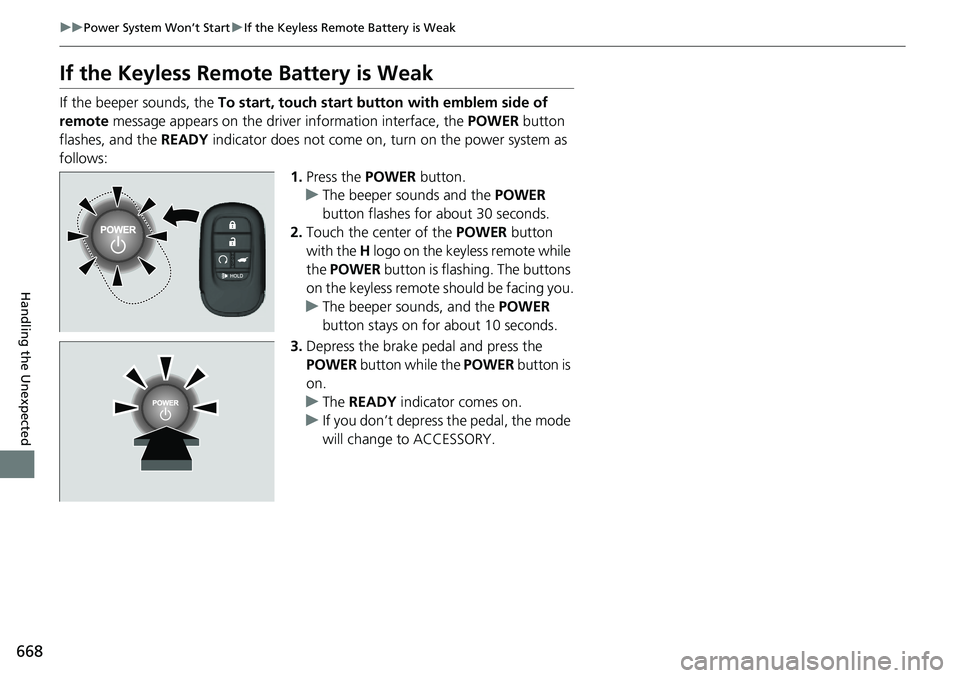
follows: 1.Press the POWER button.
u The beeper sounds and the POWER
button flashes for about 30 seconds.
2. Touch the center of the POWER button
with the H logo on the keyless remote while
the POWER button is flashing. The buttons
on the keyless remote should be facing you.
u The beeper sounds, and the POWER
button stays on for about 10 seconds.
3. Depress the brake pedal and press the
POWER button while the POWER button is
on.
u The READY indicator comes on.
u If you don’t depress the pedal, the mode
will change to ACCESSORY.
Page 671 of 719
670
uuPower System Won’t StartuEmergency Power System Off
Handling the Unexpected
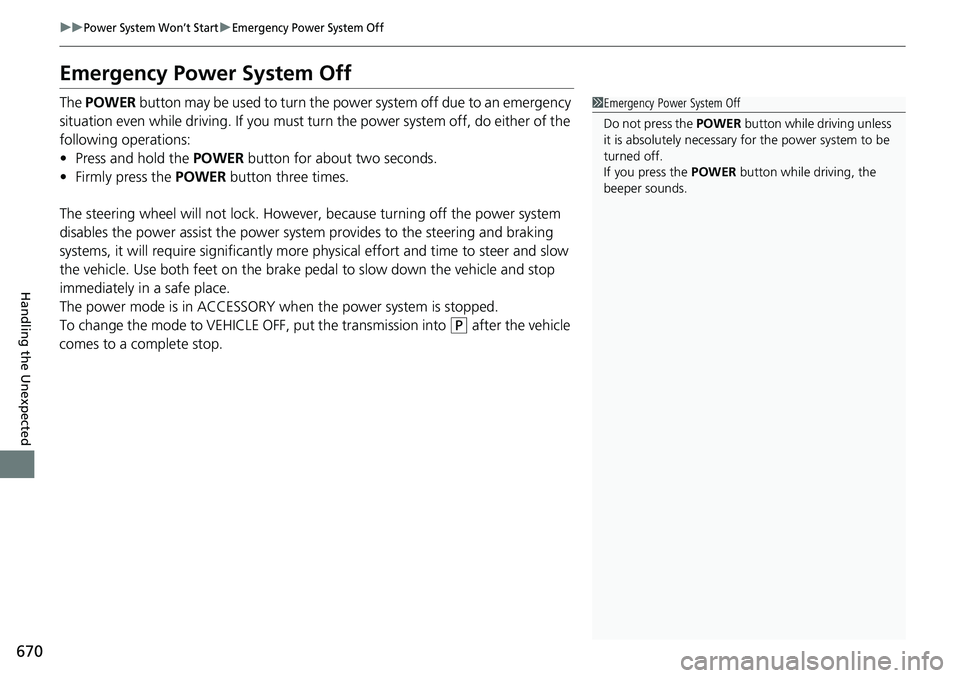
Emergency Power System Off
The POWER button may be used to turn the pow er system off due to an emergency
situation even while driving. If you must turn the power system off, do either of the
following operations:
• Press and hold the POWER button for about two seconds.
• Firmly press the POWER button three times.
The steering wheel will not lock. However, because turning off the power system
disables the power assist the power syst em provides to the steering and braking
systems, it will require significantly more physical effort and time to steer and slow
the vehicle. Use both feet on the brake pe dal to slow down the vehicle and stop
immediately in a safe place.
The power mode is in ACCESSORY wh en the power system is stopped.
To change the mode to VEHICLE OFF, put the transmission into
(P after the vehicle
comes to a complete stop.
1 Emergency Power System Off
Do not press the POWER button while driving unless
it is absolutely necessary for the power system to be
turned off.
If you press the POWER button while driving, the
beeper sounds.
Page 696 of 719
695
uuSpecifications u
Information
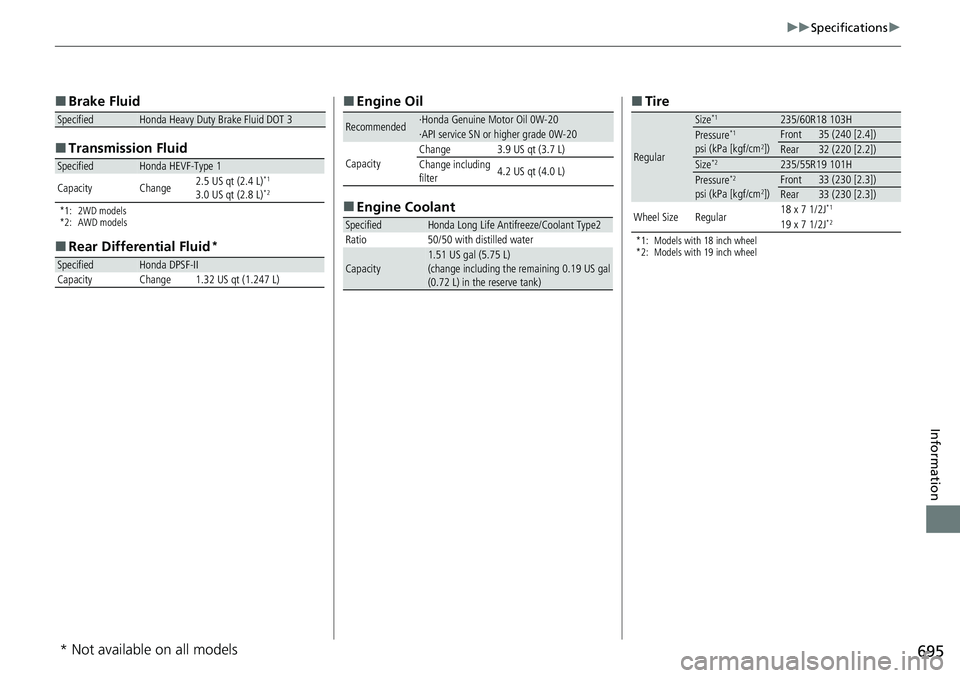
■
Brake Fluid
■ Transmissi on Fluid
*1: 2WD models
*2: AWD models
■
Rear Differential Fluid*
SpecifiedHonda Heavy Duty Brake Fluid DOT 3
SpecifiedHonda HEVF-Type 1
Capacity Change 2.5 US qt (2.4 L)*1
3.0 US qt (2.8 L)*2
SpecifiedHonda DPSF-II
Capacity Change 1.32 US qt (1.247 L)
■ Engine Oil
■ Engine Coolant
Recommended·Honda Genuine Motor Oil 0W-20·API service SN or higher grade 0W-20
CapacityChange3.9 US qt (3.7 L)
Change including
filter 4.2 US qt (4.0 L)
SpecifiedHonda Long Life Antifreeze/Coolant Type2
Ratio 50/50 with distilled water
Capacity1.51 US gal (5.75 L)
(change including the remaining 0.19 US gal
(0.72 L) in the reserve tank)
■ Tire
*1: Models with 18 inch wheel
*2: Models with 19 inch wheel
Regular
Size*1235/60R18 103HPressure*1
psi (kPa [kgf/cm2])Front35 (240 [2.4])Rear32 (220 [2.2])Size*2235/55R19 101HPressure*2
psi (kPa [kgf/cm2])Front33 (230 [2.3])Rear33 (230 [2.3])
Wheel SizeRegular18 x 7 1/2J*1
19 x 7 1/2J*2
* Not available on all models
Page 698 of 719
697
Information
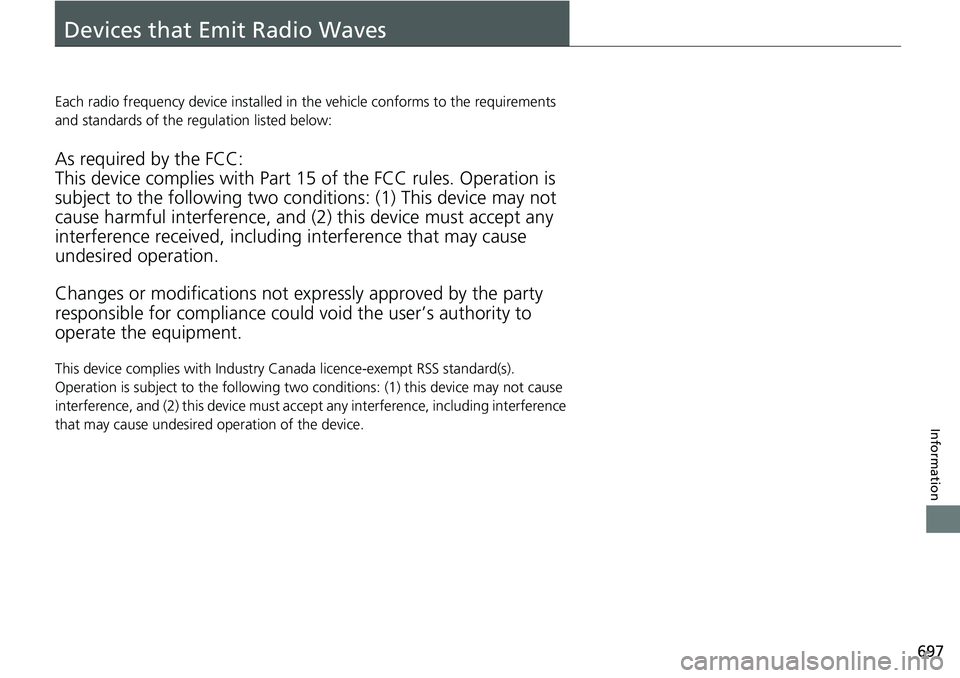
Devices that Emit Radio Waves
Each radio frequency device installed in the vehicle conforms to the requirements
and standards of the regulation listed below:
As required by the FCC:
This device complies with Part 15 of the FCC rules. Operation is
subject to the following two cond itions: (1) This device may not
cause harmful interferenc e, and (2) this device must accept any
interference received, including interference that may cause
undesired operation.
Changes or modifications not ex pressly approved by the party
responsible for compliance could void the user’s authority to
operate the equipment.
This device complies with Industry Canada licence-exempt RSS standard(s).
Operation is subject to the following two conditions: (1) this device may not cause
interference, and (2) this device must acce pt any interference, including interference
that may cause undesired operation of the device.