ECU HONDA CRV 2023 User Guide
[x] Cancel search | Manufacturer: HONDA, Model Year: 2023, Model line: CRV, Model: HONDA CRV 2023Pages: 719, PDF Size: 13.43 MB
Page 86 of 719
Continued85
uuChild Safety uSafety of Infants and Small Children
Safe Driving
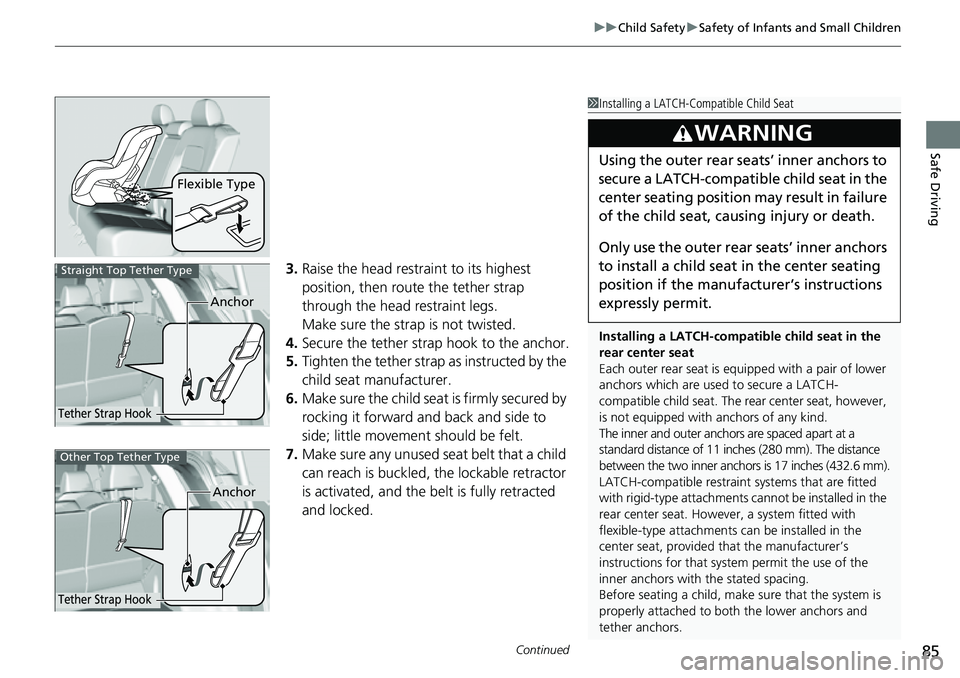
3. Raise the head restraint to its highest
position, then route the tether strap
through the head restraint legs.
Make sure the strap is not twisted.
4. Secure the tether strap hook to the anchor.
5. Tighten the tether strap as instructed by the
child seat manufacturer.
6. Make sure the child seat is firmly secured by
rocking it forward and back and side to
side; little movement should be felt.
7. Make sure any unused seat belt that a child
can reach is buckled, the lockable retractor
is activated, and the be lt is fully retracted
and locked.
Flexible Type
1 Installing a LATCH-Compatible Child Seat
Installing a LATCH-compatible child seat in the
rear center seat
Each outer rear seat is equi pped with a pair of lower
anchors which are used to secure a LATCH-
compatible child seat. The rear center seat, however,
is not equipped with anchors of any kind.
The inner and outer anchors are spaced apart at a
standard distance of 11 in ches (280 mm). The distance
between the two inner anchors is 17 inches (432.6 mm).
LATCH-compatible restraint systems that are fitted
with rigid-type attachments cannot be installed in the
rear center seat. However, a system fitted with
flexible-type attachments can be installed in the
center seat, provided that the manufacturer’s
instructions for that system permit the use of the
inner anchors with the stated spacing.
Before seating a child, make sure that the system is
properly attached to both the lower anchors and
tether anchors.
3WARNING
Using the outer rear seats’ inner anchors to
secure a LATCH-compatible child seat in the
center seating position may result in failure
of the child seat, causing injury or death.
Only use the outer rear seats’ inner anchors
to install a child seat in the center seating
position if the manufa cturer’s instructions
expressly permit.
Anchor
Tether Strap Hook
Straight Top Tether Type
Anchor
Tether Strap Hook
Other Top Tether Type
Page 87 of 719
uuChild Safety uSafety of Infants and Small Children
86
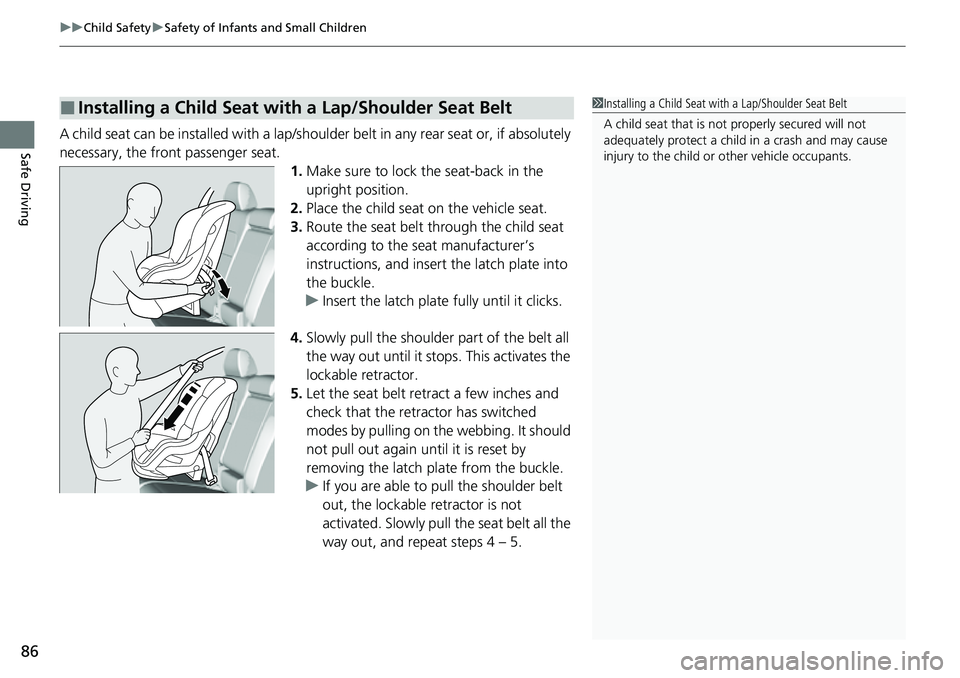
Safe DrivingA child seat can be installed with a lap/should er belt in any rear seat or, if absolutely
necessary, the front passenger seat. 1.Make sure to lock th e seat-back in the
upright position.
2. Place the child seat on the vehicle seat.
3. Route the seat belt through the child seat
according to the seat manufacturer’s
instructions, and insert the latch plate into
the buckle.
u Insert the latch plate fully until it clicks.
4. Slowly pull the shoulder part of the belt all
the way out until it stops. This activates the
lockable retractor.
5. Let the seat belt retract a few inches and
check that the retractor has switched
modes by pulling on the webbing. It should
not pull out again until it is reset by
removing the latch plate from the buckle.
u If you are able to pull the shoulder belt
out, the lockable retractor is not
activated. Slowly pull the seat belt all the
way out, and repeat steps 4 – 5.
■Installing a Child Seat with a Lap/Shoulder Seat Belt1Installing a Child Seat with a Lap/Shoulder Seat Belt
A child seat that is not properly secured will not
adequately protect a child in a crash and may cause
injury to the child or other vehicle occupants.
Page 88 of 719
Continued87
uuChild Safety uSafety of Infants and Small Children
Safe Driving
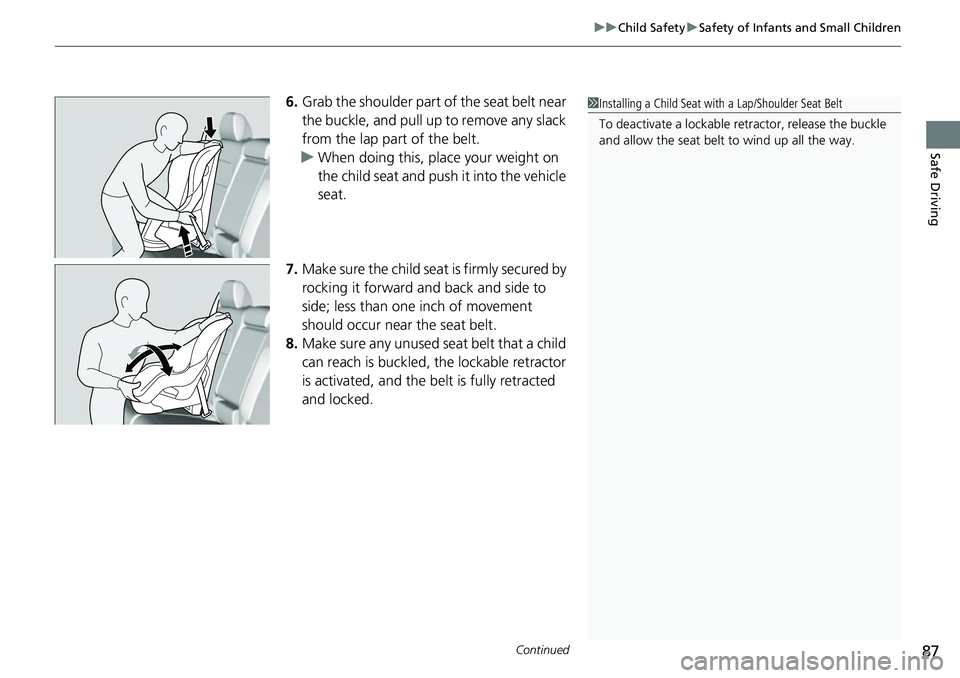
6. Grab the shoulder part of the seat belt near
the buckle, and pull up to remove any slack
from the lap part of the belt.
u When doing this, place your weight on
the child seat and push it into the vehicle
seat.
7. Make sure the child seat is firmly secured by
rocking it forward and back and side to
side; less than one inch of movement
should occur near the seat belt.
8. Make sure any unused seat belt that a child
can reach is buckled, the lockable retractor
is activated, and the be lt is fully retracted
and locked.1 Installing a Child Seat with a Lap/Shoulder Seat Belt
To deactivate a lockable retractor, release the buckle
and allow the seat belt to wind up all the way.
Page 89 of 719
uuChild Safety uSafety of Infants and Small Children
88
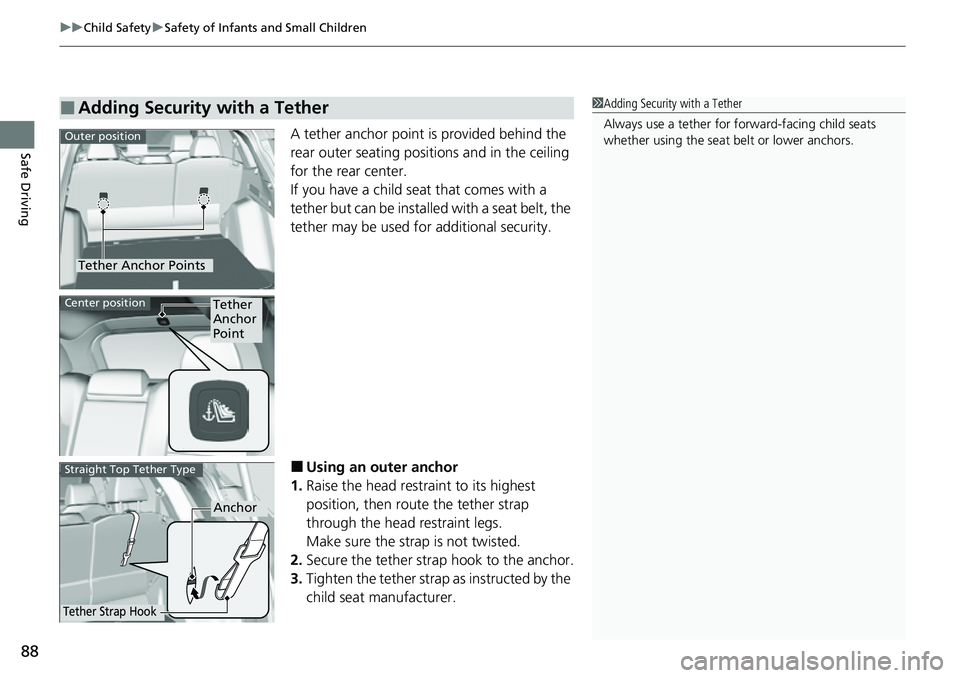
Safe DrivingA tether anchor point is provided behind the
rear outer seating positions and in the ceiling
for the rear center.
If you have a child seat that comes with a
tether but can be installe d with a seat belt, the
tether may be used for additional security.
■Using an outer anchor
1. Raise the head restraint to its highest
position, then rout e the tether strap
through the head restraint legs.
Make sure the strap is not twisted.
2. Secure the tether strap hook to the anchor.
3. Tighten the tether strap as instructed by the
child seat manufacturer.
■Adding Security with a Tether1Adding Security with a Tether
Always use a tether for forward-facing child seats
whether using the seat belt or lower anchors.
Tether Anchor Points
Outer position
Tether
Anchor
PointCenter position
Anchor
Tether Strap Hook
Straight Top Tether Type
Page 90 of 719
89
uuChild Safety uSafety of Infants and Small Children
Safe Driving
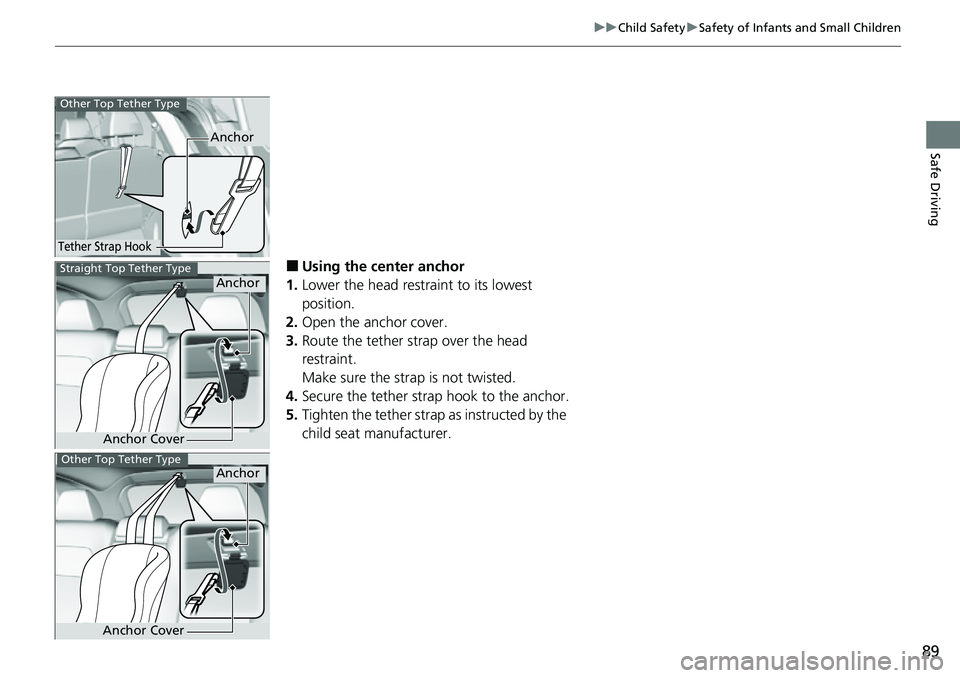
■Using the center anchor
1. Lower the head restraint to its lowest
position.
2. Open the anchor cover.
3. Route the tether strap over the head
restraint.
Make sure the strap is not twisted.
4. Secure the tether strap hook to the anchor.
5. Tighten the tether strap as instructed by the
child seat manufacturer.
Anchor
Tether Strap Hook
Other Top Tether Type
Anchor
Anchor Cover
Straight Top Tether Type
Anchor
Anchor Cover
Other Top Tether Type
Page 91 of 719
90
uuChild Safety uSafety of Larger Children
Safe Driving
Safety of Larger Children
The following pages give instructions on how to check proper seat belt fit, what kind
of booster seat to use if one is needed, and important precautions for a child who
must sit in front.
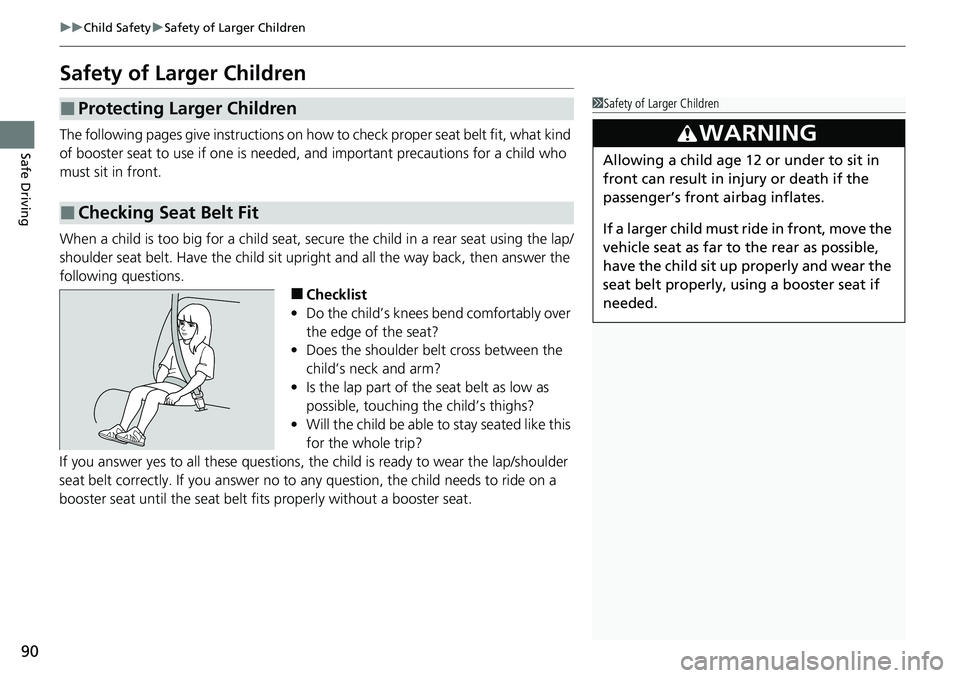
When a child is too big for a child seat, secure the child in a rear seat using the lap/
shoulder seat belt. Have the child sit upright and all the way back, then answer the
following questions.
■Checklist
• Do the child’s knees bend comfortably over
the edge of the seat?
• Does the shoulder belt cross between the
child’s neck and arm?
• Is the lap part of the seat belt as low as
possible, touching the child’s thighs?
• Will the child be able to stay seated like this
for the whole trip?
If you answer yes to all thes e questions, the child is read y to wear the lap/shoulder
seat belt correctly. If you answer no to any question, the child needs to ride on a
booster seat until the seat belt fits properly without a booster seat.
■Protecting Larger Children
■Checking Seat Belt Fit
1 Safety of Larger Children
3WARNING
Allowing a child age 12 or under to sit in
front can result in injury or death if the
passenger’s front airbag inflates.
If a larger child must ride in front, move the
vehicle seat as far to the rear as possible,
have the child sit up properly and wear the
seat belt properly, using a booster seat if
needed.
Page 92 of 719
91
uuChild Safety uSafety of Larger Children
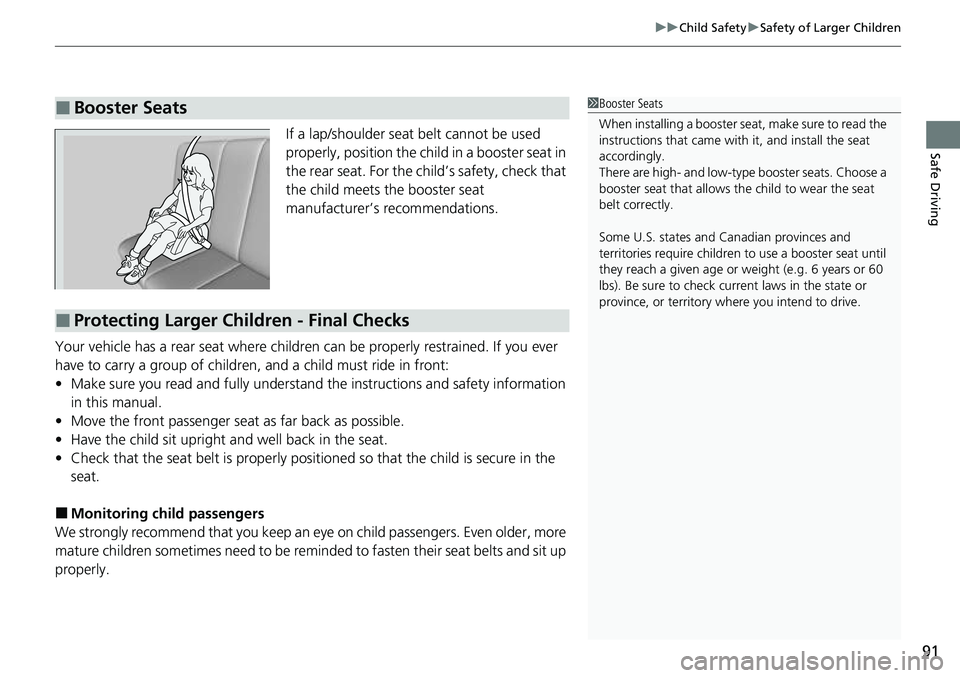
Safe DrivingIf a lap/shoulder seat belt cannot be used
properly, position the child in a booster seat in
the rear seat. For the child’s safety, check that
the child meets the booster seat
manufacturer’s recommendations.
Your vehicle has a rear seat where children can be properly restrained. If you ever
have to carry a group of children, and a child must ride in front:
• Make sure you read and fully understand the instructions and safety information
in this manual.
• Move the front passenger seat as far back as possible.
• Have the child sit upright and well back in the seat.
• Check that the seat belt is properly positi oned so that the child is secure in the
seat.
■Monitoring child passengers
We strongly recommend that you keep an eye on child passengers. Even older, more
mature children sometimes need to be remi nded to fasten their seat belts and sit up
properly.
■Booster Seats1 Booster Seats
When installing a booster seat , make sure to read the
instructions that came with it, and install the seat
accordingly.
There are high- and low-type booster seats. Choose a
booster seat that allows the child to wear the seat
belt correctly.
Some U.S. states and Canadian provinces and
territories require children to use a booster seat until
they reach a given age or weight (e.g. 6 years or 60
lbs). Be sure to check current laws in the state or
province, or territory where you intend to drive.
■Protecting Larger Children - Final Checks
Page 98 of 719
97
uuIndicators u
Continued
Instrument Panel
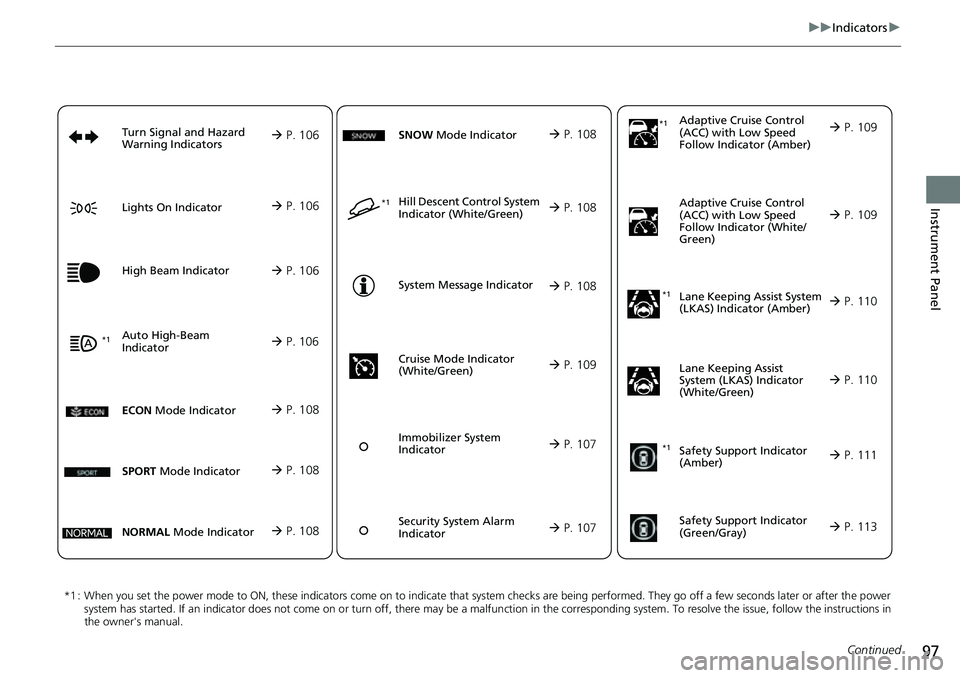
*1 : When you set the power mode to ON, these indicators come on to indicate that system checks are being performed. They go off a few seconds later or after the power
system has started. If an indicator does not come on or turn o ff, there may be a malfunction in the corresponding system. To re solve the issue, follow the instructions in
the owner's manual. Adaptive Cruise Control
(ACC) with Low S
p
eed
Follow Indicator (Amber)
Lane Keeping Assist System
(LKAS) Indicator (Amber)
Safety Support Indicator
(Green/Gray)
P. 109
P. 110
P. 113*1
Adaptive Cruise Control
(ACC) with Low Speed
Follow Indicator (White/
Green) P. 109
*1
Lane Keeping Assist
System (LKAS) Indicator
(White/Green) P. 110
*1Safety Support Indicator
(Amber) P. 111
System Message Indicator
Immobilizer System
Indicator
P. 107
P. 108
Cruise Mode Indicator
(White/Green) P. 109
P. 107
Hill Descent Control System
Indicator (White/Green) P. 108*1
Security System Alarm
Indicator
ECON Mode Indicator P. 108
NORMAL Mode Indicator P. 108
SNOW Mode Indicator P. 108
SPORT Mode Indicator P. 108
Auto High-Beam
Indicator
Lights On Indicator
High Beam Indicator
P. 106
P. 106
P. 106*1
Turn Signal and Hazard
Warning Indicators P. 106
Page 108 of 719
107
uuIndicators u
Continued
Instrument Panel
*1:Canadian models only: Apply and hold the brake pedal before selecting the ON mode.
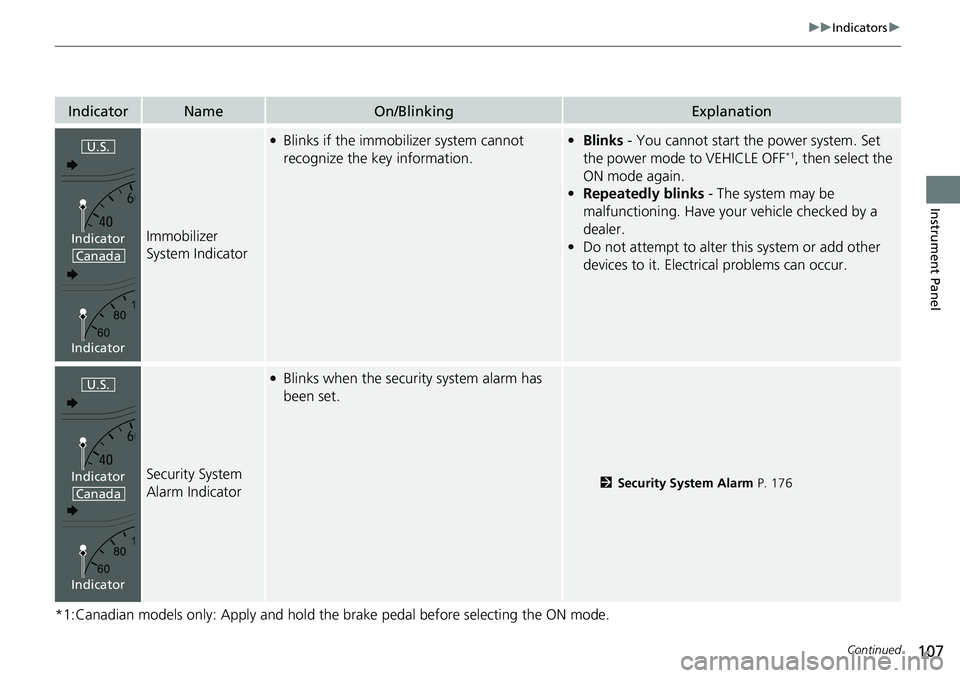
IndicatorNameOn/BlinkingExplanation
Immobilizer
System Indicator
●Blinks if the immobilizer system cannot
recognize the key information.•Blinks - You cannot start the power system. Set
the power mode to VEHICLE OFF*1, then select the
ON mode again.
• Repeatedly blinks - The system may be
malfunctioning. Have your vehicle checked by a
dealer.
• Do not attempt to alter this system or add other
devices to it. Electrical problems can occur.
Security System
Alarm Indicator
●Blinks when the security system alarm has
been set.
2 Security System Alarm P. 176
U.S.
Canada
Indicator
Indicator
U.S.
Canada
Indicator
Indicator
Page 146 of 719
145
Controls
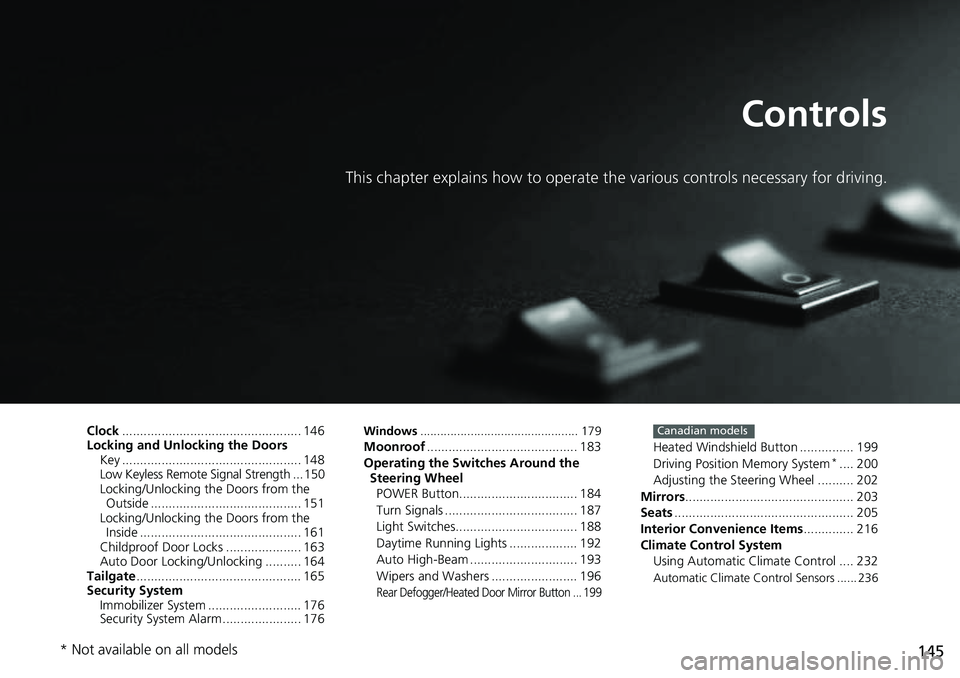
This chapter explains how to operate the various controls necessary for driving.
Clock.................................................. 146
Locking and Unlocking the Doors Key .................................................. 148
Low Keyless Remote Signal Strength ... 150
Locking/Unlocking the Doors from the Outside .......................................... 151
Locking/Unlocking the Doors from the Inside ............................................. 161
Childproof Door Locks ..................... 163
Auto Door Locking/Unlocking .......... 164
Tailgate .............................................. 165
Security System Immobilizer System .......................... 176
Security System Alarm ...................... 176Windows ............................................... 179Moonroof .......................................... 183
Operating the Switches Around the Steering Wheel
POWER Button................................. 184
Turn Signals ..................................... 187
Light Switches.................................. 188
Daytime Running Lights ................... 192
Auto High-Beam .............................. 193
Wipers and Washers ........................ 196
Rear Defogger/Heated Door Mirror Button ... 199
Heated Windshield Button ............... 199
Driving Position Memory System*.... 200
Adjusting the Steering Wheel .......... 202
Mirrors ............................................... 203
Seats .................................................. 205
Interior Convenience Items .............. 216
Climate Control System Using Automatic Climate Control .... 232
Automatic Climate Control Sensors ...... 236
Canadian models
* Not available on all models