eco mode HONDA CRV 2023 User Guide
[x] Cancel search | Manufacturer: HONDA, Model Year: 2023, Model line: CRV, Model: HONDA CRV 2023Pages: 719, PDF Size: 13.43 MB
Page 97 of 719
96
Instrument Panel
Indicators
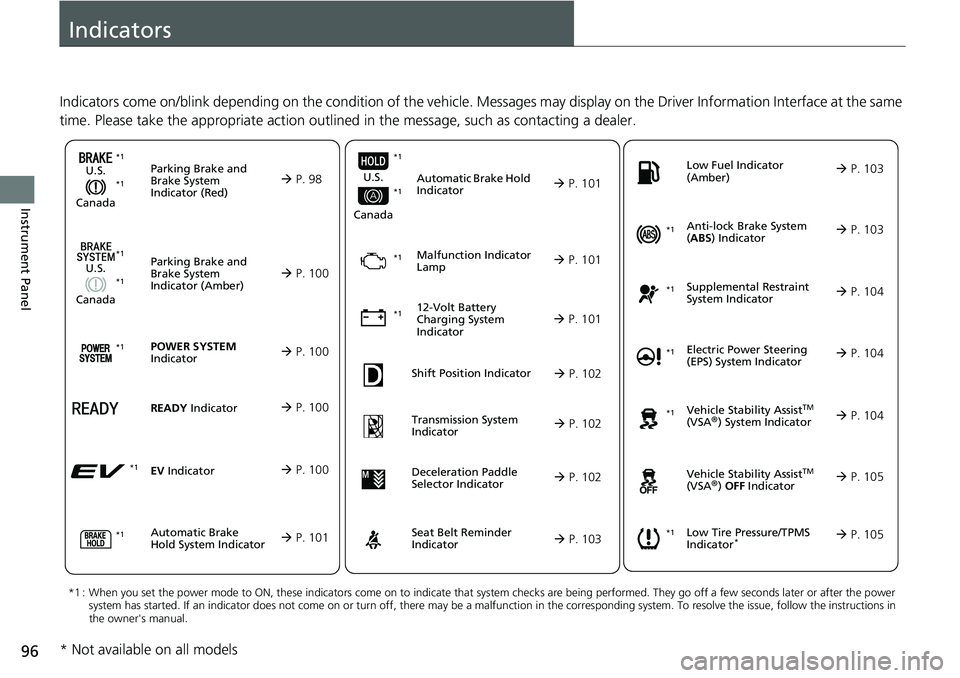
Indicators come on/blink depending on the condition of the vehicle. Messages may display on the Driver Information Interface at the same
time. Please take the appropriate action outlined in the message, such as contacting a dealer.
Parking Brake and
Brake System
Indicator (Red)
U.S.
Canada P. 98*1 *1
Parking Brake and
Brake System
Indicator (Amber)
U.S.
Canada
Automatic Brake
Hold System Indicator
Automatic Brake Hold
Indicator
U.S.
Canada
*1 : When you set the power mode to ON, these indicators come on to indicate that system checks are being performed. They go off a few seconds later or after the power
system has started. If an indicator does not come on or turn o ff, there may be a malfunction in the corresponding system. To re solve the issue, follow the instructions in
the owner's manual.
Malfunction Indicator
Lamp
12-Volt Battery
Charging System
Indicator
Anti-lock Brake System
( ABS ) Indicator
Seat Belt Reminder
Indicator Low Fuel Indicator
(Amber)
Vehicle Stability AssistTM
(VSA®) System Indicator
Vehicle Stability Assist
TM
(VSA®) OFF Indicator
Supplemental Restraint
System Indicator
Low Tire Pressure/TPMS
Indicator*
Electric Power Steering
(EPS) System Indicator
P. 100
P. 101
P. 101
P. 101
P. 101*1
*1
P. 105
*1
Shift Position Indicator P. 102
Transmission System
Indicator P. 102
P. 103
P. 103
P. 103
P. 104
P. 104
*1
*1
P. 105
*1 P. 104
*1
*1*1 *1
*1
*1
Deceleration Paddle
Selector Indicator
P. 102
POWER SYSTEM
Indicator P. 100*1
READY Indicator P. 100
EV Indicator P. 100*1
* Not available on all models
Page 98 of 719
97
uuIndicators u
Continued
Instrument Panel
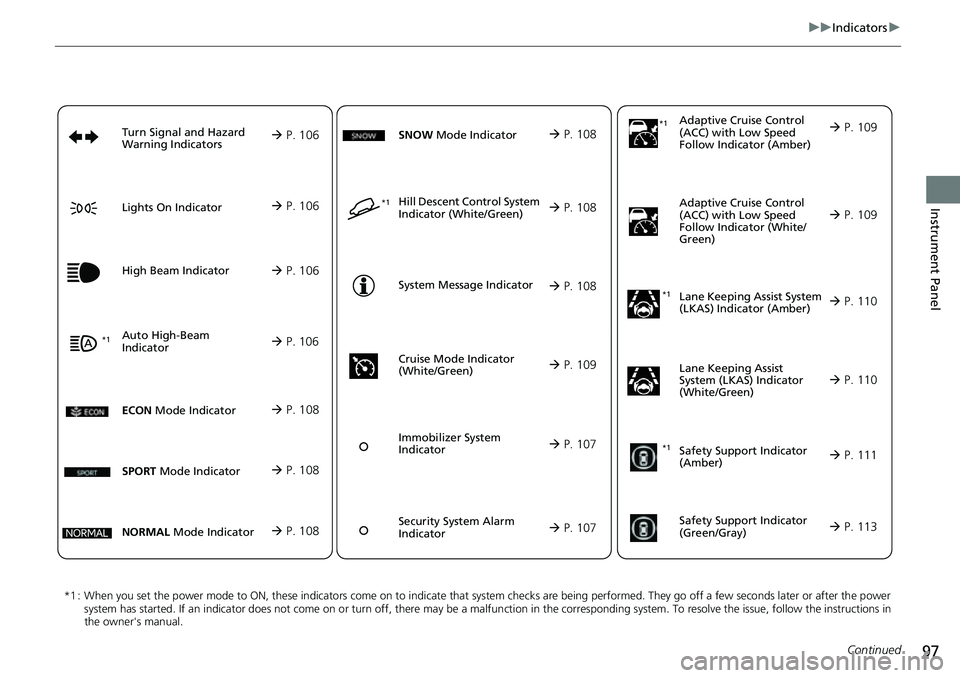
*1 : When you set the power mode to ON, these indicators come on to indicate that system checks are being performed. They go off a few seconds later or after the power
system has started. If an indicator does not come on or turn o ff, there may be a malfunction in the corresponding system. To re solve the issue, follow the instructions in
the owner's manual. Adaptive Cruise Control
(ACC) with Low S
p
eed
Follow Indicator (Amber)
Lane Keeping Assist System
(LKAS) Indicator (Amber)
Safety Support Indicator
(Green/Gray)
P. 109
P. 110
P. 113*1
Adaptive Cruise Control
(ACC) with Low Speed
Follow Indicator (White/
Green) P. 109
*1
Lane Keeping Assist
System (LKAS) Indicator
(White/Green) P. 110
*1Safety Support Indicator
(Amber) P. 111
System Message Indicator
Immobilizer System
Indicator
P. 107
P. 108
Cruise Mode Indicator
(White/Green) P. 109
P. 107
Hill Descent Control System
Indicator (White/Green) P. 108*1
Security System Alarm
Indicator
ECON Mode Indicator P. 108
NORMAL Mode Indicator P. 108
SNOW Mode Indicator P. 108
SPORT Mode Indicator P. 108
Auto High-Beam
Indicator
Lights On Indicator
High Beam Indicator
P. 106
P. 106
P. 106*1
Turn Signal and Hazard
Warning Indicators P. 106
Page 99 of 719
98
uuIndicators u
Instrument Panel
IndicatorNameOn/BlinkingExplanation
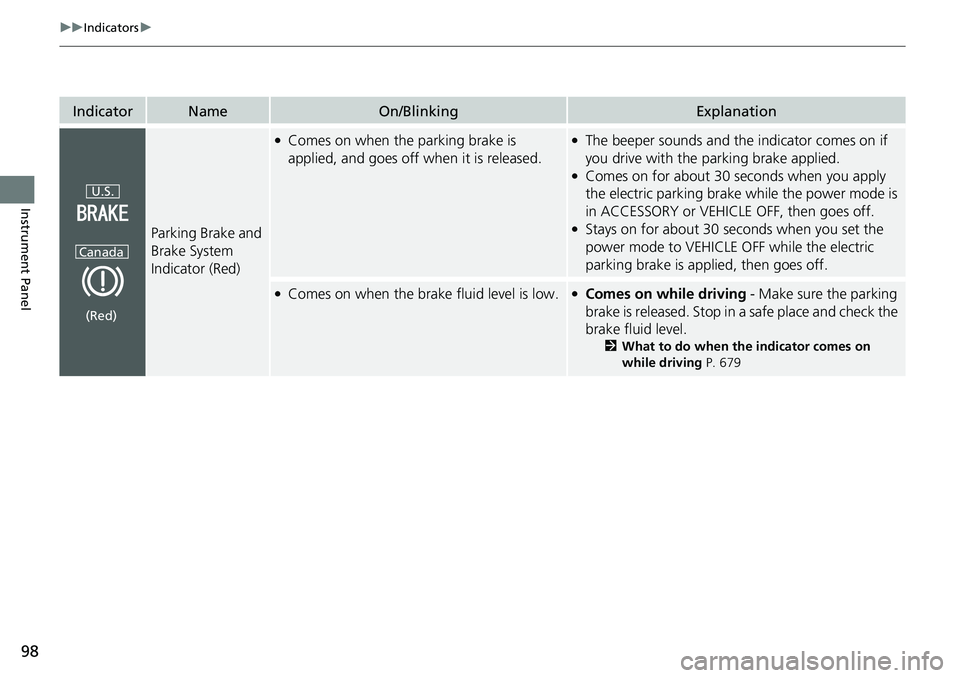
Parking Brake and
Brake System
Indicator (Red)
●Comes on when the parking brake is
applied, and goes off when it is released.●The beeper sounds and th e indicator comes on if
you drive with the parking brake applied.
●Comes on for about 30 seconds when you apply
the electric parking brake while the power mode is
in ACCESSORY or VEHICLE OFF, then goes off.
●Stays on for about 30 seconds when you set the
power mode to VEHICLE OFF while the electric
parking brake is applied, then goes off.
●Comes on when the brake fluid level is low.●Comes on while driving - Make sure the parking
brake is released. Stop in a safe place and check the
brake fluid level.
2 What to do when th e indicator comes on
while driving P. 679
U.S.
Canada
(Red)
Page 104 of 719
103
uuIndicators u
Continued
Instrument Panel
IndicatorNameOn/BlinkingExplanation
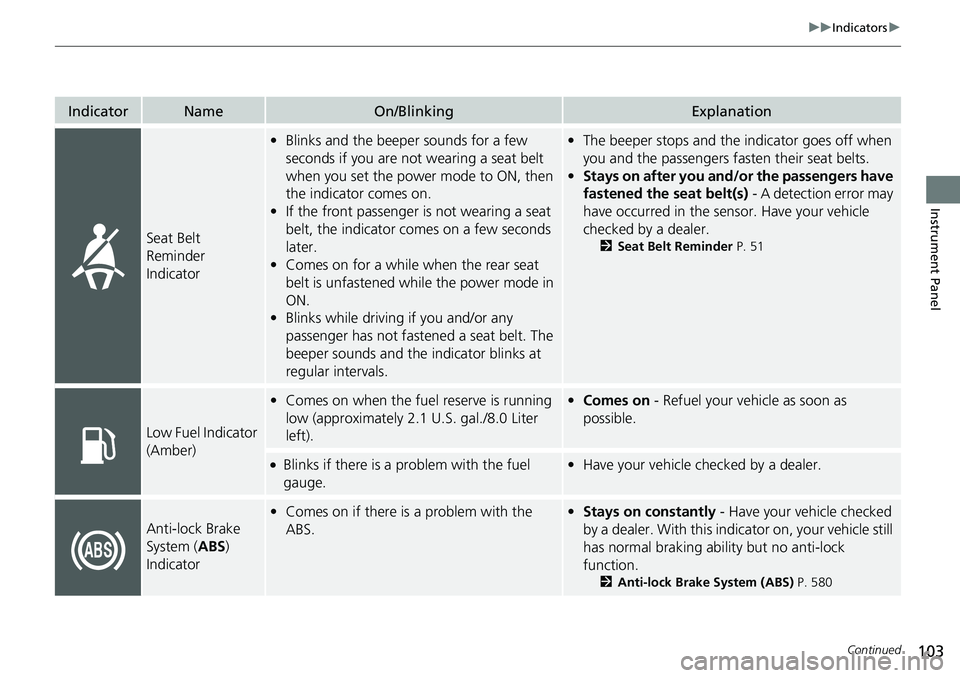
Seat Belt
Reminder
Indicator
•Blinks and the beeper sounds for a few
seconds if you are not wearing a seat belt
when you set the power mode to ON, then
the indicator comes on.
• If the front passenger is not wearing a seat
belt, the indicator comes on a few seconds
later.
• Comes on for a while when the rear seat
belt is unfastened while the power mode in
ON.
• Blinks while driving if you and/or any
passenger has not fastened a seat belt. The
beeper sounds and the indicator blinks at
regular intervals.•The beeper stops and the indicator goes off when
you and the passengers fa sten their seat belts.
• Stays on after you and/or the passengers have
fastened the seat belt(s) - A detection error may
have occurred in the sensor. Have your vehicle
checked by a dealer.
2 Seat Belt Reminder P. 51
Low Fuel Indicator
(Amber)
•Comes on when the fuel reserve is running
low (approximately 2.1 U.S. gal./8.0 Liter
left).• Comes on - Refuel your vehicle as soon as
possible.
●Blinks if there is a problem with the fuel
gauge.•Have your vehicle checked by a dealer.
Anti-lock Brake
System ( ABS)
Indicator
• Comes on if there is a problem with the
ABS.•Stays on constantly - Have your vehicle checked
by a dealer. With this indi cator on, your vehicle still
has normal braking ability but no anti-lock
function.
2 Anti-lock Brake System (ABS) P. 580
Page 106 of 719
105
uuIndicators u
Continued
Instrument Panel
IndicatorNameOn/BlinkingExplanation
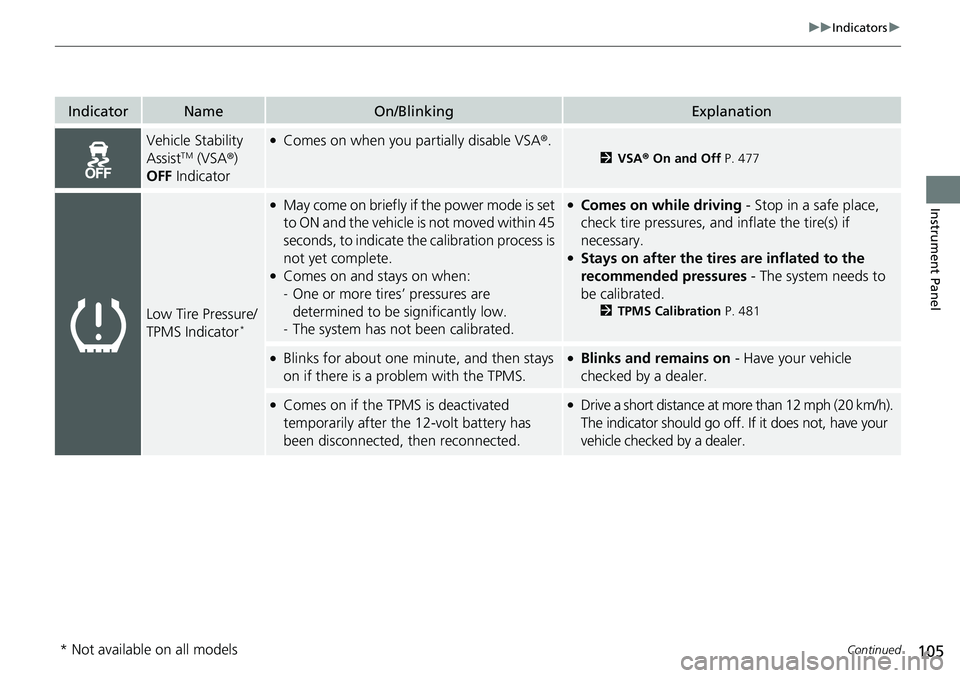
Vehicle Stability
AssistTM (VSA®)
OFF Indicator
●Comes on when you partially disable VSA ®.
2VSA ® On and Off P. 477
Low Tire Pressure/
TPMS Indicator*
●May come on briefly if the power mode is set
to ON and the vehicle is not moved within 45
seconds, to indicate the calibration process is
not yet complete.
●Comes on and stays on when:
-One or more tires’ pressures are
determined to be significantly low.
- The system has not been calibrated.
●Comes on while driving - Stop in a safe place,
check tire pressures, and inflate the tire(s) if
necessary.
●Stays on after the tires are inflated to the
recommended pressures - The system needs to
be calibrated.
2 TPMS Calibration P. 481
●Blinks for about one minute, and then stays
on if there is a problem with the TPMS.●Blinks and remains on - Have your vehicle
checked by a dealer.
●Comes on if the TPMS is deactivated
temporarily after the 12-volt battery has
been disconnected, then reconnected.●Drive a short distance at more than 12 mph (20 km/h).
The indicator should go off. If it does not, have your
vehicle checked by a dealer.
* Not available on all models
Page 108 of 719
107
uuIndicators u
Continued
Instrument Panel
*1:Canadian models only: Apply and hold the brake pedal before selecting the ON mode.
IndicatorNameOn/BlinkingExplanation
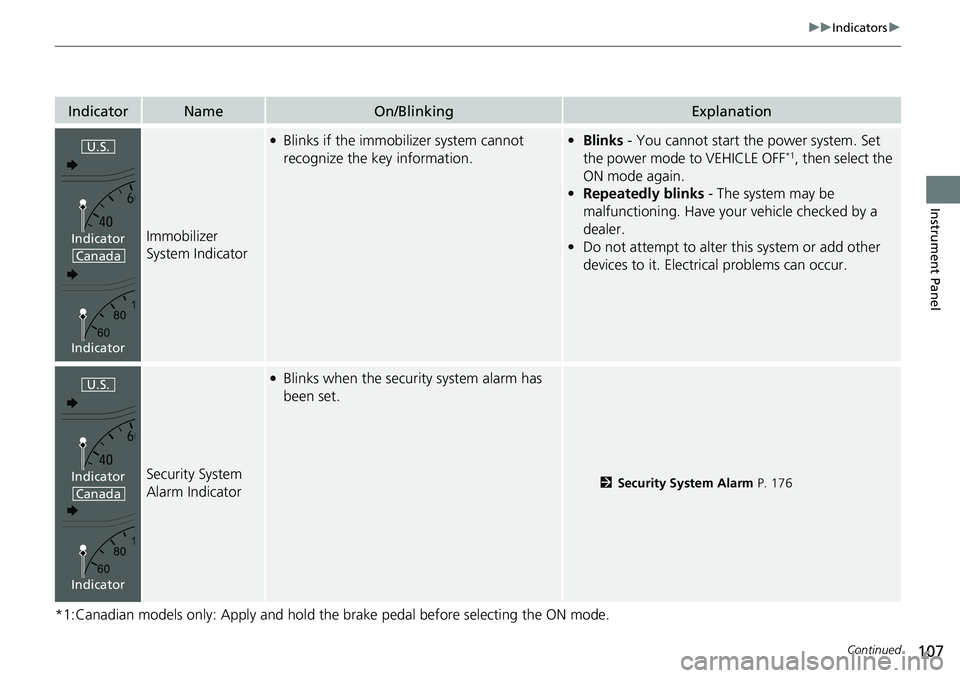
Immobilizer
System Indicator
●Blinks if the immobilizer system cannot
recognize the key information.•Blinks - You cannot start the power system. Set
the power mode to VEHICLE OFF*1, then select the
ON mode again.
• Repeatedly blinks - The system may be
malfunctioning. Have your vehicle checked by a
dealer.
• Do not attempt to alter this system or add other
devices to it. Electrical problems can occur.
Security System
Alarm Indicator
●Blinks when the security system alarm has
been set.
2 Security System Alarm P. 176
U.S.
Canada
Indicator
Indicator
U.S.
Canada
Indicator
Indicator
Page 109 of 719
108
uuIndicators u
Instrument Panel
IndicatorNameOn/BlinkingExplanation
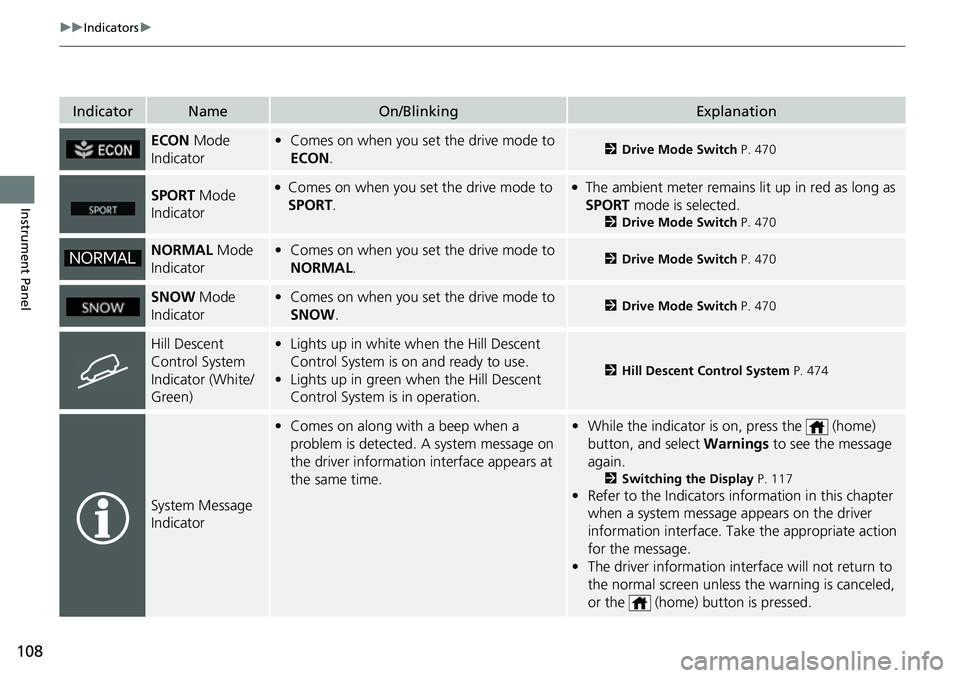
ECON Mode
Indicator• Comes on when you set the drive mode to
ECON .2Drive Mode Switch P. 470
SPORT Mode
Indicator●Comes on when you se t the drive mode to
SPORT.●The ambient meter remains lit up in red as long as
SPORT mode is selected.
2 Drive Mode Switch P. 470
NORMAL Mode
Indicator• Comes on when you set the drive mode to
NORMAL .2Drive Mode Switch P. 470
SNOW Mode
Indicator• Comes on when you set the drive mode to
SNOW .2Drive Mode Switch P. 470
Hill Descent
Control System
Indicator (White/
Green)•Lights up in white wh en the Hill Descent
Control System is on and ready to use.
• Lights up in green when the Hill Descent
Control System is in operation.
2 Hill Descent Control System P. 474
System Message
Indicator
•Comes on along with a beep when a
problem is detected. A system message on
the driver information interface appears at
the same time.•While the indicator is on, press the (home)
button, and select Warnings to see the message
again.
2 Switching the Display P. 117
•Refer to the Indicators in formation in this chapter
when a system message appears on the driver
information interface. Take the appropriate action
for the message.
• The driver information interface will not return to
the normal screen unless the warning is canceled,
or the (home) button is pressed.
Page 116 of 719
Continued115
uuGauges and Driver Information Interface uGauges
Instrument Panel
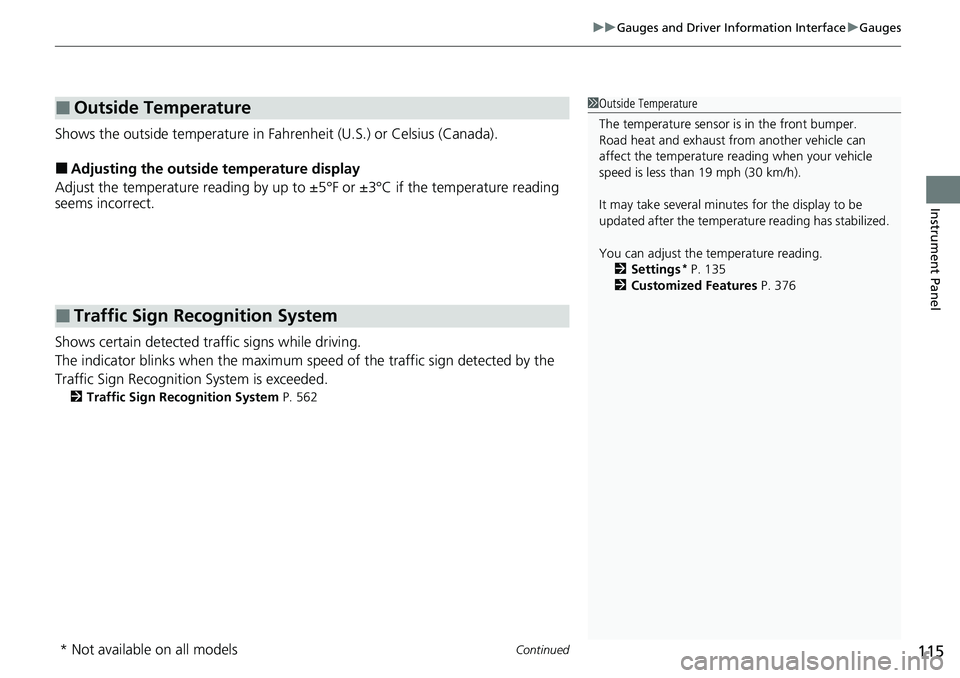
Shows the outside temperature in Fahr enheit (U.S.) or Celsius (Canada).
■Adjusting the outside temperature display
Adjust the temperature reading by up to ±5°F or ±3°C if the temperature reading
seems incorrect.
Shows certain detected traffic signs while driving.
The indicator blinks when th e maximum speed of the traffic sign detected by the
Traffic Sign Recognition System is exceeded.
2 Traffic Sign Recognition System P. 562
■Outside Temperature
■Traffic Sign Recognition System
1Outside Temperature
The temperature sensor is in the front bumper.
Road heat and exhaust from another vehicle can
affect the temperature reading when your vehicle
speed is less than 19 mph (30 km/h).
It may take several minutes for the display to be
updated after the temperature reading has stabilized.
You can adjust the temperature reading.
2 Settings
* P. 135
2 Customized Features P. 376
* Not available on all models
Page 123 of 719
uuGauges and Driver Information Interface uDriver Information Interface
122
Instrument Panel
■Trip meter
Shows the total number of miles or kilomete rs driven since the last reset. Meters A
and B can be used to measure two separate trips.
Resetting a trip meter
To reset the trip meter, display it, press the left selector wheel and then select Reset.
u The trip meter is reset to 0.0.
■Average Fuel Economy
Shows the estimated average fuel economy of each trip meter in mpg or l/100 km.
The display is updated at set intervals. When a trip meter is reset, the average fuel
economy is also reset.
■Instant Fuel Economy
Shows the instant fuel economy as a bar graph in mpg or l/100 km.
■Range
Shows the estimated distance you can trave l on the remaining power and fuel. This
estimated distance is based on the vehicle’s current fuel economy.
1 Average Fuel Economy
You can change when to reset the average fuel
economy.
2 Settings
* P. 135
2 Customized Features P. 376
1Range
The driving range displayed is only an estimate and
may differ to the actual distance the vehicle can
travel.
* Not available on all models
Page 153 of 719
uuLocking and Unlocking the Doors uLocking/Unlocking the Doors from the Outside
152
Controls
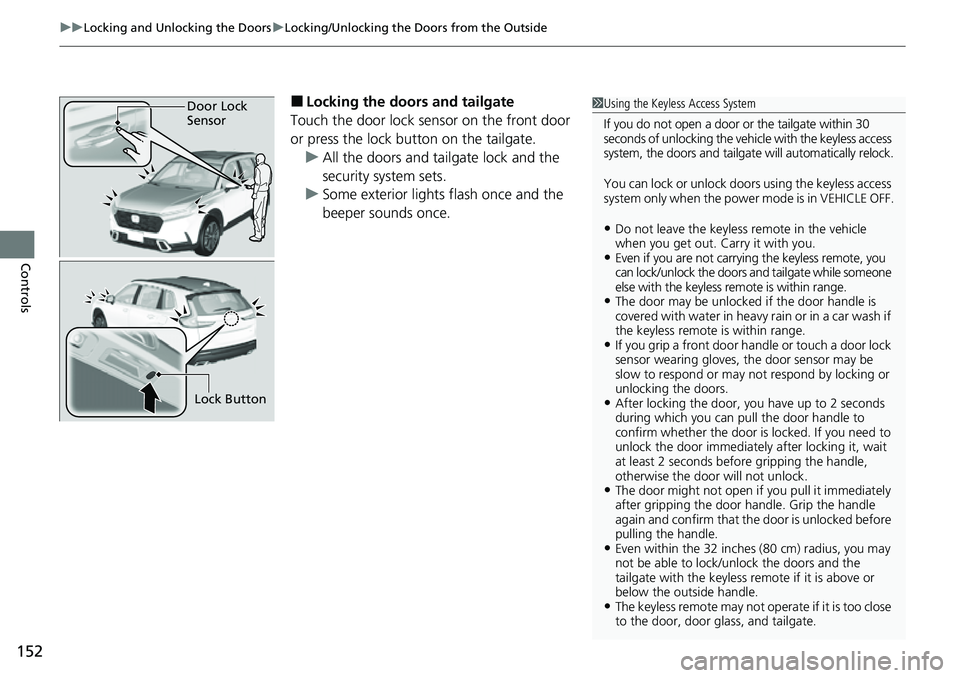
■Locking the doors and tailgate
Touch the door lock sensor on the front door
or press the lock button on the tailgate. u All the doors and tailgate lock and the
security system sets.
u Some exterior lights flash once and the
beeper sounds once.1Using the Keyless Access System
If you do not open a door or the tailgate within 30
seconds of unlocking the vehicle with the keyless access
system, the doors and tailgate will automatically relock.
You can lock or unlock doors using the keyless access
system only when the power mode is in VEHICLE OFF.
•Do not leave the keyless remote in the vehicle
when you get out. Carry it with you.
•Even if you are not carryin g the keyless remote, you
can lock/unlock the doors and tailgate while someone
else with the keyless remote is within range.
•The door may be unlocked if the door handle is
covered with water in heavy rain or in a car wash if
the keyless remote is within range.
•If you grip a front door ha ndle or touch a door lock
sensor wearing gloves, the door sensor may be
slow to respond or may no t respond by locking or
unlocking the doors.
•After locking the door, you have up to 2 seconds
during which you can pull the door handle to
confirm whether the door is locked. If you need to
unlock the door immediately after locking it, wait
at least 2 seconds befo re gripping the handle,
otherwise the door will not unlock.
•The door might not open if you pull it immediately
after gripping the door handle. Grip the handle
again and confirm that th e door is unlocked before
pulling the handle.
•Even within the 32 inches (80 cm) radius, you may
not be able to lock/unlock the doors and the
tailgate with the keyless remote if it is above or
below the outside handle.
•The keyless remote may not operate if it is too close
to the door, door glass, and tailgate.
Door Lock
Sensor
Lock Button