keyless HONDA CRV 2023 User Guide
[x] Cancel search | Manufacturer: HONDA, Model Year: 2023, Model line: CRV, Model: HONDA CRV 2023Pages: 719, PDF Size: 13.43 MB
Page 155 of 719
uuLocking and Unlocking the Doors uLocking/Unlocking the Doors from the Outside
154
Controls
■Locking the doors an d tailgate (Walk
away auto lock ®)
When you walk away from the vehicle with all
doors and tailgate closed while carrying the
keyless remote, the doors and tailgate will
automatically lock.
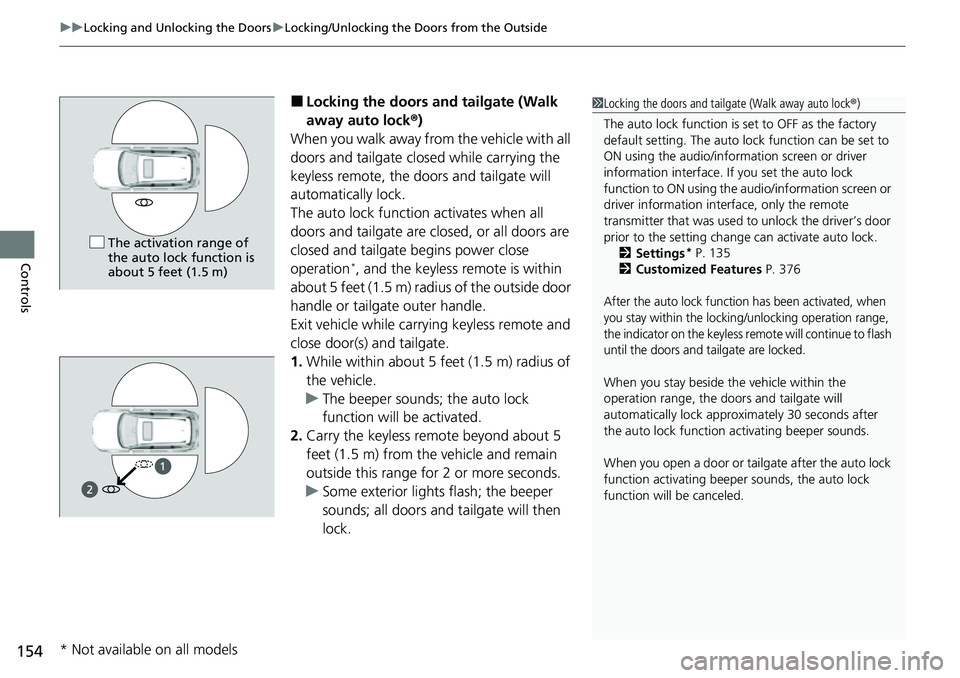
The auto lock function activates when all
doors and tailgate are closed, or all doors are
closed and tailgate begins power close
operation
*, and the keyless remote is within
about 5 feet (1.5 m) radi us of the outside door
handle or tailgate outer handle.
Exit vehicle while carrying keyless remote and
close door(s) and tailgate.
1. While within about 5 feet (1.5 m) radius of
the vehicle.
u The beeper sounds; the auto lock
function will be activated.
2. Carry the keyless remote beyond about 5
feet (1.5 m) from the vehicle and remain
outside this range fo r 2 or more seconds.
u Some exterior lights flash; the beeper
sounds; all doors and tailgate will then
lock.
1Locking the doors and tailg ate (Walk away auto lock®)
The auto lock function is set to OFF as the factory
default setting. The auto lo ck function can be set to
ON using the audio/inform ation screen or driver
information interface. If you set the auto lock
function to ON using the a udio/information screen or
driver information inte rface, only the remote
transmitter that was used to unlock the driver’s door
prior to the setting change can activate auto lock.
2 Settings
* P. 135
2 Customized Features P. 376
After the auto lock function has been activated, when
you stay within the locking/unlocking operation range,
the indicator on the keyless remote will continue to flash
until the doors and tailgate are locked.
When you stay beside the vehicle within the
operation range, the door s and tailgate will
automatically lock approx imately 30 seconds after
the auto lock function activating beeper sounds.
When you open a door or tailgate after the auto lock
function activating beeper sounds, the auto lock
function will be canceled.
The activation range of
the auto lock function is
about 5 feet (1.5 m)
* Not available on all models
Page 156 of 719
Continued155
uuLocking and Unlocking the Doors uLocking/Unlocking the Doors from the Outside
Controls
To temporarily deactivate the function:
1. Set the power mode to OFF.
2. Open the driv er’s door.
3. Using the master door lock switch, operate
the lock as follows:
Lock Unlock Lock Unlock.
u The beeper sounds, and the function is
deactivated.
To restore the function:
• Set the power mode to ON.
• Lock the vehicl e without using the auto lock
function.
• With the keyless remote on you, move out
of the auto lock function operation range.
• Open any door.1Locking the doors and tailg ate (Walk away auto lock®)
Under the following circumstances, the auto lock
function will not activate:
•The keyless remote is inside the vehicle.
u The beeper will not sound.
•The keyless remote is taken out of its operational
range before all doors a nd tailgate are closed.
u The beeper will sound.
The auto lock function does not operate when any of
the following conditions are met.
•The keyless remote is inside the vehicle.•A door, tailgate or th e hood is not closed.•The power mode is set to any mode other than OFF.•The keyless remote is not located within a radius of
about 5 feet (1.5 m) from the vehicle when you get
out of the vehicle and cl ose the doors and tailgate.
Auto lock function operation stop beeper
After the auto lock function has been activated, the
auto lock operation stop beeper sounds for
approximately two seconds in the following cases.
•The keyless remote is put inside the vehicle through
a window.
•You are located too close to the vehicle.•The keyless remote is put inside the tailgate.
If the warning beeper sounds, check that you are
carrying the keyless remote. Then, open/close a door
and confirm the auto lock activation beeper sounds
once.
Page 157 of 719
uuLocking and Unlocking the Doors uLocking/Unlocking the Doors from the Outside
156
Controls
The vehicle will automatically lock after you
lock the doors in advance then close the doors
and tailgate.
Activate lock presetting after closing the
driver’s door.
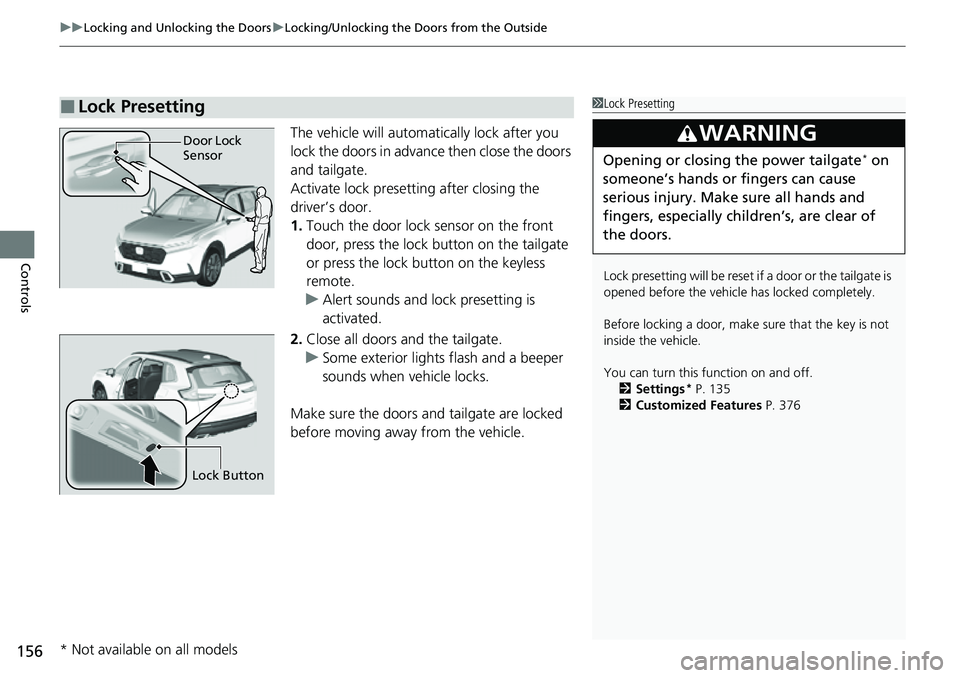
1. Touch the door lock sensor on the front
door, press the lock button on the tailgate
or press the lock button on the keyless
remote.
u Alert sounds and lock presetting is
activated.
2. Close all doors and the tailgate.
u Some exterior lights flash and a beeper
sounds when vehicle locks.
Make sure the doors and tailgate are locked
before moving away from the vehicle.
■Lock Presetting1 Lock Presetting
Lock presetting will be reset if a door or the tailgate is
opened before the vehicle has locked completely.
Before locking a door, make sure that the key is not
inside the vehicle.
You can turn this function on and off. 2 Settings
* P. 135
2 Customized Features P. 376
3WARNING
Opening or closing the power tailgate* on
someone’s hands or fingers can cause
serious injury. Make sure all hands and
fingers, especially children’s, are clear of
the doors.
Door Lock
Sensor
Lock Button
* Not available on all models
Page 159 of 719
uuLocking and Unlocking the Doors uLocking/Unlocking the Doors from the Outside
158
Controls
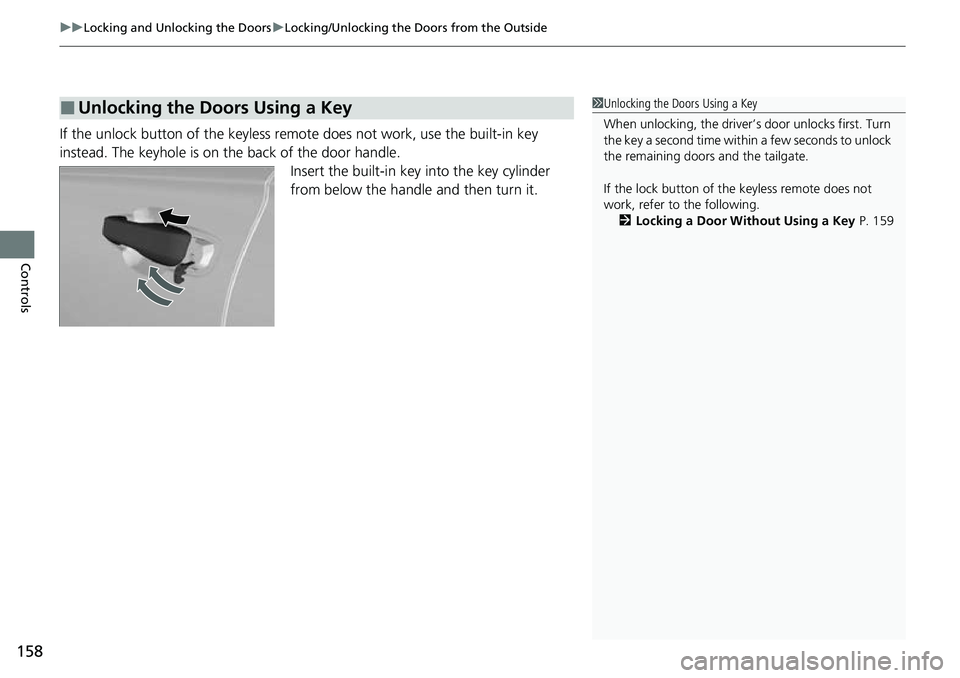
If the unlock button of the keyless re mote does not work, use the built-in key
instead. The keyhole is on the back of the door handle. Insert the built-in key into the key cylinder
from below the handle and then turn it.
■Unlocking the Doors Using a Key1Unlocking the Doors Using a Key
When unlocking, the driver’s door unlocks first. Turn
the key a second time within a few seconds to unlock
the remaining doors and the tailgate.
If the lock button of th e keyless remote does not
work, refer to the following. 2 Locking a Door Without Using a Key P. 159
Page 160 of 719
Continued159
uuLocking and Unlocking the Doors uLocking/Unlocking the Doors from the Outside
Controls
If you do not have the key on you, or if fo r some reason you cannot lock a door using
the key, you can lock the door without it.
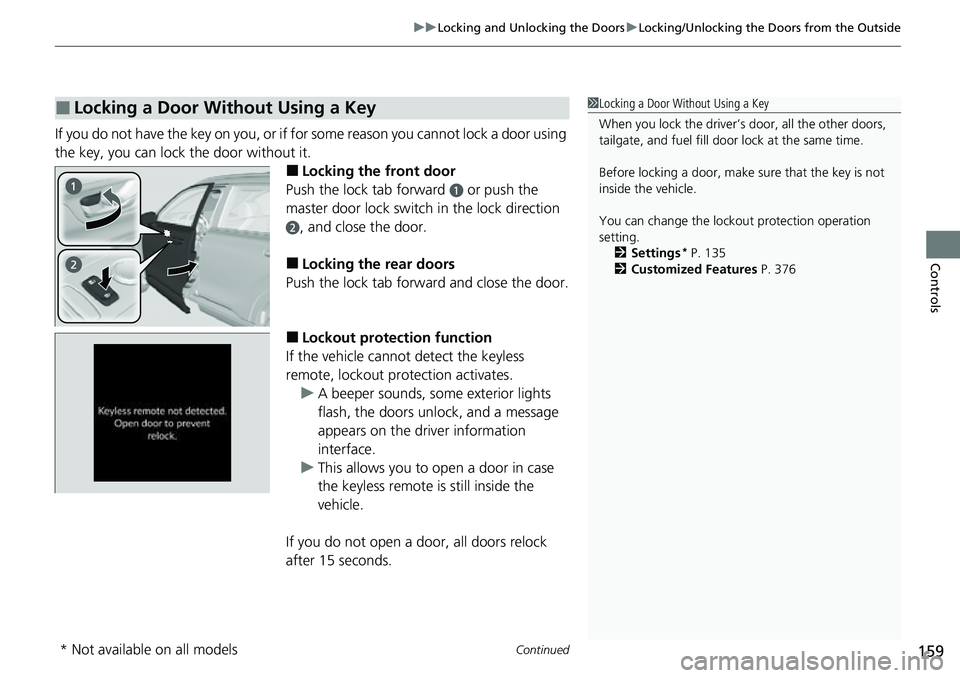
■Locking the front door
Push the lock tab forward
a or push the
master door lock switch in the lock direction
b, and close the door.
■Locking the rear doors
Push the lock tab forward and close the door.
■Lockout protection function
If the vehicle cannot detect the keyless
remote, lockout prot ection activates.
u A beeper sounds, some exterior lights
flash, the doors unlock, and a message
appears on the dr iver information
interface.
u This allows you to open a door in case
the keyless remote is still inside the
vehicle.
If you do not open a door, all doors relock
after 15 seconds.
■Locking a Door Without Using a Key1 Locking a Door Without Using a Key
When you lock the driver’s door, all the other doors,
tailgate, and fuel fill door lock at the same time.
Before locking a door, make sure that the key is not
inside the vehicle.
You can change the lockout protection operation
setting.
2 Settings
* P. 135
2 Customized Features P. 376
* Not available on all models
Page 161 of 719
160
uuLocking and Unlocking the Doors uLocking/Unlocking the Doors from the Outside
Controls
To avoid non-detection, make sure to keep
the keyless remote away from cell phones and
other devices that may cause signal
interference.
Page 167 of 719
166
uuTailgate uOpening/Closing the Tailgate
Controls
Opening/Closing the Tailgate
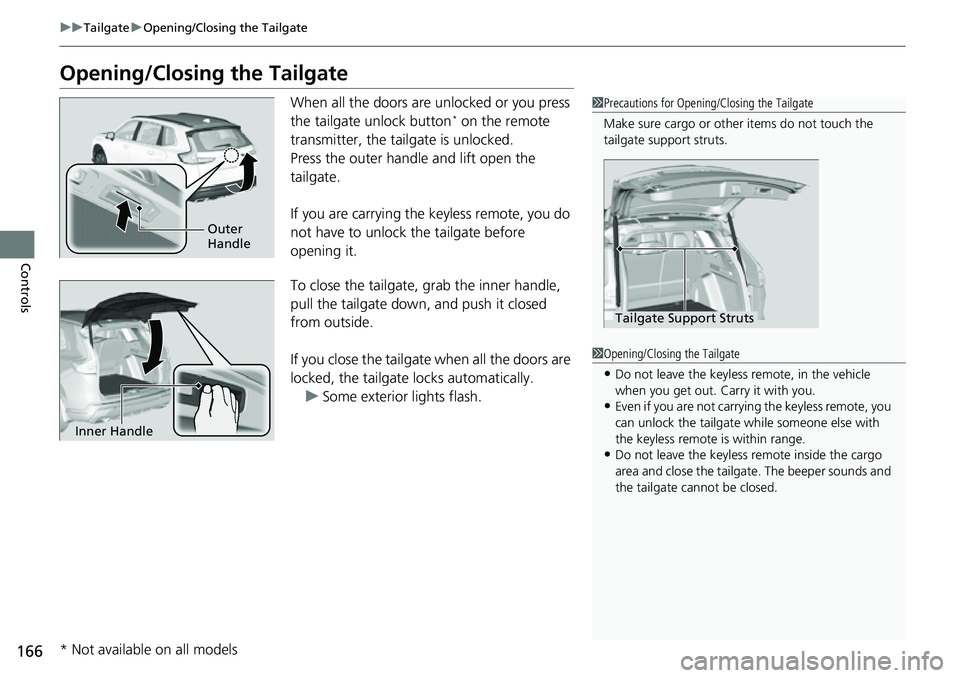
When all the doors are unlocked or you press
the tailgate unlock button* on the remote
transmitter, the tailgate is unlocked.
Press the outer handle and lift open the
tailgate.
If you are carrying the keyless remote, you do
not have to unlock the tailgate before
opening it.
To close the tailgate, grab the inner handle,
pull the tailgate down, and push it closed
from outside.
If you close the tailgate when all the doors are
locked, the tailgate locks automatically.
u Some exterior lights flash.
1Precautions for Opening/Closing the Tailgate
Make sure cargo or othe r items do not touch the
tailgate support struts.
Tailgate Support Struts
1 Opening/Closing the Tailgate
•Do not leave the keyless remote, in the vehicle
when you get out. Carry it with you.
•Even if you are not carrying the keyless remote, you
can unlock the tailgate wh ile someone else with
the keyless remote is within range.
•Do not leave the keyless re mote inside the cargo
area and close the tailgate. The beeper sounds and
the tailgate cannot be closed.
Outer
Handle
Inner Handle
* Not available on all models
Page 170 of 719
Continued169
uuTailgate uOpening/Closing the Power Tailgate*
Controls
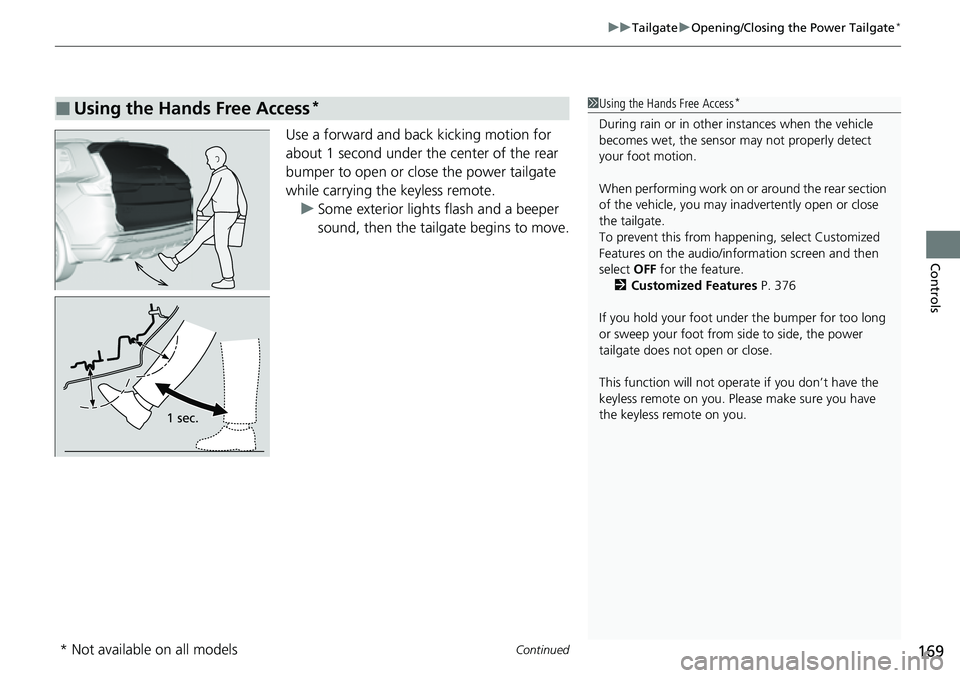
Use a forward and back kicking motion for
about 1 second under the center of the rear
bumper to open or close the power tailgate
while carrying the keyless remote.
u Some exterior lights flash and a beeper
sound, then the tailgate begins to move.
■Using the Hands Free Access*1Using the Hands Free Access*
During rain or in other instances when the vehicle
becomes wet, the sensor may not properly detect
your foot motion.
When performing work on or around the rear section
of the vehicle, you may in advertently open or close
the tailgate.
To prevent this from happe ning, select Customized
Features on the audio/information screen and then
select OFF for the feature.
2 Customized Features P. 376
If you hold your foot under the bumper for too long
or sweep your foot from side to side, the power
tailgate does not open or close.
This function will not opera te if you don’t have the
keyless remote on you. Please make sure you have
the keyless remote on you.
1 sec.
* Not available on all models
Page 173 of 719
uuTailgate uOpening/Closing the Power Tailgate*
172
Controls
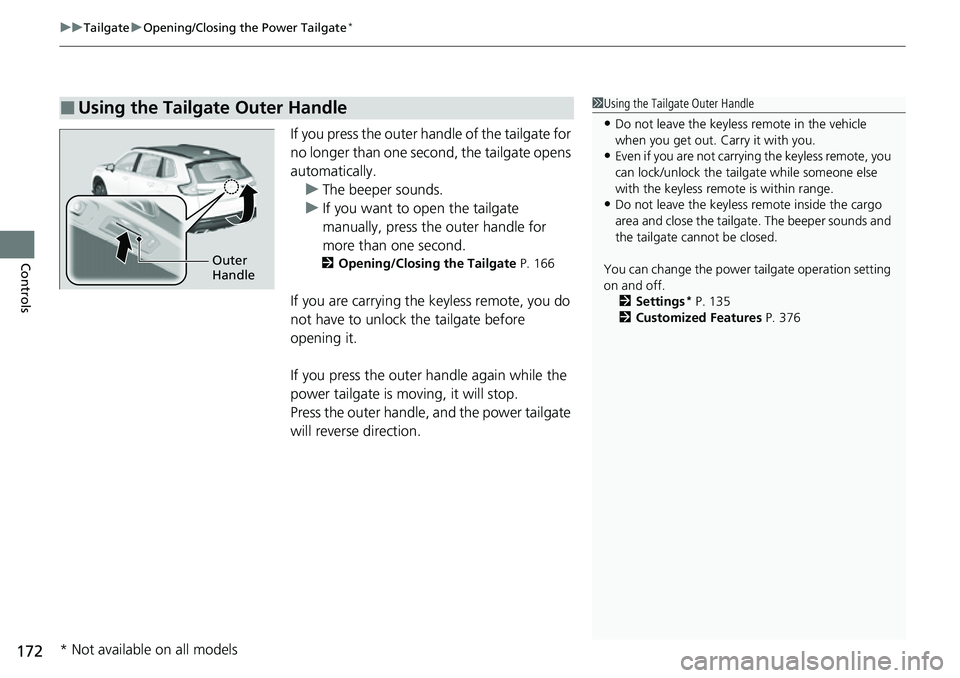
If you press the outer ha ndle of the tailgate for
no longer than one second, the tailgate opens
automatically. u The beeper sounds.
u If you want to open the tailgate
manually, press the outer handle for
more than one second.
2 Opening/Closing the Tailgate P. 166
If you are carrying the keyless remote, you do
not have to unlock the tailgate before
opening it.
If you press the outer handle again while the
power tailgate is moving, it will stop.
Press the outer handle, and the power tailgate
will reverse direction.
■Using the Tailgate Outer Handle1Using the Tailgate Outer Handle
•Do not leave the keyless remote in the vehicle
when you get out. Carry it with you.
•Even if you are not carrying the keyless remote, you
can lock/unlock the tailg ate while someone else
with the keyless remote is within range.
•Do not leave the keyless re mote inside the cargo
area and close the tailgate. The beeper sounds and
the tailgate cannot be closed.
You can change the power tailgate operation setting
on and off.
2 Settings
* P. 135
2 Customized Features P. 376
Outer
Handle
* Not available on all models
Page 177 of 719
176
Controls
Security System
Immobilizer System
This system prevents a key that has not been pre-registered from starting the power
system.
Pay attention to the follo wing when pressing the POWER button:
• Do not allow objects that emit strong radio waves near the POWER button.
• Make sure the key is not covered by or touching a metal object.
• Do not bring a key from another vehi cle’s immobilizer system near the POWER
button.
• Do not put the key near magnetic items. El ectronic device, such as televisions and
audio systems emit strong magnetic fields. Note that even a key chain can
become magnetic.
Security System Alarm
The security system alarm activates when the tailgate, hood, or doors are forcibly
opened. The alarm does not activate if the tailgate or doors are opened with the key,
remote transmitter or keyless access system.
However, the alarm activates if a door is opened with the key and then the hood is
opened before the power mode is set to ON.
1 Immobilizer System
NOTICE
Leaving the key in the vehicl e can result in theft or
accidental movement of the vehicle.
Always take the key with you whenever you leave the
vehicle unattended.
Do not alter the system or add other devices to it.
Doing so may damage the system and make your
vehicle inoperable.
Apply and hold the brake pedal before turning the
vehicle on the first time after the battery has been
disconnected.
Canadian models
1 Security System Alarm
Do not alter the system or add other devices to it.
Doing so may damage the system and make your
vehicle inoperable.
The security system alarm continues for a maximum
of two minutes until the security system alarm
deactivates.