tow HONDA CRV 2023 User Guide
[x] Cancel search | Manufacturer: HONDA, Model Year: 2023, Model line: CRV, Model: HONDA CRV 2023Pages: 719, PDF Size: 13.43 MB
Page 197 of 719
196
uuOperating the Switches Around the Steering Wheel uWipers and Washers
Controls
Wipers and Washers
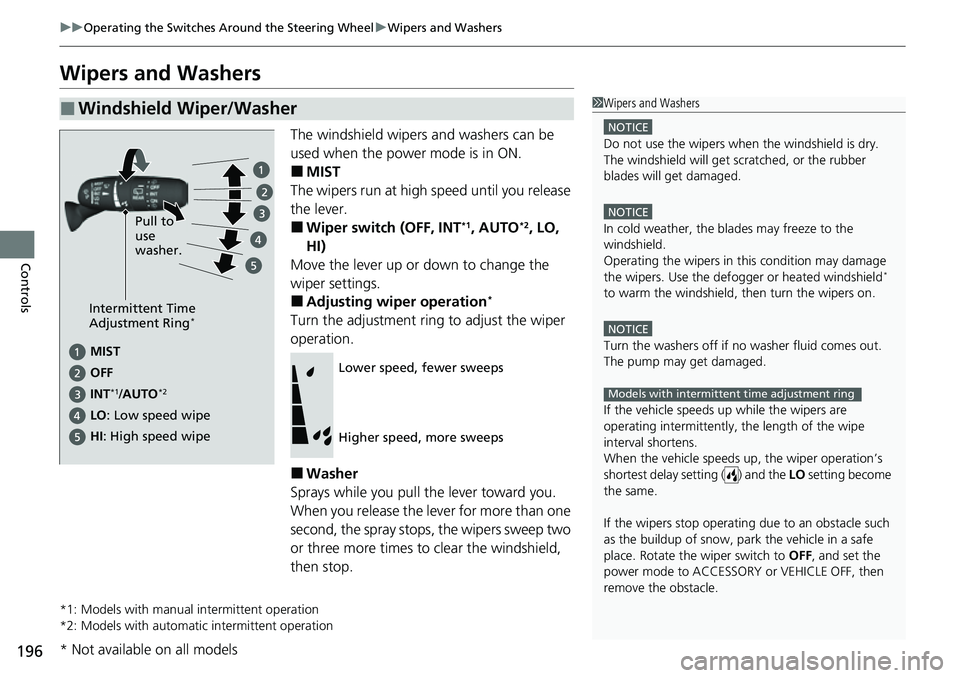
The windshield wipers and washers can be
used when the power mode is in ON.
■MIST
The wipers run at high speed until you release
the lever.
■Wiper switch (OFF, INT*1, AUTO*2, LO,
HI)
Move the lever up or down to change the
wiper settings.
■Adjusting wiper operation*
Turn the adjustment ring to adjust the wiper
operation.
■Washer
Sprays while you pull the lever toward you.
When you release the lever for more than one
second, the spray stops, the wipers sweep two
or three more times to clear the windshield,
then stop.
*1: Models with manual intermittent operation
*2: Models with automati c intermittent operation
■Windshield Wiper/Washer1Wipers and Washers
NOTICE
Do not use the wipers when the windshield is dry.
The windshield will get sc ratched, or the rubber
blades will get damaged.
NOTICE
In cold weather, the blades may freeze to the
windshield.
Operating the wipers in th is condition may damage
the wipers. Use the defogge r or heated windshield
*
to warm the windshield, then turn the wipers on.
NOTICE
Turn the washers off if no washer fluid comes out.
The pump may get damaged.
If the vehicle speeds up while the wipers are
operating intermittently, the length of the wipe
interval shortens.
When the vehicle speeds up, the wiper operation’s
shortest delay setting ( ) and the LO setting become
the same.
If the wipers st op operating due to an obstacle such
as the buildup of snow, park the vehicle in a safe
place. Rotate the wiper switch to OFF, and set the
power mode to ACCESSORY or VEHICLE OFF, then
remove the obstacle.
Models with intermittent time adjustment ring
Intermittent Time
Adjustment Ring*
MIST
INT
*1/AUTO*2
OFF
LO : Low speed wipe Pull to
use
washer.
HI: High speed wipe
Lower speed, fewer sweeps
Higher speed, more sweeps
* Not available on all models
Page 227 of 719
uuInterior Convenience Items uOther Interior Convenience Items
226
Controls
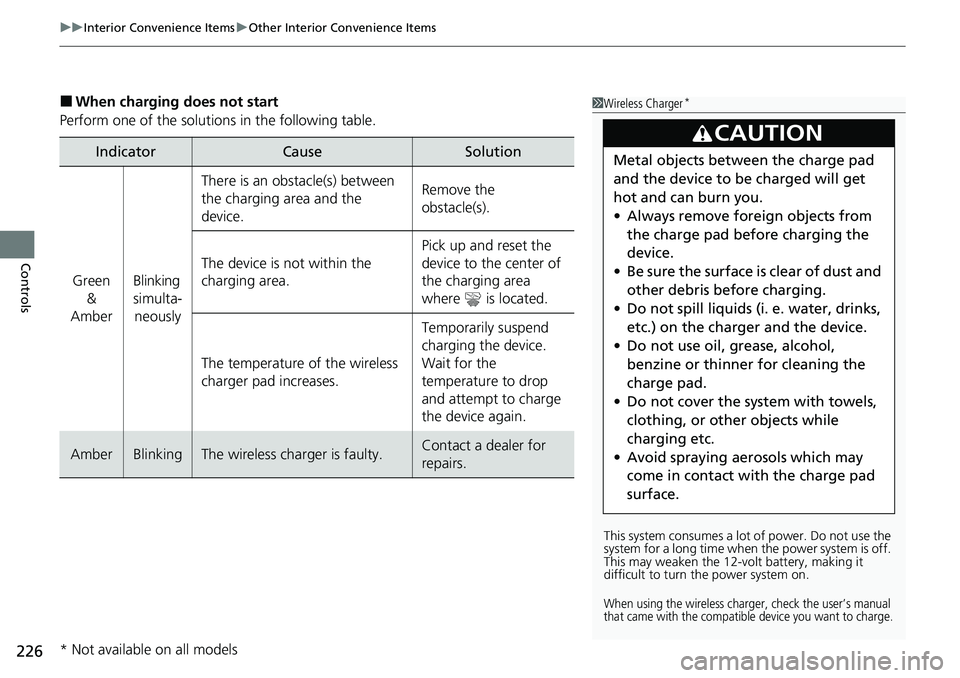
■When charging does not start
Perform one of the solution s in the following table.
IndicatorCauseSolution
Green
&
AmberBlinking
simulta- neously
There is an obstacle(s) between
the charging area and the
device.Remove the
obstacle(s).
The device is not within the
charging area. Pick up and reset the
device to the center of
the charging area
where is located.
The temperature of the wireless
charger pad increases. Temporarily suspend
charging the device.
Wait for the
temperature to drop
and attempt to charge
the device again.
AmberBlinkingThe wireless charger is faulty.Contact a dealer for
repairs.
1
Wireless Charger*
This system consumes a lot of power. Do not use the
system for a long time when the power system is off.
This may weaken the 12-v olt battery, making it
difficult to turn the power system on.
When using the wireless charge r, check the user’s manual
that came with the compatible device you want to charge.
3CAUTION
Metal objects between the charge pad
and the device to be charged will get
hot and can burn you.
• Always remove foreign objects from
the charge pad before charging the
device.
• Be sure the surface is clear of dust and
other debris before charging.
• Do not spill liquids (i. e. water, drinks,
etc.) on the charger and the device.
• Do not use oil, grease, alcohol,
benzine or thinner for cleaning the
charge pad.
• Do not cover the system with towels,
clothing, or other objects while
charging etc.
• Avoid spraying aerosols which may
come in contact with the charge pad
surface.
* Not available on all models
Page 442 of 719
441
Driving
This chapter discusses driving and refueling.
Before Driving................................... 442
Towing a Trailer ................................ 447
Off-Highway Driving Guidelines ..... 453
When Driving Turning on the Power ...................... 455
Precautions While Driving................. 462
Transmission........................................ 463Shifting ............................................ 464
Deceleration Paddle Selector ............ 466
Acoustic Vehicle Al erting System ...... 469
Drive Mode Switch ........................... 470
Hill Descent Control System ............. 474
Vehicle Stability AssistTM (VSA®), aka Electronic
Stability Control (ESC), System .............. 476
Agile Handling Assist ....................... 478
Real Time AWD with Intelligent Control System
TM*...................................... 479Tire Pressure Monitoring System (TPMS) .... 480Tire Pressure Monitoring System (TPMS) - Required Federal Explanation ......... 485
Blind Spot Information System ......... 487
High Voltage Battery ........................ 491
Honda Sensing ®................................ 492
Collision Mitigati on Braking System
TM
(CMBSTM) ....................................... 495 Low Speed Braking Control
*............ 507
Adaptive Cruise Control (ACC) with Low Speed Follow ................................. 513
Lane Keeping Assist System (LKAS).... 533
Traffic Jam Assist ............................. 545
Road Departure Miti gation System... 554
Traffic Sign Recognition System ....... 562
Front Sensor Camera ....................... 568
Radar Sensor ................................... 570
Sonar Sensors
*................................ 571
Braking .............................................. 572
Parking Your Vehicle ........................ 582
Multi-View Rear Camera .................. 593
Refueling ........................................... 595
Fuel Economy and CO
2 Emissions .... 598
* Not available on all models
Page 444 of 719
Continued443
uuBefore Driving uDriving Preparation
Driving
• Store or secure all items on board properly.
u Carrying too much cargo, or improperly storing it, can affect your vehicle’s
handling, stability, sto pping distance, and tires, and make it unsafe.
2Maximum Load Limit P. 445
•Do not pile items higher than the seat height.
u They can block your view and may be thrown forward in the event of sudden
braking.
• Do not place anything in the front seat footwells. Make sure to secure the floor
mat.
u An object or unsecured floor mat can in terfere with your brake and accelerator
pedal operation while driving.
• If you have any animals on board, do not let them move around in the vehicle.
u They may interfere with driving and a crash could occur.
• Securely close and lock al l doors and the tailgate.
2Locking/Unlocking the Doors from the Inside P. 161
•Adjust your seating position properly.
u Adjust the head restraint, too.
2Seats P. 205
2 Adjusting the Front Head Restraint Positions P. 213
•Adjust the mirrors and steering wheel properly.
u Adjust them while sitting in the proper driving position.
2 Mirrors P. 203
2 Adjusting the Steering Wheel P. 202
■Interior Checks1Interior Checks
The headlight aim is set by the factory, and does not
need to be adjusted. Howeve r, if you regularly carry
heavy items in the cargo area or tow a trailer, have
the aiming readjusted at a dealer or by a qualified
technician.
Page 446 of 719
445
uuBefore Driving uMaximum Load Limit
Continued
Driving
Maximum Load Limit
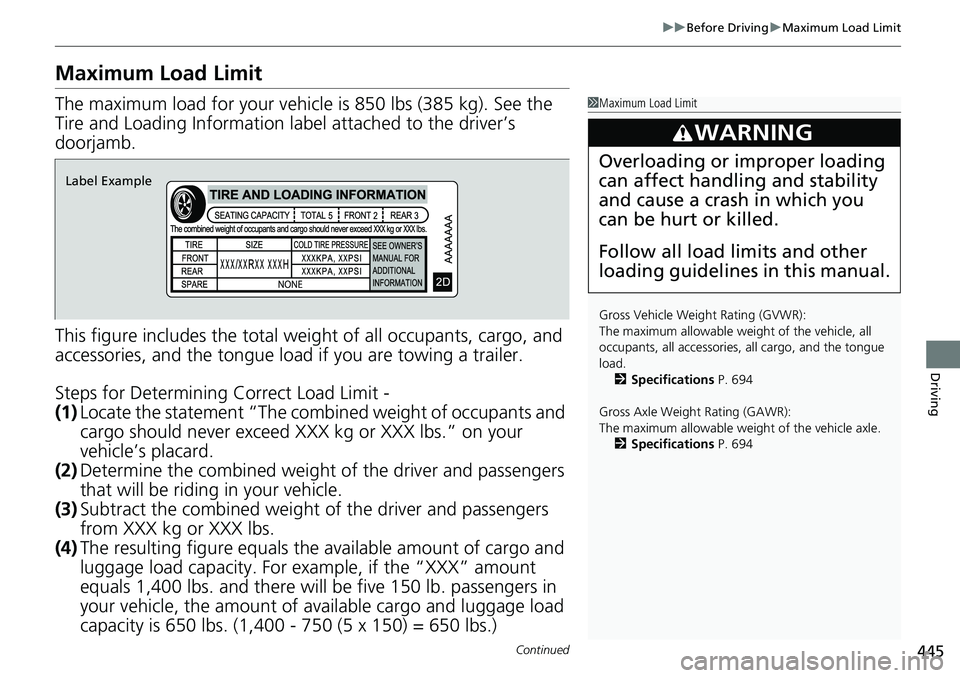
The maximum load for your vehicl e is 850 lbs (385 kg). See the
Tire and Loading Information la bel attached to the driver’s
doorjamb.
This figure includes the total weig ht of all occupants, cargo, and
accessories, and the tongue load if you are towing a trailer.
Steps for Determining Correct Load Limit -
(1) Locate the statement “The combined weight of occupants and
cargo should never exceed XXX kg or XXX lbs.” on your
vehicle’s placard.
(2) Determine the combined weight of the driver and passengers
that will be riding in your vehicle.
(3) Subtract the combined weight of the driver and passengers
from XXX kg or XXX lbs.
(4) The resulting figure equals the available amount of cargo and
luggage load capacity. For example, if the “XXX” amount
equals 1,400 lbs. and there will be five 150 lb. passengers in
your vehicle, the am ount of available cargo and luggage load
capacity is 650 lbs. (1,400 - 750 (5 x 150) = 650 lbs.)1 Maximum Load Limit
Gross Vehicle Weight Rating (GVWR):
The maximum allowable weight of the vehicle, all
occupants, all a ccessories, all cargo, and the tongue
load. 2 Specifications P. 694
Gross Axle Weight Rating (GAWR):
The maximum allowable weight of the vehicle axle. 2 Specifications P. 694
3WARNING
Overloading or improper loading
can affect handling and stability
and cause a crash in which you
can be hurt or killed.
Follow all load limits and other
loading guidelines in this manual.
Label Example
Page 447 of 719
uuBefore Driving uMaximum Load Limit
446
Driving
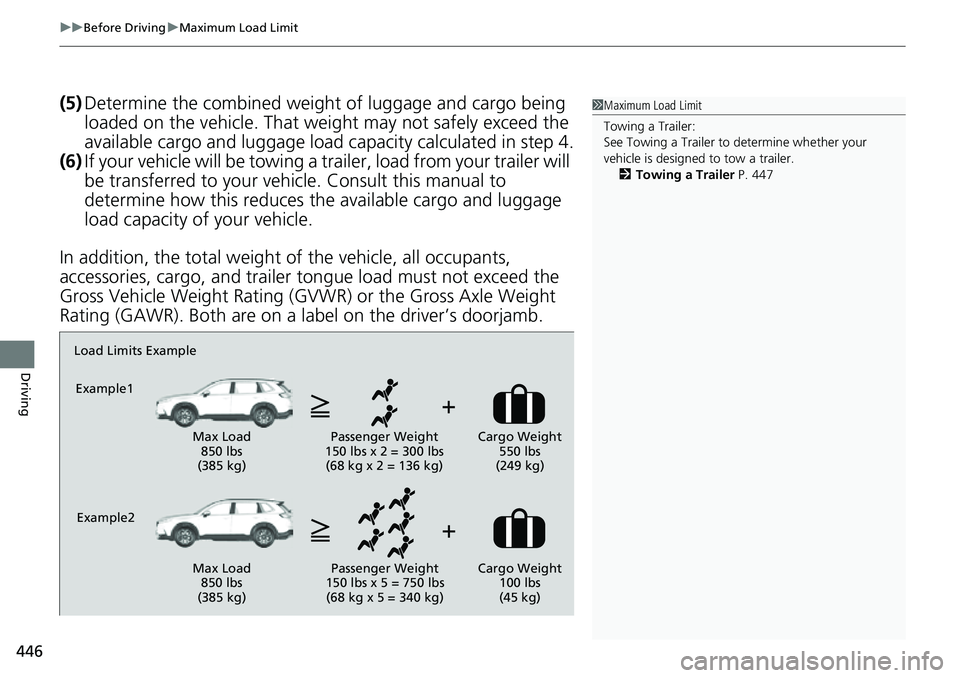
(5) Determine the combined weight of luggage and cargo being
loaded on the vehicle. That we ight may not safely exceed the
available cargo and luggage load capacity calculated in step 4.
(6) If your vehicle will be towing a trailer, load from your trailer will
be transferred to your vehicl e. Consult this manual to
determine how this reduces the available cargo and luggage
load capacity of your vehicle.
In addition, the total weight of the vehicle, all occupants,
accessories, cargo, and trailer tongue load must not exceed the
Gross Vehicle Weight Rating (GVW R) or the Gross Axle Weight
Rating (GAWR). Both are on a label on the driver’s doorjamb.1 Maximum Load Limit
Towing a Trailer:
See Towing a Trailer to determine whether your
vehicle is designed to tow a trailer.
2 Towing a Trailer P. 447
Load Limits Example
Example1
Max Load 850 lbs
(385 kg) Passenger Weight
150 lbs x 2 = 300 lbs (68 kg x 2 = 136 kg) Cargo Weight
550 lbs
(249 kg)
Example2 Max Load 850 lbs
(385 kg) Passenger Weight
150 lbs x 5 = 750 lbs (68 kg x 5 = 340 kg) Cargo Weight
100 lbs
(45 kg)
Page 448 of 719
447Continued
Driving
Towing a Trailer
Towing Preparation
Your vehicle can tow a trailer if you carefully observe the load limits, use the proper
equipment, and follow the towing guidelin es. Check the load limits before driving.
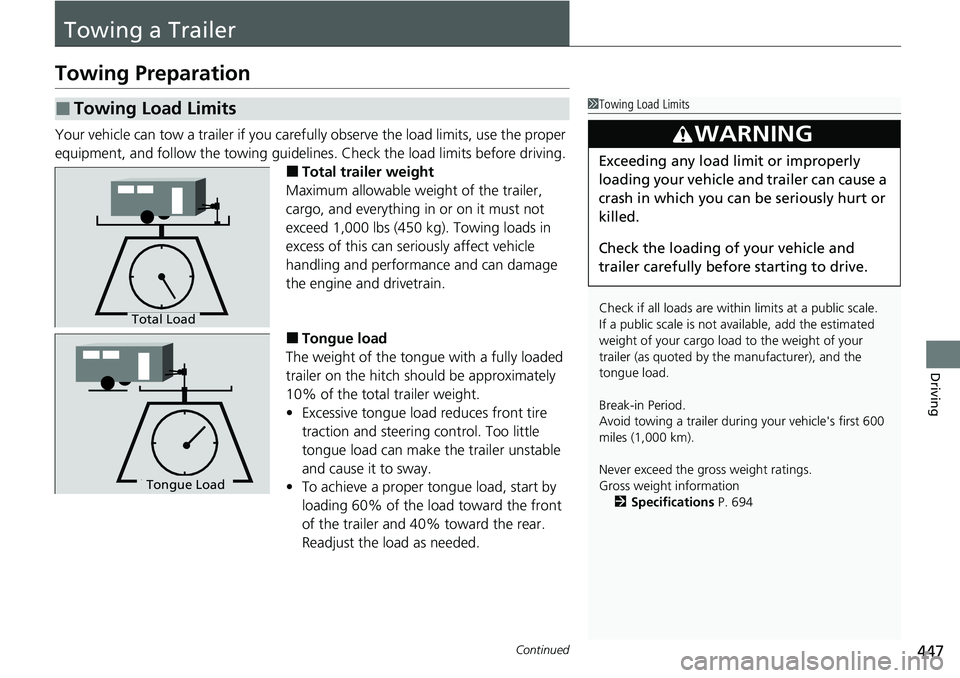
■Total trailer weight
Maximum allowable weight of the trailer,
cargo, and everything in or on it must not
exceed 1,000 lbs (450 kg). Towing loads in
excess of this can seriously affect vehicle
handling and performance and can damage
the engine and drivetrain.
■Tongue load
The weight of the tongue with a fully loaded
trailer on the hitch should be approximately
10% of the total trailer weight.
• Excessive tongue load reduces front tire
traction and steering control. Too little
tongue load can make the trailer unstable
and cause it to sway.
• To achieve a proper tongue load, start by
loading 60% of the load toward the front
of the trailer and 40% toward the rear.
Readjust the lo ad as needed.
■Towing Load Limits1Towing Load Limits
Check if all loads are within limits at a public scale.
If a public scale is not av ailable, add the estimated
weight of your cargo load to the weight of your
trailer (as quoted by th e manufacturer), and the
tongue load.
Break-in Period.
Avoid towing a trailer duri ng your vehicle's first 600
miles (1,000 km).
Never exceed the gross weight ratings.
Gross weight information 2 Specifications P. 694
3WARNING
Exceeding any load limit or improperly
loading your vehicle and trailer can cause a
crash in which you can be seriously hurt or
killed.
Check the loading of your vehicle and
trailer carefully before starting to drive.
Total Load
Tongue LoadTongue Load
Page 449 of 719
uuTowing a Trailer uTowing Preparation
448
Driving
Towing equipment varies by the size of your trailer, how much load you are towing,
and where you are towing.
■Hitches
The hitch must be of an approved type and properly bolted to the underbody.
■Safety chains
Always use safety chains when you tow a trailer. Leave enough slack to allow the
trailer to turn corners easily, but do not allow the chains to drag on the ground.
■Trailer brakes
If you are thinking of getting a trailer that has brakes, be sure they are electronically
actuated. Do not attempt to tap into your vehicle's hydraulic system. No matter how
successful it may seem, any attempt to attach trailer brakes to your vehicle's
hydraulic system will lower braking effe ctiveness and create a potential hazard.
■Additional towing equipment
Many states and provinces/territories requi re special outside mirrors when towing a
trailer. Even if mirrors are not required in your locale, you should install special
mirrors if visibility is restricted in any way.
■Towing Equipment and Accessories1Towing Equipment and Accessories
Make sure that all equipmen t is properly installed and
maintained, and that it meets federal, state, province/
territory, and lo cal regulations.
Consult your trai ler maker for prope r installation and
setup of the equipment.
Improper installation and setup can affect the
handling, stability, and br aking performance of your
vehicle.
Consult your traile r sales or rental agency if any other
items are recommended or required for your towing
situation.
The lighting and wiring of tra ilers can vary by type
and brand. If a connector is required, it should only
be installed by a qua lified technician.
Trailer packages and products:
•Ball mount, hitch plug, hitch pin etc.•Wiring harness kit
•Trailer hitch kit
Are available at a dealer.
Page 450 of 719
449
uuTowing a Trailer uTowing Preparation
Driving
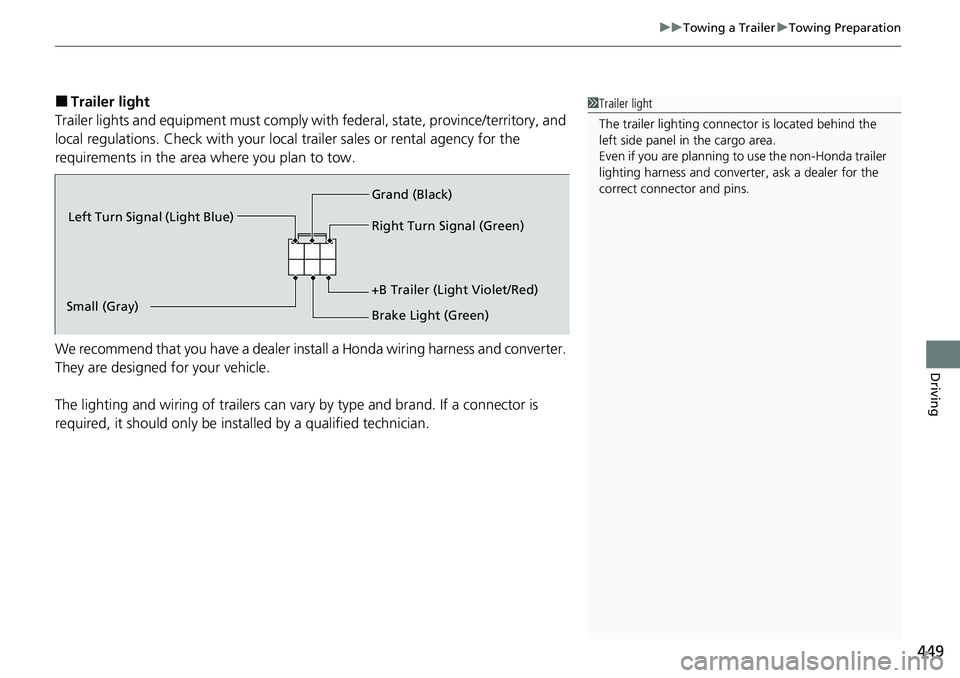
■Trailer light
Trailer lights and equipment must comply with federal, state, province/territory, and
local regulations. Check with your local trailer sales or rental agency for the
requirements in the area where you plan to tow.
We recommend that you have a dealer inst all a Honda wiring harness and converter.
They are designed for your vehicle.
The lighting and wiring of trailers can vary by type and brand. If a connector is
required, it should only be installed by a qualified technician.1 Trailer light
The trailer lighting connect or is located behind the
left side panel in the cargo area.
Even if you are planning to use the non-Honda trailer
lighting harness and converte r, ask a dealer for the
correct connector and pins.
Right Turn Signal (Green)
Left Turn Signal (Light Blue)
Small (Gray) Brake Light (Green)
+B Trailer (Light Violet/Red) Grand (Black)
Page 451 of 719
450
uuTowing a Trailer uDriving Safely with a Trailer
Driving
Driving Safely with a Trailer
• Have the trailer properly serviced and keep it in good condition.
• Make sure that all the weights and load in the vehicle and trailer are within limits.
2Towing Load Limits P. 447
•Securely attach the hitch, safety chains, and other necessary parts to the trailer.
• Securely store all the items in and on the tr ailer so that they do not shift while
driving.
• Check if the lights and brakes on the trailer are working properly.
• Check the pressure of the traile r tires, including the spare.
• Turn off the rear parking sensor system.
2 Parking sensor system on and off P. 585
•Turn off the Low Speed Braking Control syst em. It may activate if it detects the
towed object as an obstacle.
2 System On and Off P. 510
•Drive slower than normal.
• Obey posted speed limits for vehicles with trailers.
• Use the
(D position when towing a trailer on level roads.
■Things You Need To Know Before Towing a Trailer
■Towing Speeds and Shift Position
1Driving Safely with a Trailer
Operating speed when towing a trailer must not
exceed 62 mph (100 km/h).
Parking
In addition to the normal precautions, place wheel
chocks at each of the trailer's tires.
When towing a trailer, we recommend that you carry
a full-size spare wheel and tire for both your vehicle
and trailer.
Remember to unhitch the tra iler before changing a
flat tire. Ask the trailer sales or rental agency where
and how to store the trailer’s spare tire.
Models with parking sensor system
1 Towing Speeds and Shift Position
When towing a fixed-sided trailer (e.g., camper), do
not exceed 55 mph (88 km/h). At higher speeds, the
trailer may sway or af fect vehicle handling.