accessory mode HONDA CRV 2023 Owner's Manual
[x] Cancel search | Manufacturer: HONDA, Model Year: 2023, Model line: CRV, Model: HONDA CRV 2023Pages: 719, PDF Size: 13.43 MB
Page 669 of 719
668
uuPower System Won’t Start uIf the Keyless Remote Battery is Weak
Handling the Unexpected
If the Keyless Remote Battery is Weak
If the beeper sounds, the To start, touch start butto n with emblem side of
remote message appears on the driver information interface, the POWER button
flashes, and the READY indicator does not come on, tu rn on the power system as
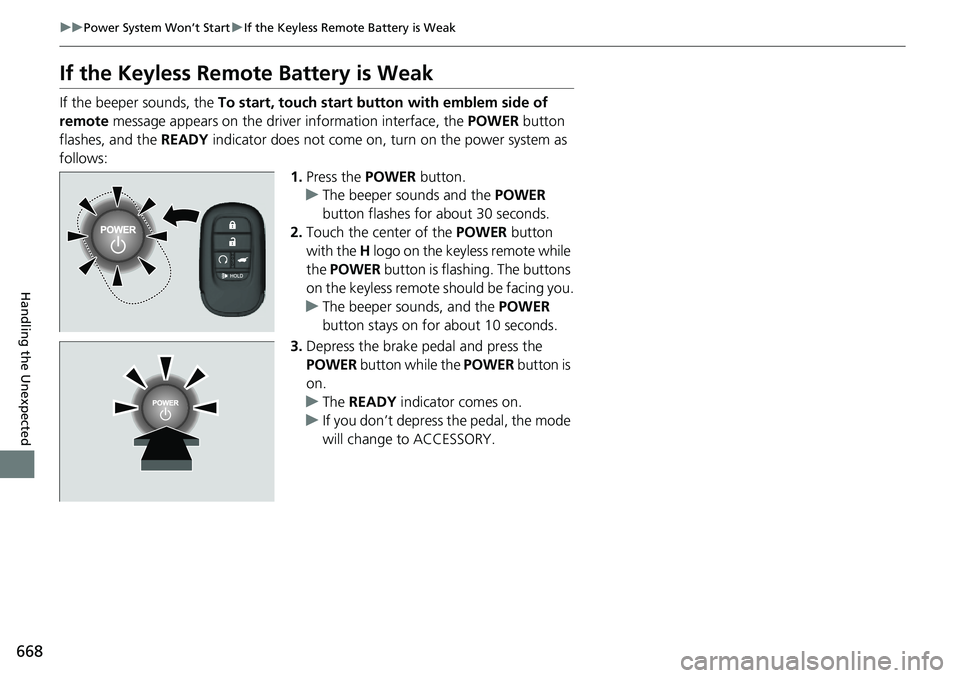
follows: 1.Press the POWER button.
u The beeper sounds and the POWER
button flashes for about 30 seconds.
2. Touch the center of the POWER button
with the H logo on the keyless remote while
the POWER button is flashing. The buttons
on the keyless remote should be facing you.
u The beeper sounds, and the POWER
button stays on for about 10 seconds.
3. Depress the brake pedal and press the
POWER button while the POWER button is
on.
u The READY indicator comes on.
u If you don’t depress the pedal, the mode
will change to ACCESSORY.
Page 670 of 719
669
uuPower System Won’t Start uEmergency Power System On
Handling the Unexpected
Emergency Power System On
If the power system cannot be turned on using the normal starting procedure, you
may be able to turn it on using the emergency starting procedure below.
Do not use this procedure if it is not an emergency.
1. Make sure the parking brake is applied.
2. Check that the transmission is in
(P, then set the power mode to ACCESSORY.
3. Firmly depress the brake peda l, then press and hold the POWER button for at
least 15 seconds.
This should be considered a system malfun ction even if you are able to turn the
power system on using the above procedure.
Have your vehicle checked by a dealer immediately.
1Emergency Power System On
Refer to the following if you cannot move the shift
lever out of the
( P position.
2 Shift Lever Does Not Move P. 673
Page 671 of 719
670
uuPower System Won’t StartuEmergency Power System Off
Handling the Unexpected
Emergency Power System Off
The POWER button may be used to turn the pow er system off due to an emergency
situation even while driving. If you must turn the power system off, do either of the
following operations:
• Press and hold the POWER button for about two seconds.
• Firmly press the POWER button three times.
The steering wheel will not lock. However, because turning off the power system
disables the power assist the power syst em provides to the steering and braking
systems, it will require significantly more physical effort and time to steer and slow
the vehicle. Use both feet on the brake pe dal to slow down the vehicle and stop
immediately in a safe place.
The power mode is in ACCESSORY wh en the power system is stopped.
To change the mode to VEHICLE OFF, put the transmission into
(P after the vehicle
comes to a complete stop.
1 Emergency Power System Off
Do not press the POWER button while driving unless
it is absolutely necessary for the power system to be
turned off.
If you press the POWER button while driving, the
beeper sounds.
Page 709 of 719
Index
708
Index
Index
Numbers
12-Volt Battery.......................................... 640
Charging System Indicator ....................... 677
Maintenance (Checking the 12-Volt Battery) ............... 640
12-Volt Battery Charging System Indicator .................................................. 677
A
ABS (Anti-lock Brake System) ................... 580
Accessories and Modifications ................. 649
Accessory Power Socket ........................... 224
Acoustic Vehicle Alerting System ............ 469
Adaptive Cruise Control (ACC) with Low Speed Follow ................................... 109, 513
Additives Coolant ................................................... 618
Engine Oil ................................................ 615
Washer .................................................... 622
Adjusting
Armrest ................................................... 215
Clock ....................................................... 146
Front Seats .............................................. 205
Head Restraints........................................ 213
Mirrors .................................................... 203
Rear Seats................................................ 209
Sound.............................................. 247, 290
Steering Wheel ........................................ 202
Agile Handling Assist ................................ 478 Air Conditioning System
(Climate Control System) ....................... 232
Changing the Mode ................................ 232
Defrosting the Windshield and Windows ............................................... 234
Dust and Pollen Filter............................... 643
Recirculation/Fresh Air Mode ................... 233
Sensor ..................................................... 236
Synchronization Mode............................. 235
Using Automatic Climate Control ............ 232
Air Pressure ....................................... 632, 695
Airbags ........................................................ 59
Advanced Airbags ..................................... 65
Airbag Care............................................... 78
Event Data Recorder .................................... 0
Front Airbags (SRS) .................................... 62
Indicator............................................ 75, 104
Knee Airbags............................................. 67
Passenger Airbag Off Indicator .................. 76
Sensors ..................................................... 59
Side Airbags .............................................. 70
Side Curtain Airbags.................................. 73
All-Wheel Drive (AWD) ............................ 479
AM/FM Radio .................................... 249, 296
Android Auto ................................... 267, 336
Anti-lock Brake System (ABS) .................. 580
Indicator.................................................. 103
Apple CarPlay ................................... 263, 329
Armrest ..................................................... 215
AT&T Hotspot ........................................... 328
Audio ........................................................ 124 Audio Remote Controls
........................... 242
Audio System ........................... 238, 246, 271
Adjusting the Sound ....................... 247, 290
Android Auto.................................. 267, 336
Audio/Information Screen ....................... 273
Display Setup .................................. 248, 291
Error Messages ....................................... 345
General Information................................ 347
Home Screen .......................................... 278
How to Update ....................................... 284
How to Update Wirelessly ....................... 288
How to Update with a USB Device .......... 289
iPod ................................................ 251, 311
Limitations for Manual Operation ............................. 292, 402, 422
MP3/WMA/AAC ............................. 254, 314
Power Flow ............................................. 342
Reactivating ............................................ 241
Recommended Devices ........................... 348
Remote Controls ..................................... 242
Security Code ......................................... 241
Selecting an Audio Source ...................... 292
Start Up .................................................. 272
Status Area ............................................. 283
System Updates ...................................... 284
System Updates Settings ......................... 285
Theft Protection ...................................... 241
USB Flash Drives...................................... 348
USB Ports ................................................ 239
Wallpaper Setup ..................................... 276
Audio/Information Screen ....................... 273