warning HONDA CRV 2023 Workshop Manual
[x] Cancel search | Manufacturer: HONDA, Model Year: 2023, Model line: CRV, Model: HONDA CRV 2023Pages: 719, PDF Size: 13.43 MB
Page 448 of 719
447Continued
Driving
Towing a Trailer
Towing Preparation
Your vehicle can tow a trailer if you carefully observe the load limits, use the proper
equipment, and follow the towing guidelin es. Check the load limits before driving.
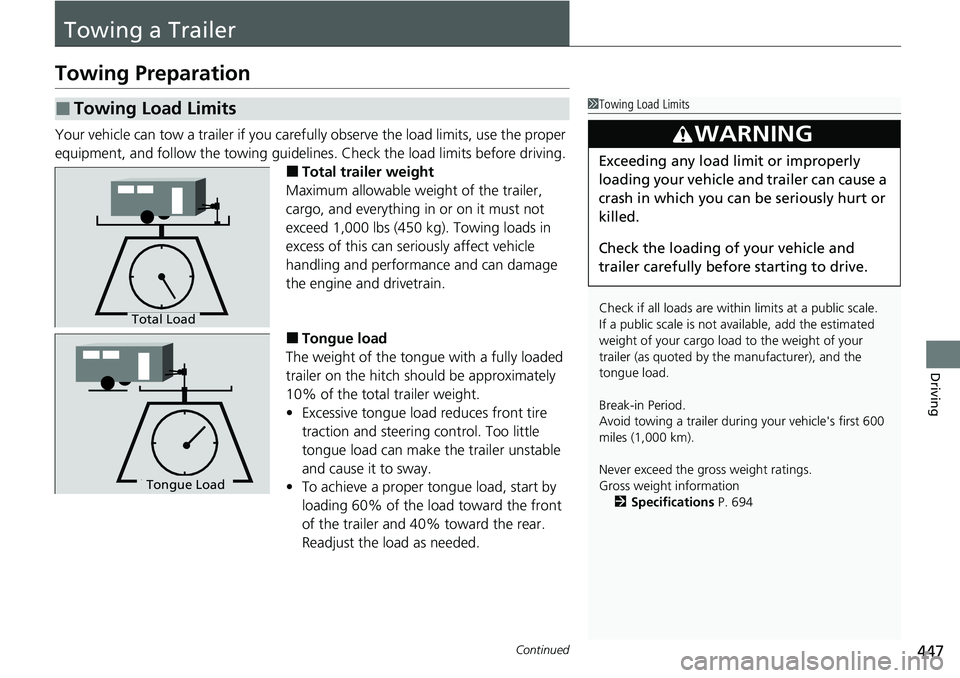
■Total trailer weight
Maximum allowable weight of the trailer,
cargo, and everything in or on it must not
exceed 1,000 lbs (450 kg). Towing loads in
excess of this can seriously affect vehicle
handling and performance and can damage
the engine and drivetrain.
■Tongue load
The weight of the tongue with a fully loaded
trailer on the hitch should be approximately
10% of the total trailer weight.
• Excessive tongue load reduces front tire
traction and steering control. Too little
tongue load can make the trailer unstable
and cause it to sway.
• To achieve a proper tongue load, start by
loading 60% of the load toward the front
of the trailer and 40% toward the rear.
Readjust the lo ad as needed.
■Towing Load Limits1Towing Load Limits
Check if all loads are within limits at a public scale.
If a public scale is not av ailable, add the estimated
weight of your cargo load to the weight of your
trailer (as quoted by th e manufacturer), and the
tongue load.
Break-in Period.
Avoid towing a trailer duri ng your vehicle's first 600
miles (1,000 km).
Never exceed the gross weight ratings.
Gross weight information 2 Specifications P. 694
3WARNING
Exceeding any load limit or improperly
loading your vehicle and trailer can cause a
crash in which you can be seriously hurt or
killed.
Check the loading of your vehicle and
trailer carefully before starting to drive.
Total Load
Tongue LoadTongue Load
Page 454 of 719
453
Driving
Off-Highway Driving Guidelines
General Information
Your vehicle has been designed primarily for use on pavement, however, its higher
ground clearance allows you to occasionally travel on unpaved roads. It is not
designed for trail-blazing, or other challenging off-highway activities.
If you decide to drive on unpaved roads, you will find that it requires somewhat
different driving skills and that your vehicl e will handle somewhat differently than it
does on pavement. Pay attention to the precau tions and tips in this section, and get
acquainted with your vehicle before leaving the pavement.
Important Safety Precautions
To avoid loss of control or rollover, be sure to follow all precautions and
recommendations:
• Be sure to store cargo properly and do not exceed your cargo load limits.
2 Maximum Load Limit P. 445
•Whenever you drive, make su re you and your passengers always wear seat belts.
• Keep your speed low, and never go faster than the conditions allow.
• It’s up to you to continually assess the situation and drive within the limits.
1Off-Highway Driving Guidelines
Failure to operate your vehicle correctly might result
in a crash or a rollover.
2 Important Handling Information P. 46
2 Precautions While Driving P. 462
3WARNING
Improperly operating this vehicle on or off-
pavement can cause a crash or rollover in
which you and your passengers could be
seriously injured or killed.
•Follow all instructions and guidelines in
this owner’s manual.
• Keep your speed low, and don’t drive
faster than conditions permit.
Page 457 of 719
uuWhen Driving uTurning on the Power
456
Driving
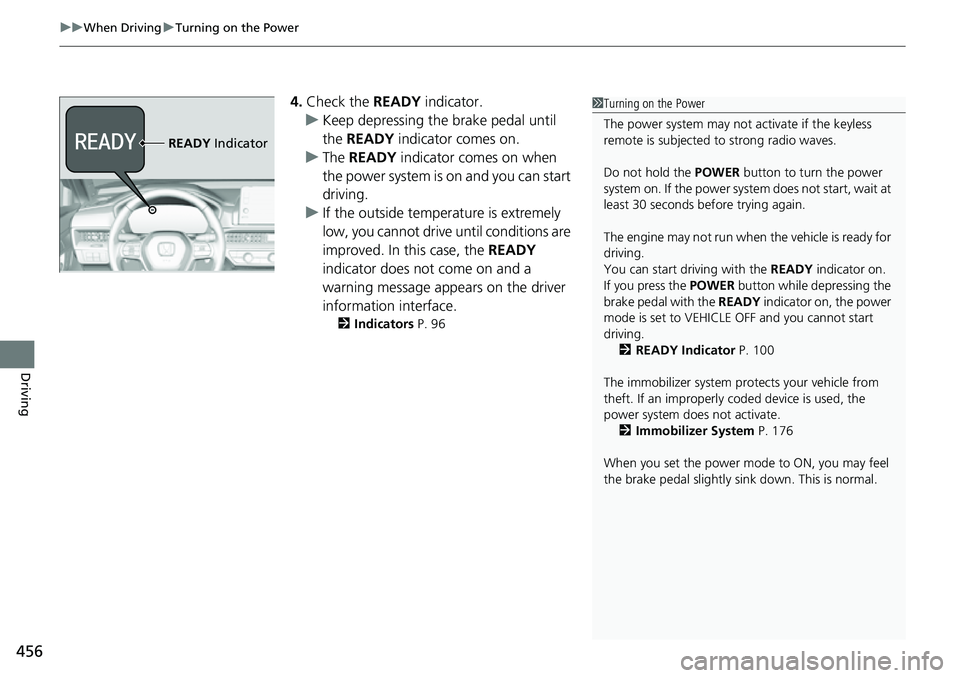
4. Check the READY indicator.
u Keep depressing the brake pedal until
the READY indicator comes on.
u The READY indicator comes on when
the power system is on and you can start
driving.
u If the outside temperature is extremely
low, you cannot drive until conditions are
improved. In this case, the READY
indicator does not come on and a
warning message appears on the driver
information interface.
2 Indicators P. 96
1Turning on the Power
The power system may not activate if the keyless
remote is subjected to strong radio waves.
Do not hold the POWER button to turn the power
system on. If the power system does not start, wait at
least 30 seconds before trying again.
The engine may not run when the vehicle is ready for
driving.
You can start driving with the READY indicator on.
If you press the POWER button while depressing the
brake pedal with the READY indicator on, the power
mode is set to VEHICLE OFF and you cannot start
driving.
2 READY Indicator P. 100
The immobilizer system pr otects your vehicle from
theft. If an improperly c oded device is used, the
power system does not activate. 2 Immobilizer System P. 176
When you set the power mode to ON, you may feel
the brake pedal slightly si nk down. This is normal.
READY Indicator
Page 458 of 719
Continued457
uuWhen Driving uTurning on the Power
Driving
You can remotely turn the power system on using the keyless remote.
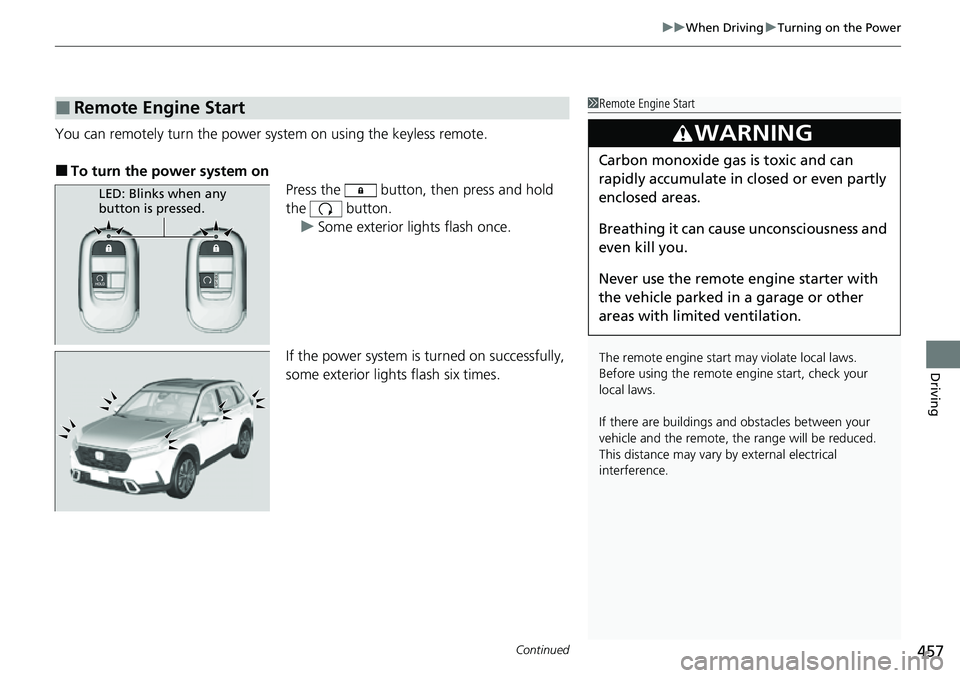
■To turn the power system on
Press the button, then press and hold
the button.
u Some exterior lights flash once.
If the power system is turned on successfully,
some exterior lights flash six times.
■Remote Engine Start1 Remote Engine Start
The remote engine start may violate local laws.
Before using the remote e ngine start, check your
local laws.
If there are buildings an d obstacles between your
vehicle and the remote, th e range will be reduced.
This distance may vary by external electrical
interference.
3WARNING
Carbon monoxide ga s is toxic and can
rapidly accumulate in closed or even partly
enclosed areas.
Breathing it can cause unconsciousness and
even kill you.
Never use the remote engine starter with
the vehicle parked in a garage or other
areas with limited ventilation.
LED: Blinks when any
button is pressed.
Page 465 of 719
464
uuWhen Driving uShifting
Driving
Shifting
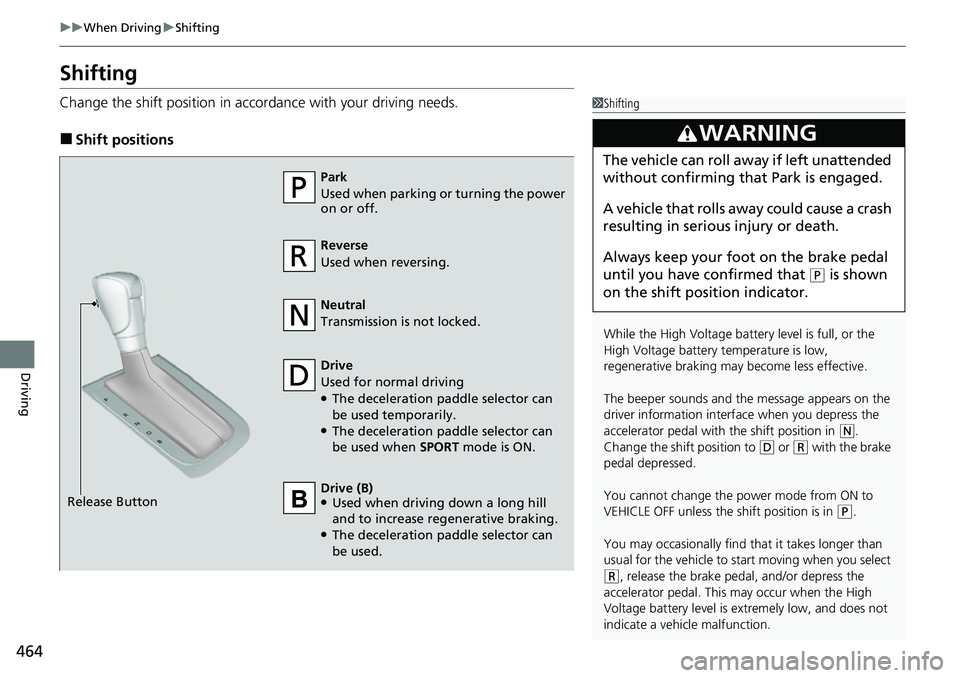
Change the shift positi on in accordance with your driving needs.
■Shift positions
1Shifting
While the High Voltage battery level is full, or the
High Voltage battery temperature is low,
regenerative braking ma y become less effective.
The beeper sounds and the message appears on the
driver information interf ace when you depress the
accelerator pedal with the shift position in
( N.
Change the shift position to
( D or (R with the brake
pedal depressed.
You cannot change the power mode from ON to
VEHICLE OFF unless the shift position is in
( P.
You may occasionally find th at it takes longer than
usual for the vehicle to st art moving when you select
(R, release the brake peda l, and/or depress the
accelerator pedal. This may occur when the High
Voltage battery level is extremely low, and does not
indicate a vehicle malfunction.
3WARNING
The vehicle can roll aw ay if left unattended
without confirming that Park is engaged.
A vehicle that rolls away could cause a crash
resulting in seriou s injury or death.
Always keep your foot on the brake pedal
until you have confirmed that
( P is shown
on the shift posi tion indicator.
Reverse
Used when reversing.
Drive
Used for normal driving
●The deceleration paddle selector can
be used temporarily.
●The deceleration paddle selector can
be used when SPORT mode is ON.
Park
Used when parking or turning the power
on or off.
Neutral
Transmission is not locked.
Release Button Drive (B)
●Used when driving down a long hill
and to increase regenerative braking.
●The deceleration paddle selector can
be used.
Page 475 of 719
474
uuWhen Driving uHill Descent Control System
Driving
Hill Descent Control System
When driving down hills where engine braking is not enough to decelerate the
vehicle, this system helps maintain a co nstant vehicle speed without needing to
depress the brake pedal.
The system operates under the following conditions.
• Driving at a speed between about 2-12 mph (3-20 km/h).
• Driving downhill.
• Accelerator pedal and brake pedal are not depressed.
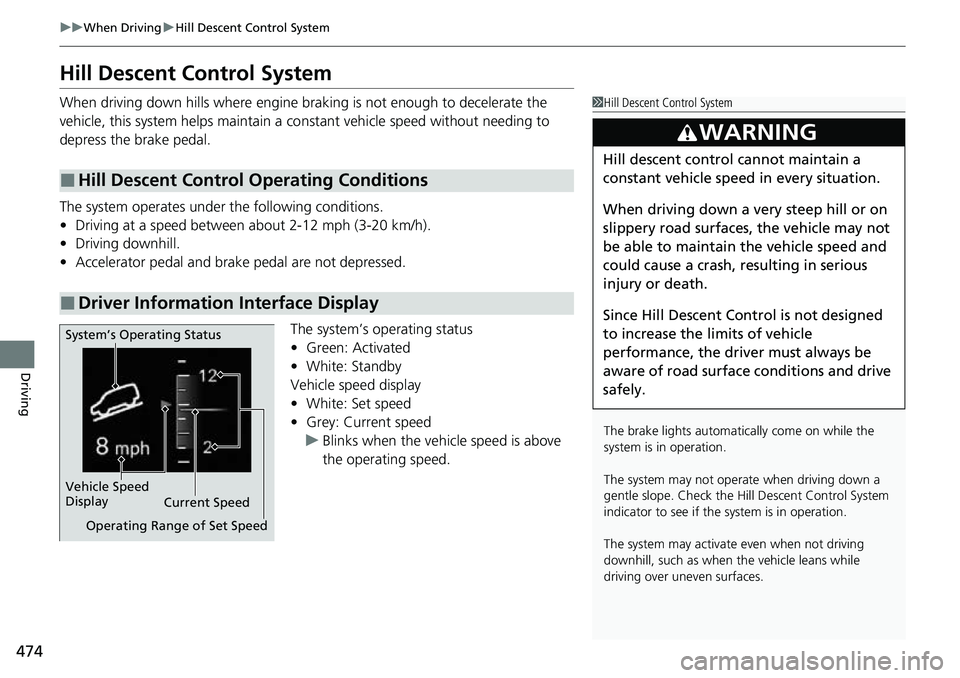
The system’s operating status
•Green: Activated
• White: Standby
Vehicle speed display
• White: Set speed
• Grey: Current speed
u Blinks when the vehicle speed is above
the operating speed.
■Hill Descent Control Operating Conditions
■Driver Information Interface Display
1Hill Descent Control System
The brake lights automati cally come on while the
system is in operation.
The system may not operate when driving down a
gentle slope. Check the Hill Descent Control System
indicator to see if the system is in operation.
The system may activate even when not driving
downhill, such as when the vehicle leans while
driving over uneven surfaces.
3WARNING
Hill descent control cannot maintain a
constant vehicle speed in every situation.
When driving down a very steep hill or on
slippery road surfaces, the vehicle may not
be able to maintain the vehicle speed and
could cause a crash, resulting in serious
injury or death.
Since Hill Descent Control is not designed
to increase the limits of vehicle
performance, the driver must always be
aware of road surface conditions and drive
safely.
System’s Operating Status
Vehicle Speed
Display Current Speed
Operating Range of Set Speed
Page 499 of 719
498
uuHonda Sensing ®u Collision Mitigation Braking SystemTM (CMBSTM)
Driving
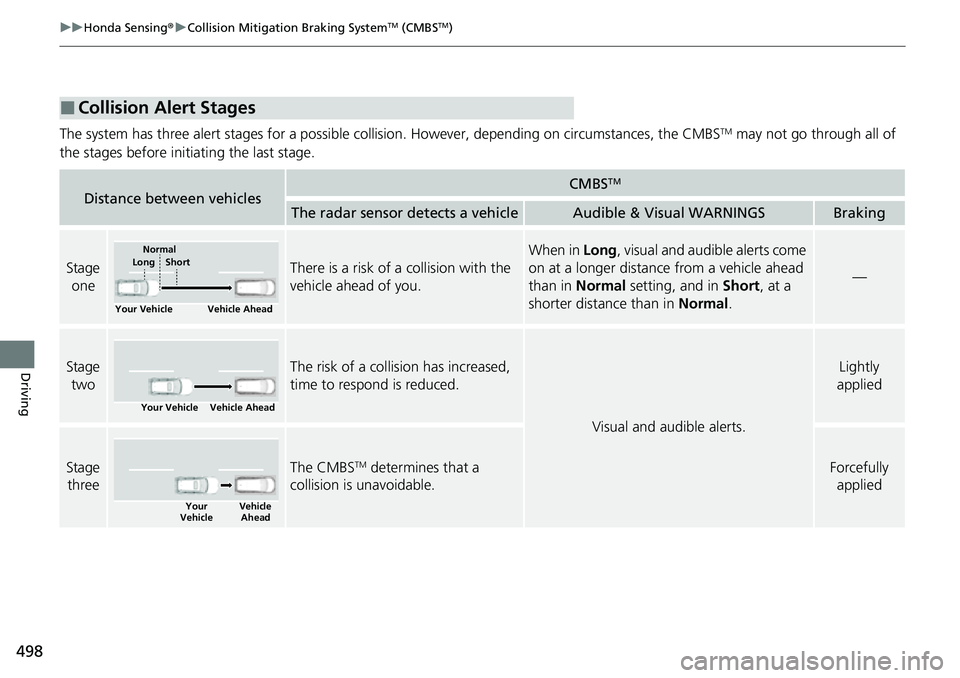
The system has three alert stages for a possible collision. However, depending on circumstances, the CMBSTM may not go through all of
the stages before initiating the last stage.
■Collision Alert Stages
Distance between vehiclesCMBSTM
The radar sensor detects a vehicleAudible & Visual WARNINGSBraking
Stage oneThere is a risk of a collision with the
vehicle ahead of you.
When in Long, visual and audible alerts come
on at a longer distance from a vehicle ahead
than in Normal setting, and in Short, at a
shorter distance than in Normal.
—
Stage
twoThe risk of a collision has increased,
time to respond is reduced.
Visual and audible alerts.
Lightly
applied
Stage three The CMBSTM determines that a
collision is unavoidable.Forcefully applied
Your Vehicle Vehicle Ahead
Normal
Short
Long
Your Vehicle Vehicle Ahead
Your
Vehicle Vehicle
Ahead
Page 500 of 719
Continued499
uuHonda Sensing ®u Collision Mitigation Braking SystemTM (CMBSTM)
Driving
You can turn the system on and off using the driver information interface.
2 Switching the Display P. 117
2 Safety Support P. 130
The CMBSTM is turned on every time you turn the power system on, even if you
turned it off the last ti me you drove the vehicle.
■CMBSTM On and Off1CMBSTM On and Off
You cannot turn the CMBS
TM off while driving.
The CMBS
TM may automatically shut off, and the
safety support indicator (amb er) will come and stay
on under certain conditions: 2 CMBS
TM Conditions and Limitations P. 500
When the CMBS
TM is activated, it will continue to
operate even if the accele rator pedal is partially
depressed. However, it w ill be canceled if the
accelerator pedal is fully depressed.
Have your vehicle checked by a dealer if you find any
unusual behavior of the system (e.g., the warning
message appears too frequently).
The Vehicle Stability Assist
TM (VSA ®) system, brake
system (Amber), Adaptive Cruise Control (ACC) with
Low Speed Follow, low tire pressure/TPMS
* and
safety support indicators may come on in amber
along with a message in the gauge when you set the
power mode to ON after reconnecting the battery.
Drive a short distance at more than 12 mph (20 km/h).
Each indicator should go off. If any do not, have your
vehicle checked by a dealer.
* Not available on all models
Page 508 of 719
507
uuHonda Sensing ®u Low Speed Braking Control*
Continued
Driving
Low Speed Braking Control*
Using sonar sensors located on the front and r ear bumpers, this system can detect if
there is danger of a potential collision with a wall or other obstacle during normal
driving or when the accelerator pedal is depressed with too much force. The system
then assists in avoiding collisions and reducing damage from impact through
assistive braking and/or assistive driving power suppression.1 Low Speed Braking Control*
If the Low Speed Braking Control activates in a
situation where you do not want automatic brake
application (such as when the vehicle is between two
railroad crossing gates), simply press the brake pedal
to deactivate the system and then continue to drive
as intended.
3WARNING
The Low Speed Braking Control System
cannot avoid all collisions and may not
reduce damage in each situation where the
accelerator is mistakenly or aggressively
pressed. Overreliance on the system may
result in a collision with serious injury or
death. Always check your surroundings,
your shift position, and your pedal use.
Driver remains responsible for safely
operating the vehicle.
* Not available on all models
Page 514 of 719
513
uuHonda Sensing ®u Adaptive Cruise Control (ACC) with Low Speed Follow
Continued
Driving
Adaptive Cruise Control (ACC) with Low Speed Follow
Helps maintain a constant vehicle speed and a set following-interval behind a vehicle
detected ahead of yours and, if the detect ed vehicle comes to a stop, can decelerate
and stop your ve hicle, without you having to keep your foot on the brake or the
accelerator.
When ACC with Low Speed Follo w slows your vehicle by applying the brakes, your
vehicle’s brake lights will illuminate.1 Adaptive Cruise Control (ACC) with Low Speed Follow
Important Reminder
As with any system, there are limits to ACC with Low
Speed Follow. Use the brake pedal whenever
necessary, and always keep a safe interval between
your vehicle and other vehicles.
For directions on the prop er handling of the radar
sensor, refer to the following page. 2 Radar Sensor P. 570
You can read about handling information for the
camera equipped with this system. 2 Front Sensor Camera P. 568
3WARNING
Improper use of ACC with Low Speed
Follow can lead to a crash.
Use ACC with Low Speed Follow only when
driving on expressways or freeways and in
good road and weather conditions.
3WARNING
ACC with Low Speed Follow has limited
braking capability and may not stop your
vehicle in time to avoid a collision with a
vehicle that quickly stops in front of you.
Always be prepared to apply the brake
pedal if the conditions require.
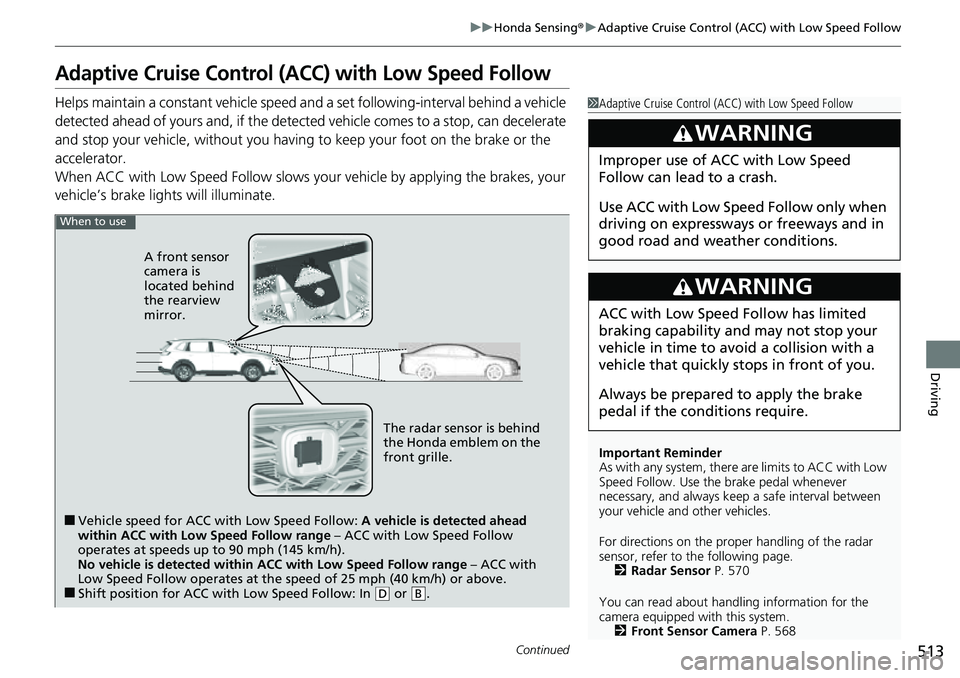
When to use
■Vehicle speed for ACC wi th Low Speed Follow: A vehicle is detected ahead
within ACC with Low Speed Follow range – ACC with Low Speed Follow
operates at speeds up to 90 mph (145 km/h).
No vehicle is detected within ACC with Low Speed Follow range – ACC with
Low Speed Follow operates at the speed of 25 mph (40 km/h) or above.
■Shift position for ACC with Low Speed Follow: In ( D or .B
The radar sensor is behind
the Honda emblem on the
front grille.
A front sensor
camera is
located behind
the rearview
mirror.