eco mode HONDA CRV 2023 Repair Manual
[x] Cancel search | Manufacturer: HONDA, Model Year: 2023, Model line: CRV, Model: HONDA CRV 2023Pages: 719, PDF Size: 13.43 MB
Page 349 of 719
348
uuGeneral Information on the Audio System uCompatible iPod, iPhone, and USB Flash Drives
Features
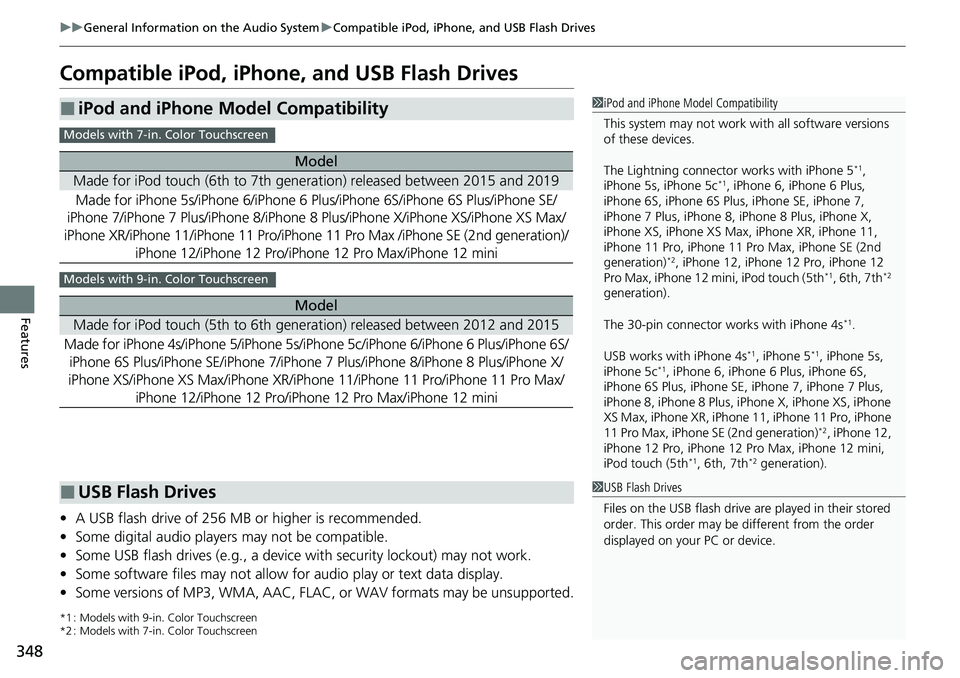
Compatible iPod, iPhone, and USB Flash Drives
• A USB flash drive of 256 MB or higher is recommended.
• Some digital audio players may not be compatible.
• Some USB flash drives (e.g., a device with security lockout) may not work.
• Some software files may not allow for audio play or text data display.
• Some versions of MP3, WMA, AAC, FLAC, or WAV formats may be unsupported.
*1 : Models with 9-in. Color Touchscreen
*2 : Models with 7-in. Color Touchscreen
■iPod and iPhone Model Compatibility
Model
Made for iPod touch (6th to 7th generation) released between 2015 and 2019
Made for iPhone 5s/iPhone 6/iPhone 6 Plus/iPhone 6S/i Phone 6S Plus/iPhone SE/
iPhone 7/iPhone 7 Plus/iPhone 8/iPhone 8 Plus/iPhone X/iPhone XS/iPhone XS Max/
iPhone XR/iPhone 11/iPhone 11 Pro/iPhone 11 Pro Max /iPhone SE (2nd generation)/
iPhone 12/iPhone 12 Pr o/iPhone 12 Pro Max/iPhone 12 mini
Model
Made for iPod touch (5th to 6th generation) released between 2012 and 2015
Made for iPhone 4s/iPhone 5/ iPhone 5s/iPhone 5c/iPhone 6/iPhone 6 Plus/iPhone 6S/
iPhone 6S Plus/iPhone SE/iPhone 7/iPhone 7 Plus/iPhone 8/iPhone 8 Plus/iPhone X/
iPhone XS/iPhone XS Max/iPhone XR/iP hone 11/iPhone 11 Pro/iPhone 11 Pro Max/
iPhone 12/iPhone 12 Pro/iPhone 12 Pro Max/iPhone 12 mini
1iPod and iPhone Model Compatibility
This system may not work with all software versions
of these devices.
The Lightning connector works with iPhone 5
*1,
iPhone 5s, iPhone 5c*1, iPhone 6, iPhone 6 Plus,
iPhone 6S, iPhone 6S Plus, iPhone SE, iPhone 7,
iPhone 7 Plus, iPhone 8, iPhone 8 Plus, iPhone X,
iPhone XS, iPhone XS Ma x, iPhone XR, iPhone 11,
iPhone 11 Pro, iPhone 11 Pr o Max, iPhone SE (2nd
generation)
*2, iPhone 12, iPhone 12 Pro, iPhone 12
Pro Max, iPhone 12 mi ni, iPod touch (5th*1, 6th, 7th*2
generation).
The 30-pin connector works with iPhone 4s
*1.
USB works with iPhone 4s
*1, iPhone 5*1, iPhone 5s,
iPhone 5c*1, iPhone 6, iPhone 6 Plus, iPhone 6S,
iPhone 6S Plus, iPhone SE, iPhone 7, iPhone 7 Plus,
iPhone 8, iPhone 8 Plus, iP hone X, iPhone XS, iPhone
XS Max, iPhone XR, iPhone 11, iPhone 11 Pro, iPhone
11 Pro Max, iPhone SE (2nd generation)
*2, iPhone 12,
iPhone 12 Pro, iPhone 12 Pro Max, iPhone 12 mini,
iPod touch (5th
*1, 6th, 7th*2 generation).
Models with 7-in. Color Touchscreen
Models with 9-in. Color Touchscreen
■USB Flash Drives1 USB Flash Drives
Files on the USB flash drive are played in their stored
order. This order may be different from the order
displayed on your PC or device.
Page 379 of 719
378
uuCustomized Features u
Features
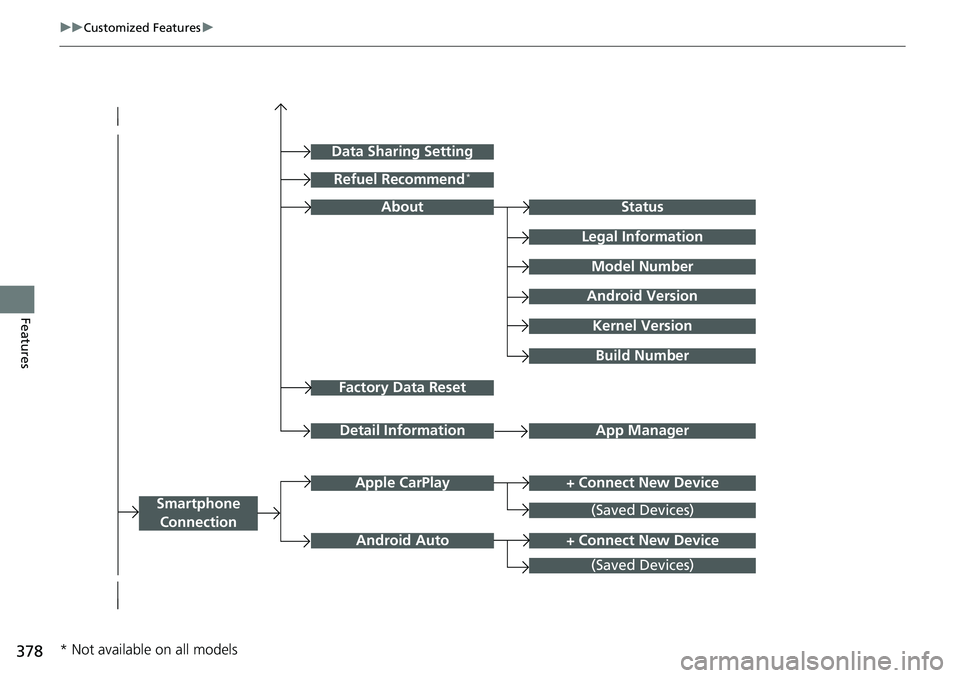
Factory Data Reset
Status
Legal Information
Build Number
Data Sharing Setting
Model Number
Android Version
Kernel Version
App ManagerDetail Information
About
+ Connect New DeviceApple CarPlay
Smartphone
Connection
Android Auto
(Saved Devices)
+ Connect New Device
(Saved Devices)
Refuel Recommend*
* Not available on all models
Page 383 of 719
382
uuCustomized Features u
Features
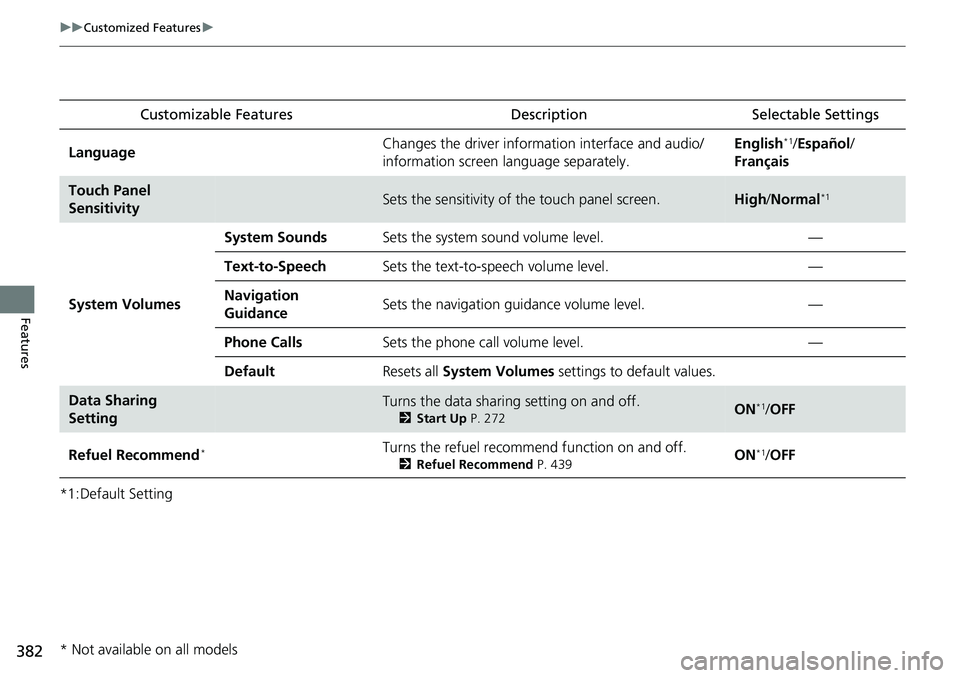
*1:Default SettingCustomizable Features
Description Selectable Settings
LanguageChanges the driver information interface and audio/
information screen language separately.English*1/Español /
Français
Touch Panel
SensitivitySets the sensitivity of the touch panel screen.High /Normal*1
System Volumes
System SoundsSets the system sound volume level.—
Text-to-SpeechSets the text-to-speech volume level.—
Navigation
GuidanceSets the navigation guidance volume level.—
Phone CallsSets the phone call volume level.—
DefaultResets all System Volumes settings to default values.
Data Sharing
SettingTurns the data sharing setting on and off.
2Start Up P. 272ON*1/OFF
Refuel Recommend*Turns the refuel recommend function on and off.
2 Refuel Recommend P. 439ON*1/OFF
* Not available on all models
Page 390 of 719
389
uuCustomized Features u
Continued
Features
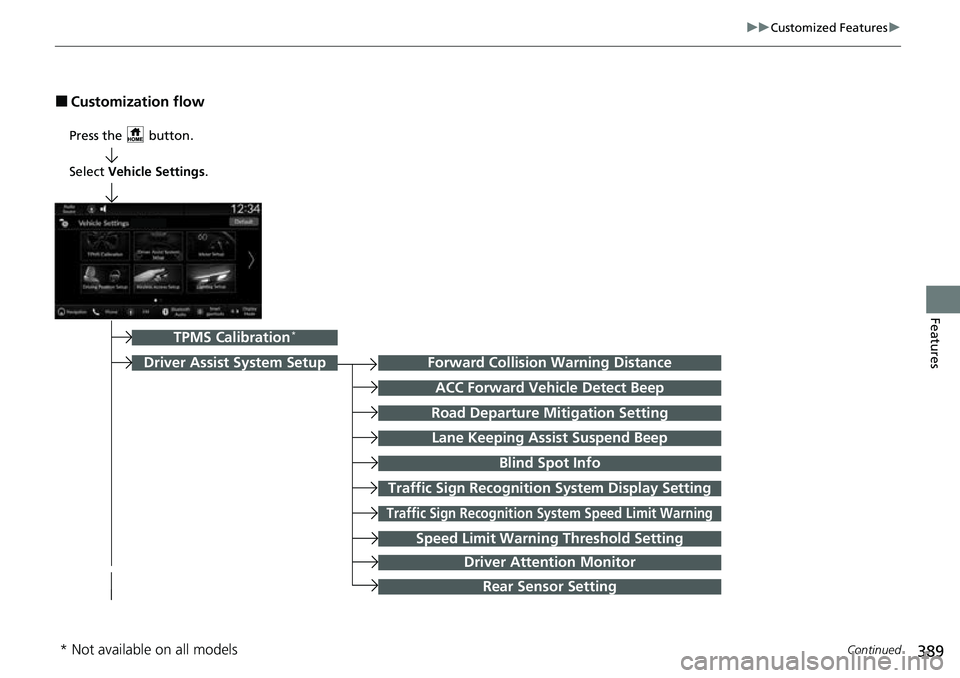
■Customization flow
Press the button.
Forward Collision Warning Distance
ACC Forward Vehicle Detect Beep
Traffic Sign Recognition System Display Setting
Road Departure Mitigation Setting
Lane Keeping Assist Suspend Beep
Blind Spot Info
Traffic Sign Recognition Sy stem Speed Limit Warning
Speed Limit Warning Threshold Setting
Driver Assist System Setup
TPMS Calibration*
Select Vehicle Settings .
Driver Attention Monitor
Rear Sensor Setting
* Not available on all models
Page 392 of 719
391
uuCustomized Features u
Continued
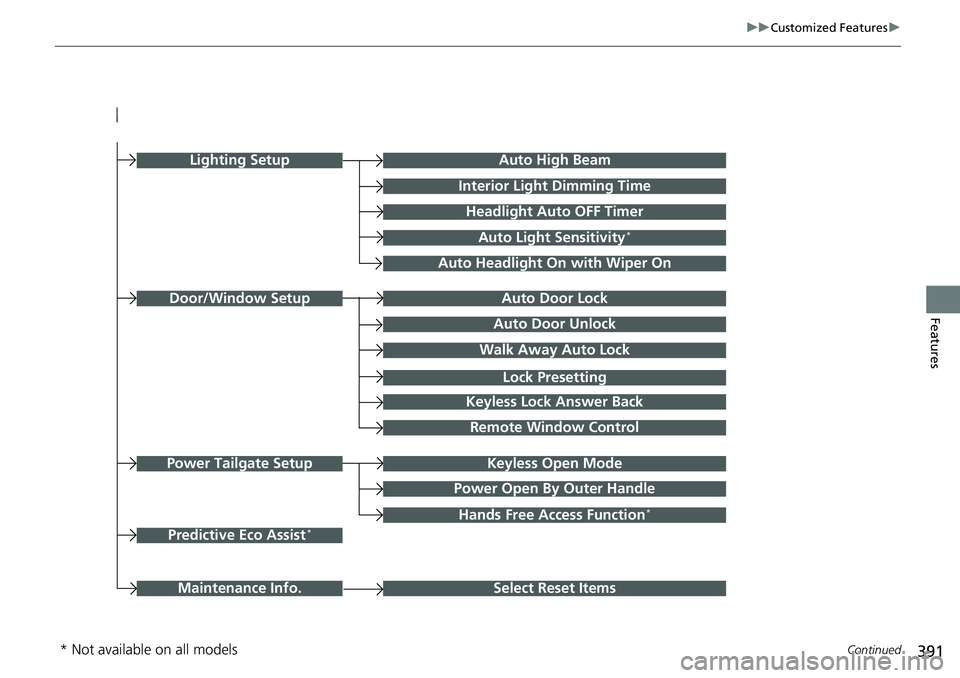
FeaturesAuto Door Unlock
Auto Door Lock
Walk Away Auto Lock
Keyless Lock Answer Back
Door/Window Setup
Lighting SetupAuto High Beam
Interior Light Dimming Time
Headlight Auto OFF Timer
Auto Light Sensitivity*
Auto Headlight On with Wiper On
Select Reset ItemsMaintenance Info.
Remote Window Control
Keyless Open Mode
Power Open By Outer Handle
Power Tailgate Setup
Lock Presetting
Hands Free Access Function*
Predictive Eco Assist*
* Not available on all models
Page 394 of 719
393
uuCustomized Features u
Continued
Features
*1:Default Setting
Customizable Features Description Selectable Settings
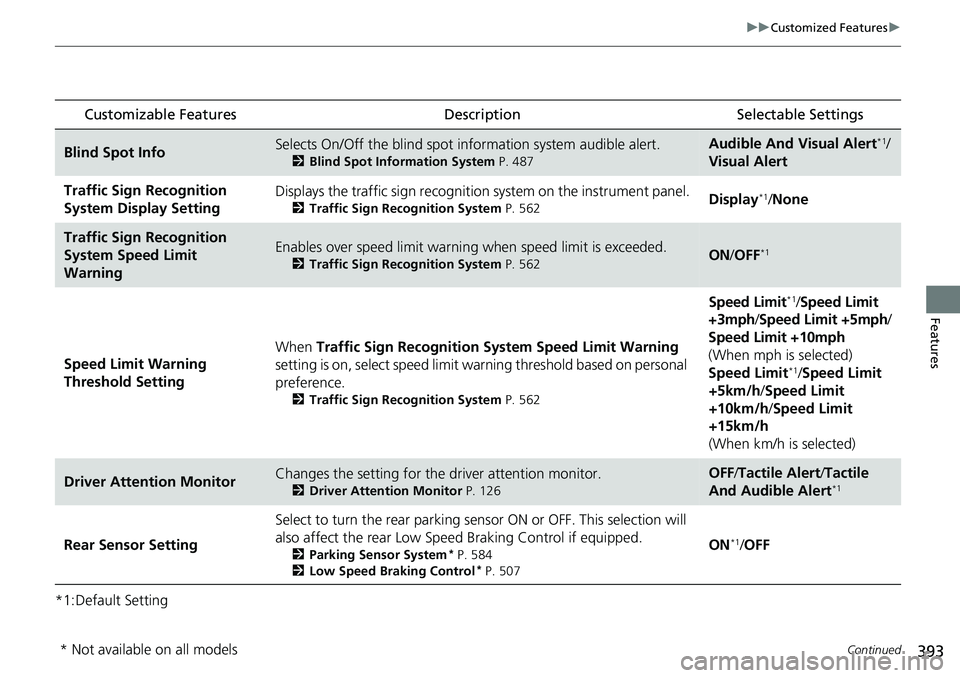
Blind Spot InfoSelects On/Off the blind spot information system audible alert.
2Blind Spot Information System P. 487
Audible And Visual Alert*1/
Visual Alert
Traffic Sign Recognition
System Display SettingDisplays the traffic sign recognition system on the instrument panel.
2 Traffic Sign Recognition System P. 562Display*1/None
Traffic Sign Recognition
System Speed Limit
WarningEnables over speed limit warning when speed limit is exceeded.
2Traffic Sign Recognition System P. 562ON/OFF*1
Speed Limit Warning
Threshold Setting When
Traffic Sign Recognition Sy stem Speed Limit Warning
setting is on, select speed limit warning threshold based on personal
preference.
2 Traffic Sign Recognition System P. 562
Speed Limit*1/Speed Limit
+3mph/ Speed Limit +5mph /
Speed Limit +10mph
(When mph is selected)
Speed Limit
*1/ Speed Limit
+5km/h /Speed Limit
+10km/h /Speed Limit
+15km/h
(When km/h is selected)
Driver Attention MonitorChanges the setting for the driver attention monitor.
2Driver Attention Monitor P. 126
OFF/Tactile Alert /Tactile
And Audible Alert*1
Rear Sensor Setting Select to turn the rear parking sens
or ON or OFF. This selection will
also affect the rear Low Speed Braking Control if equipped.2Parking Sensor System* P. 584
2 Low Speed Braking Control* P. 507
ON*1/OFF
* Not available on all models
Page 399 of 719
398
uuCustomized Features u
Features
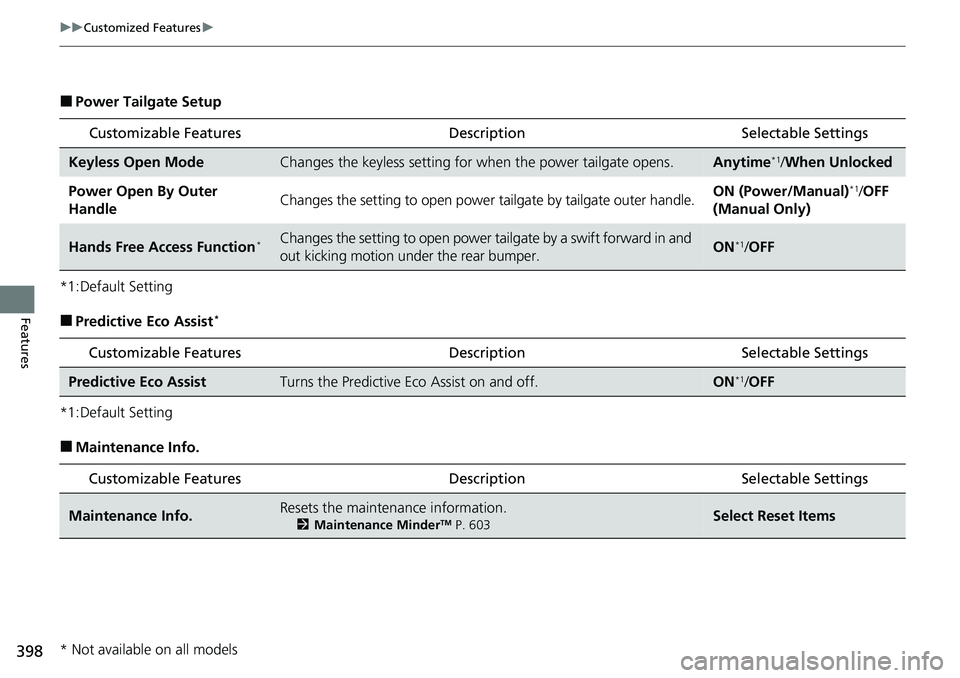
■Power Tailgate Setup
*1:Default Setting
■Predictive Eco Assist*
*1:Default Setting
■Maintenance Info.
Customizable Features Description Selectable Settings
Keyless Open ModeChanges the keyless setting for when the power tailgate opens.Anytime*1/When Unlocked
Power Open By Outer
HandleChanges the setting to open power tailgate by tailgate outer handle.ON (Power/Manual)*1/OFF
(Manual Only)
Hands Free Access Function*Changes the setting to open power tailgate by a swift forward in and
out kicking motion under the rear bumper.ON*1/ OFF
Customizable Features Desc ription Selectable Settings
Predictive Eco AssistTurns the Predictive Eco Assist on and off.ON*1/OFF
Customizable Features Desc ription Selectable Settings
Maintenance Info.Resets the maintenance information.
2Maintenance MinderTM P. 603Select Reset Items
* Not available on all models
Page 404 of 719
403
uuBluetooth ® HandsFreeLink ®u HFL Menus
Continued
Features
HFL Menus
The power mode must be in ACCESSO RY or ON to use the system.1HFL Menus
To use HFL, you must first pair your Bluetooth-
compatible cell phone to th e system while the vehicle
is parked.
Some functions are limited while driving. A message
appears on the screen when the vehicle is moving
and the operation is canceled.
PHONE button
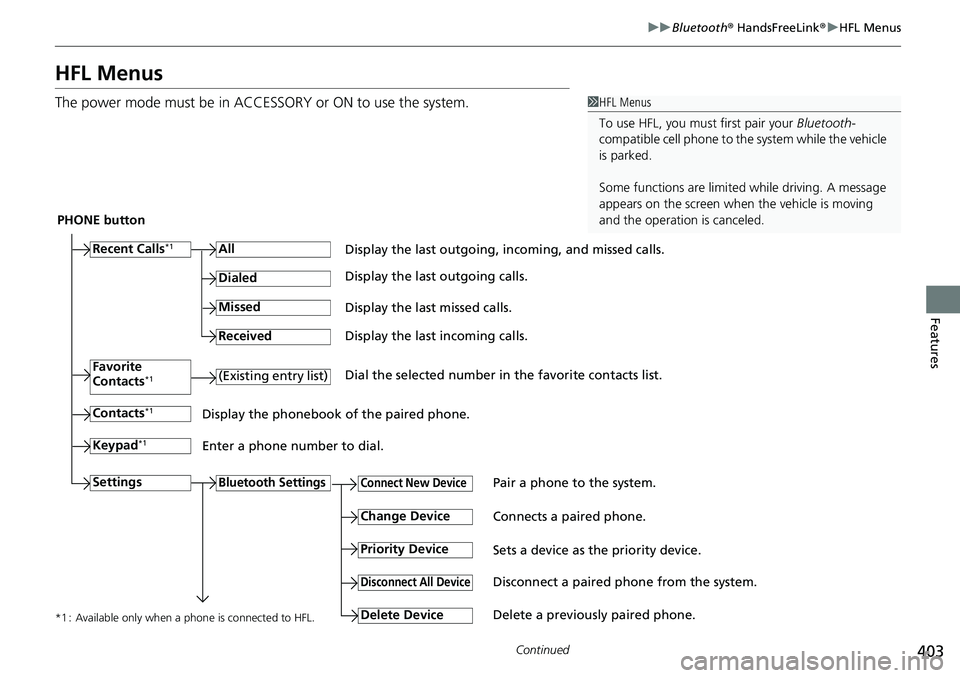
Recent Calls
*1All
Pair a phone to the system.Connect New Device
Change DeviceConnects a paired phone.
Priority Device
Sets a device as the priority device.
Bluetooth Settings
Keypad*1
Settings
Favorite
Contacts*1(Existing entry list)
Contacts*1
Dialed
Missed
Received
Display the last outgoing, incoming, and missed calls.
Display the last outgoing calls.
Display the last missed calls.
Display the last incoming calls.
Dial the selected number in the favorite contacts list.
Display the phonebook of the paired phone.
Enter a phone number to dial.
Disconnect All DeviceDisconnect a paired phone from the system.
Delete Device
Delete a previously paired phone.*1 : Available only when a phone is connected to HFL.
Page 440 of 719
439
Features
Refuel Recommend
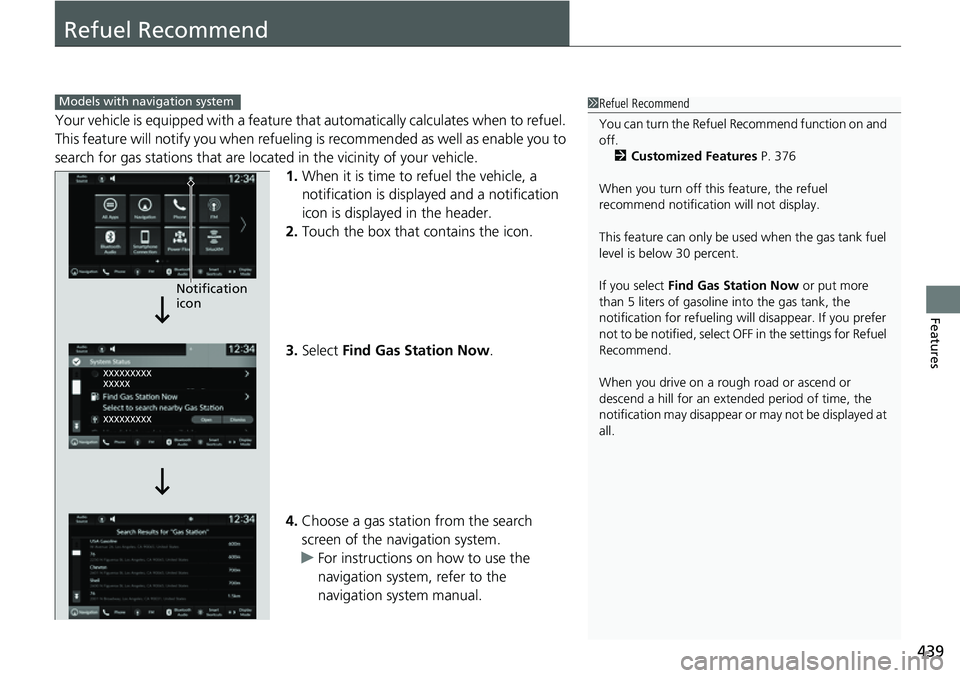
Your vehicle is equipped with a feature that automatically calculates when to refuel.
This feature will notify you when refueling is recommen ded as well as enable you to
search for gas stations that are loca ted in the vicinity of your vehicle.
1. When it is time to refuel the vehicle, a
notification is displayed and a notification
icon is displayed in the header.
2. Touch the box that contains the icon.
3. Select Find Gas Station Now .
4. Choose a gas station from the search
screen of the navigation system.
u For instructions on how to use the
navigation system, refer to the
navigation system manual.
1Refuel Recommend
You can turn the Refuel Recommend function on and
off.
2 Customized Features P. 376
When you turn off this feature, the refuel
recommend notification will not display.
This feature can only be us ed when the gas tank fuel
level is below 30 percent.
If you select Find Gas Station Now or put more
than 5 liters of gasoline into the gas tank, the
notification for refueling will disappear. If you prefer
not to be notified, select O FF in the settings for Refuel
Recommend.
When you drive on a rough road or ascend or
descend a hill for an ex tended period of time, the
notification may disappear or may not be displayed at
all.Models with navigation system
Notification
icon
Page 442 of 719
441
Driving
This chapter discusses driving and refueling.
Before Driving................................... 442
Towing a Trailer ................................ 447
Off-Highway Driving Guidelines ..... 453
When Driving Turning on the Power ...................... 455
Precautions While Driving................. 462
Transmission........................................ 463Shifting ............................................ 464
Deceleration Paddle Selector ............ 466
Acoustic Vehicle Al erting System ...... 469
Drive Mode Switch ........................... 470
Hill Descent Control System ............. 474
Vehicle Stability AssistTM (VSA®), aka Electronic
Stability Control (ESC), System .............. 476
Agile Handling Assist ....................... 478
Real Time AWD with Intelligent Control System
TM*...................................... 479Tire Pressure Monitoring System (TPMS) .... 480Tire Pressure Monitoring System (TPMS) - Required Federal Explanation ......... 485
Blind Spot Information System ......... 487
High Voltage Battery ........................ 491
Honda Sensing ®................................ 492
Collision Mitigati on Braking System
TM
(CMBSTM) ....................................... 495 Low Speed Braking Control
*............ 507
Adaptive Cruise Control (ACC) with Low Speed Follow ................................. 513
Lane Keeping Assist System (LKAS).... 533
Traffic Jam Assist ............................. 545
Road Departure Miti gation System... 554
Traffic Sign Recognition System ....... 562
Front Sensor Camera ....................... 568
Radar Sensor ................................... 570
Sonar Sensors
*................................ 571
Braking .............................................. 572
Parking Your Vehicle ........................ 582
Multi-View Rear Camera .................. 593
Refueling ........................................... 595
Fuel Economy and CO
2 Emissions .... 598
* Not available on all models