instrument panel HONDA CRV 2023 Repair Manual
[x] Cancel search | Manufacturer: HONDA, Model Year: 2023, Model line: CRV, Model: HONDA CRV 2023Pages: 719, PDF Size: 13.43 MB
Page 203 of 719
202
uuOperating the Switches Around the Steering Wheel uAdjusting the Steering Wheel
Controls
Adjusting the Steering Wheel
The steering wheel height and distance from your body can be adjusted so that you
can comfortably grip the steering wheel in an appropriate driving posture.
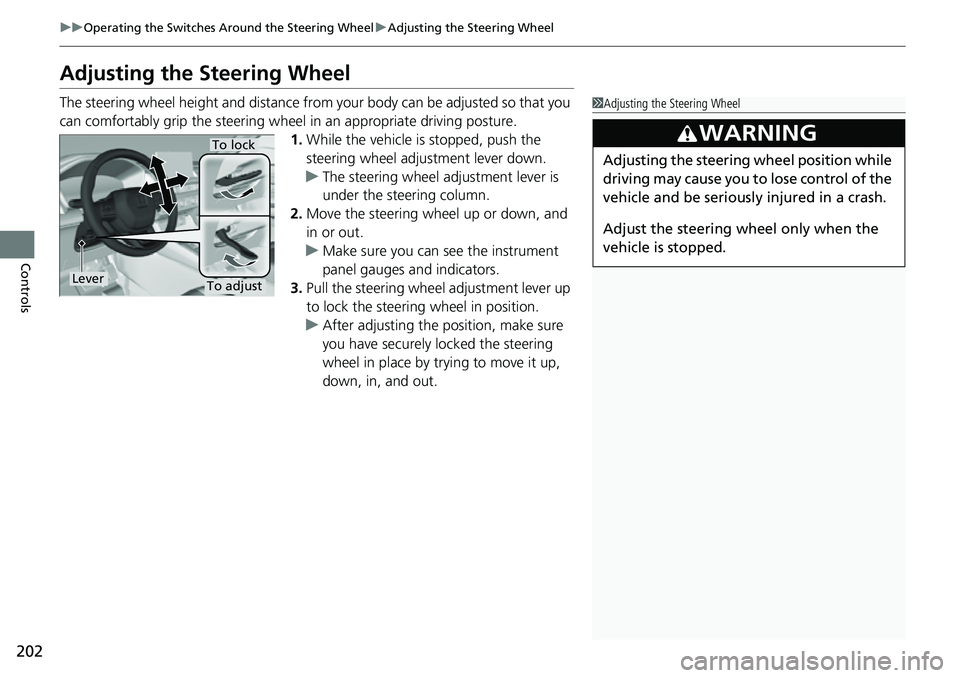
1.While the vehicle is stopped, push the
steering wheel adjustment lever down.
u The steering wheel adjustment lever is
under the steering column.
2. Move the steering wheel up or down, and
in or out.
u Make sure you can see the instrument
panel gauges and indicators.
3. Pull the steering wheel adjustment lever up
to lock the steerin g wheel in position.
u After adjusting the position, make sure
you have securely locked the steering
wheel in place by trying to move it up,
down, in, and out.1Adjusting the Steering Wheel
3WARNING
Adjusting the steering wheel position while
driving may cause you to lose control of the
vehicle and be seriously injured in a crash.
Adjust the steering wheel only when the
vehicle is stopped.To lock
LeverTo adjust
Page 394 of 719
393
uuCustomized Features u
Continued
Features
*1:Default Setting
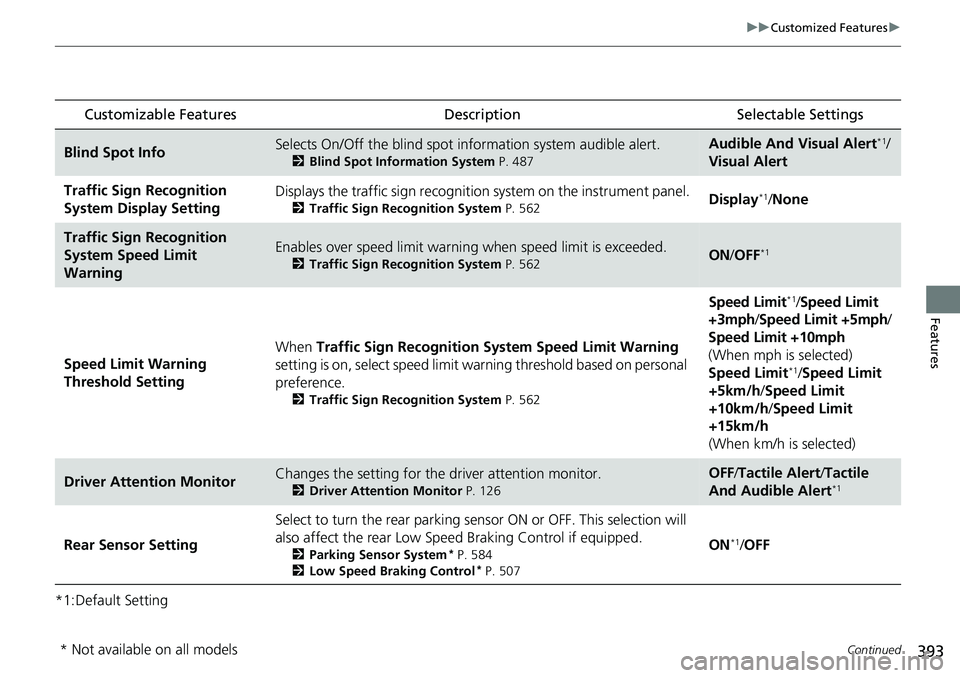
Customizable Features Description Selectable Settings
Blind Spot InfoSelects On/Off the blind spot information system audible alert.
2Blind Spot Information System P. 487
Audible And Visual Alert*1/
Visual Alert
Traffic Sign Recognition
System Display SettingDisplays the traffic sign recognition system on the instrument panel.
2 Traffic Sign Recognition System P. 562Display*1/None
Traffic Sign Recognition
System Speed Limit
WarningEnables over speed limit warning when speed limit is exceeded.
2Traffic Sign Recognition System P. 562ON/OFF*1
Speed Limit Warning
Threshold Setting When
Traffic Sign Recognition Sy stem Speed Limit Warning
setting is on, select speed limit warning threshold based on personal
preference.
2 Traffic Sign Recognition System P. 562
Speed Limit*1/Speed Limit
+3mph/ Speed Limit +5mph /
Speed Limit +10mph
(When mph is selected)
Speed Limit
*1/ Speed Limit
+5km/h /Speed Limit
+10km/h /Speed Limit
+15km/h
(When km/h is selected)
Driver Attention MonitorChanges the setting for the driver attention monitor.
2Driver Attention Monitor P. 126
OFF/Tactile Alert /Tactile
And Audible Alert*1
Rear Sensor Setting Select to turn the rear parking sens
or ON or OFF. This selection will
also affect the rear Low Speed Braking Control if equipped.2Parking Sensor System* P. 584
2 Low Speed Braking Control* P. 507
ON*1/OFF
* Not available on all models
Page 445 of 719
444
uuBefore Driving uDriving Preparation
Driving
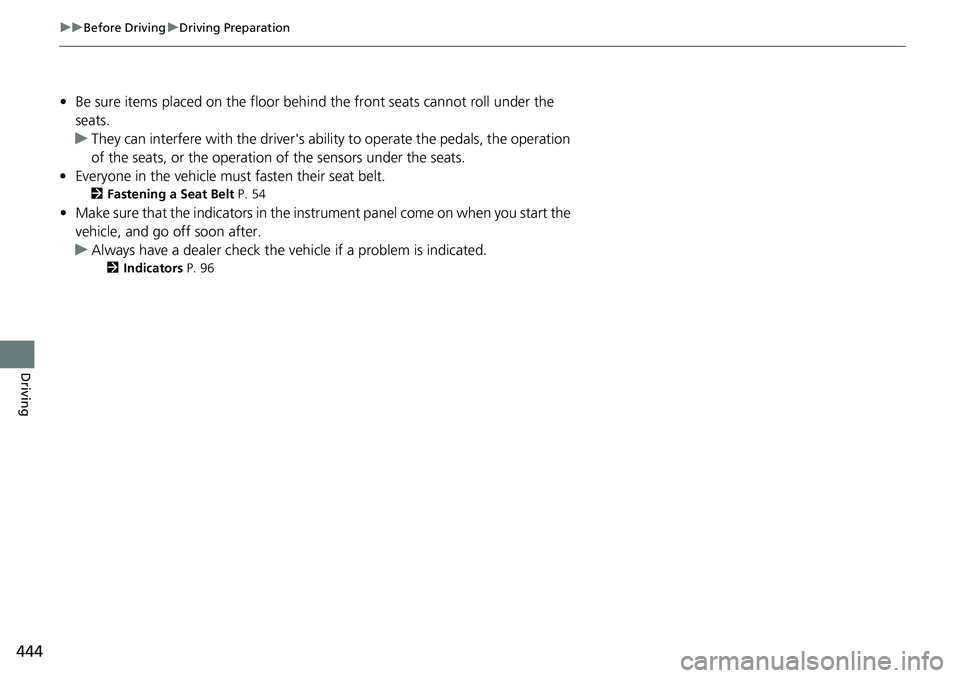
• Be sure items placed on the floor behind the front seats cannot roll under the
seats.
u They can interfere with the driver's ability to operate the pedals, the operation
of the seats, or the operation of the sensors under the seats.
• Everyone in the vehicle must fasten their seat belt.
2Fastening a Seat Belt P. 54
•Make sure that the indicators in the instrument panel come on when you start the
vehicle, and go off soon after.
u Always have a dealer check the vehicle if a problem is indicated.
2 Indicators P. 96
Page 534 of 719
533
uuHonda Sensing ®u Lane Keeping Assist System (LKAS)
Continued
Driving
Lane Keeping Assist System (LKAS)
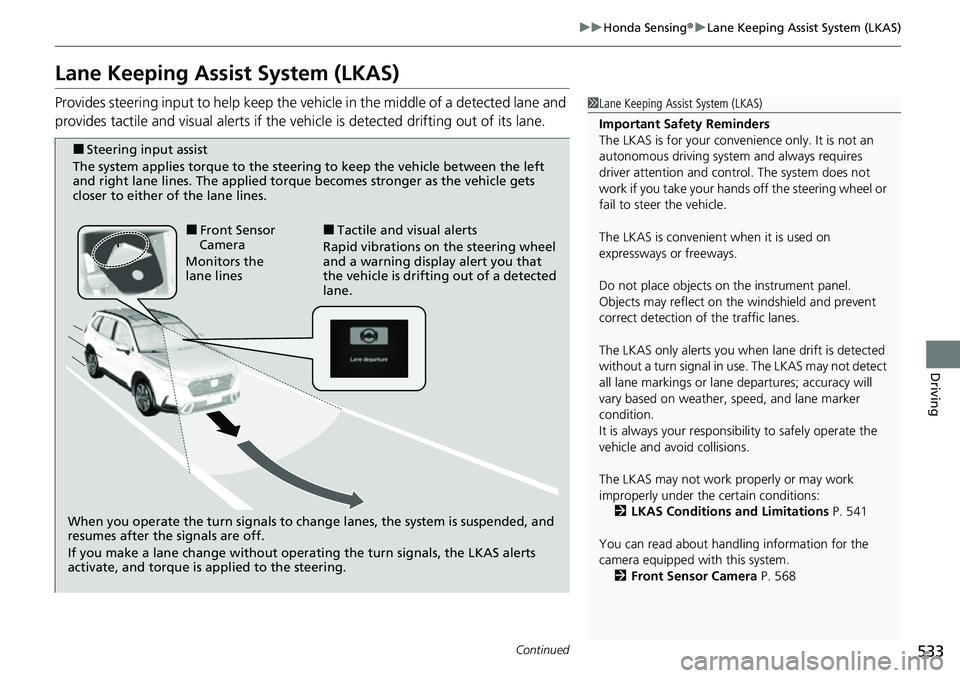
Provides steering input to help keep the vehicle in the middle of a detected lane and
provides tactile and visual al erts if the vehicle is detected drifting out of its lane.1Lane Keeping Assist System (LKAS)
Important Safety Reminders
The LKAS is for your convenience only. It is not an
autonomous driving system and always requires
driver attention and control. The system does not
work if you take your hands off the steering wheel or
fail to steer the vehicle.
The LKAS is convenient when it is used on
expressways or freeways.
Do not place objects on the instrument panel.
Objects may reflect on th e windshield and prevent
correct detection of the traffic lanes.
The LKAS only alerts you when lane drift is detected
without a turn signal in use. The LKAS may not detect
all lane markings or lane departures; accuracy will
vary based on weather, speed, and lane marker
condition.
It is always your responsibility to safely operate the
vehicle and avoid collisions.
The LKAS may not work properly or may work
improperly under the certain conditions:
2 LKAS Conditions and Limitations P. 541
You can read about handling information for the
camera equipped with this system. 2 Front Sensor Camera P. 568
When you operate the turn signals to chan ge lanes, the system is suspended, and
resumes after the signals are off.
If you make a lane change without operating the turn signals, the LKAS alerts
activate, and torque is applied to the steering.
■Front Sensor
Camera
Monitors the
lane lines■Tactile and visual alerts
Rapid vibrations on the steering wheel
and a warning display alert you that
the vehicle is drifting out of a detected
lane.
■Steering input assist
The system applies torque to the steering to keep the vehicle between the left
and right lane lines. The applied torque becomes stronger as the vehicle gets
closer to either of the lane lines.
Page 569 of 719
568
uuHonda Sensing ®u Front Sensor Camera
Driving
Front Sensor Camera
The camera, used in systems such as La ne Keeping Assist System (LKAS), Road
Departure Mitigation system, Adaptive Cruise Control (ACC) with Low Speed
Follow, Traffic Sign Recognition system, Collision Mitigation Braking System
TM
(CMBSTM), and Traffic Jam Assist, is designed to detect an object that triggers any of
the systems to operate their functions.
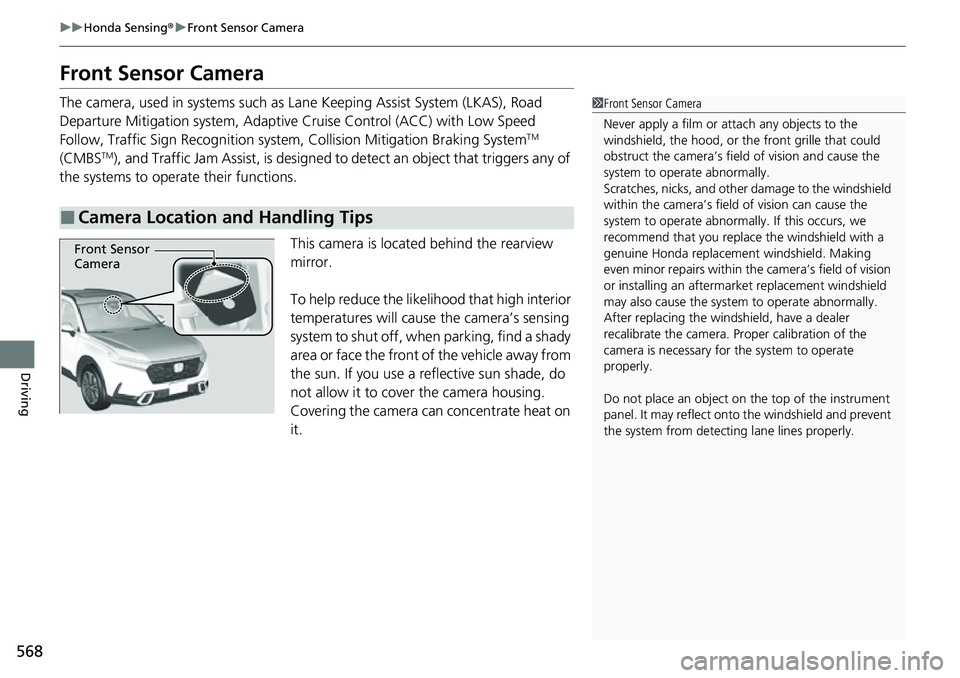
This camera is located behind the rearview
mirror.
To help reduce the likelihood that high interior
temperatures will cause the camera’s sensing
system to shut off, when parking, find a shady
area or face the front of the vehicle away from
the sun. If you use a reflective sun shade, do
not allow it to cover the camera housing.
Covering the camera can concentrate heat on
it.
■Camera Location and Handling Tips
1 Front Sensor Camera
Never apply a film or attach any objects to the
windshield, the hood, or th e front grille that could
obstruct the camera’s fiel d of vision and cause the
system to operate abnormally.
Scratches, nicks, and othe r damage to the windshield
within the camera’s fiel d of vision can cause the
system to operate abnormall y. If this occurs, we
recommend that you replac e the windshield with a
genuine Honda replacem ent windshield. Making
even minor repairs within th e camera’s field of vision
or installing an aftermarket replacement windshield
may also cause the system to operate abnormally.
After replacing the winds hield, have a dealer
recalibrate the camera. Pr oper calibration of the
camera is necessary for the system to operate
properly.
Do not place an object on the top of the instrument
panel. It may reflect onto the windshield and prevent
the system from detecting lane lines properly.
Front Sensor
Camera
Page 713 of 719
712
Index
Heating and Cooling SystemDust and Pollen Filter ............................... 643
HFL (HandsFreeLink ®)....................... 400, 420
High Beam Indicator ................................. 106
High Voltage Battery ................................ 491
Hill Descent Control System ..................... 474
Hill Descent Control System Indicator ..... 108
Hill Start Assist System .............................. 460
Honda App License Agreement ............... 349
Honda Sensing ®................................ 35, 492
HondaLink ®............................................. 320
HondaLink ® Assist ..................................... 437
Hybrid Vehicle SPORT HYBRID i-MMD (int elligent Multi-Mode
Drive) ....................................................... 13
I
Identification Numbers ............................ 696
Engine, Motor and Transmission .............. 696
Vehicle Identification ............................... 696
If the 12-Volt Battery Is Dead .................. 671
Immobilizer System .................................. 176
Indicator .................................................. 107
Indicators ..................................................... 96
12-Volt Battery Charging System ..... 101, 677
Adaptive Cruise Control (ACC) with Low
Speed Follow (Amber) ............................ 109
Adaptive Cruise Control (ACC) with Low Speed Follow (White/Green)........... 109, 514
Anti-lock Brake System (ABS) ................... 103 Auto High-Beam ..................................... 106
Automatic Brake Hold ..................... 101, 577
Automatic Brake Hold System ......... 101, 577
Cruise Mode (White/Green) ..................... 109
Deceleration Paddle Selector ................... 102
ECON Mode .................................... 108, 470
Electric Power Steering (EPS)
System .......................................... 104, 681
EV ........................................................... 100
High Beam .............................................. 106
Hill Descent Control System (White/Green)........................................ 108
Immobilizer System ................................. 107
Lane Keeping Assist System (LKAS)
(Amber) ................................................. 110
Lane Keeping Assist System (LKAS) (White/Green)........................................ 110
Lights On ................................................ 106
Low Fuel (Amber) .................................... 103
Low Tire Pressure/TPMS ... 105, 480, 485, 682
Malfunction Indicator Lamp............. 101, 678
NORMAL Mode ............................... 108, 470
Parking Brake a nd Brake System
(Amber) ......................................... 100, 680
Parking Brake a nd Brake System
(Red) ................................. 98, 99, 679, 680
POWER SYSTEM ...................................... 100
READY .................................................... 100
Safety Support (Amber) ........................... 111
Safety Support (Green/Gray) .................... 113
Seat Belt Reminder ............................ 51, 103 Security System Alarm............................. 107
Shift Position................................... 102, 465
SNOW Mode .................................. 108, 470
SPORT Mode................................... 108, 470
Supplemental Restraint System ......... 75, 104
System Message ..................................... 108
Transmission System ............................... 102
Turn Signal and Hazard Warning ............. 106
Vehicle Stability Assist
TM (VSA
®)
OFF ............................................... 105, 477
Vehicle Stability Assist
TM (VSA ®)
System .......................................... 104, 476
Information .............................................. 693
Instant Fuel Economy .............................. 122
Instrument Panel ........................................ 95
Interior Lights ........................................... 216
Interior Rearview Mirror ......................... 203
iPod ................................................... 251, 311
J
Jump Starting ........................................... 671
Page 717 of 719
716
Index
Towing a Trailer........................................ 447
Equipment and Accessories...................... 448
Load Limits .............................................. 447
Towing Your Vehicle ................................ 452
Behind a Motorhome............................... 452
Emergency............................................... 689
TPMS (Tire Pressure Monitoring System) ......... 480
Indicator .................................................. 105
Traffic Jam Assist ...................................... 545
Traffic Sign Recognition System ...... 115, 562
Transmission .............................................. 464
Creeping ................................................. 463
Fluid ........................................................ 620
Kickdown ................................................ 463
Number ................................................... 696
Operation .......................................... 31, 465
Shift Lever Does Not Move....................... 673
Shift Position Indicator ..................... 102, 465
Shifting.................................................... 464
Trip Computer ........................................... 275
Trip Meter ................................................. 122
TRK (Temporary Repair Kit) ..................... 653
Troubleshooting ....................................... 651
Blown Fuse ...................................... 683, 685
Brake Pedal Vibrates .................................. 39
Buzzer Sounds When Opening Door .......... 40
Emergency Towing .................................. 689
If the 12-Volt Battery Is Dead ................... 671
Noise When Braking .................................. 41
Overheating............................................. 674 Power System Won’t Start ....................... 667
Puncture/Flat Tire .................................... 653
Rear Door Won’t Open...................... 39, 163
Shift Lever Won’t Move ........................... 673
Warning Indicators .................................... 96
Turn Signals .............................................. 187
Indicators (Instrument Panel) ................... 106
Turning on the Power
Does Not Activate ................................... 667
Engine Switch Buzzer .............................. 185
If the 12-Volt Battery Is Dead................... 671
U
Unlocking the Doors ................................ 151
Unlocking the Front Doors
from the Inside ................................. 25, 161
USB Flash Drives ............... 238, 254, 314, 348
USB Ports ................................................... 239
Using the Keyless Access System ............. 151
V
Vanity Mirrors............................................. 11
Vehicle Identification Number ................ 696
Vehicle Stability Assist
TM (VSA ®) .............. 476
Off Button............................................... 477
OFF Indicator ........................................... 105
System Indicator ...................................... 104
Viscosity (Oil) .................................... 613, 695 Voice Control Operation
......................... 293
Audio Commands ................................... 294
General Commands ................................ 294
List Commands ....................................... 295
Navigation Commands............................ 295
Phone Commands .................................. 294
Standard Commands .............................. 295
Voice Portal Screen ................................. 294
Voice Recognition ................................... 293
VSA ® (Vehicle Stability Assist
TM).............. 476
W
Wallpaper ................................................. 276
Warning Indicator On/Blinking ............... 676
Warning Labels .......................................... 93
Warnings .................................................. 134
Warranties (Warranty Manual provided
separately) .............................................. 701
Watts ........................................................ 694
Wear Indicators (Tire) .............................. 636
Wi-Fi Connection ..................................... 327
Window Washers ..................................... 196
Adding/Refilling Fluid .............................. 622
Switch .................................................... 196
Windows (Opening and Closing) ............ 179
Windshield ............................................... 196
Cleaning ......................................... 644, 647
Defrosting/Defogging ............................. 234
Washer Fluid ........................................... 622
Wiper Blades........................................... 627