light HONDA CRV 2023 Repair Manual
[x] Cancel search | Manufacturer: HONDA, Model Year: 2023, Model line: CRV, Model: HONDA CRV 2023Pages: 719, PDF Size: 13.43 MB
Page 370 of 719
369
uuCustomized Features u
Continued
Features
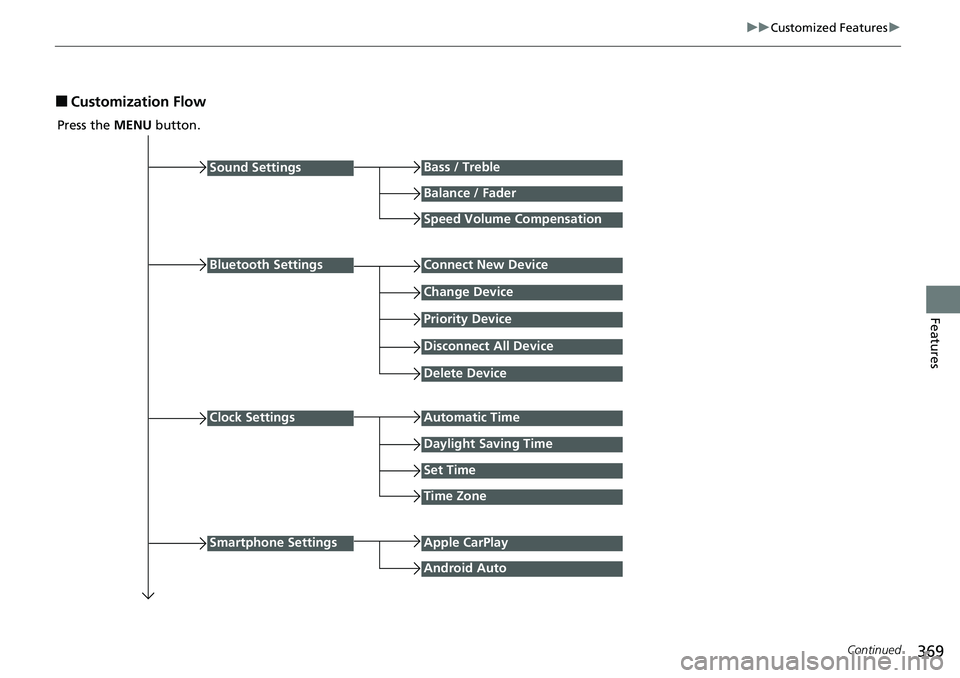
■Customization Flow
Press the MENU button.
Sound Settings
Bluetooth Settings
Bass / Treble
Balance / Fader
Speed Volume Compensation
Connect New Device
Change Device
Priority Device
Clock Settings
Smartphone Settings
Disconnect All Device
Delete Device
Automatic Time
Set Time
Time Zone
Apple CarPlay
Android Auto
Daylight Saving Time
Page 373 of 719
372
uuCustomized Features u
Features
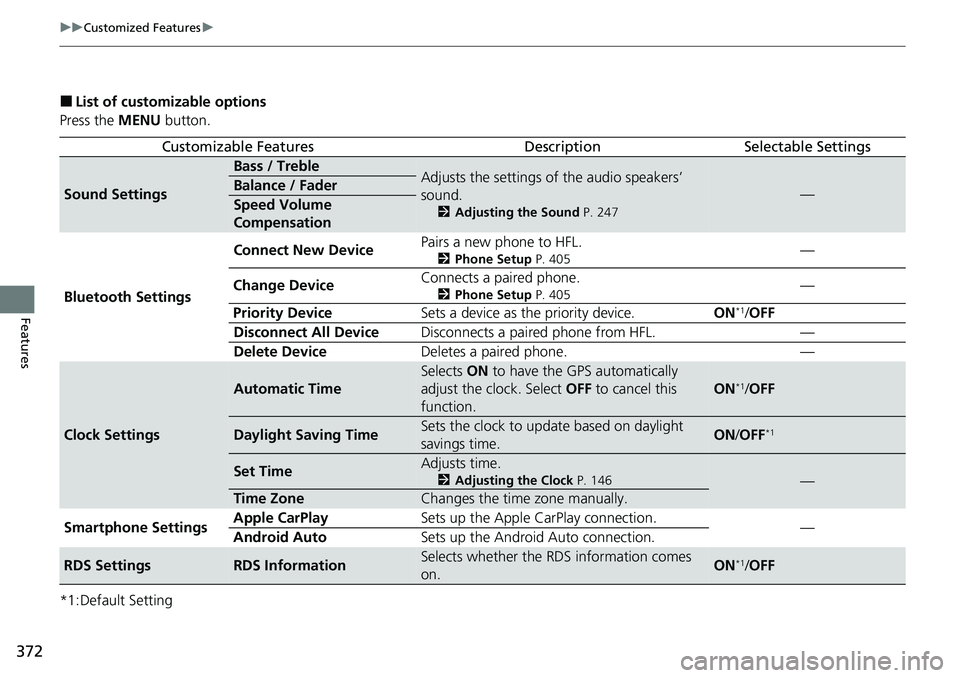
■List of customizable options
Press the MENU button.
*1:Default Setting
Customizable FeaturesDescriptionSelectable Settings
Sound Settings
Bass / TrebleAdjusts the settings of the audio speakers’
sound.
2 Adjusting the Sound P. 247
—Balance / Fader
Speed Volume
Compensation
Bluetooth Settings Connect New Device
Pairs a new phone to HFL.
2
Phone Setup P. 405—
Change Device Connects a paired phone.
2
Phone Setup P. 405—
Priority Device Sets a device as the priority device. ON
*1/OFF
Disconnect All Device Disconnects a paired phone from HFL. —
Delete Device Deletes a paired phone. —
Clock Settings
Automatic Time
Selects ON to have the GPS automatically
adjust the clock. Select OFF to cancel this
function.
ON*1/ OFF
Daylight Saving TimeSets the clock to update based on daylight
savings time.ON /OFF*1
Set TimeAdjusts time.
2 Adjusting the Clock P. 146—
Time ZoneChanges the time zone manually.
Smartphone Settings Apple CarPlay
Sets up the Apple CarPlay connection.
—
Android Auto Sets up the Android Auto connection.
RDS SettingsRDS InformationSelects whether the RDS information comes
on.ON*1/OFF
Page 378 of 719
377
uuCustomized Features u
Continued
Features
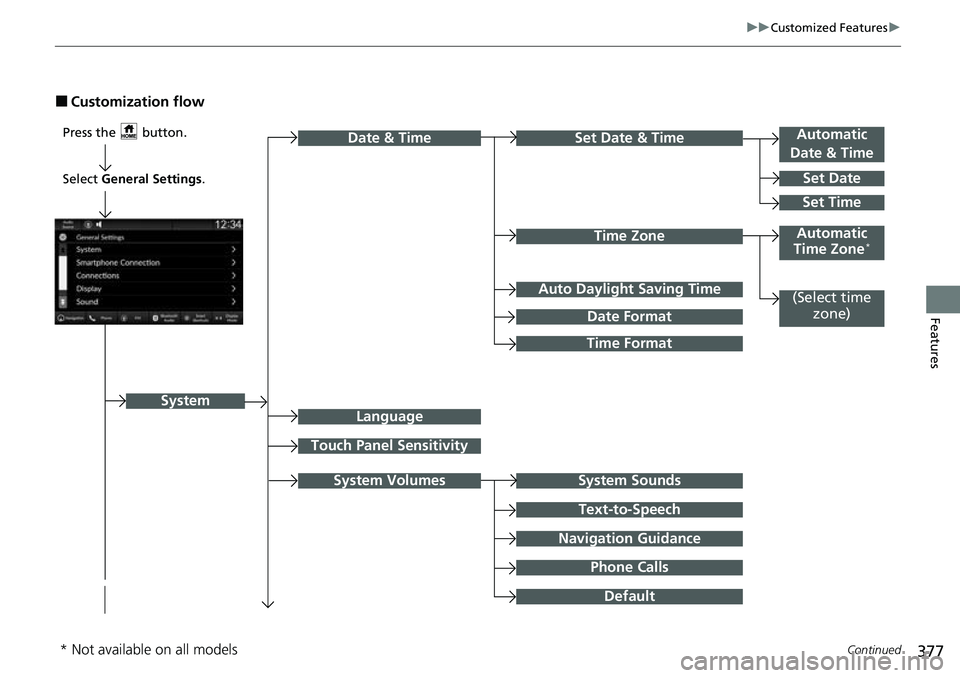
■Customization flow
Press the button.Automatic
Date & Time
Set Date
Touch Panel Sensitivity
Set Date & Time
System Sounds
Date & Time
System
Auto Daylight Saving Time
Date Format
Time Format
Text-to-Speech
Navigation Guidance
Phone Calls
Set Time
Automatic
Time Zone*
System Volumes
Language
Default
Select General Settings.
Time Zone
(Select time
zone)
* Not available on all models
Page 382 of 719
381
uuCustomized Features u
Continued
Features
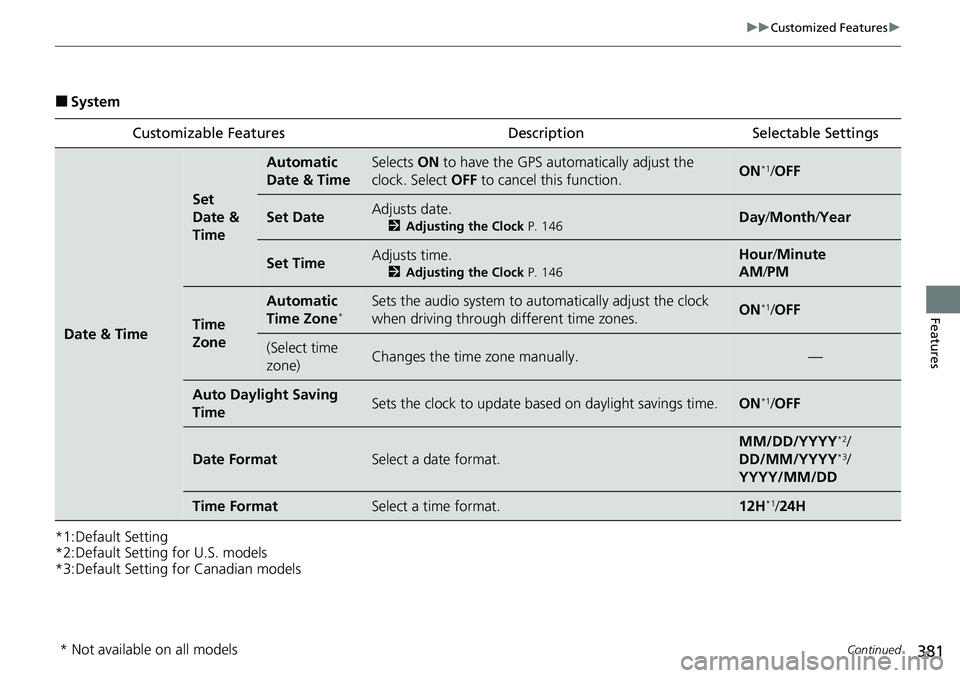
■System
*1:Default Setting
*2:Default Setting for U.S. models
*3:Default Setting for Canadian models Customizable Features Description Selectable Settings
Date & Time
Set
Date &
Time
Automatic
Date & TimeSelects
ON to have the GPS auto matically adjust the
clock. Select OFF to cancel this function.ON*1/OFF
Set DateAdjusts date.
2 Adjusting the Clock P. 146Day/Month/ Year
Set TimeAdjusts time.
2Adjusting the Clock P. 146
Hour/Minute
AM /PM
Time
Zone
Automatic
Time Zone*Sets the audio system to au tomatically adjust the clock
when driving through different time zones.ON*1/ OFF
(Select time
zone)Changes the time zone manually.—
Auto Daylig ht Saving
TimeSets the clock to update based on daylight savings time.ON*1/ OFF
Date FormatSelect a date format.
MM/DD/YYYY*2/
DD/MM/YYYY*3/
YYYY/MM/DD
Time FormatSelect a time format.12H*1/ 24H
* Not available on all models
Page 391 of 719
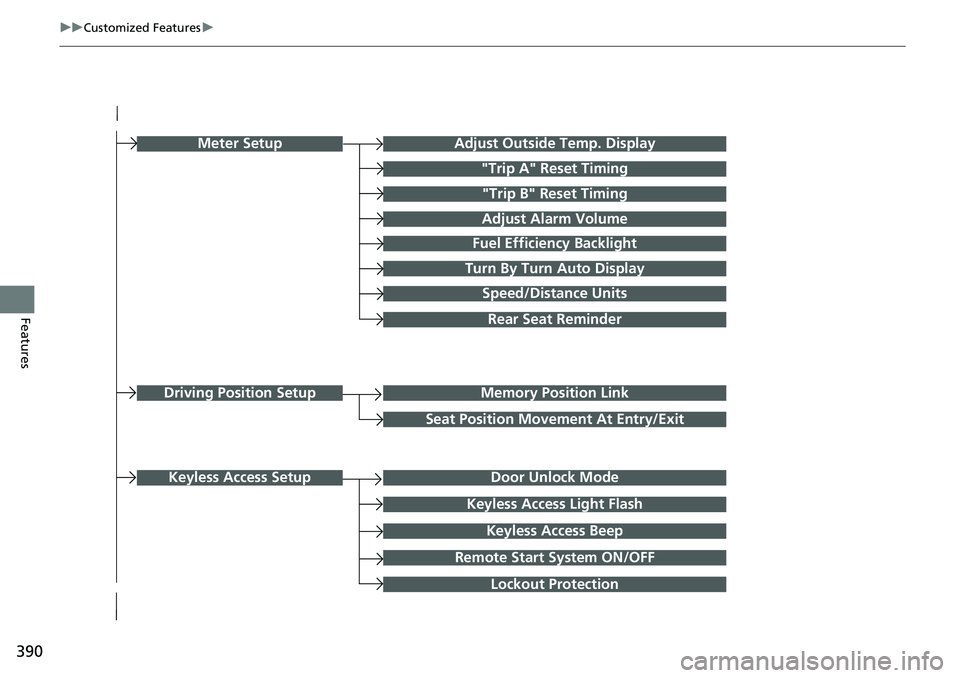
390
uuCustomized Features u
Features
Turn By Turn Auto Display
Speed/Distance Units
Keyless Access Light Flash
Rear Seat Reminder
Door Unlock Mode
Keyless Access Beep
Remote Start System ON/OFF
Lockout Protection
Keyless Access Setup
Meter SetupAdjust Outside Temp. Display
"Trip A" Reset Timing
"Trip B" Reset Timing
Adjust Alarm Volume
Fuel Efficiency Backlight
Memory Position Link
Seat Position Movement At Entry/Exit
Driving Position Setup
Page 392 of 719
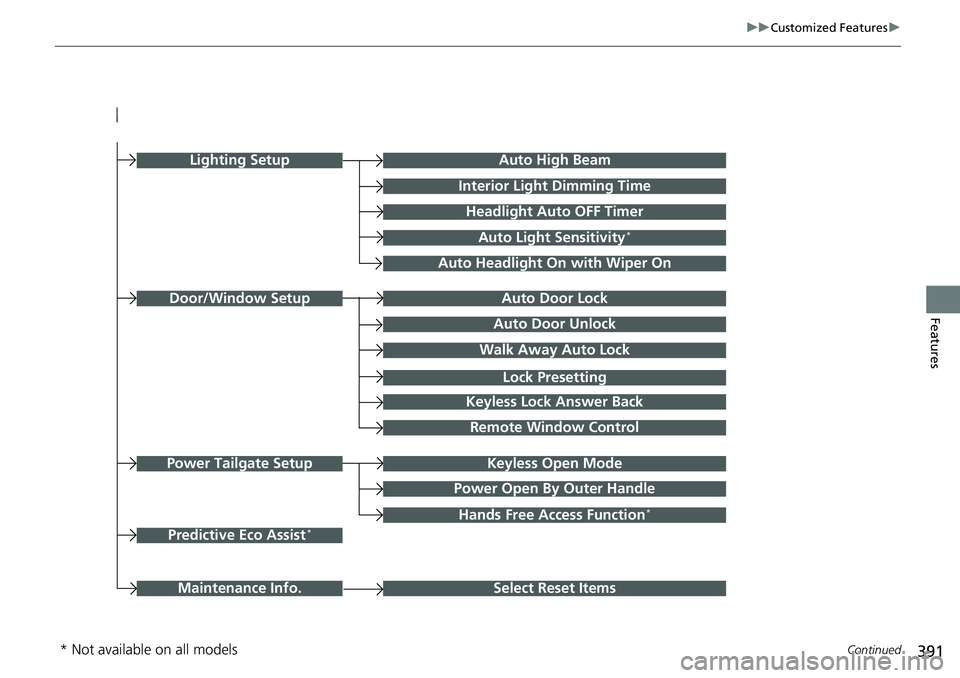
391
uuCustomized Features u
Continued
FeaturesAuto Door Unlock
Auto Door Lock
Walk Away Auto Lock
Keyless Lock Answer Back
Door/Window Setup
Lighting SetupAuto High Beam
Interior Light Dimming Time
Headlight Auto OFF Timer
Auto Light Sensitivity*
Auto Headlight On with Wiper On
Select Reset ItemsMaintenance Info.
Remote Window Control
Keyless Open Mode
Power Open By Outer Handle
Power Tailgate Setup
Lock Presetting
Hands Free Access Function*
Predictive Eco Assist*
* Not available on all models
Page 395 of 719
394
uuCustomized Features u
Features
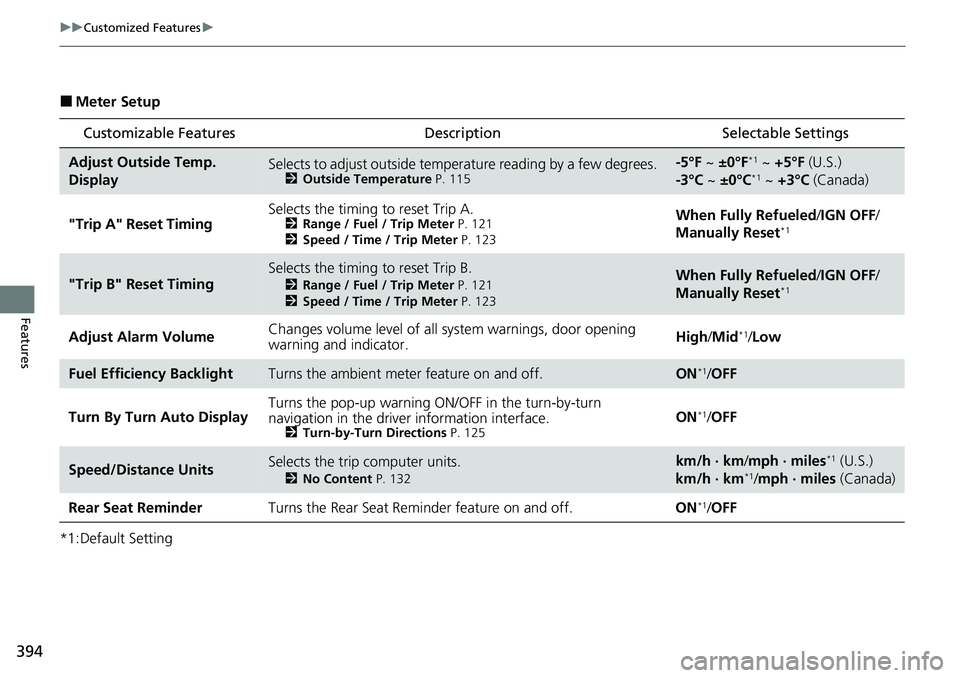
■Meter Setup
*1:Default Setting
Customizable Features Description Selectable Settings
Adjust Outside Temp.
DisplaySelects to adjust outside temperature reading by a few degrees.2Outside Temperature P. 115
-5°F ~ ±0°F*1 ~ +5°F (U.S.)
-3°C ~ ±0°C*1 ~ +3°C (Canada)
"Trip A" Reset Timing Selects the timing to reset Trip A.
2
Range / Fuel / Trip Meter P. 121
2 Speed / Time / Trip Meter P. 123When Fully Refueled /IGN OFF /
Manually Reset*1
"Trip B" Reset TimingSelects the timing to reset Trip B.
2 Range / Fuel / Trip Meter P. 121
2 Speed / Time / Trip Meter P. 123When Fully Refueled /IGN OFF /
Manually Reset*1
Adjust Alarm Volume Changes volume level of all system warnings, door opening
warning and indicator. High/
Mid*1/Low
Fuel Efficiency BacklightTurns the ambient meter feature on and off.ON*1/OFF
Turn By Turn Auto Display Turns the pop-up warning ON/OFF in the turn-by-turn
navigation in the driver
information interface.
2Turn-by-Turn Directions P. 125ON*1/OFF
Speed/Distance UnitsSelects the trip computer units.
2 No Content P. 132
km/h · km/mph · miles*1 (U.S.)
km/h · km*1/ mph · miles (Canada)
Rear Seat Reminder Turns the Rear Seat Reminder feature on and off. ON
*1/OFF
Page 396 of 719
395
uuCustomized Features u
Continued
Features
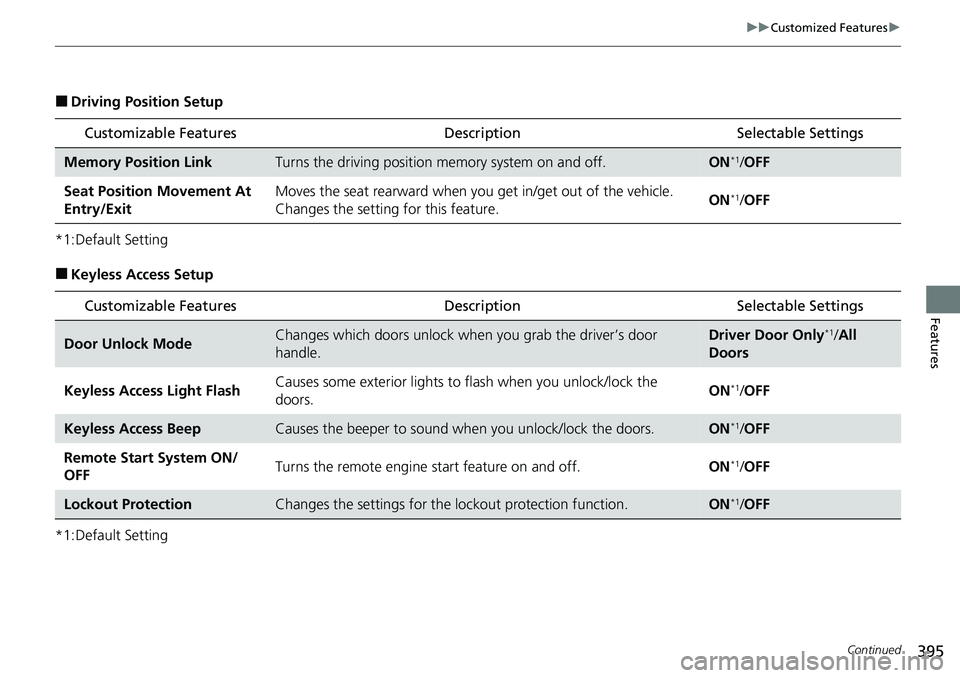
■Driving Position Setup
*1:Default Setting
■Keyless Access Setup
*1:Default Setting
Customizable Features Description Selectable Settings
Memory Position LinkTurns the driving position memory system on and off.ON*1/OFF
Seat Position Movement At
Entry/Exit Moves the seat rearward when you
get in/get out of the vehicle.
Changes the setting for this feature. ON
*1/
OFF
Customizable Features Description Selectable Settings
Door Unlock ModeChanges which doors unlock when you grab the driver’s door
handle.Driver Door Only*1/All
Doors
Keyless Access Light Flash Causes some exterior lights to
flash when you unlock/lock the
doors. ON
*1/
OFF
Keyless Access BeepCauses the beeper to sound when you unlock/lock the doors.ON*1/OFF
Remote Start System ON/
OFF Turns the remote engine start feature on and off.
ON
*1/OFF
Lockout ProtectionChanges the settings for the lo ckout protection function.ON*1/OFF
Page 397 of 719
396
uuCustomized Features u
Features
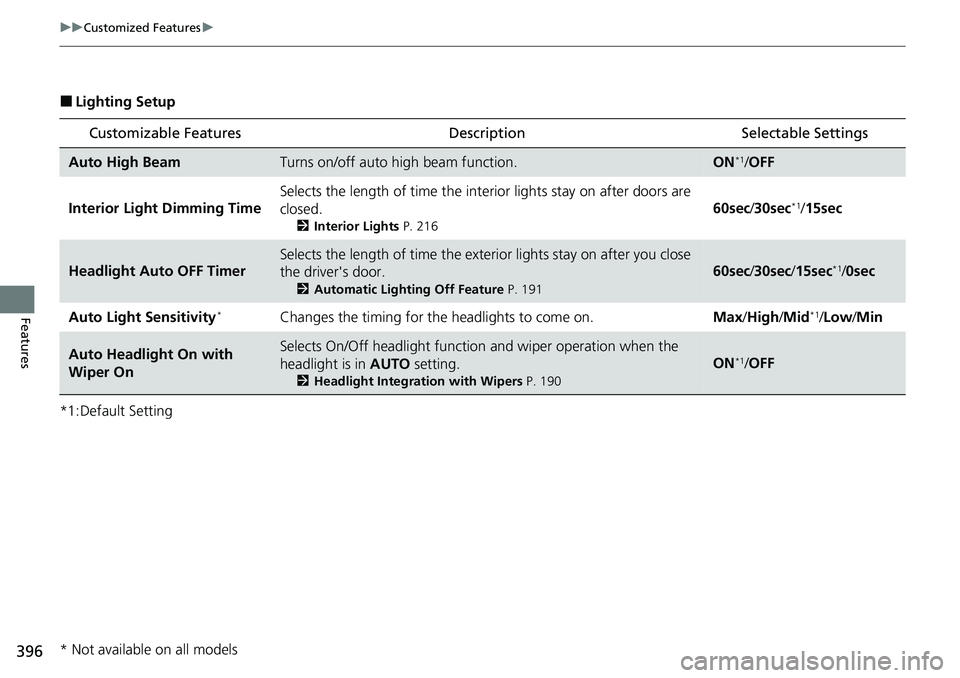
■Lighting Setup
*1:Default Setting
Customizable Features Description Selectable Settings
Auto High BeamTurns on/off auto high beam function.ON*1/OFF
Interior Light Dimming Time Selects the length of time the inte
rior lights stay on after doors are
closed.
2 Interior Lights P. 216
60sec/30sec*1/15sec
Headlight Auto OFF Timer
Selects the length of time the exterior lights stay on after you close
the driver's door.
2 Automatic Lighting Off Feature P. 191
60sec/30sec /15sec*1/0sec
Auto Light Sensitivity
*Changes the timing for the headlights to come on. Max/High/ Mid*1/Low /Min
Auto Headlight On with
Wiper OnSelects On/Off headlight function and wiper operation when the
headlight is in AUTO setting.
2Headlight Integration with Wipers P. 190
ON*1/OFF
* Not available on all models
Page 398 of 719
397
uuCustomized Features u
Continued
Features
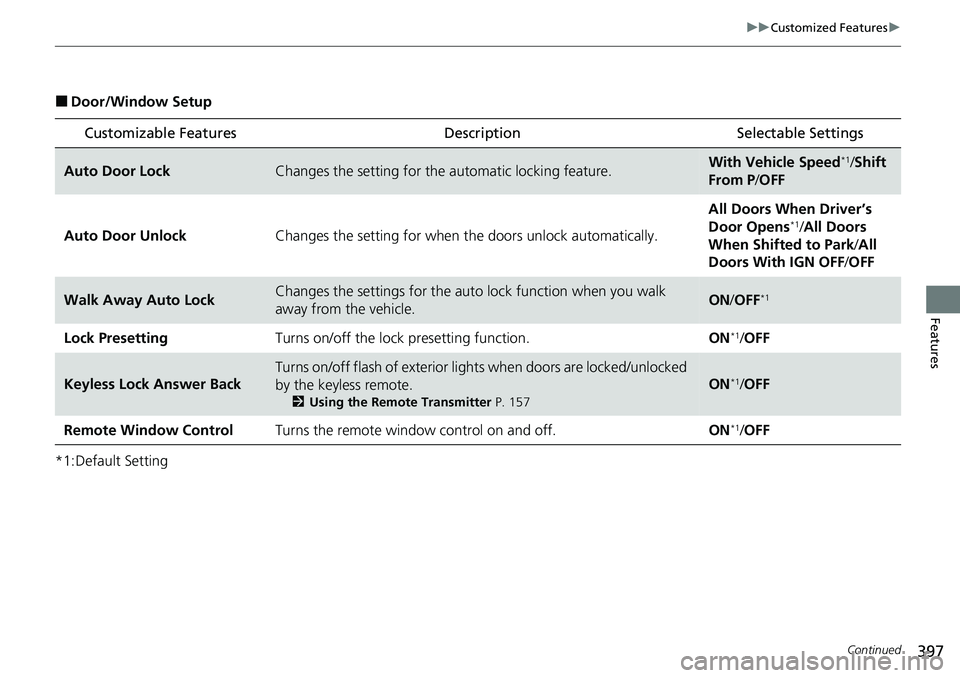
■Door/Window Setup
*1:Default Setting
Customizable Features Description Selectable Settings
Auto Door LockChanges the setting for the automatic locking feature.With Vehicle Speed*1/Shift
From P /OFF
Auto Door Unlock Changes the setting for when the doors unlock automatically. All Doors When Driver’s
Door Opens
*1/
All Doors
When Shifted to Park /All
Doors With IGN OFF /OFF
Walk Away Auto LockChanges the settings for the auto lock function when you walk
away from the vehicle.ON /OFF*1
Lock Presetting Turns on/off the lock presetting function. ON*1/OFF
Keyless Lock Answer Back
Turns on/off flash of exterior light s when doors are locked/unlocked
by the keyless remote.
2 Using the Remote Transmitter P. 157
ON*1/OFF
Remote Window Control Turns the remote window control on and off. ON
*1/OFF