Settings door HONDA CRV 2023 Owners Manual
[x] Cancel search | Manufacturer: HONDA, Model Year: 2023, Model line: CRV, Model: HONDA CRV 2023Pages: 719, PDF Size: 13.43 MB
Page 129 of 719
uuGauges and Driver Information Interface uDriver Information Interface
128
Instrument Panel
■The Driver Attention Monitor resets when:
• The power system is turned off.
• The driver unfastens the seat belt and op ens the door while the vehicle is stopped.
■For the Driver Attention Monitor to function:
• The vehicle must be traveling above 25 mph (40 km/h).
• The electric power steering (EPS) system indicator must be off.
■Depending on driving conditions or other factors, the Driver Attention
Monitor may not function in the following circumstances:
• The steering assist function of the Lane Keeping Assist System (LKAS) is active.
2Lane Keeping Assist System (LKAS) P. 533
•The condition of the road is poor; e.g., the surface is unpaved or bumpy.
• It is windy.
• The driver is frequently op erating the vehicle in an assertive manner, such as
changing lanes or accelerating.
■Customizing
You can change the Driver Attention Monitor settings. Select Tactile and audible
alert
*1/ Tactile And Audible Alert*2, Tactile alert*1/Tactile Alert*2, or OFF .
2Settings* P. 135
2 Customized Features P. 376
*1 : Models with 7-in. Color Touchscreen
*2 : Models with 9-in. Color Touchscreen
1For the Driver Attention Monitor to function:
The bars on the driver information interface remain
grayed out unless the Driv er Attention Monitor is
functioning.
* Not available on all models
Page 140 of 719
139
uuGauges and Driver Information Interface uDriver Information Interface
Continued
Instrument Panel
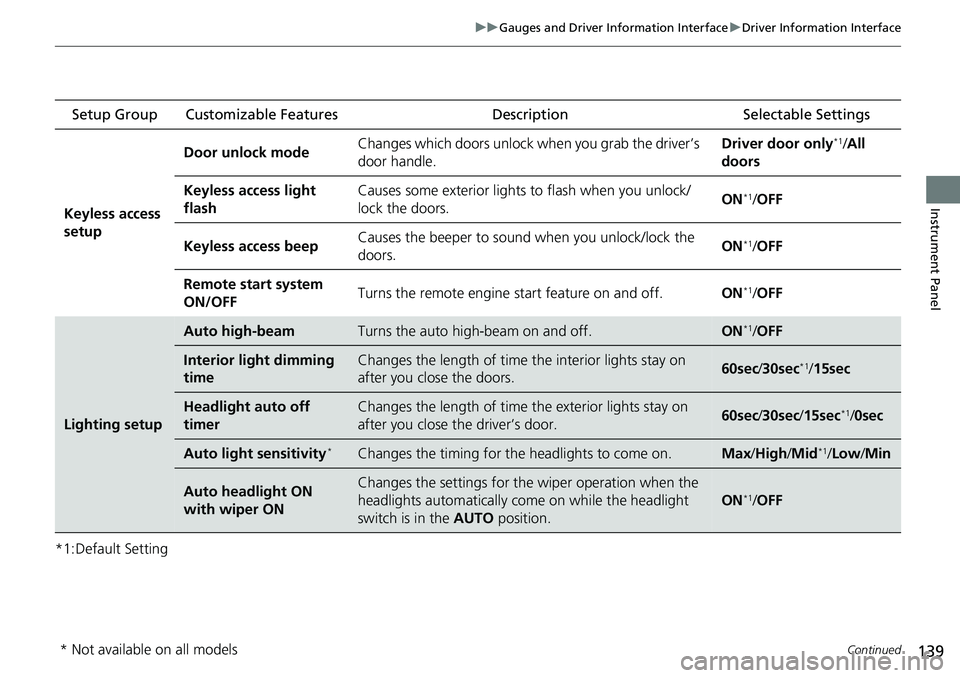
*1:Default Setting Setup Group Customizable Features
Description Selectable Settings
Keyless access
setup Door unlock mode
Changes which doors unlock when you grab the driver’s
door handle. Driver door only
*1/
All
doors
Keyless access light
flash Causes some exterior lights
to flash when you unlock/
lock the doors. ON
*1/
OFF
Keyless access beep Causes the beeper to sound when you unlock/lock the
doors.
ON
*1/
OFF
Remote start system
ON/OFF Turns the remote engine start feature on and off.
ON
*1/OFF
Lighting setup
Auto high-beamTurns the auto high -beam on and off.ON*1/OFF
Interior light dimming
timeChanges the length of time the interior lights stay on
after you close the doors.60sec /30sec*1/ 15sec
Headlight auto off
timerChanges the length of time the exterior lights stay on
after you close the driver’s door.60sec /30sec /15sec*1/0sec
Auto light sensitivity*Changes the timing for th e headlights to come on.Max/High /Mid*1/Low /Min
Auto headlight ON
with wiper ONChanges the settings for the wiper operation when the
headlights automatically come on while the headlight
switch is in the AUTO position.
ON*1/OFF
* Not available on all models
Page 141 of 719
140
uuGauges and Driver Information Interface uDriver Information Interface
Instrument Panel
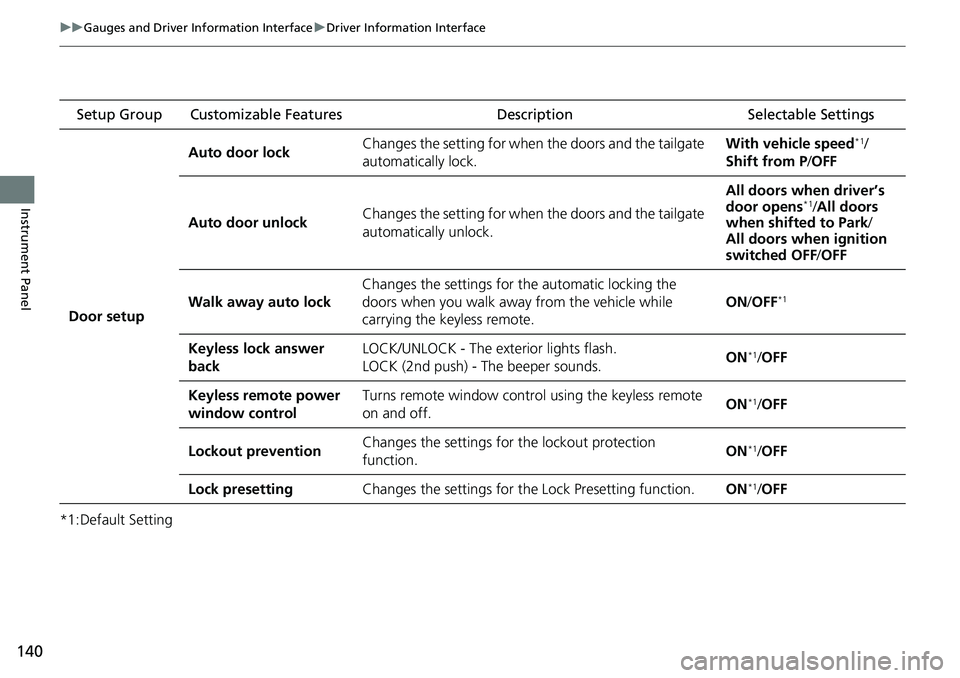
*1:Default Setting Setup Group Customizable Features
Description Selectable Settings
Door setup Auto door lock
Changes the setting for when the doors and the tailgate
automatically lock. With vehicle speed
*1/
Shift from P /OFF
Auto door unlock Changes the setting for when the doors and the tailgate
automatically unlock. All doors when driver’s
door opens
*1/
All doors
when shifted to Park /
All doors when ignition
switched OFF /OFF
Walk away auto lock Changes the settings for the automatic locking the
doors when you walk away
from the vehicle while
carrying the keyless remote. ON
/OFF
*1
Keyless lock answer
back LOCK/UNLOCK - The exterior lights flash.
LOCK (2nd push) - The beeper sounds.
ON*1/
OFF
Keyless remote power
window control Turns remote window control using the keyless remote
on and off.
ON
*1/
OFF
Lockout prevention Changes the settings for
the lockout protection
function. ON
*1/
OFF
Lock presetting Changes the settings for the Lock Presetting function. ON
*1/OFF
Page 154 of 719
Continued153
uuLocking and Unlocking the Doors uLocking/Unlocking the Doors from the Outside
Controls
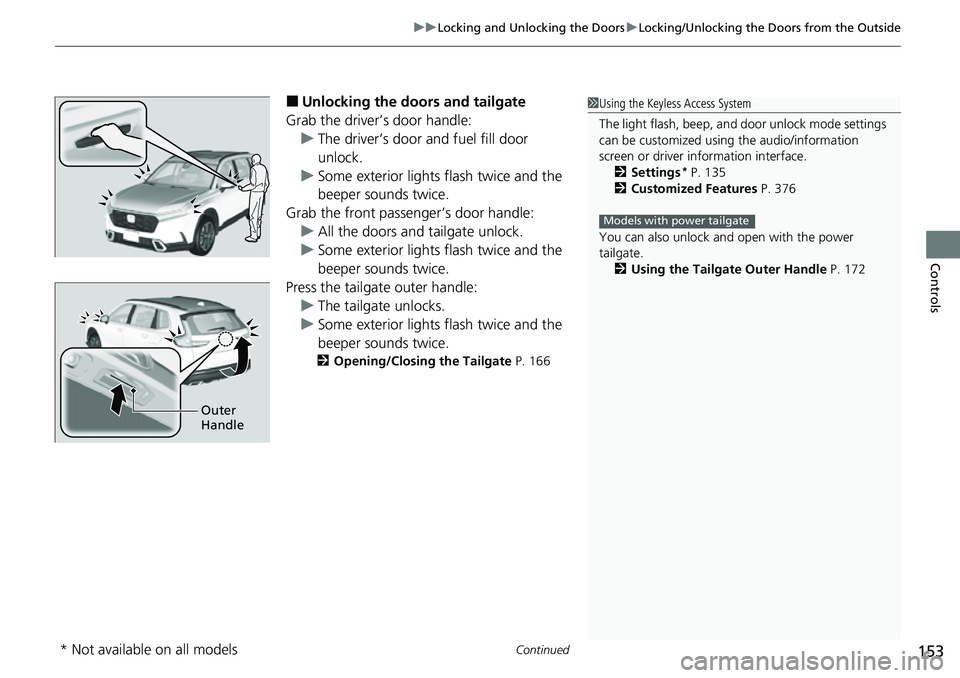
■Unlocking the doors and tailgate
Grab the driver’s door handle: u The driver’s door and fuel fill door
unlock.
u Some exterior lights flash twice and the
beeper sounds twice.
Grab the front passenger’s door handle: u All the doors and tailgate unlock.
u Some exterior lights flash twice and the
beeper sounds twice.
Press the tailgate outer handle: u The tailgate unlocks.
u Some exterior lights flash twice and the
beeper sounds twice.
2 Opening/Closing the Tailgate P. 166
1Using the Keyless Access System
The light flash, beep, a nd door unlock mode settings
can be customized using the audio/information
screen or driver information interface.
2 Settings
* P. 135
2 Customized Features P. 376
You can also unlock and open with the power
tailgate. 2 Using the Tailgate Outer Handle P. 172
Models with power tailgate
Outer
Handle
* Not available on all models
Page 155 of 719
uuLocking and Unlocking the Doors uLocking/Unlocking the Doors from the Outside
154
Controls
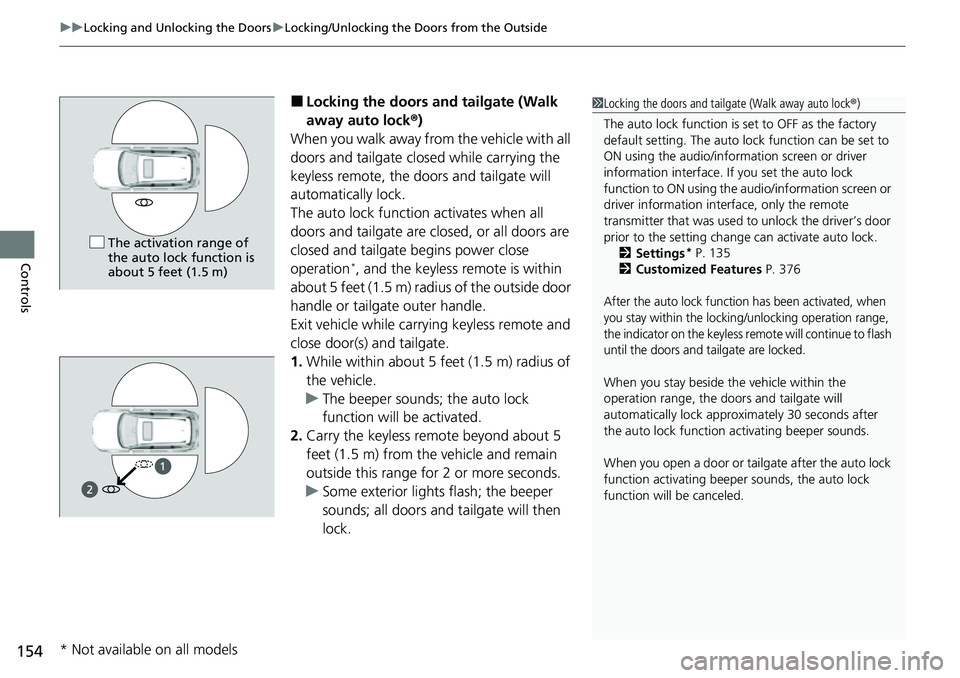
■Locking the doors an d tailgate (Walk
away auto lock ®)
When you walk away from the vehicle with all
doors and tailgate closed while carrying the
keyless remote, the doors and tailgate will
automatically lock.
The auto lock function activates when all
doors and tailgate are closed, or all doors are
closed and tailgate begins power close
operation
*, and the keyless remote is within
about 5 feet (1.5 m) radi us of the outside door
handle or tailgate outer handle.
Exit vehicle while carrying keyless remote and
close door(s) and tailgate.
1. While within about 5 feet (1.5 m) radius of
the vehicle.
u The beeper sounds; the auto lock
function will be activated.
2. Carry the keyless remote beyond about 5
feet (1.5 m) from the vehicle and remain
outside this range fo r 2 or more seconds.
u Some exterior lights flash; the beeper
sounds; all doors and tailgate will then
lock.
1Locking the doors and tailg ate (Walk away auto lock®)
The auto lock function is set to OFF as the factory
default setting. The auto lo ck function can be set to
ON using the audio/inform ation screen or driver
information interface. If you set the auto lock
function to ON using the a udio/information screen or
driver information inte rface, only the remote
transmitter that was used to unlock the driver’s door
prior to the setting change can activate auto lock.
2 Settings
* P. 135
2 Customized Features P. 376
After the auto lock function has been activated, when
you stay within the locking/unlocking operation range,
the indicator on the keyless remote will continue to flash
until the doors and tailgate are locked.
When you stay beside the vehicle within the
operation range, the door s and tailgate will
automatically lock approx imately 30 seconds after
the auto lock function activating beeper sounds.
When you open a door or tailgate after the auto lock
function activating beeper sounds, the auto lock
function will be canceled.
The activation range of
the auto lock function is
about 5 feet (1.5 m)
* Not available on all models
Page 157 of 719
uuLocking and Unlocking the Doors uLocking/Unlocking the Doors from the Outside
156
Controls
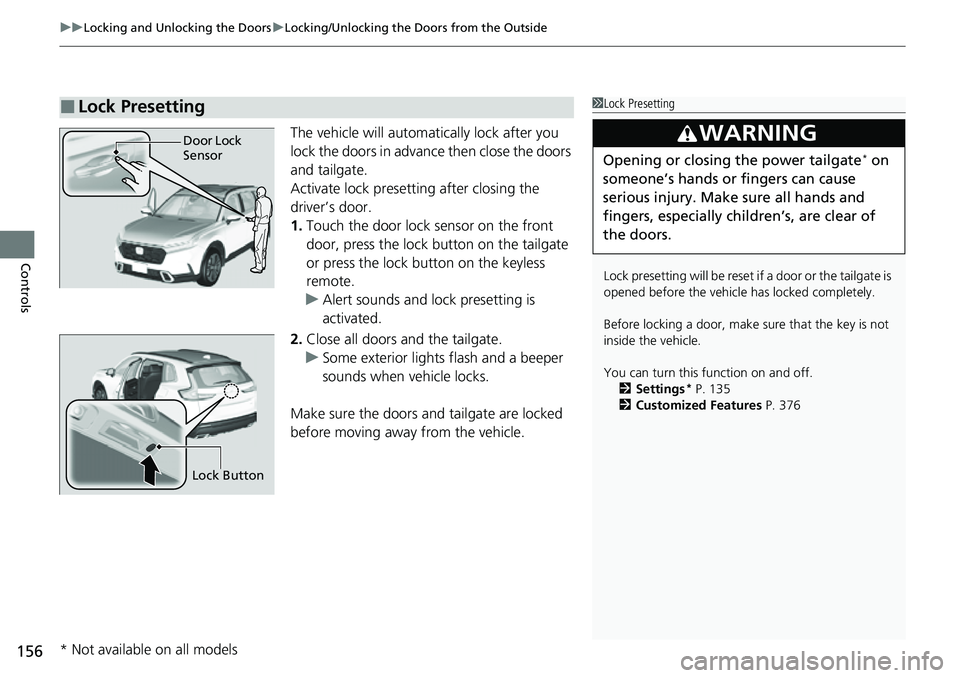
The vehicle will automatically lock after you
lock the doors in advance then close the doors
and tailgate.
Activate lock presetting after closing the
driver’s door.
1. Touch the door lock sensor on the front
door, press the lock button on the tailgate
or press the lock button on the keyless
remote.
u Alert sounds and lock presetting is
activated.
2. Close all doors and the tailgate.
u Some exterior lights flash and a beeper
sounds when vehicle locks.
Make sure the doors and tailgate are locked
before moving away from the vehicle.
■Lock Presetting1 Lock Presetting
Lock presetting will be reset if a door or the tailgate is
opened before the vehicle has locked completely.
Before locking a door, make sure that the key is not
inside the vehicle.
You can turn this function on and off. 2 Settings
* P. 135
2 Customized Features P. 376
3WARNING
Opening or closing the power tailgate* on
someone’s hands or fingers can cause
serious injury. Make sure all hands and
fingers, especially children’s, are clear of
the doors.
Door Lock
Sensor
Lock Button
* Not available on all models
Page 160 of 719
Continued159
uuLocking and Unlocking the Doors uLocking/Unlocking the Doors from the Outside
Controls
If you do not have the key on you, or if fo r some reason you cannot lock a door using
the key, you can lock the door without it.
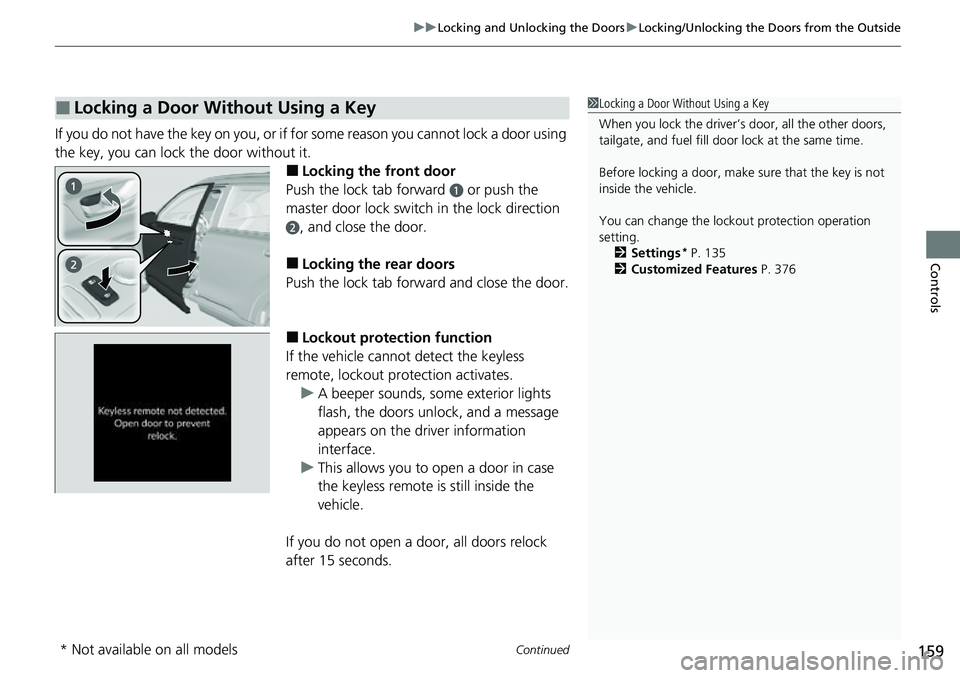
■Locking the front door
Push the lock tab forward
a or push the
master door lock switch in the lock direction
b, and close the door.
■Locking the rear doors
Push the lock tab forward and close the door.
■Lockout protection function
If the vehicle cannot detect the keyless
remote, lockout prot ection activates.
u A beeper sounds, some exterior lights
flash, the doors unlock, and a message
appears on the dr iver information
interface.
u This allows you to open a door in case
the keyless remote is still inside the
vehicle.
If you do not open a door, all doors relock
after 15 seconds.
■Locking a Door Without Using a Key1 Locking a Door Without Using a Key
When you lock the driver’s door, all the other doors,
tailgate, and fuel fill door lock at the same time.
Before locking a door, make sure that the key is not
inside the vehicle.
You can change the lockout protection operation
setting.
2 Settings
* P. 135
2 Customized Features P. 376
* Not available on all models
Page 163 of 719
uuLocking and Unlocking the Doors uLocking/Unlocking the Doors from the Inside
162
Controls
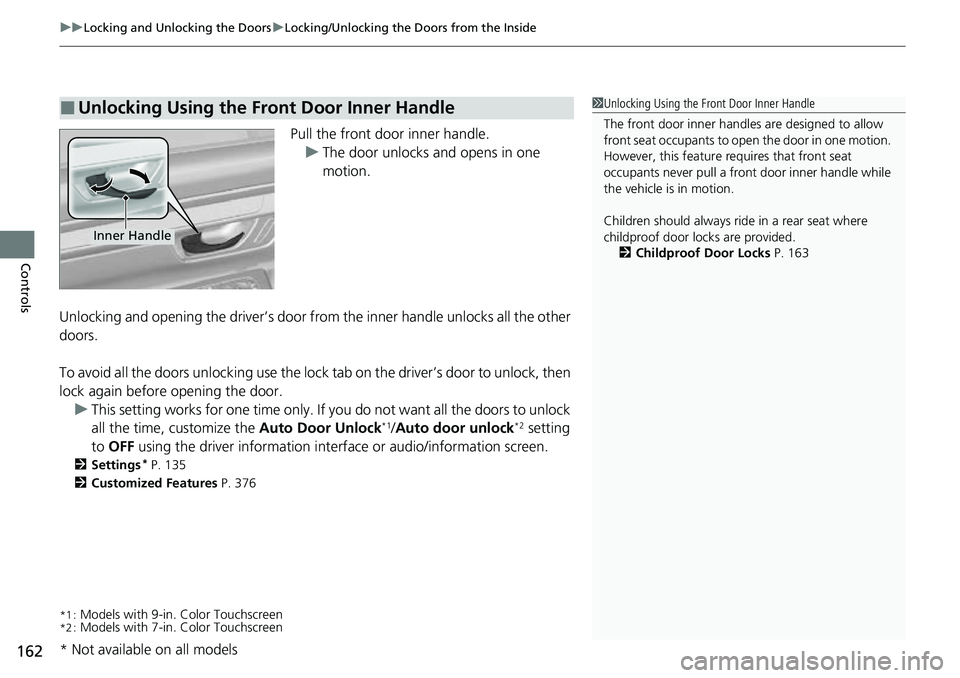
Pull the front door inner handle.
u The door unlocks and opens in one
motion.
Unlocking and opening the driver’s door from the inner handle unlocks all the other
doors.
To avoid all the doors unlocking use the lock tab on the driver’s door to unlock, then
lock again before opening the door. u This setting works for one time only. If you do not want all the doors to unlock
all the time, customize the Auto Door Unlock
*1/Auto door unlock*2 setting
to OFF using the driver information inte rface or audio/information screen.
2Settings* P. 135
2 Customized Features P. 376
*1 :Models with 9-in. Color Touchscreen*2 :Models with 7-in. Color Touchscreen
■Unlocking Using the Front Door Inner Handle1Unlocking Using the Front Door Inner Handle
The front door inne r handles are designed to allow
front seat occupants to ope n the door in one motion.
However, this feature requires that front seat
occupants never pull a front door inner handle while
the vehicle is in motion.
Children should always ride in a rear seat where
childproof door locks are provided.
2 Childproof Door Locks P. 163
Inner Handle
* Not available on all models
Page 165 of 719
164
uuLocking and Unlocking the Doors uAuto Door Locking/Unlocking
Controls
Auto Door Locking/Unlocking
Your vehicle locks or unlocks all doors auto matically when a certain condition is met.
■Drive lock mode
All doors and tailgate lock when the vehicle’s speed reaches about 10 mph (15 km/h).
■Driver’s door open mode
All doors and the tailgate unlock when the driver’s door is opened.
■Auto Door Locking
■Auto Door Unlocking
1 Auto Door Locking/Unlocking
You can turn off or cha nge to another auto door
locking/unlocking sett ing using the driver
information interface or audio/information screen. 2 Settings
* P. 135
2 Customized Features P. 376
* Not available on all models
Page 171 of 719
uuTailgate uOpening/Closing the Power Tailgate*
170
Controls
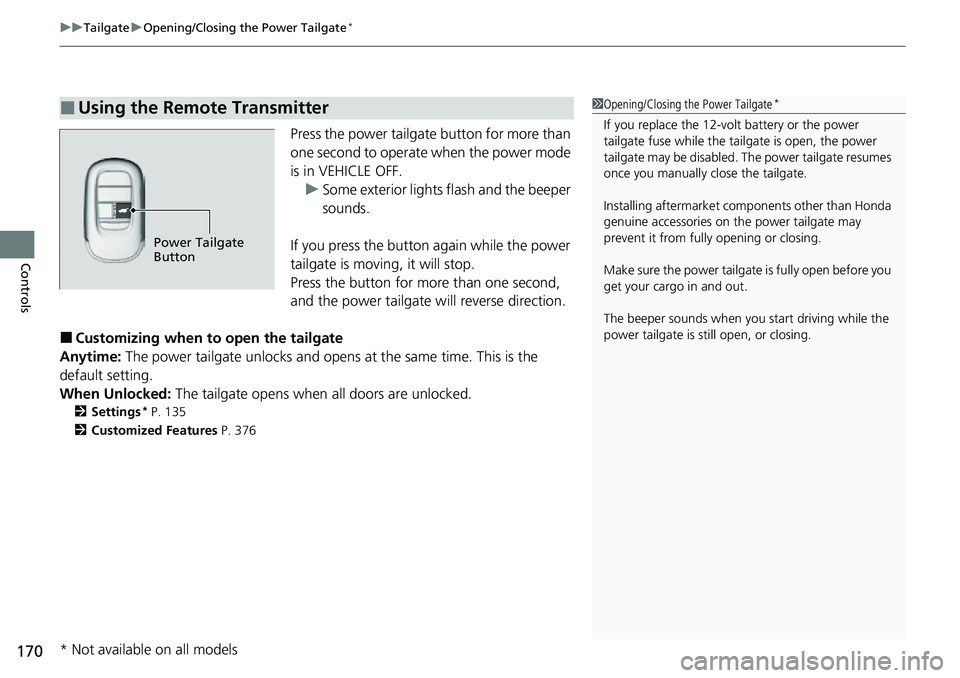
Press the power tailgate button for more than
one second to operate when the power mode
is in VEHICLE OFF.
u Some exterior lights flash and the beeper
sounds.
If you press the button again while the power
tailgate is moving, it will stop.
Press the button for more than one second,
and the power tailgate will reverse direction.
■Customizing when to open the tailgate
Anytime: The power tailgate unlocks and opens at the same time. This is the
default setting.
When Unlocked: The tailgate opens when all doors are unlocked.
2Settings* P. 135
2 Customized Features P. 376
■Using the Remote Transmitter1Opening/Closing the Power Tailgate*
If you replace the 12-volt battery or the power
tailgate fuse while the tailgate is open, the power
tailgate may be di sabled. The power tailgate resumes
once you manually cl ose the tailgate.
Installing aftermarket com ponents other than Honda
genuine accessories on the power tailgate may
prevent it from fully opening or closing.
Make sure the power tailgate is fully open before you
get your cargo in and out.
The beeper sounds when you start driving while the
power tailgate is still open, or closing.
Power Tailgate
Button
* Not available on all models