parking sensors HONDA CRV 2023 Owners Manual
[x] Cancel search | Manufacturer: HONDA, Model Year: 2023, Model line: CRV, Model: HONDA CRV 2023Pages: 719, PDF Size: 13.43 MB
Page 442 of 719
441
Driving
This chapter discusses driving and refueling.
Before Driving................................... 442
Towing a Trailer ................................ 447
Off-Highway Driving Guidelines ..... 453
When Driving Turning on the Power ...................... 455
Precautions While Driving................. 462
Transmission........................................ 463Shifting ............................................ 464
Deceleration Paddle Selector ............ 466
Acoustic Vehicle Al erting System ...... 469
Drive Mode Switch ........................... 470
Hill Descent Control System ............. 474
Vehicle Stability AssistTM (VSA®), aka Electronic
Stability Control (ESC), System .............. 476
Agile Handling Assist ....................... 478
Real Time AWD with Intelligent Control System
TM*...................................... 479Tire Pressure Monitoring System (TPMS) .... 480Tire Pressure Monitoring System (TPMS) - Required Federal Explanation ......... 485
Blind Spot Information System ......... 487
High Voltage Battery ........................ 491
Honda Sensing ®................................ 492
Collision Mitigati on Braking System
TM
(CMBSTM) ....................................... 495 Low Speed Braking Control
*............ 507
Adaptive Cruise Control (ACC) with Low Speed Follow ................................. 513
Lane Keeping Assist System (LKAS).... 533
Traffic Jam Assist ............................. 545
Road Departure Miti gation System... 554
Traffic Sign Recognition System ....... 562
Front Sensor Camera ....................... 568
Radar Sensor ................................... 570
Sonar Sensors
*................................ 571
Braking .............................................. 572
Parking Your Vehicle ........................ 582
Multi-View Rear Camera .................. 593
Refueling ........................................... 595
Fuel Economy and CO
2 Emissions .... 598
* Not available on all models
Page 509 of 719
uuHonda Sensing ®u Low Speed Braking Control*
508
Driving
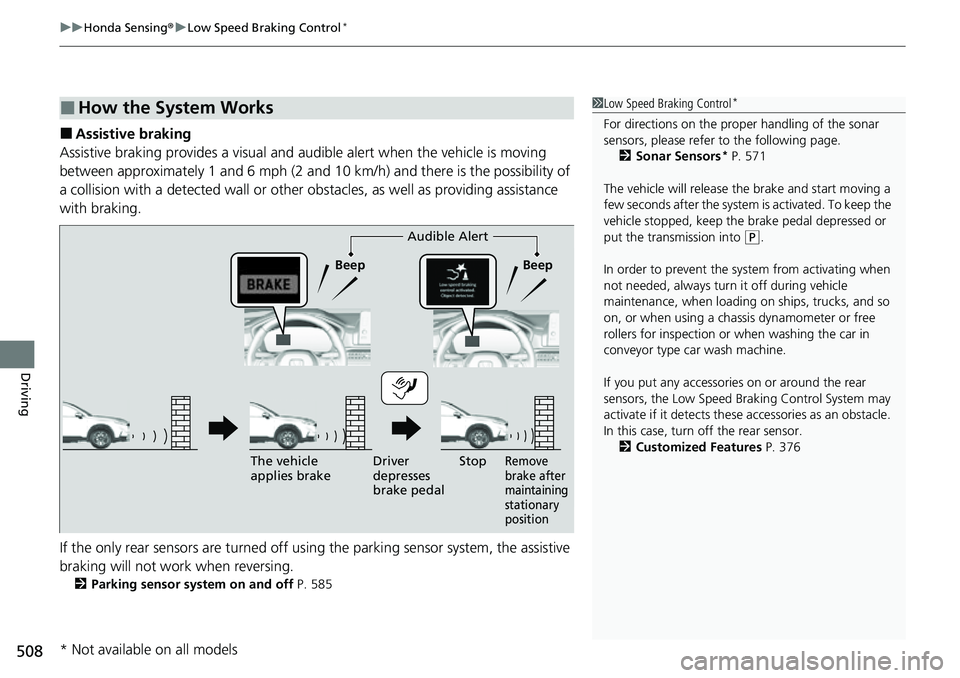
■Assistive braking
Assistive braking provides a visual and audible alert when the vehicle is moving
between approximately 1 and 6 mph (2 and 10 km/h) and there is the possibility of
a collision with a detected wall or other obstacles, as well as providing assistance
with braking.
If the only rear sensors are turned off using the parking sensor system, the assistive
braking will not work when reversing.
2 Parking sensor system on and off P. 585
■How the System Works1Low Speed Braking Control*
For directions on the prop er handling of the sonar
sensors, please refer to the following page.
2 Sonar Sensors
* P. 571
The vehicle will release the brake and start moving a
few seconds after the system is activated. To keep the
vehicle stopped, keep the brake pedal depressed or
put the transmission into
( P.
In order to prevent the sy stem from activating when
not needed, always turn it off during vehicle
maintenance, when loading on ships, trucks, and so
on, or when using a chas sis dynamometer or free
rollers for inspection or when washing the car in
conveyor type car wash machine.
If you put any accessories on or around the rear
sensors, the Low Speed Br aking Control System may
activate if it detects these accessories as an obstacle.
In this case, turn off the rear sensor. 2 Customized Features P. 376Audible Alert
Beep Beep
The vehicle
applies brake Driver
depresses
brake pedal
Remove
brake after
maintaining
stationary
positionStop
* Not available on all models
Page 510 of 719
509
uuHonda Sensing ®u Low Speed Braking Control*
Continued
Driving
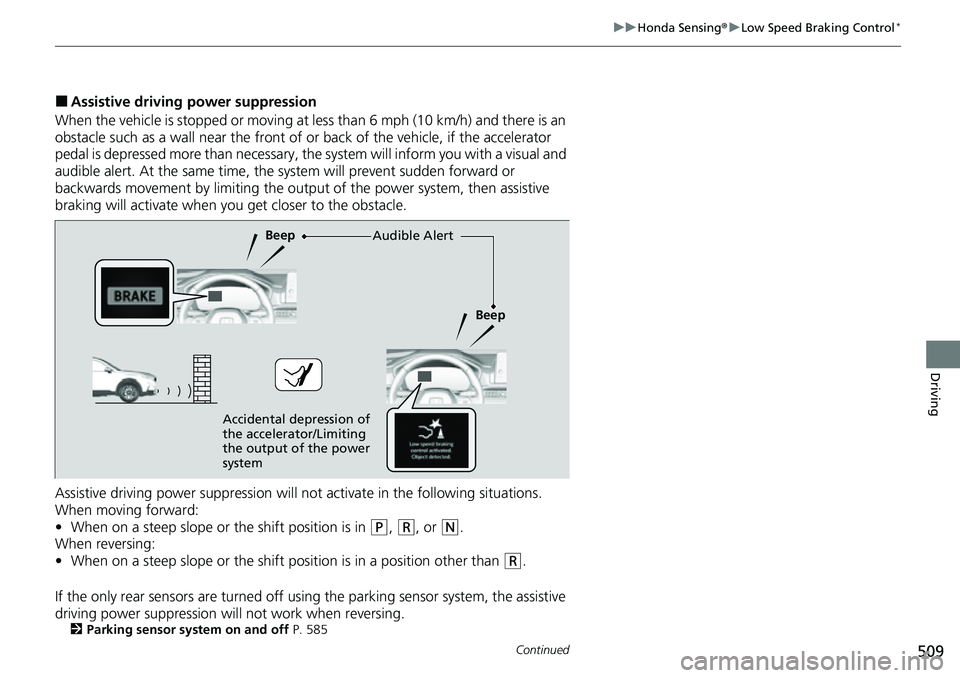
■Assistive driving power suppression
When the vehicle is stopped or moving at less than 6 mph (10 km/h) and there is an
obstacle such as a wall near the front of or back of the vehicle, if the accelerator
pedal is depressed more than necessary, the system will inform you with a visual and
audible alert. At the same time, the sy stem will prevent sudden forward or
backwards movement by limiting the outpu t of the power system, then assistive
braking will activate when you get closer to the obstacle.
Assistive driving power suppression will not activate in the following situations.
When moving forward:
• When on a steep slope or the shift position is in
(P, (R, or (N.
When reversing:
• When on a steep slope or the shift position is in a position other than
(R.
If the only rear sensors are turned off usi ng the parking sensor system, the assistive
driving power suppression will not work when reversing.
2 Parking sensor system on and off P. 585
Audible Alert
Beep
Beep
Accidental depression of
the accelerator/Limiting
the output of the power
system
Page 572 of 719
571
uuHonda Sensing ®u Sonar Sensors*
Driving
Sonar Sensors*
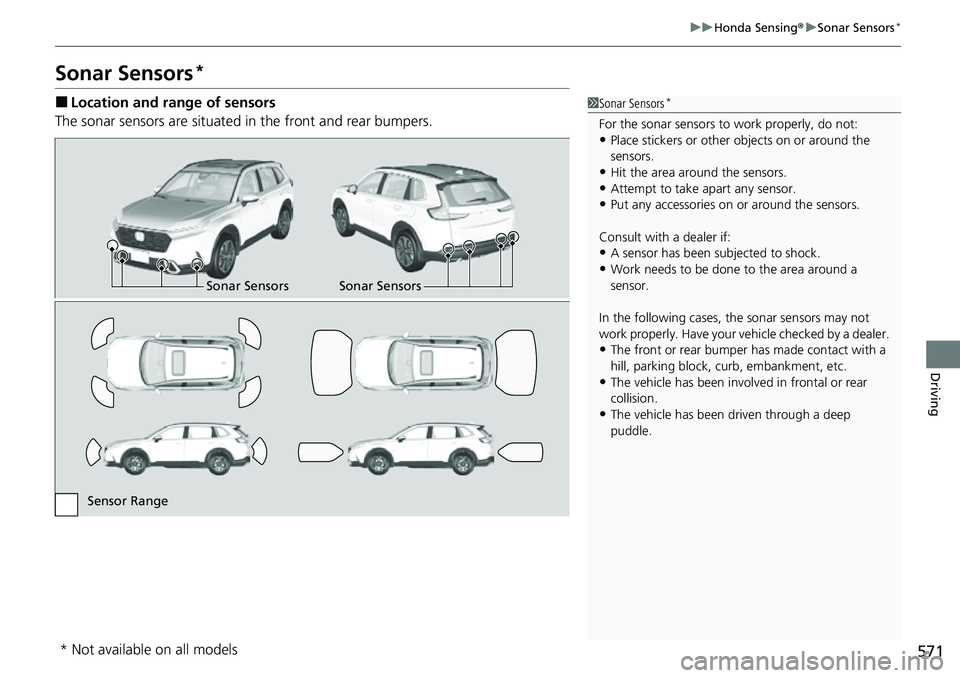
■Location and range of sensors
The sonar sensors are situated in the front and rear bumpers.1Sonar Sensors*
For the sonar sensors to work properly, do not:•Place stickers or other objects on or around the
sensors.
•Hit the area around the sensors.•Attempt to take apart any sensor.
•Put any accessories on or around the sensors.
Consult with a dealer if:
•A sensor has been subjected to shock.
•Work needs to be done to the area around a
sensor.
In the following cases, the sonar sensors may not
work properly. Have your ve hicle checked by a dealer.
•The front or rear bumper has made contact with a
hill, parking block, curb, embankment, etc.
•The vehicle has been involv ed in frontal or rear
collision.
•The vehicle has been driven through a deep
puddle.
Sonar Sensors Sonar Sensors
Sensor Range
* Not available on all models
Page 585 of 719
584
uuParking Your Vehicle uParking Sensor System*
Driving
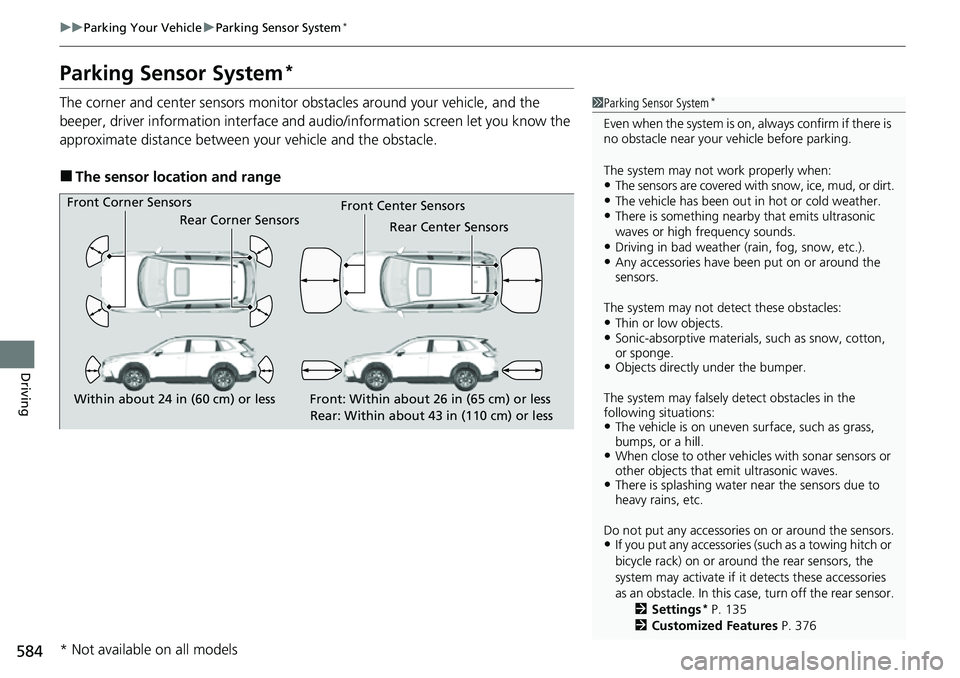
Parking Sensor System*
The corner and center sensors monitor obstacles around your vehicle, and the
beeper, driver information interface and audio/informatio n screen let you know the
approximate distance between your vehicle and the obstacle.
■The sensor location and range
1 Parking Sensor System*
Even when the system is on, always confirm if there is
no obstacle near your ve hicle before parking.
The system may not work properly when:
•The sensors are covered with snow, ice, mud, or dirt.•The vehicle has been out in hot or cold weather.•There is something nearby that emits ultrasonic
waves or high frequency sounds.
•Driving in bad weather (rain, fog, snow, etc.).•Any accessories have been put on or around the
sensors.
The system may not de tect these obstacles:
•Thin or low objects.•Sonic-absorptive materials, such as snow, cotton,
or sponge.
•Objects directly under the bumper.
The system may falsely de tect obstacles in the
following situations:
•The vehicle is on uneven su rface, such as grass,
bumps, or a hill.
•When close to other vehicl es with sonar sensors or
other objects that em it ultrasonic waves.
•There is splashing water near the sensors due to
heavy rains, etc.
Do not put any accessories on or around the sensors.
•If you put any accessories (such as a towing hitch or
bicycle rack) on or around the rear sensors, the
system may activate if it detects these accessories
as an obstacle. In this case, turn off the rear sensor. 2Settings
* P. 135
2 Customized Features P. 376
Front Corner Sensors
Rear Corner Sensors Rear Center Sensors
Front Center Sensors
Within about 24 in (60 cm) or less Front: Within about 26 in (65 cm) or less
Rear: Within about 43 in (110 cm) or less
* Not available on all models
Page 586 of 719
Continued585
uuParking Your Vehicle uParking Sensor System*
Driving
■Parking sensor system on and off
You can turn the system on and off using the driver information interface.
2 Switching the Display P. 117
2 Safety Support P. 130
The front corner, rear corner and rear cent er sensors start to detect an obstacle
when the transmission is in
(R, and the vehicle speed is less than 5 mph (8 km/h).
The front corner and front center sensor s start to detect an obstacle when the
transmission is in any position other than
(P or (R, and the vehicle speed is less
than 5 mph (8 km/h).
1 Parking Sensor System*
When you set the power mode to ON, the system will
be in the previously selected condition.
You can turn the rear park ing sensor system on and
off using the audio/information screen.
2 Customized Features P. 376
* Not available on all models
Page 588 of 719
587
uuParking Your Vehicle uParking Sensor System*
Continued
Driving
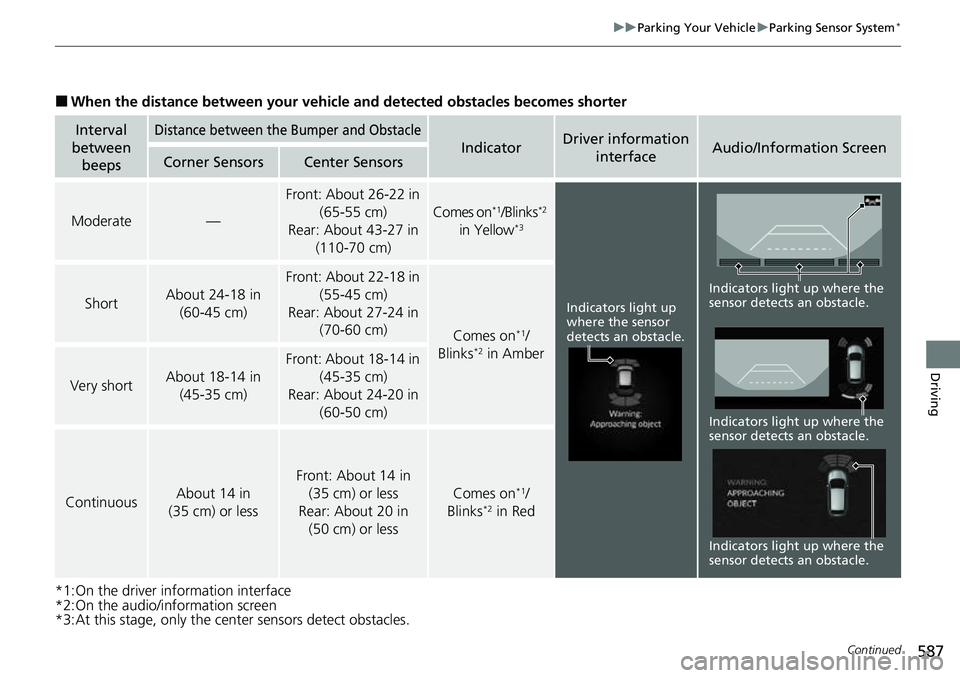
■When the distance between your vehicle and detected obstacles becomes shorter
*1:On the driver information interface
*2:On the audio/information screen
*3:At this stage, only the center sensors detect obstacles.
Interval
between beepsDistance between the Bumper and Obstacle
IndicatorDriver information
interfaceAudio/Information ScreenCorner SensorsCenter Sensors
Moderate—
Front: About 26-22 in (65-55 cm)
Rear: About 43-27 in (110-70 cm)
Comes on*1/Blinks*2
in Yellow*3
ShortAbout 24-18 in (60-45 cm)
Front: About 22-18 in
(55-45 cm)
Rear: About 27-24 in (70-60 cm)
Comes on*1/
Blinks*2 in Amber
Very shortAbout 18-14 in (45-35 cm)
Front: About 18-14 in
(45-35 cm)
Rear: About 24-20 in (60-50 cm)
ContinuousAbout 14 in
(35 cm) or less
Front: About 14 in (35 cm) or less
Rear: About 20 in (50 cm) or less
Comes on*1/
Blinks*2 in Red
Indicators light up
where the sensor
detects an obstacle.
Indicators light up where the
sensor detects an obstacle. Indicators light up where the
sensor detects an obstacle.
Indicators light up where the
sensor detects an obstacle.
Page 590 of 719
589
uuParking Your Vehicle uCross Traffic Monitor
Continued
Driving
Cross Traffic Monitor
Monitors the rear corner areas using the radar sensors when reversing, and alerts
you if a vehicle approaching from a rear corner is detected.
The system is convenient when you are backing out of a parking space.1Cross Traffic Monitor
The parking sensor system’s alerting buzzer overrides
the Cross Traffic Monitor buzzer when the sensors
are detecting obstacles at the closest range.
3CAUTION
Cross Traffic Monitor cannot detect all
approaching vehicles and may not detect
an approaching vehicle at all.
Failure to visually confirm that it is safe to
back up the vehicle before doing so may
result in a collision.
Do not solely rely on the system when
reversing; always also use your mirrors, and
look behind and to the sides of your vehicle
before reversing.
Models with parking sensor system
Page 591 of 719
uuParking Your Vehicle uCross Traffic Monitor
590
Driving
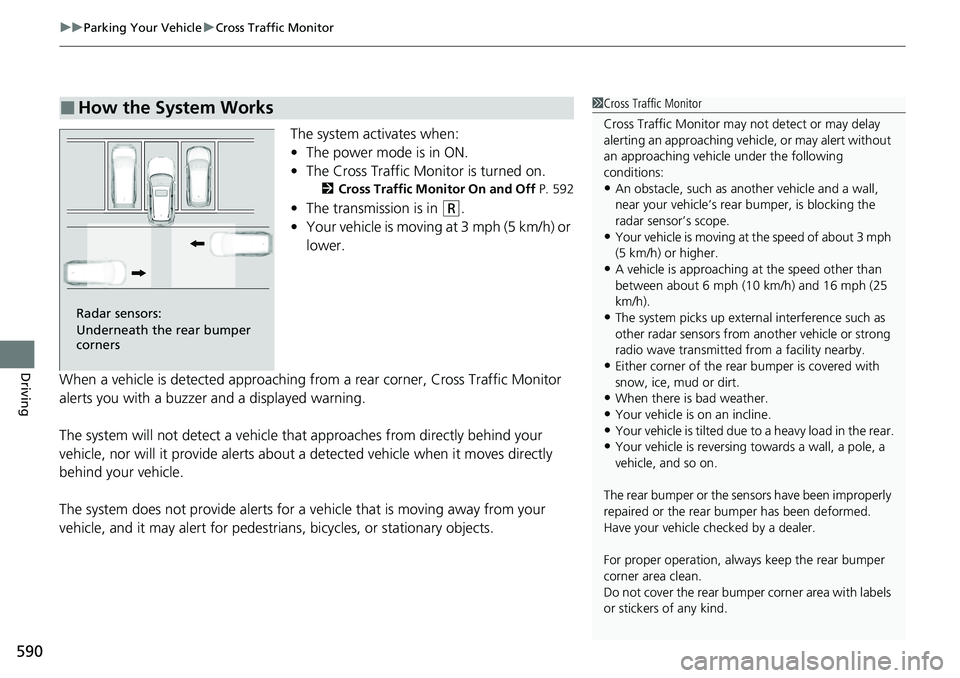
The system activates when:
• The power mode is in ON.
• The Cross Traffic Monitor is turned on.
2 Cross Traffic Monitor On and Off P. 592
•The transmission is in (R.
• Your vehicle is moving at 3 mph (5 km/h) or
lower.
When a vehicle is detected approaching from a rear corner, Cross Traffic Monitor
alerts you with a buzzer and a displayed warning.
The system will not detect a vehicle that approaches from directly behind your
vehicle, nor will it provide alerts about a detected vehicle when it moves directly
behind your vehicle.
The system does not provide alerts for a vehicle that is moving away from your
vehicle, and it may alert for pedestri ans, bicycles, or stationary objects.
■How the System Works1Cross Traffic Monitor
Cross Traffic Monitor may not detect or may delay
alerting an approach ing vehicle, or may alert without
an approaching vehicle under the following
conditions:
•An obstacle, such as a nother vehicle and a wall,
near your vehicle’s rear bumper, is blocking the
radar sensor’s scope.
•Your vehicle is moving at the speed of about 3 mph
(5 km/h) or higher.
•A vehicle is approaching at the speed other than
between about 6 mph (10 km/h) and 16 mph (25
km/h).
•The system picks up external interference such as
other radar sensors from an other vehicle or strong
radio wave transmitted fr om a facility nearby.
•Either corner of the rear bumper is covered with
snow, ice, mud or dirt.
•When there is bad weather.
•Your vehicle is on an incline.
•Your vehicle is tilted due to a heavy load in the rear.•Your vehicle is reversing towards a wall, a pole, a
vehicle, and so on.
The rear bumper or the sens ors have been improperly
repaired or the rear bum per has been deformed.
Have your vehicle checked by a dealer.
For proper operation, always keep the rear bumper
corner area clean.
Do not cover the rear bumper corner area with labels
or stickers of any kind.
Radar sensors:
Underneath the rear bumper
corners
Page 710 of 719
709
Index
Authorized Manuals................................ 704
Auto Door Locking/Unlocking ................ 164
Auto High-Beam ...................................... 193
Indicator ................................................. 106
Automatic Brake Hold ............................. 577
Indicator ......................................... 101, 577
Automatic Brake Hold System Indicator ......................................... 101, 577
Automatic Intermittent Wipers .............. 197
Automatic Lighting .................................. 189
Average Fuel Economy ............................ 122
Average Speed ......................................... 124
AWD (All-Wheel Drive) ............................ 479
AWD Torque Distribution Monitor ......... 129
B
Battery................................................ 14, 640
12-Volt Battery Charging System
Indicator ............................................... 101
High Voltage..................................... 14, 491
If the 12-Volt Battery Is Dead .................. 671
Maintenance (checking the 12-Volt battery) ............... 640
Maintenance (Replacing) ......................... 642
Belts (Seat) .................................................. 49
Beverage Holders ..................................... 220
Blind Spot Information System ............... 487
Bluetooth ® Audio ............................. 257, 317
Bluetooth ® HandsFreeLink ®........... 400, 420
Booster Seats (For Children) ...................... 91Brake System
............................................. 572
Anti-lock Brake System (ABS) ................... 580
Automatic Brake Hold ............................. 577
Brake Assist System ................................. 581
Fluid ........................................................ 621
Foot Brake ............................................... 576
Indicator (Amber) ............................ 100, 680
Indicator (Red) ..................... 98, 99, 679, 680
Parking Brake .......................................... 572
Built-in Key ............................................... 148
Bulb Replacement .................................... 623
Brake Light, Tailli ght, Rear Side Marker Light,
and Rear Turn Signal Light Bulbs ............ 624
Front Side Marker Lights .......................... 623
Front Turn Signal, Parking/Daytime Running
Lights .................................................... 623
Headlights ............................................... 623
High-Mount Brake Light .......................... 626
Rear License Plate Light ........................... 626
Side Turn Signal/Em ergency Indicator
Lights .................................................... 623
Taillights and Back-Up Lights ................... 626
Bulb Specifications ................................... 694
C
Carbon Monoxide Gas ............................... 92
Carrying Cargo ................................. 443, 445
Certification Label .................................... 696
Changing Bulbs ........................................ 623
CHARGE/DECEL Gauge ............................. 114
Charging System Indicator ............... 101, 677
Child Safety ................................................. 79
Childproof Door Locks............................. 163
Child Seat .................................................... 79
Booster Seats ............................................ 91
Child Seat for Infants................................. 81
Child Seat for Small Children ..................... 82
Installing a Child Seat wi th a Lap/Shoulder Seat
Belt ......................................................... 86
Larger Children ......................................... 90
Rear-facing Child Seat ............................... 81
Selecting a Child Seat ................................ 83
Childproof Door Locks ............................. 163
Cleaning the Exterior ............................... 646
Cleaning the Interior ................................ 644
Climate Control System ............................ 232
Changing the Mode ................................ 232
Defrosting the Windshield and Windows ............................................... 234
Dust and Pollen Filter............................... 643
Recirculation/Fresh Air Mode ................... 233
Sensors ................................................... 236
Synchronization Mode............................. 235
Using Automatic Climate Control ............ 232