set HONDA CRV 2023 Owners Manual
[x] Cancel search | Manufacturer: HONDA, Model Year: 2023, Model line: CRV, Model: HONDA CRV 2023Pages: 719, PDF Size: 13.43 MB
Page 4 of 719
System Updates Terms and Conditions*
General
Your vehicle has an application that allows your 9-in. Color
Touchscreen to automatically search for Honda software updates
that are specific to your 9-in. Color Touchscreen and its connected
devices (initially every one (1) week via Wi-Fi or every four (4) weeks
via Telematics Control Unit (TCU)
*, queries may occur more or less
frequently due to internet outages, retries, direct user action, WAP
push from the server or a chan ge in query policy on the Honda
servers). This application periodi cally transmits to our servers a
limited amount of vehicle and device information (Vehicle
Identification Number (VIN), th e Model Type (MT) Identification
Number, Hardware and Software Part Number, Serial Number,
Software Version, preferred lang uage, Internet Protocol (IP)
address, Transaction Log (alert or update viewing, update
download and installation, softw are status), etc.). When the
application finds an update from the server, the application initially
asks permission to download and install the update. Where
available, in your settings menu you may elect to automatically
download and install these updates or you may elect to manually
update the system.
When your 9-in. Color Touchscr een searches our servers for
updates or alerts, we will auto matically provide you with the
opportunity to update your devices or transmit the update or alert
directly to your 9-in. Color Touchscreen. We will also maintain on
our servers a log of the updates or alerts that are installed.
Your Personal Data
Should the aforementioned info rmation transmitted to Honda
constitute personal information in y our region, please note that this
information will be treated in stri ct accordance with the rules and
regulations outlined in this notice as well as applicable data
protection law. The terms of our privacy policy are
incorporated into these terms by
reference and your use of system updates will be subject to the
privacy policy. Our privacy policy se ts out information about how we
and any named third parties will pr ocess any personal data we collect
from you or that you provide to us, via the application.
For further details, see Honda's co nnected product privacy policy at:
U.S.: www.honda.com
Canada: www.honda.ca/privacy/vehicledata
Honda collects, uses and stores your personal data for the reasons
set out below:
●to deliver the system updates and related services to you;●to allow us to improve and optimize the system updates
products and services;
●to respond to user questions an d complaints; and for internal
record keeping.
●where necessary for Honda's legitimate interests, as listed
below, and where our interests are not overridden by your data
protection rights.
Protecting our legitimate business interests and legal rights
includes, but is not limited to, use in connection with compliance,
regulatory, auditing, legal claims (including disclosure of such
information in connection with legal process or litigation) and other
ethics and compliance reporting requirements.
Honda will also convert personal data into anonymous data and
use it (normally on an aggregated st atistical basis) for uses such as
market research and analysis, to improve the system updates, to
analyze trends, and to assess the success of software update
releases. Aggregated personal in formation does not personally
identify you or any other user of the system updates.
Honda may share this data with Honda's worldwide support
organization or affiliated Honda companies or other third parties
engaged by Honda for the purposes of rendering support services
in connection with system support.
* Not available on all models
Page 5 of 719
Software End User License Agreement
Your vehicle comes equipped with software, which is governed by
the End User License Agreement in Owner’s Manual, and which
contains a binding arbitration clau se. Please refer to the End User
License Agreement for the terms and conditions governing your
use of the installed software, as we ll as the applications, services,
functions, and content provided through the software. Your use of
the installed software wi ll serve as your consent to the terms and
conditions of the End User License Agreement.
You may opt out within 30 days of your initial use of the Software
by sending a signed, written noti ce to HONDA at American Honda
Motor Co., Inc. Honda Automobile Customer Service Mail Stop
CHI-5, 1919 Torrance Blvd., Torrance, CA 90501-2746.
Privacy Notice
This vehicle may share location and usage information. To manage
this setting, visit www.hondalink.com/vehicle-data-choices .
To learn more about how we collect and use Personal
Information, please read our Privacy Policy, accessible
at www.honda.com .
Page 11 of 719
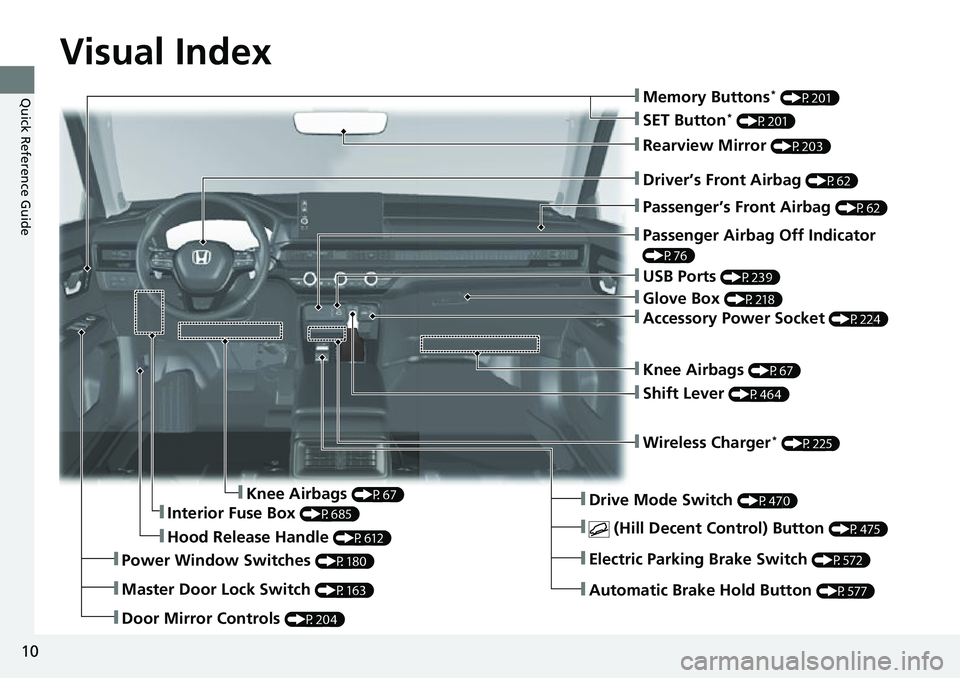
Visual Index
10
Quick Reference Guide
❚Door Mirror Controls (P204)
❚Hood Release Handle (P612)
❚Driver’s Front Airbag (P62)
❚Rearview Mirror (P203)
❚Knee Airbags (P67)
❚Passenger Airbag Off Indicator
(P76)
❚Interior Fuse Box (P685)
❚Passenger’s Front Airbag (P62)
❚Knee Airbags (P67)
❚Wireless Charger* (P225)
❚USB Ports (P239)
❚Drive Mode Switch (P470)
❚Automatic Brake Hold Button (P577)
❚Electric Parking Brake Switch (P572)
❚ (Hill Decent Control) Button (P475)
❚Power Window Switches (P180)
❚Master Door Lock Switch (P163)
❚Glove Box (P218)
❚Accessory Power Socket (P224)
❚Shift Lever (P464)
❚SET Button* (P201)
❚Memory Buttons* (P201)
Page 18 of 719
17
Quick Reference Guide
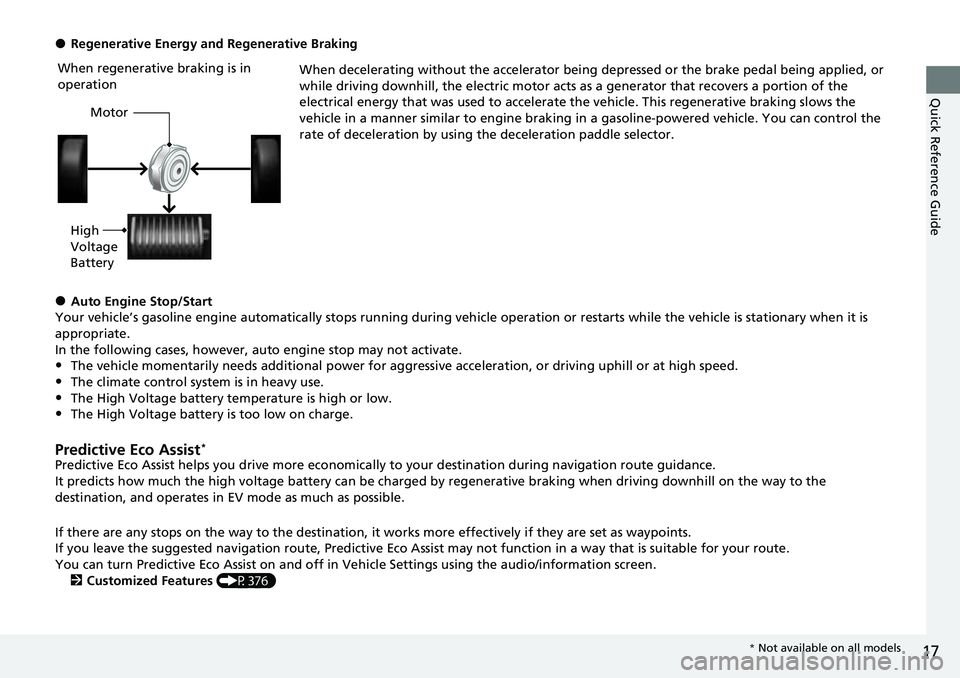
●Regenerative Energy and Regenerative BrakingWhen decelerating without the accelerator being depressed or the brake pedal being applied, or
while driving downhill, the electric motor acts as a generator that recovers a portion of the
electrical energy that was used to accelerate the vehicle. This regenerative braking slows the
vehicle in a manner similar to engine braking in a gasoline-powered vehicle. You can control the
rate of deceleration by using the deceleration paddle selector.
●Auto Engine Stop/Start
Your vehicle’s gasoline engine automatically stops running during vehicle operation or restarts while the vehicle is stationary when it is
appropriate.
In the following cases, however, auto engine stop may not activate.
•The vehicle momentarily needs additional power for aggressive acceleration, or driving uphill or at high speed.
•The climate control system is in heavy use.
•The High Voltage battery temperature is high or low.•The High Voltage battery is too low on charge.
Predictive Eco Assist*
Predictive Eco Assist helps you drive more economically to your destination during navigation route guidance.
It predicts how much the high voltage battery can be charged by regenerative braking when driving downhill on the way to the
destination, and operates in EV mode as much as possible.
If there are any stops on the way to the destination, it works more effectively if they are set as waypoints.
If you leave the suggested navigation route, Predictive Eco Assi st may not function in a way that is suitable for your route.
You can turn Predictive Eco Assist on and off in Ve hicle Settings using the audio/information screen.
2 Customized Features (P376)
When regenerative braking is in
operation
Motor
High
Voltage
Battery
* Not available on all models
Page 24 of 719
23
Quick Reference Guide
Controls (P 145)
Clock (P 146)
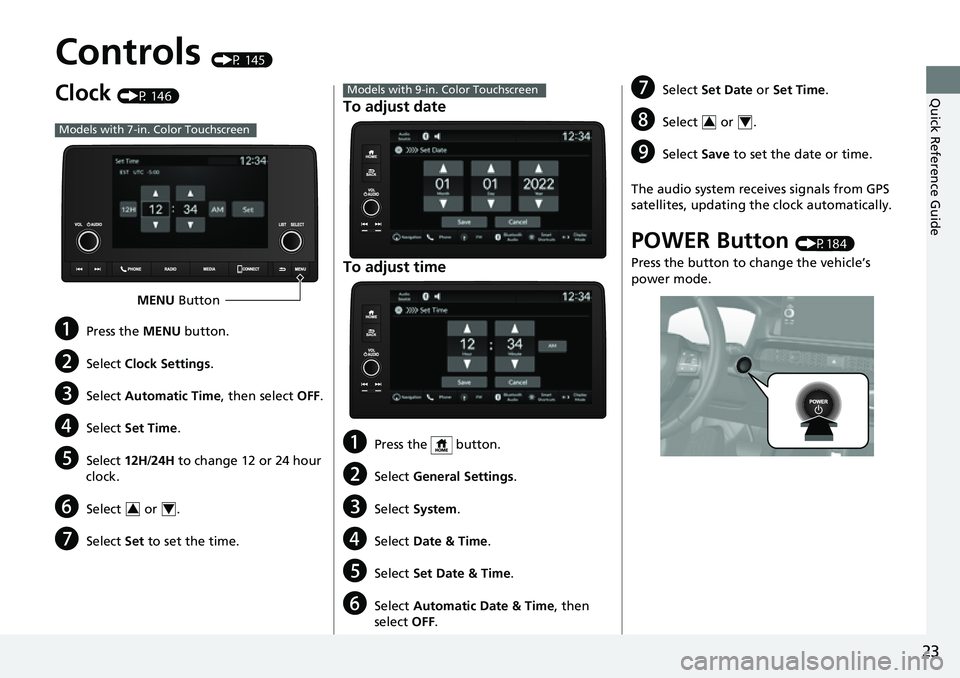
aPress the MENU button.
bSelect Clock Settings .
cSelect Automatic Time , then select OFF.
dSelect Set Time .
eSelect 12H/24H to change 12 or 24 hour
clock.
fSelect or .
gSelect Set to set the time.
Models with 7-in. Color Touchscreen
MENU Button
34
To adjust date
To adjust time
aPress the button.
bSelect General Settings .
cSelect System .
dSelect Date & Time .
eSelect Set Date & Time .
fSelect Automatic Date & Time , then
select OFF.
Models with 9-in. Color TouchscreengSelect Set Date or Set Time.
hSelect or .
iSelect Save to set the date or time.
The audio system receives signals from GPS
satellites, updating the clock automatically.
POWER Button (P184)
Press the button to change the vehicle’s
power mode.
34
Page 29 of 719
28
Quick Reference Guide
Features (P237)
Audio Remote Controls
(P 242)
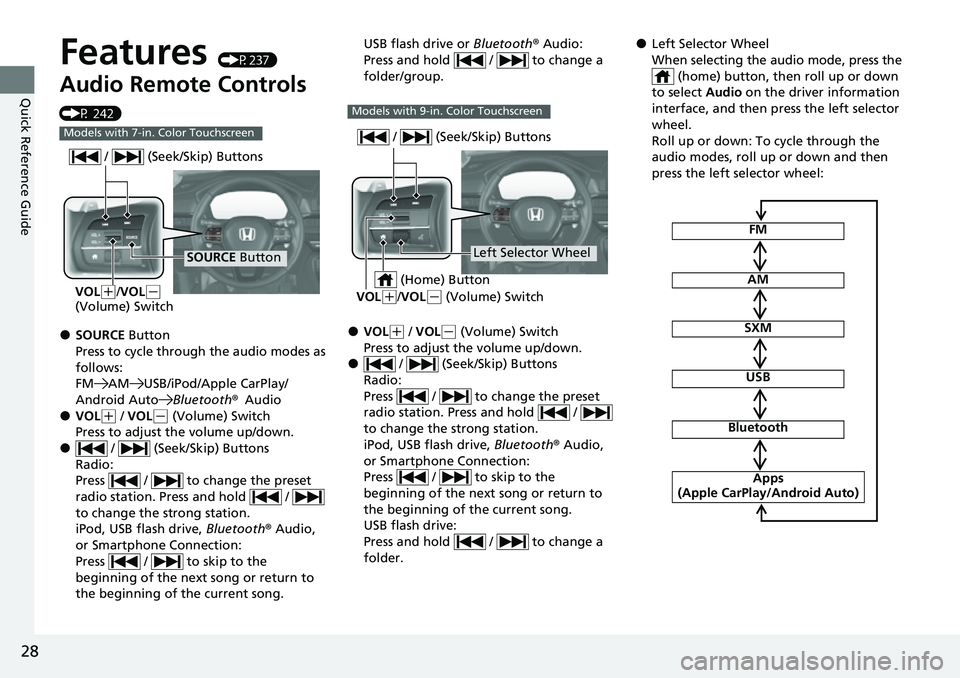
●SOURCE Button
Press to cycle through the audio modes as
follows:
FM AM USB/iPod/Apple CarPlay/
Android Auto Bluetooth®Audio
●VOL(+ / VOL(- (Volume) Switch
Press to adjust the volume up/down.
● / (Seek/Skip) Buttons
Radio:
Press / to change the preset
radio station. Press and hold /
to change the strong station.
iPod, USB flash drive, Bluetooth® Audio,
or Smartphone Connection:
Press / to skip to the
beginning of the next song or return to
the beginning of the current song.
Models with 7-in. Color Touchscreen
SOURCE Button
/ (Seek/Skip) Buttons
VOL(
+/VOL(-
(Volume) Switch
USB flash drive or Bluetooth® Audio:
Press and hold / to change a
folder/group.
●VOL( + / VOL(- (Volume) Switch
Press to adjust the volume up/down.
● / (Seek/Skip) Buttons
Radio:
Press / to change the preset
radio station. Press and hold /
to change the strong station.
iPod, USB flash drive, Bluetooth® Audio,
or Smartphone Connection:
Press / to skip to the
beginning of the next song or return to
the beginning of the current song.
USB flash drive:
Press and hold / to change a
folder.
Models with 9-in. Color Touchscreen
Left Selector Wheel
/ (Seek/Skip) Buttons
VOL(
+/VOL(- (Volume) Switch
(Home) Button
●Left Selector Wheel
When selecting the audio mode, press the
(home) button, then roll up or down
to select Audio on the driver information
interface, and then press the left selector
wheel.
Roll up or down: To cycle through the
audio modes, roll up or down and then
press the left selector wheel:
FM
AM
SXM
USB
Bluetooth
Apps
(Apple CarPlay/Android Auto)
Page 37 of 719
36
Quick Reference Guide
Adaptive Cruise Control
(ACC) with Low Speed
Follow
(P513)
Helps maintain a constant vehicle speed and
a set following-interval behind a vehicle
detected ahead of yours and, if the detected
vehicle comes to a stop, can decelerate and
stop your vehicle, without you having to
keep your foot on the brake or the
accelerator.
Lane Keeping Assist
System (LKAS)
(P 533)
Provides steering input to help keep the
vehicle in the middle of a detected lane and
provides tactile and visual alerts if the
vehicle is detected drifting out of its lane.
Traffic Jam Assist (P545)
The Traffic Jam Assist system uses a camera
mounted to the uppe r portion of the
windshield to detect and monitor left and
right white (or yellow) traffic lane lines.
Based on inputs from the camera, the
system can apply steering torque to keep
your vehicle in the center of the detected
lane.
Road Departure
Mitigation System
(P 554)
Alerts and helps assist you when the system
detects a possibility of your vehicle crossing
over detected lane markings, or
approaching the outer edge of the
pavement (into grass or gravel border) or a
detected oncoming vehicle.
Traffic Sign Recognition
System
(P562)
Reminds you of road si gn information, such
as the current speed limit your vehicle has
just passed through, showing it on the
gauge.
Page 52 of 719
Continued51
uuSeat Belts uAbout Your Seat Belts
Safe Driving■Front seats
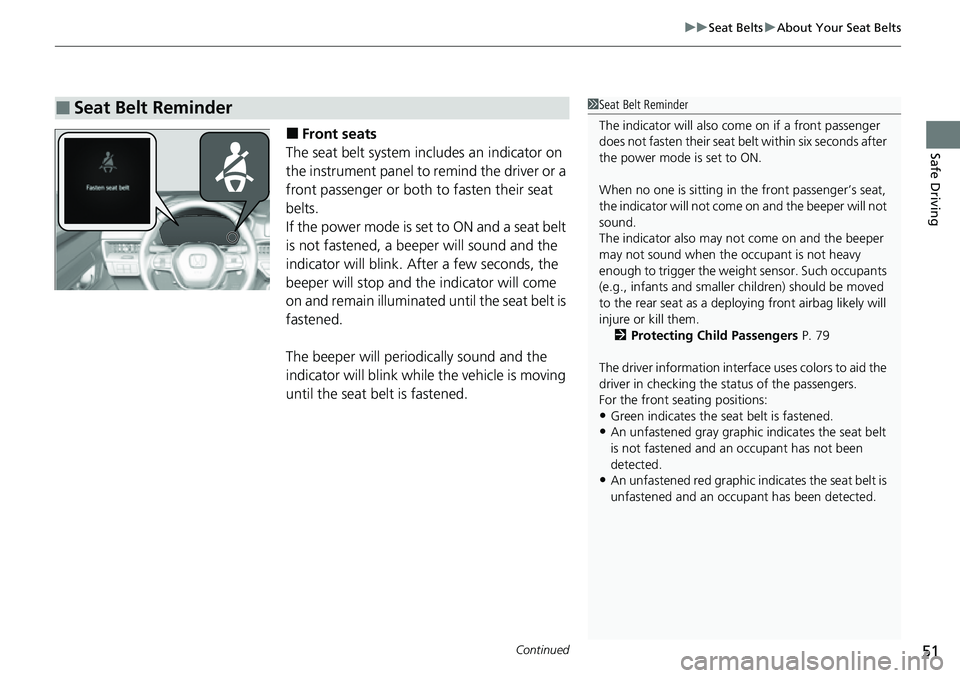
The seat belt system includes an indicator on
the instrument panel to remind the driver or a
front passenger or both to fasten their seat
belts.
If the power mode is set to ON and a seat belt
is not fastened, a beeper will sound and the
indicator will blink. After a few seconds, the
beeper will stop and the indicator will come
on and remain illuminated until the seat belt is
fastened.
The beeper will periodically sound and the
indicator will blink while the vehicle is moving
until the seat belt is fastened.
■Seat Belt Reminder1 Seat Belt Reminder
The indicator will also co me on if a front passenger
does not fasten their seat belt within six seconds after
the power mode is set to ON.
When no one is sitting in th e front passenger’s seat,
the indicator will not come on and the beeper will not
sound.
The indicator also may no t come on and the beeper
may not sound when the occupant is not heavy
enough to trigger the weight sensor. Such occupants
(e.g., infants and smaller children) should be moved
to the rear seat as a deploying front airbag likely will
injure or kill them.
2 Protecting Child Passengers P. 79
The driver information interface uses colors to aid the
driver in checking the st atus of the passengers.
For the front seating positions:
•Green indicates the seat belt is fastened.
•An unfastened gray graphic indicates the seat belt
is not fastened and an occupant has not been
detected.
•An unfastened red graphic i ndicates the seat belt is
unfastened and an occupa nt has been detected.
Page 67 of 719
uuAirbags uFront Airbags (SRS)
66
Safe Driving
We advise against allowing a child age 12 or under to ride in the front passenger’s
seat. However, if you do allow a small child or infant to ride in the front passenger’s
seat, the system is designed to automaticall y deactivate the front passenger’s airbag.
Do not let a small child or infant ride in the front passenger’s seat if the airbag does
not automatically deactivate.1 Advanced Airbags
•There is no child seat or other object pressing
against the rear of the seat or seat-back.
•There is no rear passenger pushing or pulling on
the back of the front passenger’s seat.
•There are no objects placed under or beside the
front passenger’s seat . Improperly positioned
objects can interfere with the advanced airbag
sensors.
•The head restraint is not contacting the roof.
2 Passenger Airbag Off Indicator P. 76
•The floor mat behind the front passenger’s seat is
set in the correct position evenly on the floor. An
improperly placed mat can interfere with the
advanced airbag sensors. 2Floor Mats P. 645
Page 76 of 719
75
uuAirbags uAirbag System Indicators
Continued
Safe Driving
Airbag System Indicators
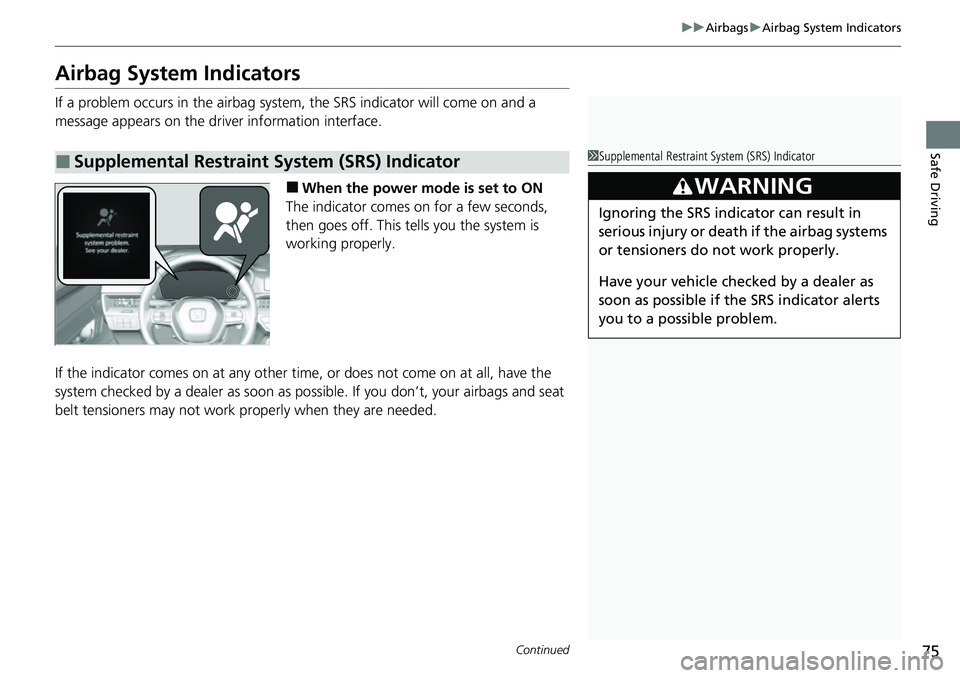
If a problem occurs in the airbag system , the SRS indicator will come on and a
message appears on the driver information interface.
■When the power mode is set to ON
The indicator comes on for a few seconds,
then goes off. This tells you the system is
working properly.
If the indicator comes on at any other time , or does not come on at all, have the
system checked by a dealer as soon as po ssible. If you don’t, your airbags and seat
belt tensioners may not work properly when they are needed.
■Supplemental Restraint System (SRS) Indicator1Supplemental Restraint Sy stem (SRS) Indicator
3WARNING
Ignoring the SRS indicator can result in
serious injury or death if the airbag systems
or tensioners do not work properly.
Have your vehicle checked by a dealer as
soon as possible if th e SRS indicator alerts
you to a possible problem.