cooling HONDA ELEMENT 2003 1.G User Guide
[x] Cancel search | Manufacturer: HONDA, Model Year: 2003, Model line: ELEMENT, Model: HONDA ELEMENT 2003 1.GPages: 338, PDF Size: 4.08 MB
Page 127 of 338

CONT INUED
Air conditioning places an extra load
on the engine. Watch the engine
coolant temperature gauge (see page) when driving in stop-and-go
traf f ic or climbing a long, steep hill.
If it moves near the red zone, turn
of f the A/C until the gauge reads
normally. To warm the interior:
Start the engine.
Select .
Set the f an to the desired speed.
Adjust the warmth of the air with
the temperature control dial. Air conditioning, as it cools, removes
moisture from the air. When used in
combination with the heater, it
makes the interior warm and dry.
Set the f an to the desired speed.
Turn on the air conditioning.
Select and Fresh Air mode.
Adjust the temperature control
dial so the mixture of heated and
cooled air f eels comf ortable.
This setting is suitable f or all driving
conditions whenever the outside
temperature is above 32°F (0°C).
74
1.
2.
3.
4.
1.
2.
3.
4.
Heating and Cooling
Comf ort and Convenience Feat ures
T o Heat T o Heat and Dehumidif y wit h A ir
Condit ioning
123
Page 128 of 338

To remove f og f rom the inside of the
windows:To remove exterior f rost or ice f rom
the windshield and side windows
after the vehicle has been sitting out
in cold weather:
Start the engine.
Select .
When you select , the
system automatically switches
to Fresh Air mode and turns on
the A/C.
Set the f an and temperature
controls to maximum.
To rapidly remove exterior f rost or
ice f rom the windshield (on very cold
days), f irst select the Recirculation
mode. Once the windshield is clear,
select the Fresh Air mode to avoid
f ogging the windows. These settings direct all the air f low
to the defroster vents at the base of
the windshield and the side window
defroster vents. The air flow will get
warmer and clear the windows faster
as the engine warms up.
For saf ety, make sure you have a
clear view through all the windows
bef ore driving away.
Set the f an to the desired speed.
Select .
When you select , the
system automatically switches to
Fresh Air mode and turns on the
A/C (the indicator in the A/C
button does not come on).
Adjust the temperature control
dial so the air flow from the
def roster vents f eels warm.
Turn on the rear window def ogger
to help clear the rear window.
When you switch to another mode
f rom , the A/C stays on.
Press the A/C button to turn it of f . 1.
2.
3.
1.
2.
3.
4.
Heating and Cooling
Comf ort and Convenience Feat ures
T o Def og and Def rost
124
Page 129 of 338

To shut of f the system temporarily,
turn the fan speed and temperature
control dials all the way to the lef t.
No air f low can cause the windows to
fogup.Itisrecommendedthatyou
keep the fan on at all times so stale
air and moisture do not build up in
the interior and cause f ogging. To Turn Everything Of f
Heating and Cooling
Comf ort and Convenience Feat ures125
Page 199 of 338

Many states and Canadian provinces
require special outside mirrors when
towing a trailer. Even if they don’t,
you should install special mirrors if
you cannot clearly see behind you, or
if the trailer creates a blind spot.
Askyourtrailersalesorrental
agency if any other items are
recommended or required f or your
towing situation.When preparing to tow, and bef ore
driving away, be sure to check the
f ollowing:
The vehicle has been properly
serviced, and the tires, brakes,
suspension, and cooling system
are in good operating condition. The lights and brakes on your
vehicle and the trailer are working
properly.
The trailer has been properly
serviced and is in good condition.
Allitemsonandinthetrailerare
properly secured and cannot shif t
while you drive. Thehitch,safetychains,andany
other attachments are secure. Your vehicle tires and spare are
properly inf lated (see page ),
and the trailer tires and spare are
inflated as recommended by the
trailer maker.
All weights and loads are within
limits (see pages and ). If you tow f requently, f ollow the
Severe Conditions maintenance
schedule. 192
191 250
Additional Trailer EquipmentPre-T ow Checklist
Towing a Trailer
Driving195
Page 211 of 338
This section explains the importance
of keeping your vehicle well
maintained and why you should
f ollow basic maintenance saf ety
precautions.
This section also includes
Maintenance Schedules f or normal
driving and severe driving conditions,
a Maintenance Record, and instruc-
tions f or simple maintenance tasks
you may want to take care of
yourself .
If you have the skills and tools to per-
f orm more complex maintenance
tasks on your Honda, you may want
to purchase the Service Manual. See
page f or inf ormation on how to
obtain a copy, or see your Honda
dealer.......................
Maintenance Saf ety .208
.
Important Safety Precautions . 209
.................
Maintenance Schedule . 210
...
Required Maintenance Record . 217
.......
Owner Maintenance Checks . 219
..............................
Fluid Locations .220
......................................
Engine Oil .221
..................................
Adding Oil .221
....................
Recommended Oil .221
..............................
Synthetic Oil .222
....................................
Additives .222
.....
Changing the Oil and Filter . 223
.............................
Cooling System .225
............
Adding Engine Coolant . 225
.......
Replacing Engine Coolant . 227
....................
Windshield Washers .230
.......................
Transmission Fluid .231
..........
Automatic Transmission . 231
5-speed Manual .........................
Transmission .232
.................
Rear Dif f erential Fluid . 233
................
Brake and Clutch Fluid . 234
............................
Brake System .234
...........................
Clutch System .235
..............................
Power Steering .235
.....................
Air Cleaner Element .236 ....................................
Hood Latch .237
....................................
Spark Plugs .238
..............................
Replacement .238
............................
Specif ications .239
...........................................
Battery .240
.................................
Wiper Blades .242
..............
Air Conditioning System . 245
..................
Dust and Pollen Filter . 246
.......................................
Drive Belt .248
...............................................
Tires .249
......................................
Inf lation .249
Recommended Tire Pressures f or Normal ...........................
Driving .250
..................................
Inspection .251
..............................
Maintenance .251
.............................
Tire Rotation .252
...
Replacing Tires and Wheels . 253
......................
Wheels and Tires .254
..........................
Winter Driving .254
.............................
Snow Tires .254
............................
Tire Chains .255
.............................................
Lights .256
.....................
Headlight Aiming .258
........................
Replacing Bulbs .258
....................
Storing Your Vehicle .266
323
Maintenance
Maint enance207
Page 229 of 338
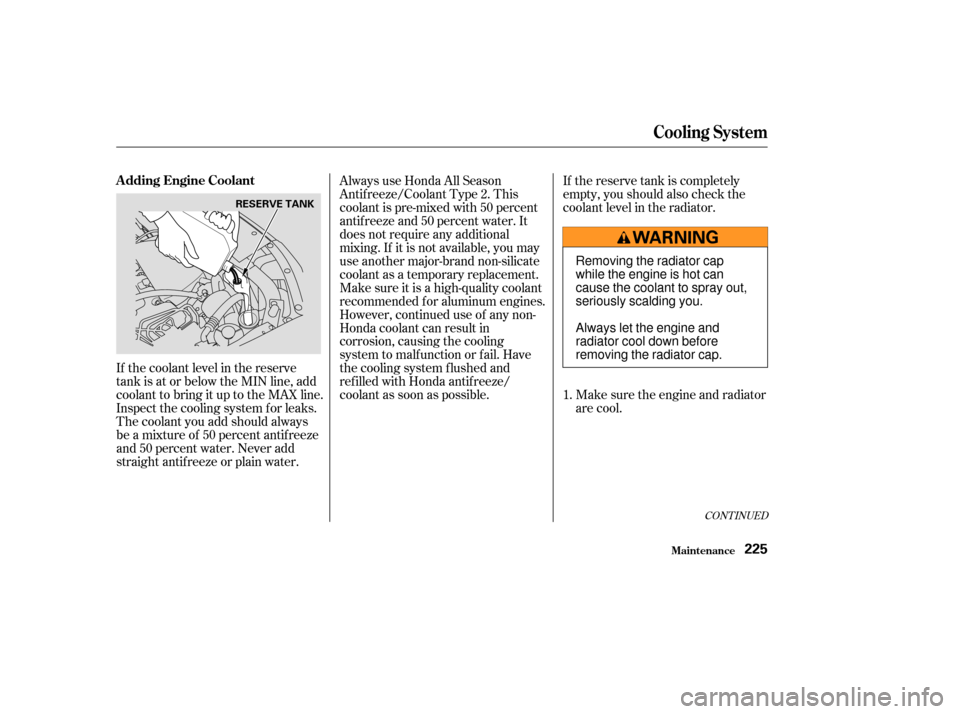
If the coolant level in the reserve
tank is at or below the MIN line, add
coolant to bring it up to the MAX line.
Inspect the cooling system f or leaks.
The coolant you add should always
be a mixture of 50 percent antif reeze
and 50 percent water. Never add
straight antif reeze or plain water.Always use Honda All Season
Antif reeze/Coolant Type 2. This
coolant is pre-mixed with 50 percent
antif reeze and 50 percent water. It
does not require any additional
mixing. If it is not available, you may
use another major-brand non-silicate
coolant as a temporary replacement.
Make sure it is a high-quality coolant
recommended f or aluminum engines.
However, continued use of any non-
Honda coolant can result in
corrosion, causing the cooling
system to malf unction or f ail. Have
the cooling system f lushed and
ref illed with Honda antif reeze/
coolant as soon as possible.
If the reserve tank is completely
empty, you should also check the
coolant level in the radiator.
Make sure the engine and radiator
are cool.
1.
CONT INUED
A dding Engine Coolant
Cooling Syst em
Maint enance225
RESERVE TANK
Removing the radiator cap
while the engine is hot can
cause the coolant to spray out,
seriously scalding you.
Always let the engine and
radiator cool down before
removing the radiator cap.
Page 230 of 338
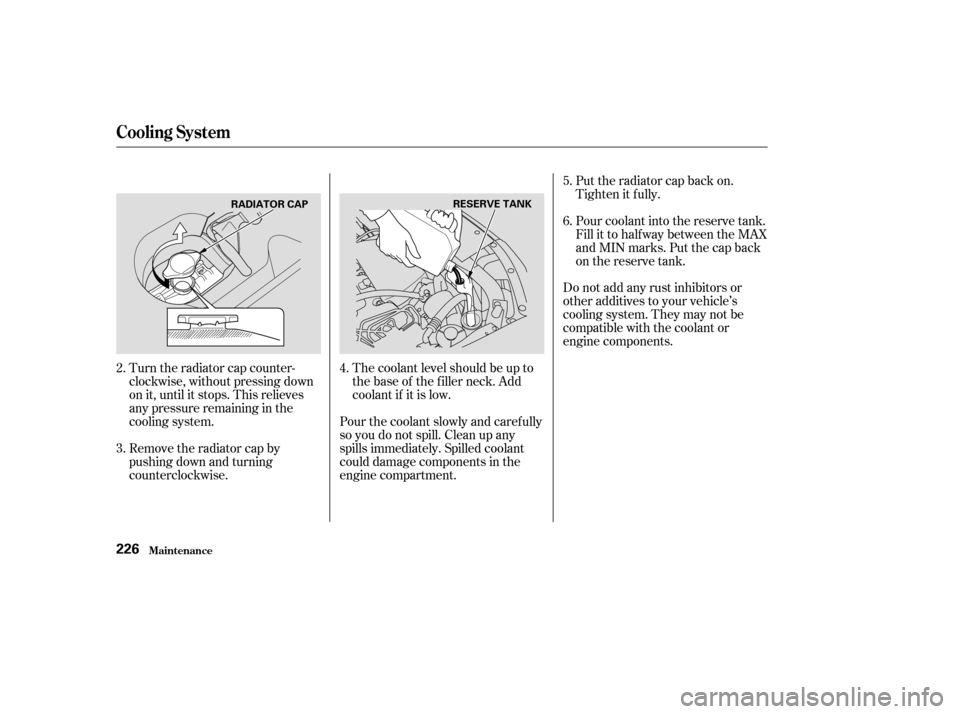
The coolant level should be up to
the base of the f iller neck. Add
coolant if it is low.
Turn the radiator cap counter-
clockwise, without pressing down
on it, until it stops. This relieves
any pressure remaining in the
cooling system.
Remove the radiator cap by
pushing down and turning
counterclockwise. Do not add any rust inhibitors or
other additives to your vehicle’s
cooling system. They may not be
compatible with the coolant or
engine components.
Put the radiator cap back on.
Tighten it f ully.
Pour coolant into the reserve tank.
Fill it to half way between the MAX
and MIN marks. Put the cap back
on the reserve tank.
Pour the coolant slowly and caref ully
so you do not spill. Clean up any
spills immediately. Spilled coolant
could damage components in the
engine compartment.
2.
3.
4.5.
6.
Cooling Syst em
Maint enance226
RADIATOR CAP
RESERVE TANK
Page 231 of 338
CONT INUED
Thecoolingsystemshouldbe
completely drained and ref illed with
new coolant according to the time
and distance recommendations in
the maintenance schedule. Only use
Honda All Season Antif reeze/
Coolant Type 2.
Draining the coolant requires access
to the underside of the vehicle.
Unless you have the tools and
knowledge, you should have this
maintenance done by a skilled
mechanic.Turn the ignition ON (II). Turn
the heater temperature control
dial f ully clockwise. Turn the
ignition of f .
Openthehood.Makesurethe
engine and radiator are cool to the
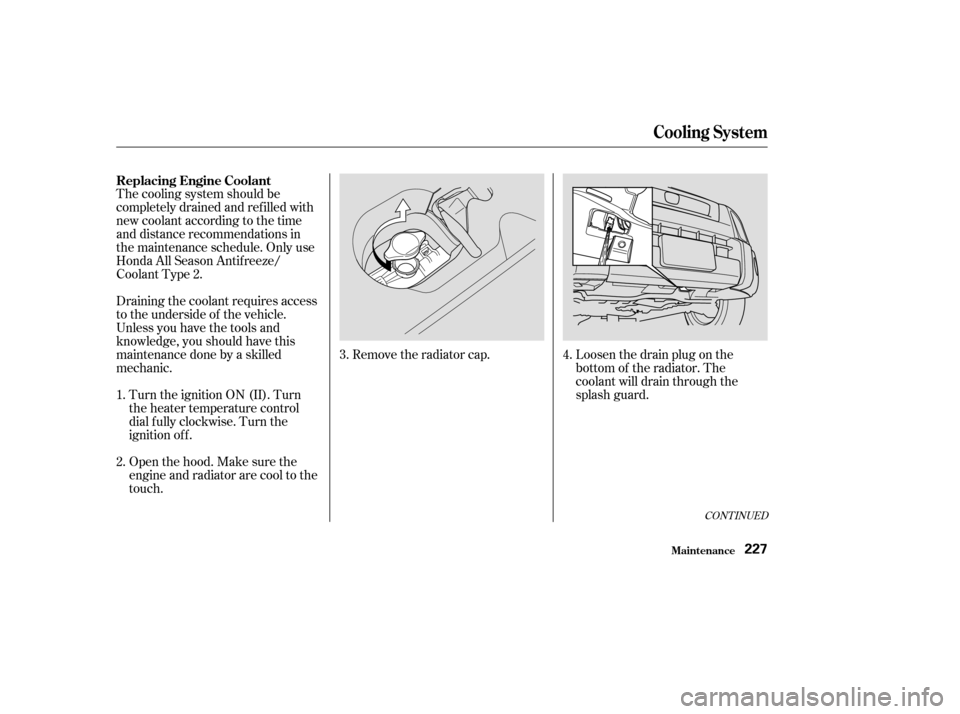
touch. Remove the radiator cap.
Loosen the drain plug on the
bottom of the radiator. The
coolant will drain through the
splash guard.
1.
2. 3.
4.
Replacing Engine Coolant
Cooling Syst em
Maint enance227
Page 232 of 338
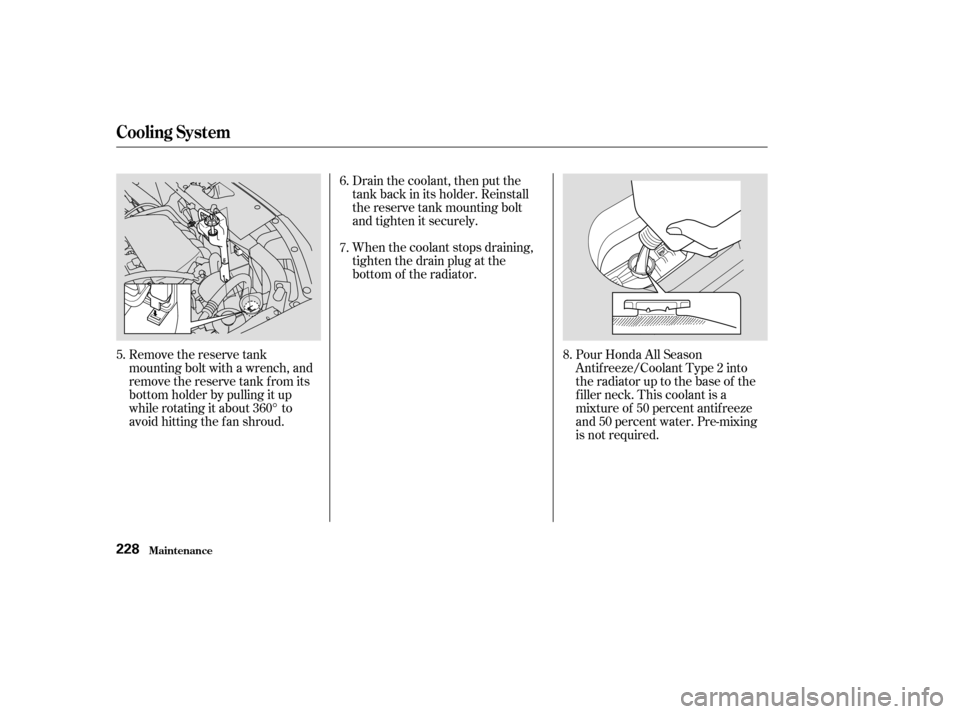
Remove the reserve tank
mounting bolt with a wrench, and
remove the reserve tank f rom its
bottom holder by pulling it up
while rotating it about 360° to
avoid hitting the fan shroud.Drain the coolant, then put the
tank back in its holder. Reinstall
the reserve tank mounting bolt
and tighten it securely.
When the coolant stops draining,
tightenthedrainplugatthe
bottom of the radiator.
Pour Honda All Season
Antif reeze/Coolant Type 2 into
the radiator up to the base of the
f iller neck. This coolant is a
mixture of 50 percent antif reeze
and 50 percent water. Pre-mixing
is not required.
5. 6.
7.
8.
Cooling Syst em
Maint enance228
Page 233 of 338
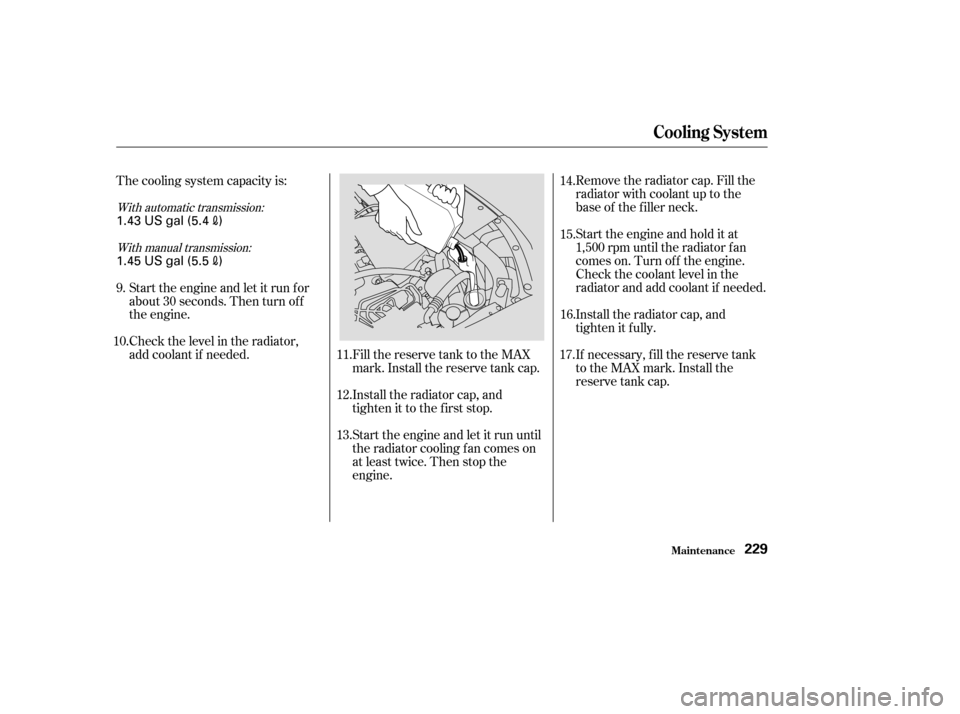
Fill the reserve tank to the MAX
mark. Install the reserve tank cap.
Install the radiator cap, and
tighten it to the first stop.Remove the radiator cap. Fill the
radiator with coolant up to the
base of the f iller neck.
Start the engine and hold it at
1,500 rpm until the radiator f an
comes on. Turn of f the engine.
Check the coolant level in the
radiator and add coolant if needed.
Install the radiator cap, and
tighten it fully.
If necessary, f ill the reserve tank
to the MAX mark. Install the
reserve tank cap.
Start the engine and let it run until
the radiator cooling f an comes on
at least twice. Then stop the
engine.
Start the engine and let it run f or
about 30 seconds. Then turn of f
the engine.
Check the level in the radiator,
add coolant if needed.
The cooling system capacity is:
9.
10. 11.
12.
13.14.
15.
16.
17.
With automatic transmission:
With manual transmission:
Maint enance
Cooling Syst em
229
1.43 US gal (5.4)
1.45 US gal (5.5
)