lock HONDA ELEMENT 2003 1.G Service Manual
[x] Cancel search | Manufacturer: HONDA, Model Year: 2003, Model line: ELEMENT, Model: HONDA ELEMENT 2003 1.GPages: 338, PDF Size: 4.08 MB
Page 121 of 338
.....................
Heating and Cooling .118
.........
What Each Control Does . 118
............
How to Use the System . 121
..........
To Turn Everything Of f . 125
................................
Audio System .126
Audio System ..........
(Canadian DX model) . 126
....
AM/FM/CD Audio System . 126
.................
Operating the Radio . 126
.................
Adjusting the Sound . 129
..............................
Digital Clock .130
............
Audio System Lighting . 132
.........
Operating the CD Player . 132
.....
Operating the CD Changer . 134
....
CD Player Error Indications . 135
CD Changer Error .............................
Indications .136 ...........
Audio System (EX model) . 137
....
AM/FM/CD Audio System . 137
.................
Operating the Radio . 138
.................
Adjusting the Sound . 141
..............................
Digital Clock .142
............
Audio System Lighting . 143
....................
Radio Frequencies . 143
........................
Radio Reception .143
.........
Operating the CD Player . 145
.....
Operating the CD Changer . 147
....
CD Player Error Indications . 148
CD Changer Error .............................
Indications .149
.......
Protecting Compact Discs . 150
..................
Auxiliary Input Jack . 151
.......................
Thef t Protection .152
...............................
Cruise Control .153
Comf ort and Convenience Features
Comf ort and Convenience Feat ures117
Page 122 of 338
Proper use of the Heating and
Cooling system can make the
interior dry and comf ortable, and
keep the windows clear f or the best
visibility.
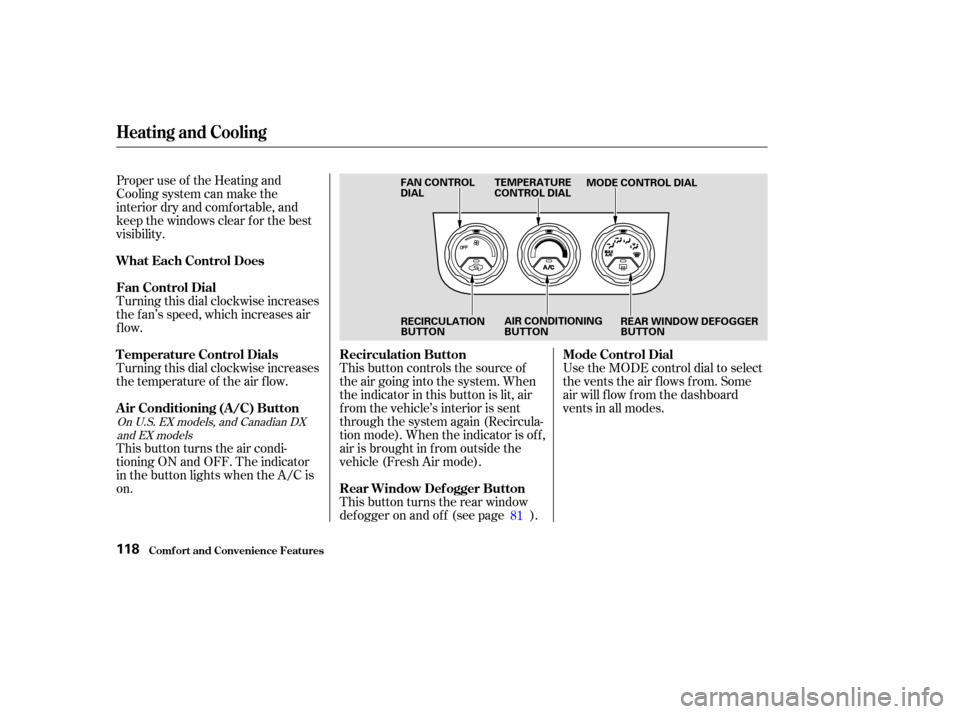
Turning this dial clockwise increases
the f an’s speed, which increases air
flow.
Turning this dial clockwise increases
the temperature of the air flow.This button controls the source of
the air going into the system. When
the indicator in this button is lit, air
f rom the vehicle’s interior is sent
through the system again (Recircula-
tion mode). When the indicator is off,
air is brought in f rom outside the
vehicle (Fresh Air mode).
This button turns the rear window
def ogger on and of f (see page ).Use the MODE control dial to select
the vents the air flows from. Some
air will f low f rom the dashboard
vents in all modes.
This button turns the air condi-
tioning ON and OFF. The indicator
in the button lights when the A/C is
on. 81
On U.S. EX models, and Canadian DXand EX models
Comf ort and Convenience Feat ures
Heating and Cooling
What Each Control Does
Fan Control Dial
T emperature Control Dials
Air Conditioning (A/C) Button Recirculation Button
Rear Window Def ogger ButtonMode Control Dial
118
FAN CONTROL
DIAL
TEMPERATURE
CONTROL DIAL
MODE CONTROL DIAL
RECIRCULATION
BUTTON AIR CONDITIONING
BUTTON
REAR WINDOW DEFOGGER
BUTTON
Page 134 of 338
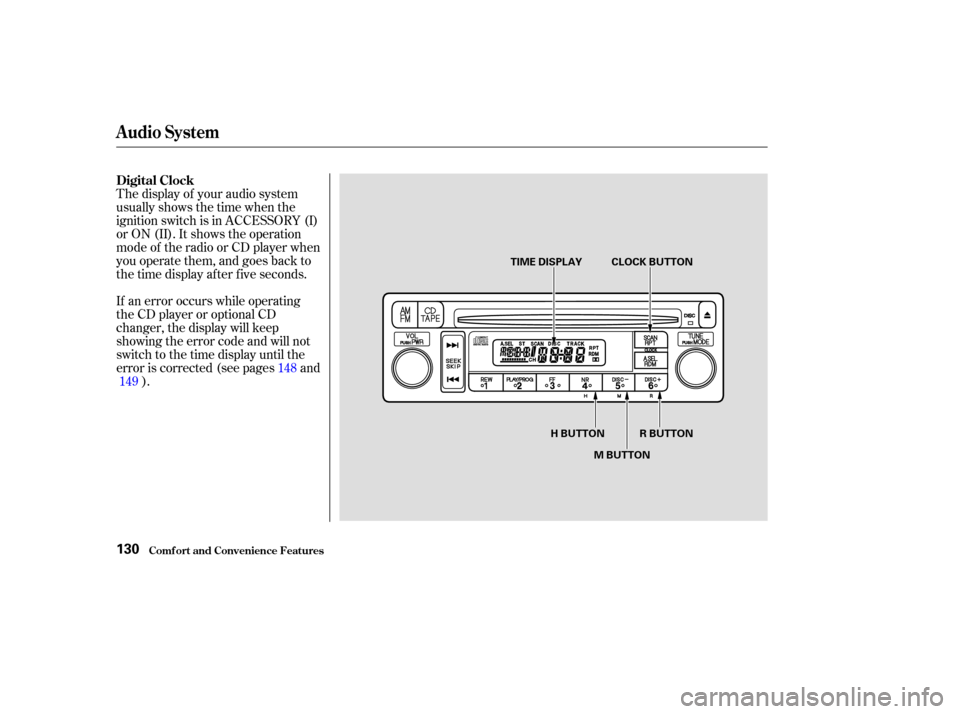
The display of your audio system
usually shows the time when the
ignition switch is in ACCESSORY (I)
or ON (II). It shows the operation
mode of the radio or CD player when
you operate them, and goes back to
the time display af ter f ive seconds.
If an error occurs while operating
the CD player or optional CD
changer, the display will keep
showing the error code and will not
switch to the time display until the
error is corrected (see pages and). 148
149
Comf ort and Convenience Feat ures
Audio System
Digital Clock
130
R BUTTON
H BUTTON
M BUTTONCLOCK BUTTON
TIME DISPLAY
Page 135 of 338

You can use the R (Preset 6) button
to quickly set the time to the nearest
hour. Press the R button while
pressing the CLOCK button. If the
displayed time is bef ore the half
hour, pressing R sets the clock back
to the previous hour. If the displayed
time is af ter the half hour, pressing
R sets the clock f orward to the
beginning of the next hour.For example:
1:06 would RESET to 1:00.
1:52 would RESET to 2:00.
If your vehicle’s battery is
disconnected or goes dead, the time
setting will be lost. To set the time
again, f ollow the setting procedure.
To set the hour, press the H (Preset
4) button while pressing the CLOCK
(SCAN/RPT) button. Press and hold
the H button until the hour advances
to the desired time.
To set the minute, press the M
(Preset 5) button while pressing the
CLOCK (SCAN/RPT) button. Press
andholdtheMbuttonuntilthe
minute numbers advance to the
desired time.
Audio System
Comf ort and Convenience Feat ures131
Page 146 of 338
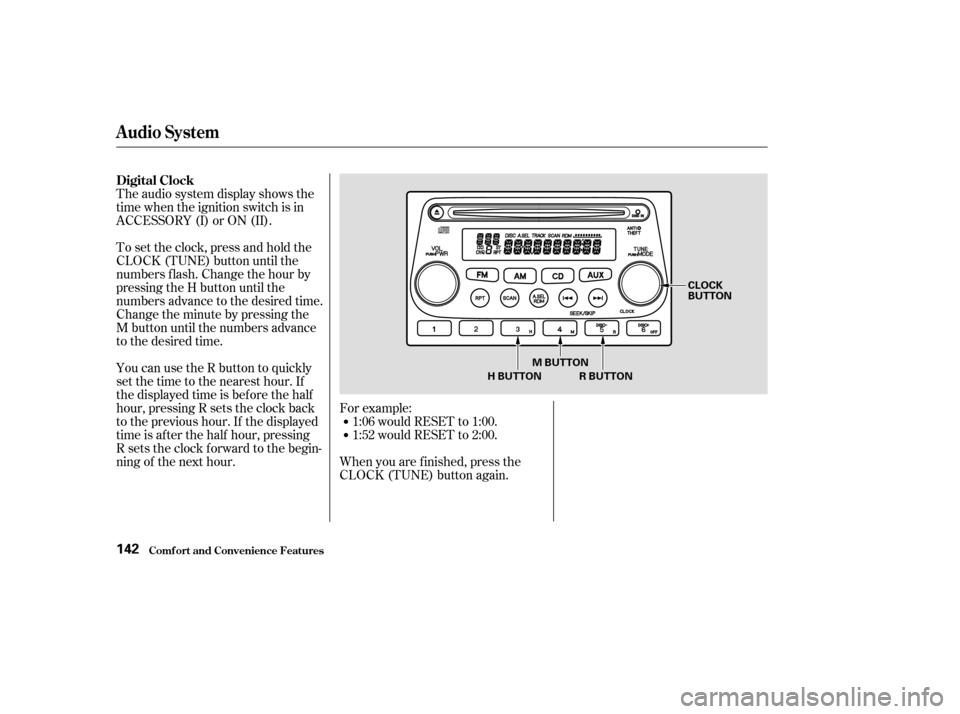
The audio system display shows the
time when the ignition switch is in
ACCESSORY (I) or ON (II).For example:1:06 would RESET to 1:00.
1:52 would RESET to 2:00.
When you are f inished, press the
CLOCK (TUNE) button again.
To set the clock, press and hold the
CLOCK (TUNE) button until the
numbers f lash. Change the hour by
pressing the H button until the
numbers advance to the desired time.
Change the minute by pressing the
M button until the numbers advance
to the desired time.
You can use the R button to quickly
set the time to the nearest hour. If
the displayed time is before the half
hour, pressing R sets the clock back
to the previous hour. If the displayed
time is af ter the half hour, pressing
R sets the clock f orward to the begin-
ning of the next hour.
Audio System
Comf ort and Convenience Feat ures
Digital Clock
142
H BUTTON
CLOCK
BUTTON
M BUTTON R BUTTON
Page 169 of 338
Modif ying your vehicle, or installing
some non-Honda accessories, can
make your vehicle unsaf e. Bef ore
you make any modif ications or add
anyaccessories,besuretoreadthe
f ollowing inf ormation.When properly installed, cellular
phones, alarms, two-way radios, and
low-powered audio systems should
not interf ere with your vehicle’s
computer-controlled systems, such
as the SRS and anti-lock brake
system.
Your dealer has Honda accessories
that allow you to personalize your
vehicle. These accessories have
been designed and approved f or your
vehicle, and are covered by warranty.
Non-Honda accessories are usually
designed f or universal applications.
Although aftermarket accessories
may f it on your vehicle, they may not
meet f actory specif ications, and
could adversely af f ect your vehicle’s
handling and stability. (See
‘‘Modif ications’’ on page f or
additional inf ormation.)
If possible, have your dealer inspect
the f inal installation. Have the installer contact your
Honda dealer f or assistance bef ore
installing any electronic accessory. Be sure electronic accessories do
not overload electrical circuits
(see page ). Make sure the accessory does not
obscure any lights, or interf ere
with proper vehicle operation or
perf ormance.
Bef ore installing any accessory: However, if electronic accessories
are improperly installed, or exceed
your vehicle’s electrical system
capacity, they can interf ere with the
operation of your vehicle, or even
cause the airbags to deploy.
299
166
A ccessories
A ccessories and Modif ications
Bef ore Driving165
Improper accessories or
modifications can affect your
vehicle’s handling, stability, and
performance, and cause a
crash in which you can be hurt
or killed.
Follow all instructions in this
owner’s manual regarding
accessories and modifications.
Page 170 of 338

If a side airbag
inflates,acupholderorotherhard
object attached on or near the
door could be propelled inside the
vehicle and hurt someone.
Covering the outside edge of a
f ront seat-back, with a non-Honda
seat cover for example, could
prevent the side airbag f rom
inf lating properly.
Removing parts f rom your vehicle,
or replacing components with non-
Honda (af termarket) components
could seriously af f ect your vehicle’s
handling, stability, and reliability.
Some examples are:
Lowering the vehicle with an
aftermarket suspension kit that
signif icantly reduces ground
clearance can allow the
undercarriage to impact speed
bumps or other raised objects,
which could cause the airbags to
deploy.
Raising the vehicle with an
af termarket suspension kit can
af f ect the handling and stability.
Af termarket wheels, because they
are a universal design, can cause
excessive stress on suspension
components. Larger or smaller wheels and tires
can interf ere with the operation of
your vehicle’s anti-lock brakes and
other systems.
Do not modif y your steering wheel
or any other part of your
Supplemental Restraint System.
Modif ications could make the
system inef f ective.
Any object
attached to or placed on the covers
marked ‘‘SRS AIRBAG,’’ in the
center of the steering wheel and
on top of the dashboard, could
interf ere with the proper operation
of the airbags. Or, if the airbags
inf late, the objects could be
propelled inside the vehicle and
hurt someone.
If you plan to modif y your vehicle,
consult with your Honda dealer.
Only on models equipped with side
airbagsModif ications
Additional Saf ety Precautions
Do not at t ach hard object s on ornear a f ront door.
Do not place any object s over t heoutsideedgeof afront seat-back.
Do not at t ach or place object s on the f ront airbag covers.
A ccessories and Modif ications
Bef ore Driving166
Page 175 of 338
This section gives you tips on
starting the engine under various
conditions, and how to operate the
5-speed manual and automatic
transmissions. It also includes
important inf ormation on parking
your vehicle, the braking system,
and f acts you need if you are plan-
ning to tow a trailer or drive off-
highway.........................
Driving Guidelines .172
........................
Preparing to Drive .173
.......................
Starting the Engine .174
Starting in Cold Weather ....................
at High Altitude .175
....
5-speed Manual Transmission . 176
.....
Recommended Shif t Points . 177
..............
Engine Speed Limiter . 177
..............
Automatic Transmission . 178
.
Shif t Lever Position Indicator . 178
................
Shif t Lever Positions . 179
..............
Engine Speed Limiter . 182
....................
Shif t Lock Release . 183
...........................................
Parking .184
.....................
The Braking System .185
.............
Brake Wear Indicators . 185
...............
Brake System Design . 186
.......................
Anti-lock Brakes .186
Important Saf ety .........................
Reminders .187
........................
ABS Indicator .188
...............
Driving in Bad Weather . 189
...........................
Towing a Trailer .191
Towing Your Vehicle Behind a ................................
Motorhome .198 ..............
Of f -Highway Guidelines . 200
.................
General Inf ormation . 200
Important Saf ety ............................
Precautions .201
...............................
Driving Tips .202
Driving
Driving171
Page 177 of 338

Youshoulddothefollowingchecks
and adjustments every day bef ore
you drive your vehicle.Make sure all windows, mirrors,
and outside lights are clean and
unobstructed. Remove f rost, snow,
or ice. Check the adjustment of the seat
(see page ).
Check the adjustment of the
inside and outside mirrors (see
page ).
Check the adjustment of the
steering wheel (see page ).Turn the ignition switch ON (II).
Check the indicator lights in the
instrument panel.
Start the engine (see page ).
Check the gauges and indicator
lights in the instrument panel (see
page ).
Visually check the tires. If a tire
looks low, use a gauge to check its
pressure.
Check that any items you may be
carrying with you inside are stored
properly or f astened down
securely. Make sure the doors, the hatch,
and the tailgate are securely
closed and locked.
Fasten your seat belt. Check that
your passengers have f astened
their seat belts (see page ).
Check that the hood, tailgate, and
hatch are f ully closed.
1.
2.
3.
4. 5.
6.
7.
8.
9.
10.
11.
12.
17 65
92
106 82 174
Driving
Preparing to Drive
173
Page 180 of 338
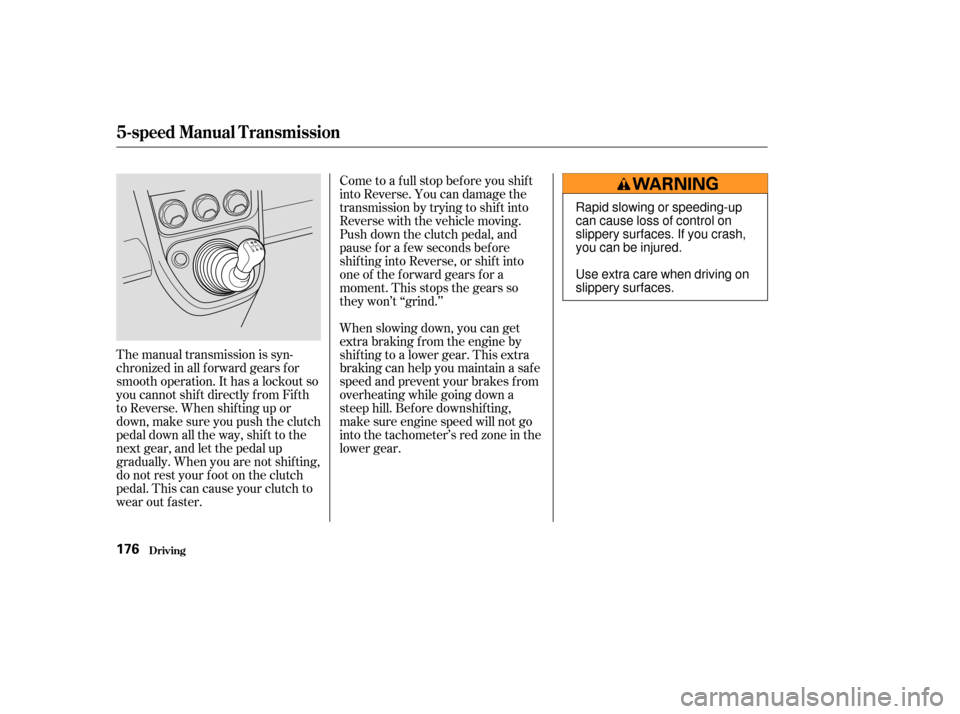
The manual transmission is syn-
chronizedinallforwardgearsfor
smooth operation. It has a lockout so
you cannot shift directly from Fifth
to Reverse. When shif ting up or
down,makesureyoupushtheclutch
pedal down all the way, shift to the
next gear, and let the pedal up
gradually. When you are not shif ting,
do not rest your f oot on the clutch
pedal. This can cause your clutch to
wear out faster.Come to a full stop before you shift
into Reverse. You can damage the
transmission by trying to shif t into
Reverse with the vehicle moving.
Push down the clutch pedal, and
pause f or a f ew seconds bef ore
shif ting into Reverse, or shif t into
one of the f orward gears f or a
moment. This stops the gears so
they won’t ‘‘grind.’’
When slowing down, you can get
extra braking f rom the engine by
shifting to a lower gear. This extra
braking can help you maintain a safe
speed and prevent your brakes f rom
overheating while going down a
steep hill. Bef ore downshif ting,
make sure engine speed will not go
into the tachometer’s red zone in the
lower gear.
5-speed Manual T ransmission
Driving176
Rapid slowing or speeding-up
can cause loss of control on
slippery surfaces. If you crash,
you can be injured.
Use extra care when driving on
slippery surfaces.