tires HONDA ELEMENT 2007 1.G Owners Manual
[x] Cancel search | Manufacturer: HONDA, Model Year: 2007, Model line: ELEMENT, Model: HONDA ELEMENT 2007 1.GPages: 275, PDF Size: 4.16 MB
Page 63 of 275

The instrument panel has many
indicato rs that give you important
info rmation about your vehicl e.
See page .
If this indicator comes on when the
engine is running, the battery is not
being charged. For more information,
see page .
The
engine can be severely damaged
if this indicator flashes or stays on
wh en the engine is running. For
more information, see page .This
indicator has two functions: This
indicator comes on when you
turn the ignition switch to the ON
(II) position. It reminds you and your
passengers to fasten your seat belts.
A beeper also sounds if you have not
fastened your seat belt.
If you turn the ignition switch to the
ON (II) position before fastening
your seat belt, the beeper sounds
and the indicator flashes. If you do
notfastenyourseatbeltbeforethe
beep er stops, the indicator stops
fl ashing but remains on.
If your front passenger does not
fasten their seat belt, the indic ator
comes on about 6 seconds after the
ignition switch is turned to the ON
(II) position.
Itcomesonwhenyouturnthe
ignition
switch to the ON (II)
position. It is a reminder to check
the parking brake. A beeper
sounds if you drive with the
parking brake not fully released.
Driving with the parking brake not
fully released can damage the
brakes and tires.
If it stays on after you have fully
released the parking brake while
the engine is running, or if it
comes on while driving, there
could be a problem with the brake
system. For more inf ormation, see
page .
2. 1.
232
231
231 233
Malf unction Indicator
Lamp
L ow Oil Pressure
Indicator
Charging System
Indicator
Parking Brake and
Brake System
Indicator
Seat Belt Reminder
Indicator
Instrument Panel Indicators
60
U.S. Canada
Page 67 of 275

This indicator has three functions:
Itcomesonasareminderthatyou
have turned off the vehicle
stability assist (VSA) system.
It flashes when VSA is active (see
page ).
It comes on along with the VSA
system indicator if there is a
problem with the VSA system.
Ifitcomesonandstaysonatany
other
time, or it does not come on
wh en you turn the ignition switch to
the ON (II) position, there is a
problem with the VSA system. Have
your vehicle checked by your dealer.
Wi thout VSA, your vehicle still has
norm al driving ability, but will not
have VSA traction and stability
enhancement. See page for more
info rmation on the VSA system. This
indicator normally comes on for
a few seconds when you turn the
ignition switch to the ON (II)
position. For more information, see
page .
This
indicator normally comes on for
a few seconds when you turn the
ignition switch to the ON (II)
position. This
indicator normally comes on for
a few seconds when you turn the
ignition to the ON (II) position.
If it comes on while driving, it
indicates that one or more of your
vehicl e’s tires are extremely low on
pressure.
If this happens, pull to the side of the
ro ad when it is safe, check which tire
has lost the pressure, and determine
the cause. If it is because of a flat tire,
replace the flat tire with the compact
spare (see page ), and have the
flat tire repaired as soon as possible.
If two or more tires are underinflated,
ca ll a professional towing service
(see page ). Ref er to page f or more inf ormation.
1.
2.
3.
165 165
165 218
239
163
Instrument Panel Indicators
Vehicle Stability Assist
(VSA ) System Indicator VSA A ctivation Indicator L ow T ire Pressure
Indicator
64
Page 147 of 275

Larger or smaller wheels and tires
can interf ere with the operation of
your vehicle’s anti-lock brakes and
other systems.
If you plan to modif y your vehicle,
consult your dealer. Modif ying your steering wheel or
any other part of your vehicle’s
safety features can make the
systems inef f ective.
Lowering the vehicle with a non-
Honda suspension kit that
signif icantly reduces ground
clearance can allow the
undercarriage to hit speed bumps
or other raised objects, which
could cause the airbags to deploy.
Raising your vehicle with a
non-Honda suspension kit can
af f ect the handling and stability.
Herearesomeexamples:
Non-Honda wheels, because they
are a universal design, can cause
excessive stress on suspension
components.
Removing parts f rom your vehicle,
or replacing components with some
non-Honda components could
seriously af f ect your vehicle’s
handling, stability, and reliability. Modif ying Your Vehicle
A ccessories and Modif ications
144
Page 148 of 275
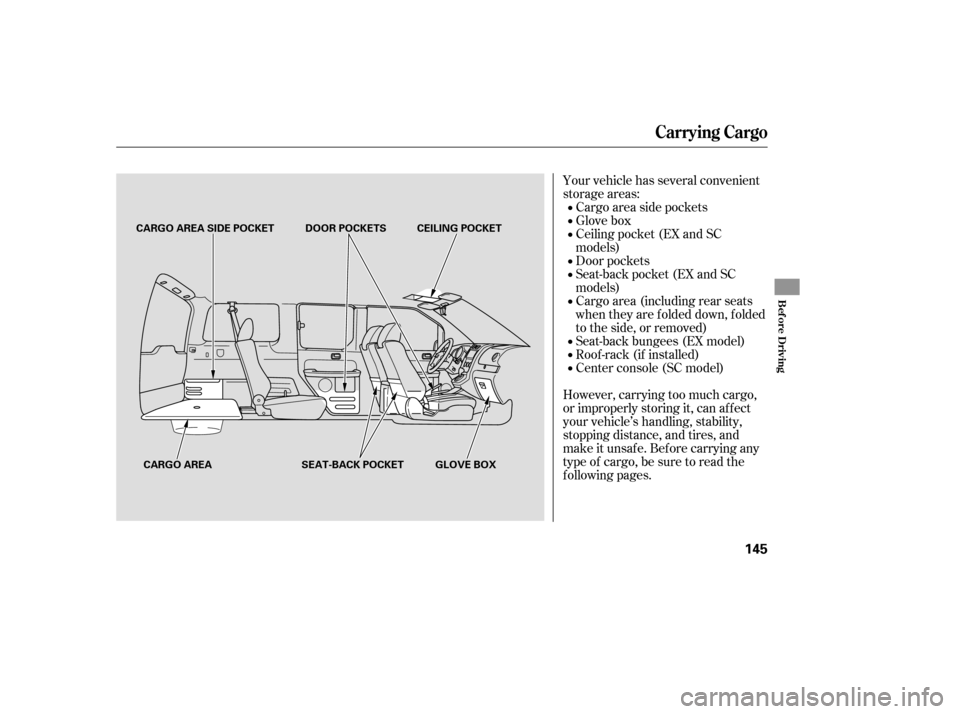
Your vehicle has several convenient
storage areas:Cargo area side pockets
Glove box
Door pockets
Cargo area (including rear seats
when they are f olded down, f olded
to the side, or removed) Ceiling pocket (EX and SC
models)
Seat-back pocket (EX and SC
models)
Seat-back bungees (EX model)
Roof -rack (if installed)
However, carrying too much cargo,
or improperly storing it, can af f ect
your vehicle’s handling, stability,
stopping distance, and tires, and
make it unsaf e. Bef ore carrying any
type of cargo, be sure to read the
f ollowing pages. Center console (SC model)
Carrying Cargo
Bef ore Driving
145
CARGO AREA SIDE POCKET DOOR POCKETS
CARGO AREA CEILING POCKET
SEAT-BACK POCKET GLOVE BOX
Page 154 of 275

Check the seat adjustment (see
page ).
Check the adjustment of the
inside and outside mirrors (see
page ).
Check the steering wheel
ad justment (see page ). Make
sure the doors, hatch, and
tailgate are secu rely closed and
locked.
Fasten your seat belt. Check that
your passengers have fastened
their seat belts (see page ).
When you start the engine, check
the gauges and indicators in the
instrument panel (see page ).
Visually check the tires. If a tire
looks low, use a gauge to check its
pressure. Check that the hood is f ully closed. Make sure all windows, mirrors,
and outside lights are clean and
unobstructed. Remove f rost, snow,
or ice.
Youshoulddothefollowingchecks
and adjustments bef ore you drive
your vehicle.
Check that any items you may be
carrying are stored properly or
f astened down securely.
1.
2.
3.
4. 5.
6.
7.
8.
9.
10. 59
15
74
92
83
Preparing to Drive
Driving Guidelines
Driving
151
Page 166 of 275

Your vehicle is equipped with a tire
pressure monitoring system (TPMS)
that turns on every time you start the
engine and monitors the pressure in
your tires while driving. Each
tire, including the spare, should
be checked monthly when cold and
set to the recommended inflation
pressure as specified in the vehicle
placard and this owner’s manual (see
page ).
Although your tire pressure is
monitored, you must manually check
thetirepressuresmonthly.
If you think you can saf ely drive a
short distance to a service station,
proceed slowly, and inf late the tire to
the recommended pressure shown
on the driver’s doorjamb.
When the tire pressure monitoring
system warning indicator is on, one
or more of your tires is signif icantly
under-inf lated. You should stop and
check your tires as soon as possible,
and inflate them to the proper
pressureasindicatedonthevehicle’s
tire inf ormation placard.
If the tire is f lat, or if the tire
pressure is too low to continue
driving, replace the tire with the
compact spare tire.
Each tire has its own pressure
sensor. If the air pressure of a tire
becomes signif icantly low, the
sensor in that tire immediately sends
a signal that causes the low tire
pressure indicator to come on. After inflating the tire(s) to the
proper pressure, the warning
indicator will remain on until the
vehicle is driven at a speed more
than 25 mph (40 km/h).
Driving on a signif icantly under-
inf lated tire causes the tire to
overheat and can lead to tire failure.
Under-inf lation also reduces f uel
efficiency and tire tread life, and may
af f ect the vehicle’s handling and
stopping ability. 245
Tire Pressure Monitoring System (TPMS)
Low Tire Pressure
Indicator
Driving
163
Page 167 of 275

Each wheel is equipped with a tire
pressure sensor mounted inside the
tire behind the valve stem. You must
use TPMS specific wheels. It is
recommended that you always have
your tires serviced by your dealer or
qualified technician.
After you replace the flat tire, the
low tire pressu re indicator stays on.
This is norm al; the system is not
monitoring the spare tire pressure.
Manually check the spare tire
pressure to be sure it is correct.
Never use a puncture-repairing agent
in a flat tire. If used, you will have to
replace the tire pressure sensor.
Havetheflattirerepairedbyyour
dealer as soon as possible.
This
indicator comes on and stays on
if there is a problem with the tire
pressure monitoring system.
If you see this message, the system
is off and is not monitoring the tire
pressures. Have the system checked
by your dealer as soon as possible.
If you have a f lat tire, the low tire
pressure indicator will come on.
Replace the flat tire with the
compact spare tire (see page ). 218As required by the FCC:
This device complies with Part 15 of theFCC rules. Operation is subject to thef ollowing two conditions: (1) This devicemay not cause harmf ul interf erence, and(2) this device must accept anyinterf erence received, includinginterf erence that may cause undesiredoperation.
Changes or modif ications not expresslyapproved by the party responsible f orcompliance could void the user’sauthority to operate the equipment.
This device complies with IndustryCanada Standard RSS-210.Operation is subject to the f ollowing twoconditions: (1) this device may not causeinterf erence, and (2) this device mustaccept any interf erence that may causeundesired operation of the device.
Tire Pressure Monitoring System (TPMS)
Tire Pressure Monitoring
System (T PMS) Indicator
Changing a T ire with T PMS
164
Page 169 of 275
VSA is turned on every time you
start the engine, even if you turn ed it
off the last time you drove the
vehicle.
Driving with varying tire or wheel
sizes may cause the VSA to
malfunction. When replacing tires,
make sure they are the same size
and type as your original tires (see
page ).
If you install winter tires, make sure
they are the same size as those that
were originally supplied with your
vehicle. Exercise the same caution
during winter driving as you would if
your vehicle was not equipped with
VSA.
Immediately af ter f reeing your
vehicle, be sure to switch the VSA on
again. We do not recommend driving
your vehicle with the VSA and
traction control systems switched off. In certain unusual conditions when
your vehicle gets stuck in shallow
mud or f resh snow, it may be easier
to free it with the VSA temporarily
switched of f . When the VSA system
is of f , the traction control system is
alsooff.Youshouldonlyattemptto
f ree your vehicle with the VSA of f if
you are not able to f ree it when the
VSA is on.
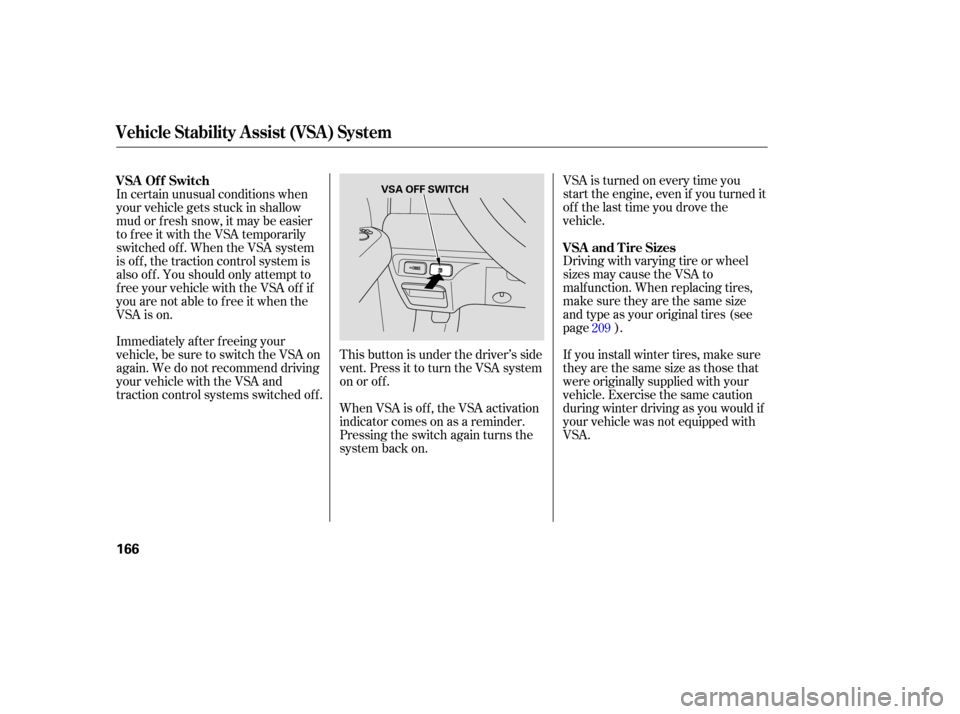
This button is under the driver’s side
vent. Press it to turn the VSA system
on or of f .
When VSA is off, the VSA activation
indicator comes on as a reminder.
Pressing the switch again turns the
system back on. 209
VSA and Tire Sizes
VSA Of f Switch
Vehicle Stability Assist (VSA) System
166
VSA OFF SWITCH
Page 174 of 275

When preparing to tow, and before
driving away, be sure to check the
following:
The vehicle has been properly
serviced, and the tires, brakes,
suspension, cooling system, and
lights are in good operating
condition. Your
vehicle tires and spare are
properly inflated (see page ),
and the trailer tires and spare are
inflated as recommended by the
trailer maker. The
added weight, length, and
height of a trailer will affect your
vehicl e’s handling and performance,
so driving with a trailer requires
some special driving skills and
techniques.
All weights and loads are within
limits (see pages and ). The trailer has been properly
serviced and is in good condition.
Thehitch,safetychains,andany
other attachments are secure.
All items in or on the trailer are
properly secured and cannot shif t
while you drive. Foryoursafetyandthesafetyof
others,taketimetopracticedriving
maneuvers bef ore heading f or the
open road, and f ollow the guidelines
below.
Drive slower than normal in all
driving situations, and obey posted
speed limits f or vehicles with trailers.
If you have an automatic
transmission, use D position when
towing a trailer on level roads. D is
the proper shif t lever position to use
when towing a trailer in hilly terrain.
(See ‘‘ ’’ on the next
page f or additional gear inf ormation.)
208
167 168
CONT INUED
3
Pre-T ow Checklist Driving Saf ely With a T railer
Towing a Trailer
T owing Speeds and Gears
Driving on Hills
Driving
171
Page 175 of 275

Maketurnsmoreslowlyandwider
than normal. The trailer tracks a
smaller arc than your vehicle, and it
canhitorrunoversomethingthe
vehicle misses. Allow more time and
distance f or braking. Do not brake or
turn suddenly as this could cause the
trailer to jackknif e or turn over.
When climbing hills, closely watch
your temperature gauge. If it nears
the red (Hot) mark, turn the air
conditioning of f , reduce speed and, if
necessary, pull to the side of the
road to let the engine cool.If you must stop when f acing uphill,
use the f oot brake or parking brake.
Do not try to hold the vehicle in
placebypressingontheaccelerator,
as this can cause the automatic
transmission to overheat.
Always drive slowly and have
someone guide you when backing up.
Grip the of the steering
wheel; then turn the wheel to the lef t
to get the trailer to move to the lef t,
andturnthewheelrighttomovethe
trailer to the right.
Follow all normal precautions when
parking, including f irmly setting the
parking brake and putting the
transmission in Park (automatic) or
in 1st or reverse (manual). Also,
place wheel chocks at each of the
trailer’s tires.
If the automatic transmission shif ts
f requently while going up a hill, shif t
to D . When driving down hills, reduce
your speed, and shif t down to second
gear. Do not ‘‘ride’’ the brakes, and
remember, it will take longer to slow
downandstopwhentowingatrailer.
Crosswinds and air turbulence
caused by passing trucks can disrupt
your steering and cause trailer to
sway. When being passed by a large
vehicle, keep a constant speed, and
steer straight ahead. Do not try to
make quick steering or braking
corrections.
bottom
3
Towing a Trailer
Making T urns and Braking
Driving on Hills Backing Up
Parking
Handling Crosswinds and Buf f et ing
172