instrument panel HONDA ELEMENT 2009 1.G Owner's Manual
[x] Cancel search | Manufacturer: HONDA, Model Year: 2009, Model line: ELEMENT, Model: HONDA ELEMENT 2009 1.GPages: 345, PDF Size: 18.9 MB
Page 79 of 345
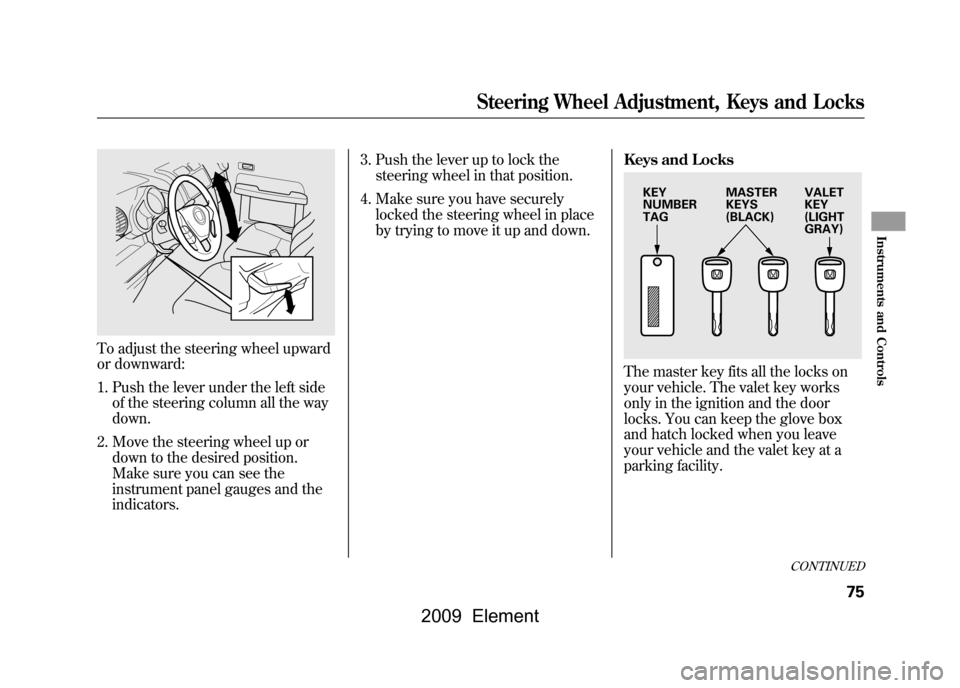
To adjust the steering wheel upward
or downward:1. Push the lever under the left side of the steering column all the way
down.
2. Move the steering wheel up or down to the desired position.
Make sure you can see the
instrument panel gauges and the
indicators. 3. Push the lever up to lock the
steering wheel in that position.
4. Make sure you have securely locked the steering wheel in place
by trying to move it up and down. Keys and Locks
The master key fits all the locks on
your vehicle. The valet key works
only in the ignition and the door
locks. You can keep the glove box
and hatch locked when you leave
your vehicle and the valet key at a
parking facility.
KEY
NUMBER
TAG
MASTER
KEYS
(BLACK)VALET
KEY
(LIGHT
GRAY)
CONTINUED
Steering Wheel Adjustment, Keys and Locks
75
Instruments and Controls
2009 Element
Page 84 of 345
If the front wheels are turned, the
anti-theft lock may make it difficult to
turn the key. Firmly turn the steering
wheel to the left or right as you turn
the key.
ACCESSORY (I)-You can operate
the audio system and the accessory
power sockets in this position.
ON (II) -This is the normal key
position when driving. Several of the
indicators on the instrument panel
come on as a test when you turn the
ignition switch from the
ACCESSORY (I) to the ON (II)
position.
START (III) -Use this position
only to start the engine. The switch
returns to the ON (II) position when
you let go of the key. You will hear a reminder beeper if
you leave the key in the LOCK (0) or
the ACCESSORY (I) position and
open the driver's door. Remove the
key to turn off the beeper.
If your vehicle has an automatic
transmission, the shift lever must be
in Park before you can remove the
key from the ignition switch.
Removing the key from the
ignition switch while driving
locks the steering. This can
cause you to lose control of the
vehicle.
Remove the key from the
ignition switch only when
parked.Power Door Locks
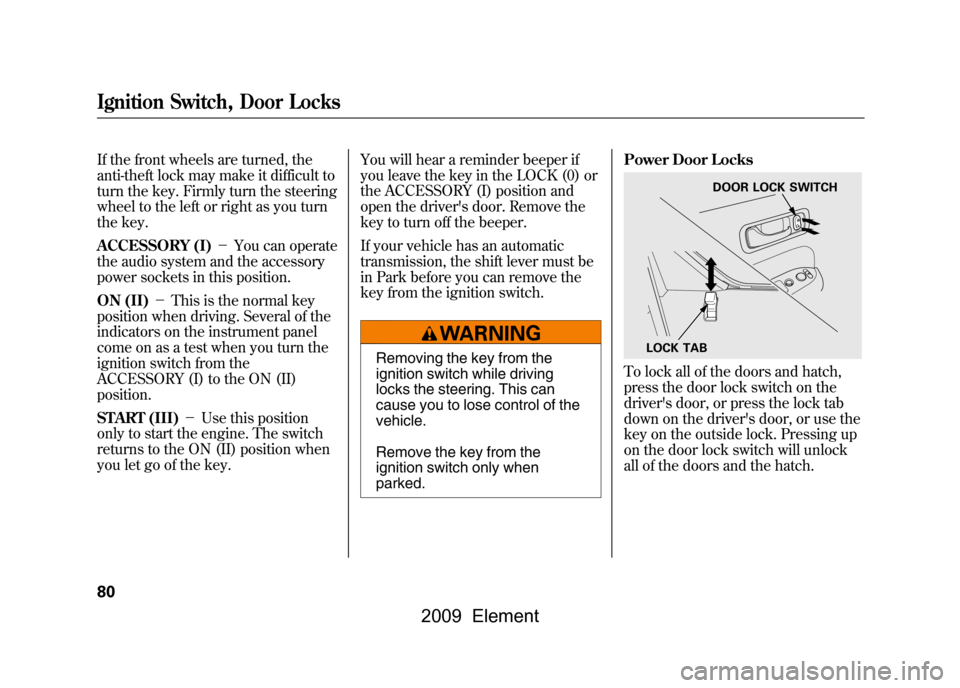
To lock all of the doors and hatch,
press the door lock switch on the
driver's door, or press the lock tab
down on the driver's door, or use the
key on the outside lock. Pressing up
on the door lock switch will unlock
all of the doors and the hatch.
LOCK TAB
DOOR LOCK SWITCH
Ignition Switch, Door Locks80
2009 Element
Page 98 of 345
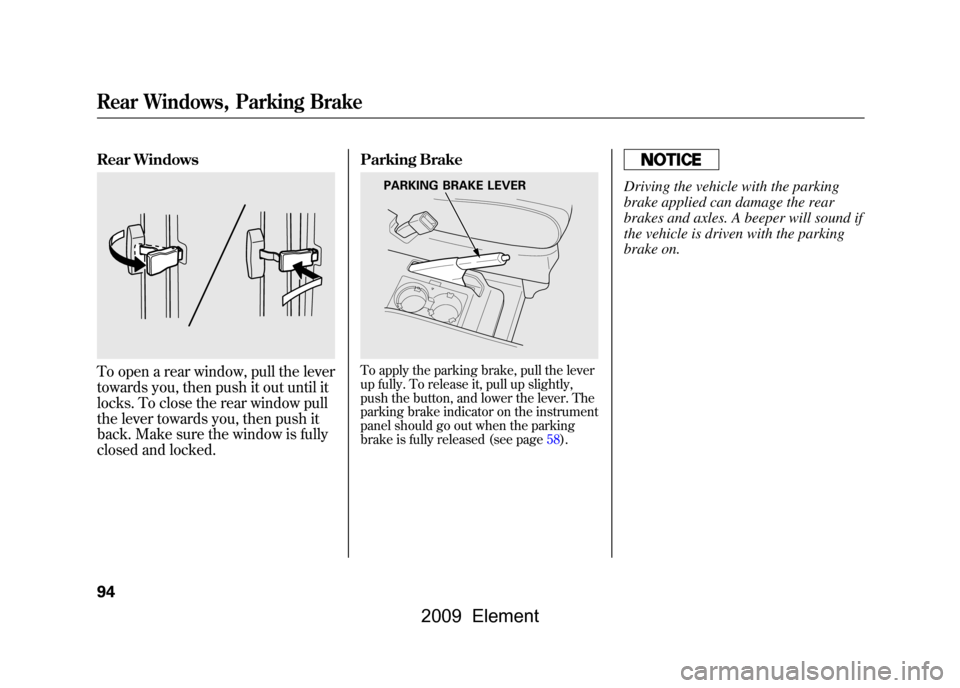
Rear WindowsTo open a rear window, pull the lever
towards you, then push it out until it
locks. To close the rear window pull
the lever towards you, then push it
back. Make sure the window is fully
closed and locked.Parking Brake
To apply the parking brake, pull the lever
up fully. To release it, pull up slightly,
push the button, and lower the lever. The
parking brake indicator on the instrument
panel should go out when the parking
brake is fully released (see page58).
Driving the vehicle with the parking
brake applied can damage the rear
brakes and axles. A beeper will sound if
the vehicle is driven with the parking
brake on.
PARKING BRAKE LEVER
Rear Windows, Parking Brake94
2009 Element
Page 100 of 345
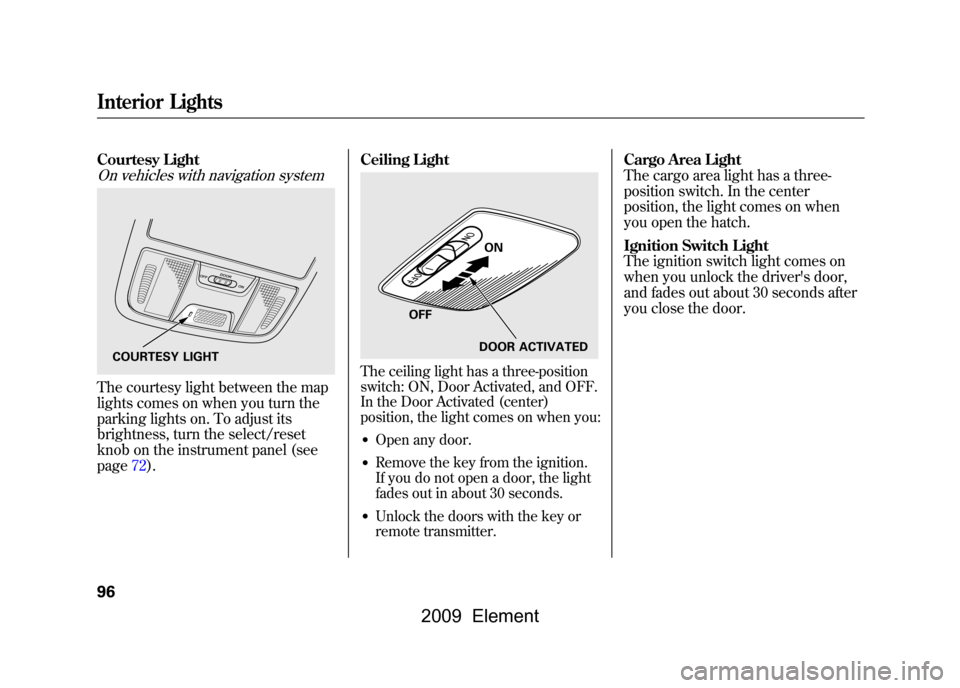
Courtesy LightOn vehicles with navigation systemThe courtesy light between the map
lights comes on when you turn the
parking lights on. To adjust its
brightness, turn the select/reset
knob on the instrument panel (see
page72).Ceiling Light
The ceiling light has a three-position
switch: ON, Door Activated, and OFF.
In the Door Activated (center)
position, the light comes on when you:●Open any door.●Remove the key from the ignition.
If you do not open a door, the light
fades out in about 30 seconds.●Unlock the doors with the key or
remote transmitter.
Cargo Area Light
The cargo area light has a three-
position switch. In the center
position, the light comes on when
you open the hatch.
Ignition Switch Light
The ignition switch light comes on
when you unlock the driver's door,
and fades out about 30 seconds after
you close the door.
COURTESY LIGHT
ON
OFF DOOR ACTIVATED
Interior Lights96
2009 Element
Page 135 of 345

BALANCE-Adjusts the side-to-
side strength of the sound.
To adjust the left/right balance,
touch the L or R icon.
SUBWOOFER -Adjusts the
strength of sound from the
subwoofer speaker. To adjust the
sound strength, touch
or
on
each side of the adjustment bar.
The right upper display shows you
the current setting of the sound
strength coming from each speaker.
SVC (speed-sensitive volume
compensation) -The SVC mode
controls the volume based on vehicle
speed. The faster you go, the louder
the audio volume becomes. As you
slow down, the audio volume
decreases. Touch the appropriate
icon (Low, Mid, Hi, Off) to select the
mode. This function is set to Mid as the
default setting when the vehicle
leaves the factory. If you feel the
sound is too loud, choose low. If you
feel the sound is too quiet, choose
Hi.
You can also select the icon with the
joystick. Move it up and down to
move the highlighting and scroll
through lists. Select the icon, then
move the joystick left or right to
change the setting.
The system will return to the audio
display about 10 seconds after you
stop adjusting a mode.
Screen ModeYou can select the background
screen to display the sound level.
There are three screen modes: level
(the sound level is shown with the
vertical bars), spectrum analysis (the
sound level appears as ripples of
water), and off. Each time you touch
the background icon, the display
changes.
Audio System Lighting
You can use the instrument panel
brightness control knob to adjust the
illumination of the audio system (see
page72).The audio system
illuminates when the parking lights
are on, even if the radio is off.
Playing the FM/AM Radio (Models with navigation system)
131
Features
2009 Element
Page 197 of 345
Cruise control allows you to maintain
a set speed above 25 mph (40 km/h)
without keeping your foot on the
accelerator pedal. It should be used
for cruising on straight, open
highways. It is not recommended for
city driving, winding roads, slippery
roads, heavy rain, or bad weather.
Improper use of the cruise
control can lead to a crash.
Use the cruise control only
when traveling on open
highways in good weather.Using Cruise Control
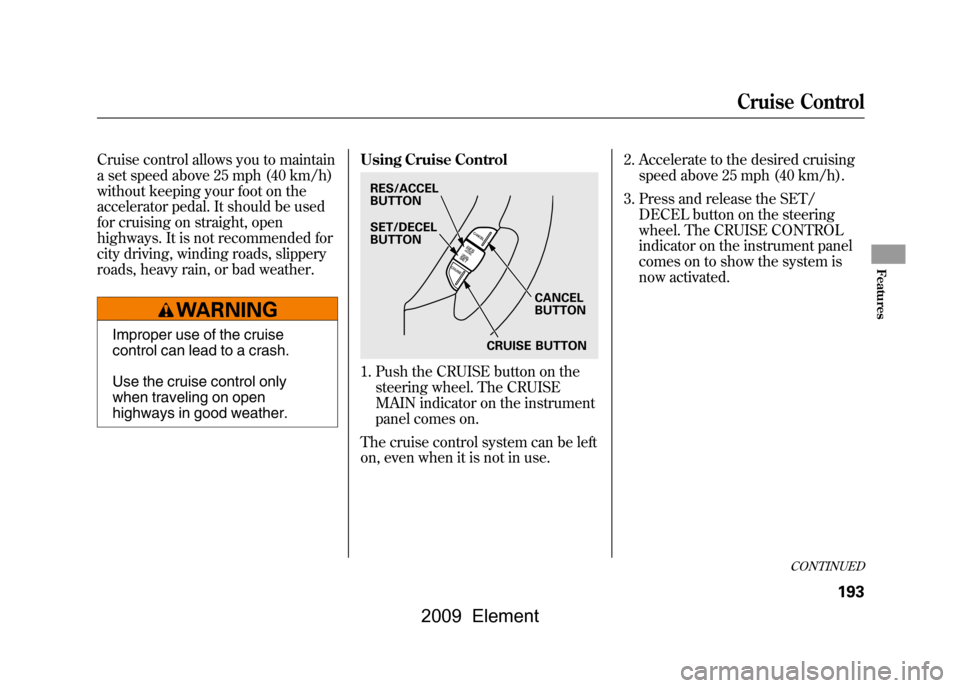
1. Push the CRUISE button on the
steering wheel. The CRUISE
MAIN indicator on the instrument
panel comes on.
The cruise control system can be left
on, even when it is not in use. 2. Accelerate to the desired cruising
speed above 25 mph (40 km/h).
3. Press and release the SET/ DECEL button on the steering
wheel. The CRUISE CONTROL
indicator on the instrument panel
comes on to show the system is
now activated.RES/ACCEL
BUTTON
CANCEL
BUTTON
SET/DECEL
BUTTON
CRUISE BUTTON
CONTINUED
Cruise Control
193
Features
2009 Element
Page 198 of 345
Cruise control may not hold the set
speed when you are going up and
down hills. If your speed increases
going down a hill, use the brakes to
slow down. This will cancel cruise
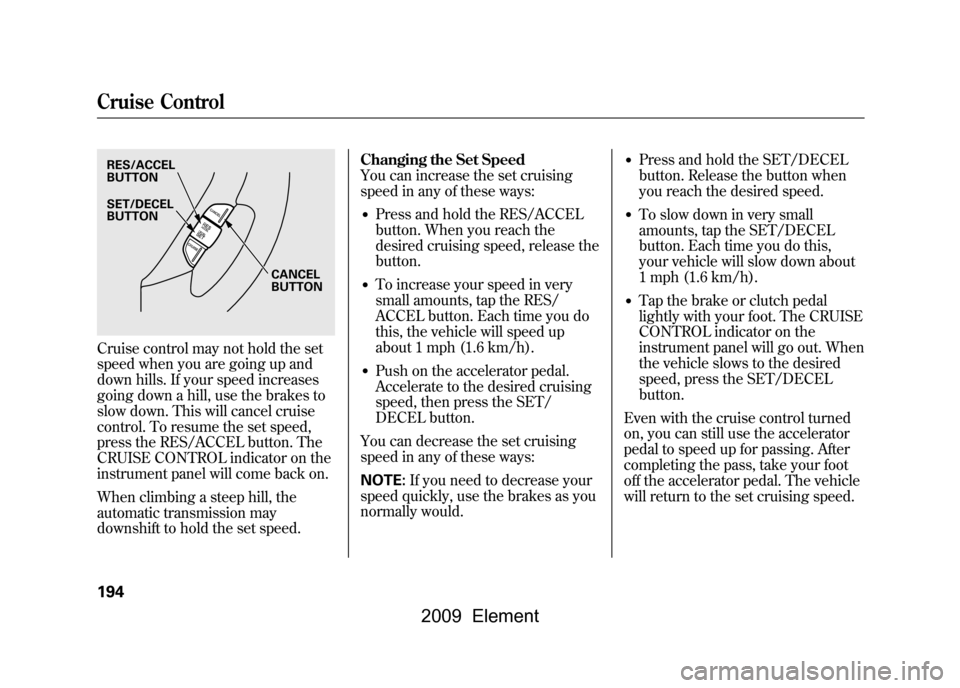
control. To resume the set speed,
press the RES/ACCEL button. The
CRUISE CONTROL indicator on the
instrument panel will come back on.
When climbing a steep hill, the
automatic transmission may
downshift to hold the set speed.Changing the Set Speed
You can increase the set cruising
speed in any of these ways:
●Press and hold the RES/ACCEL
button. When you reach the
desired cruising speed, release the
button.●To increase your speed in very
small amounts, tap the RES/
ACCEL button. Each time you do
this, the vehicle will speed up
about 1 mph (1.6 km/h).●Push on the accelerator pedal.
Accelerate to the desired cruising
speed, then press the SET/
DECEL button.
You can decrease the set cruising
speed in any of these ways:
NOTE: If you need to decrease your
speed quickly, use the brakes as you
normally would.
●Press and hold the SET/DECEL
button. Release the button when
you reach the desired speed.●To slow down in very small
amounts, tap the SET/DECEL
button. Each time you do this,
your vehicle will slow down about
1 mph (1.6 km/h).●Tap the brake or clutch pedal
lightly with your foot. The CRUISE
CONTROL indicator on the
instrument panel will go out. When
the vehicle slows to the desired
speed, press the SET/DECEL
button.
Even with the cruise control turned
on, you can still use the accelerator
pedal to speed up for passing. After
completing the pass, take your foot
off the accelerator pedal. The vehicle
will return to the set cruising speed.
RES/ACCEL
BUTTON
CANCEL
BUTTON
SET/DECEL
BUTTONCruise Control194
2009 Element
Page 202 of 345

Break-in Period
Help assure your vehicle's future
reliability and performance by paying
extra attention to how you drive
during the first 600 miles (1,000 km).
During this period:●Avoid full-throttle starts and rapid
acceleration.●Do not change the oil until the
scheduled maintenance time.●Avoid hard braking for the first 200
miles (300 km).●Do not tow a trailer.
You should also follow these
recommendations with an
overhauled or exchanged engine, or
when the brakes are replaced. Fuel Recommendation
Your vehicle is designed to operate
on unleaded gasoline with a pump
octane number of 87 or higher. Use
of a lower octane gasoline can cause
a persistent, heavy metallic rapping
noise that can lead to engine
damage.
On vehicles with manual transmissionYou may hear a knocking noise from
the engine if you drive the vehicle at
low engine speed (below about 1,000
rpm) in a higher gear. To stop this,
raise the engine speed by shifting to
a lower gear.
We recommend using quality
gasoline containing detergent
additives that help prevent fuel
system and engine deposits.In addition, in order to maintain good
performance, fuel economy, and
emissions control, we strongly
recommend, in areas where it is
available, the use of gasoline that
does NOT contain manganese-based
fuel additives such as MMT.
Use of gasoline with these additives
may adversely affect performance,
and cause the malfunction indicator
lamp on your instrument panel to
come on. If this happens, contact
your authorized dealer for service.
Some gasoline today is blended with
oxygenates such as ethanol or
MTBE. Your vehicle is designed to
operate on oxygenated gasoline
containing up to 10% ethanol by
volume and up to 15% MTBE by
volume. Do not use gasoline
containing methanol.
Break-in Period, Fuel Recommendation198
2009 Element
Page 219 of 345

You should do the following checks
and adjustments before you drive
your vehicle.1. Make sure all windows, mirrors, and outside lights are clean and
unobstructed. Remove frost, snow,
or ice.
2. Check that the hood is fully closed.
3. Visually check the tires. If a tire looks low, use a gauge to check its
pressure.
4. Check that any items you may be carrying are stored properly or
fastened down securely. 5. Check the seat adjustment (see
page83).
6. Check the adjustment of the inside and outside mirrors (see page93).
7. Check the steering wheel adjustment (see page74). 8. Make sure the doors, the hatch,
and the tailgate are securely
closed and locked.
9. Fasten your seat belt. Check that your passengers have fastened
their seat belts (see page14).
10. When you start the engine, check the gauges and indicators in the
instrument panel (see page57).
Preparing to Drive
215
Driving
2009 Element
Page 223 of 345
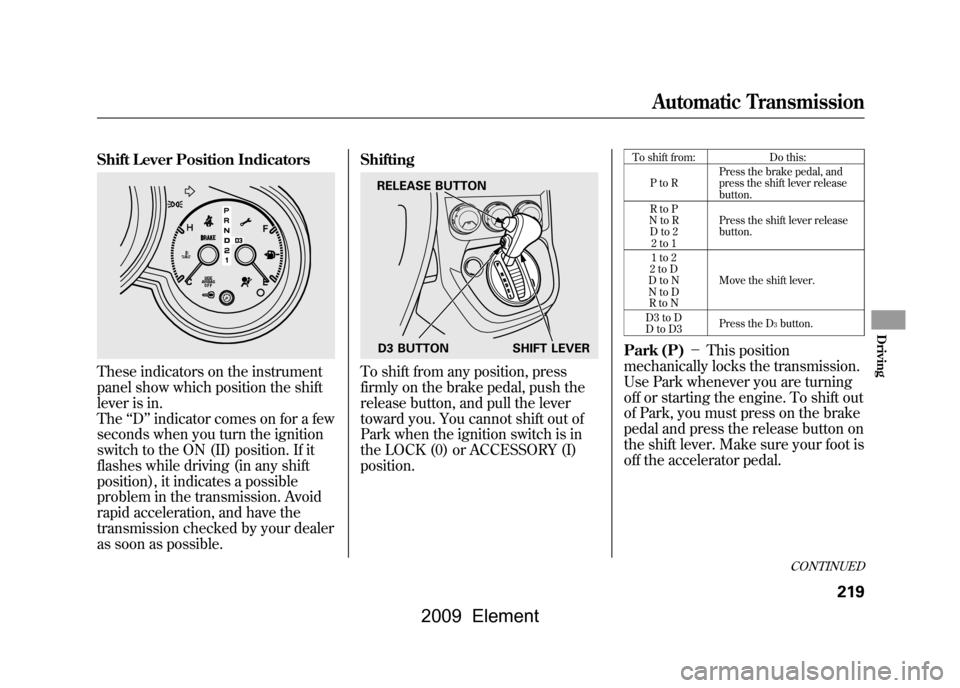
Shift Lever Position IndicatorsThese indicators on the instrument
panel show which position the shift
lever is in.
The‘‘D ’’indicator comes on for a few
seconds when you turn the ignition
switch to the ON (II) position. If it
flashes while driving (in any shift
position), it indicates a possible
problem in the transmission. Avoid
rapid acceleration, and have the
transmission checked by your dealer
as soon as possible. Shifting
To shift from any position, press
firmly on the brake pedal, push the
release button, and pull the lever
toward you. You cannot shift out of
Park when the ignition switch is in
the LOCK (0) or ACCESSORY (I)
position.
To shift from:
Do this:
PtoR Press the brake pedal, and
press the shift lever release
button.
RtoP
NtoR Dto2 2to1 Press the shift lever release
button.
1to2
2toD
DtoN
NtoD RtoN Move the shift lever.
D3 to D
DtoD3 Press the D
3button.
Park (P)
-This position
mechanically locks the transmission.
Use Park whenever you are turning
off or starting the engine. To shift out
of Park, you must press on the brake
pedal and press the release button on
the shift lever. Make sure your foot is
off the accelerator pedal.
RELEASE BUTTON
D3 BUTTON SHIFT LEVER
CONTINUED
Automatic Transmission
219
Driving
2009 Element