AUX HONDA ELEMENT 2010 1.G User Guide
[x] Cancel search | Manufacturer: HONDA, Model Year: 2010, Model line: ELEMENT, Model: HONDA ELEMENT 2010 1.GPages: 342, PDF Size: 5.76 MB
Page 186 of 342

ALBUM RANDOM-This feature
plays all available albums from the
selected item in the iPod menu list
(playlists, artists, albums or songs) in
random order. The tracks/files in
each album are played in the
recorded order. To activate album
random, press and release the RDM
button (preset 2) repeatedly until you
see ALBUM RANDOM on thescreen.
Press and hold the button until you
hear a beep to turn off either random mode.
You can also select another list from
the iPod menu while keeping the
random function. NOTE:
Available operating functions vary on
models or versions. Some functions
may not be available on the vehicle's
audio system. To Stop Playing Your iPod
To play the radio when an iPod is
playing, press the AM/FM button or
touch the FM1, FM2, AM, XM1, or
XM2 icon. If a disc is in the audio
unit, press the CD/XM button or
touch the CD icon to play the disc. If
a PC card is in the audio unit, Press
the CD/XM button or touch the
CARD icon to play a PC card.
Press the CD/XM button again or
touch the AUX icon to switch back to
the iPod.Disconnecting an iPod
You can disconnect the iPod at any
time when you see the
‘‘OK to
disconnect ’’message
ꭧin the iPod
display. Always make sure you seethe ‘‘OK to disconnect ’’message in
the iPod display before you
disconnect it. Make sure to follow
the iPod's instructions on how to
disconnect the dock connector from
the USB adapter cable. ꭧ : The displayed message may vary
on models or versions. On some
models, there is no message todisconnect.
When you disconnect the iPod while
it is playing, the audio screen (if
selected) shows NO DATA.
If you reconnect the same iPod, the
system may begin playing where it
left off, depending on what mode the
iPod is in when it is reconnected.
Playing an iPod®(Models with navigation system)
170
Table of Contents
Page 190 of 342

To Play a USB Flash Memory Device
This audio system can select and
play the audio files from a USB flash
memory device with the same
controls used for the in-dash disc
player. To play a USB flash memory
device, connect it to the USB adapter
cable in the glove box. The ignition
switch must be in the ACCESSORY
(I) or ON (II) position. Press the
AUDIO button beside the screen to
show the audio display and touch the
AUX icon.
You can also select an icon by
moving the joystick. Move it to left,
right, up, or down to change the
highlighting and scroll through lists,
then press ENT on the top of the
joystick to set your selection.To select the USB mode without
using the icon, press the CD/XM
button repeatedly. The status bar
appears on the bottom of the screen.
The audio system reads and plays
the audio files on the USB flash
memory device in MP3, WMA orAAC
ꭧformats. Depending on the
format, the display shows MP3,
WMA or AAC when a USB flash
memory device is playing. The USB
flash memory device limit is up to
700 folders or up to 65535 files. ꭧ : Only AAC format files recorded
with iTunes are playable on this
audio unit. The recommended USB flash
memory devices are 256 MB or
higher and formatted with the FAT
file system. Some digital audio
players may be compatible as well.
Some USB flash memory devices
(such as devices with security lock-
out features, etc.) will not work in
this audio unit.
Playing a USB Flash Memory Device (Models with navigation system)
174
Table of Contents
Page 191 of 342

NOTE:● Do not use a device such as a card
reader or hard drive as the device
or your files may be damaged.
● Do not connect your USB flash
memory device using a HUB.
● Do not use an extension cable to
the USB adapter cable equipped
with your vehicle.
● Do not keep the USB flash
memory device in the vehicle.
Direct sunlight and high heat will
damage it.
● We recommend backing up your
data before playing a USB flash
memory device.
● Some devices cannot be powered
or charged via the USB adapter. If
this is the case, use the accessory
adapter to supply power to yourdevice. ●
Depending on the type and
number of files, it may take some
time before they begin to play.
● Depending on the software the
files were made with, it may not be
possible to play some files, or
display some text data.
Voice Control System
You can select the AUX mode by
using the navigation system voice
control buttons, but cannot operate
the play mode functions. The specifications for compatible
MP3 files are:
– Sampling frequency:
32/44.1/48 kHz (MPEG1)
16/22.05/24 kHz (MPEG2)
– Bitrate:
32/40/48/56/64/80/96/112/128/
160/192/224/256/320/VBR kbps(MPEG1)
– Supported standards:
MPEG1 Audio Layer3
MPEG2 Audio Layer3
– Partition: Top partition only
– Maximum layers: 8
CONTINUED
Playing a USB Flash Memory Device (Models with navigation system)
175
Features
Table of Contents
Page 193 of 342
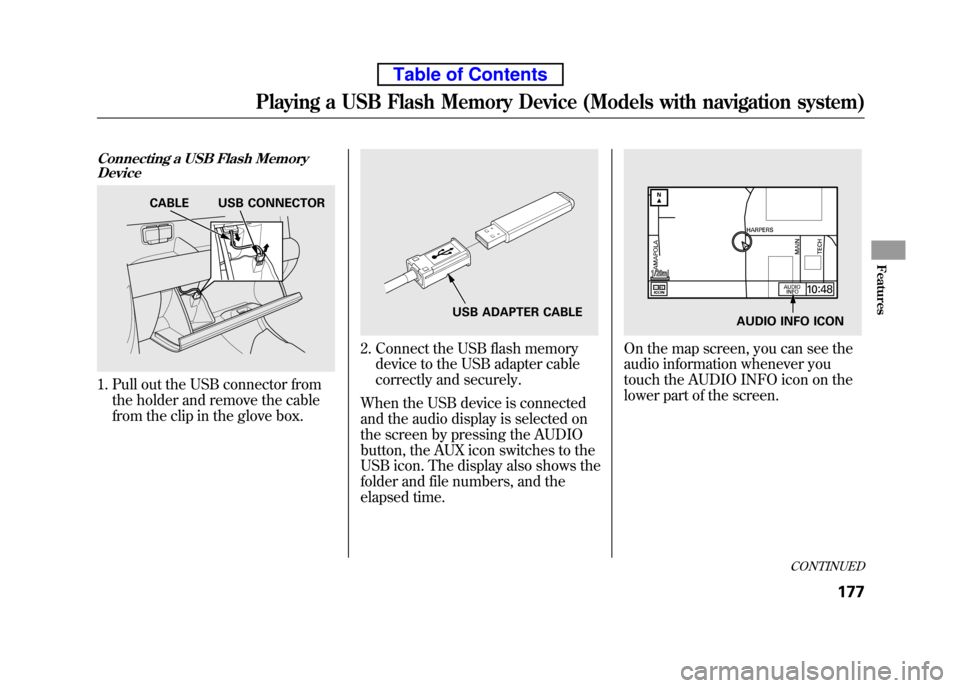
Connecting a USB Flash MemoryDevice
1. Pull out the USB connector from
the holder and remove the cable
from the clip in the glove box.
2. Connect the USB flash memorydevice to the USB adapter cable
correctly and securely.
When the USB device is connected
and the audio display is selected on
the screen by pressing the AUDIO
button, the AUX icon switches to the
USB icon. The display also shows the
folder and file numbers, and the
elapsed time.On the map screen, you can see the
audio information whenever you
touch the AUDIO INFO icon on the
lower part of the screen.
CABLE USB CONNECTOR
USB ADAPTER CABLEAUDIO INFO ICON
CONTINUED
Playing a USB Flash Memory Device (Models with navigation system)
177
Features
Table of Contents
Page 197 of 342

TRACK SCAN-This feature
samples all tracks/files in the
selected folder in the order they are
stored. To activate track scan, press
and release the SCAN button. You
will see TRACK SCAN in the display.
You will get a 10 second sampling of
each track/file in the folder. FOLDER-SCAN -This feature
samples the first track/file in each
folder in the order they are stored.
To activate folder scan, press and
hold the SCAN button. You will see
FOLDER SCAN in the display. You
will get a 10 second sampling of each
first track/file in the folder(s).
Press and release the button to turn
off either scan mode. Pressing either
SKIP button also turns off thisfeature. To Stop Playing a USB Flash
Memory Device
To play the radio when an USB flash
memory device is playing, press the
AM/FM button or touch the FM1,
FM2, AM, XM1, or XM2 icon. If a
disc is in the audio unit, press the
CD/XM button or touch the CD icon
to play the disc. If a PC card is in the
audio unit, Press the CD/XM button
or touch the CARD icon to play a PCcard.
Press the CD/XM button again or
touch the AUX icon to switch back to
the USB flash memory device.Disconnecting a USB Flash Memory
Device
You can disconnect the USB flash
memory device at any time even if
the USB mode is selected on the
audio system. Make sure to follow
the USB flash memory device's
instructions when you remove it.
When you disconnect the USB flash
memory device while it is playing,
the audio display (if selected) shows
NO DATA.
If you reconnect the same USB flash
memory device, the system will
begin playing where it left off.
USB Flash Memory Device Error Messages
If you see an error message in the
screen, see page 182.
Playing a USB Flash Memory Device (Models with navigation system)
181
Features
Table of Contents
Page 208 of 342
In MP3 or WMA mode, you can use
the seek function to select folders.
Press and hold the CH button until
you hear a beep, to skip forward to
the first file of the next folder.
On vehicles with navigation system
If you are playing a PC card, press
the CH button to advance to the nextfile.
If you are playing a USB flash
memory device or iPod with the USB
adapter cable (if equipped), press
and release the CH button to skip
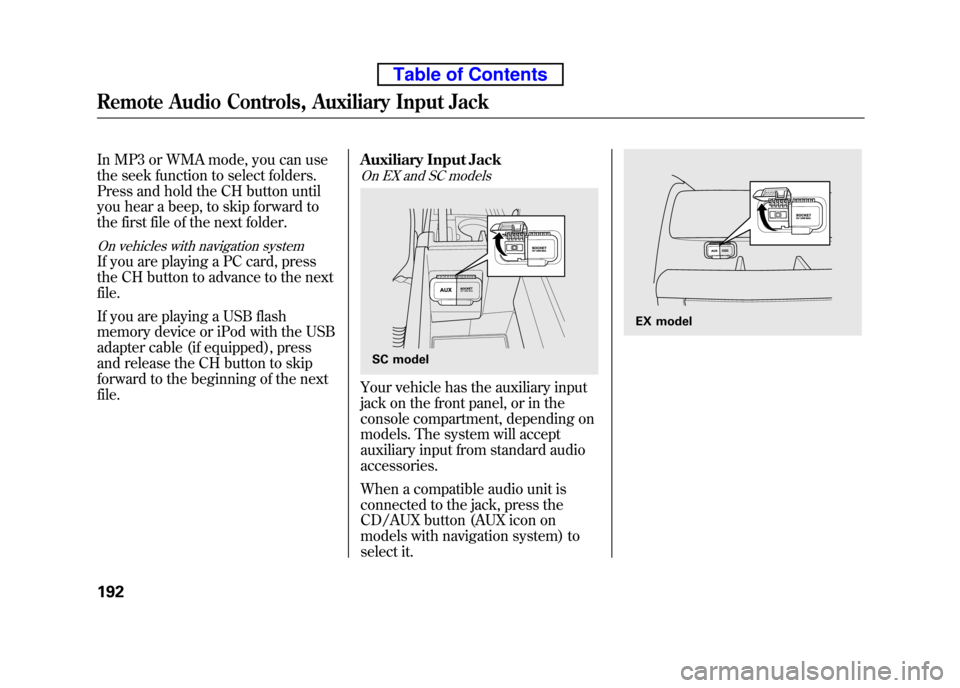
forward to the beginning of the nextfile.Auxiliary Input Jack
On EX and SC models
Your vehicle has the auxiliary input
jack on the front panel, or in the
console compartment, depending on
models. The system will accept
auxiliary input from standard audioaccessories.
When a compatible audio unit is
connected to the jack, press the
CD/AUX button (AUX icon on
models with navigation system) to
select it.
SC model
EX model
Remote Audio Controls, Auxiliary Input Jack
192
Table of Contents