belt HONDA ELEMENT 2010 1.G Workshop Manual
[x] Cancel search | Manufacturer: HONDA, Model Year: 2010, Model line: ELEMENT, Model: HONDA ELEMENT 2010 1.GPages: 342, PDF Size: 5.76 MB
Page 73 of 342
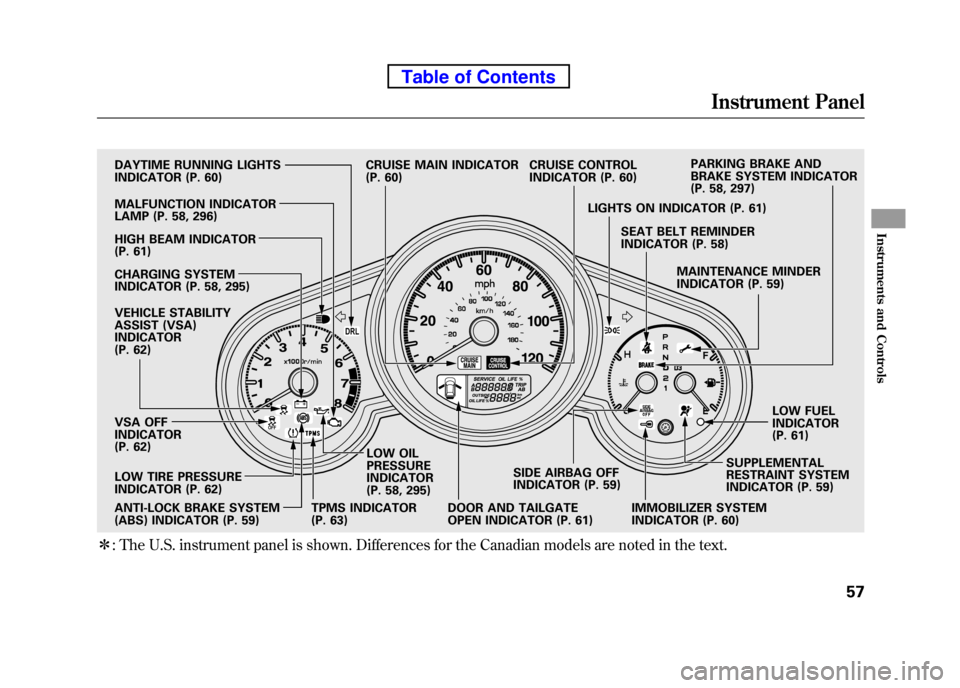
ꭧ: The U.S. instrument panel is shown. Differences for the Canadian models are noted in the text.
DRL
DAYTIME RUNNING LIGHTS
INDICATOR (P. 60)
HIGH BEAM INDICATOR
(P. 61)
CHARGING SYSTEM
INDICATOR (P. 58, 295)
VEHICLE STABILITY
ASSIST (VSA)
INDICATOR
(P. 62)
VSA OFF
INDICATOR
(P. 62)
ANTI-LOCK BRAKE SYSTEM
(ABS) INDICATOR (P. 59) LOW OIL PRESSURE
INDICATOR
(P. 58, 295)
DOOR AND TAILGATE
OPEN INDICATOR (P. 61)SIDE AIRBAG OFF
INDICATOR (P. 59)
IMMOBILIZER SYSTEM
INDICATOR (P. 60)SUPPLEMENTAL
RESTRAINT SYSTEM
INDICATOR (P. 59)LOW FUELINDICATOR
(P. 61)
MAINTENANCE MINDER
INDICATOR (P. 59)
SEAT BELT REMINDER
INDICATOR (P. 58)
LIGHTS ON INDICATOR (P. 61) PARKING BRAKE AND
BRAKE SYSTEM INDICATOR
(P. 58, 297)
CRUISE CONTROL
INDICATOR (P. 60)
TPMS INDICATOR
(P. 63) CRUISE MAIN INDICATOR
(P. 60)
MALFUNCTION INDICATOR
LAMP (P. 58, 296)
LOW TIRE PRESSURE
INDICATOR (P. 62)
Instrument Panel
57
Instruments and Controls
Table of Contents
Page 74 of 342
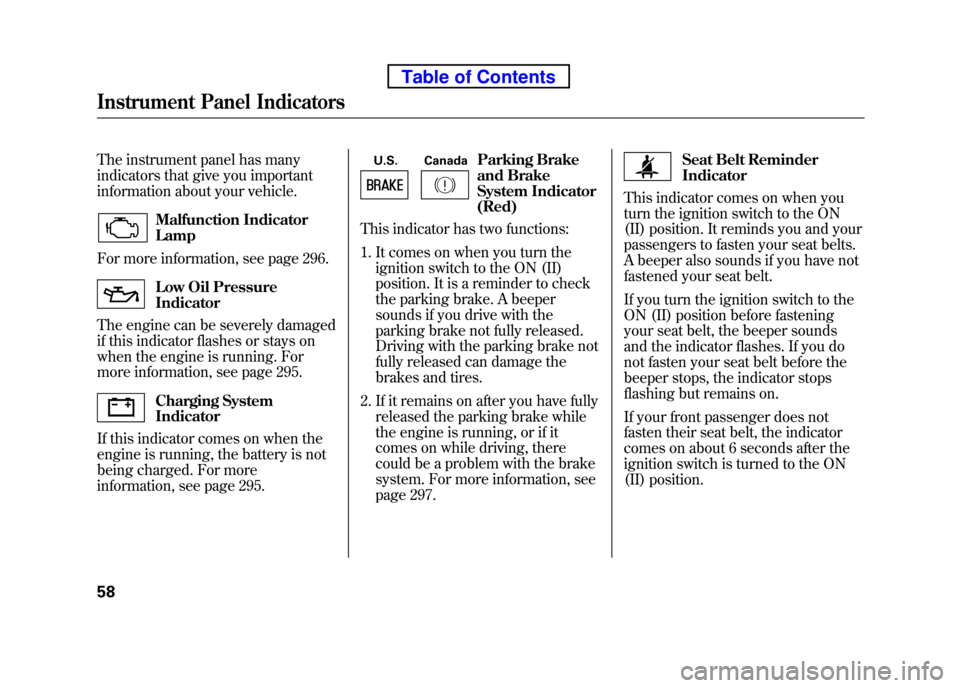
The instrument panel has many
indicators that give you important
information about your vehicle.
Malfunction Indicator Lamp
For more information, see page 296.
Low Oil Pressure Indicator
The engine can be severely damaged
if this indicator flashes or stays on
when the engine is running. For
more information, see page 295.
Charging System Indicator
If this indicator comes on when the
engine is running, the battery is not
being charged. For more
information, see page 295. U.S. Canada
Parking Brake
and Brake
System Indicator(Red)
This indicator has two functions:
1. It comes on when you turn the
ignition switch to the ON (II)
position. It is a reminder to check
the parking brake. A beeper
sounds if you drive with the
parking brake not fully released.
Driving with the parking brake not
fully released can damage the
brakes and tires.
2. If it remains on after you have fully released the parking brake while
the engine is running, or if it
comes on while driving, there
could be a problem with the brake
system. For more information, see
page 297.
Seat Belt Reminder Indicator
This indicator comes on when you
turn the ignition switch to the ON
(II) position. It reminds you and your
passengers to fasten your seat belts.
A beeper also sounds if you have not
fastened your seat belt.
If you turn the ignition switch to the
ON (II) position before fastening
your seat belt, the beeper sounds
and the indicator flashes. If you do
not fasten your seat belt before the
beeper stops, the indicator stops
flashing but remains on.
If your front passenger does not
fasten their seat belt, the indicator
comes on about 6 seconds after the
ignition switch is turned to the ON
(II) position.
Instrument Panel Indicators
58
Table of Contents
Page 75 of 342
If either of you do not fasten your
seat belt while driving, the beeper
will sound and the indicator will flash
again at regular intervals. For more
information, see page 18.
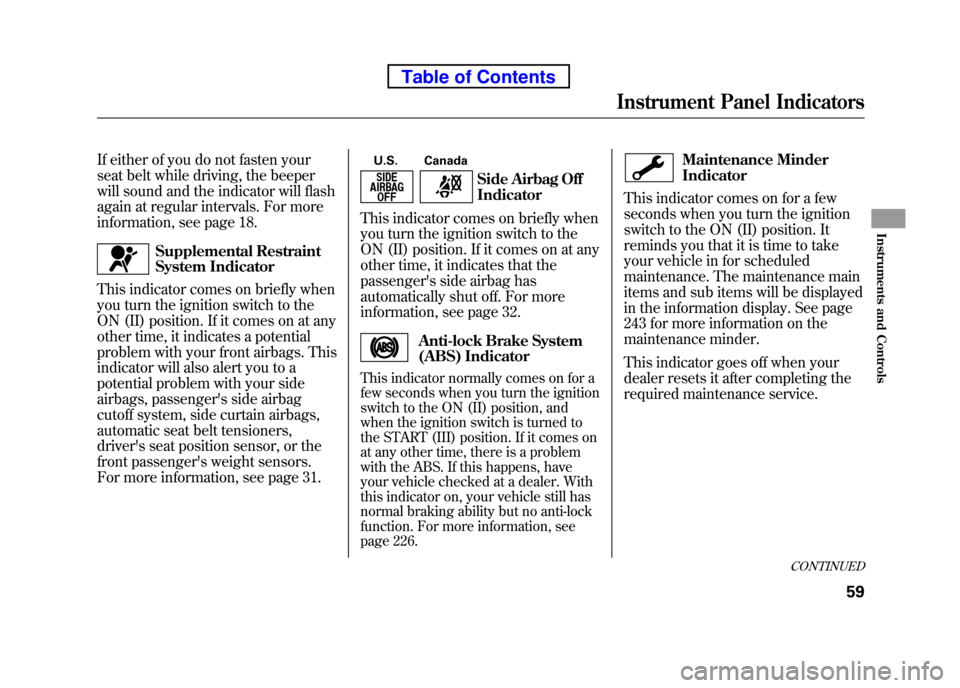
Supplemental Restraint
System Indicator
This indicator comes on briefly when
you turn the ignition switch to the
ON (II) position. If it comes on at any
other time, it indicates a potential
problem with your front airbags. This
indicator will also alert you to a
potential problem with your side
airbags, passenger's side airbag
cutoff system, side curtain airbags,
automatic seat belt tensioners,
driver's seat position sensor, or the
front passenger's weight sensors.
For more information, see page 31. U.S. Canada
Side Airbag Off Indicator
This indicator comes on briefly when
you turn the ignition switch to the
ON (II) position. If it comes on at any
other time, it indicates that the
passenger's side airbag has
automatically shut off. For more
information, see page 32.
Anti-lock Brake System
(ABS) Indicator
This indicator normally comes on for a
few seconds when you turn the ignition
switch to the ON (II) position, and
when the ignition switch is turned to
the START (III) position. If it comes on
at any other time, there is a problem
with the ABS. If this happens, have
your vehicle checked at a dealer. With
this indicator on, your vehicle still has
normal braking ability but no anti-lock
function. For more information, see
page 226.
Maintenance Minder Indicator
This indicator comes on for a few
seconds when you turn the ignition
switch to the ON (II) position. It
reminds you that it is time to take
your vehicle in for scheduled
maintenance. The maintenance main
items and sub items will be displayed
in the information display. See page
243 for more information on the
maintenance minder.
This indicator goes off when your
dealer resets it after completing the
required maintenance service.
CONTINUED
Instrument Panel Indicators
59
Instruments and Controls
Table of Contents
Page 116 of 342
Accessory Power Sockets
Your vehicle has one, two, or three
accessory power sockets, depending
on the model. All models have a front
accessory power socket on the
dashboard above the glove box.
EX and SC models have an accessory
power socket in the cargo area on
the passenger's side.
The SC model has one additional
socket in the center console.
These sockets are intended to supply
power for 12 volt DC accessories that
are rated 120 watts or less (10 amps).
None of the sockets will power an
automotive type cigarette lighter
element. When more than one
socket is being used, the combined
power rating of the accessories
should be 120 watts or less (10 amps).Glove Box
Open the glove box by pulling the
bottom of the handle. Close it with a
firm push. Lock or unlock the glove
box with the master key.
An open glove box can cause
serious injury to your passenger
in a crash, even if the
passenger is wearing the seat belt.
Always keep the glove box
closed while driving.
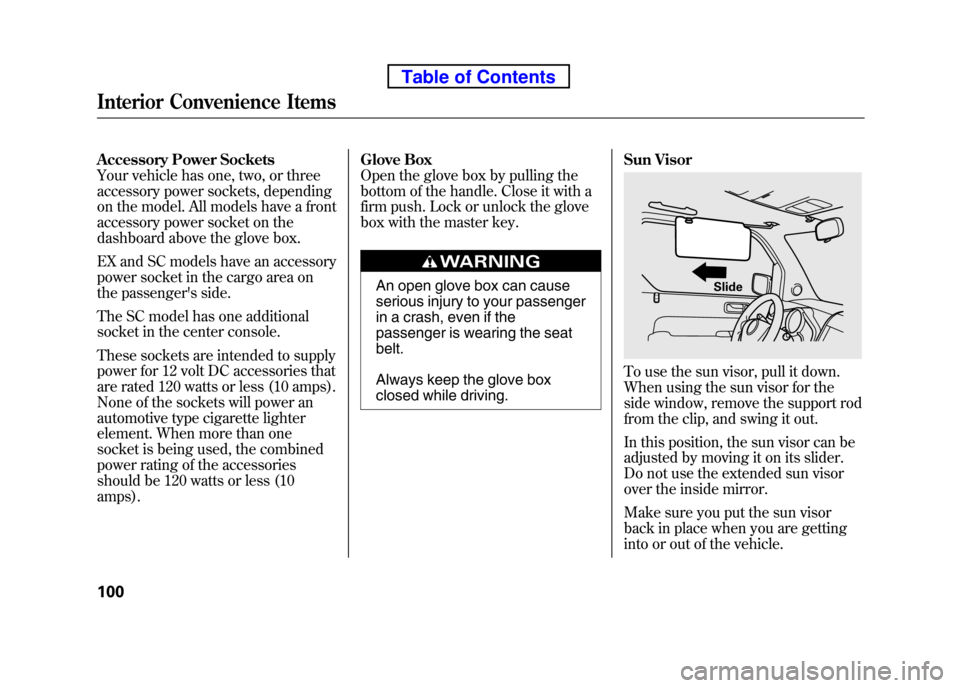
Sun Visor
To use the sun visor, pull it down.
When using the sun visor for the
side window, remove the support rod
from the clip, and swing it out.
In this position, the sun visor can be
adjusted by moving it on its slider.
Do not use the extended sun visor
over the inside mirror.
Make sure you put the sun visor
back in place when you are getting
into or out of the vehicle.
Slide
Interior Convenience Items
100
Table of Contents
Page 231 of 342

You should do the following checks
and adjustments before you drive
your vehicle.1. Make sure all windows, mirrors, and outside lights are clean and
unobstructed. Remove frost, snow,
or ice.
2. Check that the hood is fully closed.
3. Visually check the tires. If a tire looks low, use a gauge to check itspressure.
4. Check that any items you may be carrying are stored properly or
fastened down securely. 5. Check the seat adjustment (see
page 83).
6. Check the adjustment of the inside and outside mirrors (see page 93).
7. Check the steering wheel adjustment (see page 74). 8. Make sure the doors, the hatch,
and the tailgate are securely
closed and locked.
9. Fasten your seat belt. Check that your passengers have fastened
their seat belts (see page 14).
10. When you start the engine, check the gauges and indicators in the
instrument panel (see page 57).
Preparing to Drive
215
Driving
Table of Contents
Page 254 of 342

General Information
Your vehicle has been designed
primarily for use on pavement. But
its higher ground clearance allows
you to occasionally travel on unpaved
roads, such as campgrounds, picnic
sites, and similar locations. It is not
designed for trail-blazing, mountain
climbing, or other challenging off-
road activities.
If you decide to drive on unpaved
roads, you will find that it requires
somewhat different driving skills.
Your vehicle will also handle
somewhat differently than it does on
pavement. So be sure to read this
owner's manual, pay special attention
to the precautions and tips in this
section, and get acquainted with your
vehicle before you leave thepavement.
Improperly operating this
vehicle on or off pavement can
cause a crash or rollover in
which you and your passengers
could be seriously injured orkilled.● Follow all instructions and
guidelines in this owner'smanual.
● Keep your speed low, and
don't drive faster than
conditions permit. Important Safety Precautions
To avoid loss of control or rollover,
be sure to follow all precautions and
recommendations.
● Be sure to store cargo properly,
and do not exceed your vehicle
cargo load limits (see pages 208
and 232).
● Wherever you drive, make sure
you and your passengers always
wear seat belts.
● Keep your speed low, and never go
faster than the conditions allow.
● It's up to you to continually assess
the situation and drive within thelimits.
Off-Highway Driving Guidelines
238
Table of Contents
Page 257 of 342
This section explains why it is important
to keep your vehicle well maintained and
how to follow basic maintenance safety
precautions.
This section also includes instructions
on how to read the maintenance minder
messages on the information display,
and instructions for simple maintenance
tasks you may want to take care of
yourself.
If you have the skills and tools to
perform more complex maintenance
tasks on your vehicle, you may want to
purchase the service manual. See page
325 for information on how to obtain a
copy, or see your dealer.
U.S. Vehicles:
Maintenance, replacement, or repair
of emissions control devices and
systems may be done by any
automotive repair establishment or
individual using parts that are‘‘certified ’’to EPA standards.Maintenance Safety .....................242
Maintenance Minder ..................
243
Fluid Locations ........................... 250
Adding Engine Oil ......................
251
Changing the Engine Oil and Filter ....................................... 252
Engine Coolant ........................... 254
Windshield Washers ...................255
Transmission Fluid .....................
256
Automatic Transmission Fluid ................................... 256
Manual Transmission Fluid ....257
Rear Differential Fluid .................
258
Brake and Clutch Fluid ...............258
Power Steering Fluid ..................
260
Cleaning the Body Panels ...........260
Lights .......................................... 261
Cleaning the Seat Belts ...............
268
Floor Mats .................................. 268
Dust and Pollen Filter .................
269
Wiper Blades .............................. 269
Wheels ........................................
271
Tires ........................................... 271
Checking the Battery ..................277Vehicle Storage
...........................
278
Maintenance
241
Maintenance
Page 265 of 342

Symbol Maintenance Main ItemsA ●
Replace engine oilꭧ1
B ●
Replace engine oilꭧ1and oil filter
● Inspect front and rear brakes
● Check parking brake adjustment
● Inspect these items:
● Tie rod ends, steering gear box, and boots
● Suspension components
● Driveshaft boots
● Brake hoses and lines (including ABS/VSA)
● All fluid levels and condition of fluids
● Exhaust system
#
●Fuel lines and connections#
ꭧ1: If the message ‘‘SERVICE ’’does not appear more than 12 months after the
display is reset, change the engine oil every year.
# : See information on maintenance and emissions warranty on page 248.
NOTE: ●
Independent of the maintenance message in the information display,
replace the brake fluid every 3 years.
● Inspect idle speed every 160,000 miles (256,000 km).
● Adjust the valves during services A, B, 1, 2, or 3 if they are noisy. Symbol Maintenance Sub Items
1 ●
Rotate tires
2 ●
Replace air cleaner element
If you drive in dusty conditions, replace
every 15,000 miles (24,000 km).
● Replace dust and pollen filter
If you drive primarily in urban areas that have high
concentrations of soot in the air from industry and
from diesel-powered vehicles, replace every
15,000 miles (24,000 km).
● Inspect drive belt
3 ●
Replace transmission fluid
Driving in mountainous areas at very low vehicle
speeds or trailer towing results in higher transmission
and transfer temperatures. This requires transmission
and transfer fluid changes more frequently than
recommended by the maintenance minder. If you
regularly drive your vehicle under these conditions,
have the transmission and transfer fluid changed at
60,000 miles (100,000 km), then every 30,000 miles
(48,000 km) (For A/T only).
4 ●
Replace spark plugs
● Inspect valve clearance
5 ●
Replace engine coolant
6 ●
Replace rear differential fluid (4WD model only)
Maintenance Minder
Maintenance Minder
249
Table of Contents
Page 284 of 342
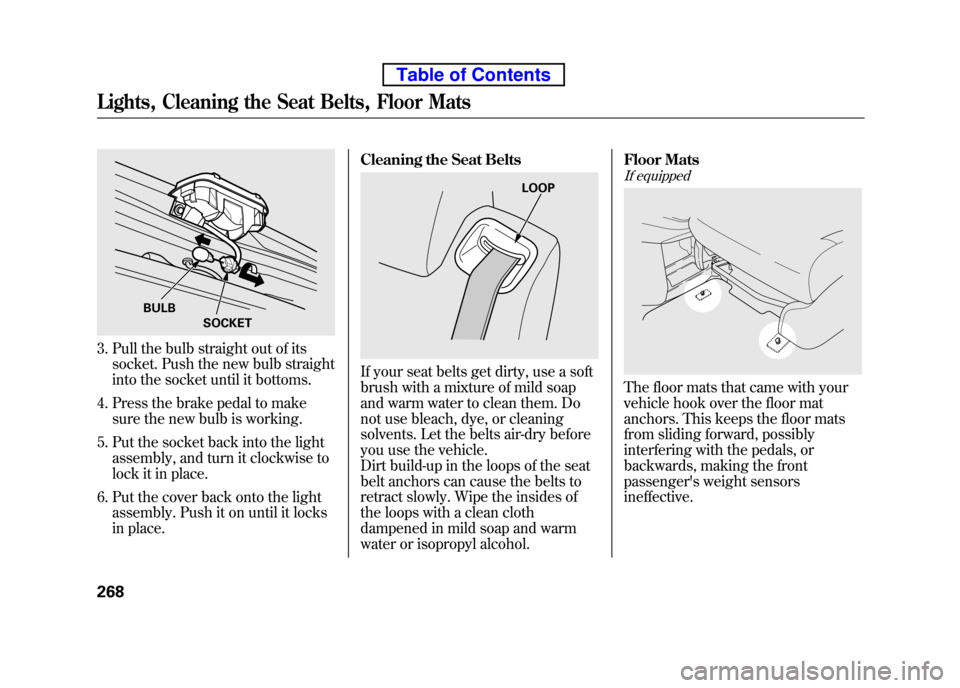
3. Pull the bulb straight out of itssocket. Push the new bulb straight
into the socket until it bottoms.
4. Press the brake pedal to make sure the new bulb is working.
5. Put the socket back into the light assembly, and turn it clockwise to
lock it in place.
6. Put the cover back onto the light assembly. Push it on until it locks
in place. Cleaning the Seat Belts
If your seat belts get dirty, use a soft
brush with a mixture of mild soap
and warm water to clean them. Do
not use bleach, dye, or cleaning
solvents. Let the belts air-dry before
you use the vehicle.
Dirt build-up in the loops of the seat
belt anchors can cause the belts to
retract slowly. Wipe the insides of
the loops with a clean cloth
dampened in mild soap and warm
water or isopropyl alcohol. Floor Mats
If equipped
The floor mats that came with your
vehicle hook over the floor mat
anchors. This keeps the floor mats
from sliding forward, possibly
interfering with the pedals, or
backwards, making the front
passenger's weight sensorsineffective.
BULB
SOCKET
LOOP
Lights, Cleaning the Seat Belts, Floor Mats
268
Table of Contents
Page 339 of 342

U.S. Owners
Your new vehicle is covered by thesewarranties:
New Vehicle Limited Warranty-
covers your new vehicle, except for
the battery, emissions control
systems, and accessories, against
defects in materials andworkmanship.
Emissions Control Systems Defects Warranty and Emissions
Performance Warranty
- these two
warranties cover your vehicle's
emissions control systems. Time,
mileage, and coverage are
conditional. Please read your
warranty booklet for exactinformation.
Original Equipment Battery Limited Warranty
- this warranty gives up to
100% credit toward a replacementbattery.
Seat Belt Limited Warranty- a seat
belt that fails to function properly is
covered by a limited warranty. Please
read your warranty booklet for details.
Rust Perforation Limited Warranty-
all exterior body panels are covered
for rust-through from the inside for
the specified time period with no
mileage limit.
Accessory Limited Warranty-
Honda accessories are covered
under this warranty. Time and
mileage limits depend on the type of
accessory and other factors. Please
read your warranty booklet fordetails.
Replacement Parts Limited
Warranty
- covers all Honda
replacement parts against defects in
materials and workmanship.
Replacement Battery Limited
Warranty
- provides prorated
coverage for a replacement battery
purchased from your dealer.
Replacement Muffler Lifetime Limited Warranty
- provides
coverage for as long as the purchaser
of the muffler owns the vehicle.
Restrictions and exclusions apply to
all these warranties. Please read the
2010 Honda warranty information
booklet that came with your vehicle
for precise information on warranty
coverages. Your vehicle's original
tires are covered by their
manufacturer. Tire warranty
information is in a separate booklet.
Canadian Owners
Please refer to the 2010 warranty
manual that came with your vehicle.
Warranty Coverages
323
Warranty and Customer Relations
Table of Contents