lock HONDA FIT 2009 2.G Navigation Manual
[x] Cancel search | Manufacturer: HONDA, Model Year: 2009, Model line: FIT, Model: HONDA FIT 2009 2.GPages: 149, PDF Size: 4.18 MB
Page 98 of 149
98Navigation System
System Limitations
The destination icon shows the
approximate location of the destination.
This occurs because a city block can
have as many as 100 possible addresses
(for example, the 1400 block is followed
by the 1500 block). Since most cities
use only a portion of the 100 possible
addresses (for example, in the 1400
block, the addresses may only go up to
1425 before the 1500 block starts), the
address 1425 will be shown a quarter of
the way down the block by the system
instead of at the end of the block where
the destination is actually located.
You may find that the system
occasionally reboots. This is indicated
by the display returning to the globe
screen. A reboot can be caused by a
number of things, such as extreme
temperatures or shock from bumpy
roads. It does not necessarily indicate a
problem that requires service. If this
happens frequently, please see your
dealer.
2009 Fit
Page 119 of 149
Navigation System119
Coverage Areas
Operation in Alaska and
Hawaii
Certain functions that rely on a satellite
signal will not work in Alaska and
Hawaii. These functions include but are
not limited to XM radio, automatic
clock updates, and time zone
adjustments.
Alaska
If the vehicle was purchased in the
lower 48 states and driven to Alaska, the
system cannot display maps. The
message “Vehicle is out of the
database...” will be displayed.
Hawaii
This section describes the differences in
navigation system operation for vehicles
delivered in Hawaii.
Map Coverage
All roads displayed on the Hawaii map
screens are detailed coverage roads.
Text related to “unverified” roads or
areas are not applicable. The following
topics do not apply in Hawaii:
Unverified road descriptions (see page
6 and 82 ).
Cautions and pop-up windows related to unverified roads (see page
61).
Setup entries that relate to turning on
or off unverified routing (see
page
83 ).
When zooming in and out, there is no 350-mile scale for Hawaii.
Other Map Issues
See the coverage section for a list of islands with coverage (see page
106).
Freeway Exit information does not exist in Hawaii, so the “Freeway Exit
Info” icon is not shown on the icon
bar.
Address and POI Entry Screens
When in Hawaii, the following
differences occur for map, address, and
POI selection:
It is not possible to enter U.S. mainland addresses or scroll the map
east to the U.S. mainland.
Selection of the “State” is confined to the state of Hawaii only.
Entry of a destination address or POI on an island other than your current
island may result in a screen caution
message. This is normal because
there are no “ferry” routes between
islands available in the database.
If the “Guidance Prompts” setting on the Setup screen is set to normal or
maximum, street names will not be
spoken in voice guidance commands.
2009 Fit
Page 120 of 149
120Navigation System
Setup Screen Differences
The Setup screen differences are minor
and are listed belo w. See the Setup
section (page72) for additional
information.
Routing and Guidan ce (Unverified
Area Routing On/Off)
This feature is unavailable. All roads
displayed on the map are verified.
Clock Adjust Screen
There is no daylight saving time for
Hawaii. Auto Daylight Saving
Time, Auto Time Zone by GPS , and
DST Selection will not be shown on
the Clock adjustment screen. To test
your adjustment, use the voice control
system, and say “What time is it?” (see
page92).
Shipping a Vehicle To or From
Hawaii
Although the DVD in the vehicle
contains maps for both U.S. mainland
and Hawaii, the dealer must perform the
selection of “U.S. mainland” or
“Hawaii” for you. When the dealer
makes the switch from U.S. mainland to
Hawaii or vice versa, the system clears
all user data. Make sure to record any
personal information that you do not
want to lose.
Coverage Areas
2009 Fit
Page 123 of 149
Navigation System123
Frequently Asked Questions
Guidance, Routing
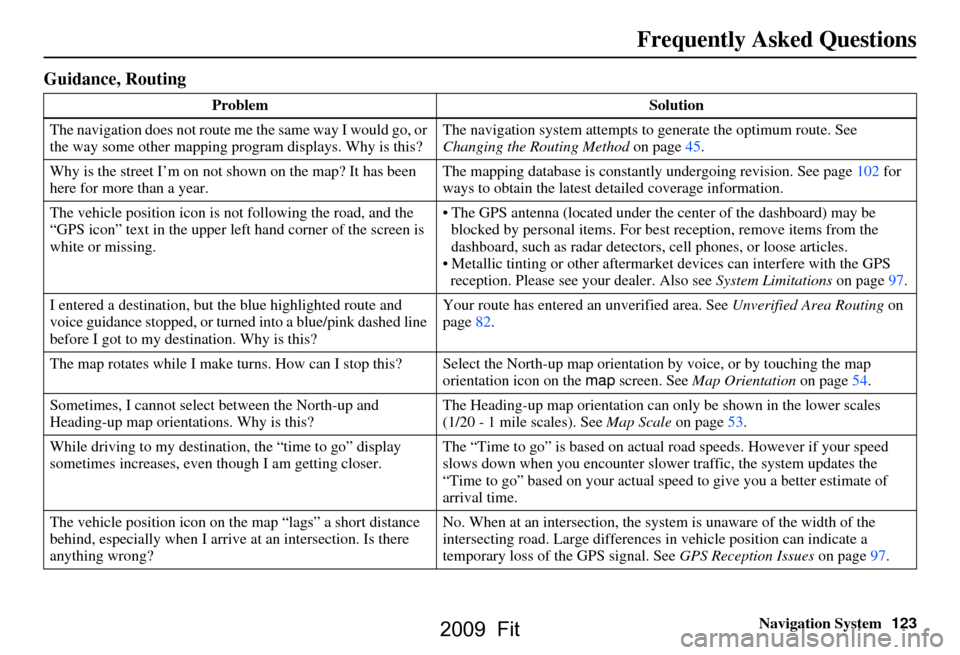
Problem Solution
The navigation does not route me the same way I would go, or
the way some other mapping program displays. Why is this? The navigation system attempts to
generate the optimum route. See
Changing the Routing Method on page45.
Why is the street I’m on not shown on the map? It has been
here for more than a year. The mapping database is
constantly undergoing revision. See page102 for
ways to obtain the latest de tailed coverage information.
The vehicle position icon is not following the road, and the
“GPS icon” text in the upper left hand corner of the screen is
white or missing. The GPS antenna (located under the center of the dashboard) may be
blocked by personal items. For best reception, remove items from the
dashboard, such as radar detector s, cell phones, or loose articles.
Metallic tinting or other aftermarke t devices can interfere with the GPS
reception. Please see your dealer. Also see System Limitations on page97.
I entered a destination, but th e blue highlighted route and
voice guidance stopped, or turned into a blue/pink dashed line
before I got to my dest ination. Why is this? Your route has entered
an unverified area. See Unverified Area Routing on
page82.
The map rotates while I make turns. How can I stop this? Select the North-up map orientation by voice, or by touching the map
orientation icon on the map screen. See Map Orientation on page54.
Sometimes, I cannot select between the North-up and
Heading-up map orienta tions. Why is this? The Heading-up map orient
ation can only be shown in the lower scales
(1/20 - 1 mile scales). See Map Scale on page53.
While driving to my destinati on, the “time to go” display
sometimes increases, even though I am getting closer. The “Time to go” is based on actual
road speeds. However if your speed
slows down when you encounter slower traffic, the system updates the
“Time to go” based on your actual spee d to give you a better estimate of
arrival time.
The vehicle position icon on the map “lags” a short distance
behind, especially when I arrive at an intersection. Is there
anything wrong? No. When at an intersection, the syst
em is unaware of the width of the
intersecting road. Large differences in vehicle position can indicate a
temporary loss of the GPS signal. See GPS Reception Issues on page97.
2009 Fit
Page 127 of 149
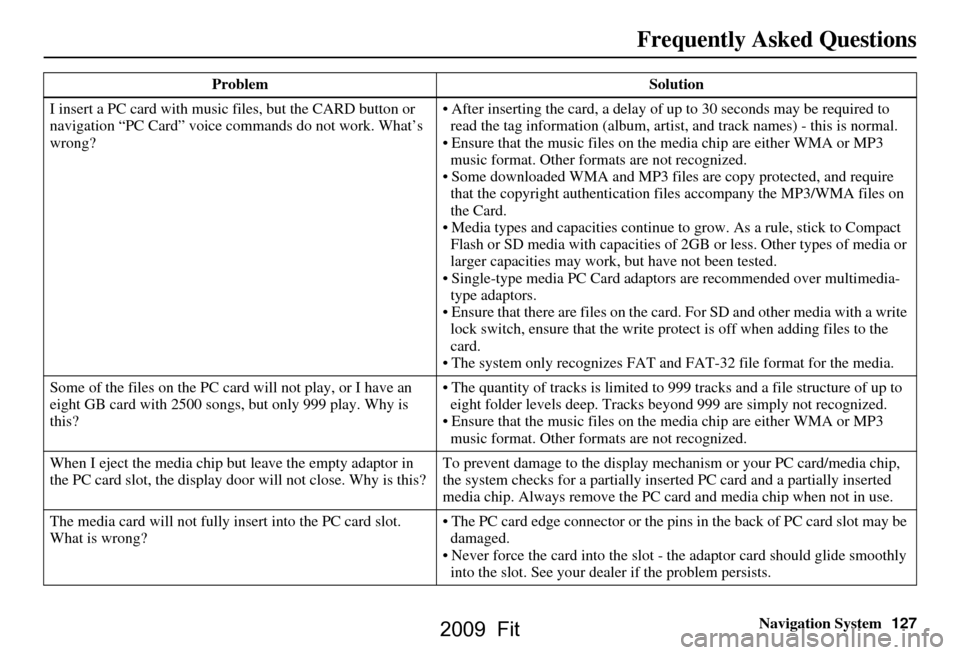
Navigation System127
Frequently Asked Questions
I insert a PC card with music files, but the CARD button or
navigation “PC Card” voice comm ands do not work. What’s
wrong? After inserting the card, a delay of
up to 30 seconds may be required to
read the tag information (album, artist , and track names) - this is normal.
Ensure that the music files on the media chip are either WMA or MP3 music format. Other formats are not recognized.
Some downloaded WMA and MP3 files are copy protected, and require
that the copyright authentication f iles accompany the MP3/WMA files on
the Card.
Media types and capacities continue to grow. As a rule, stick to Compact Flash or SD media with ca pacities of 2GB or less. Other types of media or
larger capacities may work, but have not been tested.
Single-type media PC Card adapto rs are recommended over multimedia-
type adaptors.
Ensure that there are files on the card . For SD and other media with a write
lock switch, ensure that the write protect is off when adding files to the
card.
The system only recogni zes FAT and FAT-32 file format for the media.
Some of the files on the PC card will not play, or I have an
eight GB card with 2500 s ongs, but only 999 play. Why is
this? The quantity of tracks is limited to
999 tracks and a file structure of up to
eight folder levels deep. Tracks beyond 999 are simply not recognized.
Ensure that the music files on the media chip are either WMA or MP3 music format. Other formats are not recognized.
When I eject the media chip but leave the empty adaptor in
the PC card slot, the display door will not close. Why is this? To prevent damage to the display mechanism or your PC card/media chip,
the system checks for a partially inserted PC card and a partially inserted
media chip. Always remove the PC ca
rd and media chip when not in use.
The media card will not fully in sert into the PC card slot.
What is wrong? The PC card edge connector or the pins
in the back of PC card slot may be
damaged.
Never force the card into the slot - the adaptor card should glide smoothly into the slot. See your dealer if the problem persists.
Problem
Solution
2009 Fit
Page 129 of 149
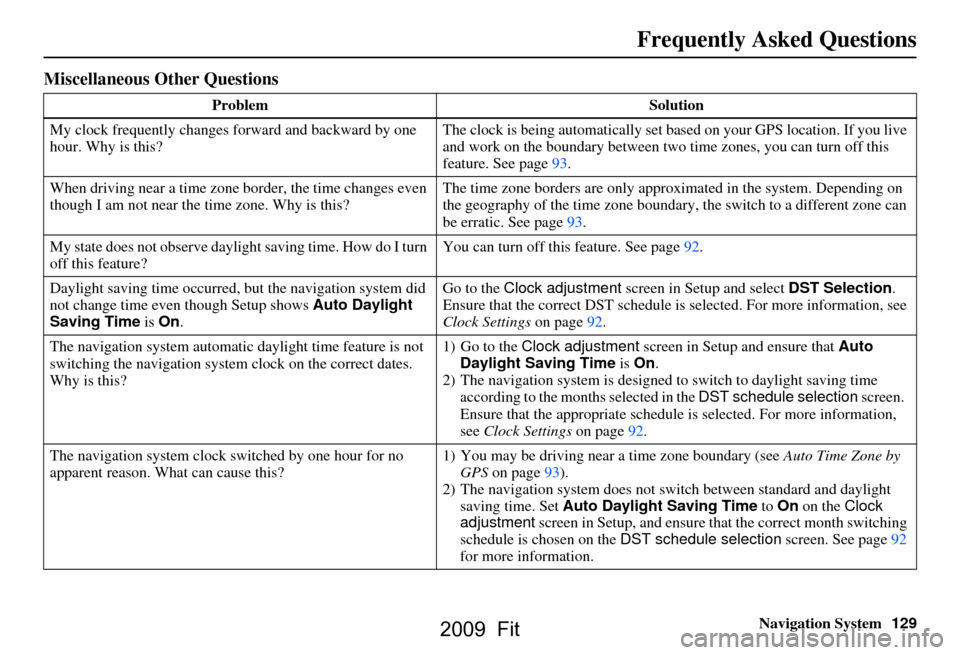
Navigation System129
Miscellaneous Other Questions
Problem Solution
My clock frequently changes forward and backward by one
hour. Why is this? The clock is being automatically set based on your GPS location. If you live
and work on the boundary between two
time zones, you can turn off this
feature. See page93.
When driving near a time zone border, the time changes even
though I am not near the time zone. Why is this? The time zone borders are only appr
oximated in the system. Depending on
the geography of the time zone boundary, the switch to a different zone can
be erratic. See page
93.
My state does not observe dayli ght saving time. How do I turn
off this feature? You can turn off this feature. See page
92.
Daylight saving time occurred, but the navigation system did
not change time even though Setup shows Auto Daylight
Saving Time is On . Go to the Clock adjustment
screen in Setup and select DST Selection.
Ensure that the correct DST schedule is selected. For more information, see
Clock Settings on page
92.
The navigation system automatic daylight time feature is not
switching the navigation system clock on the correct dates.
Why is this? 1) Go to the
Clock adjustment screen in Setup and ensure that Auto
Daylight Saving Time is On .
2) The navigation system is designed to switch to daylight saving time
according to the months selected in the DST schedule selection screen.
Ensure that the appropriate schedule is selected. For more information,
see Clock Settings on page
92.
The navigation system clock switched by one hour for no
apparent reason. Wh at can cause this? 1) You may be driving near
a time zone boundary (see Auto Time Zone by
GPS on page
93).
2) The navigation system does not switc h between standard and daylight
saving time. Set Auto Daylight Saving Time to On on the Clock
adjustment screen in Setup, and ensure that the correct month switching
schedule is chosen on the DST schedule selection screen. See page
92
for more information.
Frequently Asked Questions
2009 Fit
Page 131 of 149
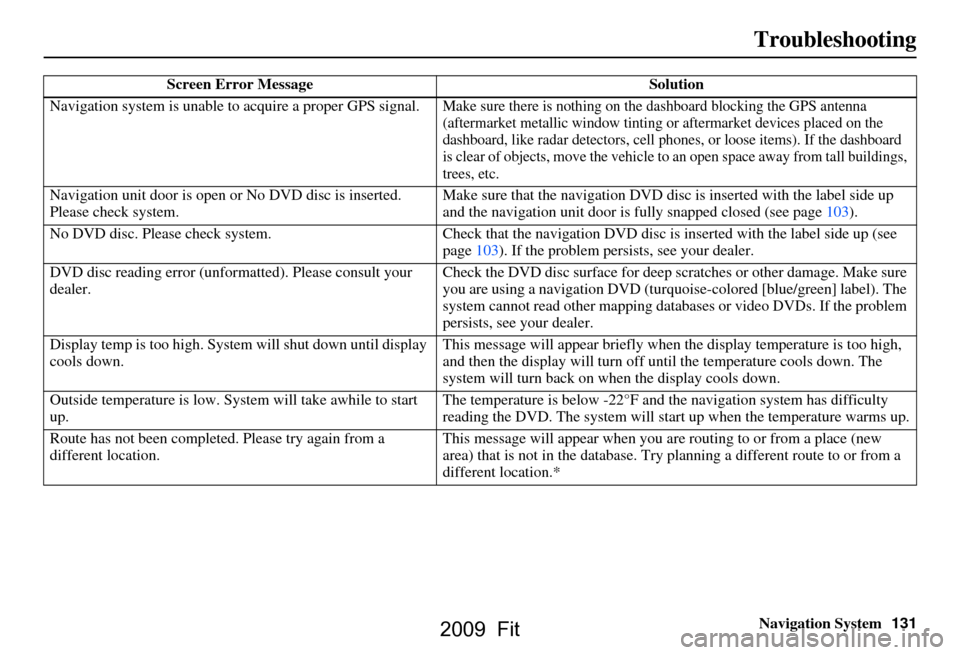
Navigation System131
Troubleshooting
Screen Error Message Solution
Navigation system is unable to acquire a proper GPS signal.
Make sure there is nothing on the dashboard blocking the GPS antenna
(aftermarket metallic window tinting or aftermarket devices placed on the
dashboard, like radar detectors, cell p hones, or loose items). If the dashboard
is clear of objects, move the vehicle to an open space away from tall buildings,
trees, etc.
Navigation unit door is open or No DVD disc is inserted.
Please check system. Make sure that the navigation DVD disc
is inserted with the label side up
and the navigation unit door is fully snapped closed (see page103).
No DVD disc. Please check system. Check that the navigation DVD disc is in serted with the label side up (see
page103). If the problem persists, see your dealer.
DVD disc reading error (unfor matted). Please consult your
dealer. Check the DVD disc surface
for deep scratches or other damage. Make sure
you are using a navigation DVD (turquoise-colored [blue/green] label). The
system cannot read other mapping data bases or video DVDs. If the problem
persists, see your dealer.
Display temp is too high. Syst em will shut down until display
cools down. This message will appear briefly when
the display temperature is too high,
and then the display will turn off until the temperature cools down. The
system will turn back on when the display cools down.
Outside temperature is low. System will take awhile to start
up. The temperature is below -22°F and
the navigation system has difficulty
reading the DVD. The system will st art up when the temperature warms up.
Route has not been complete d. Please try again from a
different location. This message will appear when you are routing to or from a place (new
area) that is not in the database. Try
planning a different route to or from a
different location.*
2009 Fit
Page 144 of 149
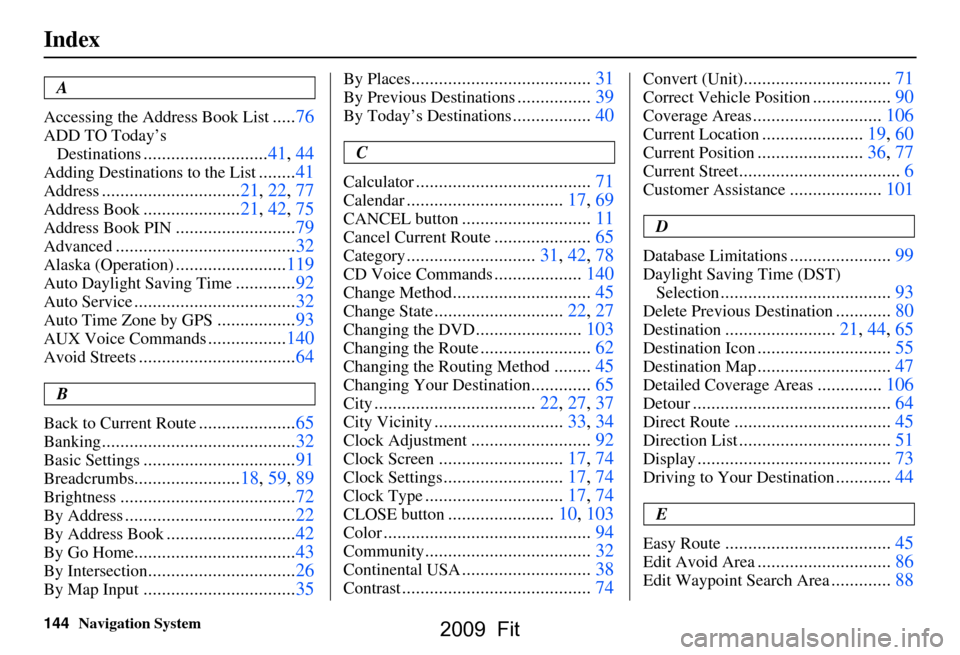
144Navigation System
Index
A
Accessing the Address Book List
..... 76
ADD TO Today’s
Destinations
........................... 41, 44
Adding Destinations to the List........41
Address..............................21, 22, 77
Address Book..................... 21, 42, 75
Address Book PIN.......................... 79
Advanced............................ ...........32
Alaska (Operation)........................ 119
Auto Daylight Saving Time.............92
Auto Service................................... 32
Auto Time Zone by GPS................. 93
AUX Voice Commands................. 140
Avoid Streets.................................. 64
B
Back to Current Route
..................... 65
Banking.......................................... 32
Basic Settings.................................91
Breadcrumbs.......................18, 59, 89
Brightness...................................... 72
By Address.....................................22
By Address Book............................42
By Go Home................................... 43
By Intersection................................26
By Map Input................................. 35
By Places....................................... 31
By Previous Destinations................39
By Today’s Destinations................. 40
C
Calculator
.... .................................. 71
Calendar..................................17, 69
CANCEL button............................11
Cancel Current Route.....................65
Category............................31, 42, 78
CD Voice Commands...................140
Change Method..............................45
Change State............................ 22, 27
Changing the DVD.......................103
Changing the Route........................ 62
Changing the Routing Method........45
Changing Your Destination.............65
City................................... 22, 27, 37
City Vicinity............................33, 34
Clock Adjustment..........................92
Clock Screen...........................17, 74
Clock Settings..........................17, 74
Clock Type.............................. 17, 74
CLOSE button.......................10, 103
Color............................................. 94
Community....................................32
Continental USA............................38
Contrast......................................... 74
Convert (Unit)................................71
Correct Vehicle Position................. 90
Coverage Areas............................ 106
Current Location...................... 19, 60
Current Position....................... 36, 77
Current Street................................... 6
Customer Assistance.................... 101
D
Database Limitations
...................... 99
Daylight Saving Time (DST)
Selection
..................................... 93
Delete Previous Destination............80
Destination........................21, 44, 65
Destination Icon............................. 55
Destination Map............................. 47
Detailed Coverage Areas..............106
Detour........................................... 64
Direct Route..................................45
Direction List.................................51
Display.......................................... 73
Driving to Your Destination............44
E
Easy Route
.................................... 45
Edit Avoid Area.............................86
Edit Waypoint Search Area.............88
2009 Fit