buttons HONDA FIT 2009 2.G User Guide
[x] Cancel search | Manufacturer: HONDA, Model Year: 2009, Model line: FIT, Model: HONDA FIT 2009 2.GPages: 352, PDF Size: 17.67 MB
Page 155 of 352
Press the AUDIO button beside the
screen to show the audio display and
operate the in-dash disc player.
You can also operate the audio
system without using the control
icons on the audio screen. Press the
CD/AUX button. The status bar
appears on the bottom of the screen.
On the navigation screen, you can
see the audio information whenever
you touch the AUDIO INFO or
TRACK LIST icons on the lower of
the screen.
When playing a CD recorded with
text data, the track, album, and artist
name are shown on the audio
display. When playing a disc in MP3
or WMA, the folder number and
name, the file number and name, the
artist name, and the elapsed time are
shown. The system will continuously
play a disc until you change modes.
If the disc was not recorded with text
data, it will not be displayed.
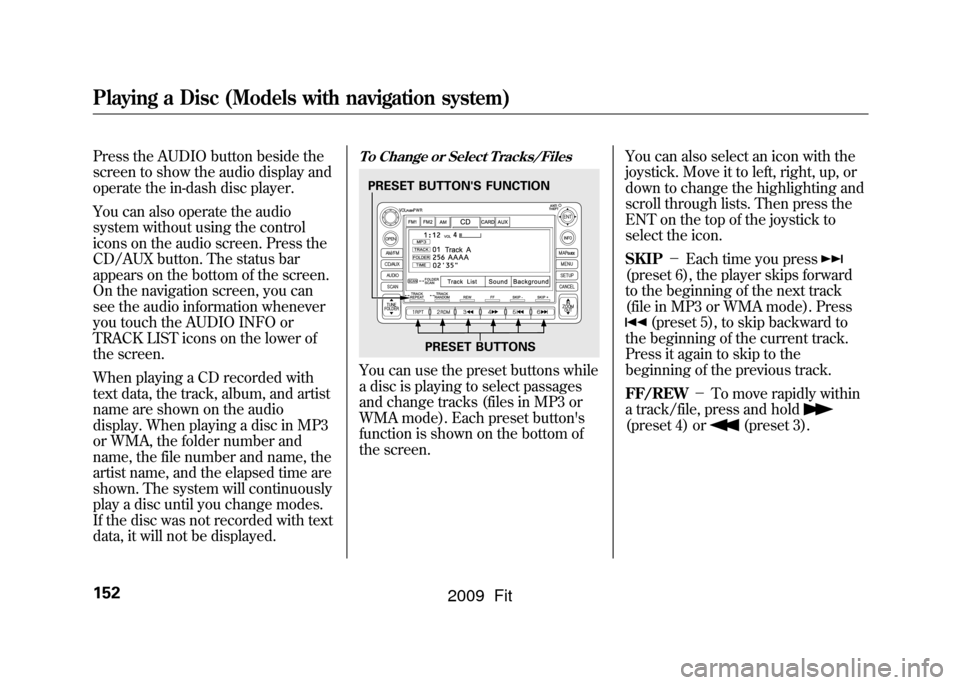
To Change or Select Tracks/FilesYou can use the preset buttons while
a disc is playing to select passages
and change tracks (files in MP3 or
WMA mode). Each preset button's
function is shown on the bottom of
the screen.You can also select an icon with the
joystick. Move it to left, right, up, or
down to change the highlighting and
scroll through lists. Then press the
ENT on the top of the joystick to
select the icon.
SKIP
-Each time you press
(preset 6), the player skips forward
to the beginning of the next track
(file in MP3 or WMA mode). Press
(preset 5), to skip backward to
the beginning of the current track.
Press it again to skip to the
beginning of the previous track.
FF/REW -To move rapidly within
a track/file, press and hold
(preset 4) or
(preset 3).
PRESET BUTTON'S FUNCTION
PRESET BUTTONS
Playing a Disc (Models with navigation system)152
2009 Fit
Page 163 of 352
The specifications for compatible
WMA files are:– Sampling frequency:
32/44.1/48 kHz
– Bit rate:
48/64/80/96/128/160/192 kbps
– Compatible with variable bit rate
and multi-session
– Maximum layers
(including ROOT): 8 layers
In WMA format, DRM (digital rights
management) files cannot be played.
If the system finds a DRM file, it
skips that file and plays the next
available folder or file.
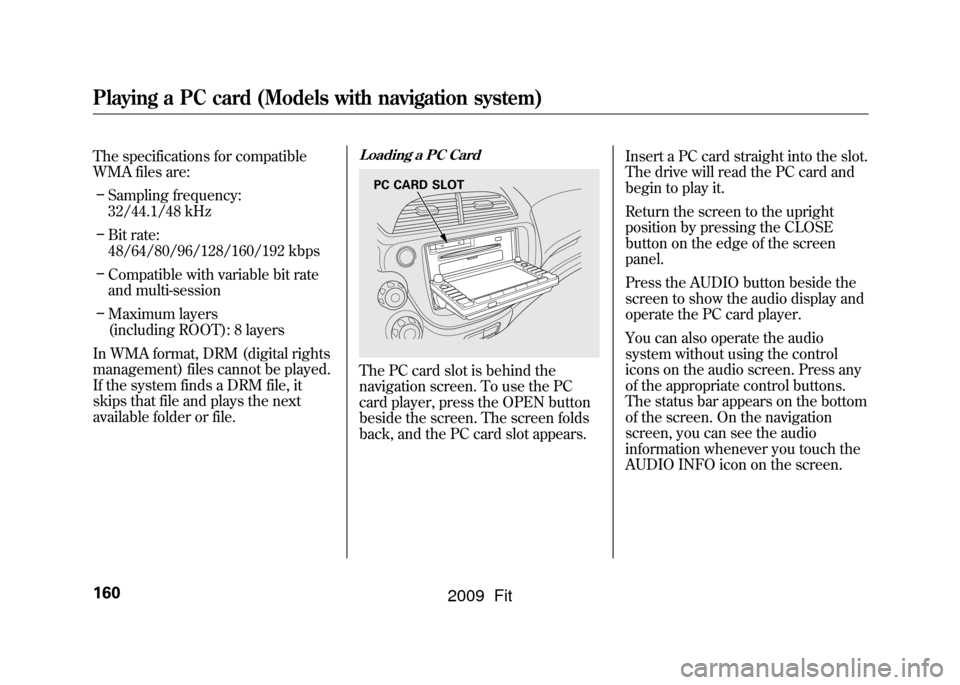
Loading a PC CardThe PC card slot is behind the
navigation screen. To use the PC
card player, press the OPEN button
beside the screen. The screen folds
back, and the PC card slot appears. Insert a PC card straight into the slot.
The drive will read the PC card and
begin to play it.
Return the screen to the upright
position by pressing the CLOSE
button on the edge of the screen
panel.
Press the AUDIO button beside the
screen to show the audio display and
operate the PC card player.
You can also operate the audio
system without using the control
icons on the audio screen. Press any
of the appropriate control buttons.
The status bar appears on the bottom
of the screen. On the navigation
screen, you can see the audio
information whenever you touch the
AUDIO INFO icon on the screen.
PC CARD SLOT
Playing a PC card (Models with navigation system)160
2009 Fit
Page 166 of 352
If you select‘‘Play a new track list, ’’
the system goes into the selected
play mode immediately and begins to
play the new track list.
To go back to the previous screen,
press the CANCEL button on the
right side of the screen. To exit the
play mode screens, press the AUDIO
button.
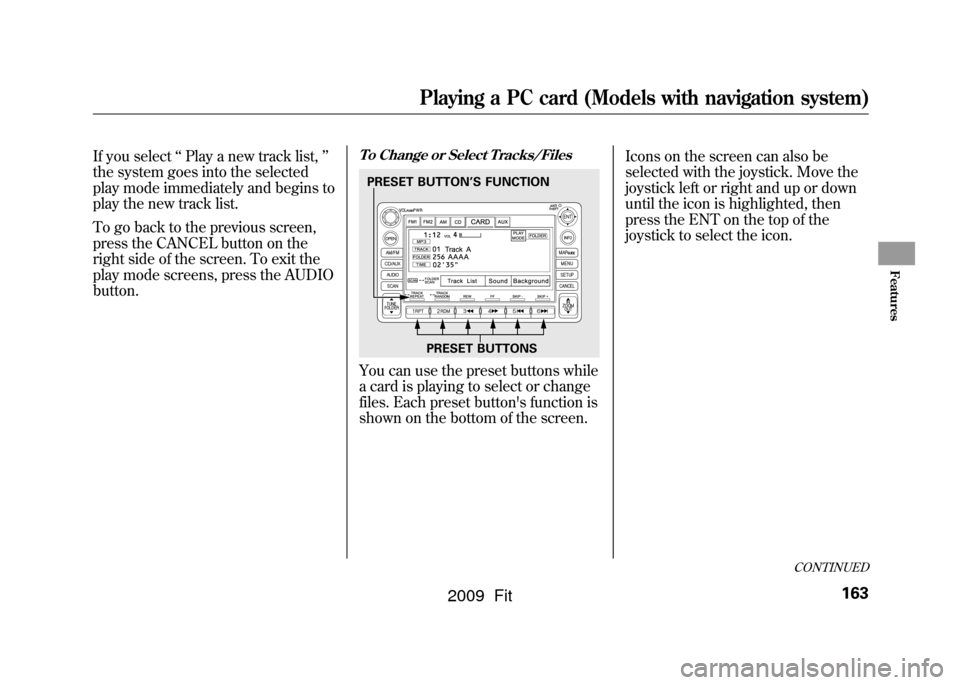
To Change or Select Tracks/FilesYou can use the preset buttons while
a card is playing to select or change
files. Each preset button's function is
shown on the bottom of the screen. Icons on the screen can also be
selected with the joystick. Move the
joystick left or right and up or down
until the icon is highlighted, then
press the ENT on the top of the
joystick to select the icon.
PRESET BUTTONS
PRESET BUTTON
’S FUNCTION
CONTINUED
Playing a PC card (Models with navigation system)
163
Features
2009 Fit
Page 168 of 352

The system then selects and plays
files randomly. This continues until
you deactivate each random play by
pressing the RDM button again.
SCAN-The SCAN function
samples all the files on the PC card in
the order they are recorded. To
activate the scan feature, press the
SCAN button. You will see ‘‘TRACK
SCAN ’’in the display. You will get a
10 second sampling of each file on
the PC card. Press the SCAN button
again to get out of scan mode and
play the last file sampled.
Pressing either of the SKIP buttons
(preset 5 or 6) also turns off the scan
feature. FOLDER/ARTIST/ALBUM SCAN
-
This feature, when activated,
samples the first file in each folder/
artist/album on the PC card in order.
To activate each scan feature, press
and hold the SCAN button. You will
see ‘‘FOLDER SCAN, ARTIST
SCAN or ALBUM SCAN ’’in the
display.
The system plays the first file in the
folder for about 10 seconds. If you do
nothing, the system plays the first
file in each folder, in order, for 10
seconds each. After playing the first
file of the last folder/artist/album,
the system returns to normal play. Pressing either of the SKIP buttons
(preset 5 or 6), selecting a different
folder/artist/album with the TUNE
bar, or pressing the SCAN button,
also turns off the scan feature.
CONTINUED
Playing a PC card (Models with navigation system)
165
Features
2009 Fit
Page 174 of 352

To Play an iPod
ꭂ
This audio system can operate the
audio files on the iPod
ꭂwith the
same controls used for the in-dash
disc player. To play an iPod, connect
it to the USB adapter cable in the
upper glove box by using your dock
connector, then press the CD/AUX
button. The ignition switch must be
in the ACCESSORY (I) or ON (II)
position. The iPod will also be
recharged with the ignition switch in
these positions.
The audio system reads and plays
sound files to be playable on the
iPod. The system cannot operate an
iPod as a mass storage device. The
system will only play songs stored on
the iPod with iTunes.
iPod and iTunes are registered
trademarks owned by Apple Inc.
Voice Control SystemYou can select the AUX mode by
using the navigation system voice
control buttons, but cannot operate
the play mode functions.
iPods that are compatible with your
audio system are listed below.
Model Firmware
ꭧ
iPod 5G Ver. 1.2 or more
iPod classic Ver. 1.0 or more
iPod nano Ver. 1.2 or more
iPod nano 2nd
generation Ver. 1.1.2 or more
iPod nano 3rd
generation Ver. 1.0 or more
iPod touch Ver. 1.1.1 or more
iPhone Ver. 1.1.1 or moreꭧ: Use the latest firmware.
Use only compatible iPods with the
latest firmware. iPods that are not
compatible will not work in this audio
unit. NOTE:
●Do not connect your iPod using a
HUB.●Do not keep the iPod in the
vehicle. Direct sunlight and high
heat will damage it.●Do not use an extension cable
between the USB adapter cable
equipped with your vehicle and
your dock connector.●We recommend backing up your
data before playing it.
In AAC format, DRM (digital rights
management) files cannot be played.
If the system finds a DRM file, the
audio unit displays UNPLAYABLE,
and then skips to the next file.
CONTINUED
Playing an iPod
®
(Models with navigation system)
171
Features
2009 Fit
Page 181 of 352

To Play a USB Flash Memory
Device
This audio system can operate the
audio files on a USB flash memory
device with the same controls used
for the in-dash disc player. To play a
USB flash memory device, connect it
to the USB adapter cable in the
upper glove box, then press the CD/
AUX button. The ignition switch
must be in the ACCESSORY (I) or
ON (II) position.
The audio system reads and plays
the audio files on the USB flash
memory device in MP3, WMA or
AAC
ꭧformats. Depending on the
format, the display shows MP3,
WMA or AAC when a USB flash
memory device is playing. The USB
flash memory device limit is up to
700 folders or up to 65535 files.
ꭧ : Only AAC format files recorded
with iTunes are playable on this
audio unit. The recommended USB flash
memory devices are 256 Mbyte or
higher. Some digital audio players
may be compatible as well.
Some USB flash memory device
(such as devices with security
lockout features, etc.) will not work
in this audio unit.
NOTE:
●Do not use a device such as a card
reader or hard drive as the device
or your files may be damaged.●Do not connect your USB flash
memory device using a HUB.●Do not use an extension cable to
the USB adapter cable equipped
with your vehicle.●Do not keep the USB flash
memory device in the vehicle.
Direct sunlight and high heat will
damage it.
●We recommend backing up your
data before playing a USB flash
memory device.●Depending on the type and
number of files, it may take some
time before they begin to play.●Depending on the software the
files were made with, it may not be
possible to play some files, or
display some text data.
Voice Control SystemYou can select the AUX mode by
using the navigation system voice
control buttons, but cannot operate
the play mode functions.
The specifications for compatible
MP3 files are:
– Sampling frequency:
32/44.1/48 kHz (MPEG1)
16/22.05/24 kHz (MPEG2)
Playing a USB Flash Memory Device (Models with navigation system)178
2009 Fit
Page 194 of 352

Your vehicle's audio system will
disable itself if it is disconnected
from electrical power for any reason.
To make it work again, you must
enter a specific digit code using the
preset buttons. Because there are
hundreds of number combinations
possible from specific digits, making
the system work without knowing
the exact code is nearly impossible.
You should have received a card that
lists your audio system's code and
serial numbers. It is best to store this
card in a safe place at home. In
addition, you should write the audio
system's serial number in this
owner's manual.
If you lose the card, you must obtain
the code number from a dealer. To
do this, you will need the system's
serial number.If your vehicle's battery is
disconnected or goes dead, or the
radio fuse is removed, the audio
system will disable itself. If this
happens, you will see
‘‘ENTER
CODE ’’in the frequency display the
next time you turn on the system.
Use the preset buttons to enter the
code. On vehicles with navigation
system, touch the Done icon to set
the code. The code is on the radio
code card included in your owner's
manual kit. When it is entered
correctly, the radio will start playing.
If you make a mistake entering the
code, do not start over; complete the
sequence, then enter the correct
code. You have 10 tries to enter the
correct code. If you are unsuccessful
in 10 attempts, you must then leave
the system on for 1 hour before
trying again.
Radio Theft Protection
191
Features
2009 Fit
Page 243 of 352
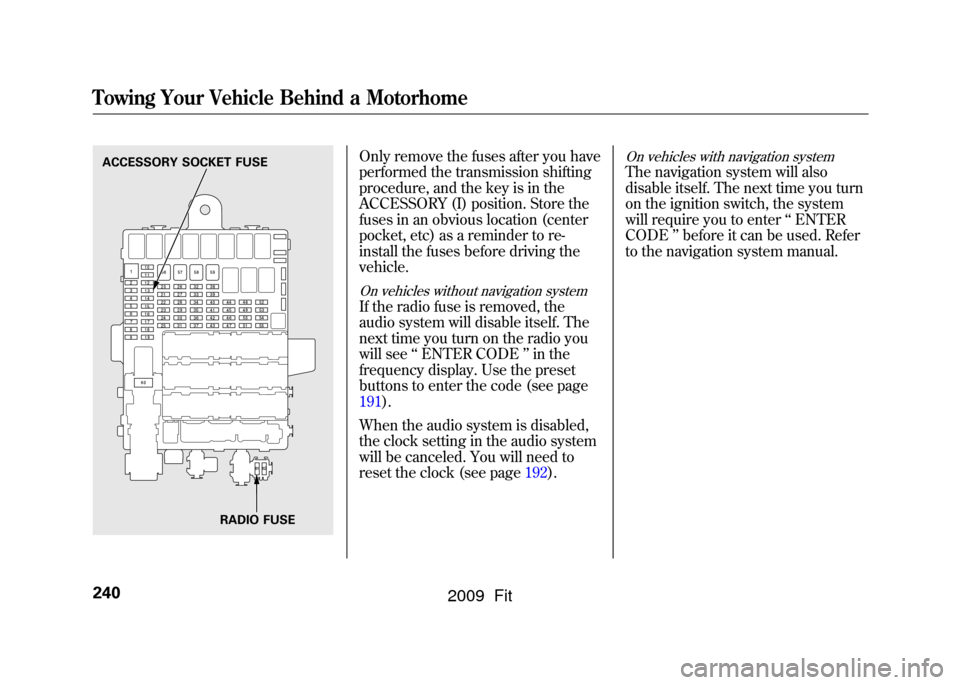
Only remove the fuses after you have
performed the transmission shifting
procedure, and the key is in the
ACCESSORY (I) position. Store the
fuses in an obvious location (center
pocket, etc) as a reminder to re-
install the fuses before driving the
vehicle.On vehicles without navigation systemIf the radio fuse is removed, the
audio system will disable itself. The
next time you turn on the radio you
will see‘‘ENTER CODE ’’in the
frequency display. Use the preset
buttons to enter the code (see page
191).
When the audio system is disabled,
the clock setting in the audio system
will be canceled. You will need to
reset the clock (see page 192).
On vehicles with navigation systemThe navigation system will also
disable itself. The next time you turn
on the ignition switch, the system
will require you to enter‘‘ENTER
CODE ’’before it can be used. Refer
to the navigation system manual.
ACCESSORY SOCKET FUSE
RADIO FUSETowing Your Vehicle Behind a Motorhome240
2009 Fit
Page 283 of 352
WARNING:Battery posts,
terminals, and related accessories
contain lead and lead compounds.
Wash your hands after handling.
If you need to connect the battery to
a charger, disconnect both cables to
prevent damaging your vehicle's
electrical system. Always disconnect
the negative ( -) cable first, and
reconnect it last.On vehicles without navigation systemIf your vehicle's battery is
disconnected, or goes dead, the time
setting is lost. To reset the time, see
page192.
If your vehicle's battery is
disconnected, or goes dead, the
audio system may disable itself. The
next time you turn on the radio, you
will see ‘‘ENTER CODE ’’in the
frequency display. Use the preset
buttons to enter the code (see page
191).
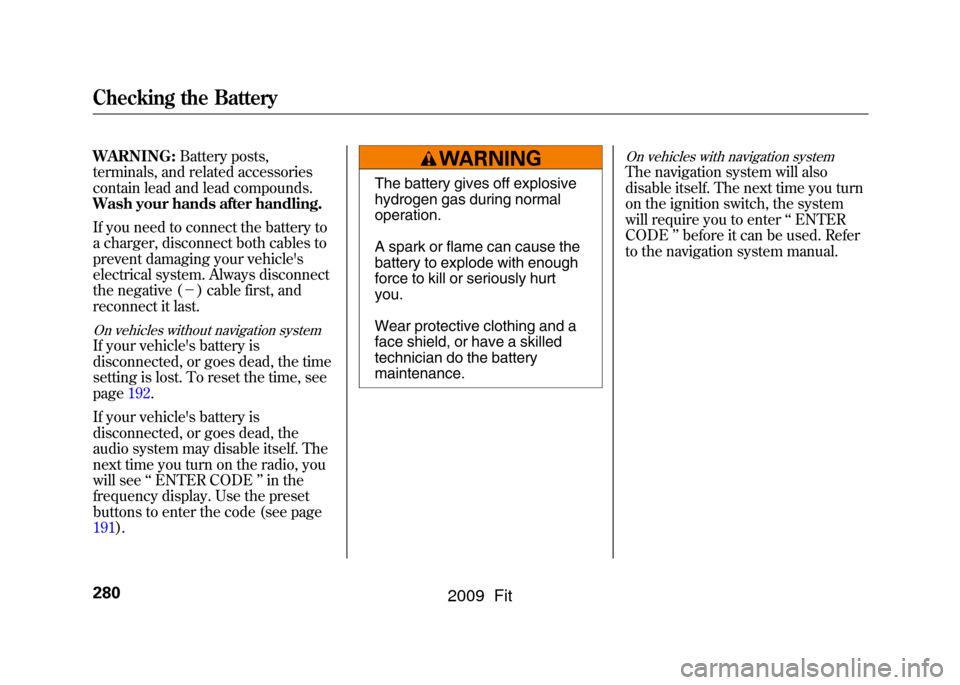
The battery gives off explosive
hydrogen gas during normal
operation.
A spark or flame can cause the
battery to explode with enough
force to kill or seriously hurt
you.
Wear protective clothing and a
face shield, or have a skilled
technician do the battery
maintenance.
On vehicles with navigation systemThe navigation system will also
disable itself. The next time you turn
on the ignition switch, the system
will require you to enter ‘‘ENTER
CODE ’’before it can be used. Refer
to the navigation system manual.
Checking the Battery280
2009 Fit
Page 311 of 352
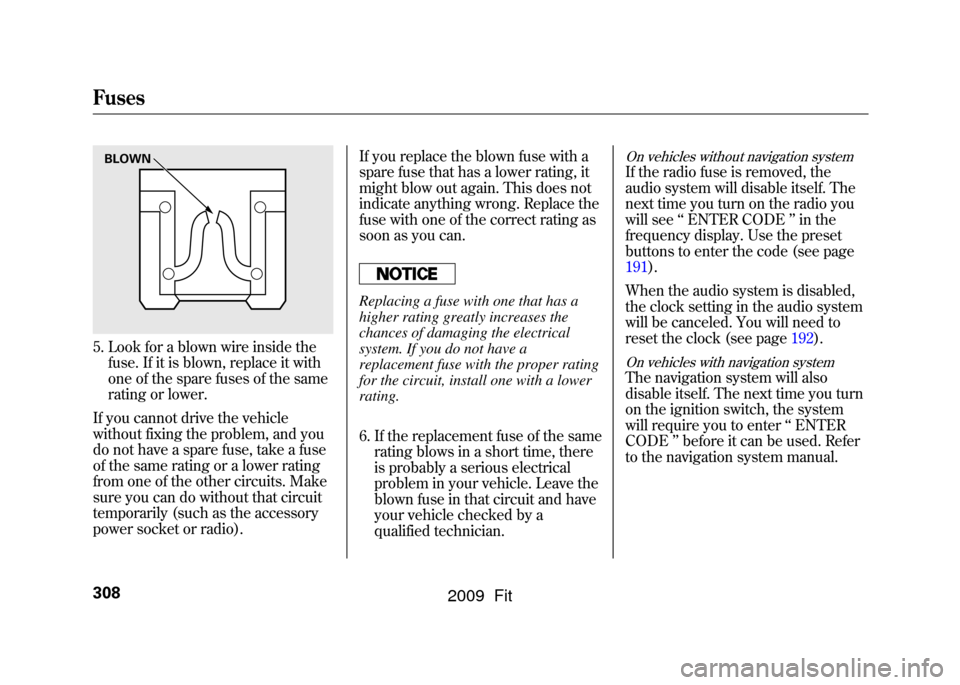
5. Look for a blown wire inside thefuse. If it is blown, replace it with
one of the spare fuses of the same
rating or lower.
If you cannot drive the vehicle
without fixing the problem, and you
do not have a spare fuse, take a fuse
of the same rating or a lower rating
from one of the other circuits. Make
sure you can do without that circuit
temporarily (such as the accessory
power socket or radio). If you replace the blown fuse with a
spare fuse that has a lower rating, it
might blow out again. This does not
indicate anything wrong. Replace the
fuse with one of the correct rating as
soon as you can.
Replacing a fuse with one that has a
higher rating greatly increases the
chances of damaging the electrical
system. If you do not have a
replacement fuse with the proper rating
for the circuit, install one with a lower
rating.
6. If the replacement fuse of the same
rating blows in a short time, there
is probably a serious electrical
problem in your vehicle. Leave the
blown fuse in that circuit and have
your vehicle checked by a
qualified technician.
On vehicles without navigation systemIf the radio fuse is removed, the
audio system will disable itself. The
next time you turn on the radio you
will see ‘‘ENTER CODE ’’in the
frequency display. Use the preset
buttons to enter the code (see page
191).
When the audio system is disabled,
the clock setting in the audio system
will be canceled. You will need to
reset the clock (see page 192).On vehicles with navigation systemThe navigation system will also
disable itself. The next time you turn
on the ignition switch, the system
will require you to enter‘‘ENTER
CODE ’’before it can be used. Refer
to the navigation system manual.
BLOWNFuses308
2009 Fit