engine HONDA FIT 2009 2.G User Guide
[x] Cancel search | Manufacturer: HONDA, Model Year: 2009, Model line: FIT, Model: HONDA FIT 2009 2.GPages: 352, PDF Size: 17.67 MB
Page 73 of 352

Current Fuel Mileage
This shows your current fuel mileage
in mpg (U.S.) or l/100 km (Canada).
Average Fuel Mileage
This shows your vehicle's average
fuel economy in mpg (U.S.) or l/100
km (Canada) since you last reset the
trip meter.
When you reset a trip meter, the
average fuel mileage for that trip
meter also resets.Odometer
The odometer shows the total
distance your vehicle has been
driven. It measures miles in U.S.
models and kilometers in Canadian
models. It is illegal under U.S.
federal law and Canadian provincial
regulations to disconnect, reset, or
alter the odometer with the intent to
change the number of miles or
kilometers indicated.
Fuel Gauge
This shows how much fuel you have.
It may show slightly more or less
than the actual amount. The needle
returns to the bottom after you turn
off the ignition.
Avoid driving with an extremely low
fuel level. Running out of fuel could
cause the engine to misfire, damaging
the catalytic converter.Check Fuel Cap Indicator
If the fuel fill cap is loose or missing,
a
‘‘CHECK FUEL CAP ’’message
appears on the information display
after you start the engine. The
message changes from CHECK, to
FUEL, to CAP repeatedly.
Turn the engine off and confirm the
fuel fill cap is installed. If it is, loosen
the cap, then retighten it until it
clicks at least once. You can cycle the
message off of the display by
pressing the select/reset knob
repeatedly, but this message will be
displayed each time the engine is
started. It will take several days of
normal driving for the vehicle to turn
the warning off.
Gauges70
2009 Fit
Page 74 of 352

If the system still detects a loose or
missing fuel fill cap, the malfunction
indicator lamp (MIL) comes on. Turn
the engine off, and check or
retighten the fuel fill cap until it
clicks at least once. The MIL goes
out after several days of normal
driving once the cap is tightened or
replaced. If it does not go out, have
your dealer inspect the vehicle. For
more information, see page304.Maintenance Minder
The information display in the
instrument panel shows you the
engine oil life and maintenance
service items when the ignition
switch is in the ON (II) position. This
information helps to keep you aware
of the periodic maintenance your
vehicle needs for continued trouble-
free driving. Refer to page245for
more information.
Gauges
71
Instruments and Controls
2009 Fit
Page 81 of 352
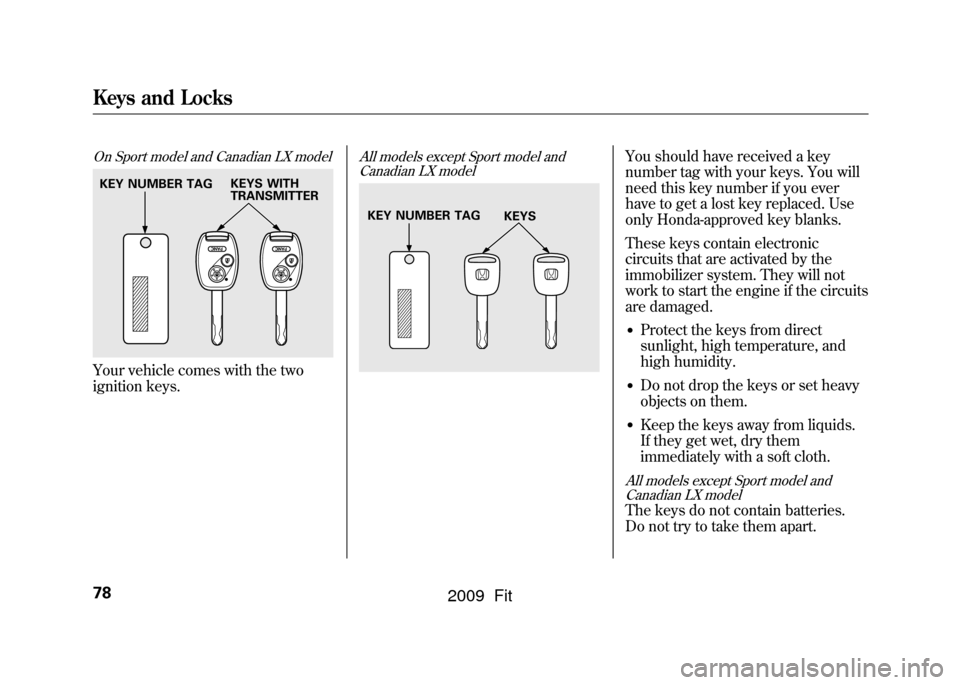
On Sport model and Canadian LX modelYour vehicle comes with the two
ignition keys.
All models except Sport model andCanadian LX model
You should have received a key
number tag with your keys. You will
need this key number if you ever
have to get a lost key replaced. Use
only Honda-approved key blanks.
These keys contain electronic
circuits that are activated by the
immobilizer system. They will not
work to start the engine if the circuits
are damaged.●Protect the keys from direct
sunlight, high temperature, and
high humidity.●Do not drop the keys or set heavy
objects on them.●Keep the keys away from liquids.
If they get wet, dry them
immediately with a soft cloth.
All models except Sport model and
Canadian LX modelThe keys do not contain batteries.
Do not try to take them apart.
KEY NUMBER TAG KEYS WITH
TRANSMITTER
KEY NUMBER TAG
KEYS
Keys and Locks78
2009 Fit
Page 82 of 352

The immobilizer system protects
your vehicle from theft. If an
improperly coded key (or other
device) is used, the engine's fuel
system is disabled.
When you turn the ignition switch to
the ON (II) position, the immobilizer
system indicator should come on
briefly, then go off. If the indicator
starts to blink, it means the system
does not recognize the coding of the
key. Turn the ignition switch to the
LOCK (0) position, remove the key,
reinsert it, and turn the ignition
switch to the ON (II) position again.
The system may not recognize your
key's coding if another immobilizer
key or other metal object (i.e. key
fob) is near the ignition switch when
you insert the key.If the system repeatedly does not
recognize the coding of your key,
contact your dealer.
Do not attempt to alter this system or
add other devices to it. Electrical
problems could result that may make
your vehicle inoperable.
If you have lost your key and cannot
start the engine, contact your dealer.
Always take the ignition key with you
whenever you leave the vehicle alone.
As required by the FCC:
This device complies with Part 15 of the
FCC rules. Operation is subject to thefollowing two conditions: (1) This devicemay not cause harmful interference, and(2) this device must accept any
interference received, includinginterference that may cause undesiredoperation.
Changes or modifications not expresslyapproved by the party responsible forcompliance could void the user's
authority to operate the equipment.
This device complies with IndustryCanada Standard RSS-210. Operation issubject to the following two conditions:(1) this device may not cause
interference, and (2) this device mustaccept any interference that may causeundesired operation of the device.
Immobilizer System
79
Instruments and Controls
2009 Fit
Page 83 of 352
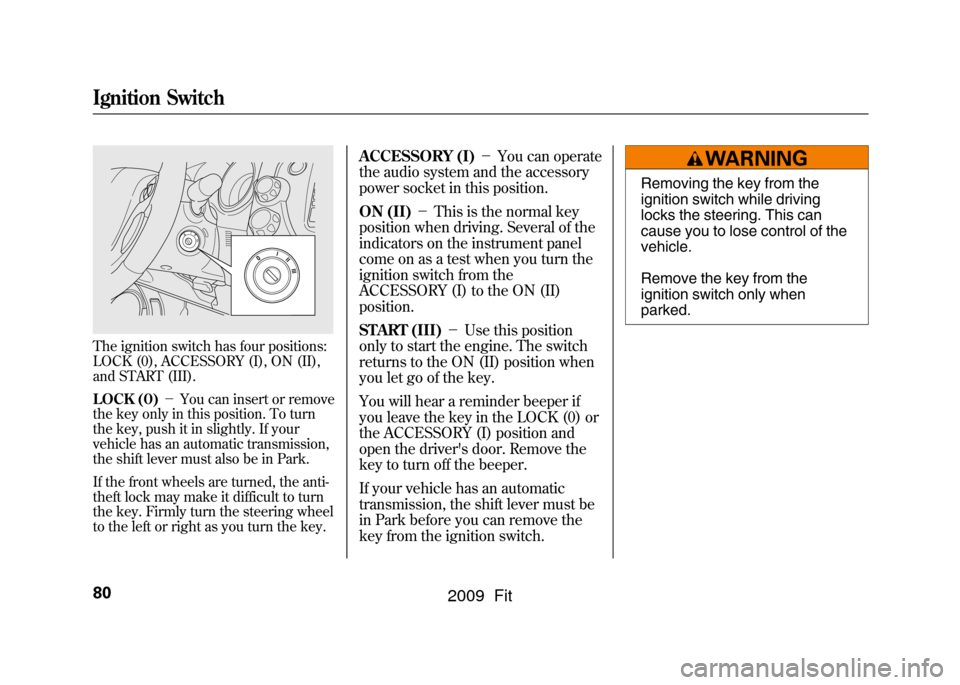
The ignition switch has four positions:
LOCK (0), ACCESSORY (I), ON (II),
and START (III).
LOCK (0)-You can insert or remove
the key only in this position. To turn
the key, push it in slightly. If your
vehicle has an automatic transmission,
the shift lever must also be in Park.
If the front wheels are turned, the anti-
theft lock may make it difficult to turn
the key. Firmly turn the steering wheel
to the left or right as you turn the key.
ACCESSORY (I) -You can operate
the audio system and the accessory
power socket in this position.
ON (II) -This is the normal key
position when driving. Several of the
indicators on the instrument panel
come on as a test when you turn the
ignition switch from the
ACCESSORY (I) to the ON (II)
position.
START (III) -Use this position
only to start the engine. The switch
returns to the ON (II) position when
you let go of the key.
You will hear a reminder beeper if
you leave the key in the LOCK (0) or
the ACCESSORY (I) position and
open the driver's door. Remove the
key to turn off the beeper.
If your vehicle has an automatic
transmission, the shift lever must be
in Park before you can remove the
key from the ignition switch.
Removing the key from the
ignition switch while driving
locks the steering. This can
cause you to lose control of the
vehicle.
Remove the key from the
ignition switch only when
parked.
Ignition Switch80
2009 Fit
Page 86 of 352
CONTINUED
Door Locks
83
Instruments and Controls
Auto Door Locking/UnlockingOn all models except Canadian DX andDX-AYour vehicle has customizable
settings for the doors and tailgate to
automatically lock and unlock. There
are default settings for each of these
features. You can turn off or change
the settings for these features as
described on the following pages.
When you customize the setting,
make sure your vehicle is parked
safely, the engine is off, and apply the
parking brake. Make all settings
before you start driving. Auto Door Locking
The auto door locking feature has
three possible settings:
●The auto door locking is
deactivated all the time.●All doors and tailgate lock
whenever you move the shift lever
out of the Park (P) position (A/T
vehicles).●All doors and tailgate lock when
the vehicle speed reaches 9 mph
(15 km/h).
This is the default setting.
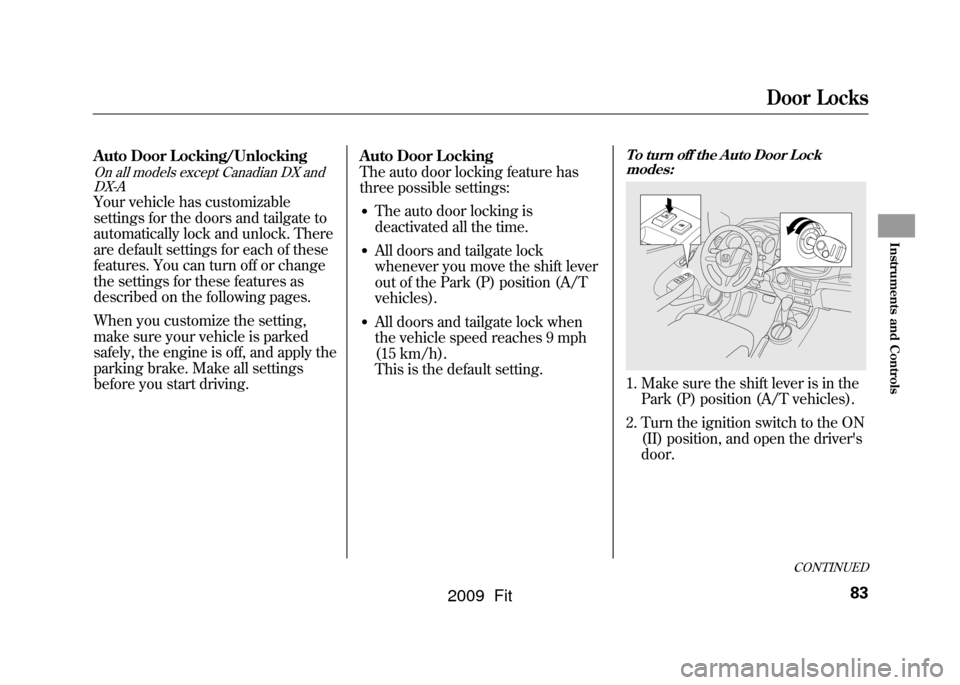
To turn off the Auto Door Lock
modes:1. Make sure the shift lever is in the Park (P) position (A/T vehicles).
2. Turn the ignition switch to the ON (II) position, and open the driver's
door.
2009 Fit
Page 115 of 352

When you select
or
, the
system automatically turns on the
A/C (if equipped). You cannot turn
the A/C off in this mode.
Ventilation
The flow-through ventilation system
draws in outside air, circulates it
through the interior, then discharges
it through vents near the tailgate.
1. Set the temperature to the lower limit.
2. Make sure the A/C is off.
3. Select
and
.
4. Set the fan to the desired speed. Using the Heater
The heater uses engine coolant to
warm the air. If the engine is cold, it
will be several minutes before you
feel warm air coming from the
system.
1. Select
and
.
2. Set the fan to the desired speed.
3. Adjust the warmth of the air with the temperature control dial. Using the A/C
If equippedAir conditioning places an extra load
on the engine. Check the high
temperature indicator (see page63).
If the indicator begins to blink, turn
off the A/C until the indicator goes
off.
1. Turn on the A/C by pressing the
button. The indicator in the button
comes on when a fan speed is
selected.
2. Make sure the temperature is set to maximum cool.
3. Select
.
4. If the outside air is humid, select recirculation mode. If the outside
air is dry, select
.
5. Set the fan to the desired speed.
Vents, Heating, and A/C112
2009 Fit
Page 200 of 352

Before you begin driving your
vehicle, you should know what
gasoline to use and how to check the
levels of important fluids. You also
need to know how to properly store
luggage or packages. The
information in this section will help
you. If you plan to add any
accessories to your vehicle, please
read the information in this section
first.Break-in Period
...........................
198
Fuel Recommendation
................
198
Service Station Procedures
.........
199
Refueling
.................................
199
Opening and Closing the Hood
...................................
200
Oil Check
................................
201
Engine Coolant Check
............
202
Fuel Economy
.............................
203
Accessories and Modifications
..........................
206
Carrying Cargo
...........................
208
Before Driving
197
Before Driving
2009 Fit
Page 201 of 352

Break-in Period
Help assure your vehicle's future
reliability and performance by paying
extra attention to how you drive
during the first 600 miles (1,000 km).
During this period:●Avoid full-throttle starts and rapid
acceleration.●Avoid hard braking for the first 200
miles (300 km).●Do not change the oil until the
scheduled maintenance time.
You should also follow these
recommendations with an
overhauled or exchanged engine, or
when the brakes are replaced. Fuel Recommendation
Your vehicle is designed to operate
on unleaded gasoline with a pump
octane number of 87 or higher. Use of
a lower octane gasoline can cause a
persistent, heavy metallic rapping
noise that can lead to engine damage.
We recommend using quality
gasolines containing detergent
additives that help prevent fuel
system and engine deposits.
In addition, in order to maintain good
performance, fuel economy, and
emissions control, we strongly
recommend, in areas where it is
available, the use of gasoline that
does NOT contain manganese-based
fuel additives such as MMT.
Use of gasoline with these additives
may adversely affect performance,
and cause the malfunction indicator
lamp on your instrument panel to
come on. If this happens, contact your
authorized dealer for service.
Some gasoline today is blended with
oxygenates such as ethanol or
MTBE. Your vehicle is designed to
operate on oxygenated gasoline
containing up to 10% ethanol by
volume and up to 15% MTBE by
volume. Do not use gasoline
containing methanol.
If you notice any undesirable
operating symptoms, try another
service station or switch to another
brand of gasoline.
For further important fuel-related
information, please refer to your
Quick Start Guide.
Break-in Period, Fuel Recommendation198
2009 Fit
Page 203 of 352
Gasoline is highly flammable
and explosive. You can be
burned or seriously injured
when handling fuel.●Stop the engine, and keep
heat, sparks, and flame
away.●Handle fuel only outdoors.●Wipe up spills immediately.
5. Screw the fuel fill cap back on until it clicks at least once. If you do not
properly tighten the cap, the
malfunction indicator lamp may
come on (see page304).You will
also see a ‘‘CHECK FUEL CAP ’’
message on the information
display.
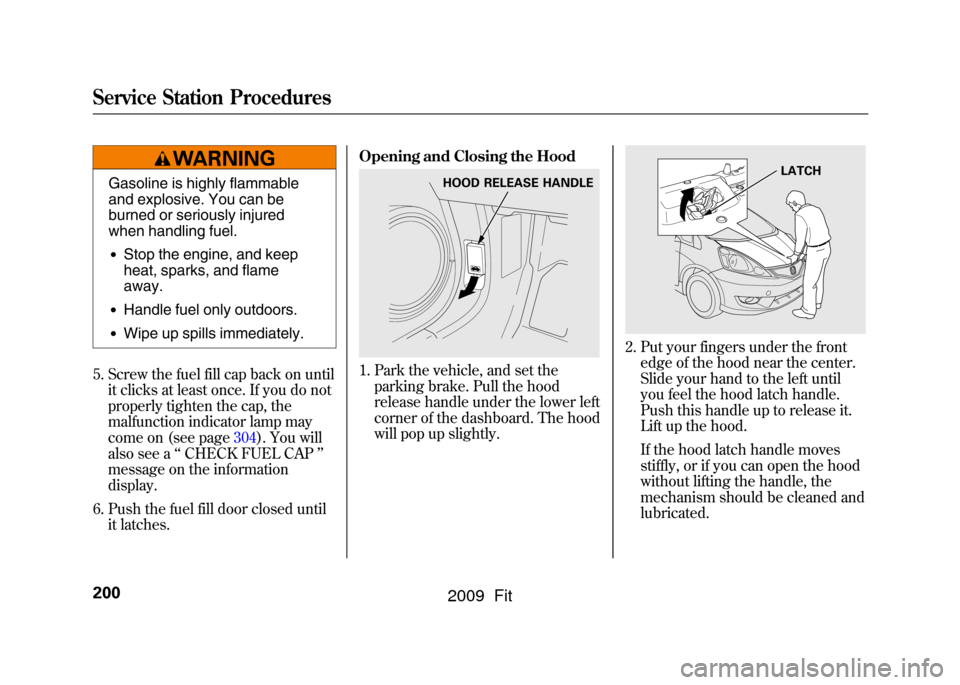
6. Push the fuel fill door closed until it latches. Opening and Closing the Hood
1. Park the vehicle, and set the
parking brake. Pull the hood
release handle under the lower left
corner of the dashboard. The hood
will pop up slightly.
2. Put your fingers under the frontedge of the hood near the center.
Slide your hand to the left until
you feel the hood latch handle.
Push this handle up to release it.
Lift up the hood.
If the hood latch handle moves
stiffly, or if you can open the hood
without lifting the handle, the
mechanism should be cleaned and
lubricated.
HOOD RELEASE HANDLE
LATCH
Service Station Procedures200
2009 Fit