wheel HONDA FIT 2009 2.G User Guide
[x] Cancel search | Manufacturer: HONDA, Model Year: 2009, Model line: FIT, Model: HONDA FIT 2009 2.GPages: 352, PDF Size: 17.67 MB
Page 192 of 352
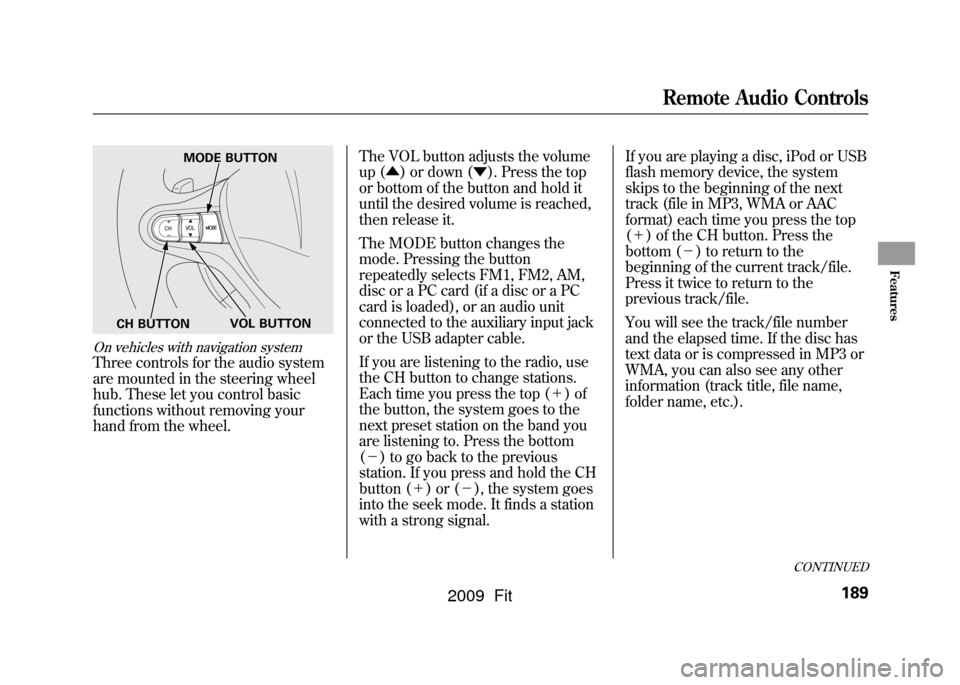
On vehicles with navigation systemThree controls for the audio system
are mounted in the steering wheel
hub. These let you control basic
functions without removing your
hand from the wheel.The VOL button adjusts the volume
up (
▲) or down ( ▼). Press the top
or bottom of the button and hold it
until the desired volume is reached,
then release it.
The MODE button changes the
mode. Pressing the button
repeatedly selects FM1, FM2, AM,
disc or a PC card (if a disc or a PC
card is loaded), or an audio unit
connected to the auxiliary input jack
or the USB adapter cable.
If you are listening to the radio, use
the CH button to change stations.
Each time you press the top ( +)of
the button, the system goes to the
next preset station on the band you
are listening to. Press the bottom
( - ) to go back to the previous
station. If you press and hold the CH
button ( +)or( -), the system goes
into the seek mode. It finds a station
with a strong signal. If you are playing a disc, iPod or USB
flash memory device, the system
skips to the beginning of the next
track (file in MP3, WMA or AAC
format) each time you press the top
(
+ ) of the CH button. Press the
bottom ( -) to return to the
beginning of the current track/file.
Press it twice to return to the
previous track/file.
You will see the track/file number
and the elapsed time. If the disc has
text data or is compressed in MP3 or
WMA, you can also see any other
information (track title, file name,
folder name, etc.).
MODE BUTTON
VOL BUTTON
CH BUTTON
CONTINUED
Remote Audio Controls
189
Features
2009 Fit
Page 197 of 352
On Sport model and Canadian LX modelCruise control allows you to maintain
a set speed above 25 mph (40 km/h)
without keeping your foot on the
accelerator pedal. It should be used
for cruising on straight, open
highways. It is not recommended for
city driving, winding roads, slippery
roads, heavy rain, or bad weather.
Improper use of the cruise
control can lead to a crash.
Use the cruise control only
when traveling on open
highways in good weather.Using the Cruise Control
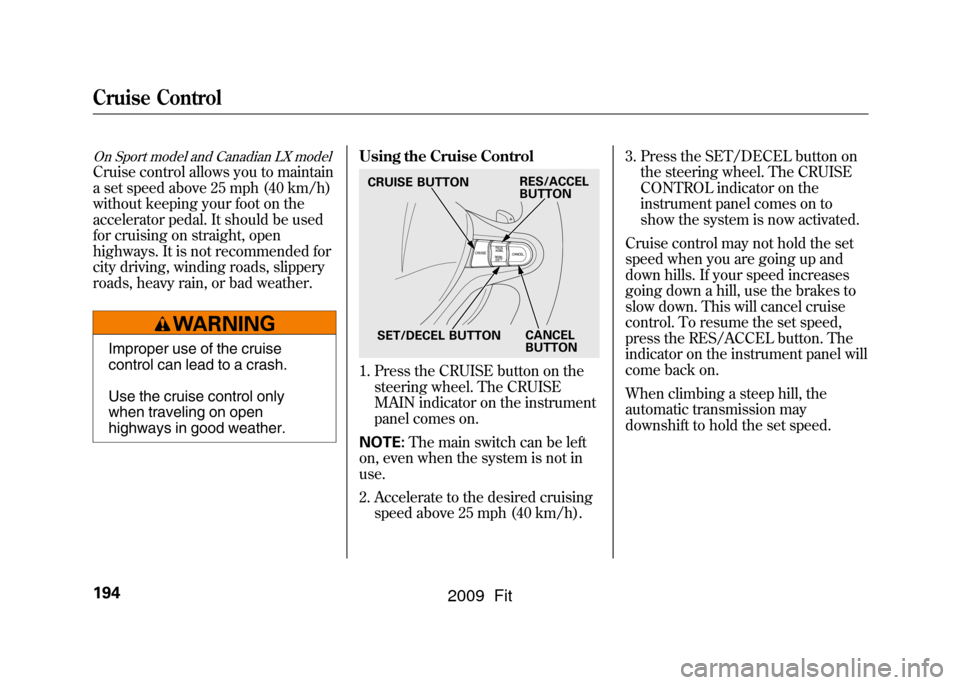
1. Press the CRUISE button on the
steering wheel. The CRUISE
MAIN indicator on the instrument
panel comes on.
NOTE: The main switch can be left
on, even when the system is not in
use.
2. Accelerate to the desired cruising speed above 25 mph (40 km/h). 3. Press the SET/DECEL button on
the steering wheel. The CRUISE
CONTROL indicator on the
instrument panel comes on to
show the system is now activated.
Cruise control may not hold the set
speed when you are going up and
down hills. If your speed increases
going down a hill, use the brakes to
slow down. This will cancel cruise
control. To resume the set speed,
press the RES/ACCEL button. The
indicator on the instrument panel will
come back on.
When climbing a steep hill, the
automatic transmission may
downshift to hold the set speed.CRUISE BUTTON
SET/DECEL BUTTON CANCEL
BUTTON
RES/ACCEL
BUTTON
Cruise Control194
2009 Fit
Page 199 of 352
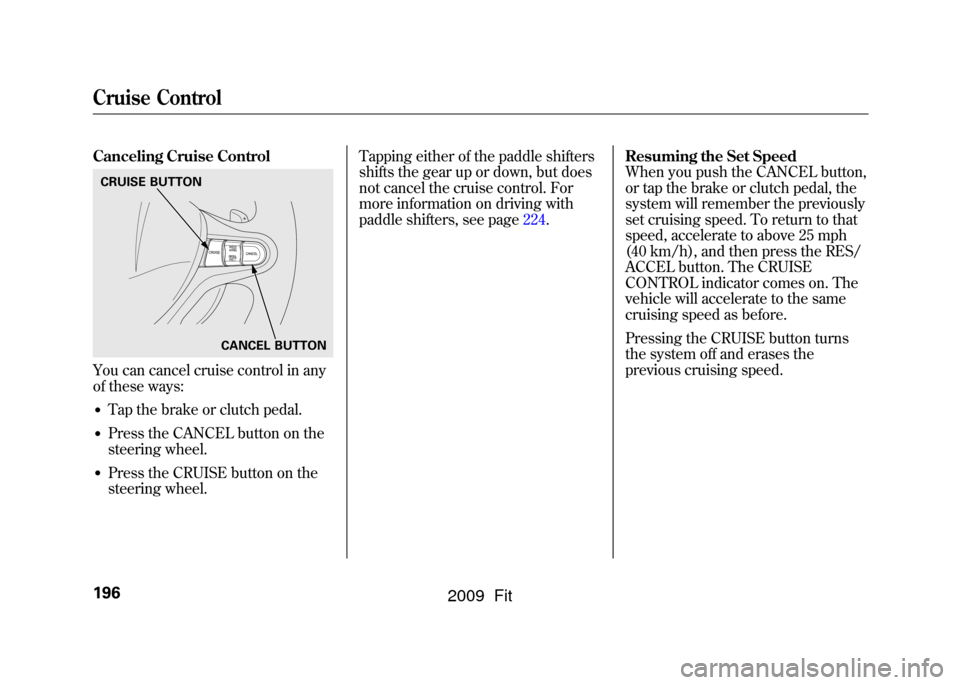
Canceling Cruise ControlYou can cancel cruise control in any
of these ways:●Tap the brake or clutch pedal.●Press the CANCEL button on the
steering wheel.●Press the CRUISE button on the
steering wheel.Tapping either of the paddle shifters
shifts the gear up or down, but does
not cancel the cruise control. For
more information on driving with
paddle shifters, see page224.
Resuming the Set Speed
When you push the CANCEL button,
or tap the brake or clutch pedal, the
system will remember the previously
set cruising speed. To return to that
speed, accelerate to above 25 mph
(40 km/h), and then press the RES/
ACCEL button. The CRUISE
CONTROL indicator comes on. The
vehicle will accelerate to the same
cruising speed as before.
Pressing the CRUISE button turns
the system off and erases the
previous cruising speed.CRUISE BUTTON
CANCEL BUTTONCruise Control196
2009 Fit
Page 210 of 352

Modifying Your Vehicle
Removing parts from your vehicle, or
replacing components with non-
Honda components could seriously
affect your vehicle's handling,
stability, and reliability.
Here are some examples:●Lowering your vehicle with a non-
Honda suspension kit that
significantly reduces ground
clearance can allow the
undercarriage to hit speed bumps
or other raised objects, which
could cause the airbags to deploy.●Raising your vehicle with a non-
Honda suspension kit can affect
the handling and stability.
●Non-Honda wheels, because they
are a universal design, can cause
excessive stress on suspension
components and will not be
compatible with the tire pressure
monitoring system (TPMS)
ꭧ.
ꭧ : If equipped
●Larger or smaller wheels and tires
can interfere with the operation of
your vehicle's anti-lock brakes and
other systems.●Modifying your steering wheel or
any other part of your vehicle's
safety features can make the
systems ineffective.
If you plan to modify your vehicle,
consult your dealer.
CONTINUED
Accessories and Modifications
207
Before Driving
2009 Fit
Page 218 of 352

You should do the following checks
and adjustments before you drive
your vehicle.
1. Make sure all windows, mirrors,and outside lights are clean and
unobstructed. Remove frost, snow,
or ice.
2. Check that the hood is fully closed.
3. Visually check the tires. If a tire looks low, use a gauge to check its
pressure (see page273).
4. Check that any items you may be carrying are stored properly or
fastened down securely. 5. Check the seat adjustment (see
page 93).
6. Check the adjustment of the inside and outside mirrors (see page
101).
7. Check the steering wheel adjustment (see page 77).
8. Make sure the doors and the tailgate are securely closed and
locked.
9. Fasten your seat belt. Check that your passengers have fastened
their seat belts (see page 14).
10. When you start the engine, check the gauges and indicators in the
instrument panel (see page 59).
Preparing to Drive
215
Driving
2009 Fit
Page 224 of 352

Reverse (R)-Press the brake
pedal and press the release button on
the front of the shift lever to shift
from Park to reverse. To shift from
reverse to neutral, come to a
complete stop, and then shift. Press
the release button before shifting
into reverse from neutral.
Neutral (N) -Use neutral if you
need to restart a stalled engine, or if
it is necessary to stop briefly with the
engine idling. Shift to the Park
position if you need to leave your
vehicle for any reason. Press on the
brake pedal when you are moving
the shift lever from neutral to
another gear. Drive (D)
-Use this position for
your normal driving. The
transmission automatically selects a
suitable gear (1 through 5) for your
speed and acceleration. You may
notice the transmission shifting up at
higher engine speeds when the
engine is cold. This helps the engine
warm up faster.
All models except U.S. SportDrive (D
3) - This position is similar
to D, except only the first three gears
are selected. Use D
3to provide
engine braking when going down a
steep hill. D
3can also keep the
transmission from cycling between
third and fourth gears in stop-and-go
driving.
All models except U.S. SportSecond (2) -To shift to second,
press the release button on the front
of the shift lever. This position locks
the transmission in second gear. It
does not downshift to first gear when
you come to a stop.
Use second gear:●For more power when climbing.●To increase engine braking when
going down steep hills.●For starting out on a slippery
surface or in deep snow.●To help reduce wheel spin.
CONTINUED
Automatic Transmission
221
Driving
2009 Fit
Page 227 of 352
Using the Paddle Shifters in D
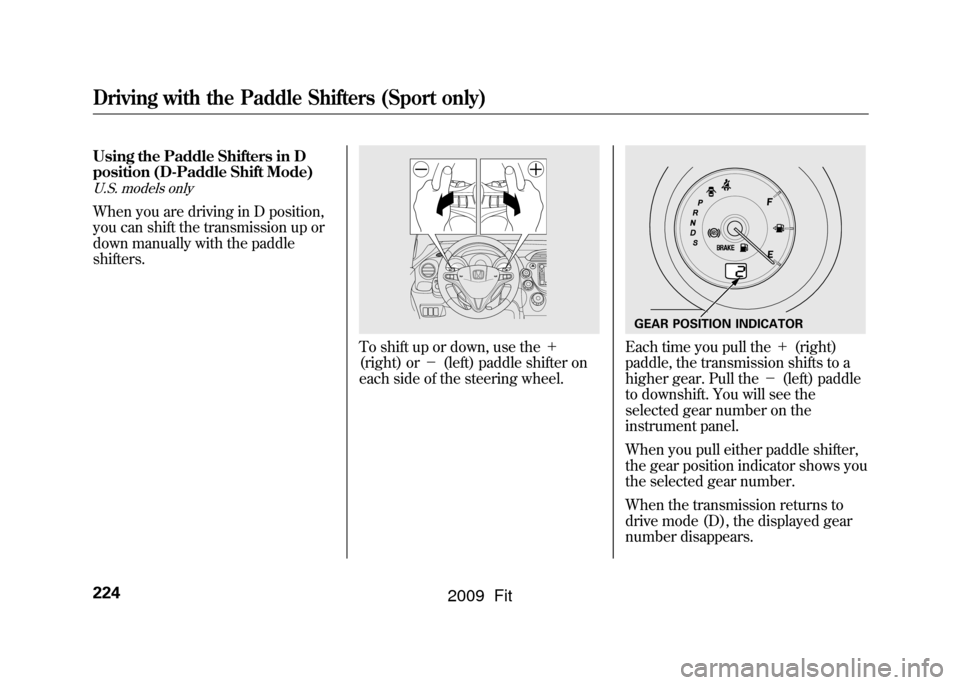
position (D-Paddle Shift Mode)U.S. models onlyWhen you are driving in D position,
you can shift the transmission up or
down manually with the paddle
shifters.
To shift up or down, use the+
(right) or -(left) paddle shifter on
each side of the steering wheel.
Each time you pull the +(right)
paddle, the transmission shifts to a
higher gear. Pull the -(left) paddle
to downshift. You will see the
selected gear number on the
instrument panel.
When you pull either paddle shifter,
the gear position indicator shows you
the selected gear number.
When the transmission returns to
drive mode (D), the displayed gear
number disappears.GEAR POSITION INDICATOR
Driving with the Paddle Shifters (Sport only)224
2009 Fit
Page 231 of 352

Here are the speed ranges for
upshifting and downshifting.To shift from Speed range
1 → 2 over 0 mph (0 km/h)
2 → 3 over 6 mph (10 km/h)
3 → 4 over 21 mph (34 km/h)
4 → 5 over 27 mph (44 km/h)
To shift from Speed range
2 → 1 under 26 mph (42 km/h)
3 → 2 under 51 mph (82 km/h)
4 → 3 under 79 mph (127 km/h)
Starting in Second GearWhen you are in sequential shift
mode, and the vehicle is stopped,
pull the +(right) paddle shifter to
shift to second gear. You will see
‘‘ M2 ’’in the display. Starting in
second gear helps to reduce
wheelspin in deep snow or on a
slippery surface.
Driving with the Paddle Shifters (Sport only)228
2009 Fit
Page 232 of 352

Always use the parking brake when
you park your vehicle. Make sure the
parking brake is set firmly, or your
vehicle may roll if it is parked on an
incline.
If your vehicle has an automatic
transmission, set the parking brake
before you put the transmission in
Park. This keeps the vehicle from
moving and putting pressure on the
parking mechanism in the
transmission.Parking Tips
●Make sure the windows are
closed.●Turn off the lights.●Place any packages, valuables, etc.
in the cargo area or take them with
you.●Lock the doors and the tailgate.On Sport modelCheck the indicator on the
instrument panel to verify that the
security system is set.●Never park over dry leaves, tall
grass, or other flammable
materials. The hot three way
catalytic converter could cause
these materials to catch on fire.
●If the vehicle is facing uphill, turn
the front wheels away from the
curb. If your vehicle has a manual
transmission, put it in first gear
and set the parking brake.●If the vehicle is facing downhill,
turn the front wheels toward the
curb. If your vehicle has a manual
transmission, put it in reverse gear
and set the parking brake.●Make sure the parking brake is
fully released before driving away.
Driving with the parking brake
partially set can overheat or
damage the rear brakes.
Parking
229
Driving
2009 Fit
Page 233 of 352

Your vehicle is equipped with front
disc brakes. The brakes on the rear
wheels are drum. A power assist
helps reduce the effort needed on the
brake pedal. The anti-lock brake
system (ABS) helps you retain
steering control when braking very
hard.
Resting your foot on the pedal keeps
the brakes applied lightly, builds up
heat, and reduces their effectiveness
and reduces brake pad life. In
addition, fuel economy can be
reduced. It also keeps your brake
lights on all the time, confusing
drivers behind you.
Constant application of the brakes
when going down a long hill builds
up heat and reduces their
effectiveness. Use the engine to
assist the brakes by taking your foot
off the accelerator and downshifting
to a lower gear.Check your brakes after driving
through deep water. Apply the
brakes moderately to see if they feel
normal. If not, apply them gently and
frequently until they do. Be extra
cautious and alert in your driving.
Braking System Design
The hydraulic system that operates
the brakes has two separate circuits.
Each circuit works diagonally across
the vehicle (the left-front brake is
connected with the right-rear brake,
etc.). If one circuit should develop a
problem, you will still have braking
at two wheels.
Brake Pad Wear Indicators
If the front brake pads need
replacing, you will hear a distinctive,
metallic screeching sound when you
apply the brake pedal. If you do not
have the brake pads replaced, they
will screech all the time. It is normal
for the brakes to occasionally squeal
or squeak when you apply them.Braking System230
2009 Fit