change time HONDA FIT 2009 2.G Owners Manual
[x] Cancel search | Manufacturer: HONDA, Model Year: 2009, Model line: FIT, Model: HONDA FIT 2009 2.GPages: 352, PDF Size: 17.67 MB
Page 73 of 352
Current Fuel Mileage
This shows your current fuel mileage
in mpg (U.S.) or l/100 km (Canada).
Average Fuel Mileage
This shows your vehicle's average
fuel economy in mpg (U.S.) or l/100
km (Canada) since you last reset the
trip meter.
When you reset a trip meter, the
average fuel mileage for that trip
meter also resets.Odometer
The odometer shows the total
distance your vehicle has been
driven. It measures miles in U.S.
models and kilometers in Canadian
models. It is illegal under U.S.
federal law and Canadian provincial
regulations to disconnect, reset, or
alter the odometer with the intent to
change the number of miles or
kilometers indicated.
Fuel Gauge
This shows how much fuel you have.
It may show slightly more or less
than the actual amount. The needle
returns to the bottom after you turn
off the ignition.
Avoid driving with an extremely low
fuel level. Running out of fuel could
cause the engine to misfire, damaging
the catalytic converter.Check Fuel Cap Indicator
If the fuel fill cap is loose or missing,
a
‘‘CHECK FUEL CAP ’’message
appears on the information display
after you start the engine. The
message changes from CHECK, to
FUEL, to CAP repeatedly.
Turn the engine off and confirm the
fuel fill cap is installed. If it is, loosen
the cap, then retighten it until it
clicks at least once. You can cycle the
message off of the display by
pressing the select/reset knob
repeatedly, but this message will be
displayed each time the engine is
started. It will take several days of
normal driving for the vehicle to turn
the warning off.
Gauges70
2009 Fit
Page 86 of 352
CONTINUED
Door Locks
83
Instruments and Controls
Auto Door Locking/UnlockingOn all models except Canadian DX andDX-AYour vehicle has customizable
settings for the doors and tailgate to
automatically lock and unlock. There
are default settings for each of these
features. You can turn off or change
the settings for these features as
described on the following pages.
When you customize the setting,
make sure your vehicle is parked
safely, the engine is off, and apply the
parking brake. Make all settings
before you start driving. Auto Door Locking
The auto door locking feature has
three possible settings:
●The auto door locking is
deactivated all the time.●All doors and tailgate lock
whenever you move the shift lever
out of the Park (P) position (A/T
vehicles).●All doors and tailgate lock when
the vehicle speed reaches 9 mph
(15 km/h).
This is the default setting.
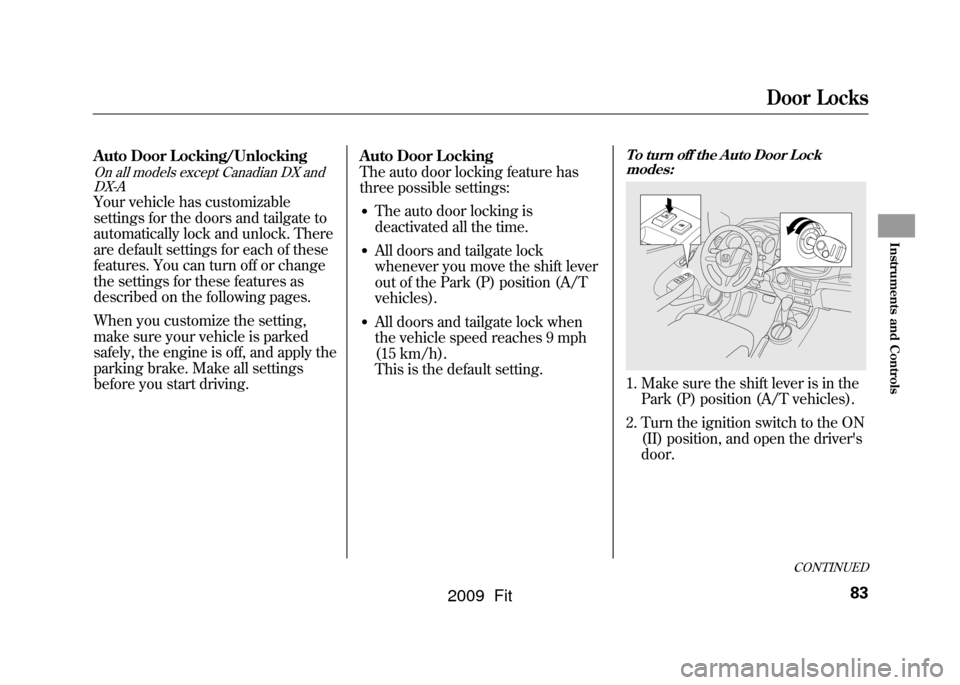
To turn off the Auto Door Lock
modes:1. Make sure the shift lever is in the Park (P) position (A/T vehicles).
2. Turn the ignition switch to the ON (II) position, and open the driver's
door.
2009 Fit
Page 127 of 352
The specifications of the compatible
MP3 file are:
Sampling frequency:
32/44.1/48 kHz (MPEG1), 24/
22.05/16 kHz (MPEG2)
Bit rate:
32/40/48/56/64/80/96/112/128/
160/192/224/256/320 kbps
(MPEG1),
8/16/24/32/40/48/56/64/80/96/
112/128/160 kbps (MPEG2)
Compatible with variable bit rate and
multi-session.
Maximum layers (including ROOT):
8 layers
The specifications of the compatible
WMA file are:
Sampling frequency:
32/44.1/48 kHz
Bit rate:
48/64/80/96/128/160/192 kbps
Compatible with variable bit rate and
multi-session.
Maximum layers (including ROOT):
8 layers
To Load a DiscInsert a disc about halfway into the
disc slot. The drive will pull the disc
in the rest of the way to play it. You
operate the disc player with the same
controls used for the radio. The
number of the current track is shown
in the display. When playing a disc in
MP3 or WMA, the numbers of the
current folder and file are shown.
The system will continuously play a
disc until you change modes.
You cannot load and play 3-inch (8-
cm) discs in this unit.
For information on how to handle
and protect compact discs, see page
186.Text Data Display FunctionEach time you press the TITLE
button, the display shows you the
text data on a disc, if the disc was
recorded with text data.You can see the album, artist, and
track name in the display. If a disc is
recorded in MP3 or WMA, you can
see the folder and file name, and the
artist, album, and track tag.
With the folder name, you will see
the FOLDER indicator in the display.
The TRACK indicator is shown with
the file or track name.
When you press the TITLE button
while a disc without text data is
playing, you will see
‘‘NO INFO ’’on
the display.
The display shows up to about 16
characters of selected text data (the
folder name, file name, etc.).
If the text data has more than 16
characters, you will see the first 15
characters and the
indicator on the
display. Press and hold the TITLE
button until the next 16 characters
are shown. You can see up to about
31 characters of the text data.
Playing a Disc (Models without navigation system)124
2009 Fit
Page 128 of 352

If you press and hold the TITLE
button again, the display shows the
first 15 characters again.
If any letter is not available, it is
replaced with‘‘.’’ (dot) in the
display. When the disc has no text
data, you will see ‘‘NO INFO ’’on
the display.
You will also see some text data
under these conditions:●When a new folder, file, or track is
selected.●When you change the audio mode
to play a disc with text data or in
MP3 or WMA.●When you insert a disc, and the
system begins to play.
When playing a CD-DA with text
data, the album and track name are
shown in the display.With a disc in
MP3 or WMA, the display shows the
folder and file name. When you turn on the audio system
next time, the system keeps your
selection with the TITLE button.
To Change or Select Tracks/FilesYou can use the SEEK/SKIP button
while a disc is playing to select
passages and change tracks (files in
MP3/WMA mode).
In MP3/WMA mode, use theor
PLAY button to select folders in
the disc, and use the SEEK/SKIP
button to change files. SEEK/SKIP
-Each time you press
the
button, the player skips
forward to the beginning of the next
track (files in MP3/WMA mode).
Press the
button to skip
backward to the beginning of the
current track. Press it again to skip to
the beginning of the previous track.
To move rapidly within a track, press
and hold the
or
button.
You can also operate the track
selection by using the VOL/SELECT
knob. Press the VOL/SELECT knob
and you will see ‘‘SEL ’’in the
display. Turn the knob to switch the
track number. Press the VOL/
SELECT knob or
PLAY button to
set your selection. To turn it off,
press the
buttton.
CONTINUED
Playing a Disc (Models without navigation system)
125
Features
2009 Fit
Page 129 of 352

In MP3/WMA modeFOLDER SELECTION-To select
a different folder, press the
or
PLAY button. Press the
button to skip to the next folder, and
the
PLAY button to skip to the
previous folder.
You can also operate the folder and
file selection by using the VOL/
SELECT knob. Press the VOL/
SELECT knob and you will see
‘‘ SEL ’’in the display. Turn the knob
to switch the folder number and
press the knob to set your selection.
Turn the knob to switch the file
number and press the knob to your
selection. To turn it off, press thebutton repeatedly.
REPEAT (TRACK/FILE REPEAT)
- To continuously replay a track
(file in MP3/WMA mode), press the
RPT button. You will see ‘‘RPT ’’in
the display. Press and hold the RPT
button to turn it off.
In MP3/WMA modeFOLDER-REPEAT -This feature,
when activated, replays all the files
on the selected folder in the order
they are compressed in MP3/WMA.
To activate folder repeat mode, press
the RPT button repeatedly until you
see ‘‘F-RPT ’’in the display. The
system continuously replays the
current folder. Press and hold the
RPT button to turn it off.
Each time you press the RPT button,
the mode changes from file repeat to
folder repeat, then to normal playing.
RANDOM (Random within a disc)
- This feature plays the tracks
within a disc in random order. In
MP3/WMA mode, all files in all
folders are played in random order.
To activate random mode, press the
RDM button repeatedly until you see
‘‘ RDM ’’in the display. Press and
hold the RDM button to turn it off.
In MP3/WMA modeFOLDER-RANDOM -This
feature, when activated, plays the
files in the current folder in random
order, rather than in the order they
are compressed in MP3/WMA. To
activate folder random play, press the
RDM button. You will see ‘‘F-RDM ’’
in the display. The system will then
select and play files randomly. This
continues until you deactivate folder
random play by pressing and holding
the RDM button.
Each time you press the RDM
button, the mode changes from
folder random play, to within a disc
random play, then to normal play.
Playing a Disc (Models without navigation system)126
2009 Fit
Page 130 of 352
SCAN-The scan function samples
all the tracks on the disc in the order
they are recorded on the disc (all
files in the selected folder in MP3 or
WMA mode). To activate the scan
feature, press the SCAN button. You
will see ‘‘SCAN ’’in the display. You
will get a 10 second sampling of each
track/file in the disc/folder. Press
and hold the SCAN button to get out
of scan mode and play the last track
sampled.
In MP3/WMA modeFOLDER-SCAN -This feature,
when activated, samples the first file
in each folder on the disc in the
order they are recorded. To activate
the folder scan feature, press the
SCAN button repeatedly. You will
see ‘‘F-SCAN ’’in the display. The
system will then play the first file in
the main folders for about 10
seconds. If you do nothing, the
system will then play the following
first files for 10 seconds each. When
the system samples the first file of all
folders, F-SCAN is cancelled, and the
system plays normally.
Each time you press the SCAN
button, the mode changes from
track/file scan to folder scan, then to
normal playing. To Stop Playing a Disc
Press the eject button (
)to
remove the disc. If you eject the disc,
but do not remove it from the slot,
the system will automatically reload
it after 10 seconds and put it in pause
mode. To begin playing, press the
CD button.
Press the FM/AM button to switch
to the radio while a disc is playing.
Press the CD button to play the disc.
If you turn the system off while a disc
is playing, either with the power (
)
button or by turning off the ignition
switch, the disc will stay in the drive.
When you turn the system back on,
the disc will begin playing where it
left off.
Protecting Discs
For information on how to handle
and protect compact discs, see page
186.
Playing a Disc (Models without navigation system)
127
Features
2009 Fit
Page 135 of 352

If the audio system still does not
recognize the iPod, the iPod may
need to be reset. Follow the
instructions that came with your
iPod, or you can find reset
instructions online at
www.apple.com/
ipod
.
Text Data Display FunctionEach time you press the TITLE
button the display mode switches
between the album name, the song
name, the artist name, or name off
(which turns off the text display).
The display shows up to about 16
characters of the selected data. If the
text data has more than 16
characters, you will see the first 15
characters and the
indicator in the
display. Press and hold the TITLE
button until the next 16 characters
are shown.
To Change or Select FilesUse the SKIP button while an iPod is
playing to select passages and
change files.
SKIP -Each time you press the(SKIP +) button, the system skips
forward to the beginning of the next
file. Press the
(SKIP -) button,
to skip backward to the beginning of
the current file. Press it again to skip
to the beginning of the previous file.
To move rapidly within a file, press
and hold either side (
or
)of
the SKIP button.
Playing an iPod
®
(Models without navigation system)
132
2009 Fit
Page 137 of 352
SHUFFLE ALBUM-This feature
plays all available albums in a
selected list (playlists, artists, albums
or songs) in random order. The files
in each album are played in the
recorded order. To activate the
shuffle album feature, press the
RDM button repeatedly. You will see
‘‘ F-RDM ’’in the display. To turn it
off, press and hold the RDM button.
Each time you press the RDM
button, the mode changes from
shuffle all play to shuffle album play,
then to normal playing. To Stop Playing Your iPod
To play the radio when an iPod is
playing, press the FM/AM button. If
a disc is in the audio unit, press the
CD button to play the disc.
Disconnecting an iPodYou can disconnect the iPod at any
time when you see
‘‘OK to
Disconnect ’’message
ꭧin the iPod
display. Always make sure you see
‘‘ OK to Disconnect ’’message in the
iPod display before you disconnect it.
Make sure to follow the iPod ’s
instructions on how to disconnect the
dock connector from the USB
adapter cable.
ꭧ : The displayed message may vary
on models or versions. On some
models, there is no message to
disconnect.
If you reconnect the same iPod, the
system may begin playing where it
left off, depending on what mode the
iPod is in when it is reconnected. When you disconnect the iPod while
it is playing, the display shows
‘‘USB
NO DATA. ’’
iPod Error Messages
If you see an error message in the
display, see page 135.
Playing an iPod
®
(Models without navigation system)
134
2009 Fit
Page 142 of 352
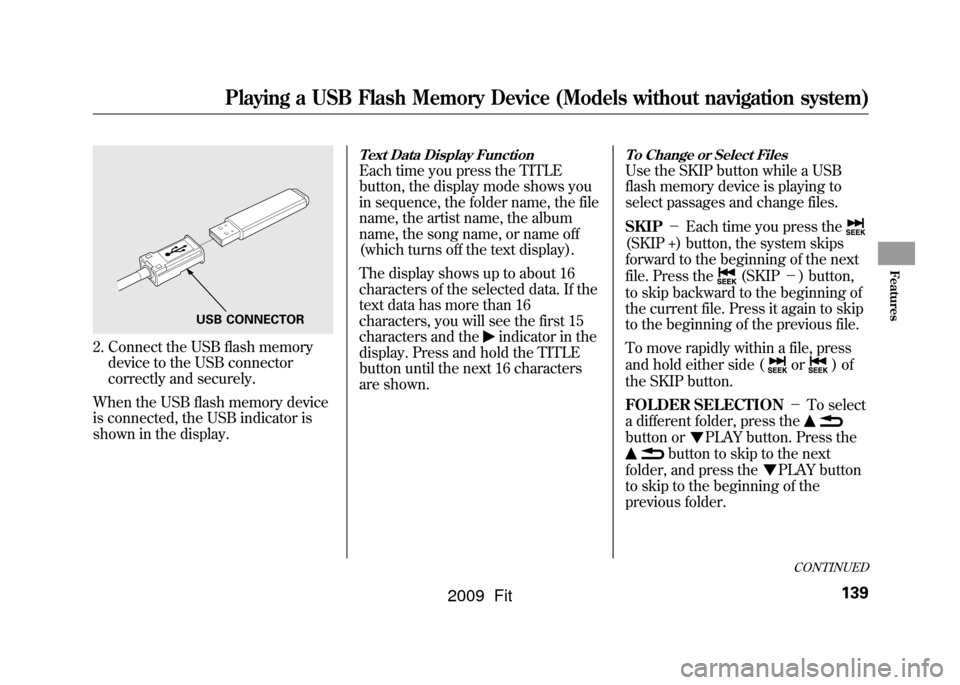
2. Connect the USB flash memorydevice to the USB connector
correctly and securely.
When the USB flash memory device
is connected, the USB indicator is
shown in the display.
Text Data Display FunctionEach time you press the TITLE
button, the display mode shows you
in sequence, the folder name, the file
name, the artist name, the album
name, the song name, or name off
(which turns off the text display).
The display shows up to about 16
characters of the selected data. If the
text data has more than 16
characters, you will see the first 15
characters and the
indicator in the
display. Press and hold the TITLE
button until the next 16 characters
are shown.
To Change or Select FilesUse the SKIP button while a USB
flash memory device is playing to
select passages and change files.
SKIP -Each time you press the(SKIP +) button, the system skips
forward to the beginning of the next
file. Press the
(SKIP -) button,
to skip backward to the beginning of
the current file. Press it again to skip
to the beginning of the previous file.
To move rapidly within a file, press
and hold either side (
or
)of
the SKIP button.
FOLDER SELECTION -To select
a different folder, press the
button or
PLAY button. Press the
button to skip to the next
folder, and press the
PLAY button
to skip to the beginning of the
previous folder.
USB CONNECTOR
CONTINUED
Playing a USB Flash Memory Device (Models without navigation system)
139
Features
2009 Fit
Page 143 of 352
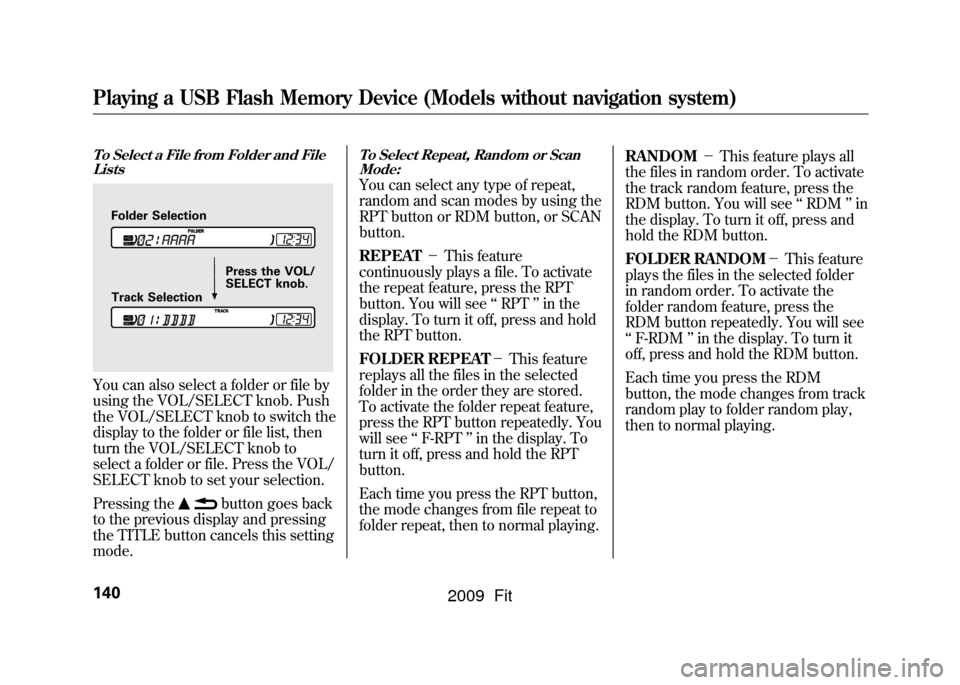
To Select a File from Folder and FileListsYou can also select a folder or file by
using the VOL/SELECT knob. Push
the VOL/SELECT knob to switch the
display to the folder or file list, then
turn the VOL/SELECT knob to
select a folder or file. Press the VOL/
SELECT knob to set your selection.
Pressing the
button goes back
to the previous display and pressing
the TITLE button cancels this setting
mode.
To Select Repeat, Random or Scan
Mode:You can select any type of repeat,
random and scan modes by using the
RPT button or RDM button, or SCAN
button.
REPEAT -This feature
continuously plays a file. To activate
the repeat feature, press the RPT
button. You will see ‘‘RPT ’’in the
display. To turn it off, press and hold
the RPT button.
FOLDER REPEAT -This feature
replays all the files in the selected
folder in the order they are stored.
To activate the folder repeat feature,
press the RPT button repeatedly. You
will see ‘‘F-RPT ’’in the display. To
turn it off, press and hold the RPT
button.
Each time you press the RPT button,
the mode changes from file repeat to
folder repeat, then to normal playing. RANDOM
-This feature plays all
the files in random order. To activate
the track random feature, press the
RDM button. You will see ‘‘RDM ’’in
the display. To turn it off, press and
hold the RDM button.
FOLDER RANDOM -This feature
plays the files in the selected folder
in random order. To activate the
folder random feature, press the
RDM button repeatedly. You will see
‘‘ F-RDM ’’in the display. To turn it
off, press and hold the RDM button.
Each time you press the RDM
button, the mode changes from track
random play to folder random play,
then to normal playing.
Folder Selection
Track Selection Press the VOL/
SELECT knob.
Playing a USB Flash Memory Device (Models without navigation system)140
2009 Fit