mileage HONDA FIT 2009 2.G Owners Manual
[x] Cancel search | Manufacturer: HONDA, Model Year: 2009, Model line: FIT, Model: HONDA FIT 2009 2.GPages: 352, PDF Size: 17.67 MB
Page 60 of 352
This section gives information about
the controls and displays that
contribute to the daily operation of
your vehicle. All the essential
controls are within easy reach.Control Locations
..........................
58
Instrument Panel
..........................
59
Instrument Panel Indicators
..........
60
Gauges
..........................................
68
Trip Meter
................................
69
Current Fuel Mileage
................
70
Average Fuel Mileage
...............
70
Odometer
..................................
70
Fuel Gauge
...............................
70
Check Fuel Cap Indicator
.........
70
Maintenance Minder
................
71
Controls Near the Steering
Wheel
.......................................
72
Windshield Wipers and Washers
................................
73
Windshield Wipers
...................
73
Rear Window Wiper and
Washer
.................................
73
Turn Signal and Headlights
..........
74
Headlights
....................................
75
Instrument Panel Brightness
........
76
Hazard Warning Button
................
76
Rear Window Defogger
.................
76
Steering Wheel Adjustment
..........
77
Keys and Locks
.............................
78 Immobilizer System
......................
79
Ignition Switch
..............................
80
Door Locks
...................................
81
Power Door Locks
....................
81
Childproof Door Locks
..............
82
Auto Door Locking/
Unlocking
.............................
83
Auto Door Locking
...................
83
Auto Door Unlocking
................
85
Tailgate
.........................................
88
Remote Transmitter
......................
90
Seats
.............................................
93
Power Windows
..........................
100
Mirrors
.......................................
101
Parking Brake
.............................
102
Interior Convenience Items
.........
104
Lower Glove Box
....................
105
Upper Glove Box
.....................
105
Beverage Holders
...................
106
Seat Under Box
.......................
106
Accessory Power Socket
.........
106
Sun Visor
................................
106
Interior Lights
.............................
107
Instruments and Controls
57
Instruments and Controls
2009 Fit
Page 71 of 352
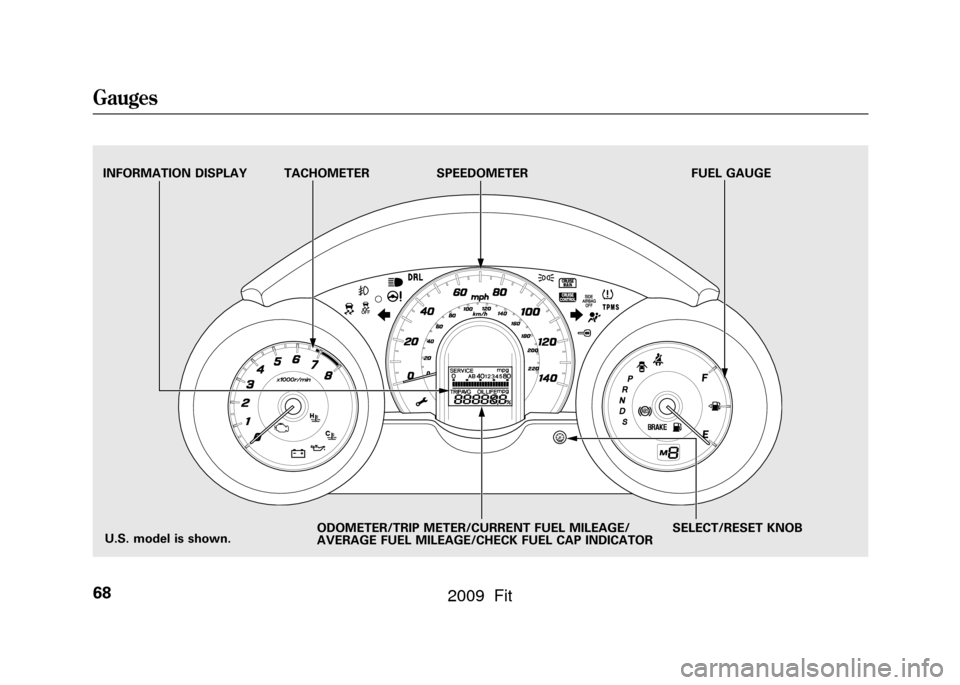
TACHOMETERSPEEDOMETER FUEL GAUGE
SELECT/RESET KNOB
INFORMATION DISPLAY
ODOMETER/TRIP METER/CURRENT FUEL MILEAGE/
AVERAGE FUEL MILEAGE/CHECK FUEL CAP INDICATOR
U.S. model is shown.
Gauges68
2009 Fit
Page 72 of 352
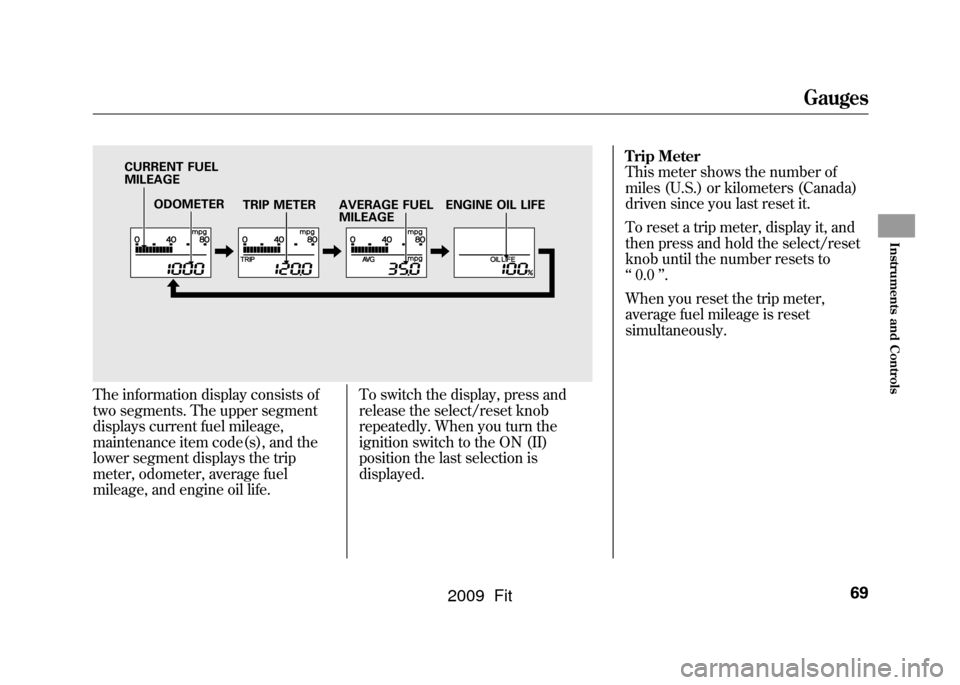
The information display consists of
two segments. The upper segment
displays current fuel mileage,
maintenance item code(s), and the
lower segment displays the trip
meter, odometer, average fuel
mileage, and engine oil life.To switch the display, press and
release the select/reset knob
repeatedly. When you turn the
ignition switch to the ON (II)
position the last selection is
displayed.Trip Meter
This meter shows the number of
miles (U.S.) or kilometers (Canada)
driven since you last reset it.
To reset a trip meter, display it, and
then press and hold the select/reset
knob until the number resets to
‘‘
0.0 ’’.
When you reset the trip meter,
average fuel mileage is reset
simultaneously.
ODOMETER TRIP METER
CURRENT FUEL
MILEAGE
AVERAGE FUEL
MILEAGEENGINE OIL LIFE
Gauges
69
Instruments and Controls
2009 Fit
Page 73 of 352
Current Fuel Mileage
This shows your current fuel mileage
in mpg (U.S.) or l/100 km (Canada).
Average Fuel Mileage
This shows your vehicle's average
fuel economy in mpg (U.S.) or l/100
km (Canada) since you last reset the
trip meter.
When you reset a trip meter, the
average fuel mileage for that trip
meter also resets.Odometer
The odometer shows the total
distance your vehicle has been
driven. It measures miles in U.S.
models and kilometers in Canadian
models. It is illegal under U.S.
federal law and Canadian provincial
regulations to disconnect, reset, or
alter the odometer with the intent to
change the number of miles or
kilometers indicated.
Fuel Gauge
This shows how much fuel you have.
It may show slightly more or less
than the actual amount. The needle
returns to the bottom after you turn
off the ignition.
Avoid driving with an extremely low
fuel level. Running out of fuel could
cause the engine to misfire, damaging
the catalytic converter.Check Fuel Cap Indicator
If the fuel fill cap is loose or missing,
a
‘‘CHECK FUEL CAP ’’message
appears on the information display
after you start the engine. The
message changes from CHECK, to
FUEL, to CAP repeatedly.
Turn the engine off and confirm the
fuel fill cap is installed. If it is, loosen
the cap, then retighten it until it
clicks at least once. You can cycle the
message off of the display by
pressing the select/reset knob
repeatedly, but this message will be
displayed each time the engine is
started. It will take several days of
normal driving for the vehicle to turn
the warning off.
Gauges70
2009 Fit
Page 206 of 352
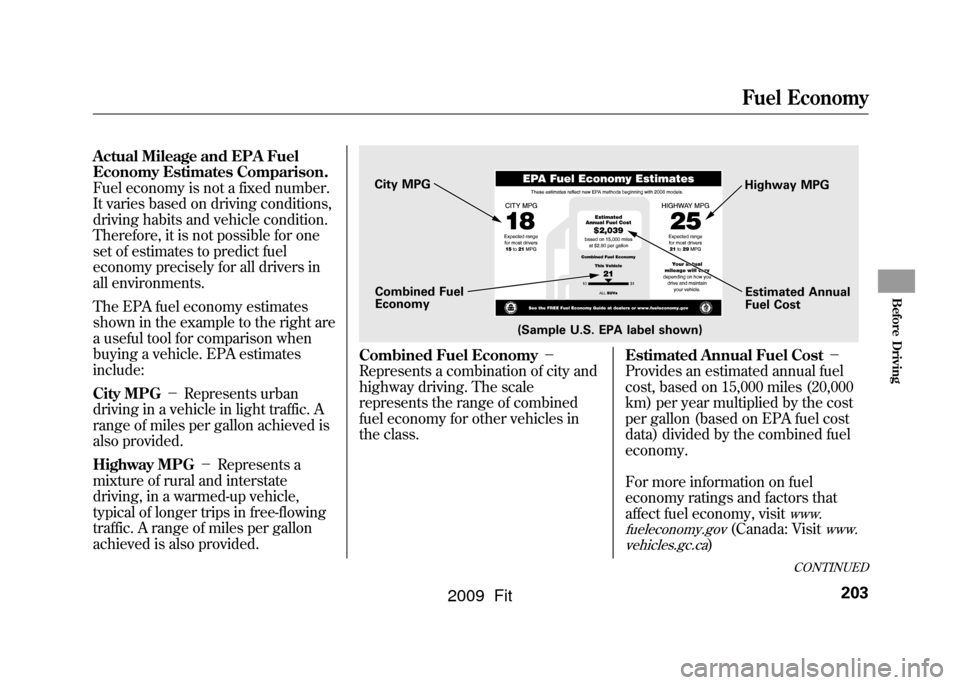
Actual Mileage and EPA Fuel
Economy Estimates Comparison.
Fuel economy is not a fixed number.
It varies based on driving conditions,
driving habits and vehicle condition.
Therefore, it is not possible for one
set of estimates to predict fuel
economy precisely for all drivers in
all environments.
The EPA fuel economy estimates
shown in the example to the right are
a useful tool for comparison when
buying a vehicle. EPA estimates
include:
City MPG-Represents urban
driving in a vehicle in light traffic. A
range of miles per gallon achieved is
also provided.
Highway MPG -Represents a
mixture of rural and interstate
driving, in a warmed-up vehicle,
typical of longer trips in free-flowing
traffic. A range of miles per gallon
achieved is also provided.
Combined Fuel Economy -
Represents a combination of city and
highway driving. The scale
represents the range of combined
fuel economy for other vehicles in
the class. Estimated Annual Fuel Cost
-
Provides an estimated annual fuel
cost, based on 15,000 miles (20,000
km) per year multiplied by the cost
per gallon (based on EPA fuel cost
data) divided by the combined fuel
economy.
For more information on fuel
economy ratings and factors that
affect fuel economy, visit
www.
fueleconomy.gov
(Canada: Visit
www.
vehicles.gc.ca
)
(Sample U.S. EPA label shown)
City MPG
Combined Fuel
Economy Highway MPG
Estimated Annual
Fuel Cost
CONTINUED
Fuel Economy
203
Before Driving
2009 Fit
Page 207 of 352

Fuel Economy Factors
The following factors can lower your
vehicle's fuel economy:●Aggressive driving (hard
acceleration and braking)●Excessive idling, accelerating and
braking in stop-and-go traffic●Cold engine operation (engines
are more efficient when warmed
up)●Driving with a heavy load or the air
conditioner running●Improperly inflated tiresImproving Fuel Economy
Vehicle MaintenanceA properly maintained vehicle
maximizes fuel economy. Poor
maintenance can significantly reduce
fuel economy. Always maintain your
vehicle according to the maintenance
messages displayed on the
information display (see
Owner's
Maintenance Checks on page250).
For example:●Use the recommended viscosity
motor oil, displaying the API
Certification Seal (see page
253).●Maintain proper tire inflation -
An under-inflated tire increases
‘‘ rolling resistance, ’’which
reduces fuel economy.●Avoid carrying excess weight in
your vehicle -It puts a heavier
load on the engine, increasing fuel
consumption.
●Keep your vehicle clean -In
particular, a build-up of snow or
mud on your vehicle's underside
adds weight and rolling resistance.
Frequent cleaning helps your fuel
economy.
Drive Efficiently●Drive moderately -Rapid
acceleration, abrupt cornering, and
hard braking increase fuel
consumption.●Observe the speed limit -
Aerodynamic drag has a big effect
on fuel mileage at speeds above 45
mph (75 km/h). Reduce your
speed and you reduce the drag.
Trailers, car top carriers, roof
racks and bike racks are also big
contributors to increased drag.●Always drive in the highest gear
possible -If your vehicle has a
manual transmission, you can
boost your fuel economy by up
shifting as early as possible.
Fuel Economy204
2009 Fit
Page 250 of 352
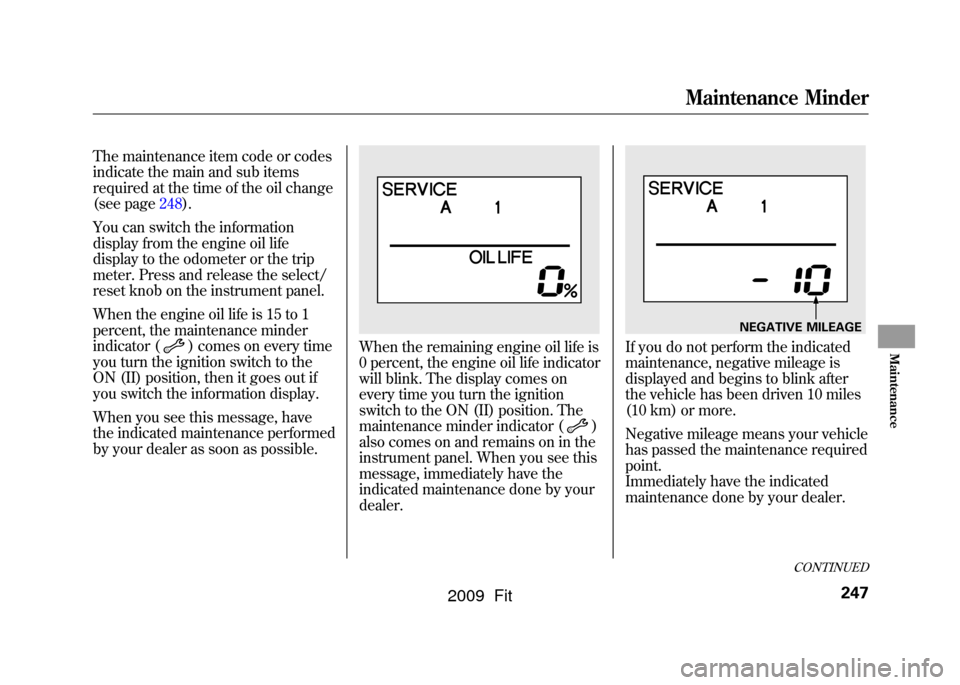
The maintenance item code or codes
indicate the main and sub items
required at the time of the oil change
(see page248).
You can switch the information
display from the engine oil life
display to the odometer or the trip
meter. Press and release the select/
reset knob on the instrument panel.
When the engine oil life is 15 to 1
percent, the maintenance minder
indicator (
) comes on every time
you turn the ignition switch to the
ON (II) position, then it goes out if
you switch the information display.
When you see this message, have
the indicated maintenance performed
by your dealer as soon as possible.
When the remaining engine oil life is
0 percent, the engine oil life indicator
will blink. The display comes on
every time you turn the ignition
switch to the ON (II) position. The
maintenance minder indicator (
)
also comes on and remains on in the
instrument panel. When you see this
message, immediately have the
indicated maintenance done by your
dealer.
If you do not perform the indicated
maintenance, negative mileage is
displayed and begins to blink after
the vehicle has been driven 10 miles
(10 km) or more.
Negative mileage means your vehicle
has passed the maintenance required
point.
Immediately have the indicated
maintenance done by your dealer.
NEGATIVE MILEAGE
CONTINUED
Maintenance Minder
247
Maintenance
2009 Fit
Page 251 of 352
To change the information display
from the engine oil life display to the
odometer, the trip meter or average
fuel mileage, press and release the
select/reset knob.
When the engine oil life is 0 percent
or negative mileage, the maintenance
minder indicator (
) remains on
even if you change the information
display.
Immediately have the service
performed, and make sure to reset
the display as described. Maintenance Main Items and Sub
Items
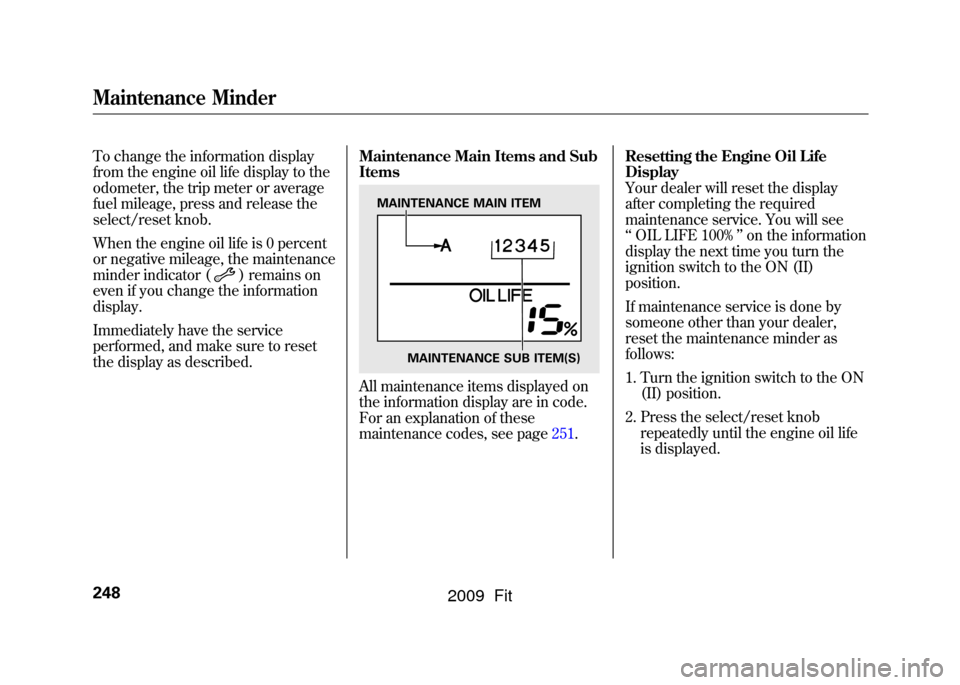
All maintenance items displayed on
the information display are in code.
For an explanation of these
maintenance codes, see page251.Resetting the Engine Oil Life
Display
Your dealer will reset the display
after completing the required
maintenance service. You will see
‘‘
OIL LIFE 100% ’’on the information
display the next time you turn the
ignition switch to the ON (II)
position.
If maintenance service is done by
someone other than your dealer,
reset the maintenance minder as
follows:
1. Turn the ignition switch to the ON (II) position.
2. Press the select/reset knob repeatedly until the engine oil life
is displayed.
MAINTENANCE MAIN ITEM
MAINTENANCE SUB ITEM(S)
Maintenance Minder248
2009 Fit
Page 335 of 352

Honda dealership personnel are
trained professionals. They should
be able to answer all your questions.
If you encounter a problem that your
dealership does not solve to your
satisfaction, please discuss it with the
dealership's management. The
service manager or general manager
can help. Almost all problems are
solved in this way.
If you are dissatisfied with the
decision made by the dealership's
management, contact Honda
Customer Service.
U.S. Owners:American Honda Motor Co., Inc.
Automobile Customer Service
Mail Stop 500-2N-7A
1919 Torrance Boulevard
Torrance, California 90501-2746
Tel: (800) 999-1009
Canadian Owners:Customer Relations
Honda Canada Inc.
715 Milner Avenue
Toronto, ON
M1B 2K8
Tel: 1-888-9-HONDA-9
Fax: Toll-free 1-877-939-0909Toronto (416) 287-4776In Puerto Rico and the U.S. Virgin
Islands:Bella International
P.O. Box 190816
San Juan, PR 00919-0816
Tel: (787) 620-7546
When you call or write, please give
us this information:●Vehicle Identification Number (see
page316)●Name and address of the dealer
who services your vehicle●Date of purchase●Mileage on your vehicle●Your name, address, and
telephone number●A detailed description of the
problem●Name of the dealer who sold the
vehicle to you
Customer Service Information332
2009 Fit
Page 336 of 352

U.S. Owners
Your new vehicle is covered by these
warranties:New Vehicle Limited Warranty
-
covers your new vehicle, except for
the battery, emissions control
systems, and accessories against
defects in materials and
workmanship.
Emissions Control Systems Defects
Warranty and Emissions
Performance Warranty
- these two
warranties cover your vehicle's
emissions control systems. Time,
mileage, and coverage are
conditional. Please read your
warranty booklet for exact
information.
Original Equipment Battery Limited
Warranty
- this warranty gives up to
100% credit toward a replacement
battery.
Seat Belt Limited Warranty
- a seat
belt that fails to function properly is
covered by a limited warranty. Please
read your warranty booklet for
details.
Rust Perforation Limited Warranty
-
all exterior body panels are covered
for rust-through from the inside for
the specified time period with no
mileage limit.
Accessory Limited Warranty
-
Honda accessories are covered
under this warranty. Time and
mileage limits depend on the type of
accessory and other factors. Please
read your warranty booklet for
details.
Replacement Parts Limited Warranty- covers all Honda replacement
parts against defects in materials and
workmanship.
Replacement Battery Limited
Warranty
- provides prorated
coverage for a replacement battery
purchased from your dealer.
Replacement Muffler Lifetime
Limited Warranty
- provides
coverage for as long as the purchaser
of the muffler owns the vehicle.
Restrictions and exclusions apply to
all these warranties. Please read the
2009 Honda warranty information
booklet that came with your vehicle
for precise information on warranty
coverages. Your vehicle's original
tires are covered by their
manufacturer. Tire warranty
information is in a separate booklet.
Canadian Owners
Please refer to the 2009 warranty
manual that came with your vehicle.
Warranty Coverages
333
Warranty and Customer Relations
2009 Fit