Instrument panel HONDA FIT 2012 2.G User Guide
[x] Cancel search | Manufacturer: HONDA, Model Year: 2012, Model line: FIT, Model: HONDA FIT 2012 2.GPages: 286, PDF Size: 9.92 MB
Page 69 of 286
68
uuIndicatorsu
Instrument Panel
Indicator
Name
On/Blinking
Explanation
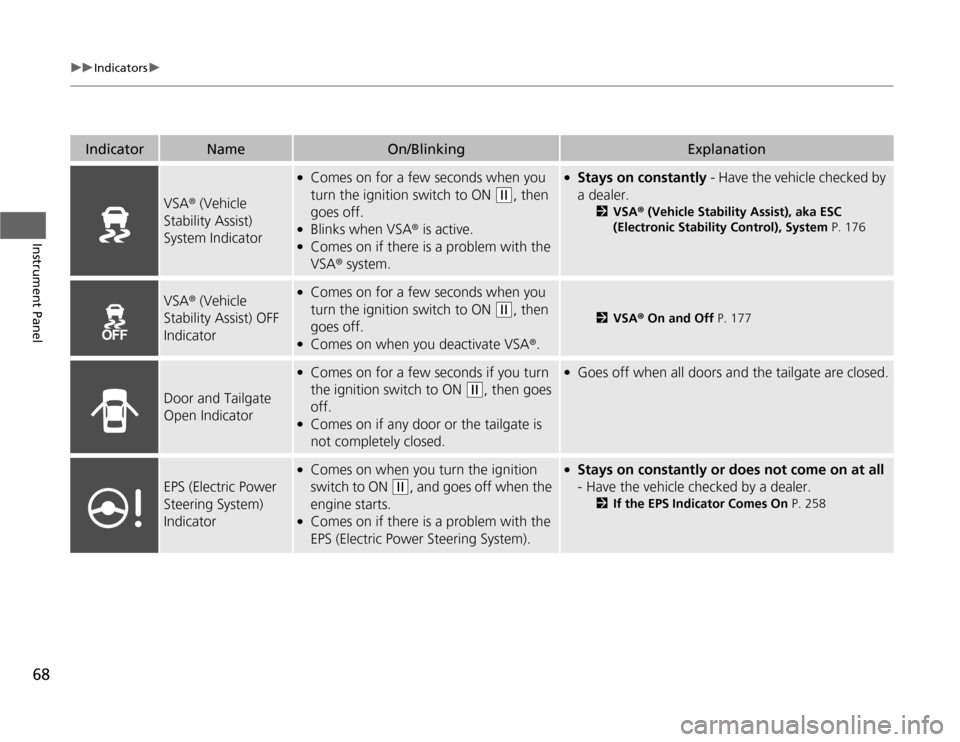
VSA® (Vehicle
Stability Assist)
System Indicator
●
Comes on for a few seconds when you
turn the ignition switch to ON
(w
, then
goes off.
●
Blinks when VSA® is active.
●
Comes on if there is a problem with the
VSA® system.
●
Stays on constantly - Have the vehicle checked by
a dealer.
2VSA® (Vehicle Stability Assist), aka ESC
(Electronic Stability Control), System P. 176
VSA® (Vehicle
Stability Assist) OFF
Indicator
●
Comes on for a few seconds when you
turn the ignition switch to ON
(w
, then
goes off.
●
Comes on when you deactivate VSA®.
2VSA® On and Off P. 177
Door and Tailgate
Open Indicator
●
Comes on for a few seconds if you turn
the ignition switch to ON
(w
, then goes
off.
●
Comes on if any door or the tailgate is
not completely closed.
●
Goes off when all doors and the tailgate are closed.
EPS (Electric Power
Steering System)
Indicator
●
Comes on when you turn the ignition
switch to ON
(w
, and goes off when the
engine starts.
●
Comes on if there is a problem with the
EPS (Electric Power Steering System).
●
Stays on constantly or does not come on at all
- Have the vehicle checked by a dealer.
2If the EPS Indicator Comes On P. 258
Page 70 of 286
69
uuIndicatorsu
Continued
Instrument Panel
Indicator
Name
On/Blinking
Explanation
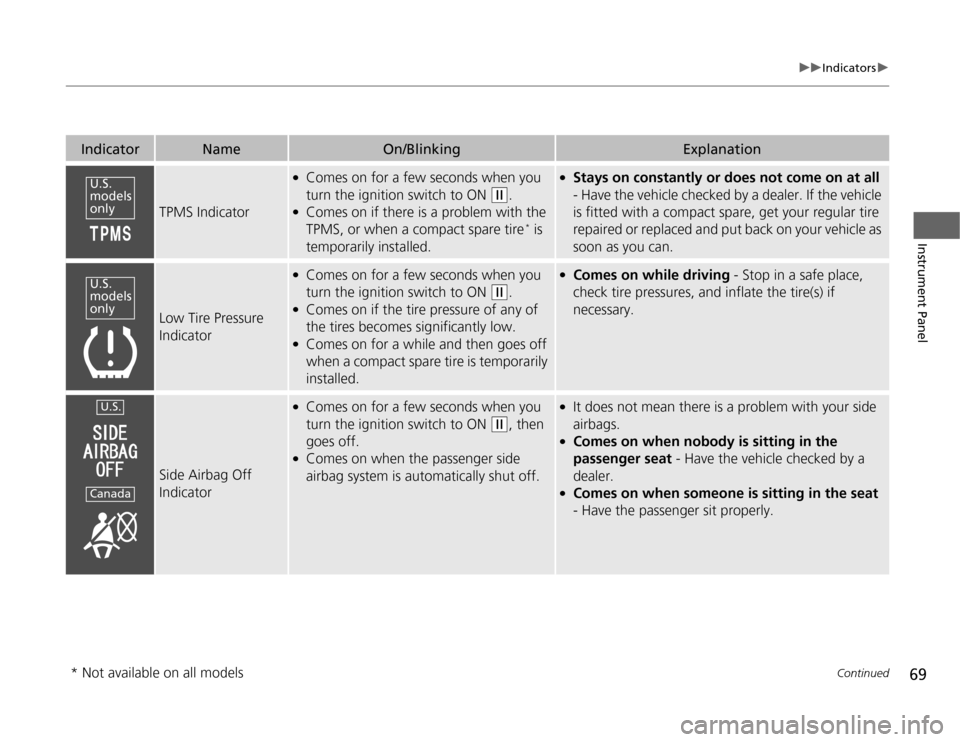
TPMS Indicator
●
Comes on for a few seconds when you
turn the ignition switch to ON
(w
.
●
Comes on if there is a problem with the
TPMS, or when a compact spare tire
* is
temporarily installed.
●
Stays on constantly or does not come on at all
- Have the vehicle checked by a dealer. If the vehicle
is fitted with a compact spare, get your regular tire
repaired or replaced and put back on your vehicle as
soon as you can.
Low Tire Pressure
Indicator
●
Comes on for a few seconds when you
turn the ignition switch to ON
(w
.
●
Comes on if the tire pressure of any of
the tires becomes significantly low.
●
Comes on for a while and then goes off
when a compact spare tire is temporarily
installed.
●
Comes on while driving - Stop in a safe place,
check tire pressures, and inflate the tire(s) if
necessary.
Side Airbag Off
Indicator
●
Comes on for a few seconds when you
turn the ignition switch to ON
(w
, then
goes off.
●
Comes on when the passenger side
airbag system is automatically shut off.
●
It does not mean there is a problem with your side
airbags.
●
Comes on when nobody is sitting in the
passenger seat - Have the vehicle checked by a
dealer.
●
Comes on when someone is sitting in the seat
- Have the passenger sit properly.
U.S.
models
onlyU.S.
models
onlyU.S.Canada
* Not available on all models
Page 71 of 286
70
uuIndicatorsu
Instrument Panel
Indicator
Name
On/Blinking
Explanation
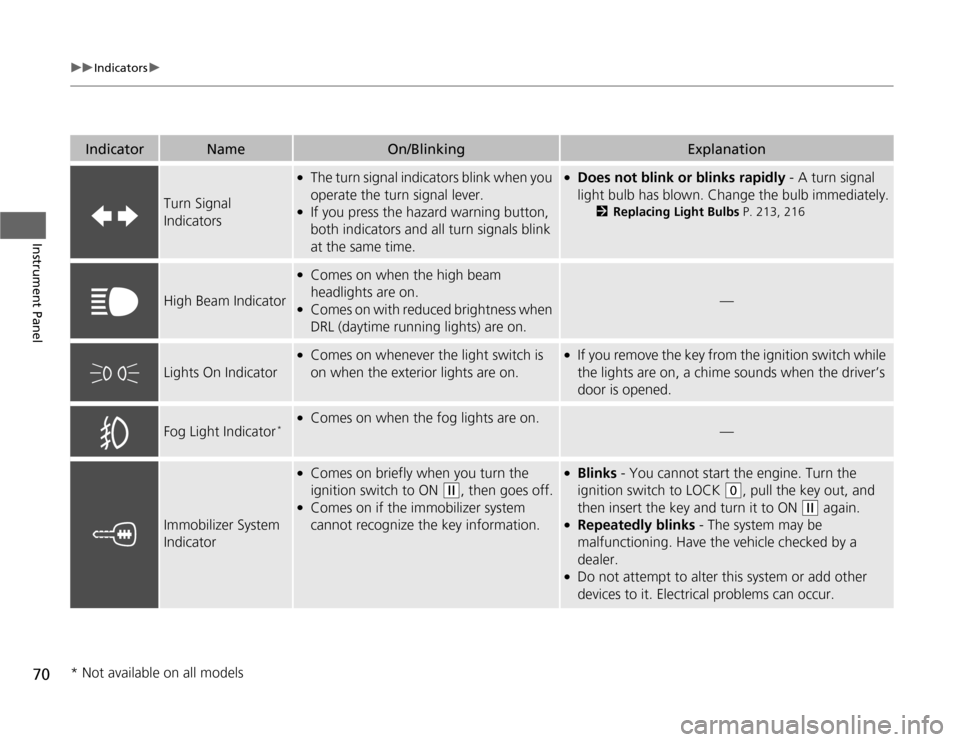
Turn Signal
Indicators
●
The turn signal indicators blink when you
operate the turn signal lever.
●
If you press the hazard warning button,
both indicators and all turn signals blink
at the same time.
●
Does not blink or blinks rapidly - A turn signal
light bulb has blown. Change the bulb immediately.
2Replacing Light Bulbs P. 213, 216
High Beam Indicator
●
Comes on when the high beam
headlights are on.
●
Comes on with reduced brightness when
DRL (daytime running lights) are on.
—
Lights On Indicator
●
Comes on whenever the light switch is
on when the exterior lights are on.
●
If you remove the key from the ignition switch while
the lights are on, a chime sounds when the driver’s
door is opened.
Fog Light Indicator
*
●
Comes on when the fog lights are on.
—
Immobilizer System
Indicator
●
Comes on briefly when you turn the
ignition switch to ON
(w
, then goes off.
●
Comes on if the immobilizer system
cannot recognize the key information.
●
Blinks - You cannot start the engine. Turn the
ignition switch to LOCK
(0
, pull the key out, and
then insert the key and turn it to ON
(w
again.
●
Repeatedly blinks - The system may be
malfunctioning. Have the vehicle checked by a
dealer.
●
Do not attempt to alter this system or add other
devices to it. Electrical problems can occur.
* Not available on all models
Page 72 of 286
71
uuIndicatorsu
Instrument Panel
Indicator
Name
On/Blinking
Explanation
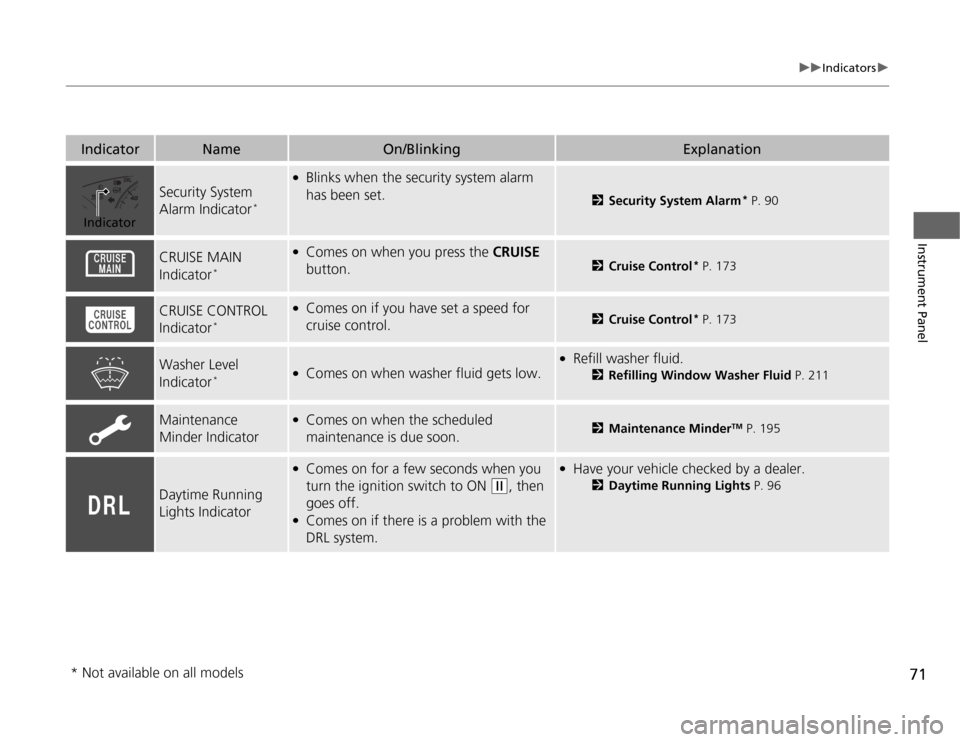
Security System
Alarm Indicator
*
●
Blinks when the security system alarm
has been set.
2Security System Alarm
* P. 90
CRUISE MAIN
Indicator
*
●
Comes on when you press the CRUISE
button.
2Cruise Control
* P. 173
CRUISE CONTROL
Indicator
*
●
Comes on if you have set a speed for
cruise control.
2Cruise Control
* P. 173
Washer Level
Indicator
*
●
Comes on when washer fluid gets low.
●
Refill washer fluid.
2Refilling Window Washer Fluid P. 211
Maintenance
Minder Indicator
●
Comes on when the scheduled
maintenance is due soon.
2Maintenance Minder
TM P. 195
Daytime Running
Lights Indicator
●
Comes on for a few seconds when you
turn the ignition switch to ON
(w
, then
goes off.
●
Comes on if there is a problem with the
DRL system.
●
Have your vehicle checked by a dealer.
2Daytime Running Lights P. 96
Indicator
* Not available on all models
Page 73 of 286
72Instrument Panel
Gauges and DisplaysGaugesGauges include the speedometer, tachometer, fuel gauge, and related indicators.
They are displayed when the ignition switch is in ON
(w
.
Displays your driving speed in mph (U.S.) or km/h (Canada).
Shows the number of engine revolutions per minute.
Displays the amount of fuel left in the fuel tank.
■
Speedometer
■
Tachometer
■
Fuel Gauge
1Fuel Gauge
NOTICEYou should refuel when the reading approaches .
Running out of fuel can cause the engine to misfire,
damaging the catalytic converter.
The actual amount of remaining fuel may differ from
the fuel gauge reading.
E
Page 74 of 286
73
uuGauges and DisplaysuInformation Display
Continued
Instrument Panel
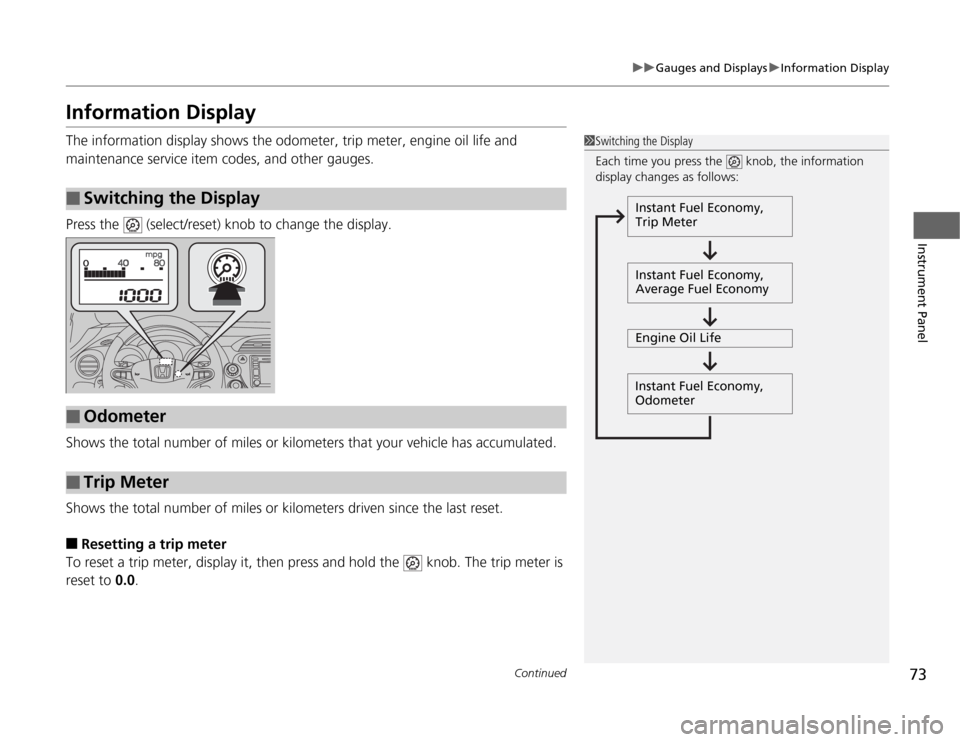
Information DisplayThe information display shows the odometer, trip meter, engine oil life and
maintenance service item codes, and other gauges.
Press the (select/reset) knob to change the display.
Shows the total number of miles or kilometers that your vehicle has accumulated.
Shows the total number of miles or kilometers driven since the last reset.■
Resetting a trip meter
To reset a trip meter, display it, then press and hold the knob. The trip meter is
reset to 0.0.
■
Switching the Display
1Switching the Display
Each time you press the knob, the information
display changes as follows:
Instant Fuel Economy,
Trip Meter
Instant Fuel Economy,
Average Fuel Economy
Engine Oil Life
Instant Fuel Economy,
Odometer
■
Odometer
■
Trip Meter
Page 75 of 286
74
uuGauges and DisplaysuInformation Display
Instrument Panel
Shows the estimated average fuel economy of the trip meter in mpg (U.S.) or l/100
km (Canada). The display is updated at set intervals. When a trip meter is reset, the
average fuel economy is also reset.
Shows the remaining oil life and Maintenance Minder
TM.
2Maintenance Minder
TM P. 195
Shows the instant fuel economy as a bar graph in mpg or l/100 km.
Appears when the fuel fill cap is loose or is not installed.
2Check/Tighten Fuel Cap Message P. 257
■
Average Fuel Economy
■
Engine Oil Life
■
Instant Fuel Economy
■
Check Fuel Cap
Page 92 of 286
91
uuSecurity SystemuSecurity System Alarm
*
Controls
■
Setting the security system alarm
The security system alarm automatically sets when the following conditions have
been met:
•The ignition switch is in LOCK
(0
, and the key has been removed from the
ignition switch.
•The hood is closed.
•All doors and the tailgate are locked with the key or the remote transmitter.
■
When the security system alarm sets
The security system indicator in the instrument panel blinks. When the blinking
interval changes after about 15 seconds, the security system is set.
■
To cancel the security system alarm
The security system is canceled when the vehicle is unlocked using the key or remote
transmitter. The security system indicator goes off at the same time.
■
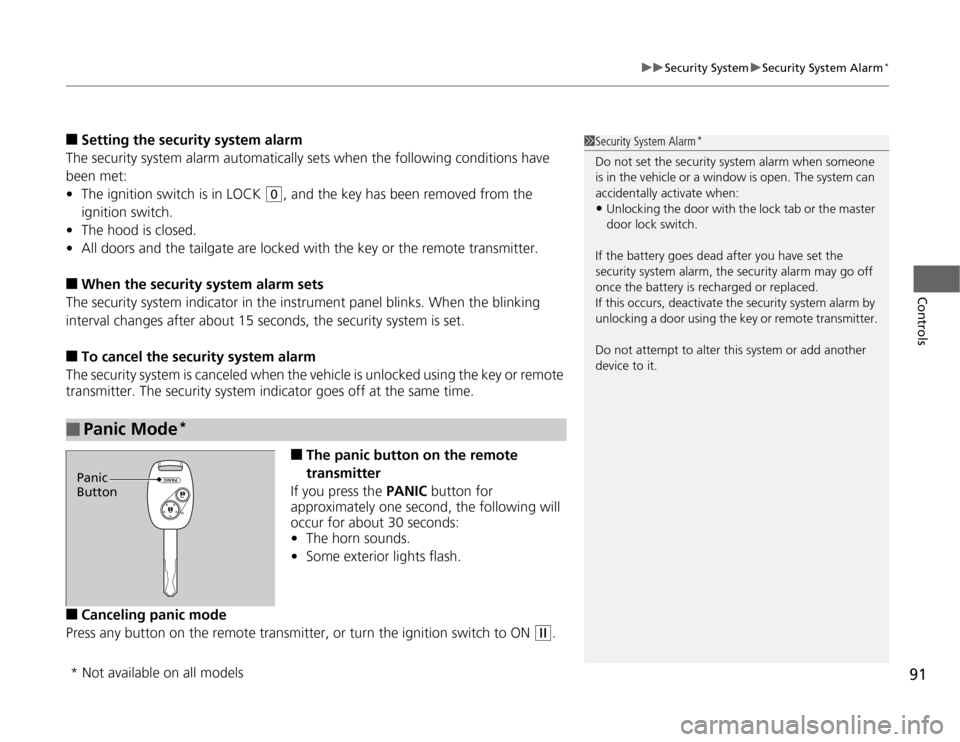
The panic button on the remote
transmitter
If you press the PANIC button for
approximately one second, the following will
occur for about 30 seconds:
•The horn sounds.
•Some exterior lights flash.
■
Canceling panic mode
Press any button on the remote transmitter, or turn the ignition switch to ON
(w
.
■
Panic Mode
*
1Security System Alarm
*
Do not set the security system alarm when someone
is in the vehicle or a window is open. The system can
accidentally activate when:•Unlocking the door with the lock tab or the master
door lock switch.
If the battery goes dead after you have set the
security system alarm, the security alarm may go off
once the battery is recharged or replaced.
If this occurs, deactivate the security system alarm by
unlocking a door using the key or remote transmitter.
Do not attempt to alter this system or add another
device to it.
Panic
Button* Not available on all models
Page 96 of 286
95
uuOperating the Switches Around the Steering WheeluTurn Signals
Controls
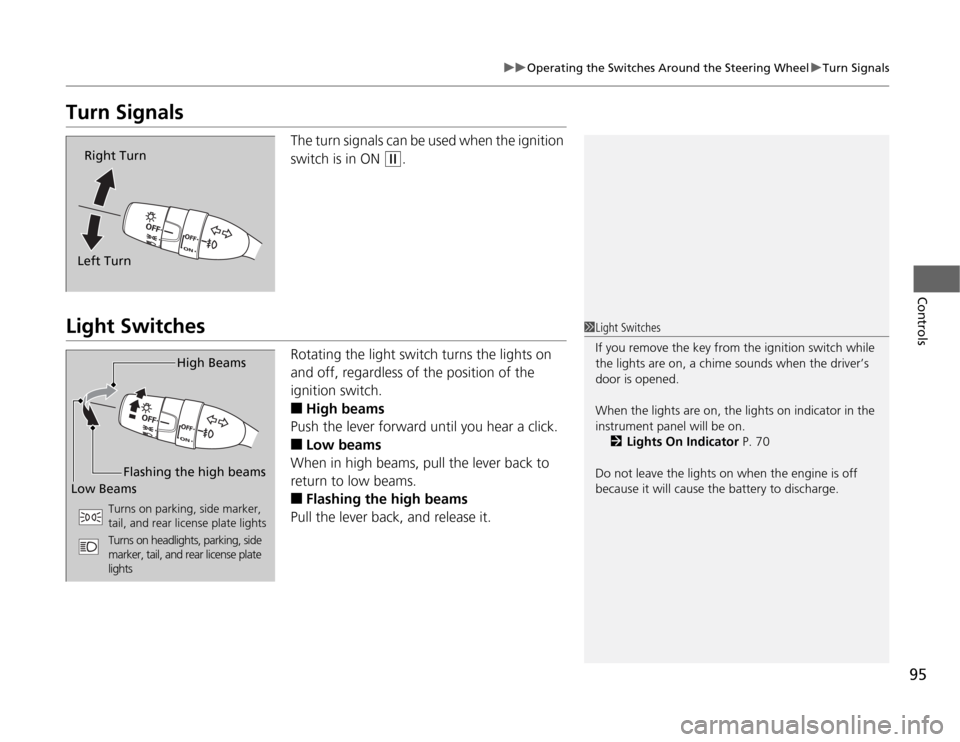
Turn Signals
The turn signals can be used when the ignition
switch is in ON
(w
.
Light Switches
Rotating the light switch turns the lights on
and off, regardless of the position of the
ignition switch.■
High beams
Push the lever forward until you hear a click.
■
Low beams
When in high beams, pull the lever back to
return to low beams.
■
Flashing the high beams
Pull the lever back, and release it.
Right Turn
Left Turn
1Light Switches
If you remove the key from the ignition switch while
the lights are on, a chime sounds when the driver’s
door is opened.
When the lights are on, the lights on indicator in the
instrument panel will be on.
2Lights On Indicator P. 70
Do not leave the lights on when the engine is off
because it will cause the battery to discharge.
High Beams
Flashing the high beams
Low Beams
Turns on parking, side marker,
tail, and rear license plate lights
Turns on headlights, parking, side
marker, tail, and rear license plate
lights
Page 97 of 286
96
uuOperating the Switches Around the Steering WheeluFog Lights
*
Controls
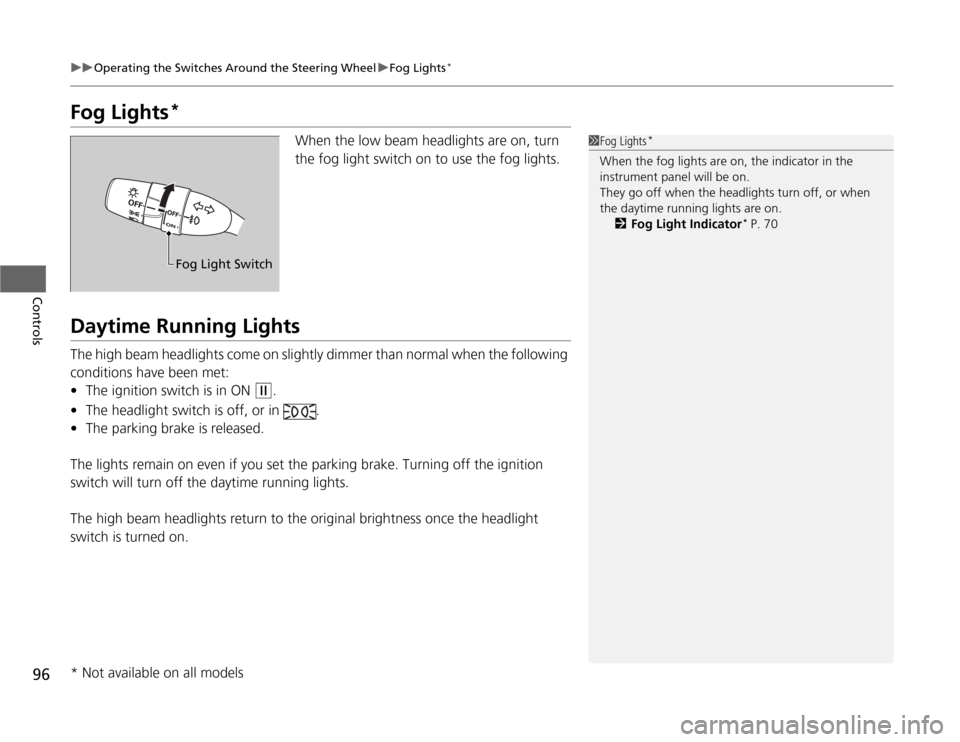
Fog Lights
*
When the low beam headlights are on, turn
the fog light switch on to use the fog lights.
Daytime Running LightsThe high beam headlights come on slightly dimmer than normal when the following
conditions have been met:
•The ignition switch is in ON
(w
.
•The headlight switch is off, or in .
•The parking brake is released.
The lights remain on even if you set the parking brake. Turning off the ignition
switch will turn off the daytime running lights.
The high beam headlights return to the original brightness once the headlight
switch is turned on.
1Fog Lights
*
When the fog lights are on, the indicator in the
instrument panel will be on.
They go off when the headlights turn off, or when
the daytime running lights are on.
2Fog Light Indicator
* P. 70
Fog Light Switch
* Not available on all models