display HONDA FIT 2012 2.G User Guide
[x] Cancel search | Manufacturer: HONDA, Model Year: 2012, Model line: FIT, Model: HONDA FIT 2012 2.GPages: 286, PDF Size: 9.92 MB
Page 100 of 286
99
uuOperating the Switches Around the Steering WheeluBrightness Control
Controls
Brightness Control
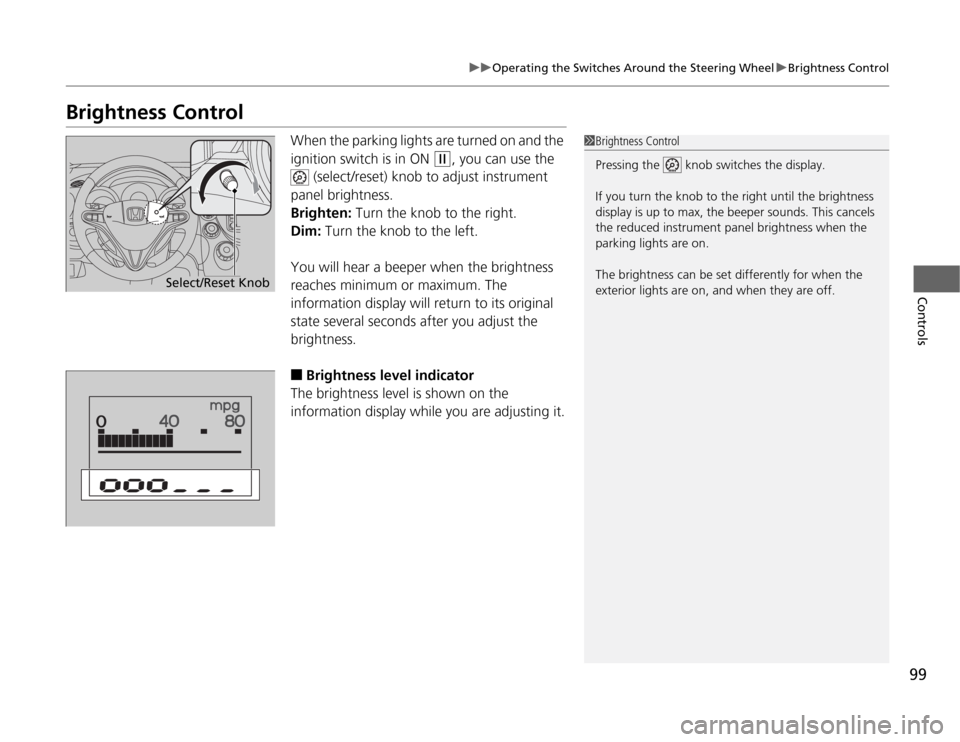
When the parking lights are turned on and the
ignition switch is in ON
(w
, you can use the
(select/reset) knob to adjust instrument
panel brightness.
Brighten: Turn the knob to the right.
Dim: Turn the knob to the left.
You will hear a beeper when the brightness
reaches minimum or maximum. The
information display will return to its original
state several seconds after you adjust the
brightness.
■
Brightness level indicator
The brightness level is shown on the
information display while you are adjusting it.
1Brightness Control
Pressing the knob switches the display.
If you turn the knob to the right until the brightness
display is up to max, the beeper sounds. This cancels
the reduced instrument panel brightness when the
parking lights are on.
The brightness can be set differently for when the
exterior lights are on, and when they are off.
Select/Reset Knob
Page 124 of 286
123
uuAudio SystemuUSB Adapter Cable
*
Features
USB Adapter Cable
*
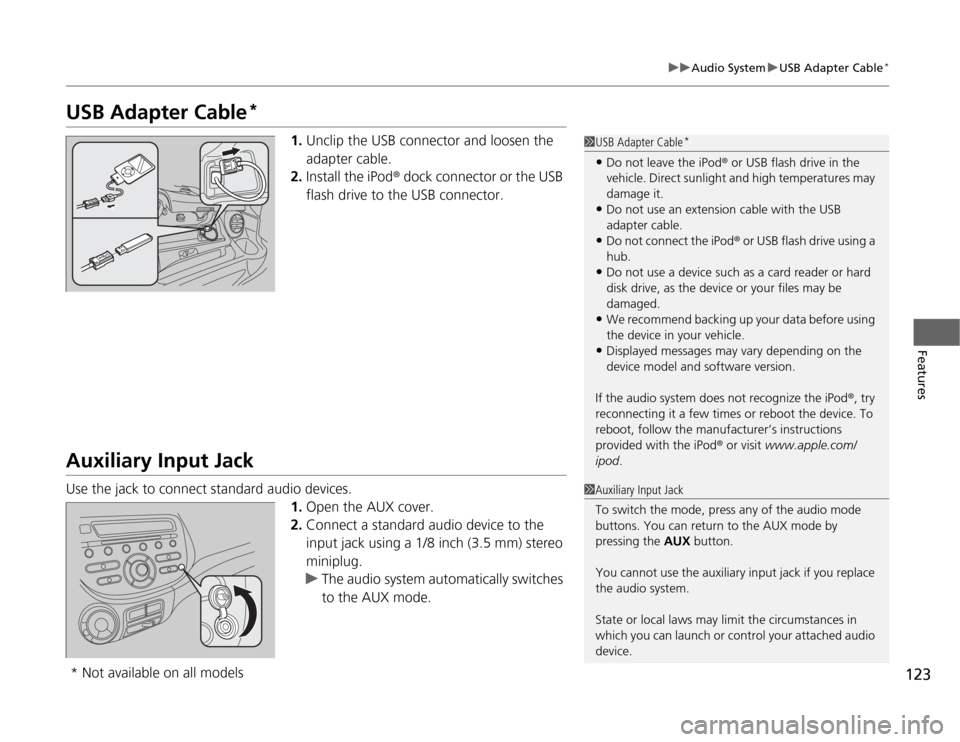
1.Unclip the USB connector and loosen the
adapter cable.
2.Install the iPod® dock connector or the USB
flash drive to the USB connector.
Auxiliary Input JackUse the jack to connect standard audio devices.
1.Open the AUX cover.
2.Connect a standard audio device to the
input jack using a 1/8 inch (3.5 mm) stereo
miniplug.
uThe audio system automatically switches
to the AUX mode.
1USB Adapter Cable
*
•Do not leave the iPod® or USB flash drive in the
vehicle. Direct sunlight and high temperatures may
damage it.•Do not use an extension cable with the USB
adapter cable.•Do not connect the iPod® or USB flash drive using a
hub.•Do not use a device such as a card reader or hard
disk drive, as the device or your files may be
damaged.•We recommend backing up your data before using
the device in your vehicle.•Displayed messages may vary depending on the
device model and software version.
If the audio system does not recognize the iPod®, try
reconnecting it a few times or reboot the device. To
reboot, follow the manufacturer’s instructions
provided with the iPod® or visit www.apple.com/
ipod.
1Auxiliary Input Jack
To switch the mode, press any of the audio mode
buttons. You can return to the AUX mode by
pressing the AUX button.
You cannot use the auxiliary input jack if you replace
the audio system.
State or local laws may limit the circumstances in
which you can launch or control your attached audio
device.
* Not available on all models
Page 125 of 286
124
uuAudio SystemuAudio Antenna
Features
Audio Antenna
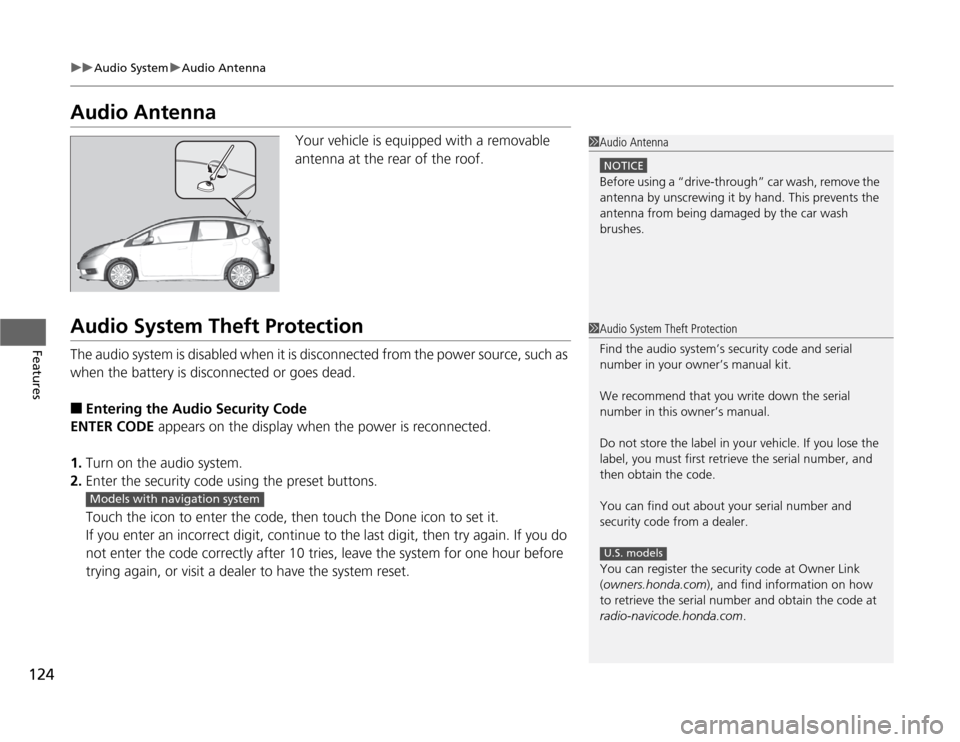
Your vehicle is equipped with a removable
antenna at the rear of the roof.
Audio System Theft ProtectionThe audio system is disabled when it is disconnected from the power source, such as
when the battery is disconnected or goes dead.■
Entering the Audio Security Code
ENTER CODE appears on the display when the power is reconnected.
1.Turn on the audio system.
2.Enter the security code using the preset buttons.
Touch the icon to enter the code, then touch the Done icon to set it.
If you enter an incorrect digit, continue to the last digit, then try again. If you do
not enter the code correctly after 10 tries, leave the system for one hour before
trying again, or visit a dealer to have the system reset.
1Audio Antenna
NOTICEBefore using a “drive-through” car wash, remove the
antenna by unscrewing it by hand. This prevents the
antenna from being damaged by the car wash
brushes.1Audio System Theft Protection
Find the audio system’s security code and serial
number in your owner’s manual kit.
We recommend that you write down the serial
number in this owner’s manual.
Do not store the label in your vehicle. If you lose the
label, you must first retrieve the serial number, and
then obtain the code.
You can find out about your serial number and
security code from a dealer.
You can register the security code at Owner Link
(owners.honda.com), and find information on how
to retrieve the serial number and obtain the code at
radio-navicode.honda.com.
U.S. models
Models with navigation system
Page 126 of 286
125
Features
Audio System Basic OperationTo use the audio system function, the ignition switch must be in ACCESSORY
(q
or
ON
(w
.
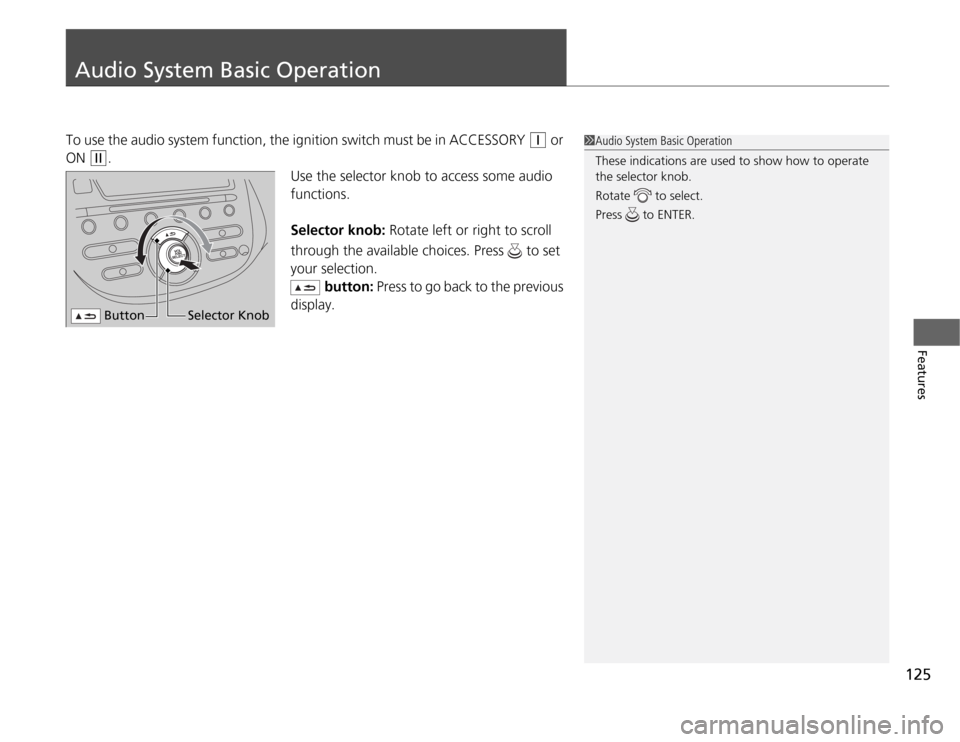
Use the selector knob to access some audio
functions.
Selector knob: Rotate left or right to scroll
through the available choices. Press to set
your selection.
button: Press to go back to the previous
display.
1Audio System Basic Operation
These indications are used to show how to operate
the selector knob.
Rotate to select.
Press to ENTER.
Button
Selector Knob
Page 127 of 286
126
uuAudio System Basic OperationuAdjusting the Sound
Features
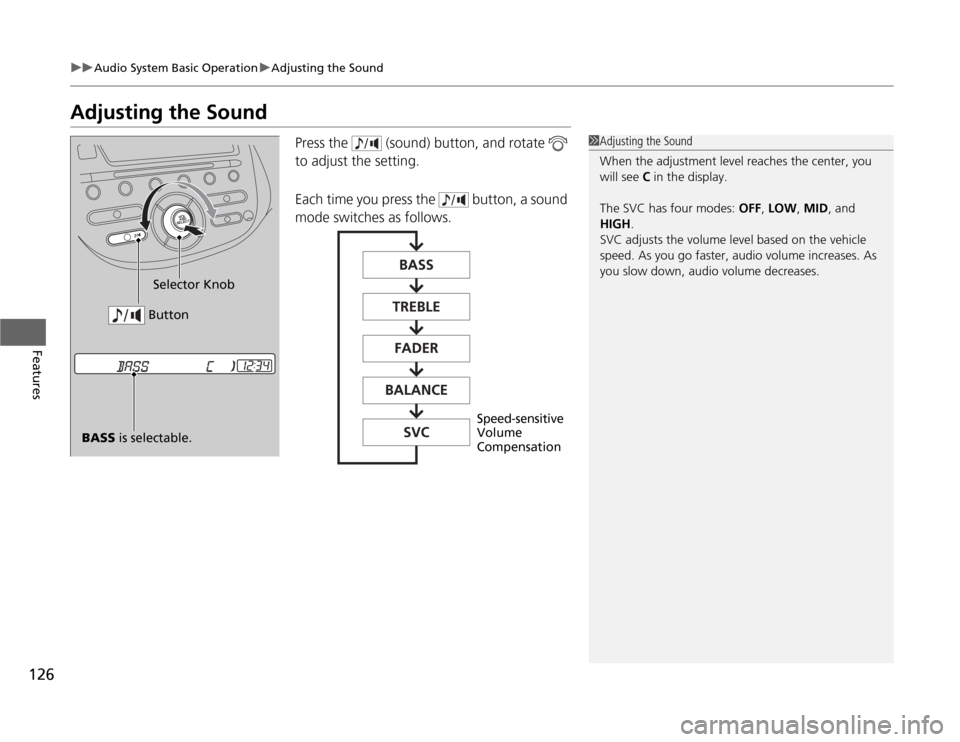
Adjusting the Sound
Press the (sound) button, and rotate
to adjust the setting.
Each time you press the button, a sound
mode switches as follows.
1Adjusting the Sound
When the adjustment level reaches the center, you
will see C in the display.
The SVC has four modes: OFF, LOW, MID, and
HIGH.
SVC adjusts the volume level based on the vehicle
speed. As you go faster, audio volume increases. As
you slow down, audio volume decreases.
BASS is selectable.Selector Knob
Button
Speed-sensitive
Volume
Compensation
Page 128 of 286
127
uuAudio System Basic OperationuPlaying the FM/AM Radio
Continued
Features
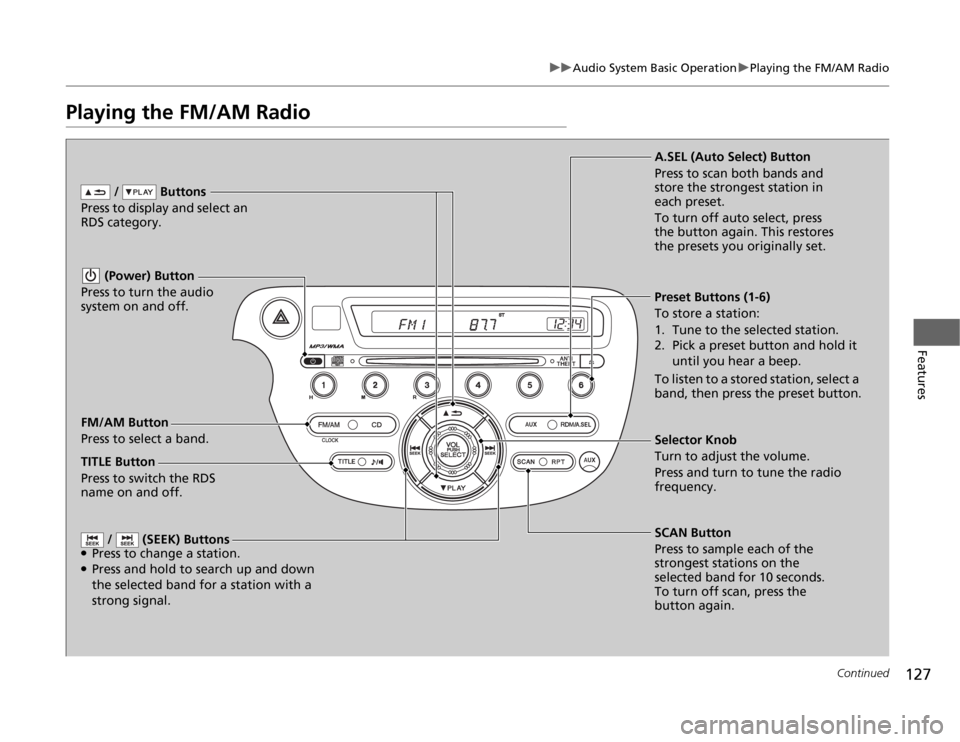
Playing the FM/AM Radio
FM/AM Button
Press to select a band. / Buttons
Press to display and select an
RDS category.
SCAN Button
Press to sample each of the
strongest stations on the
selected band for 10 seconds.
To turn off scan, press the
button again. (Power) Button
Press to turn the audio
system on and off.Preset Buttons (1-6)
To store a station:
1. Tune to the selected station.
2. Pick a preset button and hold it
until you hear a beep.
To listen to a stored station, select a
band, then press the preset button.
/ (SEEK) Buttons
●Press to change a station.●Press and hold to search up and down
the selected band for a station with a
strong signal.
Selector Knob
Turn to adjust the volume.
Press and turn to tune the radio
frequency. A.SEL (Auto Select) Button
Press to scan both bands and
store the strongest station in
each preset.
To turn off auto select, press
the button again. This restores
the presets you originally set.
TITLE Button
Press to switch the RDS
name on and off.
Page 129 of 286
uuAudio System Basic OperationuPlaying the FM/AM Radio
128Features
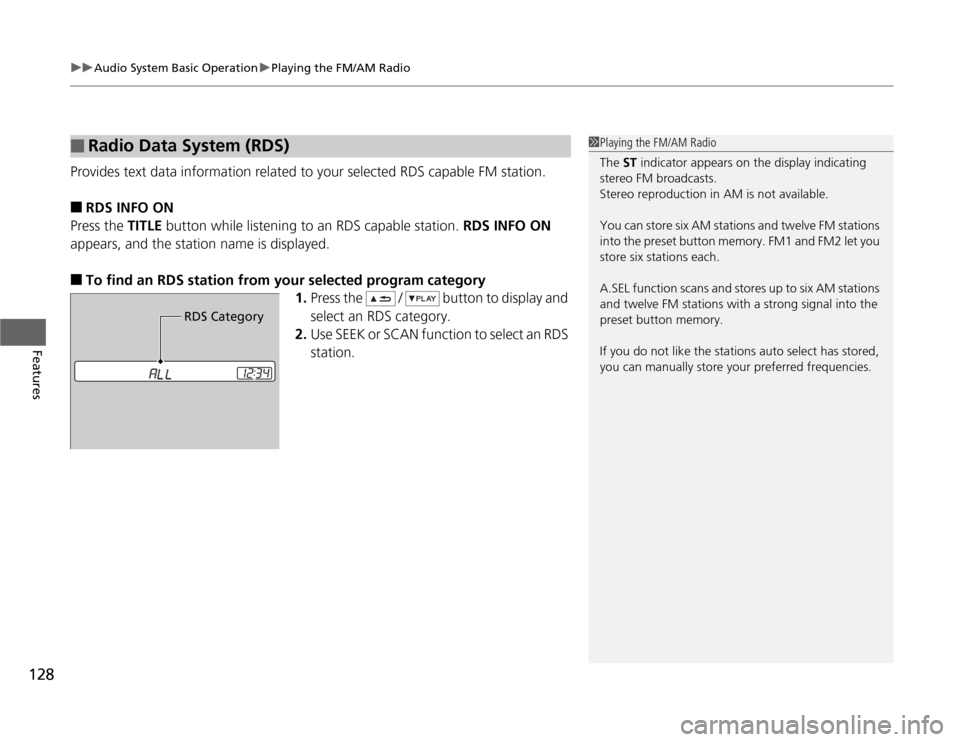
Provides text data information related to your selected RDS capable FM station.■
RDS INFO ON
Press the TITLE button while listening to an RDS capable station. RDS INFO ON
appears, and the station name is displayed.
■
To find an RDS station from your selected program category
1.Press the / button to display and
select an RDS category.
2.Use SEEK or SCAN function to select an RDS
station.
■
Radio Data System (RDS)
1Playing the FM/AM Radio
The ST indicator appears on the display indicating
stereo FM broadcasts.
Stereo reproduction in AM is not available.
You can store six AM stations and twelve FM stations
into the preset button memory. FM1 and FM2 let you
store six stations each.
A.SEL function scans and stores up to six AM stations
and twelve FM stations with a strong signal into the
preset button memory.
If you do not like the stations auto select has stored,
you can manually store your preferred frequencies.
RDS Category
Page 130 of 286
129
uuAudio System Basic OperationuPlaying a CD
Continued
Features
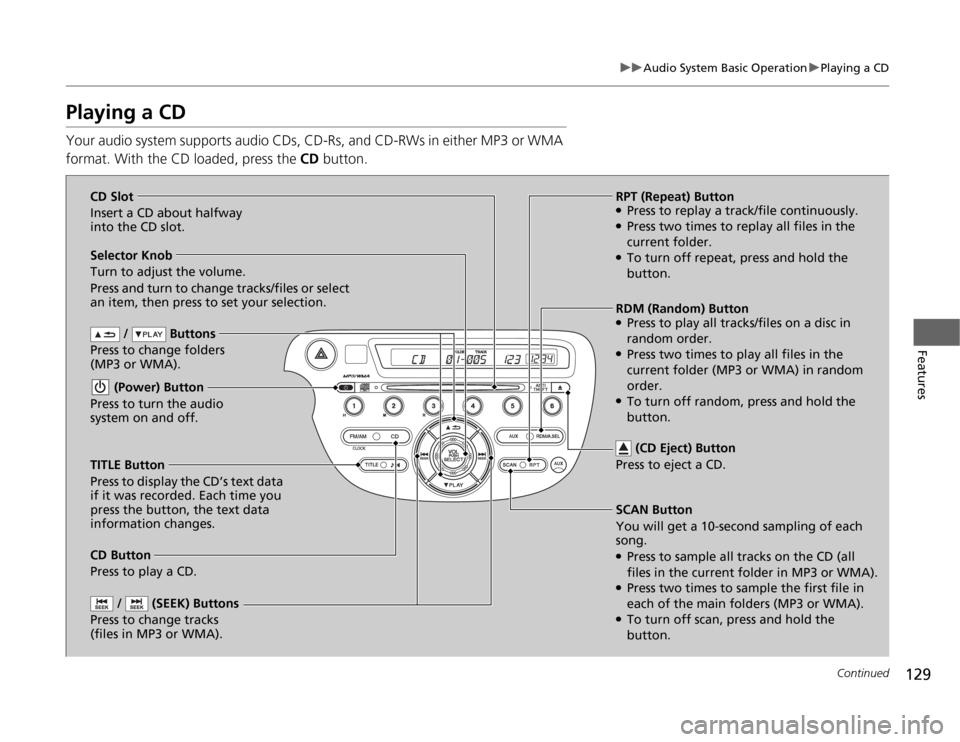
Playing a CDYour audio system supports audio CDs, CD-Rs, and CD-RWs in either MP3 or WMA
format. With the CD loaded, press the CD button.
/ Buttons
Press to change folders
(MP3 or WMA).
SCAN Button
You will get a 10-second sampling of each
song.●Press to sample all tracks on the CD (all
files in the current folder in MP3 or WMA).●Press two times to sample the first file in
each of the main folders (MP3 or WMA).●To turn off scan, press and hold the
button. (Power) Button
Press to turn the audio
system on and off.
/ (SEEK) Buttons
Press to change tracks
(files in MP3 or WMA).
RPT (Repeat) Button●Press to replay a track/file continuously.●Press two times to replay all files in the
current folder.●To turn off repeat, press and hold the
button. Selector Knob
Turn to adjust the volume.
Press and turn to change tracks/files or select
an item, then press to set your selection.
CD Button
Press to play a CD. (CD Eject) Button
Press to eject a CD.
TITLE Button
Press to display the CD’s text data
if it was recorded. Each time you
press the button, the text data
information changes.RDM (Random) Button
●Press to play all tracks/files on a disc in
random order.●Press two times to play all files in the
current folder (MP3 or WMA) in random
order.●To turn off random, press and hold the
button. CD Slot
Insert a CD about halfway
into the CD slot.
Page 131 of 286

uuAudio System Basic OperationuPlaying a CD
130Features
1.Press to switch the display to a folder list.
2.Rotate to select a folder.
3.Press to change the display to a list of
files in that folder.
4.Rotate to select a file, then press .
■
How to Select a File from a Folder with the Selector Knob
(MP3/WMA)
1Playing a CD
NOTICEDo not use CDs with adhesive labels. The label can
cause the CD to jam in the unit.
WMA files protected by digital rights management
(DRM) cannot be played.
The audio system displays UNSUPPORTED, then
skips to the next file.
Text data appears on the display under the following
circumstances:•When you select a new folder, file, or track.•When you change the audio mode to CD.•When you insert a CD.
The display shows up to 31 characters of text data.
Press and hold the TITLE button to see additional
characters. indicates that the text data continues.
The display goes back to the previous screen if you
press and hold the button again.
If you eject the CD but do not remove it from the slot,
the system reloads the CD automatically after several
seconds.
Track Selection Folder Selection
Page 132 of 286
131
uuAudio System Basic OperationuPlaying an iPod®
*
Continued
Features
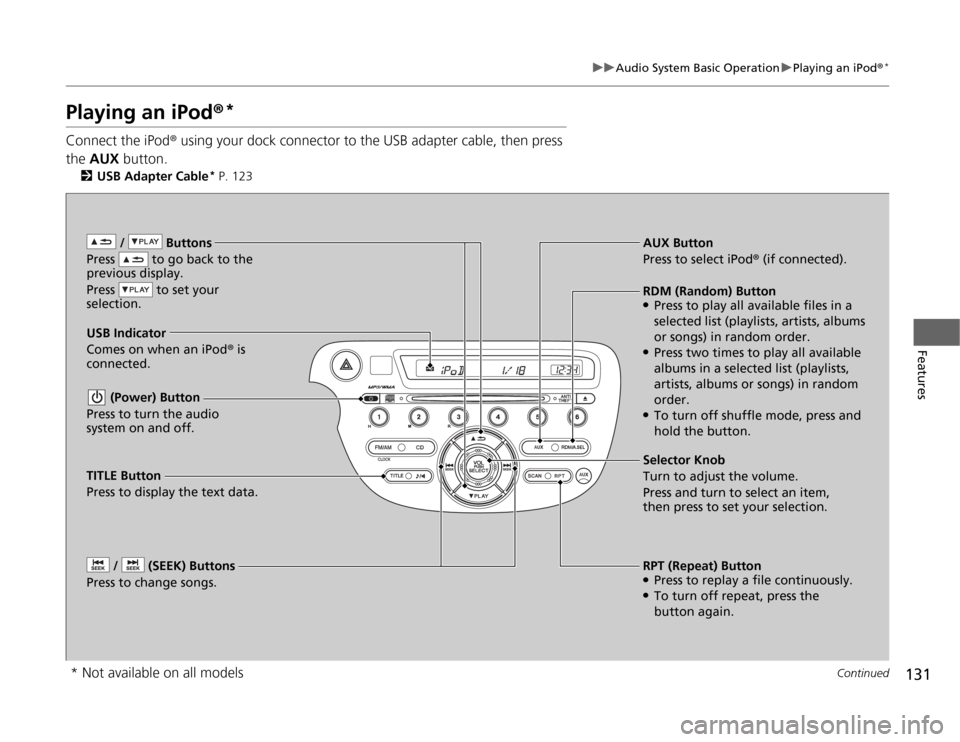
Playing an iPod®
*
Connect the iPod® using your dock connector to the USB adapter cable, then press
the AUX button.
2USB Adapter Cable
* P. 123
/ Buttons
Press to go back to the
previous display.
Press to set your
selection. (Power) Button
Press to turn the audio
system on and off. / (SEEK) Buttons
Press to change songs.
RPT (Repeat) Button●Press to replay a file continuously.●To turn off repeat, press the
button again. Selector Knob
Turn to adjust the volume.
Press and turn to select an item,
then press to set your selection. AUX Button
Press to select iPod® (if connected).
USB Indicator
Comes on when an iPod® is
connected.RDM (Random) Button●Press to play all available files in a
selected list (playlists, artists, albums
or songs) in random order.●Press two times to play all available
albums in a selected list (playlists,
artists, albums or songs) in random
order.●To turn off shuffle mode, press and
hold the button.
TITLE Button
Press to display the text data.
* Not available on all models