phone HONDA FIT 2012 2.G User Guide
[x] Cancel search | Manufacturer: HONDA, Model Year: 2012, Model line: FIT, Model: HONDA FIT 2012 2.GPages: 286, PDF Size: 9.92 MB
Page 149 of 286
uuBluetooth® HandsFreeLink®
*uHFL Menus
148Features
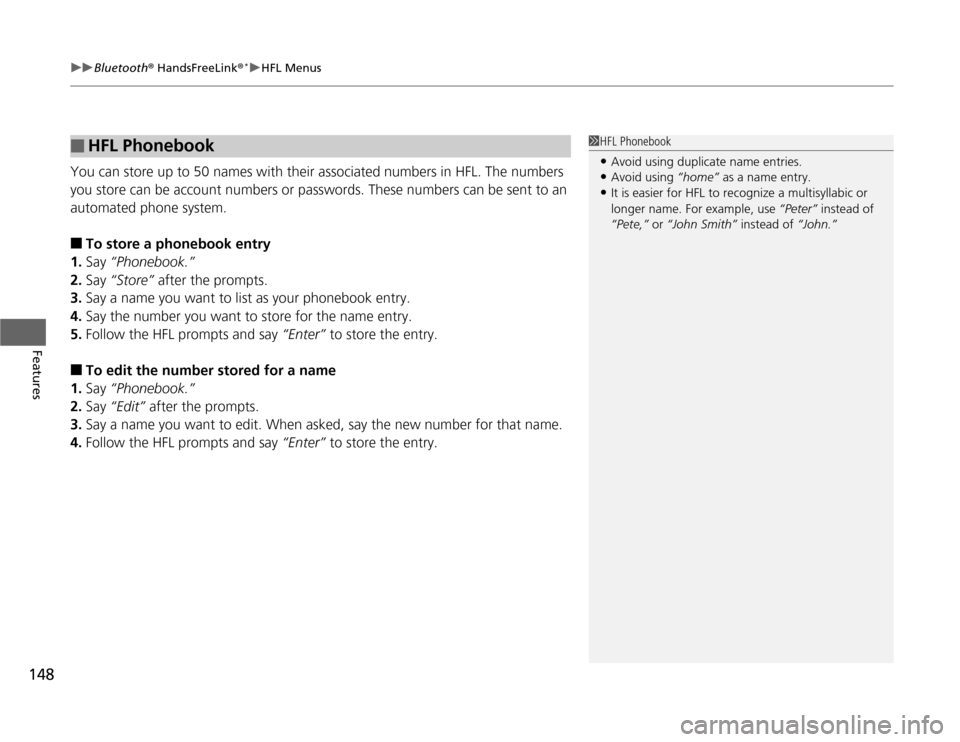
You can store up to 50 names with their associated numbers in HFL. The numbers
you store can be account numbers or passwords. These numbers can be sent to an
automated phone system.■
To store a phonebook entry
1.Say “Phonebook.”
2.Say “Store” after the prompts.
3.Say a name you want to list as your phonebook entry.
4.Say the number you want to store for the name entry.
5.Follow the HFL prompts and say “Enter” to store the entry.
■
To edit the number stored for a name
1.Say “Phonebook.”
2.Say “Edit” after the prompts.
3.Say a name you want to edit. When asked, say the new number for that name.
4.Follow the HFL prompts and say “Enter” to store the entry.
■
HFL Phonebook
1HFL Phonebook•Avoid using duplicate name entries.•Avoid using “home” as a name entry.•It is easier for HFL to recognize a multisyllabic or
longer name. For example, use “Peter” instead of
“Pete,” or “John Smith” instead of “John.”
Page 150 of 286

149
uuBluetooth® HandsFreeLink®
*uHFL Menus
Continued
Features
■
To delete a name
1.Say “Phonebook.”
2.Say “Delete” after the prompts.
3.Say a name you want to delete.
4.Say “Yes,” and follow the HFL prompts.
■
To list all names in the phonebook
1.Say “Phonebook.”
2.Say “List” after the prompts.
3.HFL begins reading the names in the order they were stored.
4.When you hear a name you want to call, say “Call.”
■
To store a specific phone number from your cell phone directly to the HFL
phonebook
*
1.Say “Phonebook.”
2.Say “Receive Contact” after the prompts.
3.Follow the HFL prompts, select a number from your cell phone, and send it to HFL.
4.Follow the HFL prompts and name the number, or say “Discard” if it is not the
number you want to store.
5.Follow the HFL prompts to continue.
* Not available on all models
Page 152 of 286
151
uuBluetooth® HandsFreeLink®
*uHFL Menus
Features
■
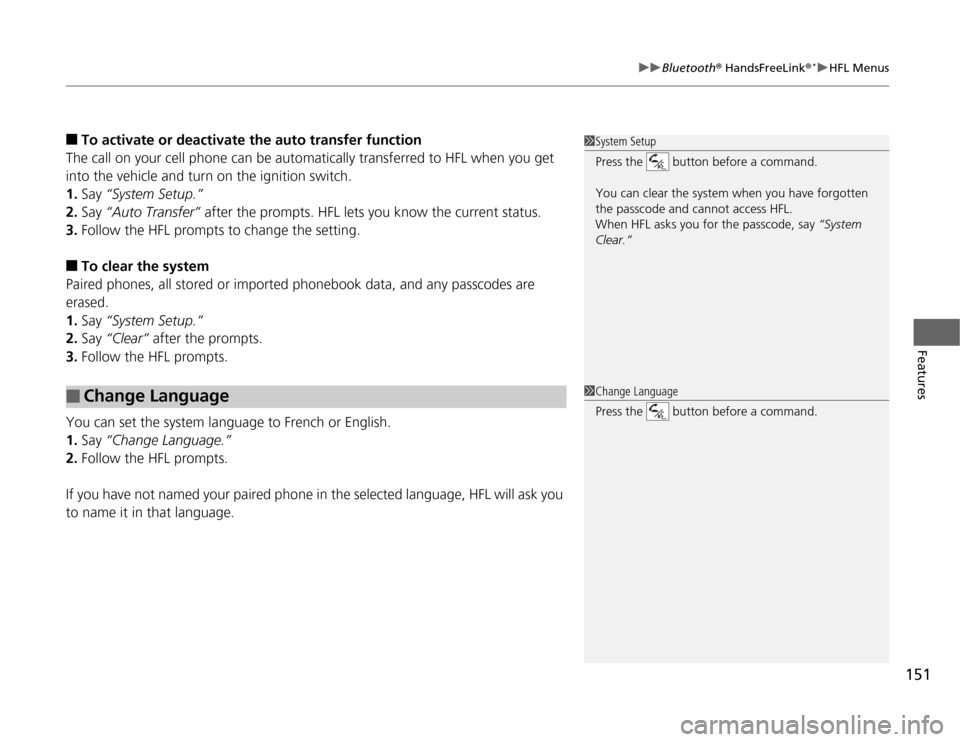
To activate or deactivate the auto transfer function
The call on your cell phone can be automatically transferred to HFL when you get
into the vehicle and turn on the ignition switch.
1.Say “System Setup.”
2.Say “Auto Transfer” after the prompts. HFL lets you know the current status.
3.Follow the HFL prompts to change the setting.
■
To clear the system
Paired phones, all stored or imported phonebook data, and any passcodes are
erased.
1.Say “System Setup.”
2.Say “Clear” after the prompts.
3.Follow the HFL prompts.
You can set the system language to French or English.
1.Say “Change Language.”
2.Follow the HFL prompts.
If you have not named your paired phone in the selected language, HFL will ask you
to name it in that language.
■
Change Language
1System Setup
Press the button before a command.
You can clear the system when you have forgotten
the passcode and cannot access HFL.
When HFL asks you for the passcode, say “System
Clear.”1Change Language
Press the button before a command.
Page 278 of 286
277
Information
Authorized Manuals■
Service Express
For electronic copies of service publications, you can purchase a subscription to
Service Express. Visit www.techinfo.honda.com for pricing and options.
■
For U.S. Owners:
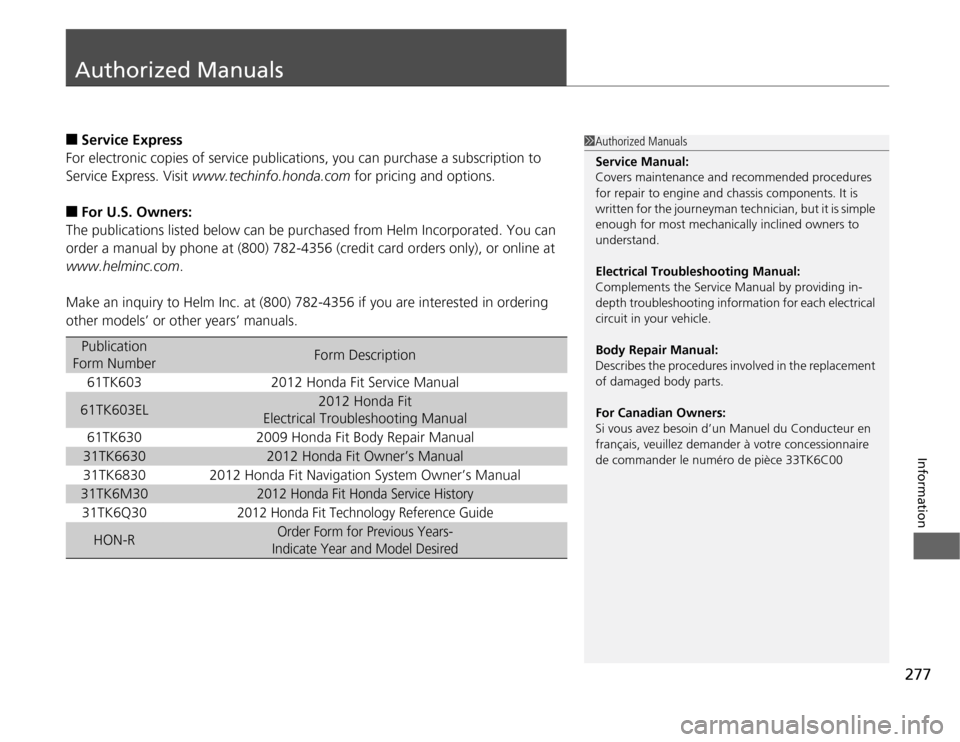
The publications listed below can be purchased from Helm Incorporated. You can
order a manual by phone at (800) 782-4356 (credit card orders only), or online at
www.helminc.com.
Make an inquiry to Helm Inc. at (800) 782-4356 if you are interested in ordering
other models’ or other years’ manuals.Publication
Form Number
Form Description
61TK603
2012 Honda Fit Service Manual
61TK603EL
2012 Honda Fit
Electrical Troubleshooting Manual
61TK630
2009 Honda Fit Body Repair Manual
31TK6630
2012 Honda Fit Owner’s Manual
31TK6830
2012 Honda Fit Navigation System Owner’s Manual
31TK6M30
2012 Honda Fit Honda Service History
31TK6Q30
2012 Honda Fit Technology Reference Guide
HON-R
Order Form for Previous Years-
Indicate Year and Model Desired
1Authorized Manuals
Service Manual:
Covers maintenance and recommended procedures
for repair to engine and chassis components. It is
written for the journeyman technician, but it is simple
enough for most mechanically inclined owners to
understand.
Electrical Troubleshooting Manual:
Complements the Service Manual by providing in-
depth troubleshooting information for each electrical
circuit in your vehicle.
Body Repair Manual:
Describes the procedures involved in the replacement
of damaged body parts.
For Canadian Owners:
Si vous avez besoin d’un Manuel du Conducteur en
français, veuillez demander à votre concessionnaire
de commander le numéro de pièce 33TK6C00
Page 279 of 286
278Information
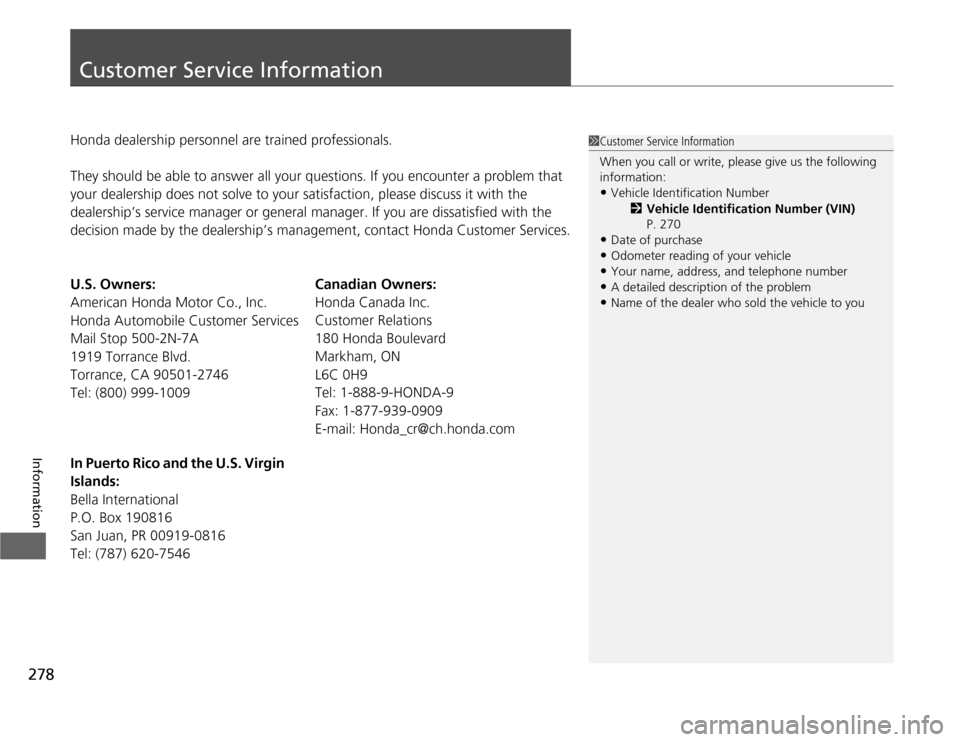
Customer Service InformationHonda dealership personnel are trained professionals.
They should be able to answer all your questions. If you encounter a problem that
your dealership does not solve to your satisfaction, please discuss it with the
dealership’s service manager or general manager. If you are dissatisfied with the
decision made by the dealership’s management, contact Honda Customer Services.
U.S. Owners:
American Honda Motor Co., Inc.
Honda Automobile Customer Services
Mail Stop 500-2N-7A
1919 Torrance Blvd.
Torrance, CA 90501-2746
Tel: (800) 999-1009Canadian Owners:
Honda Canada Inc.
Customer Relations
180 Honda Boulevard
Markham, ON
L6C 0H9
Tel: 1-888-9-HONDA-9
Fax: 1-877-939-0909
E-mail: [email protected]
In Puerto Rico and the U.S. Virgin
Islands:
Bella International
P.O. Box 190816
San Juan, PR 00919-0816
Tel: (787) 620-7546
1Customer Service Information
When you call or write, please give us the following
information:•Vehicle Identification Number
2Vehicle Identification Number (VIN)
P. 270•Date of purchase•Odometer reading of your vehicle•Your name, address, and telephone number•A detailed description of the problem•Name of the dealer who sold the vehicle to you
Page 282 of 286

281
Index
High Temperature Indicator ...................... 67
Low Temperature Indicator ....................... 67
Overheating ............................................ 254
Engine Oil................................................. 201
Adding ................................................... 203
Checking ................................................ 202
Displaying Oil Life ................................... 195
Low Oil Pressure Indicator ................. 64, 256
Recommended Engine Oil ....................... 201
EPS (Electric Power Steering
System).............................................. 68, 258
Exhaust Gas Hazard (Carbon Monoxide).. 61
Exterior Care (Cleaning).......................... 235
Exterior Mirrors........................................ 102
FFeatures.................................................... 121
Filters
Dust and Pollen....................................... 233
Oil .......................................................... 204
Flat Tire..................................................... 239
Floor Mats................................................ 234
Fluids
Automatic Transmission .......................... 208
Brake/Clutch ........................................... 210
Engine Coolant ....................................... 206
Manual Transmission .............................. 209
Windshield Washer ................................. 211
FM/AM Radio........................................... 127
Fog Light Indicator.................................... 70Folding Down the Rear Seats.................. 108
Foot Brake................................................. 182
Front Airbags (SRS)..................................... 37
Front Seats................................................ 103
Adjusting ................................................. 103
Fuel...................................................... 14, 186
Economy ................................................. 189
Gauge ....................................................... 72
Low Fuel Indicator ..................................... 66
Recommendation .................................... 186
Refueling ................................................. 186
Fuel Economy............................................ 189
Fuel Fill Cap................................................. 14
Message .................................................. 257
Fuel Fill Door............................................... 14
Fuses.......................................................... 260
Inspecting and Changing ......................... 263
Locations ................................................. 260
GGasoline (Fuel)
Economy ................................................. 189
Gauge ....................................................... 72
Information ............................................. 186
Low Fuel Indicator ..................................... 66
Refueling ................................................. 186
Gauges........................................................ 72
Gear Shift Lever Positions
Automatic Transmission ................... 165, 167
Manual Transmission ............................... 172Glass (care)................................................ 236
Glove Box.................................................. 113
HHalogen Bulbs.................................. 212, 214
Handling the Unexpected........................ 237
HandsFreeLink® (HFL)............................... 140
Change Language ................................... 151
Help Features .......................................... 141
Making a Call .......................................... 146
Menus..................................................... 142
Muting a Call .......................................... 147
Phone Setup............................................ 144
Phonebook.............................................. 148
Receiving a Call ....................................... 147
Sending Numbers or Names During a
Call ....................................................... 147
Transferring a Call ................................... 147
Hazard Warning Button.............................. 2
Head Restraints........................................ 105
Headlights................................................... 95
Aiming .................................................... 212
Dimming ............................................. 95, 96
Operating.................................................. 95
Heated Door Mirrors................................ 100
Heating and Cooling System................... 118
Cooling ................................................... 120
Defrosting the Windshield and
Windows ............................................... 120
Dust and Pollen Filter............................... 233