lock HONDA FIT 2015 3.G Owners Manual
[x] Cancel search | Manufacturer: HONDA, Model Year: 2015, Model line: FIT, Model: HONDA FIT 2015 3.GPages: 453, PDF Size: 21.19 MB
Page 237 of 453
236
uuCustomized Features u
Features
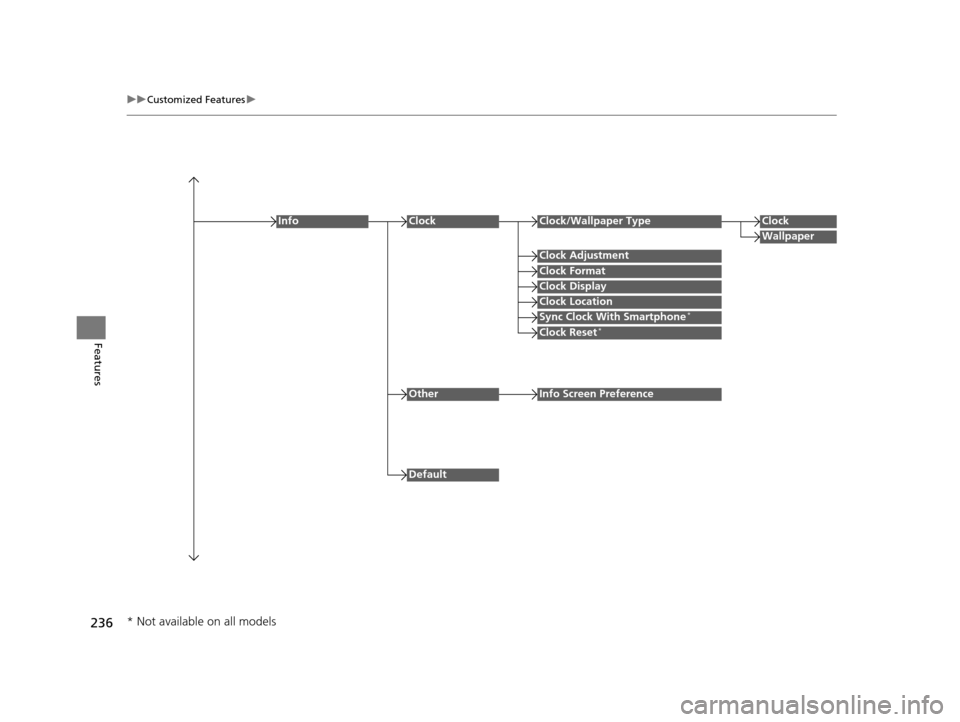
Clock Format
ClockClock/Wallpaper TypeClock
Wallpaper
Clock Adjustment
Clock Display
Clock Location
Sync Clock With Smartphone*
Clock Reset*
Info
Default
OtherInfo Screen Preference
* Not available on all models
15 US FIT-31T5A6000.book 236 ページ 2014年3月6日 木曜日 午後7時5分
Page 241 of 453
240
uuCustomized Features u
Features
*1 : Default Setting
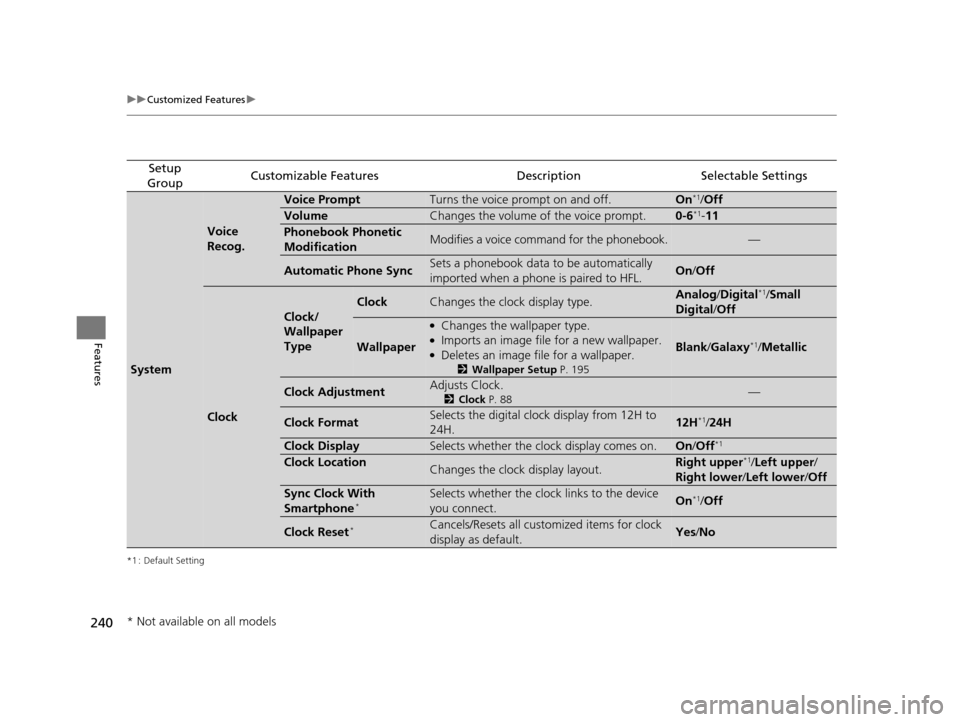
Setup
GroupCustomizable FeaturesDescriptionSelectable Settings
System
Voice
Recog.
Voice PromptTurns the voice prompt on and off.On*1/ Off
VolumeChanges the volume of the voice prompt.0-6*1- 11
Phonebook Phonetic
ModificationModifies a voice command for the phonebook.—
Automatic Phone SyncSets a phonebook data to be automatically
imported when a phone is paired to HFL.On /Off
Clock
Clock/
Wallpaper
Type
ClockChanges the clock display type.Analog /Digital*1/Small
Digital /Off
Wallpaper
●Changes the wallpaper type.●Imports an image file for a new wallpaper.●Deletes an image file for a wallpaper.
2 Wallpaper Setup P. 195
Blank/Galaxy*1/ Metallic
Clock AdjustmentAdjusts Clock.
2 Clock P. 88—
Clock FormatSelects the digital clock display from 12H to
24H.12H*1/24H
Clock DisplaySelects whether the clock display comes on.On /Off*1
Clock LocationChanges the clock display layout.Right upper*1/Left upper /
Right lower /Left lower /Off
Sync Clock With
Smartphone*Selects whether the clock links to the device
you connect. On*1/Off
Clock Reset*Cancels/Resets all customized items for clock
display as default.Yes /No
* Not available on all models
15 US FIT-31T5A6000.book 240 ページ 2014年3月6日 木曜日 午後7時5分
Page 244 of 453
243
uuCustomized Features u
Continued
Features
*1 : Default Setting
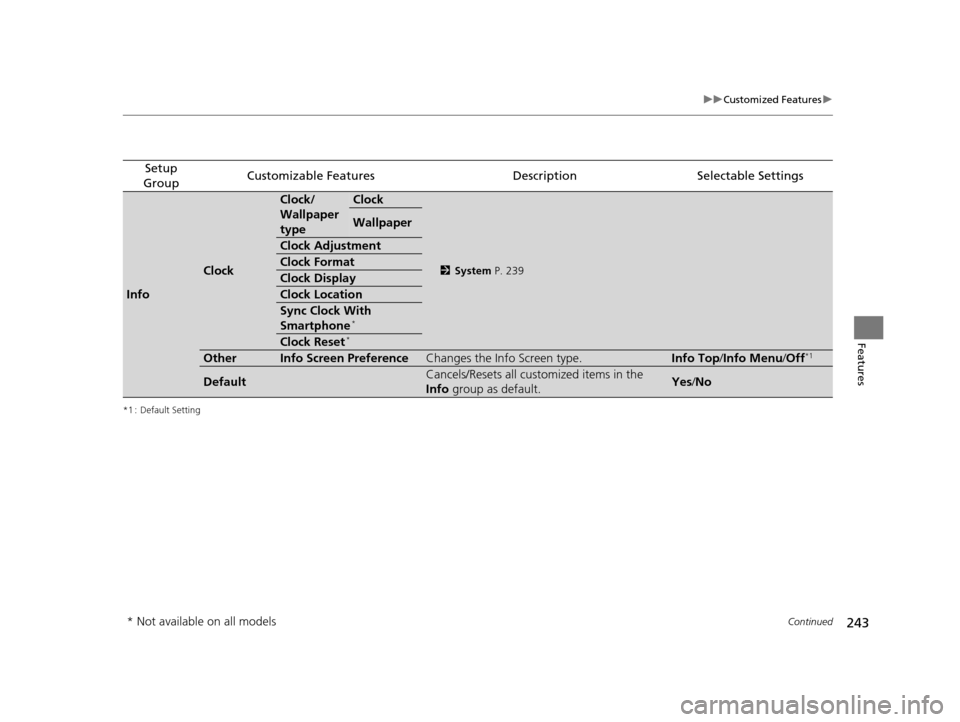
Setup
GroupCustomizable FeaturesDescriptionSelectable Settings
Info
Clock
Clock/
Wallpaper
typeClock
2 System P. 239
Wallpaper
Clock Adjustment
Clock Format
Clock Display
Clock Location
Sync Clock With
Smartphone*
Clock Reset*
OtherInfo Screen PreferenceChanges the Info Screen type.Info Top /Info Menu/ Off*1
DefaultCancels/Resets all customized items in the
Info group as default.Yes/No
* Not available on all models
15 US FIT-31T5A6000.book 243 ページ 2014年3月6日 木曜日 午後7時5分
Page 302 of 453
301
Driving
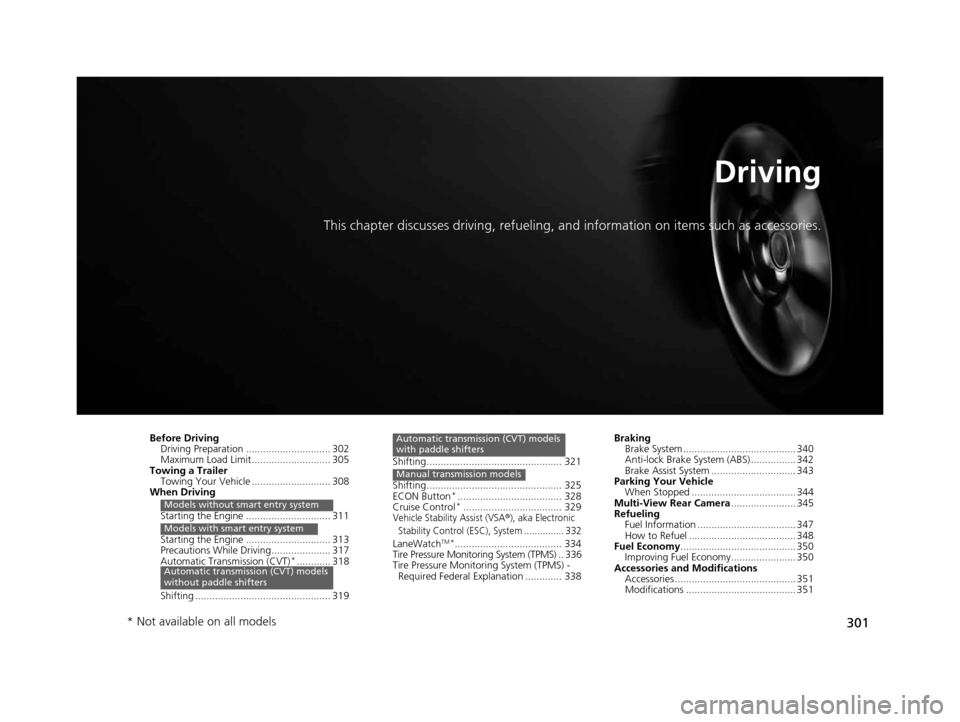
This chapter discusses driving, refueling, and information on items such as accessories.
Before Driving
Driving Preparation .............................. 302
Maximum Load Limit............................ 305
Towing a Trailer Towing Your Vehicle ............................ 308
When Driving
Starting the Engine .............................. 311
Starting the Engine .............................. 313
Precautions While Driving..................... 317
Automatic Transmission (CVT)
*............ 318
Shifting ................................................ 319
Models without smart entry system
Models with smart entry system
Automatic transmission (CVT) models
without paddle shifters
Shifting................................................ 321
Shifting................................................ 325
ECON Button
*..................................... 328
Cruise Control*................................... 329Vehicle Stability Assist (VSA®), aka Electronic
Stability Control (ESC), System ............... 332
LaneWatchTM*...................................... 334
Tire Pressure Monitoring System (TPMS) .. 336
Tire Pressure Monitoring System (TPMS) -
Required Federal Explanation ............. 338
Automatic transmission (CVT) models
with paddle shifters
Manual transmission models
Braking Brake System ........................................ 340
Anti-lock Brake System (ABS) ................ 342
Brake Assist System .............................. 343
Parking Your Vehicle When Stopped ..................................... 344
Multi-View Rear Camera ....................... 345
Refueling Fuel Information ................................... 347
How to Refuel ...................................... 348
Fuel Economy ......................................... 350
Improving Fuel Economy....................... 350
Accessories and Modifications Accessories ........................................... 351
Modifications ....................................... 351
* Not available on all models
15 US FIT-31T5A6000.book 301 ページ 2014年3月6日 木曜日 午後7時5分
Page 303 of 453
302
Driving
Before Driving
Driving Preparation
Check the following items before you start driving.
• Make sure there are no obstructions on th e windows, door mirrors, exterior
lights, or other parts of the vehicle.
u Remove any frost, snow, or ice.
u Remove any snow on the roof, as this can slip down and obstruct your field of
vision while driving. If frozen solid , remove ice once it has softened.
u When removing ice from around the wheel s, be sure not to damage the wheel
or wheel components.
• Make sure the hood is securely closed.
u If the hood opens while driving, your front view will be blocked.
• Make sure the tires are in good condition.
u Check air pressure, check for damage and excessive wear.
2 Checking and Maintaining Tires P. 384
•Make sure there are no people or ob jects behind or around the vehicle.
u There are blind spots from the inside.
■Exterior Checks1Exterior Checks
NOTICE
When doors are frozen s hut, use warm water around
the door edges to melt any ice. Do not try to force
them open, as this can damage the rubber trim
around the doors. When done, wipe dry to avoid
further freezing.
Do not pour warm water into the key cylinder.
You will be unable to insert the key if the water
freezes in the hole.
Heat from the engine and exhaust can ignite
flammable material s left under the hood, causing a
fire. If you've parked y our vehicle for an extended
period, inspect and remove any debris that may have
collected, such as dried grass and leaves that have
fallen or have been carried in for use as a nest by a
small animal. Also check under the hood for leftover
flammable materials after you or someone else has
performed maintenance on your vehicle.
15 US FIT-31T5A6000.book 302 ページ 2014年3月6日 木曜日 午後7時5分
Page 304 of 453
Continued303
uuBefore Driving uDriving Preparation
Driving
• Store or secure all items on board properly.
u Carrying too much cargo, or improperly storing it, can affect your vehicle’s
handling, stability, sto pping distance, and tires, and make it unsafe.
2Maximum Load Limit P. 305
•Do not pile items higher than the seat height.
u They can block your view and may be thrown forward in the event of sudden
braking.
• Do not place anything in the front seat footwells. Make sure to secure the floor
mat
*.
u An object or unsecured floor mat can in terfere with your brake and accelerator
pedal operation while driving.
• If you have any animals on board, do not let them move around in the vehicle.
u They may interfere with driv ing and a crash could occur.
• Securely close and lock al l doors and the tailgate.
2Locking/Unlocking the Doors from the Inside P. 99
•Adjust your seating position properly.
u Adjust the head restraint, too.
2Adjusting the Seats P. 133
2 Adjusting the Head Restraints P. 135
•Adjust the mirrors and steering wh eel properly for your driving.
u Adjust them while sitting in the proper driving position.
2 Adjusting the Mirrors P. 131
2 Adjusting the Steering Wheel P. 130
■Interior Checks1Interior Checks
The headlight aim is set by the factory, and does not
need to be adjusted. Howeve r, if you regularly carry
heavy items in the cargo area, have the aiming
readjusted at a dealer or by a qualified technician.
* Not available on all models
15 US FIT-31T5A6000.book 303 ページ 2014年3月6日 木曜日 午後7時5分
Page 309 of 453
308
uuTowing a Trailer uTowing Your Vehicle
Driving
Towing Your Vehicle
Your vehicle is not designed to be towed be hind a motorhome. If your vehicle needs
to be towed in an emergency, refe r to the emergency towing information.
2Emergency Towing P. 428
Your vehicle can be towed behind a motorhome.
Perform the following procedure before towing your vehicle.
1. Shift to
(N.
2. Release the parking brake.
3. Turn the ignition switch to ACCESSORY
(q*1.
u Make sure the steering wheel does not lock.
4. Turn off all the electric devices. Do not use any accessory power sockets.
u This can prevent the battery from running down.
*1 : Models with the smart entry system have an ENGINE START/STOP button instead of an ignition switch.
■When Your Vehicle is Towed Behind a Motorhome
1Towing Your Vehicle
Do not exceed 65 mph (100 km/h).
Consult your towing parts sa les or rental agency if
any other items are recommended or required for
your towing situation.Automatic transmission (CVT) models
Manual transmission models
15 US FIT-31T5A6000.book 308 ページ 2014年3月6日 木曜日 午後7時5分
Page 310 of 453
Continued309
uuTowing a Trailer uTowing Your Vehicle
Driving
■Extended Towing
If you tow more than eight hours in one day, you should repeat the “before towing
your vehicle procedure” at least every eight hours.
You also need to perform the following procedure to prevent the battery from
running down.
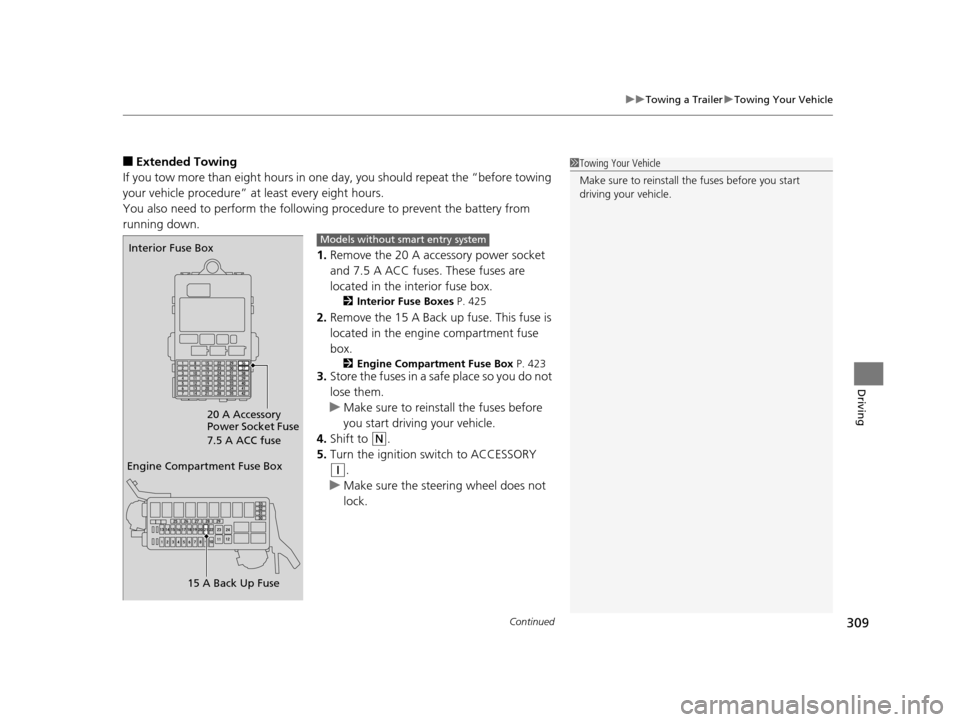
1.Remove the 20 A accessory power socket
and 7.5 A ACC fuses. These fuses are
located in the interior fuse box.
2 Interior Fuse Boxes P. 425
2.Remove the 15 A Back up fuse. This fuse is
located in the engine compartment fuse
box.
2 Engine Compartment Fuse Box P. 4233.Store the fuses in a safe place so you do not
lose them.
u Make sure to reinstall the fuses before
you start driving your vehicle.
4. Shift to
(N.
5. Turn the ignition switch to ACCESSORY
(q.
u Make sure the steering wheel does not
lock.
1Towing Your Vehicle
Make sure to reinstall the fuses before you start
driving your vehicle.
Engine Compartment Fuse Box
15 A Back Up Fuse
Interior Fuse Box
20 A Accessory
Power Socket Fuse
7.5 A ACC fuseModels without smart entry system
15 US FIT-31T5A6000.book 309 ページ 2014年3月6日 木曜日 午後7時5分
Page 311 of 453
310
uuTowing a Trailer uTowing Your Vehicle
Driving
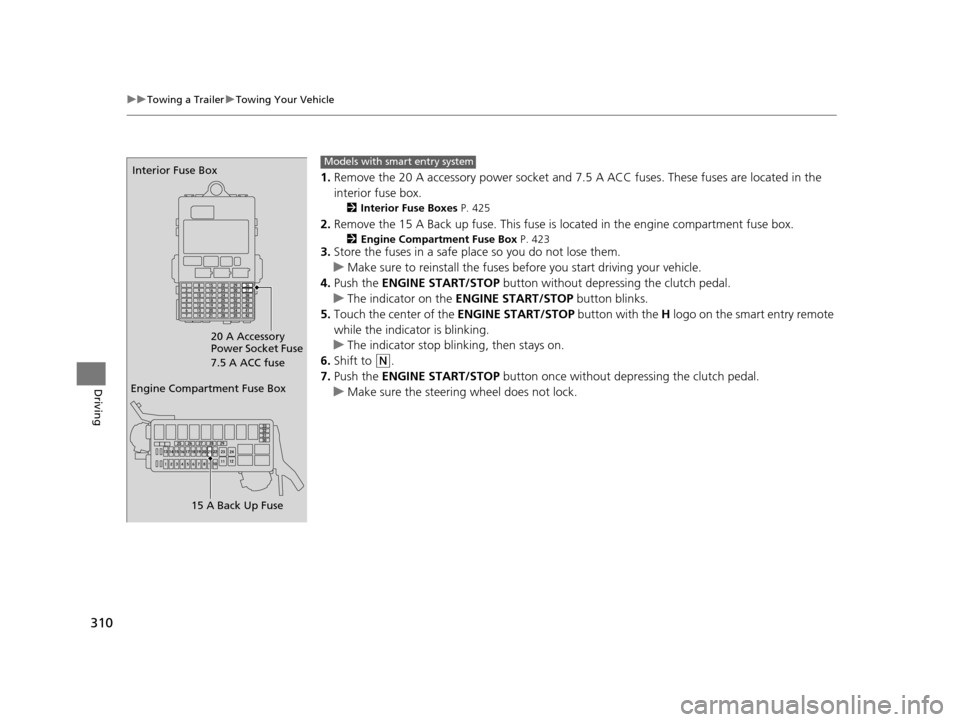
1. Remove the 20 A accessory powe r socket and 7.5 A ACC fuses. These fuses are located in the
interior fuse box.
2 Interior Fuse Boxes P. 425
2.Remove the 15 A Back up fuse. This fuse is located in the engine compartment fuse box.
2Engine Compartment Fuse Box P. 4233.Store the fuses in a safe place so you do not lose them.
u Make sure to reinstall the fuses be fore you start driving your vehicle.
4. Push the ENGINE START/STOP button without depressing the clutch pedal.
u The indicator on the ENGINE START/STOP button blinks.
5. Touch the center of the ENGINE START/STOP button with the H logo on the smart entry remote
while the indicator is blinking.
u The indicator stop blinking, then stays on.
6. Shift to
(N.
7. Push the ENGINE START/STOP button once without depressing the clutch pedal.
u Make sure the steering wheel does not lock.
Engine Compartment Fuse Box
15 A Back Up Fuse
Interior Fuse Box
20 A Accessory
Power Socket Fuse
7.5 A ACC fuseModels with smart entry system
15 US FIT-31T5A6000.book 310 ページ 2014年3月6日 木曜日 午後7時5分
Page 312 of 453
311Continued
Driving
When Driving
Starting the Engine
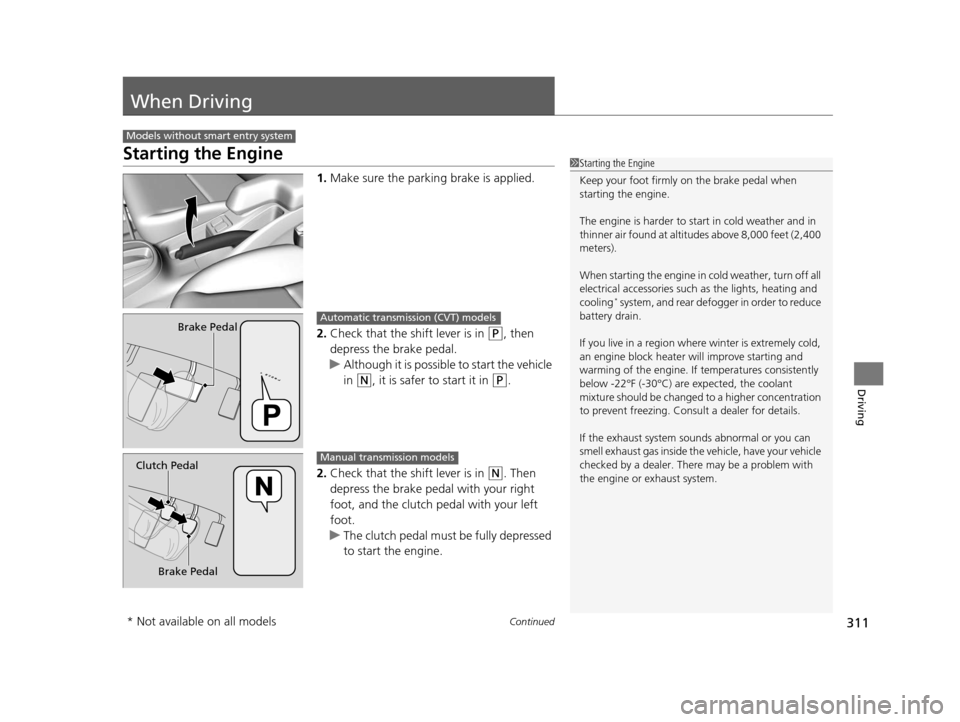
1.Make sure the parkin g brake is applied.
2. Check that the shift lever is in
(P, then
depress the brake pedal.
u Although it is possible to start the vehicle
in
(N, it is safer to start it in (P.
2. Check that the shift lever is in
(N. Then
depress the brake pedal with your right
foot, and the clutch pedal with your left
foot.
u The clutch pedal must be fully depressed
to start the engine.
Models without smart entry system
1Starting the Engine
Keep your foot firmly on the brake pedal when
starting the engine.
The engine is harder to st art in cold weather and in
thinner air found at altitudes above 8,000 feet (2,400
meters).
When starting the engine in cold weather, turn off all
electrical accessories such as the lights, heating and
cooling
* system, and rear defo gger in order to reduce
battery drain.
If you live in a region where winter is extremely cold,
an engine block heater will improve starting and
warming of the engine. If temperatures consistently
below -22°F (-30°C) are expected, the coolant
mixture should be changed to a higher concentration
to prevent freezing. Cons ult a dealer for details.
If the exhaust system sounds abnormal or you can
smell exhaust gas inside the vehicle, have your vehicle
checked by a dealer. There may be a problem with
the engine or exhaust system.
Brake PedalAutomatic transmission (CVT) models
Brake Pedal
Clutch Pedal
Manual transmission models
* Not available on all models
15 US FIT-31T5A6000.book 311 ページ 2014年3月6日 木曜日 午後7時5分